当前位置:首页>python>期刊图片复现|Python绘制XGBoost+SHAP特征重要性与影响方向汇总图


期刊图片复现|Python绘制XGBoost+SHAP特征重要性与影响方向汇总图

  • 2026-02-05 01:07:06
期刊图片复现|Python绘制XGBoost+SHAP特征重要性与影响方向汇总图

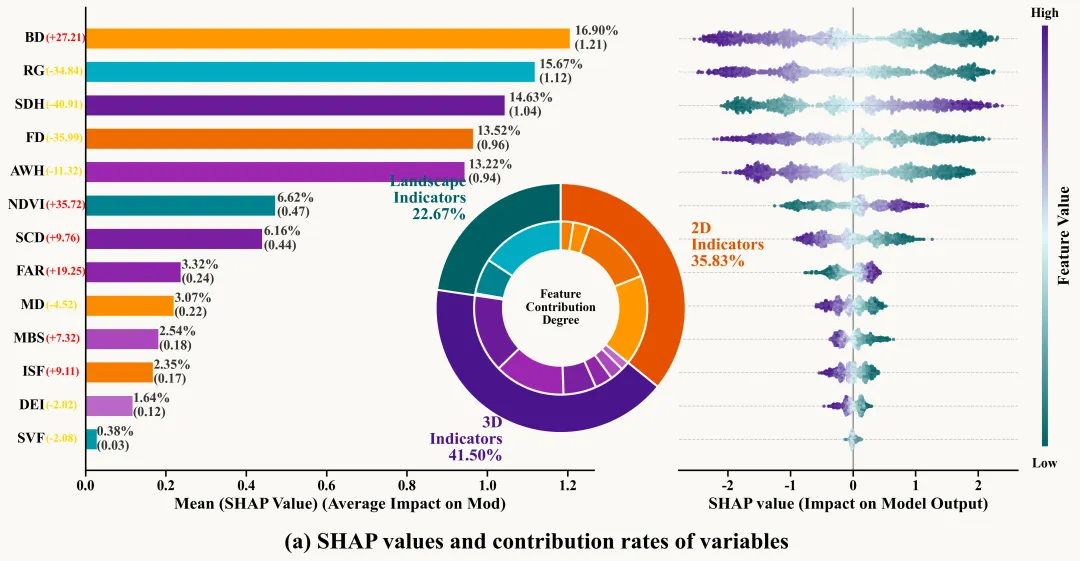
代码绘制成果展示

论文:How do built environment factors influence urban heat islands across local  climate zones? Evidence from an interpretable XGBoost-SHAP model
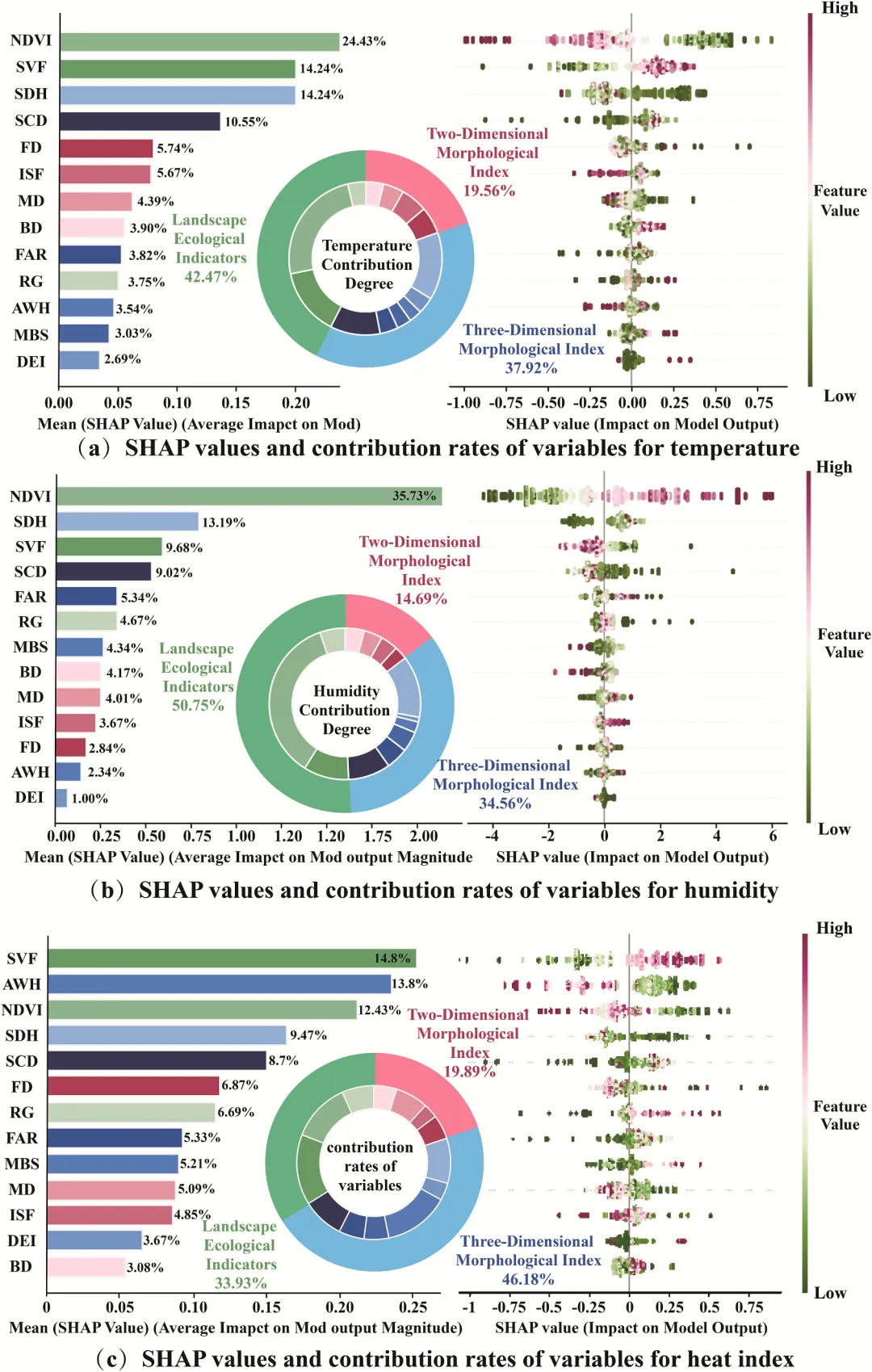
论文原图
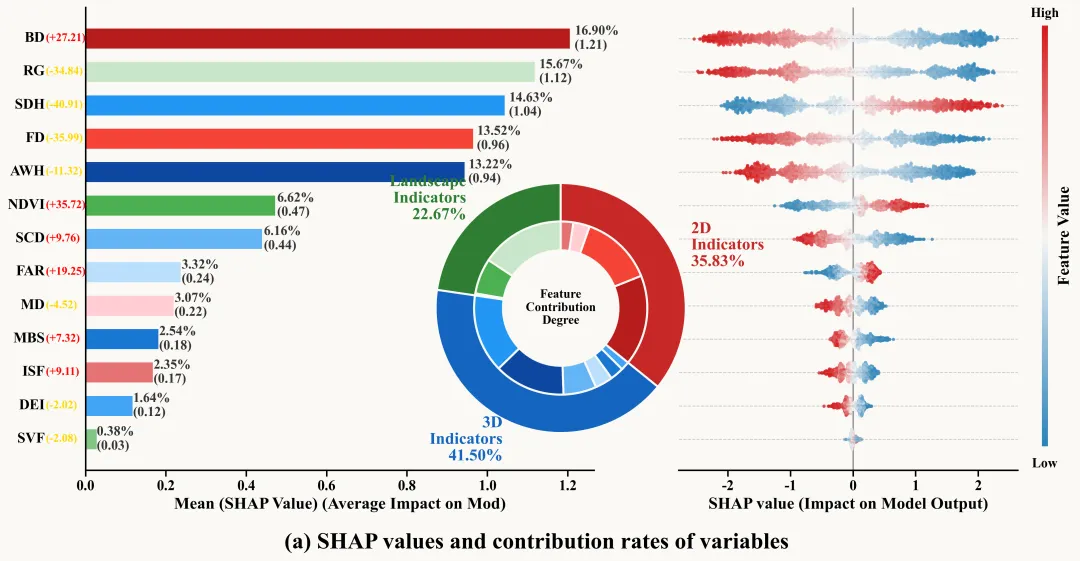
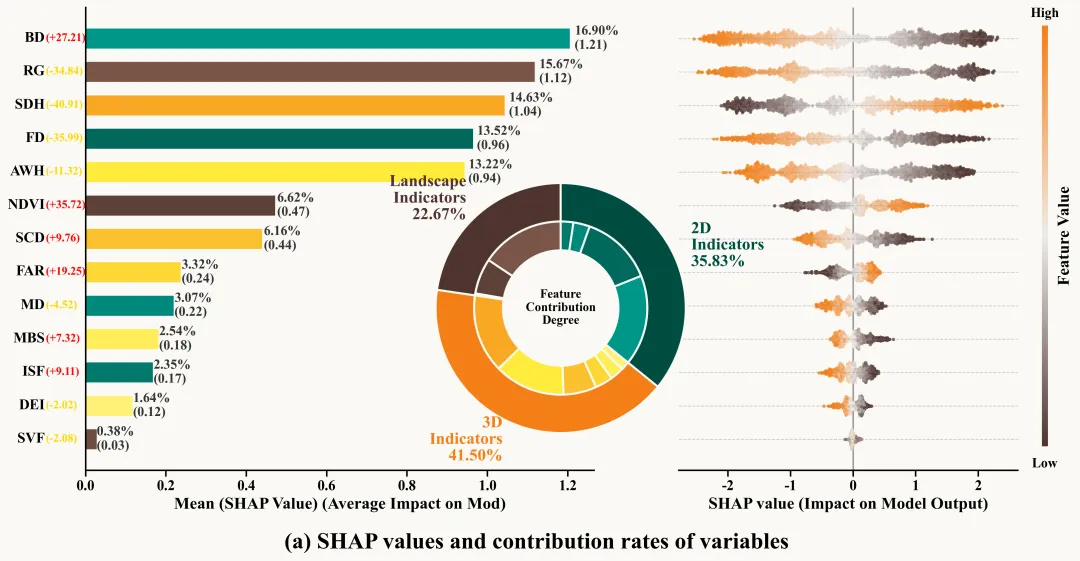
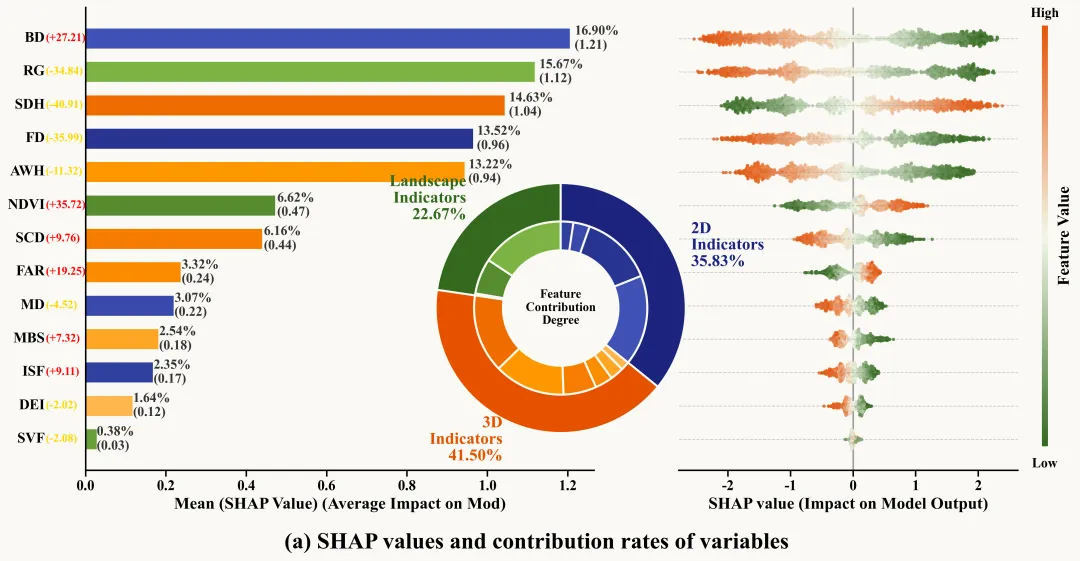
此图展示了 XGBoost 模型结合SHA 解释性分析的结果,通过左、中、右三个维度详尽揭示了变量对模型的贡献逻辑:首先,左侧的平均绝对SHAP值条形图直观展示了变量重要性排名,展示了模型的核心驱动力,且变量名旁括号内的正负值标明了它们与预测目标的总体相关方向;其次,中间的嵌套环形贡献度图将所有特征归纳为三大类,显示出3D指标对模型的影响力占据主导地位,2D指标次之,而景观指标位居第三,内环比例与外环具体变量颜色一一对应,形成了从宏观分类到微观个体的贡献率映射;最后,右侧的 SHAP摘要蜂群图进一步深化了这种解释,通过横轴 SHAP 值的正负分布和由蓝到红的颜色演变(代表特征数值从低到高),刻画了每个变量在不同取值下如何定量地推高或拉低模型输出。整张图不仅量化了每个细节标注背后的影响权重,还呈现了特征与目标变量之间复杂的非线性响应关系。
注意,此为个人理解,可能存在错误,具体内容还请阅读原文进行理解。
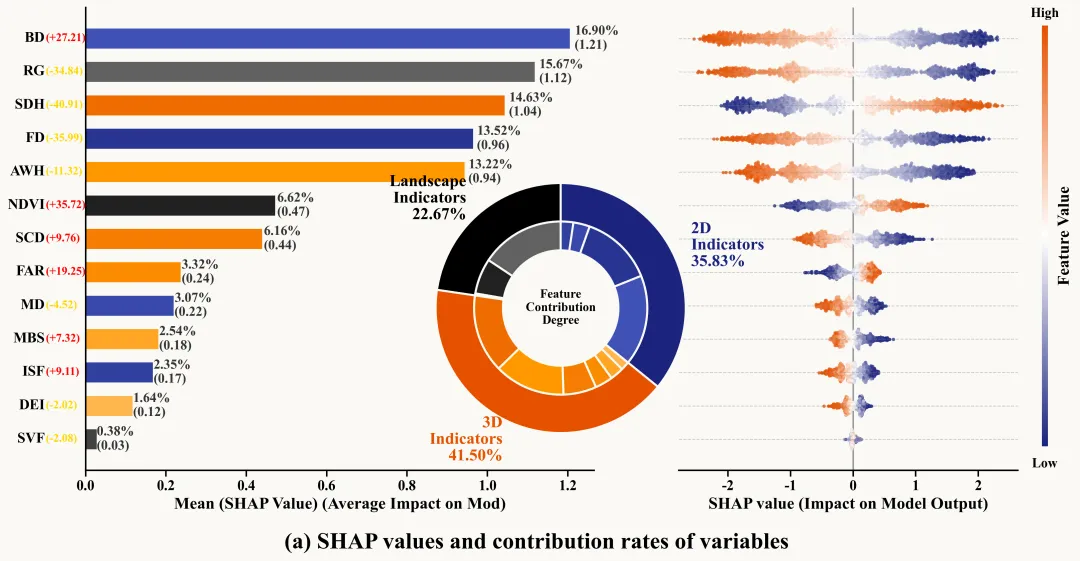
仿图
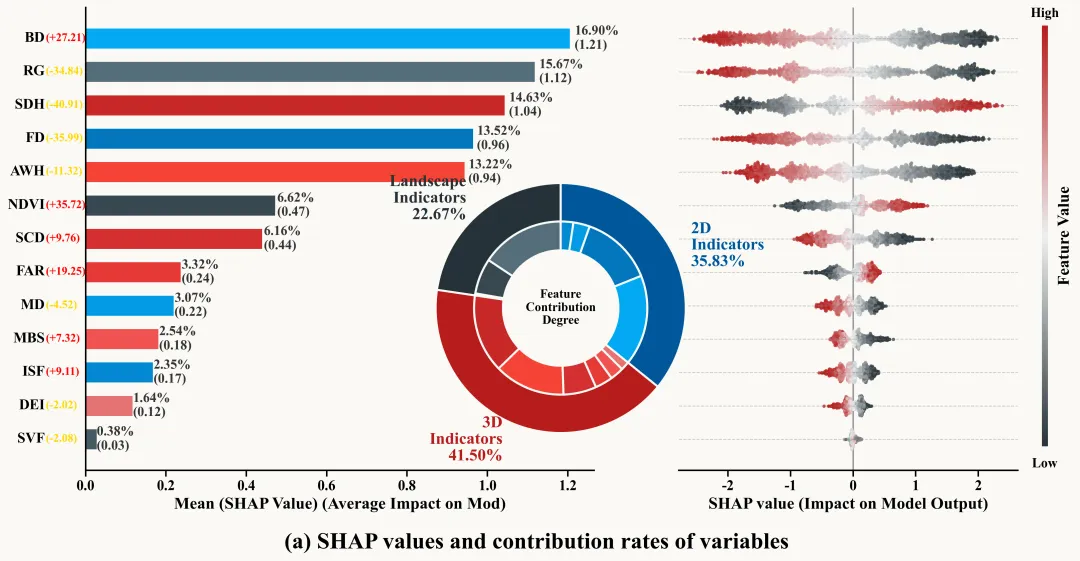
多种配色

代码解释

第一部分

库的导入以及字体设置
# =========================================================================================# ====================================== 1. 环境设置 =======================================# =========================================================================================import pandas as pdimport numpy as npimport xgboost as xgbimport shapimport matplotlib.pyplot as pltimport matplotlib.colors as mcolorsfrom matplotlib.gridspec import GridSpecfrom sklearn.model_selection import train_test_split, GridSearchCV

第二部分

特征分组配置,颜色库设置,配色方案的选择,颜色的分配设置
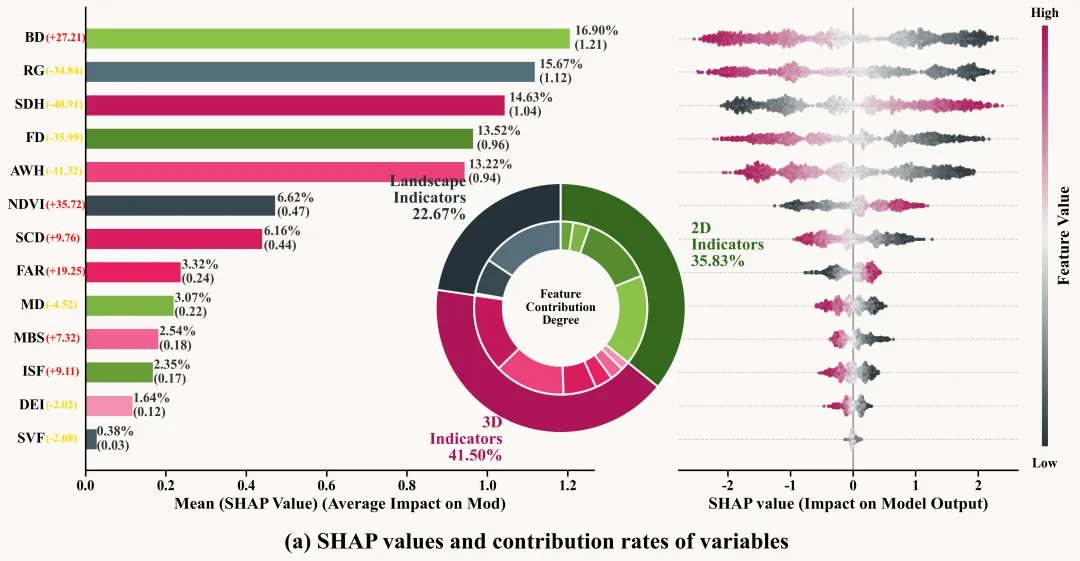
# =========================================================================================# ======================================2.特征分组以及颜色库的设置=======================================# =========================================================================================# 对特征进行分组FEATURE_STRUCTURE = {    'Landscape': ['NDVI''SVF''RG'],    '3D': ['SDH''SCD''FAR''AWH''MBS''DEI'],    '2D': ['FD''ISF''MD''BD']}#颜色库COLOR_SCHEMES = {    40: {'Landscape': ['#263238', ['#37474F''#455A64''#546E7A']],         '3D': ['#AD1457', ['#C2185B''#D81B60''#E91E63''#EC407A''#F06292''#F48FB1']],         '2D': ['#33691E', ['#558B2F''#689F38''#7CB342''#8BC34A']],         'gradient': ['#263238''#ECEFF1''#AD1457']}}SCHEME_ID = 40  #选择配色方案#中获取指定的配色方案_current_scheme = COLOR_SCHEMES.get(SCHEME_ID, COLOR_SCHEMES[1])#用于存储最终的特征、分组与颜色的映射关系FEATURE_CONFIG = {}# 遍历特征结构字典for _group, _feats in FEATURE_STRUCTURE.items():    # 提取当前组的主色调,用于饼图外环    _main_color = _current_scheme[_group][0]    # 提取当前组对应的子颜色列表,用于各个具体特征的区分    _sub_colors = _current_scheme[_group][1]    # 将特征名称与其对应的子颜色按顺序一一绑定    _feat_map = {name: _sub_colors[i] for i, name in enumerate(_feats)}    # 将组主色和特征颜色映射表存入字典中    FEATURE_CONFIG[_group] = {        'group_color': _main_color,  # 存储组主色        'features': _feat_map  # 存储组内各特征的颜色字典    }#用于存储蜂群图所需的渐变色FEATURE_CONFIG['_meta_'] = {'beeswarm_gradient': _current_scheme.get('gradient')}print(f"当前使用的配色方案 ID: {SCHEME_ID}")

第三部分

蜂群图辅助函数,还是之前的那个,已经用过多次了就不介绍了
# =========================================================================================# ======================================3.蜂群图辅助函数=======================================# =========================================================================================def simple_beeswarm(x_values, nbins=40, width=0.1):    hist_range = (np.min(x_values), np.max(x_values))  #数据的最小值和最大值范围    if hist_range[0] == hist_range[1]:  # 如果最大值等于最小值        hist_range = (hist_range[0] - 0.1, hist_range[1] + 0.1)  #手动扩展范围    counts, edges = np.histogram(x_values, bins=nbins, range=hist_range)  #计算直方图,获取各区间的计数和边界    bin_indices = np.digitize(x_values, edges) - 1  # 计算每个数据点所属的箱子索引    bin_indices = np.clip(bin_indices, 0, nbins - 1)  #索引范围    y_values = np.zeros_like(x_values)  #初始化Y轴抖动值    max_count = counts.max()  # 获取直方图中的最大计数值    if max_count == 0:  # 如果最大计数为0        return np.random.uniform(-0.10.1len(x_values))  #返回随机噪声    for i in range(len(counts)):  #遍历每一个直方图箱子        idxs = np.where(bin_indices == i)[0]  #找到当前箱子内的所有数据点索引        if len(idxs) == 0:   #如果当前箱子为空            continue        current_width = (counts[i] / max_count) * width  # 根据当前箱子的密度计算抖动宽度        ys = np.linspace(-current_width, current_width, len(idxs))  # 在宽度范围内生成均匀分布的Y值        np.random.shuffle(ys)  # 打乱Y值顺序        y_values[idxs] = ys  # 将计算好的Y值赋给对应的数据点    return y_values  # 返回计算好的Y轴抖动坐标

第四部分

绘图函数:数据准备与画布设置。拆解特征颜色表、分组映射表和渐变色配置。计算 SHAP 值的绝对值平均值(代表特征重要性大小)和 SHAP 值总和(用于大致判断正负影响方向)。将特征按重要性从小到大排序,方便绘制横向条形图。创建一个画布,将画布分为左右两部分,左边画条形图,右边画蜂群图,并设置统一的背景色。

# =========================================================================================# ====================================== 4.绘图函数 =========================================# =========================================================================================def plot_shap_composite(X, shap_values, feature_names, config_dict):    colors_map = {}  #特征颜色映射字典    group_mapping = {}  # 特征所属组映射字典    group_colors = {}  # 特征所属组颜色映射字典    #计算每个特征 SHAP 值的绝对值均值    mean_shap = np.abs(shap_values).mean(axis=0)    # 计算每个特征的 SHAP 值总和,带正负号    sum_shap = shap_values.sum(axis=0)    #汇总SHAP分析结果    feature_importance = pd.DataFrame({        'feature': feature_names,#原始特征的名称        'importance': mean_shap,#特征的绝对值均值        'sum_importance': sum_shap,#特征在所有样本上的贡献总和        'shap_idx'range(len(feature_names))#特征在原始矩阵中的索引位置    })    # 按重要性升序排序    feature_importance_sorted = feature_importance.sort_values('importance', ascending=True)    sorted_features = feature_importance_sorted['feature'].tolist()  #排序后的特征名称列表    sorted_indices = feature_importance_sorted['shap_idx'].tolist()  #排序后的索引列表    total_importance = feature_importance['importance'].sum()  #所有特征重要性的总和    bg_color = '#FAF9F5'  #背景颜色    # 创建画布    fig = plt.figure(figsize=(168), dpi=120)    # 设置画布背景色    fig.patch.set_facecolor( '#FAF9F5')    # 定义网格布局    gs = GridSpec(12, width_ratios=[1.20.8], wspace=0.2)    ax_bar = fig.add_subplot(gs[0])  #在左侧网格创建子图,条形图    ax_bee = fig.add_subplot(gs[1])  #在右侧网格创建子图,蜂群图    ax_bar.set_facecolor(bg_color)  # 设置条形图背景色    ax_bee.set_facecolor(bg_color)  # 设置蜂群图背景色

第五部分

绘图函数:绘制左侧条形图。绘制显示特征重要性的水平条形图,遍历每个条形,计算其占比(百分比),并在条形右侧标注“百分比”和“绝对值重要性”。

    #生成 Y 轴坐标位置    y_pos = np.arange(len(sorted_features))    # 获取每个条形的颜色    bar_colors = [colors_map.get(f, '#999999'for f in sorted_features]    # 绘制水平条形图    bars = ax_bar.barh(y_pos,  # Y 轴                       feature_importance_sorted['importance'],  # 条形的长度                       color=bar_colors,  #颜色                       height=0.6)  #高度        # 条形图文本        ax_bar.text(            width * 1.01,#x            bar.get_y() + bar.get_height() / 2,#y            label_text,#内容            va='center',#垂直对齐            ha='left',#水平对齐            fontsize=13,#字体大小            fontweight='bold',#粗细            color='#333'#字体颜色        )

第六部分

绘图函数:进一步设置条形图,添加特征名称和正负影响数值。设置边框和刻度。

    #清空y轴默认标签    ax_bar.set_yticklabels([])    #获取y轴变换对象    y_trans = ax_bar.get_yaxis_transform()    # 遍历排序后的特征列表    for i, feature in enumerate(sorted_features):        #绘制对应的正负影响数值        ax_bar.text(-0.0985,#x                    i,#y                    f'({sign}{current_sum:.2f})',  #内容                    transform=y_trans,  #坐标变换                    ha='left',  #水平对齐                    va='center',  #垂直                    fontweight='bold',  #加粗                    fontsize=14,  #大小                    color=sum_color)  #颜色    # 隐藏边框    ax_bar.spines['top'].set_visible(False)    ax_bar.spines['right'].set_visible(False)    # 设置边框线宽    ax_bar.spines['left'].set_linewidth(1.5)    ax_bar.spines['bottom'].set_linewidth(1.5)    #关闭网格线    ax_bar.grid(False)    #隐藏Y轴刻度线    ax_bar.tick_params(axis='y', length=0)    # 设置 X 轴刻度样式    ax_bar.tick_params(axis='x', length=6, width=1.5, labelsize=14)

第七部分

绘图函数:绘制右侧蜂群图,展示每个样本SHAP分布。创建渐变色,代表特征值本身的大小。遍历特征,将原始特征值归一化用于取色。调用simple_beeswarm计算每个样本点的Y轴位置,绘制散点。添加垂直基准线,对Y轴范围,并添加虚线网格以增强可读性。

    # 创建自定义线性渐变色图    cmap = mcolors.LinearSegmentedColormap.from_list("custom_shap", beeswarm_gradient)    norm = plt.Normalize(vmin=-1, vmax=1)  #设置颜色归一化范围        f_vals_norm = (f_vals - f_vals.min()) / (f_vals.max() - f_vals.min() + 1e-8)        # 将归一化值映射到 -1 到 1 之间        f_vals_color = (f_vals_norm * 2) - 1        #计算蜂群图的Y轴抖动偏移量        y_offset = simple_beeswarm(s_vals, nbins=200, width=0.3)        y_final = i + y_offset  #最终的Y轴坐标        # 绘制散点图        ax_bee.scatter(s_vals,#X                       y_final,#y                       c=f_vals_color,  #点的颜色                       cmap=cmap,  #使用的颜色映射表                       s=10,  #点的大小                       alpha=0.8,  #点的透明度                       edgecolors='none',  #无边缘颜色                       norm=norm)  #颜色归一化    ax_bee.set_yticks(y_pos)  #设置蜂群图Y轴刻度位置    ax_bee.set_yticklabels([])  #隐藏蜂群图Y轴标签(    ax_bee.set_ylim(ax_bar.get_ylim())  #设置蜂群图Y轴范围与条形图一致    #x轴标题    ax_bee.set_xlabel('SHAP value (Impact on Model Output)'#内容                      fontsize=16,#大小                      fontweight='bold')#粗细    # 隐藏边框    ax_bee.spines['top'].set_visible(False)    ax_bee.spines['left'].set_visible(False)    ax_bee.spines['right'].set_visible(False)    #设置边框线宽    ax_bee.spines['bottom'].set_linewidth(1.5)    ax_bee.grid(False)  # 关闭主网格线    #去掉Y轴刻度线    ax_bee.tick_params(axis='y', length=0)    # X轴刻度参数    ax_bee.tick_params(axis='x',  #X轴                       length=6,  #长度                       width=1.5,  #宽度                       labelsize=14)  #大小    [label.set_fontweight('bold'for label in ax_bee.get_xticklabels()]  # 遍历并设置 x 轴数值标注为加粗    [label.set_fontweight('bold'for label in ax_bar.get_xticklabels()]  # 遍历并设置 y 轴数值标注为加粗

第八部分

绘图函数:在图表右侧添加指示特征值高低的颜色条。

    # 添加颜色条子图    cbar_ax = fig.add_axes([        0.92,  #左底角的横坐标        0.15,  #左底角的纵坐标        0.005,  #宽度        0.7  #高    ])    # 在颜色条上方添加文本    cbar_ax.text(0.5,  #X                 1.02,  #Y                 'High',  #文本                 transform=cbar_ax.transAxes,  #相对坐标系                 ha='center',  #水平居中                 fontsize=13,  #大小                 fontweight='bold')  #加粗    # 在颜色条下方添加文本    cbar_ax.text(0.5,  #X                 -0.05,  #Y                 'Low',  #文本                 transform=cbar_ax.transAxes,  #相对坐标系                 ha='center',  #水平居中                 fontsize=13,  #大小                 fontweight='bold')  #加粗

第九部分

绘图函数:绘制甜甜圈图,通过设置不同的半径和宽度,绘制了两个同心圆环。外环显示组占比,内环显示具体特征占比。添加主标题,并将结果分别保存为高分辨率 PNG 和矢量 PDF 格式。

    donut_data = []  # 初始化甜甜圈图数据列表    for feat in feature_names:  # 遍历所有特征        # 添加特征信息到列表        donut_data.append({            'feature': feat,  # 特征名称            'importance': feature_importance.loc[feature_importance['feature'] == feat, 'importance'].values[0],# 特征重要性            'group': group_mapping.get(feat, 'Other'),  # 特征所属组            'color': colors_map.get(feat, '#999999')  # 特征颜色        })    # 将列表转换为DataFrame    df_donut = pd.DataFrame(donut_data)    group_order = [k for k in config_dict.keys() if k != '_meta_']  #获取分组顺序    # 遍历每个分组    for grp in group_order:        df_grp = df_donut[df_donut['group'] == grp].sort_values('importance'ascending=False)  # 获取该组数据并按重要性排序        outer_colors.append(group_colors.get(grp, '#999999'))        pct = (grp_sum / total_importance) * 100  # 该组占比        inner_sizes.extend(df_grp['importance'].tolist())  #该组内所有特征的重要性到内环        inner_colors.extend(df_grp['color'].tolist())  #该组内所有特征的颜色到内环

第十部分

主程序:数据加载与预处理,程序入口,加载Excel数据并提取特征和目标变量。

# =========================================================================================# ====================================== 5. 主程序执行部分 =======================================# =========================================================================================if __name__ == "__main__":    print("-" * 50)    print("1: 读取数据")    print("-" * 50)    excel_path = r'data.xlsx'  #原始文件路径    target_col = 'Target_Humidity'  #目标变量    print(f"读取文件: {excel_path}")    df = pd.read_excel(excel_path)  #读取数据    feature_names = []  #初始化特征名列表    # 遍历特征结构中的特征列表    for grp_feats in FEATURE_STRUCTURE.values():        feature_names.extend(grp_feats)  # 将特征添加到总列表    X = df[feature_names]  #特征    y = df[target_col]  #目标    print(f"样本量: {len(X)}, 特征数: {len(feature_names)}")

第十一部分

主程序:模型训练与分析。将数据按 7:3 划分为训练集和测试集。使用GridSearchCV对XGBoost回归模型进行超参数优化。使用 R2 分数在测试集上评估模型性能。使用TreeExplainer解释最佳模型,计算测试集的 SHAP 值。最后,调用函数,进行绘图并保存。

    print("-" * 50)    print("2: 划分训练集和测试集")    print("-" * 50)    #划分训练集和测试集    X_train, X_test, y_train, y_test = train_test_split(X, y, test_size=0.3, random_state=42)    print(f"训练集: {X_train.shape}, 测试集: {X_test.shape}")    print("-" * 50)    print("3: 建立XGBoost模型并进行超参数寻优")    print("-" * 50)    # 初始化XGB回归模型    xgb_reg = xgb.XGBRegressor(objective='reg:squarederror', random_state=42, n_jobs=-1)    # 定义参数网格    param_grid = {        'n_estimators': [100200],        'max_depth': [34],        'learning_rate': [0.050.1]    }    print("开始网格搜索")    # 初始化GridSearchCV    grid_search = GridSearchCV(        estimator=xgb_reg,  #模型        param_grid=param_grid,  #参数网格        scoring='neg_mean_squared_error',  #评分标准        cv=3,  #交叉验证        verbose=0    )    grid_search.fit(X_train, y_train)  #拟合    best_model = grid_search.best_estimator_  #获取最佳估计器    print(f"模型最佳参数: {grid_search.best_params_}")    #使用最佳模型预测    y_pred = best_model.predict(X_test)    r2 = r2_score(y_test, y_pred)  #R2    print(f"测试集R2: {r2:.4f}")    print("-" * 50)    print("4: SHAP分析与绘图")    print("-" * 50)    explainer = shap.TreeExplainer(best_model)  #初始化SHAP解释器    shap_values = explainer.shap_values(X_test)  #计算SHAP值    # 调用绘图函数    plot_shap_composite(        X_test,  #测试集特征        shap_values,  #SHAP值        feature_names,  #特征名称        FEATURE_CONFIG,  #特征配置    )

如何应用到你自己的数据

1.设置特征分组:

FEATURE_STRUCTURE = {    'Landscape': ['NDVI''SVF''RG'],    '3D': ['SDH''SCD''FAR''AWH''MBS''DEI'],    '2D': ['FD''ISF''MD''BD']}

2.设置要使用的颜色方法:

SCHEME_ID = 40  #选择配色方案

3.设置绘图结果的保存地址:

plt.savefig(fr"{SCHEME_ID}.png", dpi=300,bbox_inches='tight')plt.savefig(fr"{SCHEME_ID}.pdf",bbox_inches='tight')

4.设置原始数据的保存路径:

excel_path = r'data.xlsx'  #原始文件路径

5.设置目标变量:

target_col = 'Target_Humidity'  #目标变量

6.设置模型的超参数网格:

param_grid = {    'n_estimators': [100, 200],    'max_depth': [3, 4],    'learning_rate': [0.05, 0.1]}

7.配置网格搜索:

grid_search = GridSearchCV(    estimator=xgb_reg,  #模型    param_grid=param_grid,  #参数网格    scoring='neg_mean_squared_error',  #评分标准    cv=3,  #交叉验证    verbose=0)

推荐

期刊图片复现|Python绘制二维偏依赖PDP图
期刊复现|python绘制基于SHAP分析和GAM模型拟合的单特征依赖图
期刊图片复现|python绘制带有渐变颜色shap特征重要性组合图(条形图+蜂巢图)
期刊复现|用Python绘制SHAP特征重要性总览图、依赖图、双特征交互效应SHAP图,解锁XGBoost模型的终极奥秘
期刊图片复现|Python绘制shap重要性蜂巢图+单特征依赖图+交互效应强度气泡图+交互效应依赖图(回归+二分类+分类)

获取方式

公众号中的所有所有的免费代码都已经下架了,都并入到付费部分里了,付费合集代码和数据的购买通道已经开通,全部合集100元,后续将会持续更新,决定购买请后台私信我,注意只会分享练习数据和代码文件,不会提供答疑服务,代码文件中已经包含了每行代码的完整注释,购买前请确保真的需要!!!

最新文章

随机文章

基本 文件 流程 错误 SQL 调试
  1. 请求信息 : 2026-02-07 17:06:23 HTTP/2.0 GET : https://f.mffb.com.cn/a/471343.html
  2. 运行时间 : 0.338576s [ 吞吐率:2.95req/s ] 内存消耗:4,665.32kb 文件加载:140
  3. 缓存信息 : 0 reads,0 writes
  4. 会话信息 : SESSION_ID=7395893c41964f317a5db7ba1c60deb3
  1. /yingpanguazai/ssd/ssd1/www/f.mffb.com.cn/public/index.php ( 0.79 KB )
  2. /yingpanguazai/ssd/ssd1/www/f.mffb.com.cn/vendor/autoload.php ( 0.17 KB )
  3. /yingpanguazai/ssd/ssd1/www/f.mffb.com.cn/vendor/composer/autoload_real.php ( 2.49 KB )
  4. /yingpanguazai/ssd/ssd1/www/f.mffb.com.cn/vendor/composer/platform_check.php ( 0.90 KB )
  5. /yingpanguazai/ssd/ssd1/www/f.mffb.com.cn/vendor/composer/ClassLoader.php ( 14.03 KB )
  6. /yingpanguazai/ssd/ssd1/www/f.mffb.com.cn/vendor/composer/autoload_static.php ( 4.90 KB )
  7. /yingpanguazai/ssd/ssd1/www/f.mffb.com.cn/vendor/topthink/think-helper/src/helper.php ( 8.34 KB )
  8. /yingpanguazai/ssd/ssd1/www/f.mffb.com.cn/vendor/topthink/think-validate/src/helper.php ( 2.19 KB )
  9. /yingpanguazai/ssd/ssd1/www/f.mffb.com.cn/vendor/topthink/think-orm/src/helper.php ( 1.47 KB )
  10. /yingpanguazai/ssd/ssd1/www/f.mffb.com.cn/vendor/topthink/think-orm/stubs/load_stubs.php ( 0.16 KB )
  11. /yingpanguazai/ssd/ssd1/www/f.mffb.com.cn/vendor/topthink/framework/src/think/Exception.php ( 1.69 KB )
  12. /yingpanguazai/ssd/ssd1/www/f.mffb.com.cn/vendor/topthink/think-container/src/Facade.php ( 2.71 KB )
  13. /yingpanguazai/ssd/ssd1/www/f.mffb.com.cn/vendor/symfony/deprecation-contracts/function.php ( 0.99 KB )
  14. /yingpanguazai/ssd/ssd1/www/f.mffb.com.cn/vendor/symfony/polyfill-mbstring/bootstrap.php ( 8.26 KB )
  15. /yingpanguazai/ssd/ssd1/www/f.mffb.com.cn/vendor/symfony/polyfill-mbstring/bootstrap80.php ( 9.78 KB )
  16. /yingpanguazai/ssd/ssd1/www/f.mffb.com.cn/vendor/symfony/var-dumper/Resources/functions/dump.php ( 1.49 KB )
  17. /yingpanguazai/ssd/ssd1/www/f.mffb.com.cn/vendor/topthink/think-dumper/src/helper.php ( 0.18 KB )
  18. /yingpanguazai/ssd/ssd1/www/f.mffb.com.cn/vendor/symfony/var-dumper/VarDumper.php ( 4.30 KB )
  19. /yingpanguazai/ssd/ssd1/www/f.mffb.com.cn/vendor/topthink/framework/src/think/App.php ( 15.30 KB )
  20. /yingpanguazai/ssd/ssd1/www/f.mffb.com.cn/vendor/topthink/think-container/src/Container.php ( 15.76 KB )
  21. /yingpanguazai/ssd/ssd1/www/f.mffb.com.cn/vendor/psr/container/src/ContainerInterface.php ( 1.02 KB )
  22. /yingpanguazai/ssd/ssd1/www/f.mffb.com.cn/app/provider.php ( 0.19 KB )
  23. /yingpanguazai/ssd/ssd1/www/f.mffb.com.cn/vendor/topthink/framework/src/think/Http.php ( 6.04 KB )
  24. /yingpanguazai/ssd/ssd1/www/f.mffb.com.cn/vendor/topthink/think-helper/src/helper/Str.php ( 7.29 KB )
  25. /yingpanguazai/ssd/ssd1/www/f.mffb.com.cn/vendor/topthink/framework/src/think/Env.php ( 4.68 KB )
  26. /yingpanguazai/ssd/ssd1/www/f.mffb.com.cn/app/common.php ( 0.03 KB )
  27. /yingpanguazai/ssd/ssd1/www/f.mffb.com.cn/vendor/topthink/framework/src/helper.php ( 18.78 KB )
  28. /yingpanguazai/ssd/ssd1/www/f.mffb.com.cn/vendor/topthink/framework/src/think/Config.php ( 5.54 KB )
  29. /yingpanguazai/ssd/ssd1/www/f.mffb.com.cn/config/app.php ( 0.95 KB )
  30. /yingpanguazai/ssd/ssd1/www/f.mffb.com.cn/config/cache.php ( 0.78 KB )
  31. /yingpanguazai/ssd/ssd1/www/f.mffb.com.cn/config/console.php ( 0.23 KB )
  32. /yingpanguazai/ssd/ssd1/www/f.mffb.com.cn/config/cookie.php ( 0.56 KB )
  33. /yingpanguazai/ssd/ssd1/www/f.mffb.com.cn/config/database.php ( 2.48 KB )
  34. /yingpanguazai/ssd/ssd1/www/f.mffb.com.cn/vendor/topthink/framework/src/think/facade/Env.php ( 1.67 KB )
  35. /yingpanguazai/ssd/ssd1/www/f.mffb.com.cn/config/filesystem.php ( 0.61 KB )
  36. /yingpanguazai/ssd/ssd1/www/f.mffb.com.cn/config/lang.php ( 0.91 KB )
  37. /yingpanguazai/ssd/ssd1/www/f.mffb.com.cn/config/log.php ( 1.35 KB )
  38. /yingpanguazai/ssd/ssd1/www/f.mffb.com.cn/config/middleware.php ( 0.19 KB )
  39. /yingpanguazai/ssd/ssd1/www/f.mffb.com.cn/config/route.php ( 1.89 KB )
  40. /yingpanguazai/ssd/ssd1/www/f.mffb.com.cn/config/session.php ( 0.57 KB )
  41. /yingpanguazai/ssd/ssd1/www/f.mffb.com.cn/config/trace.php ( 0.34 KB )
  42. /yingpanguazai/ssd/ssd1/www/f.mffb.com.cn/config/view.php ( 0.82 KB )
  43. /yingpanguazai/ssd/ssd1/www/f.mffb.com.cn/app/event.php ( 0.25 KB )
  44. /yingpanguazai/ssd/ssd1/www/f.mffb.com.cn/vendor/topthink/framework/src/think/Event.php ( 7.67 KB )
  45. /yingpanguazai/ssd/ssd1/www/f.mffb.com.cn/app/service.php ( 0.13 KB )
  46. /yingpanguazai/ssd/ssd1/www/f.mffb.com.cn/app/AppService.php ( 0.26 KB )
  47. /yingpanguazai/ssd/ssd1/www/f.mffb.com.cn/vendor/topthink/framework/src/think/Service.php ( 1.64 KB )
  48. /yingpanguazai/ssd/ssd1/www/f.mffb.com.cn/vendor/topthink/framework/src/think/Lang.php ( 7.35 KB )
  49. /yingpanguazai/ssd/ssd1/www/f.mffb.com.cn/vendor/topthink/framework/src/lang/zh-cn.php ( 13.70 KB )
  50. /yingpanguazai/ssd/ssd1/www/f.mffb.com.cn/vendor/topthink/framework/src/think/initializer/Error.php ( 3.31 KB )
  51. /yingpanguazai/ssd/ssd1/www/f.mffb.com.cn/vendor/topthink/framework/src/think/initializer/RegisterService.php ( 1.33 KB )
  52. /yingpanguazai/ssd/ssd1/www/f.mffb.com.cn/vendor/services.php ( 0.14 KB )
  53. /yingpanguazai/ssd/ssd1/www/f.mffb.com.cn/vendor/topthink/framework/src/think/service/PaginatorService.php ( 1.52 KB )
  54. /yingpanguazai/ssd/ssd1/www/f.mffb.com.cn/vendor/topthink/framework/src/think/service/ValidateService.php ( 0.99 KB )
  55. /yingpanguazai/ssd/ssd1/www/f.mffb.com.cn/vendor/topthink/framework/src/think/service/ModelService.php ( 2.04 KB )
  56. /yingpanguazai/ssd/ssd1/www/f.mffb.com.cn/vendor/topthink/think-trace/src/Service.php ( 0.77 KB )
  57. /yingpanguazai/ssd/ssd1/www/f.mffb.com.cn/vendor/topthink/framework/src/think/Middleware.php ( 6.72 KB )
  58. /yingpanguazai/ssd/ssd1/www/f.mffb.com.cn/vendor/topthink/framework/src/think/initializer/BootService.php ( 0.77 KB )
  59. /yingpanguazai/ssd/ssd1/www/f.mffb.com.cn/vendor/topthink/think-orm/src/Paginator.php ( 11.86 KB )
  60. /yingpanguazai/ssd/ssd1/www/f.mffb.com.cn/vendor/topthink/think-validate/src/Validate.php ( 63.20 KB )
  61. /yingpanguazai/ssd/ssd1/www/f.mffb.com.cn/vendor/topthink/think-orm/src/Model.php ( 23.55 KB )
  62. /yingpanguazai/ssd/ssd1/www/f.mffb.com.cn/vendor/topthink/think-orm/src/model/concern/Attribute.php ( 21.05 KB )
  63. /yingpanguazai/ssd/ssd1/www/f.mffb.com.cn/vendor/topthink/think-orm/src/model/concern/AutoWriteData.php ( 4.21 KB )
  64. /yingpanguazai/ssd/ssd1/www/f.mffb.com.cn/vendor/topthink/think-orm/src/model/concern/Conversion.php ( 6.44 KB )
  65. /yingpanguazai/ssd/ssd1/www/f.mffb.com.cn/vendor/topthink/think-orm/src/model/concern/DbConnect.php ( 5.16 KB )
  66. /yingpanguazai/ssd/ssd1/www/f.mffb.com.cn/vendor/topthink/think-orm/src/model/concern/ModelEvent.php ( 2.33 KB )
  67. /yingpanguazai/ssd/ssd1/www/f.mffb.com.cn/vendor/topthink/think-orm/src/model/concern/RelationShip.php ( 28.29 KB )
  68. /yingpanguazai/ssd/ssd1/www/f.mffb.com.cn/vendor/topthink/think-helper/src/contract/Arrayable.php ( 0.09 KB )
  69. /yingpanguazai/ssd/ssd1/www/f.mffb.com.cn/vendor/topthink/think-helper/src/contract/Jsonable.php ( 0.13 KB )
  70. /yingpanguazai/ssd/ssd1/www/f.mffb.com.cn/vendor/topthink/think-orm/src/model/contract/Modelable.php ( 0.09 KB )
  71. /yingpanguazai/ssd/ssd1/www/f.mffb.com.cn/vendor/topthink/framework/src/think/Db.php ( 2.88 KB )
  72. /yingpanguazai/ssd/ssd1/www/f.mffb.com.cn/vendor/topthink/think-orm/src/DbManager.php ( 8.52 KB )
  73. /yingpanguazai/ssd/ssd1/www/f.mffb.com.cn/vendor/topthink/framework/src/think/Log.php ( 6.28 KB )
  74. /yingpanguazai/ssd/ssd1/www/f.mffb.com.cn/vendor/topthink/framework/src/think/Manager.php ( 3.92 KB )
  75. /yingpanguazai/ssd/ssd1/www/f.mffb.com.cn/vendor/psr/log/src/LoggerTrait.php ( 2.69 KB )
  76. /yingpanguazai/ssd/ssd1/www/f.mffb.com.cn/vendor/psr/log/src/LoggerInterface.php ( 2.71 KB )
  77. /yingpanguazai/ssd/ssd1/www/f.mffb.com.cn/vendor/topthink/framework/src/think/Cache.php ( 4.92 KB )
  78. /yingpanguazai/ssd/ssd1/www/f.mffb.com.cn/vendor/psr/simple-cache/src/CacheInterface.php ( 4.71 KB )
  79. /yingpanguazai/ssd/ssd1/www/f.mffb.com.cn/vendor/topthink/think-helper/src/helper/Arr.php ( 16.63 KB )
  80. /yingpanguazai/ssd/ssd1/www/f.mffb.com.cn/vendor/topthink/framework/src/think/cache/driver/File.php ( 7.84 KB )
  81. /yingpanguazai/ssd/ssd1/www/f.mffb.com.cn/vendor/topthink/framework/src/think/cache/Driver.php ( 9.03 KB )
  82. /yingpanguazai/ssd/ssd1/www/f.mffb.com.cn/vendor/topthink/framework/src/think/contract/CacheHandlerInterface.php ( 1.99 KB )
  83. /yingpanguazai/ssd/ssd1/www/f.mffb.com.cn/app/Request.php ( 0.09 KB )
  84. /yingpanguazai/ssd/ssd1/www/f.mffb.com.cn/vendor/topthink/framework/src/think/Request.php ( 55.78 KB )
  85. /yingpanguazai/ssd/ssd1/www/f.mffb.com.cn/app/middleware.php ( 0.25 KB )
  86. /yingpanguazai/ssd/ssd1/www/f.mffb.com.cn/vendor/topthink/framework/src/think/Pipeline.php ( 2.61 KB )
  87. /yingpanguazai/ssd/ssd1/www/f.mffb.com.cn/vendor/topthink/think-trace/src/TraceDebug.php ( 3.40 KB )
  88. /yingpanguazai/ssd/ssd1/www/f.mffb.com.cn/vendor/topthink/framework/src/think/middleware/SessionInit.php ( 1.94 KB )
  89. /yingpanguazai/ssd/ssd1/www/f.mffb.com.cn/vendor/topthink/framework/src/think/Session.php ( 1.80 KB )
  90. /yingpanguazai/ssd/ssd1/www/f.mffb.com.cn/vendor/topthink/framework/src/think/session/driver/File.php ( 6.27 KB )
  91. /yingpanguazai/ssd/ssd1/www/f.mffb.com.cn/vendor/topthink/framework/src/think/contract/SessionHandlerInterface.php ( 0.87 KB )
  92. /yingpanguazai/ssd/ssd1/www/f.mffb.com.cn/vendor/topthink/framework/src/think/session/Store.php ( 7.12 KB )
  93. /yingpanguazai/ssd/ssd1/www/f.mffb.com.cn/vendor/topthink/framework/src/think/Route.php ( 23.73 KB )
  94. /yingpanguazai/ssd/ssd1/www/f.mffb.com.cn/vendor/topthink/framework/src/think/route/RuleName.php ( 5.75 KB )
  95. /yingpanguazai/ssd/ssd1/www/f.mffb.com.cn/vendor/topthink/framework/src/think/route/Domain.php ( 2.53 KB )
  96. /yingpanguazai/ssd/ssd1/www/f.mffb.com.cn/vendor/topthink/framework/src/think/route/RuleGroup.php ( 22.43 KB )
  97. /yingpanguazai/ssd/ssd1/www/f.mffb.com.cn/vendor/topthink/framework/src/think/route/Rule.php ( 26.95 KB )
  98. /yingpanguazai/ssd/ssd1/www/f.mffb.com.cn/vendor/topthink/framework/src/think/route/RuleItem.php ( 9.78 KB )
  99. /yingpanguazai/ssd/ssd1/www/f.mffb.com.cn/route/app.php ( 1.72 KB )
  100. /yingpanguazai/ssd/ssd1/www/f.mffb.com.cn/vendor/topthink/framework/src/think/facade/Route.php ( 4.70 KB )
  101. /yingpanguazai/ssd/ssd1/www/f.mffb.com.cn/vendor/topthink/framework/src/think/route/dispatch/Controller.php ( 4.74 KB )
  102. /yingpanguazai/ssd/ssd1/www/f.mffb.com.cn/vendor/topthink/framework/src/think/route/Dispatch.php ( 10.44 KB )
  103. /yingpanguazai/ssd/ssd1/www/f.mffb.com.cn/app/controller/Index.php ( 4.81 KB )
  104. /yingpanguazai/ssd/ssd1/www/f.mffb.com.cn/app/BaseController.php ( 2.05 KB )
  105. /yingpanguazai/ssd/ssd1/www/f.mffb.com.cn/vendor/topthink/think-orm/src/facade/Db.php ( 0.93 KB )
  106. /yingpanguazai/ssd/ssd1/www/f.mffb.com.cn/vendor/topthink/think-orm/src/db/connector/Mysql.php ( 5.44 KB )
  107. /yingpanguazai/ssd/ssd1/www/f.mffb.com.cn/vendor/topthink/think-orm/src/db/PDOConnection.php ( 52.47 KB )
  108. /yingpanguazai/ssd/ssd1/www/f.mffb.com.cn/vendor/topthink/think-orm/src/db/Connection.php ( 8.39 KB )
  109. /yingpanguazai/ssd/ssd1/www/f.mffb.com.cn/vendor/topthink/think-orm/src/db/ConnectionInterface.php ( 4.57 KB )
  110. /yingpanguazai/ssd/ssd1/www/f.mffb.com.cn/vendor/topthink/think-orm/src/db/builder/Mysql.php ( 16.58 KB )
  111. /yingpanguazai/ssd/ssd1/www/f.mffb.com.cn/vendor/topthink/think-orm/src/db/Builder.php ( 24.06 KB )
  112. /yingpanguazai/ssd/ssd1/www/f.mffb.com.cn/vendor/topthink/think-orm/src/db/BaseBuilder.php ( 27.50 KB )
  113. /yingpanguazai/ssd/ssd1/www/f.mffb.com.cn/vendor/topthink/think-orm/src/db/Query.php ( 15.71 KB )
  114. /yingpanguazai/ssd/ssd1/www/f.mffb.com.cn/vendor/topthink/think-orm/src/db/BaseQuery.php ( 45.13 KB )
  115. /yingpanguazai/ssd/ssd1/www/f.mffb.com.cn/vendor/topthink/think-orm/src/db/concern/TimeFieldQuery.php ( 7.43 KB )
  116. /yingpanguazai/ssd/ssd1/www/f.mffb.com.cn/vendor/topthink/think-orm/src/db/concern/AggregateQuery.php ( 3.26 KB )
  117. /yingpanguazai/ssd/ssd1/www/f.mffb.com.cn/vendor/topthink/think-orm/src/db/concern/ModelRelationQuery.php ( 20.07 KB )
  118. /yingpanguazai/ssd/ssd1/www/f.mffb.com.cn/vendor/topthink/think-orm/src/db/concern/ParamsBind.php ( 3.66 KB )
  119. /yingpanguazai/ssd/ssd1/www/f.mffb.com.cn/vendor/topthink/think-orm/src/db/concern/ResultOperation.php ( 7.01 KB )
  120. /yingpanguazai/ssd/ssd1/www/f.mffb.com.cn/vendor/topthink/think-orm/src/db/concern/WhereQuery.php ( 19.37 KB )
  121. /yingpanguazai/ssd/ssd1/www/f.mffb.com.cn/vendor/topthink/think-orm/src/db/concern/JoinAndViewQuery.php ( 7.11 KB )
  122. /yingpanguazai/ssd/ssd1/www/f.mffb.com.cn/vendor/topthink/think-orm/src/db/concern/TableFieldInfo.php ( 2.63 KB )
  123. /yingpanguazai/ssd/ssd1/www/f.mffb.com.cn/vendor/topthink/think-orm/src/db/concern/Transaction.php ( 2.77 KB )
  124. /yingpanguazai/ssd/ssd1/www/f.mffb.com.cn/vendor/topthink/framework/src/think/log/driver/File.php ( 5.96 KB )
  125. /yingpanguazai/ssd/ssd1/www/f.mffb.com.cn/vendor/topthink/framework/src/think/contract/LogHandlerInterface.php ( 0.86 KB )
  126. /yingpanguazai/ssd/ssd1/www/f.mffb.com.cn/vendor/topthink/framework/src/think/log/Channel.php ( 3.89 KB )
  127. /yingpanguazai/ssd/ssd1/www/f.mffb.com.cn/vendor/topthink/framework/src/think/event/LogRecord.php ( 1.02 KB )
  128. /yingpanguazai/ssd/ssd1/www/f.mffb.com.cn/vendor/topthink/think-helper/src/Collection.php ( 16.47 KB )
  129. /yingpanguazai/ssd/ssd1/www/f.mffb.com.cn/vendor/topthink/framework/src/think/facade/View.php ( 1.70 KB )
  130. /yingpanguazai/ssd/ssd1/www/f.mffb.com.cn/vendor/topthink/framework/src/think/View.php ( 4.39 KB )
  131. /yingpanguazai/ssd/ssd1/www/f.mffb.com.cn/vendor/topthink/framework/src/think/Response.php ( 8.81 KB )
  132. /yingpanguazai/ssd/ssd1/www/f.mffb.com.cn/vendor/topthink/framework/src/think/response/View.php ( 3.29 KB )
  133. /yingpanguazai/ssd/ssd1/www/f.mffb.com.cn/vendor/topthink/framework/src/think/Cookie.php ( 6.06 KB )
  134. /yingpanguazai/ssd/ssd1/www/f.mffb.com.cn/vendor/topthink/think-view/src/Think.php ( 8.38 KB )
  135. /yingpanguazai/ssd/ssd1/www/f.mffb.com.cn/vendor/topthink/framework/src/think/contract/TemplateHandlerInterface.php ( 1.60 KB )
  136. /yingpanguazai/ssd/ssd1/www/f.mffb.com.cn/vendor/topthink/think-template/src/Template.php ( 46.61 KB )
  137. /yingpanguazai/ssd/ssd1/www/f.mffb.com.cn/vendor/topthink/think-template/src/template/driver/File.php ( 2.41 KB )
  138. /yingpanguazai/ssd/ssd1/www/f.mffb.com.cn/vendor/topthink/think-template/src/template/contract/DriverInterface.php ( 0.86 KB )
  139. /yingpanguazai/ssd/ssd1/www/f.mffb.com.cn/runtime/temp/067d451b9a0c665040f3f1bdd3293d68.php ( 11.98 KB )
  140. /yingpanguazai/ssd/ssd1/www/f.mffb.com.cn/vendor/topthink/think-trace/src/Html.php ( 4.42 KB )
  1. CONNECT:[ UseTime:0.000500s ] mysql:host=127.0.0.1;port=3306;dbname=f_mffb;charset=utf8mb4
  2. SHOW FULL COLUMNS FROM `fenlei` [ RunTime:0.000634s ]
  3. SELECT * FROM `fenlei` WHERE `fid` = 0 [ RunTime:0.001248s ]
  4. SELECT * FROM `fenlei` WHERE `fid` = 63 [ RunTime:0.004989s ]
  5. SHOW FULL COLUMNS FROM `set` [ RunTime:0.000531s ]
  6. SELECT * FROM `set` [ RunTime:0.002581s ]
  7. SHOW FULL COLUMNS FROM `article` [ RunTime:0.000644s ]
  8. SELECT * FROM `article` WHERE `id` = 471343 LIMIT 1 [ RunTime:0.041273s ]
  9. UPDATE `article` SET `lasttime` = 1770455183 WHERE `id` = 471343 [ RunTime:0.016213s ]
  10. SELECT * FROM `fenlei` WHERE `id` = 66 LIMIT 1 [ RunTime:0.004552s ]
  11. SELECT * FROM `article` WHERE `id` < 471343 ORDER BY `id` DESC LIMIT 1 [ RunTime:0.005811s ]
  12. SELECT * FROM `article` WHERE `id` > 471343 ORDER BY `id` ASC LIMIT 1 [ RunTime:0.008954s ]
  13. SELECT * FROM `article` WHERE `id` < 471343 ORDER BY `id` DESC LIMIT 10 [ RunTime:0.054776s ]
  14. SELECT * FROM `article` WHERE `id` < 471343 ORDER BY `id` DESC LIMIT 10,10 [ RunTime:0.094581s ]
  15. SELECT * FROM `article` WHERE `id` < 471343 ORDER BY `id` DESC LIMIT 20,10 [ RunTime:0.036019s ]
0.340156s