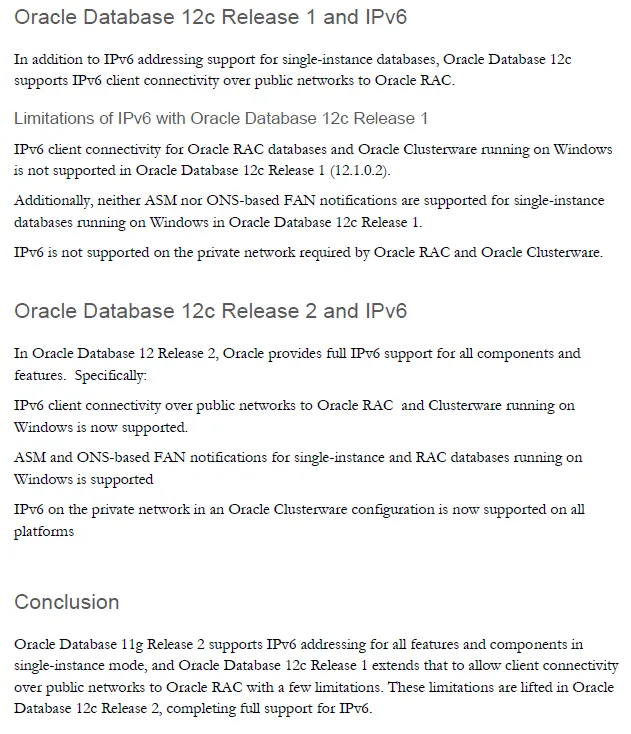
Oracle的11g单实例支持ipv6但rac不支持。 In 12.1.0.1 IPv6 is supported for the Public Network, IPv4 must be used for the Private Network.Starting with 12.2.0.1 IPv6 is fully supported for both the public and private interfaces.Please see the Oracle Database IPv6 State of Direction technical paper for details.https://www.oracle.com/docs/tech/database/oracledatabaseipv6sod.pdf19c完全支持:IPv6 Issues In 19c RAC (Doc ID 2924333.1)
添加ipv6地址:2024::57/64这个值符合ipv6的地址规范,在内网唯一即可用于测试,但不能用于公网。[root@lnkf ~]# ifconfig em1 inet6 add 2024::57/64[root@lnkf ~]# ifconfig -a|moreem1 Link encap:Ethernet HWaddr C8:1F:66:E3:DC:16 inet addr:192.168.205.57 Bcast:192.168.205.255 Mask:255.255.255.0 inet6 addr: 2024::57/64 Scope:Global inet6 addr: fe80::ca1f:66ff:fee3:dc16/64 Scope:Link UP BROADCAST RUNNING MULTICAST MTU:1500 Metric:1 RX packets:6870096 errors:32444 dropped:0 overruns:0 frame:32474 TX packets:4856695 errors:0 dropped:0 overruns:0 carrier:0 collisions:0 txqueuelen:1000 RX bytes:1815237566 (1.6 GiB) TX bytes:1623105335 (1.5 GiB) Interrupt:35 em2 Link encap:Ethernet HWaddr C8:1F:66:E3:DC:17 UP BROADCAST RUNNING MULTICAST MTU:1500 Metric:1 RX packets:0 errors:0 dropped:0 overruns:0 frame:0 TX packets:0 errors:0 dropped:0 overruns:0 carrier:0 collisions:0 txqueuelen:1000 RX bytes:0 (0.0 b) TX bytes:0 (0.0 b) Interrupt:38 em3 Link encap:Ethernet HWaddr C8:1F:66:E3:DC:18 UP BROADCAST RUNNING MULTICAST MTU:1500 Metric:1 RX packets:0 errors:0 dropped:0 overruns:0 frame:0 TX packets:0 errors:0 dropped:0 overruns:0 carrier:0 collisions:0 txqueuelen:1000 RX bytes:0 (0.0 b) TX bytes:0 (0.0 b) Interrupt:34 em4 Link encap:Ethernet HWaddr C8:1F:66:E3:DC:19 inet6 addr: fe80::ca1f:66ff:fee3:dc19/64 Scope:Link UP BROADCAST RUNNING MULTICAST MTU:1500 Metric:1 RX packets:0 errors:0 dropped:0 overruns:0 frame:0 TX packets:3 errors:0 dropped:0 overruns:0 carrier:0 collisions:0 txqueuelen:1000 RX bytes:0 (0.0 b) TX bytes:270 (270.0 b) Interrupt:36 lo Link encap:Local Loopback inet addr:127.0.0.1 Mask:255.0.0.0 inet6 addr: ::1/128 Scope:Host UP LOOPBACK RUNNING MTU:65536 Metric:1 RX packets:1799265 errors:0 dropped:0 overruns:0 frame:0 TX packets:1799265 errors:0 dropped:0 overruns:0 carrier:0 collisions:0 txqueuelen:0 RX bytes:384973715 (367.1 MiB) TX bytes:384973715 (367.1 MiB)vmnet1 Link encap:Ethernet HWaddr 00:50:56:C0:00:01 inet addr:172.16.56.1 Bcast:172.16.56.255 Mask:255.255.255.0 inet6 addr: fe80::250:56ff:fec0:1/64 Scope:Link UP BROADCAST RUNNING MULTICAST MTU:1500 Metric:1 RX packets:0 errors:0 dropped:0 overruns:0 frame:0 TX packets:6 errors:0 dropped:0 overruns:0 carrier:0 collisions:0 txqueuelen:1000 RX bytes:0 (0.0 b) TX bytes:0 (0.0 b)vmnet8 Link encap:Ethernet HWaddr 00:50:56:C0:00:08 inet addr:192.168.181.1 Bcast:192.168.181.255 Mask:255.255.255.0 inet6 addr: fe80::250:56ff:fec0:8/64 Scope:Link UP BROADCAST RUNNING MULTICAST MTU:1500 Metric:1 RX packets:0 errors:0 dropped:0 overruns:0 frame:0测试ipv6联通性:[root@lnkf ~]# ping6 2024::57 -c3PING 2024::57(2024::57) 56 data bytes64 bytes from 2024::57: icmp_seq=1 ttl=64 time=0.056 ms64 bytes from 2024::57: icmp_seq=2 ttl=64 time=0.044 ms^C--- 2024::57 ping statistics ---2 packets transmitted, 2 received, 0% packet loss, time 1704msrtt min/avg/max/mdev = 0.044/0.050/0.056/0.006 ms[root@lnkf ~]# ping6 fe80::ca1f:66ff:fee3:dc16%em1 -c3PING fe80::ca1f:66ff:fee3:dc16%em1(fe80::ca1f:66ff:fee3:dc16) 56 data bytes64 bytes from fe80::ca1f:66ff:fee3:dc16: icmp_seq=1 ttl=64 time=0.066 ms64 bytes from fe80::ca1f:66ff:fee3:dc16: icmp_seq=2 ttl=64 time=0.087 ms^C--- fe80::ca1f:66ff:fee3:dc16%em1 ping statistics ---2 packets transmitted, 2 received, 0% packet loss, time 1488msrtt min/avg/max/mdev = 0.066/0.076/0.087/0.013 ms配置监听ipv6:[root@lnkf ~]# su - oracle[oracle@lnkf ~]$ pwd/home/oracle[oracle@lnkf ~]$ cd $ORACLE_HOME/network/admin[oracle@lnkf admin]$ vi listener.ora# listener.ora Network Configuration File: /oracle/app/product/11.2.0/db_1/network/admin/listener.ora# Generated by Oracle configuration tools.LISTENER = (DESCRIPTION_LIST = (DESCRIPTION = (ADDRESS = (PROTOCOL = IPC)(KEY = EXTPROC1521)) (ADDRESS = (PROTOCOL = TCP)(HOST = 192.168.205.57)(PORT = 1521)) (ADDRESS = (PROTOCOL = TCP)(HOST = 2024::57)(PORT = 1521)) ) )ADR_BASE_LISTENER = /oracle/app~"listener.ora" 14L, 432C written [oracle@lnkf admin]$ lsnrctl statusLSNRCTL for Linux: Version 11.2.0.4.0 - Production on 20-MAY-2024 14:01:58Copyright (c) 1991, 2013, Oracle. All rights reserved.Connecting to (DESCRIPTION=(ADDRESS=(PROTOCOL=IPC)(KEY=EXTPROC1521)))TNS-12541: TNS:no listener TNS-12560: TNS:protocol adapter error TNS-00511: No listener Linux Error: 2: No such file or directoryConnecting to (DESCRIPTION=(ADDRESS=(PROTOCOL=TCP)(HOST=192.168.205.57)(PORT=1521)))TNS-12541: TNS:no listener TNS-12560: TNS:protocol adapter error TNS-00511: No listener Linux Error: 111: Connection refusedConnecting to (DESCRIPTION=(ADDRESS=(PROTOCOL=TCP)(HOST=2024::57)(PORT=1521)))TNS-12541: TNS:no listener TNS-12560: TNS:protocol adapter error TNS-00511: No listener Linux Error: 111: Connection refused[oracle@lnkf admin]$ lsnrctl startLSNRCTL for Linux: Version 11.2.0.4.0 - Production on 20-MAY-2024 14:02:00Copyright (c) 1991, 2013, Oracle. All rights reserved.Starting /oracle/app/product/11.2.0/db_1/bin/tnslsnr: please wait...TNSLSNR for Linux: Version 11.2.0.4.0 - ProductionSystem parameter file is /oracle/app/product/11.2.0/db_1/network/admin/listener.oraLog messages written to /oracle/app/diag/tnslsnr/lnkf/listener/alert/log.xmlListening on: (DESCRIPTION=(ADDRESS=(PROTOCOL=ipc)(KEY=EXTPROC1521)))Listening on: (DESCRIPTION=(ADDRESS=(PROTOCOL=tcp)(HOST=192.168.205.57)(PORT=1521)))Listening on: (DESCRIPTION=(ADDRESS=(PROTOCOL=tcp)(HOST=2024::57)(PORT=1521)))Connecting to (DESCRIPTION=(ADDRESS=(PROTOCOL=IPC)(KEY=EXTPROC1521)))STATUS of the LISTENER------------------------Alias LISTENERVersion TNSLSNR for Linux: Version 11.2.0.4.0 - ProductionStart Date 20-MAY-2024 14:02:00Uptime 0 days 0 hr. 0 min. 0 secTrace Level offSecurity ON: Local OS AuthenticationSNMP OFFListener Parameter File /oracle/app/product/11.2.0/db_1/network/admin/listener.oraListener Log File /oracle/app/diag/tnslsnr/lnkf/listener/alert/log.xmlListening Endpoints Summary... (DESCRIPTION=(ADDRESS=(PROTOCOL=ipc)(KEY=EXTPROC1521))) (DESCRIPTION=(ADDRESS=(PROTOCOL=tcp)(HOST=192.168.205.57)(PORT=1521))) (DESCRIPTION=(ADDRESS=(PROTOCOL=tcp)(HOST=2024::57)(PORT=1521)))The listener supports no servicesThe command completed successfully[oracle@lnkf admin]$ lsnrctl statusLSNRCTL for Linux: Version 11.2.0.4.0 - Production on 20-MAY-2024 14:02:04Copyright (c) 1991, 2013, Oracle. All rights reserved.Connecting to (DESCRIPTION=(ADDRESS=(PROTOCOL=IPC)(KEY=EXTPROC1521)))STATUS of the LISTENER------------------------Alias LISTENERVersion TNSLSNR for Linux: Version 11.2.0.4.0 - ProductionStart Date 20-MAY-2024 14:02:00Uptime 0 days 0 hr. 0 min. 3 secTrace Level offSecurity ON: Local OS AuthenticationSNMP OFFListener Parameter File /oracle/app/product/11.2.0/db_1/network/admin/listener.oraListener Log File /oracle/app/diag/tnslsnr/lnkf/listener/alert/log.xmlListening Endpoints Summary... (DESCRIPTION=(ADDRESS=(PROTOCOL=ipc)(KEY=EXTPROC1521))) (DESCRIPTION=(ADDRESS=(PROTOCOL=tcp)(HOST=192.168.205.57)(PORT=1521))) (DESCRIPTION=(ADDRESS=(PROTOCOL=tcp)(HOST=2024::57)(PORT=1521)))The listener supports no servicesThe command completed successfully[oracle@lnkf admin]$ sqlplus / as sysdbaSQL*Plus: Release 11.2.0.4.0 Production on Mon May 20 14:02:08 2024Copyright (c) 1982, 2013, Oracle. All rights reserved.Connected to:Oracle Database 11g Enterprise Edition Release 11.2.0.4.0 - 64bit ProductionWith the Partitioning, OLAP, Data Mining and Real Application Testing optionsSQL> alter system register; System altered.SQL> /System altered.SQL> exitDisconnected from Oracle Database 11g Enterprise Edition Release 11.2.0.4.0 - 64bit ProductionWith the Partitioning, OLAP, Data Mining and Real Application Testing options[oracle@lnkf admin]$ lsnrctl statusLSNRCTL for Linux: Version 11.2.0.4.0 - Production on 20-MAY-2024 14:02:21Copyright (c) 1991, 2013, Oracle. All rights reserved.Connecting to (DESCRIPTION=(ADDRESS=(PROTOCOL=IPC)(KEY=EXTPROC1521)))STATUS of the LISTENER------------------------Alias LISTENERVersion TNSLSNR for Linux: Version 11.2.0.4.0 - ProductionStart Date 20-MAY-2024 14:02:00Uptime 0 days 0 hr. 0 min. 21 secTrace Level offSecurity ON: Local OS AuthenticationSNMP OFFListener Parameter File /oracle/app/product/11.2.0/db_1/network/admin/listener.oraListener Log File /oracle/app/diag/tnslsnr/lnkf/listener/alert/log.xmlListening Endpoints Summary... (DESCRIPTION=(ADDRESS=(PROTOCOL=ipc)(KEY=EXTPROC1521))) (DESCRIPTION=(ADDRESS=(PROTOCOL=tcp)(HOST=192.168.205.57)(PORT=1521))) (DESCRIPTION=(ADDRESS=(PROTOCOL=tcp)(HOST=2024::57)(PORT=1521)))Services Summary...Service "lndb" has 1 instance(s). Instance "lndb", status READY, has 1 handler(s) for this service...Service "lndbXDB" has 1 instance(s). Instance "lndb", status READY, has 1 handler(s) for this service...The command completed successfully[oracle@lnkf admin]$ lltotal 24-rw-r--r-- 1 oracle oinstall 432 May 20 14:01 listener.ora-rw-r--r-- 1 oracle oinstall 357 May 20 13:53 listener.ora20240520drwxr-xr-x 2 oracle oinstall 4096 Feb 22 2019 samples-rw-r--r-- 1 oracle oinstall 381 Dec 17 2012 shrept.lst-rw-r--r-- 1 oracle oinstall 284 Jan 25 2021 sqlnet.ora-rw-r----- 1 oracle oinstall 497 Apr 10 2019 tnsnames.ora[oracle@lnkf admin]$ more tnsnames.ora # tnsnames.ora Network Configuration File: /oracle/app/product/11.2.0/db_1/network/admin/tnsnames.ora# Generated by Oracle configuration tools.LNDB = (DESCRIPTION = (ADDRESS = (PROTOCOL = TCP)(HOST = lnkf)(PORT = 1521)) (CONNECT_DATA = (SERVER = DEDICATED) (SERVICE_NAME = lndb) ) )LNDB58 = (DESCRIPTION = (ADDRESS_LIST = (ADDRESS = (PROTOCOL = TCP)(HOST = 192.168.205.58)(PORT = 1521)) ) (CONNECT_DATA = (SERVICE_NAME = lndb) ) )[oracle@lnkf admin]$ vi tnsnames.ora # tnsnames.ora Network Configuration File: /oracle/app/product/11.2.0/db_1/network/admin/tnsnames.ora# Generated by Oracle configuration tools.LNDB57 = (DESCRIPTION = (ADDRESS = (PROTOCOL = TCP)(HOST = 2024::57)(PORT = 1521)) (CONNECT_DATA = (SERVER = DEDICATED) (SERVICE_NAME = lndb) ) )~~"tnsnames.ora" 30L, 671C written [oracle@lnkf admin]$ cat tnsnames.ora # tnsnames.ora Network Configuration File: /oracle/app/product/11.2.0/db_1/network/admin/tnsnames.ora# Generated by Oracle configuration tools.LNDB = (DESCRIPTION = (ADDRESS = (PROTOCOL = TCP)(HOST = lnkf)(PORT = 1521)) (CONNECT_DATA = (SERVER = DEDICATED) (SERVICE_NAME = lndb) ) )LNDB58 = (DESCRIPTION = (ADDRESS_LIST = (ADDRESS = (PROTOCOL = TCP)(HOST = 192.168.205.58)(PORT = 1521)) ) (CONNECT_DATA = (SERVICE_NAME = lndb) ) )LNDB57 = (DESCRIPTION = (ADDRESS = (PROTOCOL = TCP)(HOST = 2024::57)(PORT = 1521)) (CONNECT_DATA = (SERVER = DEDICATED) (SERVICE_NAME = lndb) ) )测试ipv6连接:正常[oracle@lnkf admin]$ sqlplus jyc/jyc@lndb57SQL*Plus: Release 11.2.0.4.0 Production on Mon May 20 14:07:58 2024Copyright (c) 1982, 2013, Oracle. All rights reserved.Connected to:Oracle Database 11g Enterprise Edition Release 11.2.0.4.0 - 64bit ProductionWith the Partitioning, OLAP, Data Mining and Real Application Testing optionsSQL> exitDisconnected[oracle@lnkf admin]$ sqlplus jyc/jyc@[2024::57]:1521/lndbSQL*Plus: Release 11.2.0.4.0 Production on Mon May 20 14:03:40 2024Copyright (c) 1982, 2013, Oracle. All rights reserved.Connected to:Oracle Database 11g Enterprise Edition Release 11.2.0.4.0 - 64bit ProductionWith the Partitioning, OLAP, Data Mining and Real Application Testing optionsSQL> select table_name from user_tables;TABLE_NAME------------------------------J1J2TT1T2SQL> SQL> exitDisconnected from Oracle Database 11g Enterprise Edition Release 11.2.0.4.0 - 64bit ProductionWith the Partitioning, OLAP, Data Mining and Real Application Testing options测试ipv4连接同样可以:[oracle@lnkf admin]$ sqlplus jyc/jyc@192.168.205.57:1521/lndbSQL*Plus: Release 11.2.0.4.0 Production on Mon May 20 14:07:13 2024Copyright (c) 1982, 2013, Oracle. All rights reserved.Connected to:Oracle Database 11g Enterprise Edition Release 11.2.0.4.0 - 64bit ProductionWith the Partitioning, OLAP, Data Mining and Real Application Testing optionsSQL> exitDisconnected from Oracle Database 11g Enterprise Edition Release 11.2.0.4.0 - 64bit ProductionWith the Partitioning, OLAP, Data Mining and Real Application Testing options[oracle@lnkf admin]$ [root@lnkf ~]# netstat -ano|grep LISTEN|grep 1521tcp 0 0 192.168.205.57:1521 0.0.0.0:* LISTEN off (0.00/0/0)tcp 0 0 2024::57:1521 :::* LISTEN off (0.00/0/0)
相关参考:https://www.modb.pro/db/424161Enabling IPv6 on Oracle Database Enterprise Edition (文档 ID 783570.1)How to Configure a Listener for Both IPv6 and IPv4 Addresses (文档 ID 2027612.1)Configuring an Oracle Database, Enterprise Edition, with the IPv6 IPv4 Mapping Address (Doc ID 831153.1)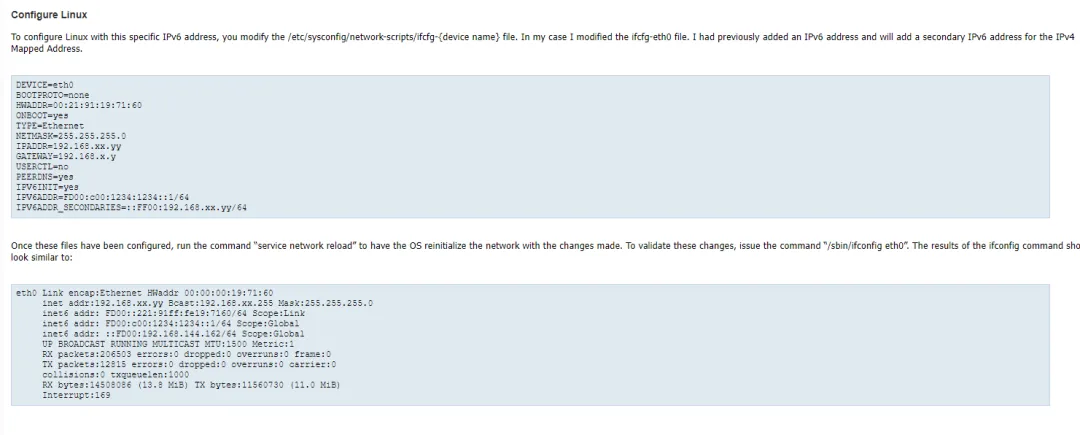
 10个月宝宝每天需要喝多少奶粉?