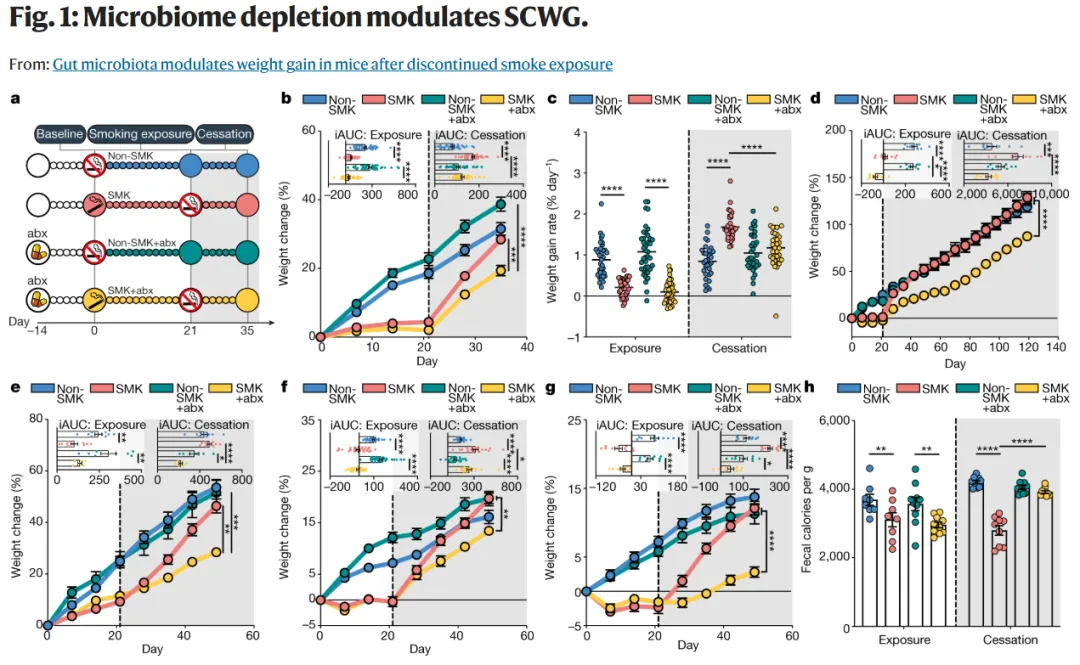
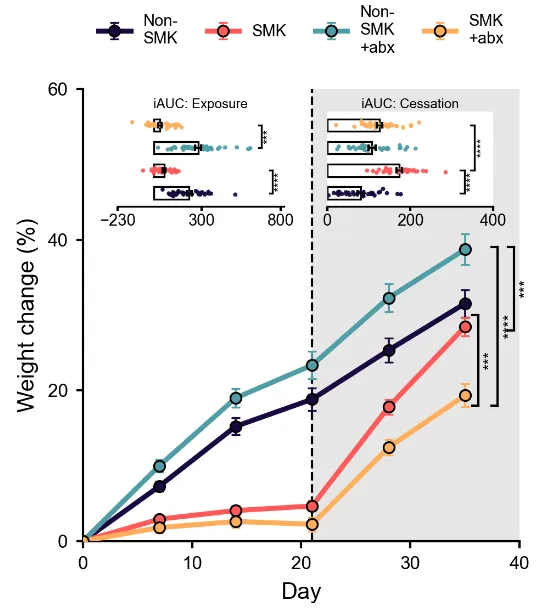
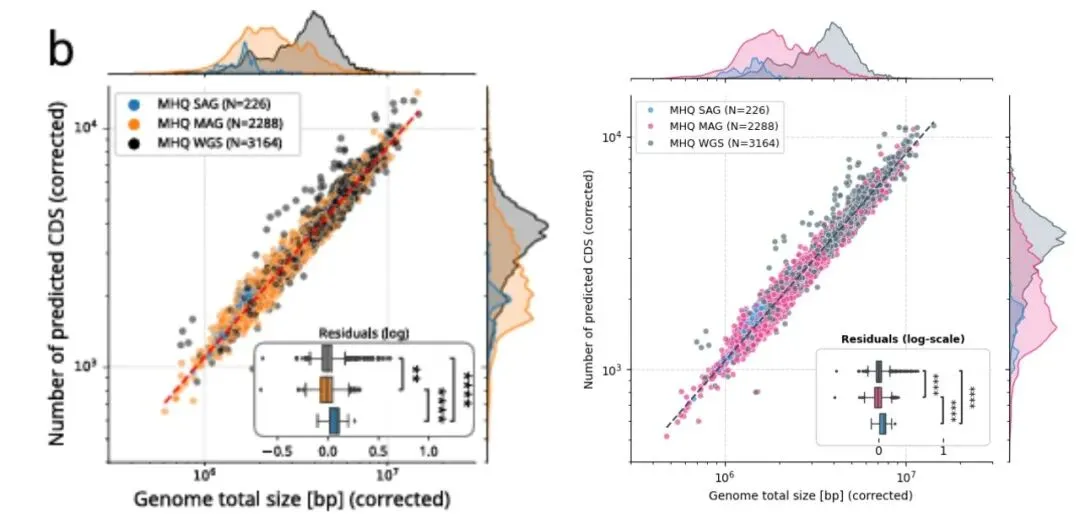
# =========================# 绘制 iAUC inset 小图并保存# =========================# 设置随机种子# 用于控制散点 jitter 的随机位置,使每次运行结果一致rng = np.random.default_rng(1)def find_col(df, treat): """ 在 iAUC 数据表中自动寻找对应处理组的列名。 这个函数的作用是兼容不同格式的列名: 例如 Non_SMK+abx、Non_SMK.abx、Non-SMK+abx 等。 """ # 构造几个可能的列名形式 candidates = [ treat, treat.replace("+", "."), treat.replace("_", "-"), treat.replace("_", "."), treat.replace("_", "-").replace("+", "."), ] # 逐一检查这些候选列名是否存在于数据表中 for c in candidates: if c in df.columns: return c # 如果所有候选列名都不存在,则报错并提示已有列名 raise KeyError(f"在 iAUC 表中找不到 {treat} 对应的列,已有列名为:{list(df.columns)}")def draw_iauc_inset(inax, iauc_df, title, xlim, xticks): """ 绘制 iAUC inset 小图。 参数说明: inax :inset 小图的坐标轴 iauc_df :iAUC 数据表 title :小图标题 xlim :小图 x 轴范围 xticks :小图 x 轴刻度 """ # 设置小图中四组的上下排列顺序 # 这里是从上到下排列 y_order = ["SMK+abx", "Non_SMK+abx", "SMK", "Non_SMK"] # 为四组指定 y 轴位置 # 3 在最上面,0 在最下面 y_pos = np.array([3, 2, 1, 0]) # 逐组绘制 bar、误差棒和散点 for i, t in enumerate(y_order): # 自动寻找当前处理组在 iAUC 表格中的列名 col = find_col(iauc_df, t) # 将该列转换为数值,并删除缺失值 vals = pd.to_numeric(iauc_df[col], errors="coerce").dropna().values # 计算当前组 iAUC 的均值 mean = np.mean(vals) # 计算当前组 iAUC 的 SEM sem = np.std(vals, ddof=1) / np.sqrt(len(vals)) # 当前组在 y 轴上的位置 y = y_pos[i] # 绘制白色横向柱形 # 柱子的长度表示均值 inax.barh( y, mean, height=0.55, color="white", edgecolor="black", linewidth=0.8, zorder=1 ) # 绘制横向 SEM 误差棒 inax.errorbar( mean, y, xerr=sem, fmt="none", ecolor="black", elinewidth=0.8, capsize=1.5, zorder=4 ) # 生成 y 方向的小随机扰动 # 这样散点不会完全重叠在一条线上 jitter = rng.normal(0, 0.06, size=len(vals)) # 绘制每个样本的散点 inax.scatter( vals, np.full_like(vals, y, dtype=float) + jitter, s=3.5, color=colors[t], edgecolor="none", alpha=0.95, zorder=3 ) # 设置 inset 小图标题 inax.set_title(title, fontsize=5.8, pad=1.5) # 设置 x 轴范围 inax.set_xlim(*xlim) # 设置 x 轴刻度 inax.set_xticks(xticks) # 不显示 y 轴刻度 inax.set_yticks([]) # 设置 y 轴范围,给上下留一点空间 inax.set_ylim(-0.6, 3.6) # 设置 x 轴刻度文字大小 inax.tick_params(axis="x", labelsize=7, length=2, pad=1) # 去掉 y 轴刻度线 inax.tick_params(axis="y", length=0) # 去掉上边框 inax.spines["top"].set_visible(False) # 去掉右边框 inax.spines["right"].set_visible(False) # 去掉左边框 inax.spines["left"].set_visible(False) # 设置底部坐标轴线宽 inax.spines["bottom"].set_linewidth(0.8) # 设置 inset 背景为白色 inax.set_facecolor("white")def add_inset_sig(inax, x, y1, y2, text, cap=12): """ 给 inset 小图添加竖向显著性括号。 参数说明: inax :inset 坐标轴 x :括号所在的 x 坐标 y1 :括号下端 y 坐标 y2 :括号上端 y 坐标 text :显著性文字 cap :括号两端横线长度 """ # 画竖线 inax.plot([x, x], [y1, y2], color="black", lw=0.8, clip_on=False) # 画下端横线 inax.plot([x - cap, x], [y1, y1], color="black", lw=0.8, clip_on=False) # 画上端横线 inax.plot([x - cap, x], [y2, y2], color="black", lw=0.8, clip_on=False) # 添加竖向显著性星号 inax.text( x + cap * 0.35, (y1 + y2) / 2, text, rotation=90, va="center", ha="left", fontsize=5.5, clip_on=False )# =========================# 在主图中添加两个 inset 坐标轴# =========================# 左侧 inset:Exposure 阶段# 使用 ax.inset_axes,坐标是相对于主图 ax 的比例坐标left_ax = ax.inset_axes([0.08, 0.74, 0.38, 0.21])# 右侧 inset:Cessation 阶段right_ax = ax.inset_axes([0.56, 0.74, 0.38, 0.21])# =========================# 绘制 Exposure inset# =========================draw_iauc_inset( left_ax, iauc_exp, "iAUC: Exposure", # 这里用 -230 到 820,避免左侧负值区域的数据被裁掉 xlim=(-230, 820), # Exposure inset 的 x 轴刻度 xticks=[-200, 300, 800])# =========================# 绘制 Cessation inset# =========================draw_iauc_inset( right_ax, iauc_ces, "iAUC: Cessation", # Cessation inset 的 x 轴范围 xlim=(0, 400), # Cessation inset 的 x 轴刻度 xticks=[0, 200, 400])# =========================# 添加 inset 显著性标注# =========================# Exposure inset 中的显著性标注add_inset_sig(left_ax, 750, 0, 1, "****", cap=18)add_inset_sig(left_ax, 680, 2, 3, "***", cap=18)# Cessation inset 中的显著性标注add_inset_sig(right_ax, 355, 1, 3, "****", cap=10)add_inset_sig(right_ax, 330, 0, 1, "****", cap=10)# =========================# 可选:添加 panel 字母# =========================# 如果需要在左上角添加 panel 字母 b,可以取消下面两行注释# ax.text(-0.18, 1.12, "b", transform=ax.transAxes,# fontsize=12, fontweight="bold")# =========================# 保存并显示图片# =========================# 保存为高分辨率图片plt.savefig("line_bar_errorbar_significant_revised.png", dpi=600)# 显示图片plt.show()