Linux下静默安装Oracle11G(单机文件系统)
- 2026-10-11 07:52:08
一、Linux下静默安装Oracle11G(单机文件系统)
1、数据库安装规划准备
1.环境规划
操作系统 | 数据库版本 | 数据库名 | 数据块大小 | 字符集 | 主机名 | IP |
Linux7.6 | Oracle 11.2.0.4 | lm11gfsdb | 8192 | GBK | lm11gfs | 192.168.0.17 |
2.空间规划
目录 | 空间大小 | 目录说明 | 备注 |
/ | 100G | 根据目录 | |
/u01 | 100G | Oracle安装目录 | 生产环境放100G,因为数据库的alert.log,trace文件都存放在该目录,还有后续可能存在的补丁,需要预留大一点的空间 |
/oradate | 200G | Oracle数据文件目录 | 空间大小:当前数据量 + (日均增长量 × 365 × 规划年数) |
/backup | 400G | 备份目录 | 至少需要1.5倍的数据库总大小,对于有较长保留策略的环境,需求更大。 |
/arch | 200G | 归档目录 | 这个目录是生产数据库的生命线,它记录了数据库的所有变更,是实现数据恢复和备库同步(如Data Guard)的关键,高峰日归档量 × 预期的故障处理天数。例如,如果一天生成100G归档,希望即使备份失败也能有2天的缓冲,那么至少需要200G。 |
3.磁盘设置及挂载
#磁盘分区[root@fsorcl ~]# fdisk /dev/sdb[root@fsorcl ~]# fdisk /dev/sdc[root@fsorcl ~]# fdisk /dev/sdd[root@fsorcl ~]# fdisk /dev/sde##################################说明:步骤如下:#############################################[root@fsorcl ~]# fdisk /dev/sde欢迎使用 fdisk (util-linux 2.23.2)。更改将停留在内存中,直到您决定将更改写入磁盘。使用写入命令前请三思。Device does not contain a recognized partition table使用磁盘标识符 0xa3b0c7de 创建新的 DOS 磁盘标签。命令(输入 m 获取帮助):nPartition type: p primary (0 primary, 0 extended, 4 free) e extendedSelect (default p):Using default response p分区号 (1-4,默认 1):起始 扇区 (2048-838860799,默认为 2048):将使用默认值 2048Last 扇区, +扇区 or +size{K,M,G} (2048-838860799,默认为 838860799):将使用默认值 838860799分区 1 已设置为 Linux 类型,大小设为 400 GiB命令(输入 m 获取帮助):wThe partition table has been altered!Calling ioctl() to re-read partition table.正在同步磁盘。####################################################################################查看磁盘情况[root@fsorcl ~]# lsblkNAME MAJ:MIN RM SIZE RO TYPE MOUNTPOINTsda 8:0 0 100G 0 disk├─sda1 8:1 0 8G 0 part [SWAP]└─sda2 8:2 0 92G 0 part /sdb 8:16 0 100G 0 disk└─sdb1 8:17 0 100G 0 partsdc 8:32 0 200G 0 disk└─sdc1 8:33 0 200G 0 partsdd 8:48 0 200G 0 disk└─sdd1 8:49 0 200G 0 partsde 8:64 0 400G 0 disk└─sde1 8:65 0 400G 0 partsr0 11:0 1 4.2G 0 rom## 格式化磁盘[root@fsorcl ~]# mkfs.ext4 /dev/sdb1[root@fsorcl ~]# mkfs.ext4 /dev/sdc1[root@fsorcl ~]# mkfs.ext4 /dev/sdd1[root@fsorcl ~]# mkfs.ext4 /dev/sde1#创建挂载目录[root@fsorcl ~]# mkdir /u01[root@fsorcl ~]# mkdir /oradata[root@fsorcl ~]# mkdir /arch[root@fsorcl ~]# mkdir /backup#文件挂载[root@fsorcl ~]# mount /dev/sdb1 /u01[root@fsorcl ~]# mount /dev/sdc1 /oradata[root@fsorcl ~]# mount /dev/sdd1 /arch[root@fsorcl ~]# mount /dev/sde1 /backup#设置挂载文件开机启动vi /etc/fstab#将如下加入到文件最后/dev/sdb1 /u01 ext4 defaults 0 0/dev/sdc1 /oradata ext4 defaults 0 0/dev/sdd1 /arch ext4 defaults 0 0/dev/sde1 /backup ext4 defaults 0 0#测试mount -a2、参数设置
1.hosts文件配置
#配置hosts文件[root@fsorcl ~]# echo "192.168.0.17 lm11gfs" >>/etc/hosts2.配置语言环境
echo "export LANG=en_US" >>~/.bash_profile3.创建用户和组
/usr/sbin/groupadd -g 5001 oinstall/usr/sbin/groupadd -g 5002 dba/usr/sbin/groupadd -g 5003 oper#-u 61001 – 指定用户 ID(UID)#-g oinstall – 指定主组(Primary Group)#-G dba,oper – 指定附加组(Supplementary Groups)useradd -u 61001 -g oinstall -G dba,oper oraclepasswd oracle4.创建目录和权限
#是 Oracle 软件的 Oracle Home 目录,即数据库软件实际安装的位置mkdir -p /u01/app/oracle/product/11.2.0/db_1#Oracle 的中央清单目录(Central Inventory),用于记录所有已安装的 Oracle 产品及组件信息mkdir -p /u01/app/oraInventorychown -R oracle:oinstall /u01chown -R oracle:dba /oradatachown -R oracle:dba /backupchown -R oracle:dba /archchmod -R 775 /u01chmod -R 775 /oradatachmod -R 775 /backupchmod -R 775 /arch5.配置本地YUM源
mount /dev/cdrom /mntcd /etc/yum.repos.drm *.repovi fsorcl.repo-----增加如下内容[EL]name=lxorclbaseurl=file:///mntgpgcheck=0enabled=1###测试是否生效yum list- [EL]:仓库的标识符,必须唯一。
- name=lxorcl:仓库的描述性名称,可自定义。
- baseurl=file:///mnt:仓库的路径。file:// 表示本地文件系统,/mnt 是挂载点。这里假设你将操作系统的安装 ISO 或 DVD 挂载到了 /mnt 目录下。
- gpgcheck=0:禁用 GPG 签名检查(仅用于测试或本地可信源)。生产环境建议开启,但若使用官方 ISO 且无需验证,可保持为 0。
- enabled=1:启用此仓库。
6.软件包安装
yum -y install autoconfyum -y install automakeyum -y install binutilsyum -y install binutils-develyum -y install bisonyum -y install cppyum -y install dos2unixyum -y install ftpyum -y install gccyum -y install gcc-c++yum -y install lrzszyum -y install python-develyum -y install compat-db*yum -y install compat-gcc-34yum -y install compat-gcc-34-c++yum -y install compat-libcap1yum -y install compat-libstdc++-33yum -y install compat-libstdc++-33.i686yum -y install glibc-*yum -y install glibc-.i686yum -y install libXpm-.i686yum -y install libXp.so.6yum -y install libXt.so.6yum -y install libXtst.so.6yum -y install libXextyum -y install libXext.i686yum -y install libXtstyum -y install libxtst.i686yum -y install libX11yum -y install libX11.i686yum -y install libXauyum -y install libXau.i686yum -y install libxcbyum -y install libxcb.i686yum -y install libXiyum -y install libXi.i686yum -y install libgcc_s_so.1yum -y install libstdc++.i686yum -y install libstdc++-develyum -y install libstdc++-devel.i686yum -y install libaioyum -y install libaio.i686yum -y install libaio-develyum -y install libaio-devel.i686yum -y install kshyum -y install libXpyum -y install libaio-develyum -y install numactlyum -y install mumactl-develyum -y install make -yyum -y install sysstat -yyum -y install unixODBCyum -y install unixODBC-develyum -y install dlfutils-libelf-devel-0.97yum -y install elfutils-libelf-develyum -y install redhat-lsb-coreyum -y install unzipyum -y install *vnc*7.修改资源限制参数
vi /etc/security/limits.conf
#增加如下内容oracle soft nproc 16384oracle hard nproc 16384oracle soft nofile 16384oracle hard nofile 65536oracle soft stack 10240oracle hard stack 32768oracle hard memlock 5242880oracle soft memlock 5242880#限制 oracle 用户可以创建的进程/线程总数。每个 Oracle 后台进程、服务器进程(dedicated/shared server)、以及用户会话都可能对应一个或多个操作系统进程
oracle soft nproc 16384
oracle hard nproc 16384
#限制用户进程可同时打开的文件句柄数,包括数据文件、控制文件、日志文件、网络套接字等
# soft 软限制,如果句柄数超过这个值,则提示
# hard硬限制,如果句柄数超过这个值,则直接报错
oracle soft nofile 16384
oracle hard nofile 65536
#限制每个进程的堆栈段大小(单位 KB)。堆栈用于存储函数调用、局部变量等
oracle soft stack 10240
oracle hard stack 32768
#限制 oracle 用户可以锁定在物理内存中的内存总量(单位 KB)。锁定内存可以防止该部分内存被交换到磁盘(swap),从而保证数据库性能稳定
#这个值通常应该略大于 Oracle 实例的 SGA 大小(因为 SGA 是主要需要锁定的内存区域)。如果 SGA 为 6 GB,则此值需大于 6 GB(例如 6.5 GB 或直接设为 unlimited)
#若 SGA 大于 6 GB,此限制会导致数据库无法启动,报错“ORA-27102: out of memory”或“Linux-x86_64 Error: 12: Cannot allocate memory”。
# 例:如果我们内存是8G,具体设置如下:
1、SGA一般设置为:物理内存*40%~80% 之间,这里我们设置50%,SGA就是4G;
2、memlock要比SGA大,一般是SGA+100MG~1GB,那么我们这么memlock设置5G
3、memlock=5*1024*1024=5242880
oracle hard memlock 5242880
oracle soft memlock 5242880
8.控制给用户分配的资源
将 session required pam_limits.so 写入到 /etc/pam.d/login 文件中,以确保 PAM(可插拔认证模块) 在用户登录时加载 pam_limits.so 模块,从而使 /etc/security/limits.conf 中定义的资源限制(如 nproc、nofile、memlock 等)对相应用户生效。
#增加如下内容echo "session required pam_limits.so">>/etc/pam.d/login9.修改内核参数
vi /etc/sysctl.conf
#增加如下内容#ORACLE SETTINGfs.aio-max-nr=1048576fs.file-max=6815744kernel.sem=250 32000 100 128net.ipv4.ip_local_port_range=9000 65500net.core.rmem_default=262144net.core.rmem_max=4194304net.core.wmem_default=262144net.core.wmem_max=1048586kernel.panic_on_oops=1vm.nr_hugepages=2048kernel.shmmax=4724464026kernel.shmall=1153433kernel.shmmni=4096生效:sysctl -p
#系统范围内允许的异步 I/O(AIO)请求的最大并发数。Oracle 使用异步 I/O 来提升数据文件的读写性能。
fs.aio-max-nr=1048576
#系统级别所有进程可打开的文件句柄总数。Oracle 数据库需要打开大量数据文件、控制文件、归档日志以及网络连接
fs.file-max=6815744
#SEMMSL (250):每个信号量集合中信号量的最大数量。Oracle 推荐 ≥ 250。
#SEMMNS (32000):系统范围内信号量的最大总数。计算公式为 SEMMNI × SEMMSL,推荐 ≥ 32000。
#SEMOPM (100):每个 semop 系统调用可执行的最大操作数。Oracle 推荐 ≥ 100。
#SEMMNI (128):系统范围内信号量标识符的最大数量(即信号量集合数)。Oracle 推荐 ≥ 128。
kernel.sem=250 32000 100 128
#定义本地 TCP/UDP 端口范围,当 Oracle 进程(如专用服务器进程)向外发起连接时,会从这个范围内随机分配源端口
net.ipv4.ip_local_port_range=9000 65500
#设置接收套接字缓冲区的默认大小和最大大小(单位:字节)。增大缓冲区可以提升网络吞吐量,对 Oracle RAC 或 Data Guard 等网络密集型应用有益
net.core.rmem_default=262144
net.core.rmem_max=4194304
#设置发送套接字缓冲区的默认大小和最大大小(字节)。
net.core.wmem_default=262144
net.core.wmem_max=1048586
#当内核捕获到一个 oops(内核错误但非致命 panic)时,控制系统的行为。设置为 1 会触发内核 panic,从而强制系统重启。这有助于在发生严重内核错误时快速恢复,避免数据库处于不确定状态
kernel.panic_on_oops=1
# 一般设置SGA/2M,如果我们的SGA为4G,那么大页设置为:4*1024/2=2048
vm.nr_hugepages=2048
# 这个值一般设置为SGA的1.1倍左右,那就是4G*1.1=4.4*1024*1024*1024
kernel.shmmax=4724464026
# 这个值为kernel.shmmax/4096
kernel.shmall=1153433
kernel.shmmni=4096
10.修改nproc参数
对所有用户施加 nproc 软限制:任何用户(包括 oracle、root、普通用户)的进程数都不能超过 16384(软限制)。如果某个用户尝试创建更多进程,系统将拒绝并可能返回错误
#增加如下内容echo "* soft nproc 16384 ">/etc/security/limits.d/20-nproc.conf11.关闭透明页
如果同时启用了手动大页(vm.nr_hugepages)和透明大页,两者可能相互干扰,导致内存分配失败或 SGA 无法获得预期的大页
#查看透明页情况cat /sys/kernel/mm/transparent_hugepage/enabled [always] madvise never(显示结果)#设置vi /etc/rc.d/rc.localif test -f /sys/kernel/mm/transparent_hugepage/enabled;thenecho never>/sys/kernel/mm/transparent_hugepage/enabledfiif test -f /sys/kernel/mm/transparent_hugepage/defrag;thenecho never>/sys/kernel/mm/transparent_hugepage/defragfi#重新生成 GRUB 配置:grub2-mkconfig -o /boot/grub2/grub.cfg12.关闭交换页面
在 Linux 内核启动参数中添加 numa=off 会彻底禁用 NUMA 子系统,使系统表现为一个统一的 UMA(统一内存访问)架构。这样所有内存对 CPU 而言都是等价的,内核不再进行节点感知的内存分配
vi /etc/default/grub在quiet后面加上:numa=offGRUB_TIMEOUT=5GRUB_DISTRIBUTOR="$(sed 's, release .*$,,g' /etc/system-release)"GRUB_DEFAULT=savedGRUB_DISABLE_SUBMENU=trueGRUB_TERMINAL_OUTPUT="console"GRUB_CMDLINE_LINUX="crashkernel=auto rhgb quiet numa=off"GRUB_DISABLE_RECOVERY="true"~----生效 grub2-mkconfig -o /etc/grub2.cfg13.修改共享内存段
对于专用数据库服务器,可设置为物理内存的 50% ~ 70%,要大于SGA,8G*0.7=5600M
vi /etc/fstabnone /dev/shm tmpfs defaults,size=5600m 0 0 mount -o remount /dev/shm14.配置安全策略
vi /etc/selinux/config将:SELINUX=enabled 改为:SELINUX=disabled#生效setenforce 015.关闭防火墙
systemctl stop firewalld.servicesystemctl disable firewalld.servicesystemctl status firewalld.service16.设置oracle环境变量
su - oraclevi ~/.bash_profile#增加如下内容:PS1="[`whoami`@`hostname`:"'$PWD]$'export PS1umask 022export TMP=/tmpexport LANG=en_USexport TMPDIR=$TMPexport ORACLE_UNQNAME=lm11gfsdbORACLE_BASE=/u01/app/oracle;export ORACLE_BASEORACLE_HOME=$ORACLE_BASE/product/11.2.0/db_1;export ORACLE_HOMEORACLE_SID=lm11gfsdb; export ORACLE_SIDORACLE_TERM=xterm;export ORACLE_TERMLD_LIBRARY_PATH=$ORACLE_HOME/lib:/lib:/usr/lib;export LD_LIBRARY_PATHCLASSPATH=$ORACLE_HOME/JRE:$ORACLE_HOME/jlib:$ORACLE_HOME/rdbms/jlib;export CLASSPATHNLS_DATE_FORMAT="yyyy-mm-dd HH24:MI:SS";export NLS_DATE_FORMATNLS_LANG=AMERICAN_AMERICA.ZHS16GBK;export NLS_LANGPATH=.:$PATH:$HOME/bin:$ORACLE_HOME/bin:$PATH;export PATHTHREADS_FLAG=native;export THREADS_PLAGif [ $USER = "oracle" ] || [ $USER = "grid" ];then if [ $SHELL = "/bin/ksh" ];then ulimit -p 16384 ulimit -n 65536 else ulimit -u 16384 -n 65536 fi umask 022 fi #生效 source ~/.bash_profile3、静默安装Oracle服务端
1.解压文件
#上传/backupsu - rootcd /backupchown -R oracle:oinstall /backupchmod -R 775 /backupsu - oracleunzip p13390677_112040_Linux-x86-64_1of7.zipunzip p13390677_112040_Linux-x86-64_2of7.zip2.创建静默安装文件db_install.rsp
su - oraclecat > /backup/db_install.rsp <<'EOF'###################################################################### 版权所有(c) Oracle Corporation 1998,2013。保留所有权利。#### #### 为以下列出的变量指定值,以自定义您的安装过程。 #### #### 每个变量都关联有注释说明,这些注释可帮助您为变量填充合适的 #### 值。 #### #### 重要提示:此文件包含明文密码,应设置权限仅允许oracle用户或 #### 拥有此安装权限的数据库管理员读取。 #### #######################################################################------------------------------------------------------------------------------# 请勿修改以下由系统生成的值。#------------------------------------------------------------------------------oracle.install.responseFileVersion=/oracle/install/rspfmt_dbinstall_response_schema_v11_2_0#------------------------------------------------------------------------------# 指定安装选项,可选值如下:# - INSTALL_DB_SWONLY:仅安装数据库软件(不创建数据库)# - INSTALL_DB_AND_CONFIG:安装数据库软件并配置数据库# - UPGRADE_DB:升级现有数据库#-------------------------------------------------------------------------------oracle.install.option=INSTALL_DB_SWONLY#-------------------------------------------------------------------------------# 指定安装时设置的系统主机名。如果系统有多个主机名和网络接口,# 可通过此参数强制安装程序使用指定的主机名而非系统识别的第一个主机名。#-------------------------------------------------------------------------------ORACLE_HOSTNAME=lm11gfs # 请替换为您的实际主机名(执行hostname命令查看)#-------------------------------------------------------------------------------# 指定库存(inventory)目录对应的Unix用户组。#-------------------------------------------------------------------------------UNIX_GROUP_NAME=oinstall#-------------------------------------------------------------------------------# 指定存放库存(inventory)文件的位置。# 若在Windows操作系统上安装,此参数为可选。#-------------------------------------------------------------------------------INVENTORY_LOCATION=/u01/app/oraInventory#-------------------------------------------------------------------------------# 指定组件安装时使用的语言,多个语言用逗号分隔。# 示例:SELECTED_LANGUAGES=en,fr,ja#-------------------------------------------------------------------------------SELECTED_LANGUAGES=en,zh_CN#-------------------------------------------------------------------------------# 指定Oracle主目录(ORACLE_HOME)的完整路径。#-------------------------------------------------------------------------------ORACLE_HOME=/u01/app/oracle/product/11.2.0/db_1#-------------------------------------------------------------------------------# 指定Oracle基目录(ORACLE_BASE)的完整路径。#-------------------------------------------------------------------------------ORACLE_BASE=/u01/app/oracle#------------------------------------------------------------------------------# 指定组件的安装版本,可选值:# - EE :企业版# - SE :标准版# - SEONE :标准版One# - PE :个人版(仅Windows系统支持)#------------------------------------------------------------------------------oracle.install.db.InstallEdition=EE#------------------------------------------------------------------------------# 此变量用于启用或禁用自定义安装,仅当InstallEdition设置为EE(企业版)时生效。# true :会安装'optionalComponents'属性中指定的可选组件# false :忽略'optionalComponents'的值(不安装可选组件)#------------------------------------------------------------------------------oracle.install.db.EEOptionsSelection=false#------------------------------------------------------------------------------# 此变量仅在'EEOptionsSelection'设置为true时生效。# 可指定以下组件的任意组合(用逗号分隔):# oracle.oraolap:11.2.0.4.0, oracle.rdbms.dm:11.2.0.4.0,# oracle.rdbms.dv:11.2.0.4.0, oracle.rdbms.lbac:11.2.0.4.0,# oracle.rdbms.partitioning:11.2.0.4.0, oracle.rdbms.rat:11.2.0.4.0#------------------------------------------------------------------------------oracle.install.db.optionalComponents=#------------------------------------------------------------------------------# 特权操作系统组配置#------------------------------------------------------------------------------oracle.install.db.DBA_GROUP=dbaoracle.install.db.OPER_GROUP=dba#------------------------------------------------------------------------------# 指定安装时选择的集群节点名称,多个节点用逗号分隔。# 示例:oracle.install.db.CLUSTER_NODES=node1,node2#------------------------------------------------------------------------------oracle.install.db.CLUSTER_NODES=#------------------------------------------------------------------------------# 此变量用于启用或禁用RAC One Node安装。#------------------------------------------------------------------------------oracle.install.db.isRACOneInstall=#------------------------------------------------------------------------------# 指定RAC One Node服务的名称。#------------------------------------------------------------------------------oracle.install.db.racOneServiceName=#===============================================================================# 以下所有参数均已注释且不会被使用#===============================================================================# 以下参数仅在安装时选择创建数据库(INSTALL_DB_AND_CONFIG)时生效。# 由于我们选择的是仅安装软件(INSTALL_DB_SWONLY),因此这些参数已注释。请勿取消注释。#oracle.install.db.config.starterdb.type=#oracle.install.db.config.starterdb.globalDBName=#oracle.install.db.config.starterdb.SID=#oracle.install.db.config.starterdb.characterSet=AL32UTF8#oracle.install.db.config.starterdb.memoryOption=true#oracle.install.db.config.starterdb.memoryLimit=#oracle.install.db.config.starterdb.installExampleSchemas=false#oracle.install.db.config.starterdb.enableSecuritySettings=true#oracle.install.db.config.starterdb.password.ALL=#oracle.install.db.config.starterdb.password.SYS=#oracle.install.db.config.starterdb.password.SYSTEM=#oracle.install.db.config.starterdb.password.SYSMAN=#oracle.install.db.config.starterdb.password.DBSNMP=#oracle.install.db.config.starterdb.control=DB_CONTROL#oracle.install.db.config.starterdb.gridcontrol.gridControlServiceURL=#oracle.install.db.config.starterdb.automatedBackup.enable=false#oracle.install.db.config.starterdb.automatedBackup.osuid=#oracle.install.db.config.starterdb.automatedBackup.ospwd=#oracle.install.db.config.starterdb.storageType=#oracle.install.db.config.starterdb.fileSystemStorage.dataLocation=#oracle.install.db.config.starterdb.fileSystemStorage.recoveryLocation=#oracle.install.db.config.asm.diskGroup=#oracle.install.db.config.asm.ASMSNMPPassword=#------------------------------------------------------------------------------# My Oracle Support相关信息(本地安装无需配置)#------------------------------------------------------------------------------MYORACLESUPPORT_USERNAME=MYORACLESUPPORT_PASSWORD=SECURITY_UPDATES_VIA_MYORACLESUPPORT=falseDECLINE_SECURITY_UPDATES=truePROXY_HOST=PROXY_PORT=PROXY_USER=PROXY_PWD=PROXY_REALM=COLLECTOR_SUPPORTHUB_URL=oracle.installer.autoupdates.option=oracle.installer.autoupdates.downloadUpdatesLoc=AUTOUPDATES_MYORACLESUPPORT_USERNAME=AUTOUPDATES_MYORACLESUPPORT_PASSWORD=EOF3.静默安装数据库
#安装脚本cd /backup/database./runInstaller -silent -responseFile /backup/db_install.rsp -ignorePrereq -ignoreSysPrereqs
4.数据库执行完成后,执行.sh脚本
su - root /u01/app/oraInventory/orainstRoot.sh/u01/app/oracle/product/11.2.0/db_1/root.sh
4、静默创建数据库
1. 创建静默dbca文件
su - oraclecat > /backup/dbca.rsp <<'EOF'################################################################################ #### DBCA 静默响应文件 #### ------------------ #### 版权所有 (c) 1998, 2013, Oracle Corporation. 保留所有权利。 #### #### 请为以下变量指定合适的值,以定制Oracle数据库的创建。 #### #### 每个变量都附有注释,说明其类型和用途。 #### #### 变量值的格式如下: #### 类型 : 示例 #### 字符串 : "<值>" #### 布尔值 : True 或 False #### 数字 : <数值> #### 字符串列表: {"<值1>","<值2>"} #### #### 示例: #### 1. dbca -progress_only -responseFile <响应文件> #### 显示数据库创建进度的进度条。 #### 2. dbca -silent -responseFile <响应文件> #### 静默创建数据库,无用户界面显示。 #### 3. dbca -silent -createDatabase -cloneTemplate #### -responseFile <响应文件> #### 使用克隆模板静默创建数据库(模板为克隆模板)。 #### 4. dbca -silent -deleteDatabase -responseFile <响应文件> #### 静默删除数据库。 #################################################################################-----------------------------------------------------------------------------# GENERAL 部分,所有数据库创建操作均需配置此部分。#-----------------------------------------------------------------------------[GENERAL]#-----------------------------------------------------------------------------# 名称 : RESPONSEFILE_VERSION# 数据类型 : 字符串# 描述 : 要创建的数据库版本# 有效值 : "11.2.0"# 默认值 : 无# 是否必须 : 是#-----------------------------------------------------------------------------RESPONSEFILE_VERSION = "11.2.0"#-----------------------------------------------------------------------------# 名称 : OPERATION_TYPE# 数据类型 : 字符串# 描述 : 操作类型# 有效值 : "createDatabase"(创建数据库)\ "createTemplateFromDB" \ # "createCloneTemplate" \ "deleteDatabase" \ "configureDatabase" \# "addInstance" (仅RAC) \ "deleteInstance" (仅RAC)# 默认值 : 无# 是否必须 : 是#-----------------------------------------------------------------------------OPERATION_TYPE = "createDatabase"#-----------------------*** GENERAL 部分结束 ***------------------------------#-----------------------------------------------------------------------------# CREATEDATABASE 部分,当 OPERATION_TYPE 为 "createDatabase" 时使用。#-----------------------------------------------------------------------------[CREATEDATABASE]#-----------------------------------------------------------------------------# 名称 : GDBNAME# 数据类型 : 字符串# 描述 : 数据库的全局数据库名# 有效值 : <数据库名>.<数据库域名>(当数据库域名不为空时)# <数据库名>(当数据库域名为空时)# 默认值 : 无# 是否必须 : 是#-----------------------------------------------------------------------------GDBNAME = "lm11gfsdb"#-----------------------------------------------------------------------------# 名称 : SID# 数据类型 : 字符串# 描述 : 数据库的系统标识符# 有效值 : 参考 Oracle11g 管理员指南# 默认值 : GDBNAME 中指定的 <数据库名># 是否必须 : 否#-----------------------------------------------------------------------------SID = "lm11gfsdb"#-----------------------------------------------------------------------------# 名称 : TEMPLATENAME# 数据类型 : 字符串# 描述 : 模板名称# 有效值 : 模板文件名# 默认值 : 无# 是否必须 : 是#-----------------------------------------------------------------------------TEMPLATENAME = "General_Purpose.dbc"#-----------------------------------------------------------------------------# 名称 : SYSPASSWORD# 数据类型 : 字符串# 描述 : SYS 用户的密码# 有效值 : 参考 Oracle11g 管理员指南# 默认值 : 无# 是否必须 : 是#-----------------------------------------------------------------------------SYSPASSWORD = "oracle"#-----------------------------------------------------------------------------# 名称 : SYSTEMPASSWORD# 数据类型 : 字符串# 描述 : SYSTEM 用户的密码# 有效值 : 参考 Oracle11g 管理员指南# 默认值 : 无# 是否必须 : 是#-----------------------------------------------------------------------------SYSTEMPASSWORD = "oracle"#-----------------------------------------------------------------------------# 名称 : DATAFILEJARLOCATION# 数据类型 : 字符串# 描述 : 数据文件压缩包的位置(模板目录)# 有效值 : 包含压缩数据文件的目录# 默认值 : 无# 是否必须 : 否(但建议指定)#-----------------------------------------------------------------------------DATAFILEJARLOCATION = "/u01/app/oracle/product/11.2.0/db_1/assistants/dbca/templates"#-----------------------------------------------------------------------------# 名称 : RECOVERYAREADESTINATION# 数据类型 : 字符串# 描述 : 快速恢复区的位置# 有效值 : 恢复区目录# 默认值 : $ORACLE_BASE/flash_recovery_area# 是否必须 : 否#-----------------------------------------------------------------------------RECOVERYAREADESTINATION = "/u01/app/oracle/recovery"#-----------------------------------------------------------------------------# 名称 : STORAGETYPE# 数据类型 : 字符串# 描述 : 数据库使用的存储类型# 有效值 : FS(文件系统,对于RAC则为CFS),ASM(自动存储管理)# 默认值 : FS# 是否必须 : 否#-----------------------------------------------------------------------------STORAGETYPE = "FS"#-----------------------------------------------------------------------------# 名称 : CHARACTERSET# 数据类型 : 字符串# 描述 : 数据库字符集# 有效值 : 参考 Oracle11g 国际化支持指南# 默认值 : "US7ASCII"# 是否必须 : 否#-----------------------------------------------------------------------------CHARACTERSET = "ZHS16GBK"#-----------------------------------------------------------------------------# 名称 : NATIONALCHARACTERSET# 数据类型 : 字符串# 描述 : 数据库国家字符集# 有效值 : "UTF8" 或 "AL16UTF16"# 默认值 : "AL16UTF16"# 是否必须 : 否#-----------------------------------------------------------------------------NATIONALCHARACTERSET = "UTF8"#-----------------------------------------------------------------------------# 名称 : AUTOMATICMEMORYMANAGEMENT# 数据类型 : 布尔值# 描述 : 是否启用自动内存管理(AMM)# 有效值 : TRUE / FALSE# 默认值 : TRUE# 是否必须 : 否#-----------------------------------------------------------------------------AUTOMATICMEMORYMANAGEMENT = "FALSE"#-----------------------------------------------------------------------------# 名称 : TOTALMEMORY# 数据类型 : 字符串# 描述 : 分配给 Oracle 的总内存(MB)# 有效值 : 数字# 默认值 : 无# 是否必须 : 否(若 AMM=FALSE 且未指定 MEMORYPERCENTAGE,则建议指定)#-----------------------------------------------------------------------------TOTALMEMORY = "4096"#-----------------------------------------------------------------------------# 以下为可选参数,可根据需要取消注释并设置。# 此处保留注释状态,采用默认行为。#-----------------------------------------------------------------------------#-----------------------------------------------------------------------------# 名称 : MEMORYPERCENTAGE# 数据类型 : 字符串# 描述 : Oracle 占用物理内存的百分比(与 TOTALMEMORY 二选一)# 默认值 : 无# 是否必须 : 否#-----------------------------------------------------------------------------#MEMORYPERCENTAGE = "40"#-----------------------------------------------------------------------------# 名称 : DATABASETYPE# 数据类型 : 字符串# 描述 : 数据库类型,用于在使用 MEMORYPERCENTAGE 时分配内存# 有效值 : MULTIPURPOSE | DATA_WAREHOUSING | OLTP# 默认值 : MULTIPURPOSE# 是否必须 : 否#-----------------------------------------------------------------------------#DATABASETYPE = "MULTIPURPOSE"#-----------------------------------------------------------------------------# 名称 : SAMPLESCHEMA# 数据类型 : 布尔值# 描述 : 是否安装示例模式(HR、OE 等)# 有效值 : TRUE / FALSE# 默认值 : FALSE# 是否必须 : 否#-----------------------------------------------------------------------------#SAMPLESCHEMA = FALSE#-----------------------------------------------------------------------------# 名称 : DISABLESECURITYCONFIGURATION# 数据类型 : 字符串# 描述 : 禁用安全配置的选项# 有效值 : ALL | NONE | AUDIT | PASSWORD_PROFILE# 默认值 : NONE# 是否必须 : 否#-----------------------------------------------------------------------------#DISABLESECURITYCONFIGURATION = "NONE"#-----------------------------------------------------------------------------# 名称 : EMCONFIGURATION# 数据类型 : 字符串# 描述 : Enterprise Manager 配置类型# 有效值 : CENTRAL | LOCAL | ALL | NONE# 默认值 : NONE# 是否必须 : 否#-----------------------------------------------------------------------------#EMCONFIGURATION = "NONE"#-----------------------------------------------------------------------------# 名称 : SYSMANPASSWORD# 数据类型 : 字符串# 描述 : SYSMAN 用户的密码(当 EMCONFIGURATION 为 LOCAL 或 ALL 时必需)#-----------------------------------------------------------------------------#SYSMANPASSWORD = "password"#-----------------------------------------------------------------------------# 名称 : DBSNMPPASSWORD# 数据类型 : 字符串# 描述 : DBSNMP 用户的密码(当 EMCONFIGURATION 指定时必需)#-----------------------------------------------------------------------------#DBSNMPPASSWORD = "password"#-----------------------------------------------------------------------------# 名称 : LISTENERS# 数据类型 : 字符串# 描述 : 数据库需注册的监听器列表(空格分隔)# 默认值 : $ORACLE_HOME/network/admin/listener.ora 中定义的所有监听器# 是否必须 : 否#-----------------------------------------------------------------------------#LISTENERS = "listener1 listener2"#-----------------------*** CREATEDATABASE 部分结束 ***------------------------EOF2. 静默dbca创建
su - oracledbca -silent -responseFile /backup/dbca.rsp5、数据库日常管理
1. 数据库启停
su - oracle#登陆数据库sqlplus “/as sysdba”#关闭数据库shutdown immediate#启动数据库startup2. 密码过期处理
sqlplus “/as sysdba”select * from dba_profiles where profile='DEFAULT';alter profile default limit PASSWORD_LIFE_TIME UNLIMITED;3. 关闭审计
show parameter audit_trail #如果非none,则代表已开始alter system set audit_trail=none scope=spfile;4. 开启数据库闪回和归档
#查看归档是否开启Archive log list #归档是否开启#查看闪回是否开启select flashback_on from v$database;#开启归档和闪回(先开归档,再开闪回)show parameter recovery#设置归档路径以及设置大小alter system set db_recovery_file_dest_size=100g; alter system set db_recovery_file_dest='/arch'; #开启归档 shutdown immediate startup mount alter database archivelog alter database flashback on ; shutdown immediate startup 5. 关闭数据库闪回和归档
#查看归档是否开启Archive log list #归档是否开启#查看闪回是否开启select flashback_on from v$database;#关闭归档和闪回(先关闪回,再关归档) shutdown immediate startup mount alter database flashback off ; alter database unarchivelog shutdown immediate startup mount6. 查看日志
show parameter dump7. 监听管理
#查看监听状态lsnrctl status#停止监听lsnrctl stop#启动监听lsnrctl start6、客户端连接数据库
1、安装好PLSQL
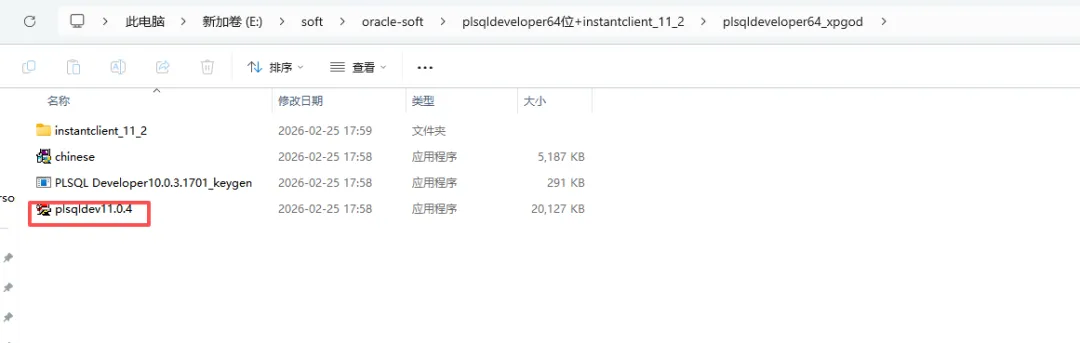

2、配置PLSQL
D:\install\oracle\instantclient_11_2在该目录下增加文件夹:NETWORK/ADMIN新建文件:tnsnames.ora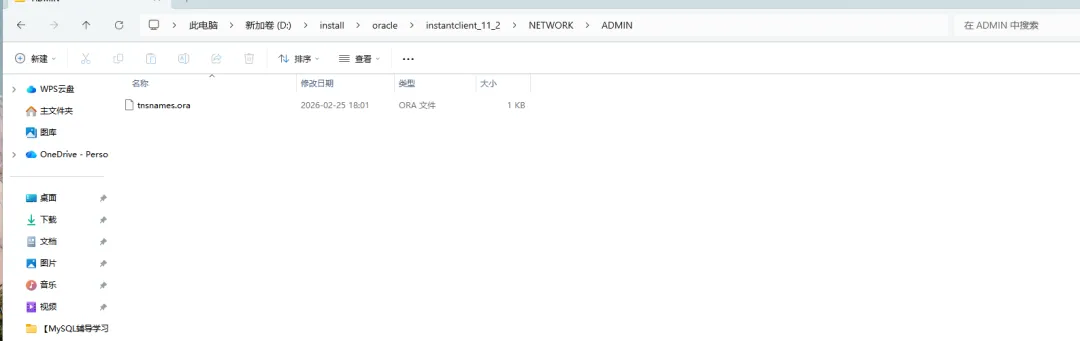
3、配置tnsnames.ora
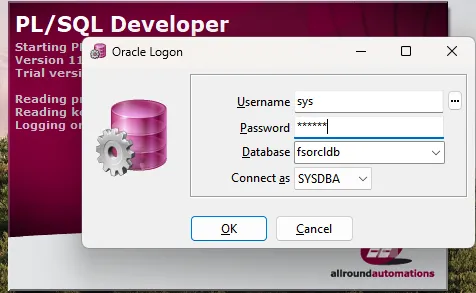
fsorcldb = (DESCRIPTION = (ADDRESS_LIST = (ADDRESS = (PROTOCOL = TCP)(HOST = 192.168.0.10)(PORT = 1521)) ) (CONNECT_DATA = (SERVICE_NAME = fsorcldb) ) )4、PLSQL连接数据库
所需软件
分享文件:银河麒麟--Oracle 11g静默链接:https://pan.xunlei.com/s/VOsWK649phBDNfEQViAATpSgA1?pwd=yzi8#复制这段内容后打开迅雷,查看更方便