目录
一、最常用的curl命令
1、发送GET请求
2、发送POST请求
3、发送json格式请求:
二、curl命令语法与curl命令参数详解
1、curl命令语法
2、curl命令参数详解
三、Linux curl命令退出码
四、常见用法
1、下载(option:-o或者option:-O)
2、上传文件(option:-T)
3、伪造来源页面|伪造referer|盗链 (option:-e)
4、伪造代理设备(模仿浏览器)
5、设置http请求
6、http响应头
7、发送表单数据
8、cookie
9、测试一个网址
10、保存访问的网页(>>)
11、请求方式
12、调试
13、显示抓取错误
curl是一个非常实用的、用来与服务器之间传输数据的工具;支持的协议包括 (DICT, FILE, FTP, FTPS, GOPHER, HTTP, HTTPS, IMAP, IMAPS, LDAP, LDAPS, POP3, POP3S, RTMP, RTSP, SCP, SFTP, SMTP, SMTPS, TELNET and TFTP),curl设计为无用户交互下完成工作;curl提供了一大堆非常有用的功能,包括代理访问、用户认证、ftp上传下载、HTTP POST、SSL连接、cookie支持、断点续传...。
一、最常用的curl命令
1、发送GET请求
curl URL
curl URL?a=1&b=nihao
2、发送POST请求
curl -X POST -d 'a=1&b=nihao' URL
3、发送json格式请求:
curl -H "Content-Type: application/json" -X POST -d '{"abc":123,"bcd":"nihao"}' URL
curl -H "Content-Type: application/json" -X POST -d @test.json URL
其中,-H代表header头,-X是指定什么类型请求(POST/GET/HEAD/DELETE/PUT/PATCH),-d代表传输什么数据。这几个是最常用的。查看所有curl命令: man curl或者curl -h请求头:H,A,e响应头:I,i,Dcookie:b,c,j传输:F(POST),G(GET),T(PUT),X输出:o,O,w断点续传:r调试:v,--trace,--trace-ascii,--trace-time
二、curl命令语法与curl命令参数详解
1、curl命令语法
curl [options] [URL...]
2、curl命令参数详解
由于linux curl功能十分强大,所以命令参数十分多,下表只是爱E族(aiezu.com)帅选出来的部分参数,更多参数请运行“man curl”命令查看。
| | |
|---|
| | 需要抓取的一到多个URLs; 多个下面通配符的方式: 1、http://{www,ftp,mail}.aiezu.com; 2、http://aiezu.com/images/[001-999].jpg; 3、http://aiezu.com/images/[1-999].html; 4、ftp://aiezu.com/file[a-z].txt |
|---|
| -H "name: value" --header "name: value" | (HTTP)添加一个http header(http请求头); |
|---|
| -H "name:" --header "name:" | (HTTP)移除一个http header(http请求头); |
| -A "string" --user-agent "string"【参考】 | (HTTP)设置Http请求头“User-Agent”,服务器通过“User-Agent”可以判断客户端使用的浏览器名称和操作系统类型,伪造此参数能导致服务器做出错误判断。 也可以使用“-H”, “--header option”设置此选项; |
| -e <URL> --referer <URL>【参考】 | (HTTP)设置访问时的来源页面,告诉http服务从哪个页面进入到此页面; -e "aiezu.com"相当于“-H "Referer: www.qq.com"”; |
| | (HTTP)只输出HTTP-header,不获取内容(HTTP/FTP/FILE)。 用于HTTP服务时,获取页面的http头; (如:curl -I http://aiezu.com) 用于FTP/FILE时,将会获取文件大小、最后修改时间; (如:curl -I file://test.txt) |
|---|
| |
| -D <file> --dump-header <file> | |
| -b name=data --cookie name=data【参考】 | (HTTP)发送cookie数据到HTTP服务器,数据格式为:"NAME1=VALUE1; NAME2=VALUE2"; 如果行中没有“=”,将把参数值当作cookie文件名; 这个cookie数据可以是由服务器的http响应头“Set-Cookie:”行发送过来的; |
|---|
| -c filename --cookie-jar file name【参考】 | (HTTP)完成操作后将服务器返回的cookies保存到指定的文件; 指定参数值为“-”将定向到标准输出“如控制台”; |
| -j --junk-session-cookies | (HTTP)告诉curl放弃所有的"session cookies"; 相当于重启浏览器; |
| -x host:port -x [protocol://[user:pwd@]host[:port] --proxy [protocol://[user:pwd@]host[:port]【参考】 | 使用HTTP代理访问;如果未指定端口,默认使用8080端口; protocol默认为http_proxy,其他可能的值包括: http_proxy、HTTPS_PROXY、socks4、socks4a、socks5; 如: --proxy 8.8.8.8:8080; -x "http_proxy://aiezu:123@aiezu.com:80" |
|---|
| 将“-x”参数的代理,作为通道的方式去代理非HTTP协议,如ftp; |
| --socks4 <host[:port]> --socks4a <host[:port]> --socks5 <host[:port]>【参考】 | 使用SOCKS4代理; 使用SOCKS4A代理; 使用SOCKS5代理; 此参数会覆盖“-x”参数; |
| --proxy-anyauth --proxy-basic --proxy-diges --proxy-negotiate --proxy-ntlm | http代理认证方式,参考: --anyauth --basic --diges --negotiate --ntlm |
| -U <user:password> --proxy-user <user:password> | |
| | 如果使用了此参数,“-d/”、“--data”、“--data-binary”参数设置的数据,讲附加在url上,以GET的方式请求; |
|---|
| -d @file -d "string" --data "string" --data-ascii "string" --data-binary "string" --data-urlencode "string"【参考】 | (HTTP)使用HTTP POST方式发送“key/value对”数据,相当于浏览器表单属性(method="POST",enctype="application/x-www-form-urlencoded") -d,--data:HTTP方式POST数据; --data-ascii:HTTP方式POST ascii数据; --data-binary:HTTP方式POST二进制数据; --data-urlencode:HTTP方式POST数据(进行urlencode); 如果数据以“@”开头,后紧跟一个文件,将post文件内的内容; |
| -F name=@file -F name=<file -F name=content --form name=content【参考】 | (HTTP)使用HTTP POST方式发送类似“表单字段”的多类型数据,相当于同时设置浏览器表单属性(method="POST",enctype="multipart/form-data"),可以使用此参数上传二进制文件。 如果字段内容以“@”开头,剩下的部分应该是文件名,curl将会上传此文件,如: curl -F "pic=@pic.jpg" http://aiezu.com; curl -F "page=@a.html;type=text/html" http://aiezu.com curl -F "page=@/tmp/a;filename=a.txt" http://aiezu.com 如果字段内容以“<”开头,剩下的部分应该是文件名,curl将从文件中获取作为此字段的值,如:curl -F "text=<text.txt" http://aiezu.com; |
| --form-string <key=value> | (HTTP)类似于“--form”,但是“@”、“<”无特殊含义; |
| -T file --upload-file file | 通过“put”的方式将文件传输到远程网址; 选项参数只使用字符"-",将通过stdin读入文件内容; 如: cat test.txt|curl "http://aiezu.com/a.php" -T - curl "http://aiezu.com/a.php" -T - <test.txt 此参数也可以使用通配符: curl -T "{file1,file2}" http://aiezu.com curl -T "img[1-1000].png" http://aiezu.com |
| -C <offset> --continue-at <offset> | 断点续转,从文件头的指定位置开始继续下载/上传; offset续传开始的位置,如果offset值为“-”,curl会自动从文件中识别起始位置开始传输; |
|---|
| -r <range> --range <range> | (HTTP/FTP/SFTP/FILE) 只传输内容的指定部分: 0-499:最前面500字节; -500:最后面500字节; 9500-:最前面9500字节; 0-0,-1:最前面和最后面的1字节; 100-199,500-599:两个100字节; |
| | (HTTP)告诉curl使用HTTP Basic authentication(HTTP协议时),这是默认认证方式; |
|---|
| (HTTP)使用NTLM身份验证方式,用于HTTP协议; 一般用于IIS使用NTLM的网站; |
| (HTTP)使用HTTP Digest authentication加密,用于HTTP协议; 配合“-u/--user”选项,防止密码使用明文方式发送; |
| (HTTP)使用GSS-Negotiate authentication方式,用于HTTP协议; 它主要目的是为它的主要目的是为kerberos5认证提供支持支持; |
| (HTTP)告诉curl自动选择合适的身份认证方法,并选用最安全的方式; |
| -u user:password --user user:password | 使用用户名、密码认证,此参数会覆盖“-n”、“--netrc”和“--netrc-optional”选项; 如果你只提供用户名,curl将要求你输入密码; 如果你使用“SSPI”开启的curl库做“NTLM”认证,可以使用不含用户名密码的“-u:”选项,强制curl使用当前登录的用户名密码进行认证; 此参数相当于设置http头“Authorization:”; |
| -E <证书[:密码]> --cert <证书[:密码]> | (SSL)指定“PEM”格式的证书文件和证书密码; |
|---|
| (SSL)告诉curl所提供证书的类型:PEM、DER、ENG等; 默认为“PEM”; |
| (SSL)告诉curl所以指定的CA证书文件,必须是“PEM”格式; |
| (SSL)告诉curl所以指定目录下的CA证书用来验证; 这些证书必须是“PEM”格式; |
| (HTTPS/FTPS)提供一个PEM格式的文件,用于指定被吊销的证书列表; |
| (SSL)设置此选项将允许使用无证书的不安全SSL进行连接和传输。 |
| --ciphers <list of ciphers> | (SSL)指定SSL要使用的加密方式;如:“aes_256_sha_256”; |
|---|
| 设置一个OpenSSL加密引擎用于加密操作; 使用“curl --engine list”查看支持的加密引擎列表; |
| (SSL)指定包含随机数据的文件路径名;数据是用来为SSL连接产生随机种子为; |
| (SSL)为随机种子生成器EGD(Entropy Gathering Daemon socket)指定的路径名; |
| -1/--tlsv1 --tlsv1.0 --tlsv1.1 --tlsv1.2 -2/--sslv2 -3/--sslv3 | (SSL)使用TLS版本2与远程服务器通讯; (SSL)使用TLS 1.0版本与远程服务器通讯; (SSL)使用TLS 1.1版本与远程服务器通讯; (SSL)使用TLS 1.2版本与远程服务器通讯; (SSL)使用SSL版本2与远程服务器通讯; (SSL)使用SSL版本3与远程服务器通讯; |
| | (SSL/SSH)指定一个私钥文件名;为指定时自动尝试使用下面文件:“~/.ssh/id_rsa”、“~/.ssh/id_dsa”、“./id_rsa'”、 “./id_dsa”; |
|---|
| (SSL)指定私钥文件类型,支持:DER、PEM、ENG,默认是PEM; |
| |
| |
| | (FTP)FTP主动模式时,设置一个地址等待服务器的连接,如: 网卡:eth1 IP:8.8.8.8 主机名:aiezu.com 可以加端口号:eth1:20000-21000; |
|---|
| (FTP)上传时将换行符(LF)转换为回车换行(CRLF); |
| |
| (FTP)可选值:multicwd/nocwd/singlecwd; |
| (FTP)使用使用PASV(被动)/EPSV模式; |
| |
| |
| |
| (FTP/LDAP)使用Ascii传输模式,用于FTP、LDAP;在ftp中相当与使用了“type=A;”模式。 |
| (FTP)告诉curl在PASV(被动模式)时不要使用EPSV; |
| (FTP)告诉curl在主动模式时禁用EPRT和LPRT; |
| | 限制curl使用的最大带宽;如果未指定单位,默认单位为“bytes/秒”,你也可以指定单位为“K”、“M”、“G”等单位,如:“--limit-rate 1m”为限制最大使用带宽为“1m字节/秒”; |
|---|
| If a download is slower than speed-limit bytes per second during a speed-time period, the download gets aborted. If speed-time is used, the default speed-limit will be 1 unless set with -Y. This option controls transfers and thus will not affect slow connects etc. If this is a concern for you, try the --connect-timeout option. |
| If a download is slower than this given speed (in bytes per second) for speed-time seconds it gets aborted. speed-time is set with -y and is 30 if not set. |
| | (HTTP) 强制curl使用HTTP 1.0而不是使用默认的HTTP 1.1; |
|---|
| 使用指定的网卡接口访问; curl --interface eth0 http://aiezu.com curl --interface 10.0.0.101 http://aiezu.com |
| -X <command> --request <command> | (HTTP)指定与服务器通信使用的请求方法,如:GET、PUT、POST、DELETE等,默认GET; |
| --keepalive-time <seconds> | |
| |
| |
| |
| (HTTP/HTTPS)追随http响应头“Location:”定向到跳转后的页面; (在http响应码为3XX时使用,如301跳转、302跳转) |
| (HTTP/HTTPS)同“--location”,但跳转后会发送跳转前的用户名和密码; |
| (HTTP)请求对返回内容使用压缩算法进行压缩;curl支持对gzip压缩进行解压; |
| --connect-timeout <seconds> | |
| -m seconds --max-time seconds | |
| |
| |
| | (HTTP)连接失败时(400以上错误)不返回默认错误页面,而是返回一个curl错误码“22”; |
|---|
| --retry <num> --retry-delay <seconds> --retry-max-time <seconds> | |
| |
| |
| | 将返回内容输出到文件。 如果是用过通配符获取多个url,可以使用“#”后跟“数字序号”,curl会自动将它替换对应的关键词,如: curl "http://aiezu.com/{a,b}.txt" -o "#1.txt"; 将保存为:“a.txt”,“b.txt”; curl "http://aiezu.com/{a,b}_[1-3].txt" -o "#1#2.txt"; 将保存为:a1.txt、a2.txt、a3.txt、b1.txt、b2.txt、b3.txt 如果要根据规则创建保存目录,参考:“--create-dirs” 指定“-”将定向到标准输出“如控制台”; |
|---|
| 将返回内容输出到当前目录下,和url中文件名相同的文件中(不含目录); |
| 与“-o”参数配合使用,创建必要的本地目录层次结构 |
| 操作完成后在返回信息尾部追加指定的内容;要追加的内容可以是一个字符串“string”、从文件中获取“@filename”、从标准输入中获取“@-” 格式参数中可以用%{variable_name} 方式使用响应信息的相关变量,如:%{content_type}、%{http_code}、%{local_ip}...,更多变量参考“man curl”获取; 格式参数可以使用“\n”、“\r”、“\t”等转义字符; |
| | 转储所有传入和传出的数据到文件,包括描述信息; 使用“-”作为文件名将输出发送到标准输出。 |
|---|
| 转储所有传入和传出的数据到文件,包括描述信息,只转储ASCII部分,更容易阅读; 使用“-”作为文件名将输出发送到标准输出。 这个选项会覆盖之前使用的-v、 --verbose、 --trace-ascii选项; |
| |
| -K --config <config file> | 从配置文件中读取参数,参考:http://curl.haxx.se/docs/ |
| |
| | |
|---|
| |
curl -h 的完整参数解释:
| |
| |
| |
| |
| |
| |
| |
| |
| |
| |
| |
| |
| |
| -E/--cert <cert[:passwd]> | |
| 证书文件类型 (DER/PEM/ENG) (SSL) |
| |
| 私钥文件类型 (DER/PEM/ENG) (SSL) |
| |
| 加密引擎使用 (SSL). "--engine list" for list |
| |
| CA目 (made using c_rehash) to verify peer against (SSL) |
| |
| 要求返回是压缩的形势 (using deflate or gzip) |
| --connect-timeout <seconds> | |
| |
| |
| |
| --ftp-method [multicwd/nocwd/singlecwd] | |
| |
| |
| |
| |
| |
| -form-string <name=string> | |
| |
| |
| |
| |
| |
| |
| |
| -j/--junk-session-cookies | |
| |
| |
| |
| |
| |
| |
| |
| |
| |
| |
| |
| |
| |
| |
| |
| |
| |
| |
| |
| |
| |
| |
| |
| |
| |
| |
| --retry-max-time <seconds> | |
| |
| |
| |
| -t/--telnet-option <OPT=val> | |
| |
| |
| |
| |
| -U/--proxy-user <user[:password]> | |
| |
| |
| |
| |
| |
| |
| |
| |
| |
| like -Q for the source URL for 3rd party transfer |
| |
| |
| |
| |
三、Linux curl命令退出码
下面是linux curl命令的错误代码和她们的相应的错误消息,可能会出现在恶劣的环境。
| |
|---|
| Unsupported protocol. This build of curl has no support for this protocol. |
|---|
| |
|---|
| URL malformed. The syntax was not correct. |
|---|
| Couldn't resolve proxy. The given proxy host could not be resolved. |
|---|
| Couldn't resolve host. The given remote host was not resolved. |
|---|
| Failed to connect to host. |
|---|
| FTP weird server reply. The server sent data curl couldn't parse. |
|---|
| FTP access denied. The server denied login or denied access to the particular resource or directory you wanted to reach. Most often you tried to change to a directory that doesn't exist on the server. |
|---|
| FTP weird PASS reply. Curl couldn't parse the reply sent to the PASS request. |
|---|
| FTP weird PASV reply, Curl couldn't parse the reply sent to the PASV request. |
|---|
| FTP weird 227 format. Curl couldn't parse the 227-line the server sent. |
|---|
| FTP can't get host. Couldn't resolve the host IP we got in the 227-line. |
|---|
| FTP couldn't set binary. Couldn't change transfer method to binary. |
|---|
| Partial file. Only a part of the file was transferred. |
|---|
| FTP couldn't download/access the given file, the RETR (or similar) command failed. |
|---|
| FTP quote error. A quote command returned error from the server. |
|---|
| HTTP page not retrieved. The requested url was not found or returned another error with the HTTP error code being 400 or above. This return code only appears if -f/--fail is used. |
|---|
| Write error. Curl couldn't write data to a local filesystem or similar. |
|---|
| FTP couldn't STOR file. The server denied the STOR operation, used for FTP uploading. |
|---|
| Read error. Various reading problems. |
|---|
| Out of memory. A memory allocation request failed. |
|---|
| Operation timeout. The specified time-out period was reached according to the conditions. |
|---|
| FTP PORT failed. The PORT command failed. Not all FTP servers support the PORT command, try doing a transfer using PASV instead! |
|---|
| FTP couldn't use REST. The REST command failed. This command is used for resumed FTP transfers. |
|---|
| HTTP range error. The range "command" didn't work. |
|---|
| HTTP post error. Internal post-request generation error. |
|---|
| SSL connect error. The SSL handshaking failed. |
|---|
| FTP bad download resume. Couldn't continue an earlier aborted download. |
|---|
| FILE couldn't read file. Failed to open the file. Permissions? |
|---|
| LDAP cannot bind. LDAP bind operation failed. |
|---|
| |
|---|
| Function not found. A required LDAP function was not found. |
|---|
| Aborted by callback. An application told curl to abort the operation. |
|---|
| Internal error. A function was called with a bad parameter. |
|---|
| Interface error. A specified outgoing interface could not be used. |
|---|
| Too many redirects. When following redirects, curl hit the maximum amount. |
|---|
| Unknown TELNET option specified. |
|---|
| |
|---|
| The peer's SSL certificate or SSH MD5 fingerprint was not ok. |
|---|
| The server didn't reply anything, which here is considered an error. |
|---|
| SSL crypto engine not found. |
|---|
| Cannot set SSL crypto engine as default. |
|---|
| Failed sending network data. |
|---|
| Failure in receiving network data. |
|---|
| Problem with the local certificate. |
|---|
| Couldn't use specified SSL cipher. |
|---|
| Peer certificate cannot be authenticated with known CA certificates. |
|---|
| Unrecognized transfer encoding. |
|---|
| |
|---|
| Maximum file size exceeded. |
|---|
| Requested FTP SSL level failed. |
|---|
| Sending the data requires a rewind that failed. |
|---|
| Failed to initialize SSL Engine. |
|---|
| The user name, password, or similar was not accepted and curl failed to log in. |
|---|
| File not found on TFTP server. |
|---|
| Permission problem on TFTP server. |
|---|
| Out of disk space on TFTP server. |
|---|
| |
|---|
| Unknown TFTP transfer ID. |
|---|
| File already exists (TFTP). |
|---|
| |
|---|
| Character conversion failed. |
|---|
| Character conversion functions required. |
|---|
| Problem with reading the SSL CA cert (path? access rights?). |
|---|
| The resource referenced in the URL does not exist. |
|---|
| An unspecified error occurred during the SSH session. |
|---|
| Failed to shut down the SSL connection. |
|---|
| Could not load CRL file, missing or wrong format (added in 7.19.0). |
|---|
| Issuer check failed (added in 7.19.0). |
|---|
| More error codes will appear here in future releases. The existing ones are meant to never change. |
|---|
四、常见用法
1、下载(option:-o或者option:-O)
1.1、下载页面:
curl -o dodo1.jpg http:www.linux.com/dodo1.JPG#要注意-O这里后面的url要具体到某个文件,不然抓不下来curl -O http://www.linux.com/dodo1.JPG
1.2:循环下载有时候下载图片可以能是前面的部分名称是一样的,就最后的尾椎名不一样。这样就会把dodo1,dodo2,dodo3,dodo4,dodo5全部保存下来curl -O http://www.linux.com/dodo[1-5].JPG
1.3:下载重命名在hello/dodo1.JPG的文件下载下来就会变成hello_dodo1.JPG,其他文件依此类推,从而有效的避免了文件被覆盖curl -o #1_#2.JPG http://www.linux.com/{hello,bb}/dodo[1-5].JPG
由于下载的hello与bb中的文件名都是dodo1,dodo2,dodo3,dodo4,dodo5。因此第二次下载的会把第一次下载的覆盖,这样就需要对文件进行重命名。curl -O http://www.linux.com/{hello,bb}/dodo[1-5].JPG
1.4:分块下载(option:-r)curl -r 0-100 -o dodo1_part1.JPG http://www.linux.com/dodo1.JPGcurl -r 100-200 -o dodo1_part2.JPG http://www.linux.com/dodo1.JPGcurl -r 200- -o dodo1_part3.JPG http://www.linux.com/dodo1.JPGcat dodo1_part* > dodo1.JPG #这样就可以查看dodo1.JPG的内容了
1.5:通过ftp下载文件(option:-u)curl可以通过ftp下载文件,curl提供两种从ftp中下载的语法curl -O -u 用户名:密码 ftp://www.linux.com/dodo1.JPGcurl -O ftp://用户名:密码@www.linux.com/dodo1.JPG
1.6:下载,显示进度条(option:-#)或不显示进度条(option:-s)curl -# -O http://www.linux.com/dodo1.JPG curl -s -O http://www.linux.com/dodo1.JPG
1.7、下载,断点续传(-C <offset>)断点续转,从文件头的指定位置开始继续下载/上传;offset续传开始的位置,如果offset值为“-”,curl会自动从文件中识别起始位置开始传输;curl -# -o centos6.8.iso -C - http://mirrors.aliyun.com/centos/6.8/isos/x86_64/CentOS-6.8-x86_64-minimal.isocurl -C -O http://www.linux.com/dodo1.JPG
2、上传文件(option:-T)
curl -T dodo1.JPG -u 用户名:密码 ftp://www.linux.com/img/
3、伪造来源页面|伪造referer|盗链 (option:-e)
很多服务器会检查http访问的referer从而来控制访问。比如:你是先访问首页,然后再访问首页中的邮箱页面,这里访问邮箱的referer地址就是访问首页成功后的页面地址,如果服务器发现对邮箱页面访问的referer地址不是首页的地址,就断定那是个盗连了#这样就会让服务器其以为你是从www.linux.com点击某个链接过来的curl -e "www.linux.com" http://mail.linux.com#告诉爱E族,我是从百度来的curl -e http://baidu.com http://aiezu.com
4、伪造代理设备(模仿浏览器)
有些网站需要使用特定的浏览器去访问他们,有些还需要使用某些特定的版本。curl内置option:-A可以让我们指定浏览器去访问网站curl -A "Mozilla/4.0 (compatible; MSIE 8.0; Windows NT 5.0)" http://www.linux.com#告诉爱E族,我是GOOGLE爬虫蜘蛛(其实我是curl命令)curl -A " Mozilla/5.0 (compatible; Googlebot/2.1; +http://www.google.com/bot.html)" http://aiezu.com#告诉爱E族,我用的是微信内置浏览器curl -A "Mozilla/5.0 AppleWebKit/600 Mobile MicroMessenger/6.0" http://aiezu.com
5、设置http请求
5.1、设置http请求头(或option:-H或option:--head)curl -H "Cache-Control:no-cache" http://aiezu.com
5.2、指定proxy服务器以及其端口(option::-x)#很多时候上网需要用到代理服务器(比如是使用代理服务器上网或者因为使用curl别人网站而被别人屏蔽IP地址的时候),幸运的是curl通过使用内置option:-x来支持设置代理curl -x 192.168.100.100:1080 http://www.linux.com
6、http响应头
6.1、查看http响应头(option:-I)# 看看本站的http头是怎么样的curl -I http://aiezu.com输出:HTTP/1.1 200 OKDate: Fri, 25 Nov 2016 16:45:49 GMTServer: ApacheSet-Cookie: rox__Session=abdrt8vesprhnpc3f63p1df7j4; path=/Expires: Thu, 19 Nov 1981 08:52:00 GMTCache-Control: no-store, no-cache, must-revalidate, post-check=0, pre-check=0Pragma: no-cacheVary: Accept-EncodingContent-Type: text/html; charset=utf-86.2、保存http的response里面的header信息(option:-D)curl -D cookied.txt http://www.linux.com执行后cookie信息就被存到了cookied.txt里面了注意:-c(小写)产生的cookie和-D里面的cookie是不一样的。
7、发送表单数据
curl -F "pic=@logo.png" -F "site=aiezu" http://aiezu.com/
8、cookie
8.1、发送cookie(option:-b)#有些网站是使用cookie来记录session信息。对于chrome这样的浏览器,可以轻易处理cookie信息,但在curl中只要增加相关参数也是可以很容易的处理cookiecurl -b "domain=aiezu.com" http://aiezu.com#很多网站都是通过监视你的cookie信息来判断你是否按规矩访问他们的网站的,因此我们需要使用保存的cookie信息。内置option: -bcurl -b cookiec.txt http://www.linux.com
8.2、保存http的response里面的cookie信息(option:-c)执行后http的response里面的cookie信息就被存到了cookiec.txt里面了curl -c cookiec.txt http://www.linux.com
9、测试一个网址
9.1、测试一个网址是否可达curl -v http://www.linux.com
9.2、测试网页返回值(option:-w [format])curl -o /dev/null -s -w %{http_code} www.linux.com
10、保存访问的网页(>>)
2.1:使用linux的重定向功能保存curl http://www.linux.com >> linux.html
11、请求方式
curl -i -v -H '' -X POST -d '' http:www.test.com/a/b其中,-X POST -d, -X GET -d, -X PUT -d 分别等价于-F, -G -d, -P
以post请求为例:11.1、 -X POST -d(11.1.1)、POST application/x-www-form-urlencodedapplication/x-www-form-urlencoded是默认的curl -X POST -d "param1=value1¶m2=value2" http://localhost:3000/data等价于curl -H "Content-Type:application/x-www-form-urlencoded" -X POST -d "param1=value1¶m2=value2" http://localhost:3000/data使用数据文件curl -X POST -d "@data.txt" http://localhost:3000/data其中data.txt内容如下:param1=value1¶m2=value2
(11.1.2)、POST application/jsoncurl -H "Content-Type:application/json" -X POST -d '{"key1":"value1","key2":"value2"}' http://localhost:3000/data使用数据文件的话:curl -X POST -d "@data.json" http://localhost:3000/data其中data.json内容如下:{"key1":"value1","key2":"value2"}再举个例子:curl -H "Content-type:application/json" -X POST -d "{\"app_key\":\"$appKey\",\"time_stamp\":\"$time\"}" http://www.test.com.cn/a/b
11.2、-Fcurl -v -H "token: 222" -F "file=@/Users/fungleo/Downloads/401.png" localhost:8000/api/v1/upimg
curl -f http://www.linux.com/error
11.3、其它举例
(11.3.1)、
curl -X POST "http://www.test.com/e/f" -H "Content-Type:application/x-www-form-urlencoded;charset=UTF-8" \-d "a=b" \-d "c=d" \-d "e=f" \-d "g=h"
(11.3.2)、错误:curl -i -G -d "a=b#1&c=d" http://www.test.com/e/f正确:要把参数值是特殊符号的用urlencode转换过来curl -i -G -d "a=b%231&c=d" http://www.test.com/e/f
12、调试
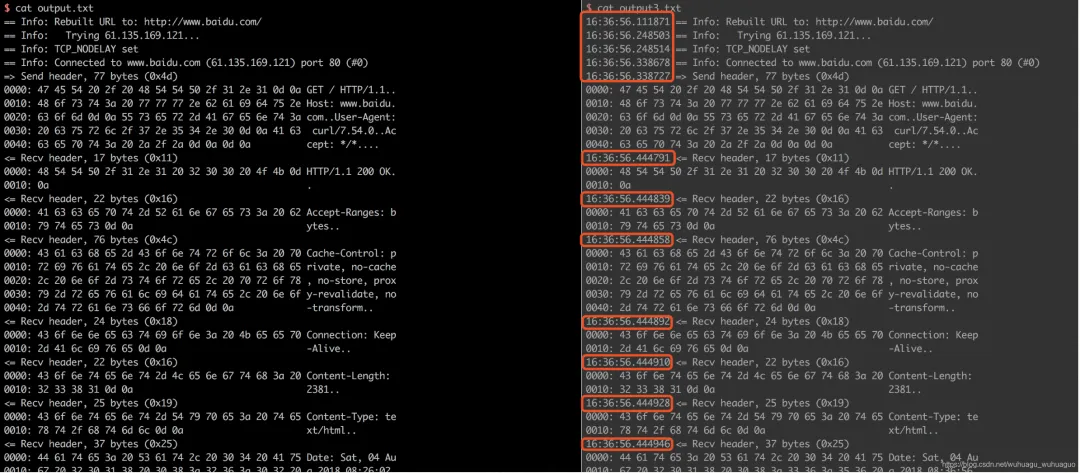
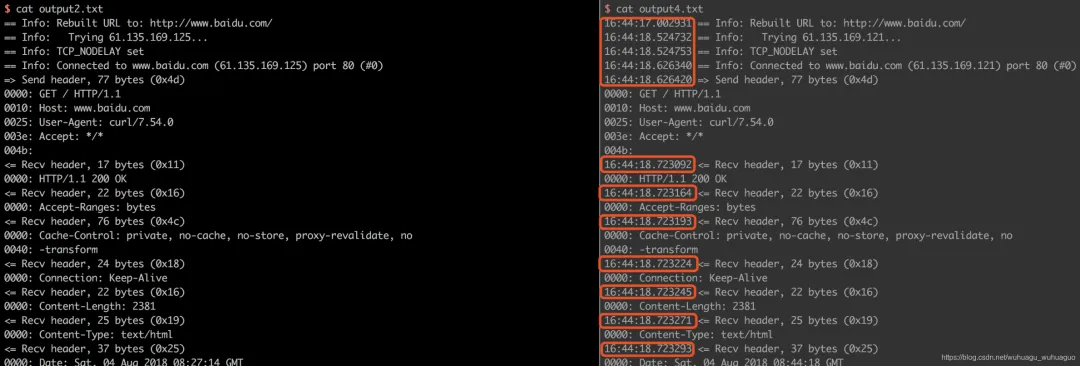
curl -v可以显示一次http通信的整个过程,包括端口连接和http request头信息。如果觉得还不够,那么下面的命令可以查看更详细的通信过程:curl --trace output.txt www.baidu.com 或者 curl --trace-ascii output.txt www.baidu.com 运行后,请打开output.txt文件查看。curl --trace output.txt http://www.baidu.comcurl --trace-ascii output2.txt http://www.baidu.comcurl --trace output3.txt --trace-time http://www.baidu.comcurl --trace-ascii output4.txt --trace-time http://www.baidu.com
 编辑
编辑
 编辑
编辑
举例:有需求每5分钟请求一次http://www.test.com/a/b生成一个日志文件。希望一月的日志(正确的和错误的)能写入一个日志文件day=`date +%F`logfile='/var/logs/www.test.com_'`date +%Y%m`'.log'/usr/bin/echo -e "\n\n[${day}] Start request \n " >> ${logfile}/bin/curl -v "http://www.test.com/a/b" -d "ccccc" 1>> ${logfile} 2>> ${logfile} --trace-time/usr/bin/echo -e "\n\n[${day}] End request\n" >> ${logfile}
13、显示抓取错误
curl -f http://www.linux.com/error
参考:
http://aiezu.com/article/linux_curl_command.htmlhttps://www.cnblogs.com/duhuo/p/5695256.html
