HyperView Python 二次开发之碰撞分析一键求取OLC
- 2026-09-02 17:04:29
HyperView Python 二次开发之碰撞分析一键求取OLC
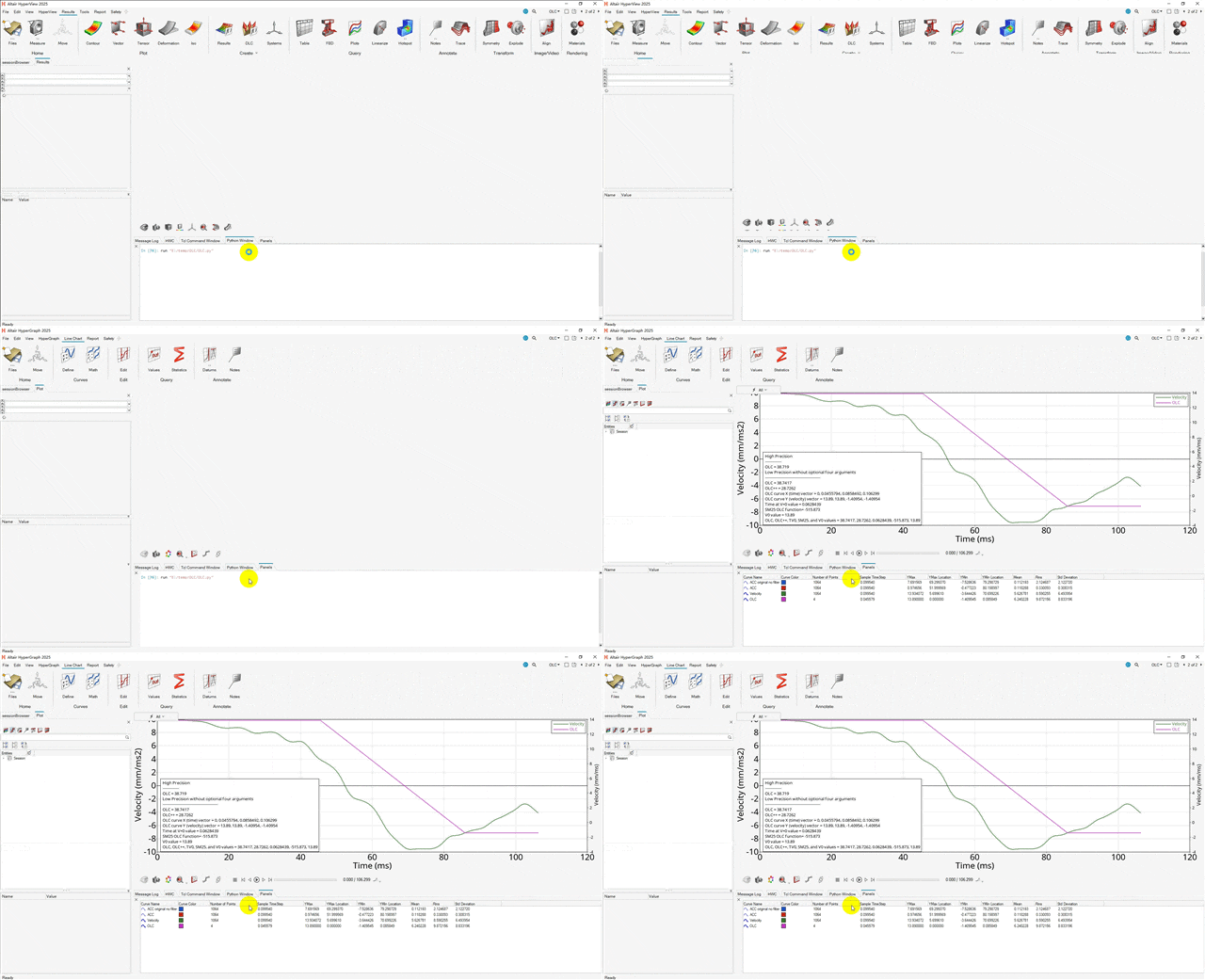
车辆碰撞仿真工程师,在结果计算完成模型验证准确合理后,需求读取B柱下端加速度,OLC是评价车辆减/加速度波形对乘员载荷影响的核心指标。
此篇是学会怎样在hyperview中使用二次开发功能自动求取OLC。
# 指定文件路径import osdir_path = r"E:\temp\OLC"file_name = "binout"file_path = os.path.join(dir_path,file_name)#def calculate_olc (file_source,nodeid): import hw import hw.hg as hg# 设置激活的窗口为 plot ses = hw.Session() new_page = hw.Page(layout=0,title='OLC') new_page_id = new_page.id ses.setActive(hw.Page,id = new_page_id) page = ses.get(hw.Page) page_id = page.id#win = ses.get(hw.Window) win = ses.get(hw.Window,window = 1) win.type = "xy"# read acc curve curve1 = hg.CurveXY( xFile=file_source, xSource="file", xSubcase="nodout", xDataType="Time", xRequest="Time", xComponent="Time", yFile=file_source, ySource="file", ySubcase="nodout", yDataType="nodout", yRequest=nodeid, yComponent="x_acceleration", label="ACC original no filter", visibility=False ) curve1_id = curve1.id# acc curve filterprint(f"p{page_id}w1c1.x")print(f"saefilt95(p{page_id}w1c1.x,p{page_id}w1c1.y,60,1,3)") curve2 = hg.CurveXY( xSource="math", xExpression=f"p{page_id}w1c1.x", ySource="math", yExpression=f"saefilt95(p{page_id}w1c1.x,p{page_id}w1c1.y,60,1,3)", label="ACC", visibility=False ) curve2_id = curve2.id# calculate velocity curve curve3 = hg.CurveXY( xSource="math", xExpression=f"p{page_id}w1c1.x", ySource="math", yExpression=f"-1*(integral(p{page_id}w1c2.x,p{page_id}w1c2.y)-13.89)", label="Velocity" ) curve3_id = curve3.id curve4 = hg.CurveXY( xSource="math", xExpression=f"olc(p{page_id}w1c3.x,p{page_id}w1c3.y,2)", ySource="math", yExpression=f"olc(p{page_id}w1c3.x,p{page_id}w1c3.y,3)", label="OLC" ) curve4_id = curve4.id line1 = f'{{olc(p{page_id}w1c3.x,p{page_id}w1c3.y,0,1)}}' line2 = f'{{olc(p{page_id}w1c3.x,p{page_id}w1c3.y,0)}}' line3 = f'{{olc(p{page_id}w1c3.x,p{page_id}w1c3.y,1)}}' line4 = f'{{olc(p{page_id}w1c3.x,p{page_id}w1c3.y,2)}}' line5 = f'{{olc(p{page_id}w1c3.x,p{page_id}w1c3.y,3)}}' line6 = f'{{olc(p{page_id}w1c3.x,p{page_id}w1c3.y,4)}}' line7 = f'{{olc(p{page_id}w1c3.x,p{page_id}w1c3.y,5)}}' line8 = f'{{olc(p{page_id}w1c3.x,p{page_id}w1c3.y,6)}}' line9 = f'{{olc(p{page_id}w1c3.x,p{page_id}w1c3.y,7)}}' note = hg.Note( attachTo="view", text= ( f"High Precision\n" f"-------------\n" f"OLC = {line1}\n" f"Low Precision without optional four arguments\n" f"--------------------------------------------\n" f"OLC = {line2}\n" f"OLC++ = {line3}\n" f"OLC curve X (time) vector = {line4}\n" f"OLC curve Y (velocity) vector = {line5}\n" f"Time at V=0 value = {line6}\n" f"SM25 OLC function= {line7}\n" f"V0 value = {line8}\n" f"OLC, OLC++, TV0, SM25, and V0 values = {line9}" ), notePosition = [1,0] )#def set_X_axis (label,fontsize): import hw import hw.hg as hg# 设置激活的窗口为 plot ses = hw.Session() h = ses.get(hg.AxisHorizontal) h.text = label h.fontSize = fontsize h.ticFontSize = fontsizedef set_Y_axis (label,fontsize): import hw import hw.hg as hg# 设置激活的窗口为 plot ses = hw.Session() v = ses.get(hg.AxisVertical) v.text = label v.fontSize = fontsize v.ticFontSize = fontsizecalculate_olc(file_path,"68000026")set_X_axis("Time",20)set_Y_axis("Velocity",20)往期文章
CAE仿真 网格评价中的雅可比为什么是0-1?及参数单元是什么
HyperView/HyperMesh基于Python二次开发 循环怎么用(for/while)
本文来自网友投稿或网络内容,如有侵犯您的权益请联系我们删除,联系邮箱:596563534@qq.com 。
