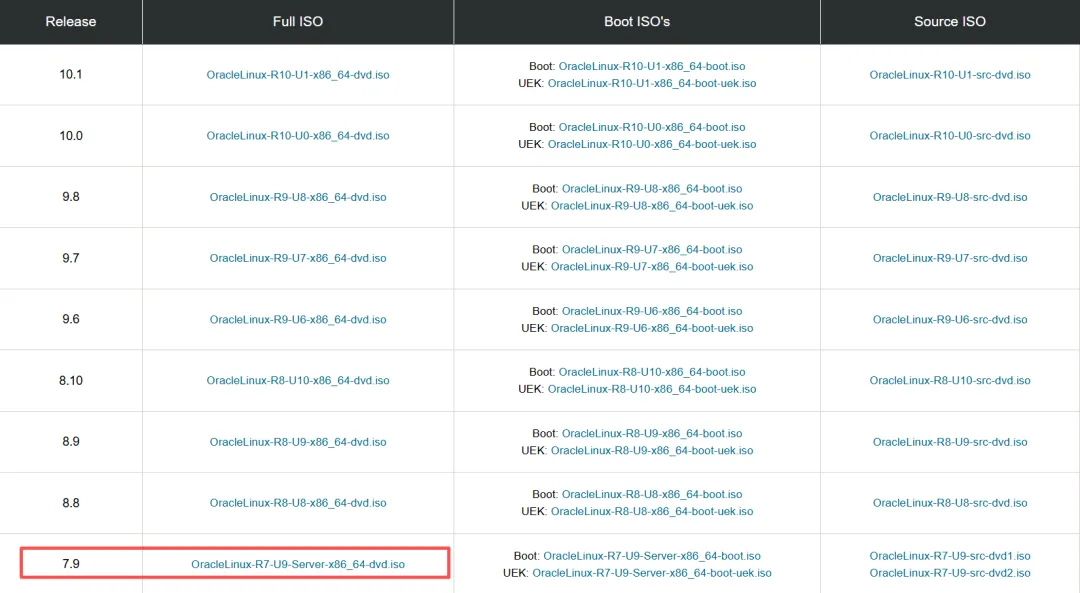
https://yum.oracle.com/ISOS/OracleLinux/OL7/u9/x86_64/OracleLinux-R7-U9-Server-x86_64-dvd.iso
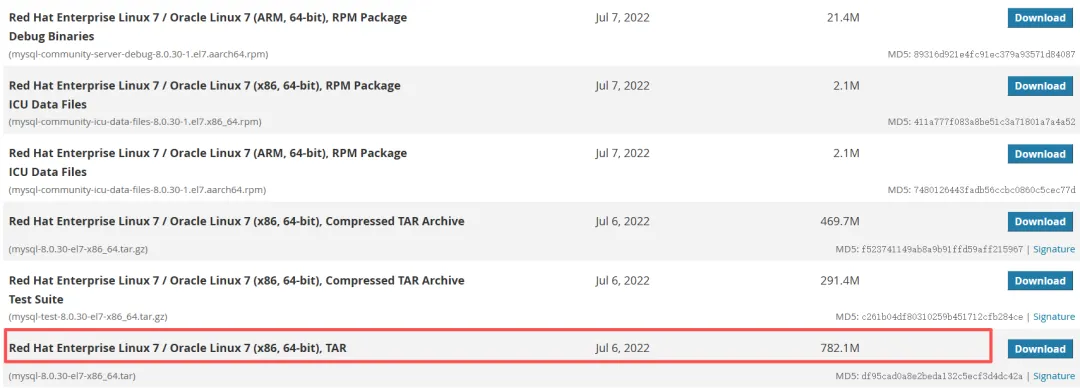
MySQL8.0.30下载地址:
https://downloads.mysql.com/archives/community/
三、安装前检查
--检查是否安装mysql[root@localhost ~]# ps -ef | grep mysql说明:若返回空信息说明没有安装。--检查是否有安装mariadb[root@localhost ~]# rpm -qa | grep mariadbmariadb-libs-5.5.68-1.el7.x86_64--卸载mariadb[root@localhost ~]# rpm -e --nodeps mariadb-libs-5.5.68-1.el7.x86_64[root@localhost ~]# rpm -qa | grep mariadb
四、上传软件(MobaXterm)
五、安装
--创建组和用户groupadd mysqluseradd -g mysql mysql--创建目录mkdir -p /usr/local/mysqlmkdir -p /usr/local/mysql/datamkdir -p /usr/local/mysql/logs--解压软件[root@localhost opt]tar -xvf mysql-8.0.30-el7-x86_64.tarmysql-test-8.0.30-el7-x86_64.tar.gzmysql-8.0.30-el7-x86_64.tar.gzmysql-router-8.0.30-el7-x86_64.tar.gz[root@localhost opt]# tar -xvf mysql-8.0.30-el7-x86_64.tar.gz[root@localhost opt]# cd mysql-8.0.30-el7-x86_64/[root@localhost mysql-8.0.30-el7-x86_64]# ls -altotal 312drwxr-xr-x. 9 root root 4096 Jul 12 21:17 .drwxr-xr-x. 4 root root 4096 Jul 12 21:17 ..drwxr-xr-x. 2 7161 31415 4096 Jul 7 2022 bindrwxr-xr-x. 2 7161 31415 55 Jul 7 2022 docsdrwxr-xr-x. 3 7161 31415 4096 Jul 7 2022 includedrwxr-xr-x. 6 7161 31415 4096 Jul 7 2022 lib-rw-r--r--. 1 7161 31415 287624 Jul 7 2022 LICENSEdrwxr-xr-x. 4 7161 31415 30 Jul 7 2022 man-rw-r--r--. 1 7161 31415 666 Jul 7 2022 READMEdrwxr-xr-x. 28 7161 31415 4096 Jul 7 2022 sharedrwxr-xr-x. 2 7161 31415 77 Jul 7 2022 support-files[root@localhost mysql-8.0.30-el7-x86_64]# mv * /usr/local/mysql--更改所有者和组chown -R mysql:mysql /usr/local/mysql--新建mysql配置文件vi /etc/my.cnf[root@localhost ~]# vi /etc/my.cnf[client]# 客户端默认字符集default-character-set = utf8mb4socket = /usr/local/mysql/data/mysql.sock[mysql]# MySQL 命令行客户端默认字符集default-character-set = utf8mb4[mysqld]# ========== 基础路径 ==========basedir = /usr/local/mysqldatadir = /usr/local/mysql/datasocket = /usr/local/mysql/data/mysql.sockpid-file = /usr/local/mysql/data/mysql.pid# ========== 端口与网络 ==========port = 3306skip-name-resolve # 禁用 DNS 反向解析,加速连接# ========== 连接限制 ==========max_connections = 200max_connect_errors = 10connect_timeout = 10# ========== 字符集 ==========character-set-server = utf8mb4collation-server = utf8mb4_general_ciinit-connect = 'SET NAMES utf8mb4'# ========== 存储引擎 ==========default-storage-engine = INNODB# ========== 认证插件 ==========default_authentication_plugin = mysql_native_password# ========== 数据包大小 ==========max_allowed_packet = 64M# ========== 大小写不敏感 ==========lower_case_table_names = 1# ========== InnoDB 性能核心参数 ==========innodb_buffer_pool_size = 1G # 建议设为物理内存的 50%~70%innodb_log_file_size = 256Minnodb_log_buffer_size = 64Minnodb_flush_log_at_trx_commit = 2 # 性能优先(生产环境可设为 1)innodb_lock_wait_timeout = 50# ========== 会话级缓冲(合理大小防爆内存) ==========sort_buffer_size = 2Mread_buffer_size = 1Mread_rnd_buffer_size = 2Mjoin_buffer_size = 2Mtmp_table_size = 64Mmax_heap_table_size = 64M# ========== 日志配置 ==========# 错误日志log_error = /usr/local/mysql/logs/mysql-error.log# 慢查询日志(建议开启)slow_query_log = 1slow_query_log_file = /usr/local/mysql/logs/mysql-slow.loglong_query_time = 2log_queries_not_using_indexes = 1# ========== 其他优化 ==========thread_cache_size = 64table_open_cache = 1024open_files_limit = 65535# ========== MySQL 8.0 专用(如使用 8.0 请取消注释)==========# log_timestamps = SYSTEM# binlog_expire_logs_seconds = 604800--安装初始化mysqlcd /usr/local/mysql/bin./mysqld --defaults-file=/etc/my.cnf --basedir=/usr/local/mysql/ --datadir=/usr/local/mysql/data/ --user=mysql --initialize--查看root密码[root@localhost ~]# cat /usr/local/mysql/logs/mysql-error.log2026-07-12T11:16:11.709375Z 0 [Warning] [MY-010918] [Server] 'default_authentication_plugin' is deprecated and will be removed in a future release. Please use authentication_policy instead.2026-07-12T11:16:11.709387Z 0 [System] [MY-013169] [Server] /usr/local/mysql/bin/mysqld (mysqld 8.0.30) initializing of server in progress as process 323792026-07-12T11:16:11.720252Z 0 [Warning] [MY-013907] [InnoDB] Deprecated configuration parameters innodb_log_file_size and/or innodb_log_files_in_group have been used to compute innodb_redo_log_capacity=536870912. Please use innodb_redo_log_capacity instead.2026-07-12T11:16:11.722643Z 1 [System] [MY-013576] [InnoDB] InnoDB initialization has started.2026-07-12T11:16:12.323402Z 1 [System] [MY-013577] [InnoDB] InnoDB initialization has ended.2026-07-12T11:16:13.527909Z 6 [Note] [MY-010454] [Server] A temporary password is generated for root@localhost: N>:kohNEL8wx--mysql.server放置到/etc/init.d/mysql中cp /usr/local/mysql/support-files/mysql.server /etc/init.d/mysql--启动mysqlservice mysql start--登录mysql[root@localhost ~]# cd /usr/local/mysql/bin[root@localhost ~]#./mysql -uroot -pEnter password:Welcome to the MySQL monitor. Commands end with ; or \g.Your MySQL connection id is 9Server version: 8.0.30 MySQL Community Server - GPLCopyright (c) 2000, 2022, Oracle and/or its affiliates.Oracle is a registered trademark of Oracle Corporation and/or itsaffiliates. Other names may be trademarks of their respectiveowners.Type 'help;' or '\h' for help. Type '\c' to clear the current input statement.--查看所有数据库mysql> show databases;+--------------------+| Database |+--------------------+| information_schema || mysql || performance_schema || sys |+--------------------+4 rows in set (0.00 sec)--修改密码ALTER USER 'root'@'localhost' IDENTIFIED BY '123456';--刷新权限flush privileges;--允许任何主机都能连接到MySQLuse mysql;update user set host='%' where user='root';--刷新权限flush privileges;--编辑配置文件vi /etc/profile--添加环境变量export PATH=$PATH:/usr/local/mysql/bin--重新加载配置文件source /etc/profile--测试登录[root@localhost ~]# mysql -uroot -pEnter password:Welcome to the MySQL monitor. Commands end with ; or \g.Your MySQL connection id is 10Server version: 8.0.30 MySQL Community Server - GPLCopyright (c) 2000, 2022, Oracle and/or its affiliates.Oracle is a registered trademark of Oracle Corporation and/or itsaffiliates. Other names may be trademarks of their respectiveowners.Type 'help;' or '\h' for help. Type '\c' to clear the current input statement.mysql>--设置开机启动systemctl enable mysql
 10个月宝宝每天需要喝多少奶粉?