当前位置:首页>python>期刊图片复现|Python绘制地理探测器单因子及交互作用组合图

期刊图片复现|Python绘制地理探测器单因子及交互作用组合图

  • 2026-08-19 15:38:50
期刊图片复现|Python绘制地理探测器单因子及交互作用组合图

代码绘制成果展示

论文:An integrated analysis for spatio-temporal evolution of food water-carbon-energy footprint and its sustainable production in northwest China
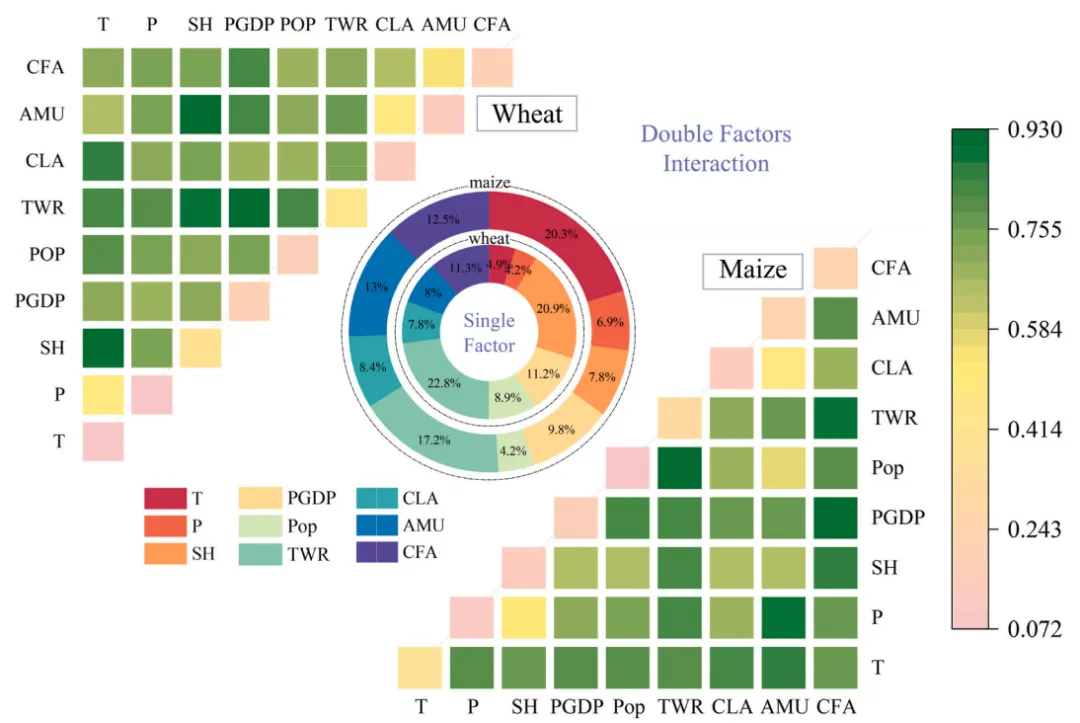
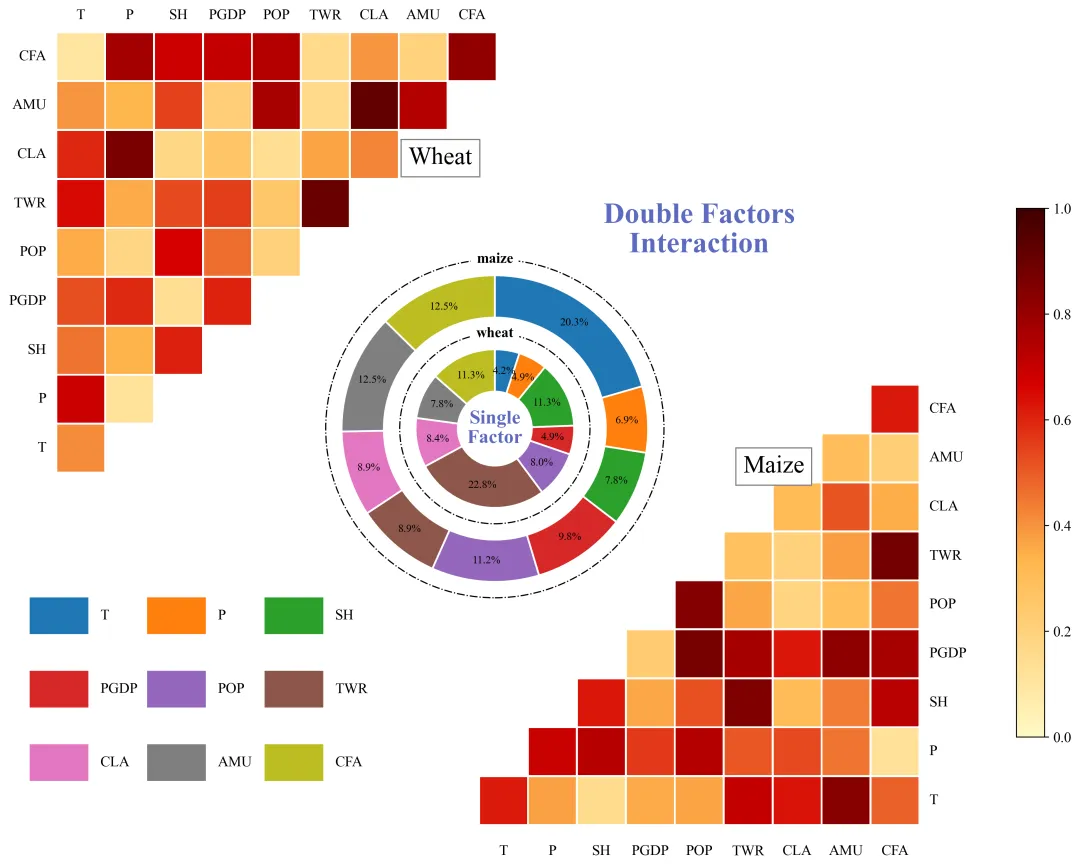
论文原图
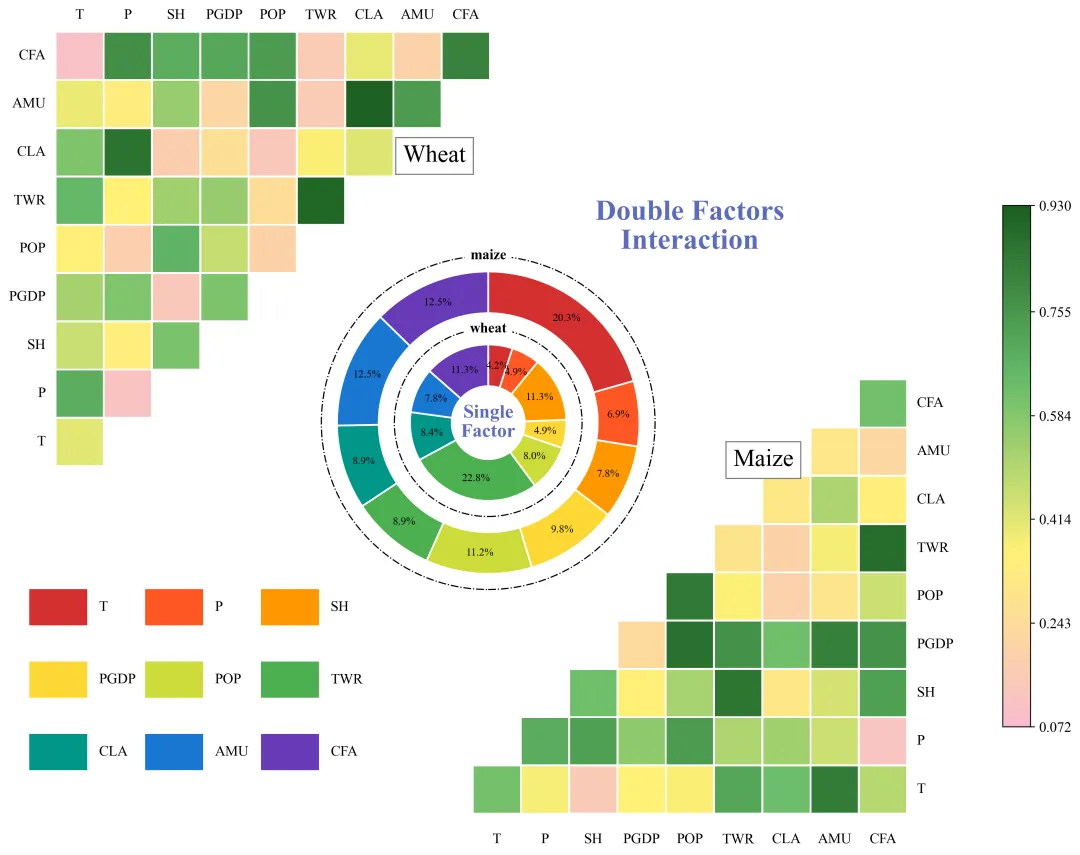
仿图
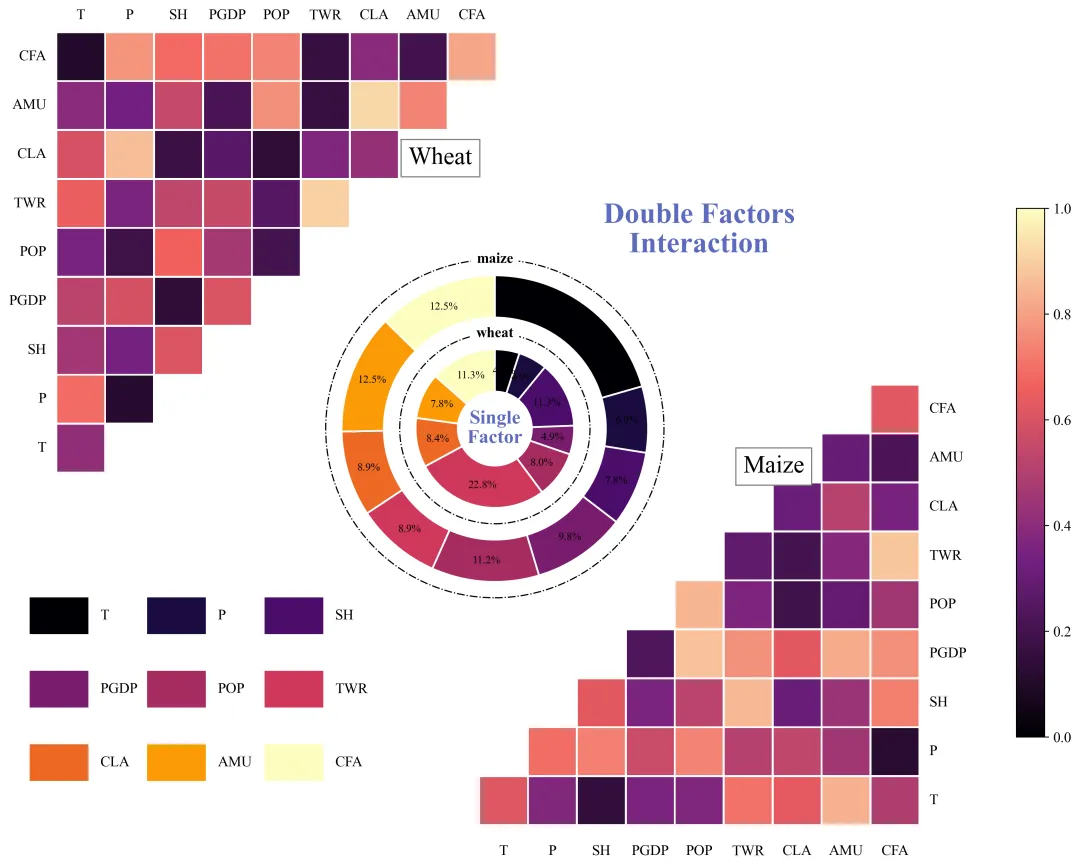
该图展示了基于地理探测器模型分析得出的单因子及其交互作用结果。左上角和右下角的三角形热图分别揭示了双因子交互作用强度,右侧颜色条颜色由粉色向深绿色过渡代表交互作用q值,深绿色区域意味着对应的两个因子共同作用时的解释力最强。中间的双层圆环图则直观展示了单因子探测(Factor Detector)结果,各扇区颜色对应左下角图例中的不同因子,扇区大小及标注的百分比数值量化了各独立因子对目标空间分异的解释程度。但是这张图也有一点为题就是看不出交互作用的数值以及影响的类型这些信息,之后会改进一下,还有就是我感觉这张图可以用于展示其他的分析结果,所以数值都是手动填入的,而不是用地理探测器分析后来进行绘图,我觉得这样做可以更具有适用性、可移植性。
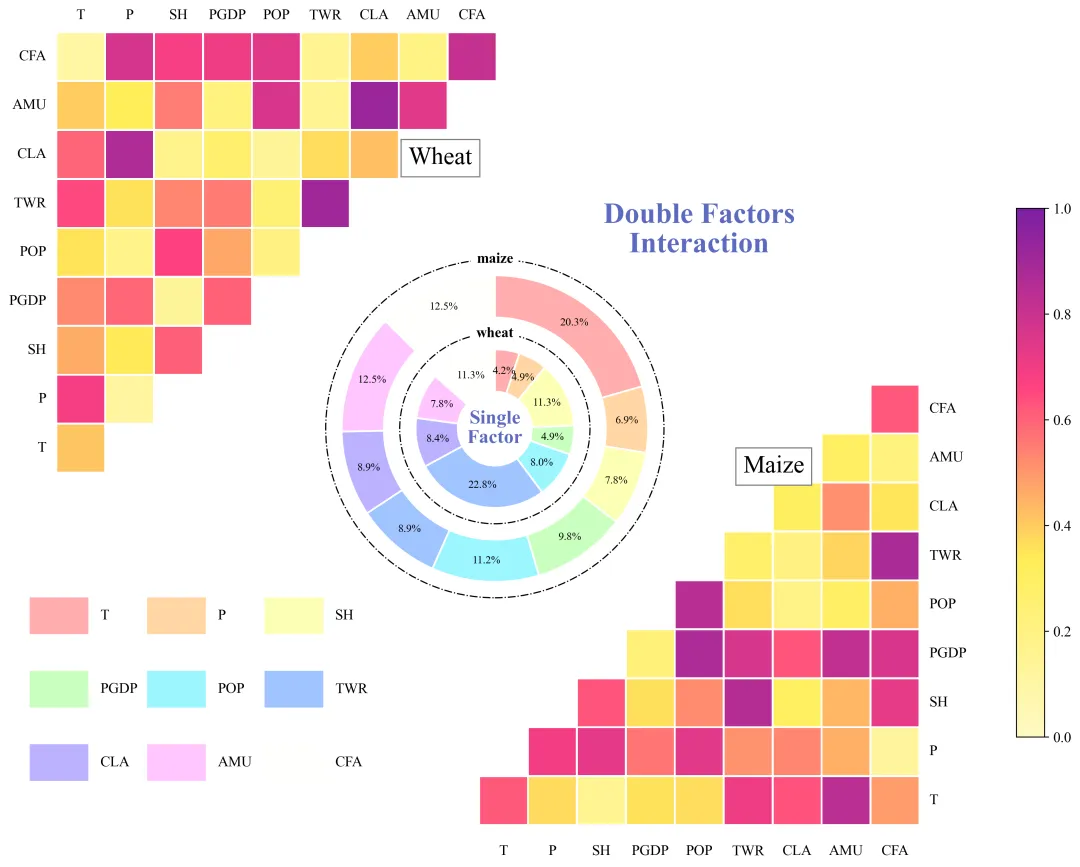
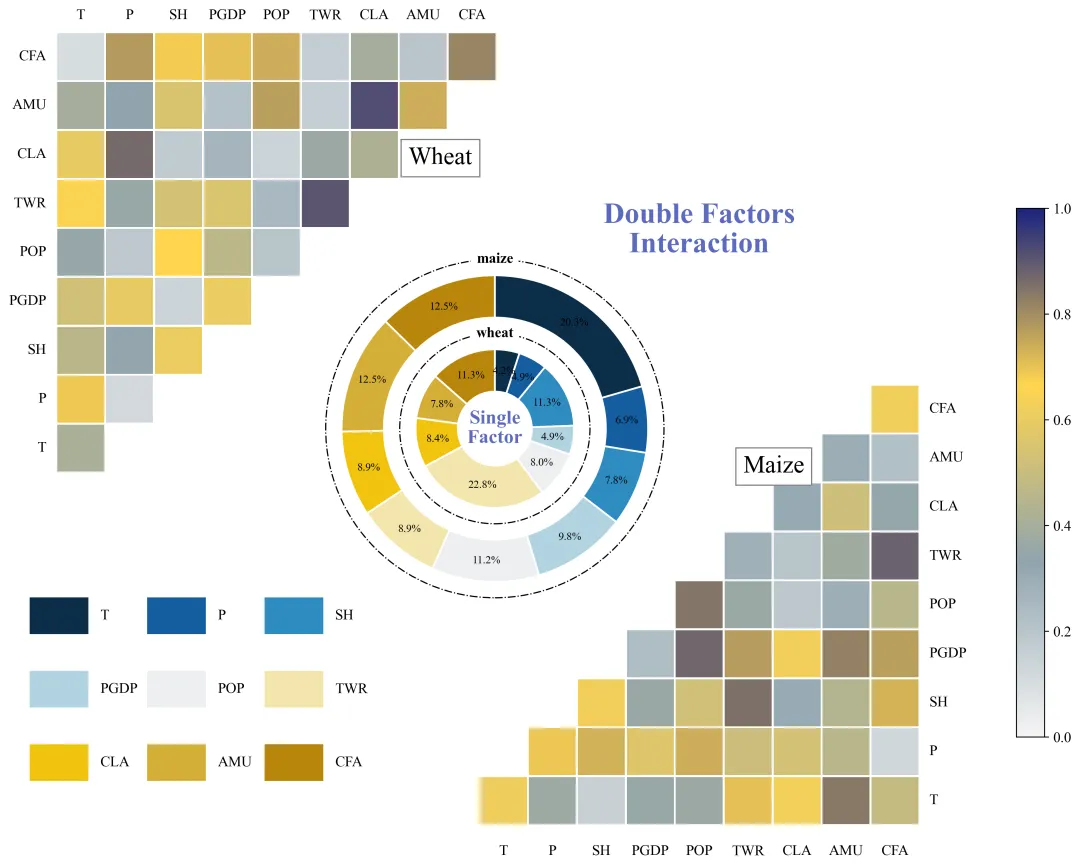
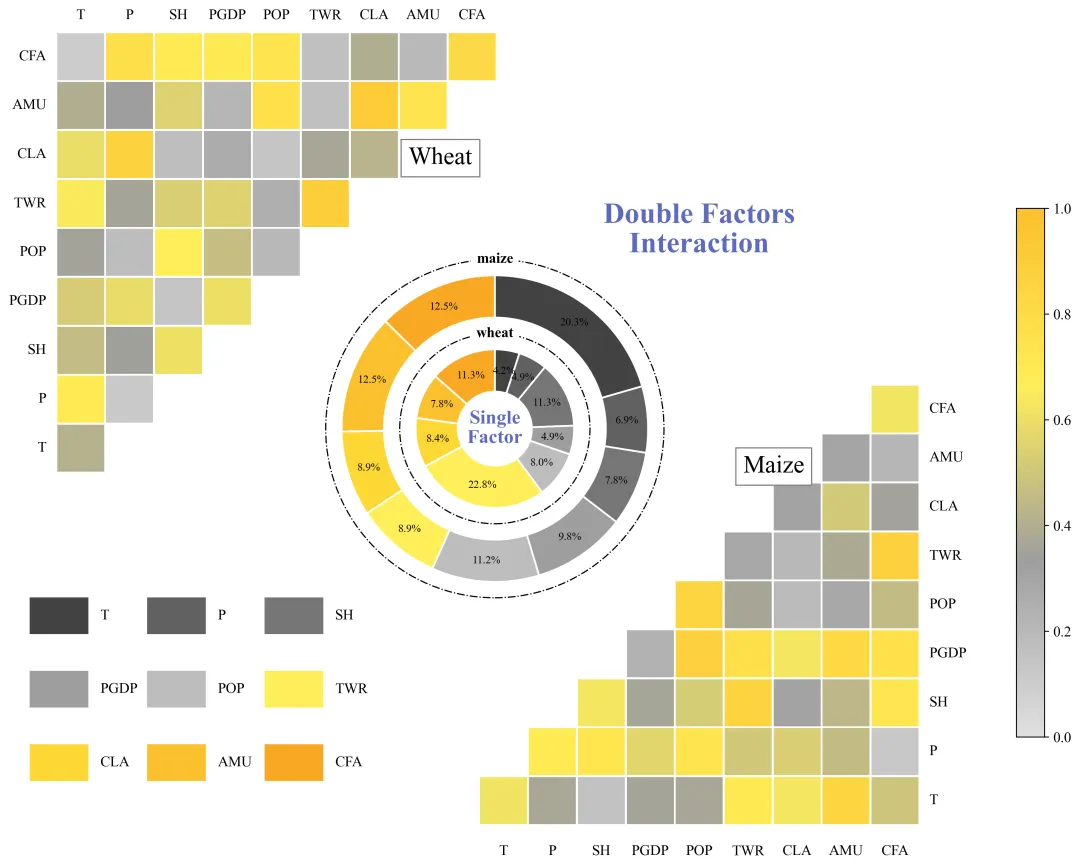
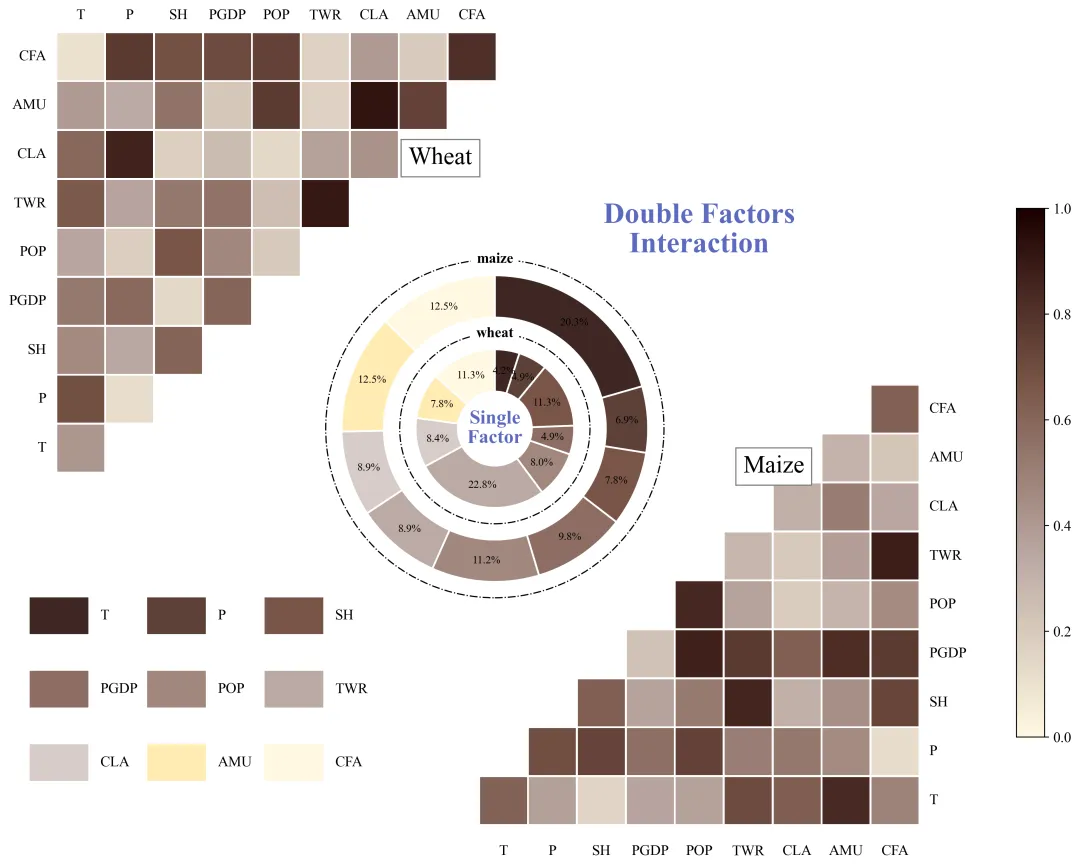
多种配色

代码解释

第一部分

库的导入以及字体设置
# =========================================================================================# ====================================== 1. 库的导入 =========================================# =========================================================================================import matplotlib.pyplot as pltimport matplotlib.patches as patchesimport matplotlib.colors as mcolorsimport numpy as npimport pandas as pdimport osimport mathimport matplotlibmatplotlib.rcParams['pdf.fonttype'] = 42matplotlib.rcParams['ps.fonttype'] = 42plt.rcParams['font.family'] = 'Times New Roman'plt.rcParams['axes.unicode_minus'] = False

第二部分

颜色库的设置以及配色方案的选择
# =========================================================================================# ====================================== 2. 颜色库==========================# =========================================================================================COLOR_SCHEMES = {    1: {        'palette': ['#D32F2F''#FF5722''#FF9800''#FDD835''#CDDC39''#4CAF50''#009688''#1976D2''#673AB7''#E91E63''#795548''#607D8B'],        'cmap_colors': ["#F8BBD0""#FFF176""#66BB6A""#1B5E20"]    },}SELECTED_SCHEME= 2  # 选择配色方案CURRENT_SCHEME = COLOR_SCHEMES.get(SELECTED_SCHEME, COLOR_SCHEMES[1])  #获取当前选择的配色方案PALETTE = CURRENT_SCHEME['palette']  #单因子颜色CMAP_COLORS = CURRENT_SCHEME['cmap_colors']  #交互作用热力图渐变色

第三部分

数据预处理,创建自定义颜色映射,并初始化画布
# =========================================================================================# ====================================== 3. 绘图函数 =========================================# =========================================================================================def draw_geodetector_chart(wheat_matrix,#左上角热图数据                           maize_matrix,#右下角数据                           wheat_single,#内圈数据                           maize_single,#外圈数据                           labels,#特征                           save_dir):#保存路径    custom_cmap = mcolors.LinearSegmentedColormap.from_list(f"custom_scheme_{SELECTED_SCHEME}", CMAP_COLORS, N=256)    # vmin = min(np.nanmin(wheat_matrix), np.nanmin(maize_matrix))    # vmax = max(np.nanmax(wheat_matrix), np.nanmax(maize_matrix))    norm = mcolors.Normalize(vmin=0, vmax=1)  #创建颜色归一化对象    # 创建画布    fig = plt.figure(figsize=(1610), facecolor='white')

第四部分

绘制左上角的三角形热图
    # ------------------------------------------------------------------    #左上角热图    # -------------------------------------------------------------------    # 在画布上添加一个新的坐标轴用于绘制交互作用热图,[左, 下, 宽, 高]    ax_wheat = fig.add_axes([0.150.450.350.5])    ax_wheat.set_aspect('equal')  #设置坐标轴的纵横比为相等    ax_wheat.axis('off')  #不显示边框和刻度    ax_wheat.set_xlim(0, n_factors)  # x 轴范围    ax_wheat.set_ylim(0, n_factors)  #y 轴范围    for y in range(n_factors):  # 遍历行        for x in range(n_factors):  # 遍历列            if y >= x:                val = wheat_matrix[y, x]  #获取对应位置的值                if pd.isna(val): continue  # 如果值为空,跳过                color = custom_cmap(norm(val))  #根据数值获取对应的颜色                # 创建一个矩形块                rect = patches.Rectangle((x + 0.02, y + 0.02),  #坐标                                         0.96,  #宽度                                         0.96,  #高度                                         linewidth=0,  #边框线宽                                         facecolor=color)  #填充颜色                ax_wheat.add_patch(rect)  #将矩形块添加到坐标轴中    for y in range(n_factors):  # 遍历 y 轴方向的因子        # 在左侧添加行标签        ax_wheat.text(-0.2#x 坐标                      y + 0.5,#y 坐标                      labels[y],#文本内容                      ha='right',#水平对齐                      va='center'#垂直对齐                      fontsize=12)#字体大小    #子标题位置    ax_wheat.text(n_factors * 0.8,  #x 坐标                  n_factors * 0.7,  #y 坐标                  "Wheat",  #文本内容                  fontsize=20,  #字体大小为                  bbox=dict(  # 文本边框的样式                      facecolor='white',  #填充背景色                      edgecolor='gray',  #边框线的颜色                      pad=6  #内边距                  ))

第五部分

绘制右下角的三角形热图
    # -------------------------------------------------------------------    # 右下角热图    # -------------------------------------------------------------------    # 添加坐标轴,[左, 下, 宽, 高]    ax_maize = fig.add_axes([0.450.050.350.5])    ax_maize.set_aspect('equal')  #设置纵横比    ax_maize.axis('off')  #关闭坐标轴    ax_maize.set_xlim(0, n_factors)  #x轴范围    ax_maize.set_ylim(0, n_factors)  #y轴范围    for y in range(n_factors):  # 遍历行        for x in range(n_factors):  # 遍历列            if x >= y:                val = maize_matrix[y, x]  #获取对应位置的值                if pd.isna(val): continue  # 如果值为空,跳过                color = custom_cmap(norm(val))  #获取颜色                # 创建矩形块                rect = patches.Rectangle((x + 0.02, y + 0.02),#坐标                                         0.96,#宽                                         0.96,#高                                         linewidth=0,#边框线粗细                                         facecolor=color)#颜色                ax_maize.add_patch(rect)  #添加矩形块    # 添加子图标题 (Maize)    ax_maize.text(n_factors * 0.6,  # x 坐标                  n_factors * 0.8,  #y 坐标                  "Maize",  #文本内容                  fontsize=20,  # 字体大小                  bbox=dict(  # 设置文本背景框                      facecolor='white',  #背景框填充色                      edgecolor='gray',  #边框线颜色                      pad=6  # 内边距                  ))    # 添加主标题    ax_maize.text(n_factors * 0.5,  #x 坐标                  n_factors * 1.3,  #y 坐标                  "Double Factors\nInteraction",  #内容                  fontsize=24,  #大小                  color='#5C6BC0',  #字体颜色                  ha='center',  #水平对齐方式                  fontweight='bold')  #字体粗细

第六部分

在画布中心绘制一个单因子双层圆环图
    # -------------------------------------------------------------------    # 中间圆环图    # -------------------------------------------------------------------    # 添加中间圆环图的坐标轴    ax_pie = fig.add_axes([0.33,  #左                           0.35,  # 下边界                           0.3,  #占画布总宽度                           0.3])  # 占画布总高度    ax_pie.set_aspect('equal')  # 设置纵横比    ax_pie.set_xlim(-1.71.7)  # x 轴范围    ax_pie.set_ylim(-1.71.7)  # y 轴范围    ax_pie.axis('off')  #关闭坐标    # =========================================================================================    # 绘制外层圆环    # =========================================================================================    wedges_out, _ = ax_pie.pie(        maize_single,  # 输入数据        radius=r_outer,  # 半径        colors=color_list,  # 颜色        startangle=90,  # 起始角度        counterclock=False,  #顺时针绘制        wedgeprops=dict(            width=w_outer,  #环的宽度            edgecolor='white',  #扇形之间的分割线颜色            linewidth=1.5  #分割线的宽度        )    )    # =========================================================================================    # 绘制内层圆环    # =========================================================================================    wedges_in, _ = ax_pie.pie(        wheat_single,  # 输入数据        radius=r_inner,  #半径        colors=color_list,  #颜色        startangle=90,  # 起始角度        counterclock=False,  #方向        wedgeprops=dict(            width=w_inner,  #内环的宽度            edgecolor='white',  # 分割线颜色            linewidth=1.5  #分割线宽度        )    )

第七部分

绘制中间圆环图的虚线圆圈以及文本标注
     # =========================================================================================    # 绘制装饰性虚线圆    # =========================================================================================    # 创建外层虚线圆    circle_dash_out = patches.Circle((00),  # 圆心坐标                                     r_outer + 0.15,  #半径                                     transform=ax_pie.transData,  #坐标系转换                                     fill=False,  # 不填充颜色                                     edgecolor='black',  #边框颜色                                     linestyle='-.',  #点划线                                     linewidth=1,  #线条粗细                                     clip_on=False)  #允许图形超出坐标轴边界显示    ax_pie.add_patch(circle_dash_out)  # 将创建好的外层虚线圆添加到坐标轴上    # =========================================================================================    # 添加圆环标签文字    # =========================================================================================    # 外环标签    ax_pie.text(0, r_outer + 0.15,  #文本坐标                "maize",  # 文本内容                ha='center',  # 水平居中对齐                va='center',  # 垂直居中对齐                fontsize=12,  # 字体大小                backgroundcolor='white',  # 设置背景色                fontweight='bold')  # 字体加粗

第八部分

绘制图例
    # =========================================================================================    #图例    # =========================================================================================    # 添加图例区域的坐标轴    ax_legend = fig.add_axes([0.15,                              0.1,                              0.25,                              0.25])    legend_cols = 3  #图例列数    legend_rows = math.ceil(n_factors / legend_cols)  #行数    ax_legend.set_xlim(0, legend_cols)  # x 范围    ax_legend.set_ylim(0, legend_rows)  # y 范围    ax_legend.axis('off')  #关闭坐标轴显示    #遍历所有因子生成图例    for idx, label in enumerate(labels):        row_idx = legend_rows - 1 - (idx // legend_cols)  # 行索引        col_idx = idx % legend_cols  # 列索引        color = factor_colors[label]  #当前因子的颜色

第九部分

绘制颜色条以及绘图结果的保存
    # =========================================================================================    #颜色条    # =========================================================================================    # 添加颜色条的坐标轴,位置在最右侧    ax_cbar = fig.add_axes([0.85,                            0.15,                            0.02,                            0.6])    # 创建垂直颜色条    cb = matplotlib.colorbar.ColorbarBase(ax_cbar,                                          cmap=custom_cmap,                                          norm=norm,                                          orientation='vertical')    cb.ax.tick_params(labelsize=12)  #设置刻度标签字体大小    # 保存    png_path = os.path.join(save_dir, f"Scheme_{SELECTED_SCHEME}.png")    pdf_path = os.path.join(save_dir, f"Scheme_{SELECTED_SCHEME}.pdf")    plt.savefig(png_path, dpi=300, bbox_inches='tight')    plt.savefig(pdf_path, bbox_inches='tight')

第十部分

主程序,负责读取 Excel 数据,提取标签和数值,然后调用绘图函数。

# =========================================================================================# ====================================== 4. 主程序执行 ========================================# =========================================================================================if __name__ == "__main__":    base_dir = r"组合图"  #保存路径    #读取数据    df_wheat_mat = pd.read_excel(r"组合图\geodetector_data.xlsx" , sheet_name='Wheat_Interaction_Matrix', index_col=0)    df_maize_mat = pd.read_excel(r"组合图\geodetector_data.xlsx" , sheet_name='Maize_Interaction_Matrix', index_col=0)    df_single = pd.read_excel(r"组合图\geodetector_data.xlsx" , sheet_name='Single_Factor_q', index_col=0)    #提取特征名称    dynamic_labels = df_wheat_mat.index.tolist()    print(f"检测到的因子 ({len(dynamic_labels)}个): {dynamic_labels}")    wheat_matrix_val = df_wheat_mat.values  #转换为 numpy 数组    maize_matrix_val = df_maize_mat.values  #转换为 numpy 数组    wheat_single_list = df_single['Wheat_Single_q'].tolist()  #转换为列表    maize_single_list = df_single['Maize_Single_q'].tolist()  #转换为列表    #调用绘图函数    draw_geodetector_chart(        wheat_matrix_val,  #交互矩阵数据        maize_matrix_val,  # 交互矩阵数据        wheat_single_list,  #单因子        maize_single_list,  #单因子        dynamic_labels,  #标签列表        base_dir  #保存路径    )

如何应用到你自己的数据

1.设置颜色方案:

SELECTED_SCHEME40  # 选择配色方案

2.设置绘图结果的保存路径:

base_dir = r"组合图"  #保存路径

3.读取数据:

#读取数据df_wheat_mat = pd.read_excel(r"detector_data.xlsx" , sheet_name='Wheat_Interaction_Matrix', index_col=0)

推荐

期刊图片复现|Python绘制二维偏依赖PDP图
期刊复现|python绘制基于SHAP分析和GAM模型拟合的单特征依赖图
期刊图片复现|python绘制带有渐变颜色shap特征重要性组合图(条形图+蜂巢图)
期刊复现|用Python绘制SHAP特征重要性总览图、依赖图、双特征交互效应SHAP图,解锁XGBoost模型的终极奥秘
期刊图片复现|Python绘制shap重要性蜂巢图+单特征依赖图+交互效应强度气泡图+交互效应依赖图(回归+二分类+分类)

获取方式

需要的后台私信我,注意只会分享练习数据和代码文件,不会提供答疑服务,代码文件中已经包含了每行代码的完整注释!!!

最新文章

随机文章

基本 文件 流程 错误 SQL 调试
  1. 请求信息 : 2026-08-21 18:55:00 HTTP/2.0 GET : https://f.mffb.com.cn/a/509229.html
  2. 运行时间 : 0.212241s [ 吞吐率:4.71req/s ] 内存消耗:4,596.69kb 文件加载:140
  3. 缓存信息 : 0 reads,0 writes
  4. 会话信息 : SESSION_ID=ce74528c6ee1006fe028b6dea7d1a69c
  1. /yingpanguazai/ssd/ssd1/www/f.mffb.com.cn/public/index.php ( 0.79 KB )
  2. /yingpanguazai/ssd/ssd1/www/f.mffb.com.cn/vendor/autoload.php ( 0.17 KB )
  3. /yingpanguazai/ssd/ssd1/www/f.mffb.com.cn/vendor/composer/autoload_real.php ( 2.49 KB )
  4. /yingpanguazai/ssd/ssd1/www/f.mffb.com.cn/vendor/composer/platform_check.php ( 0.90 KB )
  5. /yingpanguazai/ssd/ssd1/www/f.mffb.com.cn/vendor/composer/ClassLoader.php ( 14.03 KB )
  6. /yingpanguazai/ssd/ssd1/www/f.mffb.com.cn/vendor/composer/autoload_static.php ( 4.90 KB )
  7. /yingpanguazai/ssd/ssd1/www/f.mffb.com.cn/vendor/topthink/think-helper/src/helper.php ( 8.34 KB )
  8. /yingpanguazai/ssd/ssd1/www/f.mffb.com.cn/vendor/topthink/think-validate/src/helper.php ( 2.19 KB )
  9. /yingpanguazai/ssd/ssd1/www/f.mffb.com.cn/vendor/topthink/think-orm/src/helper.php ( 1.47 KB )
  10. /yingpanguazai/ssd/ssd1/www/f.mffb.com.cn/vendor/topthink/think-orm/stubs/load_stubs.php ( 0.16 KB )
  11. /yingpanguazai/ssd/ssd1/www/f.mffb.com.cn/vendor/topthink/framework/src/think/Exception.php ( 1.69 KB )
  12. /yingpanguazai/ssd/ssd1/www/f.mffb.com.cn/vendor/topthink/think-container/src/Facade.php ( 2.71 KB )
  13. /yingpanguazai/ssd/ssd1/www/f.mffb.com.cn/vendor/symfony/deprecation-contracts/function.php ( 0.99 KB )
  14. /yingpanguazai/ssd/ssd1/www/f.mffb.com.cn/vendor/symfony/polyfill-mbstring/bootstrap.php ( 8.26 KB )
  15. /yingpanguazai/ssd/ssd1/www/f.mffb.com.cn/vendor/symfony/polyfill-mbstring/bootstrap80.php ( 9.78 KB )
  16. /yingpanguazai/ssd/ssd1/www/f.mffb.com.cn/vendor/symfony/var-dumper/Resources/functions/dump.php ( 1.49 KB )
  17. /yingpanguazai/ssd/ssd1/www/f.mffb.com.cn/vendor/topthink/think-dumper/src/helper.php ( 0.18 KB )
  18. /yingpanguazai/ssd/ssd1/www/f.mffb.com.cn/vendor/symfony/var-dumper/VarDumper.php ( 4.30 KB )
  19. /yingpanguazai/ssd/ssd1/www/f.mffb.com.cn/vendor/topthink/framework/src/think/App.php ( 15.30 KB )
  20. /yingpanguazai/ssd/ssd1/www/f.mffb.com.cn/vendor/topthink/think-container/src/Container.php ( 15.76 KB )
  21. /yingpanguazai/ssd/ssd1/www/f.mffb.com.cn/vendor/psr/container/src/ContainerInterface.php ( 1.02 KB )
  22. /yingpanguazai/ssd/ssd1/www/f.mffb.com.cn/app/provider.php ( 0.19 KB )
  23. /yingpanguazai/ssd/ssd1/www/f.mffb.com.cn/vendor/topthink/framework/src/think/Http.php ( 6.04 KB )
  24. /yingpanguazai/ssd/ssd1/www/f.mffb.com.cn/vendor/topthink/think-helper/src/helper/Str.php ( 7.29 KB )
  25. /yingpanguazai/ssd/ssd1/www/f.mffb.com.cn/vendor/topthink/framework/src/think/Env.php ( 4.68 KB )
  26. /yingpanguazai/ssd/ssd1/www/f.mffb.com.cn/app/common.php ( 0.03 KB )
  27. /yingpanguazai/ssd/ssd1/www/f.mffb.com.cn/vendor/topthink/framework/src/helper.php ( 18.78 KB )
  28. /yingpanguazai/ssd/ssd1/www/f.mffb.com.cn/vendor/topthink/framework/src/think/Config.php ( 5.54 KB )
  29. /yingpanguazai/ssd/ssd1/www/f.mffb.com.cn/config/app.php ( 0.95 KB )
  30. /yingpanguazai/ssd/ssd1/www/f.mffb.com.cn/config/cache.php ( 0.78 KB )
  31. /yingpanguazai/ssd/ssd1/www/f.mffb.com.cn/config/console.php ( 0.23 KB )
  32. /yingpanguazai/ssd/ssd1/www/f.mffb.com.cn/config/cookie.php ( 0.56 KB )
  33. /yingpanguazai/ssd/ssd1/www/f.mffb.com.cn/config/database.php ( 2.48 KB )
  34. /yingpanguazai/ssd/ssd1/www/f.mffb.com.cn/vendor/topthink/framework/src/think/facade/Env.php ( 1.67 KB )
  35. /yingpanguazai/ssd/ssd1/www/f.mffb.com.cn/config/filesystem.php ( 0.61 KB )
  36. /yingpanguazai/ssd/ssd1/www/f.mffb.com.cn/config/lang.php ( 0.91 KB )
  37. /yingpanguazai/ssd/ssd1/www/f.mffb.com.cn/config/log.php ( 1.35 KB )
  38. /yingpanguazai/ssd/ssd1/www/f.mffb.com.cn/config/middleware.php ( 0.19 KB )
  39. /yingpanguazai/ssd/ssd1/www/f.mffb.com.cn/config/route.php ( 1.89 KB )
  40. /yingpanguazai/ssd/ssd1/www/f.mffb.com.cn/config/session.php ( 0.57 KB )
  41. /yingpanguazai/ssd/ssd1/www/f.mffb.com.cn/config/trace.php ( 0.34 KB )
  42. /yingpanguazai/ssd/ssd1/www/f.mffb.com.cn/config/view.php ( 0.82 KB )
  43. /yingpanguazai/ssd/ssd1/www/f.mffb.com.cn/app/event.php ( 0.25 KB )
  44. /yingpanguazai/ssd/ssd1/www/f.mffb.com.cn/vendor/topthink/framework/src/think/Event.php ( 7.67 KB )
  45. /yingpanguazai/ssd/ssd1/www/f.mffb.com.cn/app/service.php ( 0.13 KB )
  46. /yingpanguazai/ssd/ssd1/www/f.mffb.com.cn/app/AppService.php ( 0.26 KB )
  47. /yingpanguazai/ssd/ssd1/www/f.mffb.com.cn/vendor/topthink/framework/src/think/Service.php ( 1.64 KB )
  48. /yingpanguazai/ssd/ssd1/www/f.mffb.com.cn/vendor/topthink/framework/src/think/Lang.php ( 7.35 KB )
  49. /yingpanguazai/ssd/ssd1/www/f.mffb.com.cn/vendor/topthink/framework/src/lang/zh-cn.php ( 13.70 KB )
  50. /yingpanguazai/ssd/ssd1/www/f.mffb.com.cn/vendor/topthink/framework/src/think/initializer/Error.php ( 3.31 KB )
  51. /yingpanguazai/ssd/ssd1/www/f.mffb.com.cn/vendor/topthink/framework/src/think/initializer/RegisterService.php ( 1.33 KB )
  52. /yingpanguazai/ssd/ssd1/www/f.mffb.com.cn/vendor/services.php ( 0.14 KB )
  53. /yingpanguazai/ssd/ssd1/www/f.mffb.com.cn/vendor/topthink/framework/src/think/service/PaginatorService.php ( 1.52 KB )
  54. /yingpanguazai/ssd/ssd1/www/f.mffb.com.cn/vendor/topthink/framework/src/think/service/ValidateService.php ( 0.99 KB )
  55. /yingpanguazai/ssd/ssd1/www/f.mffb.com.cn/vendor/topthink/framework/src/think/service/ModelService.php ( 2.04 KB )
  56. /yingpanguazai/ssd/ssd1/www/f.mffb.com.cn/vendor/topthink/think-trace/src/Service.php ( 0.77 KB )
  57. /yingpanguazai/ssd/ssd1/www/f.mffb.com.cn/vendor/topthink/framework/src/think/Middleware.php ( 6.72 KB )
  58. /yingpanguazai/ssd/ssd1/www/f.mffb.com.cn/vendor/topthink/framework/src/think/initializer/BootService.php ( 0.77 KB )
  59. /yingpanguazai/ssd/ssd1/www/f.mffb.com.cn/vendor/topthink/think-orm/src/Paginator.php ( 11.86 KB )
  60. /yingpanguazai/ssd/ssd1/www/f.mffb.com.cn/vendor/topthink/think-validate/src/Validate.php ( 63.20 KB )
  61. /yingpanguazai/ssd/ssd1/www/f.mffb.com.cn/vendor/topthink/think-orm/src/Model.php ( 23.55 KB )
  62. /yingpanguazai/ssd/ssd1/www/f.mffb.com.cn/vendor/topthink/think-orm/src/model/concern/Attribute.php ( 21.05 KB )
  63. /yingpanguazai/ssd/ssd1/www/f.mffb.com.cn/vendor/topthink/think-orm/src/model/concern/AutoWriteData.php ( 4.21 KB )
  64. /yingpanguazai/ssd/ssd1/www/f.mffb.com.cn/vendor/topthink/think-orm/src/model/concern/Conversion.php ( 6.44 KB )
  65. /yingpanguazai/ssd/ssd1/www/f.mffb.com.cn/vendor/topthink/think-orm/src/model/concern/DbConnect.php ( 5.16 KB )
  66. /yingpanguazai/ssd/ssd1/www/f.mffb.com.cn/vendor/topthink/think-orm/src/model/concern/ModelEvent.php ( 2.33 KB )
  67. /yingpanguazai/ssd/ssd1/www/f.mffb.com.cn/vendor/topthink/think-orm/src/model/concern/RelationShip.php ( 28.29 KB )
  68. /yingpanguazai/ssd/ssd1/www/f.mffb.com.cn/vendor/topthink/think-helper/src/contract/Arrayable.php ( 0.09 KB )
  69. /yingpanguazai/ssd/ssd1/www/f.mffb.com.cn/vendor/topthink/think-helper/src/contract/Jsonable.php ( 0.13 KB )
  70. /yingpanguazai/ssd/ssd1/www/f.mffb.com.cn/vendor/topthink/think-orm/src/model/contract/Modelable.php ( 0.09 KB )
  71. /yingpanguazai/ssd/ssd1/www/f.mffb.com.cn/vendor/topthink/framework/src/think/Db.php ( 2.88 KB )
  72. /yingpanguazai/ssd/ssd1/www/f.mffb.com.cn/vendor/topthink/think-orm/src/DbManager.php ( 8.52 KB )
  73. /yingpanguazai/ssd/ssd1/www/f.mffb.com.cn/vendor/topthink/framework/src/think/Log.php ( 6.28 KB )
  74. /yingpanguazai/ssd/ssd1/www/f.mffb.com.cn/vendor/topthink/framework/src/think/Manager.php ( 3.92 KB )
  75. /yingpanguazai/ssd/ssd1/www/f.mffb.com.cn/vendor/psr/log/src/LoggerTrait.php ( 2.69 KB )
  76. /yingpanguazai/ssd/ssd1/www/f.mffb.com.cn/vendor/psr/log/src/LoggerInterface.php ( 2.71 KB )
  77. /yingpanguazai/ssd/ssd1/www/f.mffb.com.cn/vendor/topthink/framework/src/think/Cache.php ( 4.92 KB )
  78. /yingpanguazai/ssd/ssd1/www/f.mffb.com.cn/vendor/psr/simple-cache/src/CacheInterface.php ( 4.71 KB )
  79. /yingpanguazai/ssd/ssd1/www/f.mffb.com.cn/vendor/topthink/think-helper/src/helper/Arr.php ( 16.63 KB )
  80. /yingpanguazai/ssd/ssd1/www/f.mffb.com.cn/vendor/topthink/framework/src/think/cache/driver/File.php ( 7.84 KB )
  81. /yingpanguazai/ssd/ssd1/www/f.mffb.com.cn/vendor/topthink/framework/src/think/cache/Driver.php ( 9.03 KB )
  82. /yingpanguazai/ssd/ssd1/www/f.mffb.com.cn/vendor/topthink/framework/src/think/contract/CacheHandlerInterface.php ( 1.99 KB )
  83. /yingpanguazai/ssd/ssd1/www/f.mffb.com.cn/app/Request.php ( 0.09 KB )
  84. /yingpanguazai/ssd/ssd1/www/f.mffb.com.cn/vendor/topthink/framework/src/think/Request.php ( 55.78 KB )
  85. /yingpanguazai/ssd/ssd1/www/f.mffb.com.cn/app/middleware.php ( 0.25 KB )
  86. /yingpanguazai/ssd/ssd1/www/f.mffb.com.cn/vendor/topthink/framework/src/think/Pipeline.php ( 2.61 KB )
  87. /yingpanguazai/ssd/ssd1/www/f.mffb.com.cn/vendor/topthink/think-trace/src/TraceDebug.php ( 3.40 KB )
  88. /yingpanguazai/ssd/ssd1/www/f.mffb.com.cn/vendor/topthink/framework/src/think/middleware/SessionInit.php ( 1.94 KB )
  89. /yingpanguazai/ssd/ssd1/www/f.mffb.com.cn/vendor/topthink/framework/src/think/Session.php ( 1.80 KB )
  90. /yingpanguazai/ssd/ssd1/www/f.mffb.com.cn/vendor/topthink/framework/src/think/session/driver/File.php ( 6.27 KB )
  91. /yingpanguazai/ssd/ssd1/www/f.mffb.com.cn/vendor/topthink/framework/src/think/contract/SessionHandlerInterface.php ( 0.87 KB )
  92. /yingpanguazai/ssd/ssd1/www/f.mffb.com.cn/vendor/topthink/framework/src/think/session/Store.php ( 7.12 KB )
  93. /yingpanguazai/ssd/ssd1/www/f.mffb.com.cn/vendor/topthink/framework/src/think/Route.php ( 23.73 KB )
  94. /yingpanguazai/ssd/ssd1/www/f.mffb.com.cn/vendor/topthink/framework/src/think/route/RuleName.php ( 5.75 KB )
  95. /yingpanguazai/ssd/ssd1/www/f.mffb.com.cn/vendor/topthink/framework/src/think/route/Domain.php ( 2.53 KB )
  96. /yingpanguazai/ssd/ssd1/www/f.mffb.com.cn/vendor/topthink/framework/src/think/route/RuleGroup.php ( 22.43 KB )
  97. /yingpanguazai/ssd/ssd1/www/f.mffb.com.cn/vendor/topthink/framework/src/think/route/Rule.php ( 26.95 KB )
  98. /yingpanguazai/ssd/ssd1/www/f.mffb.com.cn/vendor/topthink/framework/src/think/route/RuleItem.php ( 9.78 KB )
  99. /yingpanguazai/ssd/ssd1/www/f.mffb.com.cn/route/app.php ( 1.72 KB )
  100. /yingpanguazai/ssd/ssd1/www/f.mffb.com.cn/vendor/topthink/framework/src/think/facade/Route.php ( 4.70 KB )
  101. /yingpanguazai/ssd/ssd1/www/f.mffb.com.cn/vendor/topthink/framework/src/think/route/dispatch/Controller.php ( 4.74 KB )
  102. /yingpanguazai/ssd/ssd1/www/f.mffb.com.cn/vendor/topthink/framework/src/think/route/Dispatch.php ( 10.44 KB )
  103. /yingpanguazai/ssd/ssd1/www/f.mffb.com.cn/app/controller/Index.php ( 4.81 KB )
  104. /yingpanguazai/ssd/ssd1/www/f.mffb.com.cn/app/BaseController.php ( 2.05 KB )
  105. /yingpanguazai/ssd/ssd1/www/f.mffb.com.cn/vendor/topthink/think-orm/src/facade/Db.php ( 0.93 KB )
  106. /yingpanguazai/ssd/ssd1/www/f.mffb.com.cn/vendor/topthink/think-orm/src/db/connector/Mysql.php ( 5.44 KB )
  107. /yingpanguazai/ssd/ssd1/www/f.mffb.com.cn/vendor/topthink/think-orm/src/db/PDOConnection.php ( 52.47 KB )
  108. /yingpanguazai/ssd/ssd1/www/f.mffb.com.cn/vendor/topthink/think-orm/src/db/Connection.php ( 8.39 KB )
  109. /yingpanguazai/ssd/ssd1/www/f.mffb.com.cn/vendor/topthink/think-orm/src/db/ConnectionInterface.php ( 4.57 KB )
  110. /yingpanguazai/ssd/ssd1/www/f.mffb.com.cn/vendor/topthink/think-orm/src/db/builder/Mysql.php ( 16.58 KB )
  111. /yingpanguazai/ssd/ssd1/www/f.mffb.com.cn/vendor/topthink/think-orm/src/db/Builder.php ( 24.06 KB )
  112. /yingpanguazai/ssd/ssd1/www/f.mffb.com.cn/vendor/topthink/think-orm/src/db/BaseBuilder.php ( 27.50 KB )
  113. /yingpanguazai/ssd/ssd1/www/f.mffb.com.cn/vendor/topthink/think-orm/src/db/Query.php ( 15.71 KB )
  114. /yingpanguazai/ssd/ssd1/www/f.mffb.com.cn/vendor/topthink/think-orm/src/db/BaseQuery.php ( 45.13 KB )
  115. /yingpanguazai/ssd/ssd1/www/f.mffb.com.cn/vendor/topthink/think-orm/src/db/concern/TimeFieldQuery.php ( 7.43 KB )
  116. /yingpanguazai/ssd/ssd1/www/f.mffb.com.cn/vendor/topthink/think-orm/src/db/concern/AggregateQuery.php ( 3.26 KB )
  117. /yingpanguazai/ssd/ssd1/www/f.mffb.com.cn/vendor/topthink/think-orm/src/db/concern/ModelRelationQuery.php ( 20.07 KB )
  118. /yingpanguazai/ssd/ssd1/www/f.mffb.com.cn/vendor/topthink/think-orm/src/db/concern/ParamsBind.php ( 3.66 KB )
  119. /yingpanguazai/ssd/ssd1/www/f.mffb.com.cn/vendor/topthink/think-orm/src/db/concern/ResultOperation.php ( 7.01 KB )
  120. /yingpanguazai/ssd/ssd1/www/f.mffb.com.cn/vendor/topthink/think-orm/src/db/concern/WhereQuery.php ( 19.37 KB )
  121. /yingpanguazai/ssd/ssd1/www/f.mffb.com.cn/vendor/topthink/think-orm/src/db/concern/JoinAndViewQuery.php ( 7.11 KB )
  122. /yingpanguazai/ssd/ssd1/www/f.mffb.com.cn/vendor/topthink/think-orm/src/db/concern/TableFieldInfo.php ( 2.63 KB )
  123. /yingpanguazai/ssd/ssd1/www/f.mffb.com.cn/vendor/topthink/think-orm/src/db/concern/Transaction.php ( 2.77 KB )
  124. /yingpanguazai/ssd/ssd1/www/f.mffb.com.cn/vendor/topthink/framework/src/think/log/driver/File.php ( 5.96 KB )
  125. /yingpanguazai/ssd/ssd1/www/f.mffb.com.cn/vendor/topthink/framework/src/think/contract/LogHandlerInterface.php ( 0.86 KB )
  126. /yingpanguazai/ssd/ssd1/www/f.mffb.com.cn/vendor/topthink/framework/src/think/log/Channel.php ( 3.89 KB )
  127. /yingpanguazai/ssd/ssd1/www/f.mffb.com.cn/vendor/topthink/framework/src/think/event/LogRecord.php ( 1.02 KB )
  128. /yingpanguazai/ssd/ssd1/www/f.mffb.com.cn/vendor/topthink/think-helper/src/Collection.php ( 16.47 KB )
  129. /yingpanguazai/ssd/ssd1/www/f.mffb.com.cn/vendor/topthink/framework/src/think/facade/View.php ( 1.70 KB )
  130. /yingpanguazai/ssd/ssd1/www/f.mffb.com.cn/vendor/topthink/framework/src/think/View.php ( 4.39 KB )
  131. /yingpanguazai/ssd/ssd1/www/f.mffb.com.cn/vendor/topthink/framework/src/think/Response.php ( 8.81 KB )
  132. /yingpanguazai/ssd/ssd1/www/f.mffb.com.cn/vendor/topthink/framework/src/think/response/View.php ( 3.29 KB )
  133. /yingpanguazai/ssd/ssd1/www/f.mffb.com.cn/vendor/topthink/framework/src/think/Cookie.php ( 6.06 KB )
  134. /yingpanguazai/ssd/ssd1/www/f.mffb.com.cn/vendor/topthink/think-view/src/Think.php ( 8.38 KB )
  135. /yingpanguazai/ssd/ssd1/www/f.mffb.com.cn/vendor/topthink/framework/src/think/contract/TemplateHandlerInterface.php ( 1.60 KB )
  136. /yingpanguazai/ssd/ssd1/www/f.mffb.com.cn/vendor/topthink/think-template/src/Template.php ( 46.61 KB )
  137. /yingpanguazai/ssd/ssd1/www/f.mffb.com.cn/vendor/topthink/think-template/src/template/driver/File.php ( 2.41 KB )
  138. /yingpanguazai/ssd/ssd1/www/f.mffb.com.cn/vendor/topthink/think-template/src/template/contract/DriverInterface.php ( 0.86 KB )
  139. /yingpanguazai/ssd/ssd1/www/f.mffb.com.cn/runtime/temp/067d451b9a0c665040f3f1bdd3293d68.php ( 11.98 KB )
  140. /yingpanguazai/ssd/ssd1/www/f.mffb.com.cn/vendor/topthink/think-trace/src/Html.php ( 4.42 KB )
  1. CONNECT:[ UseTime:0.001210s ] mysql:host=127.0.0.1;port=3306;dbname=f_mffb;charset=utf8mb4
  2. SHOW FULL COLUMNS FROM `fenlei` [ RunTime:0.001585s ]
  3. SELECT * FROM `fenlei` WHERE `fid` = 0 [ RunTime:0.000710s ]
  4. SELECT * FROM `fenlei` WHERE `fid` = 63 [ RunTime:0.000687s ]
  5. SHOW FULL COLUMNS FROM `set` [ RunTime:0.001243s ]
  6. SELECT * FROM `set` [ RunTime:0.000537s ]
  7. SHOW FULL COLUMNS FROM `article` [ RunTime:0.001367s ]
  8. SELECT * FROM `article` WHERE `id` = 509229 LIMIT 1 [ RunTime:0.001827s ]
  9. UPDATE `article` SET `lasttime` = 1787309700 WHERE `id` = 509229 [ RunTime:0.012069s ]
  10. SELECT * FROM `fenlei` WHERE `id` = 66 LIMIT 1 [ RunTime:0.000607s ]
  11. SELECT * FROM `article` WHERE `id` < 509229 ORDER BY `id` DESC LIMIT 1 [ RunTime:0.001228s ]
  12. SELECT * FROM `article` WHERE `id` > 509229 ORDER BY `id` ASC LIMIT 1 [ RunTime:0.001124s ]
  13. SELECT * FROM `article` WHERE `id` < 509229 ORDER BY `id` DESC LIMIT 10 [ RunTime:0.002647s ]
  14. SELECT * FROM `article` WHERE `id` < 509229 ORDER BY `id` DESC LIMIT 10,10 [ RunTime:0.001803s ]
  15. SELECT * FROM `article` WHERE `id` < 509229 ORDER BY `id` DESC LIMIT 20,10 [ RunTime:0.004679s ]
0.216386s