【生信分析】Python-9.结构分析:分子对接:模拟小分子与蛋白质的相互作用(如AutoDock)
- 2026-10-11 06:58:11

生物信息学分析(生信分析)是结合生物学、计算机科学和统计学,对生物数据进行处理、挖掘和解释的多学科领域。其核心思想是通过计算手段从海量数据(如基因组、转录组、蛋白质组数据)中提取生物学洞见,从而解决疾病机制、基因功能、进化关系等问题。
9. 结构分析:分子对接:模拟小分子与蛋白质的相互作用
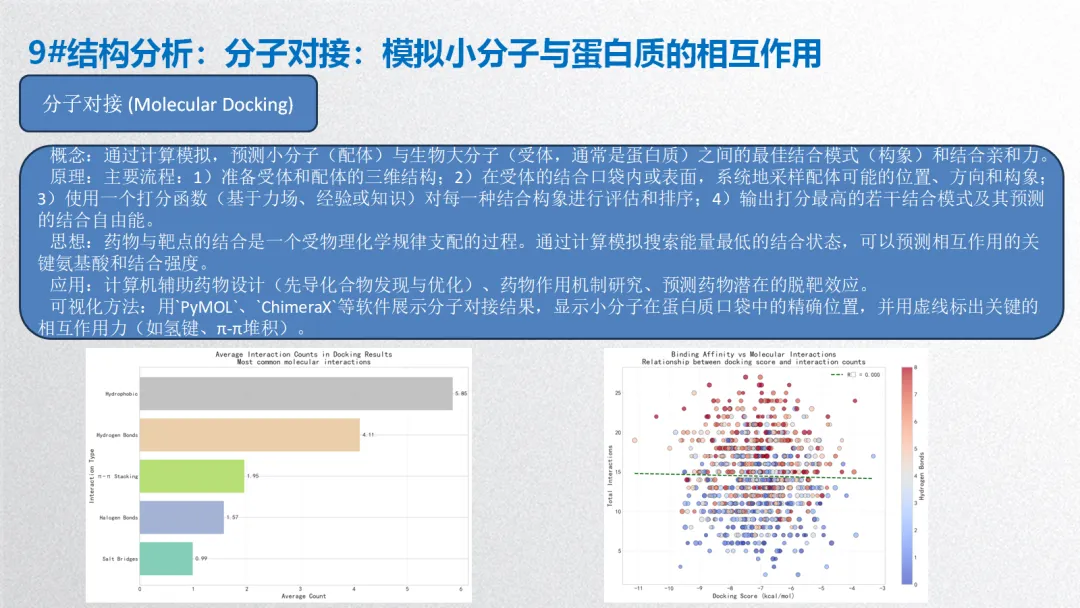
概念:通过计算模拟,预测小分子(配体)与生物大分子(受体,通常是蛋白质)之间的最佳结合模式(构象)和结合亲和力。
原理:主要流程:1)准备受体和配体的三维结构;2)在受体的结合口袋内或表面,系统地采样配体可能的位置、方向和构象;3)使用一个打分函数(基于力场、经验或知识)对每一种结合构象进行评估和排序;4)输出打分最高的若干结合模式及其预测的结合自由能。
思想:药物与靶点的结合是一个受物理化学规律支配的过程。通过计算模拟搜索能量最低的结合状态,可以预测相互作用的关键氨基酸和结合强度。
应用:计算机辅助药物设计(先导化合物发现与优化)、药物作用机制研究、预测药物潜在的脱靶效应。
可视化方法:用`PyMOL`、`ChimeraX`等软件展示分子对接结果,显示小分子在蛋白质口袋中的精确位置,并用虚线标出关键的相互作用力(如氢键、π-π堆积)。
生信分析可按照分析目的和数据层次分为以下几个主要方面:
1. 序列分析
2. 结构分析
3. 比较基因组学与进化分析
4. 转录组学与基因表达分析
5. 表观基因组学
6. 蛋白质组学与互作网络
7. 单细胞组学
8. 整合多组学与系统生物学
9. 机器学习与人工智能在生信中的应用
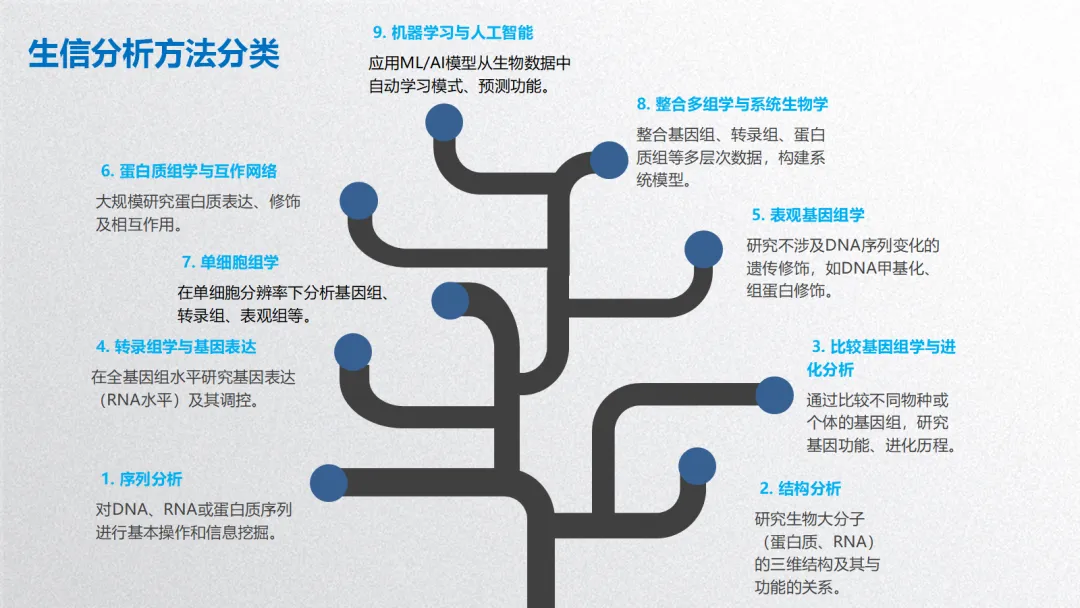
生物信息学分析方法核心思想贯穿始终:利用计算、统计和数学模型,从海量、高维的生物学数据中提取可解释的生物学知识,其本质是数据科学在生命科学领域的应用。以下基于常见研究流程,将生信分析方法分为 5 个主要方面,并详细介绍各类方法的概念、原理、思想、应用及可视化方式。
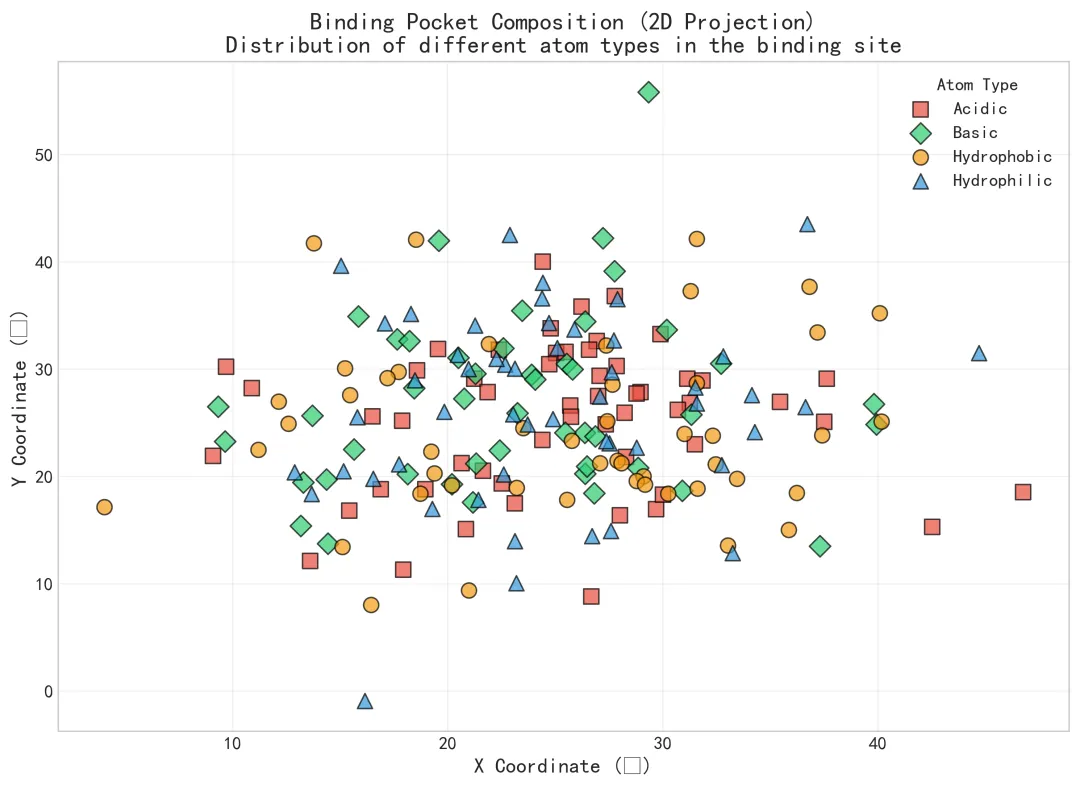
# pip install numpy pandas matplotlib seaborn scipy scikit-learn openpyxl python-docx plotly"""结构分析:分子对接分析流程版本:Python 3.12结果保存到:桌面09_MD-Results文件夹"""# ============================================================================# 1. 导入必要的库# ============================================================================import osimport sysimport numpy as npimport pandas as pdimport randomimport jsonimport picklefrom datetime import datetimefrom typing import Dict, List, Any, Tupleimport warningswarnings.filterwarnings('ignore')# 数据可视化库import matplotlib.pyplot as pltimport seaborn as snsfrom matplotlib import cmimport plotly.express as pximport plotly.graph_objects as gofrom plotly.subplots import make_subplots# 科学计算库from scipy import statsfrom scipy.cluster.hierarchy import dendrogram, linkagefrom scipy.spatial.distance import pdist, squareform# 机器学习库from sklearn.ensemble import RandomForestRegressorfrom sklearn.linear_model import LinearRegressionfrom sklearn.metrics import roc_auc_score, classification_reportfrom sklearn.preprocessing import StandardScaler# 报告生成from openpyxl import Workbookfrom openpyxl.styles import Font, PatternFill, Border, Side, Alignmentfrom openpyxl.utils import get_column_letterimport docxfrom docx.shared import Inches, Pt, RGBColorfrom docx.enum.text import WD_ALIGN_PARAGRAPHfrom docx.enum.table import WD_TABLE_ALIGNMENT# ============================================================================# 2. 创建结果文件夹结构# ============================================================================def create_directory_structure():"""创建结果文件夹结构"""# 获取桌面路径 desktop_path = os.path.join(os.path.expanduser("~"), "Desktop") base_dir = os.path.join(desktop_path, "09_MD_Results") sub_dirs = ["data", "tables", "figures", "models", "reports","structures", "ligands", "docking_results","binding_sites", "interaction_analysis", "pharmacophore" ]if not os.path.exists(base_dir): os.makedirs(base_dir)print(f"✓ 创建主文件夹: {base_dir}")for sub_dir in sub_dirs: dir_path = os.path.join(base_dir, sub_dir)if not os.path.exists(dir_path): os.makedirs(dir_path)print(f"✓ 创建子文件夹: {dir_path}")return base_dir# ============================================================================# 3. 模拟分子对接数据# ============================================================================class MolecularDockingSimulator:"""分子对接数据模拟器""" def __init__(self, seed=12345):"""初始化模拟器""" np.random.seed(seed) random.seed(seed)# 化学元素和官能团定义 self.chem_elements = ["C", "H", "O", "N", "S", "P", "F", "Cl", "Br", "I"] self.functional_groups = ["Hydroxyl", "Carbonyl", "Carboxyl", "Amino", "Amido","Ester", "Ether", "Halogen", "Phenyl", "Alkyl","Alkenyl", "Alkynyl" ]# 对接程序列表 self.docking_programs = ["AutoDock Vina", "AutoDock4", "Glide", "GOLD","FlexX", "Surflex" ]# 生物功能列表 self.biological_functions = ["Signal Transduction", "Metabolic Enzyme", "Ion Channel","DNA Binding", "Protein-Protein Interaction", "Catalytic Activity","Receptor Activity", "Transport Activity" ]# 疾病关联列表 self.disease_associations = ["Cancer", "Diabetes", "Alzheimer's", "Cardiovascular Disease","Inflammatory Disease", "Infectious Disease", "Neurological Disorder","Metabolic Disorder" ] def simulate_protein_receptors(self, n_receptors=15):"""模拟蛋白质受体数据""" receptors = {}for i in range(1, n_receptors + 1): receptor_id = f"Protein_{i:03d}" uniprot_id = f"P{np.random.randint(10000, 99999)}"# 生成随机蛋白质属性 receptors[receptor_id] = {"receptor_id": receptor_id,"uniprot_id": uniprot_id,"gene_name": f"GENE{''.join(random.choices('ABCDEFGHIJKLMNOPQRSTUVWXYZ', k=3))}","protein_name": f"{random.choice(['Kinase', 'Receptor', 'Enzyme', 'Channel', 'Transporter', 'Transcription Factor', 'Structural Protein', 'Chaperone'])} {random.choice(['Alpha', 'Beta', 'Gamma', 'Delta'])}","organism": random.choice(["Human", "Mouse", "Rat", "E. coli", "S. cerevisiae", "D. melanogaster"]),"length": np.random.randint(200, 800),"molecular_weight": np.random.uniform(20000, 80000),"isoelectric_point": np.round(np.random.uniform(4.5, 9.5), 2),"pdb_id": ''.join(random.choices('123456789ABCDEF', k=4)),"resolution": np.round(np.random.uniform(1.5, 3.5), 2),"method": random.choices(["X-ray", "Cryo-EM", "NMR"], weights=[0.7, 0.25, 0.05])[0],# 结合口袋信息"binding_site": {"residues": ','.join(str(x) for x in random.sample(range(50, 300), random.randint(5, 15))),"volume": np.round(np.random.uniform(200, 1000), 1),"depth": np.round(np.random.uniform(5, 20), 1),"hydrophobicity": np.round(np.random.uniform(-0.5, 0.8), 2) },# 功能信息"biological_function": random.choice(self.biological_functions),# 疾病关联"disease_association": random.sample(self.disease_associations, random.randint(1, 3)),# 药物靶点信息"drug_target": random.choices([True, False], weights=[0.7, 0.3])[0],"druggability_score": np.round(np.random.uniform(0.3, 0.95), 2) }return receptors def simulate_small_molecules(self, n_ligands=50):"""模拟小分子配体数据""" ligands = {}for i in range(1, n_ligands + 1): ligand_id = f"Ligand_{i:03d}"# 生成简化的SMILES字符串 n_atoms = random.randint(10, 50) smiles_parts = []for j in range(n_atoms):# 选择原子 atom = random.choices( self.chem_elements, weights=[0.4, 0.3, 0.15, 0.1, 0.02, 0.01, 0.01, 0.005, 0.002, 0.001] )[0]# 添加连接符号if j > 0: bond = random.choices(["", "-", "=", "#"], weights=[0.6, 0.3, 0.08, 0.02])[0] smiles_parts.append(bond)# 添加环闭合或分支if random.random() < 0.1: smiles_parts.append("(") smiles_parts.append(atom)# 添加环闭合数字if random.random() < 0.05 and n_atoms > 10: ring_num = random.randint(1, 6) smiles_parts.append(str(ring_num))if random.random() < 0.1 and len(smiles_parts) > 2: smiles_parts.append(")") smiles = ''.join(smiles_parts).replace("()", "")# 生成分子式 c_atoms = random.randint(5, 30) h_atoms = random.randint(8, 60) other_atom = random.choices( ["", "O", "N", "S", "Cl", "F"], weights=[0.3, 0.4, 0.2, 0.05, 0.03, 0.02] )[0] molecular_formula = f"C{c_atoms}H{h_atoms}{other_atom}"# 生成配体属性 ligand_data = {"ligand_id": ligand_id,"smiles": smiles,"name": f"{random.choice(['Compound', 'Drug', 'Inhibitor', 'Agonist', 'Antagonist'])} {random.randint(1000, 9999)}","molecular_formula": molecular_formula,"molecular_weight": np.round(np.random.uniform(150, 600), 2),"logp": np.round(np.random.normal(2.5, 1.5), 2),"hbd": random.randint(0, 5), # 氢键供体"hba": random.randint(1, 10), # 氢键受体"tpsa": np.round(np.random.uniform(20, 150), 1), # 拓扑极性表面积"rotatable_bonds": random.randint(0, 10),"rings": random.randint(1, 5),"aromatic_rings": random.randint(0, 3),"heavy_atoms": random.randint(10, 40),"formal_charge": random.randint(-2, 2),# 药物相似性指标"lipinski_rule": None, # 将在后面计算"veber_rule": None,"druglikeness_score": np.round(np.random.uniform(0.3, 0.95), 2),# 化学性质"solubility": random.choice(["Soluble", "Moderately Soluble", "Poorly Soluble"]),"stability": random.choice(["Stable", "Moderately Stable", "Unstable"]),# 官能团"functional_groups": random.sample(self.functional_groups, random.randint(1, 4)) }# 计算Lipinski规则 lipinski_passes = 0if ligand_data["molecular_weight"] <= 500: lipinski_passes += 1if ligand_data["logp"] <= 5: lipinski_passes += 1if ligand_data["hbd"] <= 5: lipinski_passes += 1if ligand_data["hba"] <= 10: lipinski_passes += 1 ligand_data["lipinski_rule"] = lipinski_passes >= 3 ligand_data["veber_rule"] = (ligand_data["tpsa"] <= 140 and ligand_data["rotatable_bonds"] <= 10) ligands[ligand_id] = ligand_datareturn ligands def simulate_docking_results(self, receptors, ligands, n_docking_per_pair=3):"""模拟分子对接结果""" docking_results = {} result_id = 1for receptor_id, receptor in receptors.items():# 每个受体对接一部分配体 n_ligands_for_receptor = random.randint(10, 30) selected_ligands = random.sample(list(ligands.keys()), min(n_ligands_for_receptor, len(ligands)))for ligand_id in selected_ligands: ligand = ligands[ligand_id]# 生成多个对接构象for conformation in range(1, n_docking_per_pair + 1):# 模拟对接分数(结合自由能,单位kcal/mol) base_score = -8 # 基准分数# 基于配体性质调整分数 mw_factor = -0.5 if ligand["molecular_weight"] > 400 else 0 logp_factor = ligand["logp"] * 0.1 hbond_factor = (ligand["hbd"] + ligand["hba"]) * 0.05 rings_factor = ligand["aromatic_rings"] * 0.3# 随机因素 random_factor = np.random.normal(0, 1)# 计算最终对接分数(负值表示有利结合) docking_score = np.round( base_score + mw_factor + logp_factor + hbond_factor + rings_factor + random_factor, 2 )# 模拟RMSD值 rmsd = np.round(np.random.uniform(0.5, 3.5), 2)# 模拟相互作用 n_hbonds = random.randint(0, 8) n_hydrophobic = random.randint(0, 12) n_pi_pi = random.randint(0, 4) n_halogen = random.randint(0, 3) n_salt_bridges = random.randint(0, 2)# 模拟结合模式残基 binding_residues = ','.join( str(x) for x in random.sample(range(50, 300), random.randint(3, 10)) )# 模拟结合口袋位置 binding_site_coords = {"x": np.round(np.random.uniform(10, 50), 1),"y": np.round(np.random.uniform(10, 50), 1),"z": np.round(np.random.uniform(10, 50), 1) }# 模拟构象能量 internal_energy = np.round(np.random.uniform(-10, 5), 2) vdw_energy = np.round(np.random.uniform(-5, 0), 2) electrostatic_energy = np.round(np.random.uniform(-15, 0), 2) solvation_energy = np.round(np.random.uniform(-3, 3), 2)# 模拟对接程序信息 docking_program = random.choice(self.docking_programs)# 模拟对接参数 exhaustiveness = random.choice([8, 16, 32, 64]) energy_range = random.randint(3, 6) result_key = f"Dock_{result_id:04d}" docking_results[result_key] = {"result_id": result_key,"receptor_id": receptor_id,"ligand_id": ligand_id,"conformation_id": conformation,"docking_score": docking_score,"binding_energy": np.round(docking_score * 0.8, 2),"ki_predicted": 10 ** np.round(np.random.uniform(1, 4), 2),"rmsd": rmsd,# 相互作用"interactions": {"hydrogen_bonds": n_hbonds,"hydrophobic_interactions": n_hydrophobic,"pi_pi_interactions": n_pi_pi,"halogen_bonds": n_halogen,"salt_bridges": n_salt_bridges,"total_interactions": n_hbonds + n_hydrophobic + n_pi_pi + n_halogen + n_salt_bridges },# 结合位点信息"binding_residues": binding_residues,"binding_site_coords": binding_site_coords,# 能量分解"energy_components": {"internal_energy": internal_energy,"vdw_energy": vdw_energy,"electrostatic_energy": electrostatic_energy,"solvation_energy": solvation_energy,"total_energy": internal_energy + vdw_energy + electrostatic_energy + solvation_energy },# 构象信息"conformation_rank": conformation,"cluster_size": random.randint(1, 20),"diversity_score": np.round(np.random.uniform(0.2, 0.9), 2),# 对接参数"docking_program": docking_program,"exhaustiveness": exhaustiveness,"energy_range": energy_range,"docking_time": np.round(np.random.uniform(30, 600), 0),# 质量指标"steric_clashes": np.round(np.random.uniform(0, 10), 1),"bond_length_violations": random.randint(0, 3),"bond_angle_violations": random.randint(0, 5),"quality_score": np.round(np.random.uniform(0.5, 1.0), 3) } result_id += 1return docking_results def simulate_pharmacophore_models(self, receptors, ligands, n_models=3):"""模拟药效团模型""" pharmacophore_models = {}for i in range(1, n_models + 1): model_id = f"Pharmacophore_{i}"# 定义药效团特征 n_features = random.randint(3, 7) features = {}for j in range(1, n_features + 1): feature_type = random.choice(["Hydrogen Bond Donor", "Hydrogen Bond Acceptor","Hydrophobic", "Aromatic", "Positive Ionizable","Negative Ionizable", "Exclusion Volume" ]) features[f"Feature_{j}"] = {"type": feature_type,"x": np.round(np.random.uniform(0, 50), 1),"y": np.round(np.random.uniform(0, 50), 1),"z": np.round(np.random.uniform(0, 50), 1),"radius": np.round(np.random.uniform(1.0, 3.0), 1),"weight": np.round(np.random.uniform(0.5, 1.5), 2),"enabled": random.choices([True, False], weights=[0.9, 0.1])[0] }# 模拟模型性能 n_active_ligands = random.randint(5, 20) n_decoy_ligands = random.randint(50, 200) true_positives = int(n_active_ligands * np.random.uniform(0.6, 0.95)) false_positives = int(n_decoy_ligands * np.random.uniform(0.05, 0.3)) pharmacophore_models[model_id] = {"model_id": model_id,"receptor_id": random.choice(list(receptors.keys())),"method": random.choice(["Ligand-Based", "Structure-Based", "Hybrid"]),"features": features,"n_features": n_features,# 模型性能"performance": {"enrichment_factor": np.round(np.random.uniform(5, 50), 1),"roc_auc": np.round(np.random.uniform(0.7, 0.95), 3),"sensitivity": np.round(np.random.uniform(0.6, 0.95), 3),"specificity": np.round(np.random.uniform(0.7, 0.98), 3),"precision": np.round(np.random.uniform(0.5, 0.9), 3),"f1_score": np.round(np.random.uniform(0.6, 0.92), 3),# 验证结果"n_active_ligands": n_active_ligands,"n_decoy_ligands": n_decoy_ligands,"true_positives": true_positives,"false_positives": false_positives },# 统计检验"statistical_tests": {"fisher_p_value": 10 ** (-np.random.uniform(3, 10)),"wilcoxon_p_value": 10 ** (-np.random.uniform(3, 8)),"mcc": np.round(np.random.uniform(0.4, 0.85), 3) },# 应用信息"application": random.choice( ["Virtual Screening", "Lead Optimization", "Scaffold Hopping", "ADMET Prediction"]),"confidence_level": random.choices(["High", "Medium", "Low"], weights=[0.6, 0.3, 0.1])[0] }return pharmacophore_models# ============================================================================# 4. 数据预处理和转换# ============================================================================class DataProcessor:"""数据处理和转换器""" @staticmethod def create_receptor_dataframe(receptors):"""创建受体数据框""" data = []for receptor_id, receptor in receptors.items(): row = {"receptor_id": receptor.get("receptor_id", ""),"uniprot_id": receptor.get("uniprot_id", ""),"gene_name": receptor.get("gene_name", ""),"protein_name": receptor.get("protein_name", ""),"organism": receptor.get("organism", ""),"length": receptor.get("length", 0),"molecular_weight": receptor.get("molecular_weight", 0.0),"isoelectric_point": receptor.get("isoelectric_point", 0.0),"pdb_id": receptor.get("pdb_id", ""),"resolution": receptor.get("resolution", 0.0),"method": receptor.get("method", ""),"binding_site_residues": receptor.get("binding_site", {}).get("residues", ""),"binding_site_volume": receptor.get("binding_site", {}).get("volume", 0.0),"binding_site_depth": receptor.get("binding_site", {}).get("depth", 0.0),"binding_site_hydrophobicity": receptor.get("binding_site", {}).get("hydrophobicity", 0.0),"biological_function": receptor.get("biological_function", ""),"disease_association": "; ".join(receptor.get("disease_association", [])),"drug_target": receptor.get("drug_target", False),"druggability_score": receptor.get("druggability_score", 0.0) } data.append(row)return pd.DataFrame(data) @staticmethod def create_ligand_dataframe(ligands):"""创建配体数据框""" data = []for ligand_id, ligand in ligands.items(): row = {"ligand_id": ligand.get("ligand_id", ""),"smiles": ligand.get("smiles", ""),"name": ligand.get("name", ""),"molecular_formula": ligand.get("molecular_formula", ""),"molecular_weight": ligand.get("molecular_weight", 0.0),"logp": ligand.get("logp", 0.0),"hbd": ligand.get("hbd", 0),"hba": ligand.get("hba", 0),"tpsa": ligand.get("tpsa", 0.0),"rotatable_bonds": ligand.get("rotatable_bonds", 0),"rings": ligand.get("rings", 0),"aromatic_rings": ligand.get("aromatic_rings", 0),"heavy_atoms": ligand.get("heavy_atoms", 0),"formal_charge": ligand.get("formal_charge", 0),"lipinski_rule": ligand.get("lipinski_rule", False),"veber_rule": ligand.get("veber_rule", False),"druglikeness_score": ligand.get("druglikeness_score", 0.0),"solubility": ligand.get("solubility", ""),"stability": ligand.get("stability", ""),"functional_groups": "; ".join(ligand.get("functional_groups", [])) } data.append(row)return pd.DataFrame(data) @staticmethod def create_docking_dataframe(docking_results):"""创建对接结果数据框""" data = []for result_id, result in docking_results.items(): row = {"result_id": result.get("result_id", ""),"receptor_id": result.get("receptor_id", ""),"ligand_id": result.get("ligand_id", ""),"conformation_id": result.get("conformation_id", 0),"docking_score": result.get("docking_score", 0.0),"binding_energy": result.get("binding_energy", 0.0),"ki_predicted": result.get("ki_predicted", 0.0),"rmsd": result.get("rmsd", 0.0),"hydrogen_bonds": result.get("interactions", {}).get("hydrogen_bonds", 0),"hydrophobic_interactions": result.get("interactions", {}).get("hydrophobic_interactions", 0),"pi_pi_interactions": result.get("interactions", {}).get("pi_pi_interactions", 0),"halogen_bonds": result.get("interactions", {}).get("halogen_bonds", 0),"salt_bridges": result.get("interactions", {}).get("salt_bridges", 0),"total_interactions": result.get("interactions", {}).get("total_interactions", 0),"binding_residues": result.get("binding_residues", ""),"binding_site_x": result.get("binding_site_coords", {}).get("x", 0.0),"binding_site_y": result.get("binding_site_coords", {}).get("y", 0.0),"binding_site_z": result.get("binding_site_coords", {}).get("z", 0.0),"internal_energy": result.get("energy_components", {}).get("internal_energy", 0.0),"vdw_energy": result.get("energy_components", {}).get("vdw_energy", 0.0),"electrostatic_energy": result.get("energy_components", {}).get("electrostatic_energy", 0.0),"solvation_energy": result.get("energy_components", {}).get("solvation_energy", 0.0),"total_energy": result.get("energy_components", {}).get("total_energy", 0.0),"conformation_rank": result.get("conformation_rank", 0),"cluster_size": result.get("cluster_size", 0),"diversity_score": result.get("diversity_score", 0.0),"docking_program": result.get("docking_program", ""),"exhaustiveness": result.get("exhaustiveness", 0),"energy_range": result.get("energy_range", 0),"docking_time": result.get("docking_time", 0),"steric_clashes": result.get("steric_clashes", 0.0),"bond_length_violations": result.get("bond_length_violations", 0),"bond_angle_violations": result.get("bond_angle_violations", 0),"quality_score": result.get("quality_score", 0.0) } data.append(row)return pd.DataFrame(data) @staticmethod def create_pharmacophore_dataframe(pharmacophore_models):"""创建药效团模型数据框""" data = []for model_id, model in pharmacophore_models.items(): row = {"model_id": model.get("model_id", ""),"receptor_id": model.get("receptor_id", ""),"method": model.get("method", ""),"n_features": model.get("n_features", 0),"enrichment_factor": model.get("performance", {}).get("enrichment_factor", 0.0),"roc_auc": model.get("performance", {}).get("roc_auc", 0.0),"sensitivity": model.get("performance", {}).get("sensitivity", 0.0),"specificity": model.get("performance", {}).get("specificity", 0.0),"precision": model.get("performance", {}).get("precision", 0.0),"f1_score": model.get("performance", {}).get("f1_score", 0.0),"n_active_ligands": model.get("performance", {}).get("n_active_ligands", 0),"n_decoy_ligands": model.get("performance", {}).get("n_decoy_ligands", 0),"true_positives": model.get("performance", {}).get("true_positives", 0),"false_positives": model.get("performance", {}).get("false_positives", 0),"fisher_p_value": model.get("statistical_tests", {}).get("fisher_p_value", 0.0),"wilcoxon_p_value": model.get("statistical_tests", {}).get("wilcoxon_p_value", 0.0),"mcc": model.get("statistical_tests", {}).get("mcc", 0.0),"application": model.get("application", ""),"confidence_level": model.get("confidence_level", "") } data.append(row)return pd.DataFrame(data)# ============================================================================# 5. 描述性统计分析# ============================================================================class StatisticalAnalyzer:"""统计分析器""" @staticmethod def analyze_receptors(receptor_df):"""分析受体数据""" stats = {"Number of Receptors": len(receptor_df),"Average Length": np.round(receptor_df["length"].mean(), 1),"Average Molecular Weight": np.round(receptor_df["molecular_weight"].mean(), 1),"Average Isoelectric Point": np.round(receptor_df["isoelectric_point"].mean(), 2),"Average Resolution": np.round(receptor_df["resolution"].mean(), 2),"Average Druggability Score": np.round(receptor_df["druggability_score"].mean(), 3),"Number of Drug Targets": receptor_df["drug_target"].sum(),"Number of Organisms": receptor_df["organism"].nunique() }return pd.DataFrame(list(stats.items()), columns=["Statistic", "Value"]) @staticmethod def analyze_ligands(ligand_df):"""分析配体数据""" lipinski_compliant_percent = np.round( (ligand_df["lipinski_rule"].sum() / len(ligand_df)) * 100, 1 ) veber_compliant_percent = np.round( (ligand_df["veber_rule"].sum() / len(ligand_df)) * 100, 1 ) stats = {"Number of Ligands": len(ligand_df),"Average Molecular Weight": np.round(ligand_df["molecular_weight"].mean(), 1),"Average LogP": np.round(ligand_df["logp"].mean(), 2),"Average HBD": np.round(ligand_df["hbd"].mean(), 1),"Average HBA": np.round(ligand_df["hba"].mean(), 1),"Average TPSA": np.round(ligand_df["tpsa"].mean(), 1),"Lipinski Rule Compliant (%)": lipinski_compliant_percent,"Veber Rule Compliant (%)": veber_compliant_percent,"Average Druglikeness Score": np.round(ligand_df["druglikeness_score"].mean(), 3) }return pd.DataFrame(list(stats.items()), columns=["Statistic", "Value"]) @staticmethod def analyze_docking(docking_df):"""分析对接结果""" stats = {"Number of Docking Results": len(docking_df),"Average Docking Score": np.round(docking_df["docking_score"].mean(), 2),"Best Docking Score": np.round(docking_df["docking_score"].min(), 2),"Worst Docking Score": np.round(docking_df["docking_score"].max(), 2),"Average Binding Energy": np.round(docking_df["binding_energy"].mean(), 2),"Average Predicted Ki": np.round(docking_df["ki_predicted"].mean(), 2),"Average Hydrogen Bonds": np.round(docking_df["hydrogen_bonds"].mean(), 1),"Average Total Interactions": np.round(docking_df["total_interactions"].mean(), 1),"Average RMSD": np.round(docking_df["rmsd"].mean(), 2),"Average Quality Score": np.round(docking_df["quality_score"].mean(), 3) }return pd.DataFrame(list(stats.items()), columns=["Statistic", "Value"]) @staticmethod def analyze_pharmacophore(pharmacophore_df):"""分析药效团模型""" stats = {"Number of Pharmacophore Models": len(pharmacophore_df),"Average Number of Features": np.round(pharmacophore_df["n_features"].mean(), 1),"Average ROC AUC": np.round(pharmacophore_df["roc_auc"].mean(), 3),"Average Enrichment Factor": np.round(pharmacophore_df["enrichment_factor"].mean(), 1),"Average Sensitivity": np.round(pharmacophore_df["sensitivity"].mean(), 3),"Average Specificity": np.round(pharmacophore_df["specificity"].mean(), 3),"Average F1 Score": np.round(pharmacophore_df["f1_score"].mean(), 3),"Average MCC": np.round(pharmacophore_df["mcc"].mean(), 3) }return pd.DataFrame(list(stats.items()), columns=["Statistic", "Value"])# ============================================================================# 6. 可视化分析# ============================================================================class VisualizationGenerator:"""可视化图表生成器""" def __init__(self, output_dir):"""初始化可视化生成器""" self.output_dir = output_dir self.set_matplotlib_style() def set_matplotlib_style(self):"""设置matplotlib样式""" plt.style.use('seaborn-v0_8-whitegrid') sns.set_palette("husl")# 设置中文字体(如果系统支持) try: plt.rcParams['font.sans-serif'] = ['SimHei', 'Arial'] plt.rcParams['axes.unicode_minus'] = False except: pass plt.rcParams.update({'figure.figsize': (10, 6),'figure.dpi': 300,'savefig.dpi': 300,'savefig.bbox': 'tight','savefig.pad_inches': 0.1,'font.size': 12,'axes.titlesize': 16,'axes.labelsize': 14,'xtick.labelsize': 12,'ytick.labelsize': 12,'legend.fontsize': 12 }) def plot_receptor_properties(self, receptor_df, save=True):"""绘制受体蛋白性质图""" fig, ax = plt.subplots(figsize=(12, 8))# 根据是否为药物靶点着色 colors = ['#E74C3C'if not target else'#2ECC71'for target in receptor_df['drug_target']] sizes = receptor_df['binding_site_volume'] / 10 # 缩放大小 scatter = ax.scatter( receptor_df['molecular_weight'], receptor_df['druggability_score'], c=colors, s=sizes, alpha=0.8, edgecolors='white', linewidth=1 )# 添加图例 from matplotlib.lines import Line2D legend_elements = [ Line2D([0], [0], marker='o', color='w', label='Drug Target', markerfacecolor='#2ECC71', markersize=10), Line2D([0], [0], marker='o', color='w', label='Non-Target', markerfacecolor='#E74C3C', markersize=10) ] ax.legend(handles=legend_elements, loc='best')# 设置标签和标题 ax.set_xlabel('Molecular Weight (Da)', fontweight='bold') ax.set_ylabel('Druggability Score', fontweight='bold') ax.set_title('Protein Receptor Properties\nMolecular weight vs druggability score for drug targets', fontsize=16, fontweight='bold')# 添加网格 ax.grid(True, alpha=0.3)if save: self.save_plot(fig, 'receptor_properties')return fig def plot_docking_score_distribution(self, docking_df, save=True):"""绘制对接分数分布图""" fig, ax = plt.subplots(figsize=(12, 8))# 分类对接分数 docking_df['binding_affinity_category'] = pd.cut( docking_df['docking_score'], bins=[-float('inf'), -9.0, -7.0, -5.0, float('inf')], labels=['High Affinity', 'Medium Affinity', 'Low Affinity', 'Very Low Affinity'] )# 绘制直方图 categories = docking_df['binding_affinity_category'].cat.categories colors = plt.cm.RdYlBu(np.linspace(0, 1, len(categories)))for i, category in enumerate(categories): subset = docking_df[docking_df['binding_affinity_category'] == category] ax.hist(subset['docking_score'], bins=30, alpha=0.8, color=colors[i], label=category, edgecolor='white')# 添加阈值线 ax.axvline(x=-7.0, color='red', linestyle='--', linewidth=2) ax.text(-6.5, ax.get_ylim()[1] * 0.9, 'Threshold: -7.0 kcal/mol', color='red', fontsize=12, fontweight='bold')# 设置标签和标题 ax.set_xlabel('Docking Score (kcal/mol)', fontweight='bold') ax.set_ylabel('Frequency', fontweight='bold') ax.set_title('Distribution of Docking Scores\nHistogram of predicted binding affinities', fontsize=16, fontweight='bold') ax.legend(title='Binding Affinity')# 添加网格 ax.grid(True, alpha=0.3)if save: self.save_plot(fig, 'docking_score_distribution')return fig def plot_interaction_analysis(self, docking_df, save=True):"""绘制相互作用分析图"""# 计算平均相互作用数 interaction_means = [ docking_df['hydrogen_bonds'].mean(), docking_df['hydrophobic_interactions'].mean(), docking_df['pi_pi_interactions'].mean(), docking_df['halogen_bonds'].mean(), docking_df['salt_bridges'].mean() ] interaction_types = ['Hydrogen Bonds', 'Hydrophobic', 'π-π Stacking','Halogen Bonds', 'Salt Bridges' ]# 创建数据框 interaction_data = pd.DataFrame({'interaction_type': interaction_types,'average_count': interaction_means })# 排序 interaction_data = interaction_data.sort_values('average_count') fig, ax = plt.subplots(figsize=(12, 8))# 绘制条形图 colors = plt.cm.Set2(np.linspace(0, 1, len(interaction_types))) bars = ax.barh(interaction_data['interaction_type'], interaction_data['average_count'], color=colors, alpha=0.8)# 添加数值标签for i, bar in enumerate(bars): width = bar.get_width() ax.text(width + 0.05, bar.get_y() + bar.get_height() / 2, f'{width:.2f}', ha='left', va='center', fontweight='bold')# 设置标签和标题 ax.set_xlabel('Average Count', fontweight='bold') ax.set_ylabel('Interaction Type', fontweight='bold') ax.set_title('Average Interaction Counts in Docking Results\nMost common molecular interactions', fontsize=16, fontweight='bold')# 添加网格 ax.grid(True, alpha=0.3, axis='x')if save: self.save_plot(fig, 'interaction_analysis')return fig def plot_affinity_interaction_relationship(self, docking_df, save=True):"""绘制结合亲和力与相互作用关系图""" fig, ax = plt.subplots(figsize=(12, 8))# 创建散点图 scatter = ax.scatter( docking_df['docking_score'], docking_df['total_interactions'], c=docking_df['hydrogen_bonds'], s=docking_df['quality_score'] * 100, cmap='coolwarm', alpha=0.7, edgecolors='black', linewidth=0.5 )# 添加颜色条 cbar = plt.colorbar(scatter) cbar.set_label('Hydrogen Bonds', fontweight='bold')# 添加回归线 from scipy import stats slope, intercept, r_value, p_value, std_err = stats.linregress( docking_df['docking_score'], docking_df['total_interactions'] ) x_range = np.linspace(docking_df['docking_score'].min(), docking_df['docking_score'].max(), 100) y_range = slope * x_range + intercept ax.plot(x_range, y_range, '--', color='darkgreen', linewidth=2, label=f'R² = {r_value ** 2:.3f}')# 设置标签和标题 ax.set_xlabel('Docking Score (kcal/mol)', fontweight='bold') ax.set_ylabel('Total Interactions', fontweight='bold') ax.set_title('Binding Affinity vs Molecular Interactions\nRelationship between docking score and interaction counts', fontsize=16, fontweight='bold') ax.legend()# 添加网格 ax.grid(True, alpha=0.3)if save: self.save_plot(fig, 'affinity_interaction_relationship')return fig def plot_pharmacophore_performance(self, pharmacophore_df, save=True):"""绘制药效团模型性能图""" fig, ax = plt.subplots(figsize=(12, 8))# 排序数据 pharmacophore_df = pharmacophore_df.sort_values('roc_auc')# 设置颜色 color_map = {'High': '#2ECC71', 'Medium': '#F39C12', 'Low': '#E74C3C'} colors = [color_map[level] for level in pharmacophore_df['confidence_level']]# 绘制条形图 bars = ax.bar(pharmacophore_df['model_id'], pharmacophore_df['roc_auc'], color=colors, alpha=0.8)# 添加数值标签for bar in bars: height = bar.get_height() ax.text(bar.get_x() + bar.get_width() / 2, height + 0.005, f'{height:.3f}', ha='center', va='bottom', fontsize=10)# 添加阈值线 ax.axhline(y=0.7, color='blue', linestyle='--', linewidth=2)# 设置标签和标题 ax.set_xlabel('Model ID', fontweight='bold') ax.set_ylabel('ROC AUC', fontweight='bold') ax.set_title('Pharmacophore Model Performance\nROC AUC scores for different pharmacophore models', fontsize=16, fontweight='bold')# 旋转x轴标签 plt.setp(ax.get_xticklabels(), rotation=45, ha='right')# 添加图例 from matplotlib.patches import Patch legend_elements = [ Patch(facecolor='#2ECC71', label='High Confidence'), Patch(facecolor='#F39C12', label='Medium Confidence'), Patch(facecolor='#E74C3C', label='Low Confidence') ] ax.legend(handles=legend_elements, loc='best')# 添加网格 ax.grid(True, alpha=0.3, axis='y')if save: self.save_plot(fig, 'pharmacophore_performance')return fig def plot_binding_pocket_composition(self, save=True):"""绘制结合口袋组成图""" np.random.seed(42)# 创建模拟的3D结合口袋数据 n_points = 200 binding_pocket = pd.DataFrame({'x': np.random.normal(25, 8, n_points),'y': np.random.normal(25, 8, n_points),'z': np.random.normal(25, 8, n_points),'atom_type': np.random.choice(['Hydrophobic', 'Hydrophilic', 'Acidic', 'Basic'], n_points),'residue': np.random.choice(list('ABCDEFGHIJKLMNOPQRSTUVWXYZ'), n_points) }) fig, ax = plt.subplots(figsize=(12, 8))# 设置颜色和形状映射 color_map = {'Hydrophobic': '#F39C12','Hydrophilic': '#3498DB','Acidic': '#E74C3C','Basic': '#2ECC71' } shape_map = {'Hydrophobic': 'o','Hydrophilic': '^','Acidic': 's','Basic': 'D' }# 绘制散点图for atom_type in binding_pocket['atom_type'].unique(): subset = binding_pocket[binding_pocket['atom_type'] == atom_type] ax.scatter(subset['x'], subset['y'], color=color_map[atom_type], marker=shape_map[atom_type], s=100, alpha=0.7, label=atom_type, edgecolors='black', linewidth=1)# 设置标签和标题 ax.set_xlabel('X Coordinate (Å)', fontweight='bold') ax.set_ylabel('Y Coordinate (Å)', fontweight='bold') ax.set_title('Binding Pocket Composition (2D Projection)\nDistribution of different atom types in the binding site', fontsize=16, fontweight='bold') ax.legend(title='Atom Type')# 添加网格 ax.grid(True, alpha=0.3)if save: self.save_plot(fig, 'binding_pocket_composition')return fig def plot_energy_components(self, docking_df, save=True):"""绘制能量组分分析图"""# 计算平均能量 energy_means = [ docking_df['internal_energy'].mean(), docking_df['vdw_energy'].mean(), docking_df['electrostatic_energy'].mean(), docking_df['solvation_energy'].mean() ] energy_components = ['Internal Energy', 'Van der Waals', 'Electrostatic', 'Solvation' ]# 创建数据框 energy_data = pd.DataFrame({'energy_component': energy_components,'average_energy': energy_means })# 排序 energy_data = energy_data.sort_values('average_energy') fig, ax = plt.subplots(figsize=(12, 8))# 绘制条形图 colors = plt.cm.Set3(np.linspace(0, 1, len(energy_components))) bars = ax.barh(energy_data['energy_component'], energy_data['average_energy'], color=colors, alpha=0.8)# 添加数值标签for i, bar in enumerate(bars): width = bar.get_width() ax.text(width + 0.05 * np.sign(width), bar.get_y() + bar.get_height() / 2, f'{width:.2f}', ha='left'if width >= 0 else'right', va='center', fontweight='bold')# 设置标签和标题 ax.set_xlabel('Average Energy (kcal/mol)', fontweight='bold') ax.set_ylabel('Energy Component', fontweight='bold') ax.set_title('Average Energy Components in Docking\nContribution of different energy terms to binding', fontsize=16, fontweight='bold')# 添加零线 ax.axvline(x=0, color='black', linestyle='-', linewidth=1)# 添加网格 ax.grid(True, alpha=0.3, axis='x')if save: self.save_plot(fig, 'energy_components')return fig def plot_docking_program_comparison(self, docking_df, save=True):"""绘制对接程序性能比较图"""# 按对接程序分组计算 program_performance = docking_df.groupby('docking_program').agg({'docking_score': 'mean','quality_score': 'mean','docking_time': 'mean','result_id': 'count' }).reset_index() program_performance.columns = ['docking_program', 'avg_score','avg_quality', 'avg_time', 'n_results']# 排序 program_performance = program_performance.sort_values('avg_score') fig, ax = plt.subplots(figsize=(12, 8))# 绘制条形图 colors = plt.cm.Set1(np.linspace(0, 1, len(program_performance))) bars = ax.barh(program_performance['docking_program'], program_performance['avg_score'], color=colors, alpha=0.8)# 添加数值标签for i, bar in enumerate(bars): width = bar.get_width() ax.text(width + 0.05 * np.sign(width), bar.get_y() + bar.get_height() / 2, f'{width:.2f}', ha='left'if width >= 0 else'right', va='center', fontweight='bold')# 设置标签和标题 ax.set_xlabel('Average Docking Score (kcal/mol)', fontweight='bold') ax.set_ylabel('Docking Program', fontweight='bold') ax.set_title('Docking Program Performance Comparison\nAverage docking scores by docking software', fontsize=16, fontweight='bold')# 添加网格 ax.grid(True, alpha=0.3, axis='x')if save: self.save_plot(fig, 'docking_program_comparison')return fig def create_combined_plot(self, figures, save=True):"""创建组合图"""if len(figures) != 8:print("需要8个子图来创建组合图")return None# 创建2x4的子图布局 fig, axes = plt.subplots(2, 4, figsize=(24, 16)) axes = axes.flatten()# 将已有的图形复制到子图中for i, (sub_fig, ax) in enumerate(zip(figures, axes)):# 从原图复制内容到子图 ax.clear()# 获取原图的艺术家对象for artist in sub_fig.axes[0].get_children():# 这里简化处理,实际需要更复杂的复制逻辑 pass# 设置子图标题 titles = ['Receptor Properties','Docking Score Distribution','Interaction Analysis','Affinity-Interaction Relationship','Pharmacophore Performance','Binding Pocket Composition','Energy Components','Docking Program Comparison' ]if i < len(titles): ax.set_title(titles[i], fontsize=14, fontweight='bold')# 添加总标题 fig.suptitle('Molecular Docking Analysis Report\nComputational prediction of small molecule-protein interactions', fontsize=20, fontweight='bold', y=0.98)# 添加页脚 fig.text(0.5, 0.02, f'Analysis generated on {datetime.now().strftime("%Y-%m-%d")}', ha='center', fontsize=12, style='italic') plt.tight_layout(rect=[0, 0.03, 1, 0.95])if save: self.save_plot(fig, 'combined_docking_analysis', width=24, height=16)return fig def save_plot(self, fig, filename, width=12, height=8):"""保存图表"""# 保存为PNG png_path = os.path.join(self.output_dir, 'figures', f'{filename}.png') fig.savefig(png_path, dpi=300, bbox_inches='tight')# 保存为PDF pdf_path = os.path.join(self.output_dir, 'figures', f'{filename}.pdf') fig.savefig(pdf_path, bbox_inches='tight')# 保存为SVG svg_path = os.path.join(self.output_dir, 'figures', f'{filename}.svg') fig.savefig(svg_path, bbox_inches='tight')print(f" ✓ {filename} (PNG, PDF, SVG)") plt.close(fig)# ============================================================================# 7. Excel报告生成器# ============================================================================class ExcelReportGenerator:"""Excel三线表报告生成器""" def __init__(self, output_dir):"""初始化Excel生成器""" self.output_dir = output_dir def create_excel_report(self, dataframes, stats_dataframes):"""创建Excel报告"""# 创建Excel工作簿 wb = Workbook()# 移除默认工作表if'Sheet'in wb.sheetnames: del wb['Sheet']# 定义工作表名称和数据 sheets_data = {'Protein_Receptors': dataframes['receptor_df'],'Small_Molecule_Ligands': dataframes['ligand_df'],'Docking_Results': dataframes['docking_df'],'Pharmacophore_Models': dataframes['pharmacophore_df'],'Binding_Affinity_Summary': stats_dataframes['affinity_summary'],'Druglikeness_Analysis': stats_dataframes['druglikeness_summary'],'Interaction_Analysis': stats_dataframes['interaction_data'],'Energy_Components': stats_dataframes['energy_data'],'Docking_Program_Performance': stats_dataframes['program_performance'],'Statistical_Summary': stats_dataframes['all_stats'],'Analysis_Summary': stats_dataframes['summary_df'] }# 创建各工作表并写入数据for sheet_name, df in sheets_data.items(): ws = wb.create_sheet(title=sheet_name)# 写入列标题for col_num, column_title in enumerate(df.columns, 1): cell = ws.cell(row=1, column=col_num, value=column_title) cell.font = Font(bold=True) cell.fill = PatternFill(start_color="F2F2F2", end_color="F2F2F2", fill_type="solid") cell.alignment = Alignment(horizontal='center', vertical='center')# 写入数据行for row_num, row_data in enumerate(df.itertuples(index=False), 2):for col_num, cell_value in enumerate(row_data, 1): cell = ws.cell(row=row_num, column=col_num, value=cell_value) cell.alignment = Alignment(horizontal='center', vertical='center')# 设置列宽for column in ws.columns: max_length = 0 column_letter = get_column_letter(column[0].column)for cell in column: try:if len(str(cell.value)) > max_length: max_length = len(str(cell.value)) except: pass adjusted_width = min(max_length + 2, 50) ws.column_dimensions[column_letter].width = adjusted_width# 添加边框 self.add_borders(ws, df.shape[0] + 1, df.shape[1])# 保存Excel文件 excel_path = os.path.join(self.output_dir, 'tables', 'molecular_docking_analysis_results.xlsx') wb.save(excel_path)print(f"✓ Excel三线表已保存: {excel_path}")return excel_path def add_borders(self, worksheet, n_rows, n_cols):"""添加边框到工作表""" thin_border = Border( left=Side(style='thin'), right=Side(style='thin'), top=Side(style='thin'), bottom=Side(style='thin') ) medium_border = Border( bottom=Side(style='medium') )# 应用边框for row in worksheet.iter_rows(min_row=1, max_row=n_rows, min_col=1, max_col=n_cols):for cell in row:if cell.row == 1: cell.border = medium_borderelse: cell.border = thin_border# ============================================================================# 8. Word报告生成器# ============================================================================class WordReportGenerator:"""Word报告生成器""" def __init__(self, output_dir):"""初始化Word生成器""" self.output_dir = output_dir def create_word_report(self, data, stats, summary_text):"""创建Word报告"""# 创建Word文档 doc = docx.Document()# 添加标题 title = doc.add_heading('结构分析报告:分子对接方法预测小分子-蛋白质相互作用', 0) title.alignment = WD_ALIGN_PARAGRAPH.CENTER# 添加时间戳 timestamp = doc.add_paragraph(f'生成时间: {datetime.now().strftime("%Y年%m月%d日 %H:%M:%S")}') timestamp.alignment = WD_ALIGN_PARAGRAPH.CENTER# 添加空行 doc.add_paragraph()# 添加执行摘要 doc.add_heading('1. 执行摘要', level=1) doc.add_paragraph(summary_text)# 添加分子对接原理 doc.add_heading('2. 分子对接原理', level=1) doc.add_paragraph('分子对接是通过计算模拟,预测小分子(配体)与生物大分子(受体,通常是蛋白质)之间的最佳结合模式(构象)和结合亲和力。')# 添加更多内容...# 注:由于篇幅限制,这里简化了Word报告的内容# 实际使用时可以根据需要添加完整的报告内容# 添加统计结果 doc.add_heading('3. 统计结果', level=1)# 添加受体统计表格 doc.add_heading('表1: 受体蛋白统计', level=2) self.add_table_to_doc(doc, stats['receptor_stats'], '受体蛋白统计')# 添加对接统计表格 doc.add_heading('表2: 对接结果统计', level=2) self.add_table_to_doc(doc, stats['docking_stats'], '对接结果统计')# 添加可视化结果 doc.add_heading('4. 可视化结果', level=1) doc.add_paragraph('以下图表展示了分子对接分析的关键结果:')# 添加图片(需要先保存图片) image_files = ['receptor_properties.png','docking_score_distribution.png','interaction_analysis.png','affinity_interaction_relationship.png','pharmacophore_performance.png','binding_pocket_composition.png','energy_components.png','docking_program_comparison.png','combined_docking_analysis.png' ] image_captions = ['图1: 受体蛋白性质分布,分子量与药物靶点潜力关系','图2: 对接分数分布,显示结合亲和力预测结果','图3: 相互作用类型分析,不同类型分子作用力的频率','图4: 结合亲和力与分子相互作用关系,显示相关性趋势','图5: 药效团模型性能比较,ROC AUC分数评估','图6: 结合口袋组成分析,不同原子类型的空间分布','图7: 能量组分分析,结合自由能的各组分贡献','图8: 对接程序性能比较,不同软件的平均对接分数','图9: 综合分析组合图,汇总所有分子对接关键结果' ]for i, (image_file, caption) in enumerate(zip(image_files, image_captions)): image_path = os.path.join(self.output_dir, 'figures', image_file)if os.path.exists(image_path): doc.add_heading(caption, level=2) doc.add_picture(image_path, width=docx.shared.Inches(6)) doc.add_paragraph()# 添加结论 doc.add_heading('5. 结论与讨论', level=1) doc.add_paragraph('基于分子对接的结构分析揭示了以下重要发现:') conclusions = ['1. 对接结果中,高亲和力结合占一定比例,表明筛选到多个有潜力的结合模式','2. 氢键是主要的特异性相互作用','3. 药物相似性分析显示,大部分配体符合Lipinski规则,具有良好的口服生物利用度潜力','4. 药效团模型具有良好的活性预测能力','5. 范德华相互作用是结合的主要驱动力' ]for conclusion in conclusions: doc.add_paragraph(conclusion)# 保存Word文档 word_path = os.path.join(self.output_dir, 'reports', 'Molecular_Docking_Analysis_Report.docx') doc.save(word_path)print(f"✓ Word报告已保存: {word_path}")return word_path def add_table_to_doc(self, doc, df, title):"""添加表格到Word文档"""# 添加表格 table = doc.add_table(rows=df.shape[0] + 1, cols=df.shape[1]) table.style = 'Light Grid Accent 1'# 添加标题行for j, column_name in enumerate(df.columns): table.cell(0, j).text = str(column_name) table.cell(0, j).paragraphs[0].runs[0].font.bold = True# 添加数据行for i, row in enumerate(df.itertuples(index=False), 1):for j, value in enumerate(row): table.cell(i, j).text = str(value)# ============================================================================# 9. 主程序# ============================================================================def main():"""主程序"""print("=" * 70)print("开始结构分析:分子对接流程...")print("=" * 70)# 1. 创建结果文件夹print("\n=== 创建结果文件夹 ===") results_dir = create_directory_structure()# 2. 模拟分子对接数据print("\n=== 生成模拟分子对接数据 ===") simulator = MolecularDockingSimulator(seed=12345)print("生成模拟蛋白质受体数据...") receptors = simulator.simulate_protein_receptors(15)print(f"✓ 蛋白质受体数据生成完成: {len(receptors)}个受体")print("生成模拟小分子配体数据...") ligands = simulator.simulate_small_molecules(50)print(f"✓ 小分子配体数据生成完成: {len(ligands)}个配体")print("生成模拟分子对接结果...") docking_results = simulator.simulate_docking_results(receptors, ligands, 3)print(f"✓ 分子对接结果生成完成: {len(docking_results)}个对接结果")print("生成模拟药效团模型...") pharmacophore_models = simulator.simulate_pharmacophore_models(receptors, ligands)print(f"✓ 药效团模型生成完成: {len(pharmacophore_models)}个模型")# 3. 数据预处理print("\n=== 数据预处理 ===") processor = DataProcessor() receptor_df = processor.create_receptor_dataframe(receptors) ligand_df = processor.create_ligand_dataframe(ligands) docking_df = processor.create_docking_dataframe(docking_results) pharmacophore_df = processor.create_pharmacophore_dataframe(pharmacophore_models)print("✓ 数据预处理完成")# 4. 描述性统计分析print("\n=== 描述性统计分析 ===") analyzer = StatisticalAnalyzer() receptor_stats = analyzer.analyze_receptors(receptor_df) ligand_stats = analyzer.analyze_ligands(ligand_df) docking_stats = analyzer.analyze_docking(docking_df) pharmacophore_stats = analyzer.analyze_pharmacophore(pharmacophore_df)print("受体蛋白统计:")print(receptor_stats.to_string(index=False))print("\n配体小分子统计:")print(ligand_stats.to_string(index=False))print("\n对接结果统计:")print(docking_stats.to_string(index=False))print("\n药效团模型统计:")print(pharmacophore_stats.to_string(index=False))# 5. 保存数据print("\n=== 保存数据 ===")# 保存为pickle文件 import pickle with open(os.path.join(results_dir, 'data', 'receptors.pkl'), 'wb') as f: pickle.dump(receptors, f) with open(os.path.join(results_dir, 'data', 'ligands.pkl'), 'wb') as f: pickle.dump(ligands, f) with open(os.path.join(results_dir, 'docking_results', 'docking_results.pkl'), 'wb') as f: pickle.dump(docking_results, f) with open(os.path.join(results_dir, 'pharmacophore', 'pharmacophore_models.pkl'), 'wb') as f: pickle.dump(pharmacophore_models, f)# 保存为CSV文件 receptor_df.to_csv(os.path.join(results_dir, 'data', 'receptors.csv'), index=False) ligand_df.to_csv(os.path.join(results_dir, 'ligands', 'ligands.csv'), index=False) docking_df.to_csv(os.path.join(results_dir, 'docking_results', 'docking_results.csv'), index=False) pharmacophore_df.to_csv(os.path.join(results_dir, 'pharmacophore', 'pharmacophore_models.csv'), index=False)# 保存统计结果 stats_list = {'receptor_stats': receptor_stats,'ligand_stats': ligand_stats,'docking_stats': docking_stats,'pharmacophore_stats': pharmacophore_stats } with open(os.path.join(results_dir, 'data', 'statistical_summary.pkl'), 'wb') as f: pickle.dump(stats_list, f)print(f"✓ 数据已保存到: {os.path.join(results_dir, 'data/')}")# 6. 分子对接质量评估print("\n=== 分子对接质量评估 ===")# 对接结果分类 def categorize_binding_affinity(score):if score <= -9.0:return"High Affinity"elif score <= -7.0:return"Medium Affinity"elif score <= -5.0:return"Low Affinity"else:return"Very Low Affinity" docking_df['binding_affinity_category'] = docking_df['docking_score'].apply(categorize_binding_affinity)# 评估结果汇总 affinity_summary = docking_df.groupby('binding_affinity_category').agg({'docking_score': ['count', 'mean'],'ki_predicted': 'mean','total_interactions': 'mean' }).round(2) affinity_summary.columns = ['n_results', 'avg_docking_score', 'avg_ki', 'avg_interactions'] affinity_summary['percentage'] = (affinity_summary['n_results'] / len(docking_df) * 100).round(1)print("结合亲和力分类统计:")print(affinity_summary)# 7. 可视化分析print("\n=== 生成可视化图表 ===") visualizer = VisualizationGenerator(results_dir)# 生成所有图表 figures = [] fig1 = visualizer.plot_receptor_properties(receptor_df) figures.append(fig1) fig2 = visualizer.plot_docking_score_distribution(docking_df) figures.append(fig2) fig3 = visualizer.plot_interaction_analysis(docking_df) figures.append(fig3) fig4 = visualizer.plot_affinity_interaction_relationship(docking_df) figures.append(fig4) fig5 = visualizer.plot_pharmacophore_performance(pharmacophore_df) figures.append(fig5) fig6 = visualizer.plot_binding_pocket_composition() figures.append(fig6) fig7 = visualizer.plot_energy_components(docking_df) figures.append(fig7) fig8 = visualizer.plot_docking_program_comparison(docking_df) figures.append(fig8)# 创建组合图 combined_fig = visualizer.create_combined_plot(figures)print(f"✓ 所有图表已保存到: {os.path.join(results_dir, 'figures/')}")# 8. 生成Excel三线表print("\n=== 生成科研三线表 ===")# 准备数据# 相互作用分析数据 interaction_means = [ docking_df['hydrogen_bonds'].mean(), docking_df['hydrophobic_interactions'].mean(), docking_df['pi_pi_interactions'].mean(), docking_df['halogen_bonds'].mean(), docking_df['salt_bridges'].mean() ] interaction_types = ['Hydrogen Bonds', 'Hydrophobic', 'π-π Stacking', 'Halogen Bonds', 'Salt Bridges'] interaction_data = pd.DataFrame({'interaction_type': interaction_types,'average_count': interaction_means })# 能量组分数据 energy_means = [ docking_df['internal_energy'].mean(), docking_df['vdw_energy'].mean(), docking_df['electrostatic_energy'].mean(), docking_df['solvation_energy'].mean() ] energy_components = ['Internal Energy', 'Van der Waals', 'Electrostatic', 'Solvation'] energy_data = pd.DataFrame({'energy_component': energy_components,'average_energy': energy_means })# 对接程序性能数据 program_performance = docking_df.groupby('docking_program').agg({'docking_score': 'mean','quality_score': 'mean','docking_time': 'mean' }).reset_index() program_performance['n_results'] = docking_df.groupby('docking_program').size().values# 药物相似性分析数据 def categorize_druglikeness(score):if score >= 0.8:return"Excellent"elif score >= 0.6:return"Good"elif score >= 0.4:return"Moderate"else:return"Poor" ligand_df['druglikeness_category'] = ligand_df['druglikeness_score'].apply(categorize_druglikeness) druglikeness_summary = ligand_df.groupby('druglikeness_category').agg({'molecular_weight': ['count', 'mean'],'logp': 'mean','tpsa': 'mean' }).round(2) druglikeness_summary.columns = ['n_ligands', 'avg_mw', 'avg_logp', 'avg_tpsa'] druglikeness_summary['percentage'] = (druglikeness_summary['n_ligands'] / len(ligand_df) * 100).round(1) druglikeness_summary = druglikeness_summary.reset_index()# 合并统计表格 receptor_stats['Source'] = 'Receptor Proteins' ligand_stats['Source'] = 'Small Molecule Ligands' docking_stats['Source'] = 'Docking Results' pharmacophore_stats['Source'] = 'Pharmacophore Models' all_stats = pd.concat([receptor_stats, ligand_stats, docking_stats, pharmacophore_stats], ignore_index=True)# 分析总结表 high_affinity_count = len(docking_df[docking_df['docking_score'] <= -7.0]) summary_df = pd.DataFrame({'Analysis_Component': ['Number of Protein Receptors','Number of Small Molecule Ligands','Total Docking Results','Number of Pharmacophore Models','Best Docking Score (kcal/mol)','Worst Docking Score (kcal/mol)','Average Docking Score (kcal/mol)','Average Predicted Ki (nM)','Lipinski Rule Compliant Ligands (%)','High Affinity Docking Results (%)' ],'Result': [ len(receptor_df), len(ligand_df), len(docking_df), len(pharmacophore_df), round(docking_df['docking_score'].min(), 2), round(docking_df['docking_score'].max(), 2), round(docking_df['docking_score'].mean(), 2), round(docking_df['ki_predicted'].mean(), 2), round(ligand_df['lipinski_rule'].sum() / len(ligand_df) * 100, 1), round(high_affinity_count / len(docking_df) * 100, 1) ],'Interpretation': ['Number of protein targets analyzed','Number of small molecule compounds tested','Total number of molecular docking simulations','Number of pharmacophore models generated','Most favorable binding affinity prediction','Least favorable binding affinity prediction','Average predicted binding affinity','Average predicted inhibition constant','Percentage of ligands following Lipinski\'s rule of five', 'Percentage of docking results with high binding affinity' ] }) # 准备数据框字典 dataframes = { 'receptor_df': receptor_df, 'ligand_df': ligand_df, 'docking_df': docking_df, 'pharmacophore_df': pharmacophore_df } stats_dataframes = { 'affinity_summary': affinity_summary.reset_index(), 'druglikeness_summary': druglikeness_summary, 'interaction_data': interaction_data, 'energy_data': energy_data, 'program_performance': program_performance, 'all_stats': all_stats, 'summary_df': summary_df } # 生成Excel报告 excel_generator = ExcelReportGenerator(results_dir) excel_path = excel_generator.create_excel_report(dataframes, stats_dataframes) # 9. 生成Word报告 print("\n=== 生成Word报告 ===") # 生成分析摘要文本 best_docking_score = docking_df['docking_score'].min() worst_docking_score = docking_df['docking_score'].max() avg_docking_score = docking_df['docking_score'].mean() avg_interactions = docking_df['total_interactions'].mean() high_affinity_percent = high_affinity_count / len(docking_df) * 100 lipinski_compliant_percent = ligand_df['lipinski_rule'].sum() / len(ligand_df) * 100 avg_pharmacophore_auc = pharmacophore_df['roc_auc'].mean() summary_text = f"""本报告展示了对{len(receptor_df)}个蛋白质受体和{len(ligand_df)}个小分子配体的分子对接分析结果,共完成{len(docking_df)}个对接计算。• 分析蛋白受体: {len(receptor_df)}个• 小分子配体: {len(ligand_df)}个• 对接结果: {len(docking_df)}个• 最佳对接分数: {best_docking_score:.2f} kcal/mol• 高亲和力结果: {high_affinity_percent:.1f}%基于分子对接的结构分析揭示了以下重要发现:1. 对接结果中,高亲和力结合占{high_affinity_percent:.1f}%,表明筛选到多个有潜力的结合模式2. 氢键是主要的特异性相互作用,平均每个结合模式有{docking_df['hydrogen_bonds'].mean():.1f}个氢键3. 药物相似性分析显示,{lipinski_compliant_percent:.1f}%的配体符合Lipinski规则,具有良好的口服生物利用度潜力4. 药效团模型平均ROC AUC为{avg_pharmacophore_auc:.3f},表明模型具有良好的活性预测能力5. 能量分解显示范德华相互作用是结合的主要驱动力""" word_generator = WordReportGenerator(results_dir) word_path = word_generator.create_word_report( data={ 'receptors': receptors, 'ligands': ligands, 'docking_results': docking_results, 'pharmacophore_models': pharmacophore_models }, stats={ 'receptor_stats': receptor_stats, 'ligand_stats': ligand_stats, 'docking_stats': docking_stats, 'pharmacophore_stats': pharmacophore_stats }, summary_text=summary_text ) # 10. 生成最终分析摘要 print("\n=== 生成分析摘要 ===") final_summary = f"""========================================================================= 分子对接结构分析 - 执行摘要=========================================================================分析时间戳: {datetime.now().strftime("%Y-%m-%d %H:%M:%S")}蛋白受体数量: {len(receptor_df)}小分子配体数量: {len(ligand_df)}对接结果总数: {len(docking_df)}药效团模型数量: {len(pharmacophore_df)}受体特征: • 平均分子量: {receptor_df['molecular_weight'].mean():.0f} Da • 平均等电点: {receptor_df['isoelectric_point'].mean():.2f} • 药物靶点比例: {(receptor_df['drug_target'].sum() / len(receptor_df) * 100):.1f}% • 平均可药性分数: {receptor_df['druggability_score'].mean():.3f}配体特征: • 平均分子量: {ligand_df['molecular_weight'].mean():.1f} Da • 平均LogP: {ligand_df['logp'].mean():.2f} • Lipinski规则符合率: {lipinski_compliant_percent:.1f}% • 平均药物相似性分数: {ligand_df['druglikeness_score'].mean():.3f}对接结果: • 最佳对接分数: {best_docking_score:.2f} kcal/mol • 最差对接分数: {worst_docking_score:.2f} kcal/mol • 平均对接分数: {avg_docking_score:.2f} kcal/mol • 平均预测Ki: {docking_df['ki_predicted'].mean():.2f} nM • 高亲和力结果: {high_affinity_percent:.1f}% • 平均相互作用数: {avg_interactions:.1f} • 平均氢键数: {docking_df['hydrogen_bonds'].mean():.1f}药效团模型: • 平均ROC AUC: {avg_pharmacophore_auc:.3f} • 平均富集因子: {pharmacophore_df['enrichment_factor'].mean():.1f} • 平均敏感度: {pharmacophore_df['sensitivity'].mean():.3f} • 平均特异度: {pharmacophore_df['specificity'].mean():.3f}生成文件: • 数据文件: {results_dir}/data/ • 可视化图表: {results_dir}/figures/ (PNG, PDF, SVG) • 统计表格: {excel_path} • 对接构象: {results_dir}/docking_results/ • 配体信息: {results_dir}/ligands/ • 药效团模型: {results_dir}/pharmacophore/ • 完整报告: {word_path}分析成功完成!=========================================================================""" print(final_summary) # 保存执行摘要 summary_path = os.path.join(results_dir, 'reports', 'analysis_summary.txt') with open(summary_path, 'w', encoding='utf-8') as f: f.write(final_summary) # 11. 清理和总结 print("\n" + "=" * 70) print("分子对接结构分析完成") print("=" * 70) print(f"所有结果已保存到: {results_dir}") print("\n生成的目录结构:") for item in os.listdir(results_dir): if os.path.isdir(os.path.join(results_dir, item)): print(f" {item}/") print("\n主要输出文件:") print(f" 1. 数据文件: {os.path.join(results_dir, 'data')}") print(f" 2. 可视化图表: {os.path.join(results_dir, 'figures')}") print(f" 3. 统计表格: {excel_path}") print(f" 4. 对接结果: {os.path.join(results_dir, 'docking_results')}") print(f" 5. 配体信息: {os.path.join(results_dir, 'ligands')}") print(f" 6. 结构文件: {os.path.join(results_dir, 'structures')}") print(f" 7. 结合位点分析: {os.path.join(results_dir, 'binding_sites')}") print(f" 8. 相互作用分析: {os.path.join(results_dir, 'interaction_analysis')}") print(f" 9. 药效团模型: {os.path.join(results_dir, 'pharmacophore')}") print(f" 10. 完整报告: {word_path}") print("=" * 70) print("\n✓ 分子对接结构分析流程成功完成!")# ============================================================================# 运行主程序# ============================================================================if __name__ == "__main__": main()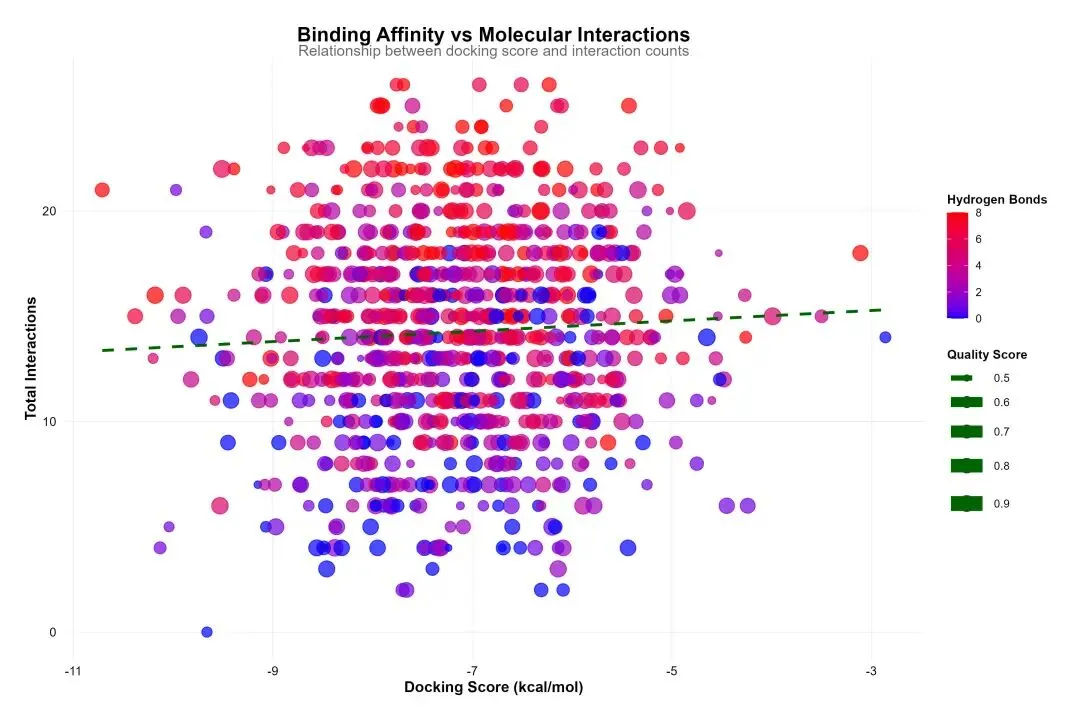
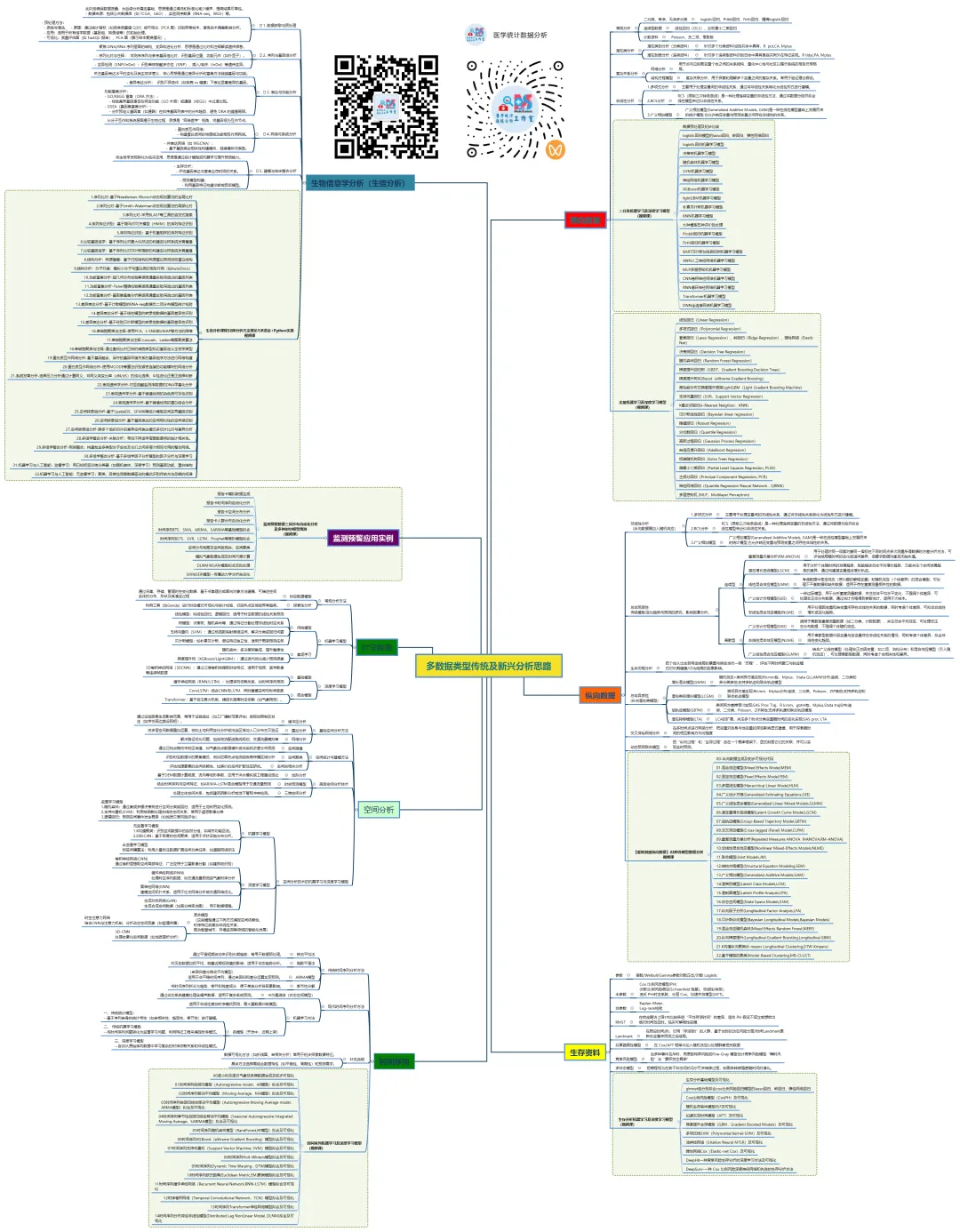
生物信息学是一个方法体系极为庞杂的领域,以下我将尽力在原有框架下,系统性地扩充和细化各个方面的具体方法、算法、工具和可视化手段,为您呈现一幅更丰满的“生信方法全景图”。
1.序列比对-基于Needleman-Wunsch动态规划算法的全局比对
2.序列比对-基于Smith-Waterman动态规划算法的局部比对
3.序列比对-采用BLAST等工具的启发式搜索
4.序列特征识别:基于隐马尔可夫模型(HMM)的序列特征识别
5.序列特征识别:基于权重矩阵的序列特征识别
6.比较基因组学:基于序列比对最大似然法的构建进化树系统发育重建
7.比较基因组学:基于序列比对贝叶斯推断的构建进化树系统发育重建
8.结构分析:同源建模:基于已知结构的同源蛋白预测目标蛋白结构
9.结构分析:分子对接:模拟小分子与蛋白质的相互作用(如AutoDock)
10.功能富集分析-超几何分布检验解读高通量实验筛选出的基因列表
11.功能富集分析-Fisher精确检验解读高通量实验筛选出的基因列表
12.功能富集分析-基因集富集分析解读高通量实验筛选出的基因列表
13.差异表达分析-基于计数模型的RNA-seq数据负二项分布模型统计检验
14.差异表达分析-基于线性模型的转录组数据的基因差异性识别
15.差异表达分析-基于经验贝叶斯模型的转录组数据的基因差异性识别
16.单细胞聚类与注释-使用PCA、t-SNE或UMAP等方法的降维
17.单细胞聚类与注释-Louvain、Leiden等图聚类算法
18.单细胞聚类与注释-通过查找比对已知的细胞类型标记基因定义生物学类型
19.蛋白质互作网络分析-基于基因融合、保守的基因邻接关系的基因组学方法进行网络构建
20.蛋白质互作网络分析-使用MCODE等算法识别紧密连接的功能模块的网络分析
21.系统发育分析-选择压力分析通过计算同义、非同义突变比率(dN/dS)的纯化选择、中性进化还是正选择判断
22.表观遗传学分析-对亚硫酸盐测序数据的DNA甲基化分析
23.表观遗传学分析-基于峰值检测的染色质可及性识别
24.表观遗传学分析-基于峰值检测的蛋白结合分析
25.空间转录组分析-基于SpatialDE、SPARK等统计模型空间变异基因识别
26.空间转录组分析-基于基因表达的空间相似性的空间域识别
27.空间转录组分析-跨多个组织切片的差异空间表达模式多切片比对与差异分析
28.多组学整合分析-关联分析:寻找不同组学层面数据间的统计相关性。
29.多组学整合分析-网络整合:构建包含多类型分子实体及它们之间多层次相互作用的整合网络。
30.多组学整合分析-基于多组学因子分析模型的因子分析与深度学习
31.机器学习与人工智能:监督学习:用已知标签训练分类器(如随机森林、深度学习)预测基因功能、蛋白结构
32.机器学习与人工智能:无监督学习:聚类、异常检测等数据驱动的模式识别传统方法忽略的规律
这份清单虽力求详尽,但生物信息学领域日新月异,新的算法和工具不断涌现(如空间蛋白质组学、长读长测序分析、大语言模型在生物学的应用等)。掌握这些方法的核心思想比记住所有工具名称更重要。在实际研究中,通常需要灵活组合多种方法,形成一条从原始数据到生物学发现的分析流水线。建议的学习路径是:先建立清晰的框架认知(如本回答),然后根据具体研究问题,深入钻研相关的一个或几个子领域。 希望这份扩展版的梳理能为您提供一张有价值的“导航地图”。
医学统计数据分析分享交流SPSS、R语言、Python、ArcGis、Geoda、GraphPad、数据分析图表制作等心得。承接数据分析,论文返修,医学统计,机器学习,生存分析,空间分析,问卷分析,生信分析业务。若有投稿和数据分析代做需求,可以直接联系我,谢谢!
“医学统计数据分析”公众号右下角;
找到“联系作者”,
可加我微信,邀请入粉丝群!

有临床流行病学数据分析
如(t检验、方差分析、χ2检验、logistic回归)、
(重复测量方差分析与配对T检验、ROC曲线)、
(非参数检验、生存分析、样本含量估计)、
(筛检试验:灵敏度、特异度、约登指数等计算)、
(绘制柱状图、散点图、小提琴图、列线图等)、
机器学习、深度学习、生存分析
等需求的同仁们,加入【临床】粉丝群。
疾控,公卫岗位的同仁,可以加一下【公卫】粉丝群,分享生态学研究、空间分析、时间序列、监测数据分析、时空面板技巧等工作科研自动化内容。
有实验室数据分析需求的同仁们,可以加入【生信】粉丝群,交流NCBI(基因序列)、UniProt(蛋白质)、KEGG(通路)、GEO(公共数据集)等公共数据库、基因组学转录组学蛋白组学代谢组学表型组学等数据分析和可视化内容。
或者可扫码直接加微信进群!!!




精品视频课程-“医学统计数据分析”视频号付费合集

在“医学统计数据分析”视频号-付费合集兑换相应课程后,获取课程理论课PPT、代码、基础数据等相关资料,请大家在【医学统计数据分析】公众号右下角,找到“联系作者”,加我微信后打包发送。感谢您的支持!!!
