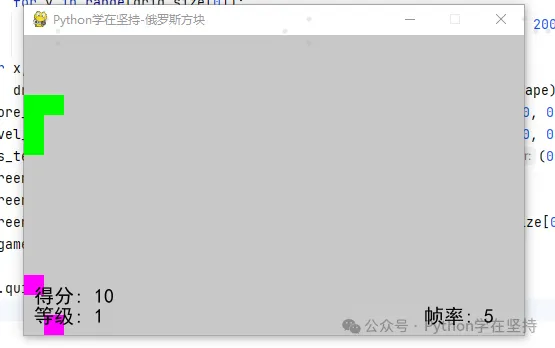
import pygameimport random# 游戏参数grid_size = (15, 25) # 宽 * 高block_size = 20 # 调小方块大小colors = [(255, 0, 0), (0, 255, 0), (0, 0, 255), (255, 255, 0), (0, 255, 255), (255, 0, 255), (255, 100, 0)]# 方块形状和颜色shapes = [ [[0, 0], [0, 1], [0, 2], [0, 3]], # 红色 [[0, 0], [0, 1], [0, 2], [1, 0]], # 绿色 [[0, 1], [0, 0], [0, 2], [1, 1]], # 蓝色 [[0, 2], [0, 1], [0, 0], [1, 2]], # 黄色 [[0, 0], [0, 1], [1, 0], [1, 1]], # 青色 [[0, 1], [0, 0], [1, 1], [1, 2]], # 紫色 [[0, 1], [0, 2], [1, 0], [1, 1]] # 橙色]# 游戏状态game_status = {"Ready": 0, "Gaming": 1, "GameOver": 2}def new_shape(): return random.choice(shapes)def draw_grid(screen, x, y, color): pygame.draw.rect(screen, color, (x * block_size, y * block_size, block_size, block_size))def check_collision(shape, grid, dx, dy): for x, y in shape: if x + dx < 0 or x + dx >= grid_size[1] or y + dy < 0 or y + dy >= grid_size[0] or grid[x + dx][y + dy]: return True return Falsedef remove_completed_lines(grid): lines_cleared = 0 for i in range(grid_size[0]): if all(grid[j][i] != 0 for j in range(grid_size[1])): for j in range(i, 0, -1): for k in range(grid_size[1]): grid[k][j] = grid[k][j - 1] grid[0] = [0] * grid_size[1] # 将顶部空出来作为新的空行 lines_cleared += 1 # 检查横向相邻方块是否可以消除 for i in range(grid_size[0]): for j in range(grid_size[1] - 1): if grid[j][i] != 0 and grid[j][i] == grid[j + 1][i]: grid[j][i] = 0 grid[j + 1][i] = 0 lines_cleared += 1 return lines_cleareddef main(): pygame.init() screen = pygame.display.set_mode((grid_size[1] * block_size, grid_size[0] * block_size)) pygame.display.set_caption("Python学在坚持-俄罗斯方块") clock = pygame.time.Clock() grid = [[0] * grid_size[0] for _ in range(grid_size[1])] current_shape = new_shape() next_shape = new_shape() dx, dy = 0, 0 score = 0 level = 1 game_over = False font = pygame.font.SysFont('SimHei', 20) frame_rate = 5 # 帧率初始值 frames_per_level = 5 # 每升一级增加的帧数 while not game_over: clock.tick(frame_rate) # 设置帧率 for event in pygame.event.get(): if event.type == pygame.QUIT: game_over = True elif event.type == pygame.KEYDOWN: if event.key == pygame.K_LEFT and not check_collision(current_shape, grid, dx - 1, dy): dx -= 1 elif event.key == pygame.K_RIGHT and not check_collision(current_shape, grid, dx + 1, dy): dx += 1 elif event.key == pygame.K_DOWN and not check_collision(current_shape, grid, dx, dy + 1): dy += 1 elif event.key == pygame.K_UP: rotated_shape = [(-y, x) for x, y in current_shape] if not check_collision(rotated_shape, grid, dx, dy): current_shape = rotated_shape if not check_collision(current_shape, grid, dx, dy + 1): dy += 1 else: for x, y in current_shape: grid[x + dx][y + dy] = shapes.index(current_shape) + 1 lines_cleared = remove_completed_lines(grid) if lines_cleared > 0: score += 10 * lines_cleared level = score // 100 + 1 # 每得100分升一级 # 等级提升时增加帧率 if level % frames_per_level == 0: frame_rate += 5 current_shape = next_shape next_shape = new_shape() dx, dy = 0, 0 if check_collision(current_shape, grid, dx, dy): # 当新方块无法放置时,游戏结束 game_over = True screen.fill((255, 255, 255)) for x in range(grid_size[1]): for y in range(grid_size[0]): color = colors[grid[x][y] - 1] if grid[x][y] != 0 else (200, 200, 200) draw_grid(screen, x, y, color) for x, y in current_shape: draw_grid(screen, x + dx, y + dy, colors[shapes.index(current_shape)]) score_text = font.render(f"得分: {score}", True, (0, 0, 0)) level_text = font.render(f"等级: {level}", True, (0, 0, 0)) fps_text = font.render(f"帧率: {frame_rate}", True, (0, 0, 0)) screen.blit(score_text, (10, grid_size[0] * block_size - 50)) screen.blit(level_text, (10, grid_size[0] * block_size - 30)) screen.blit(fps_text, (grid_size[1] * block_size - 100, grid_size[0] * block_size - 30)) pygame.display.flip() pygame.quit()if __name__ == '__main__': main()