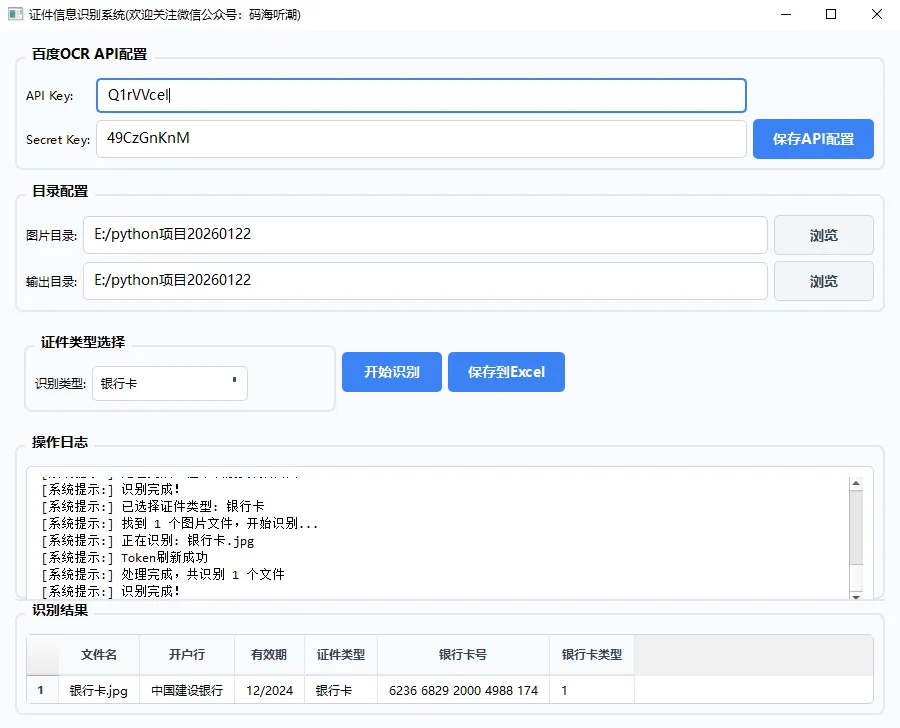
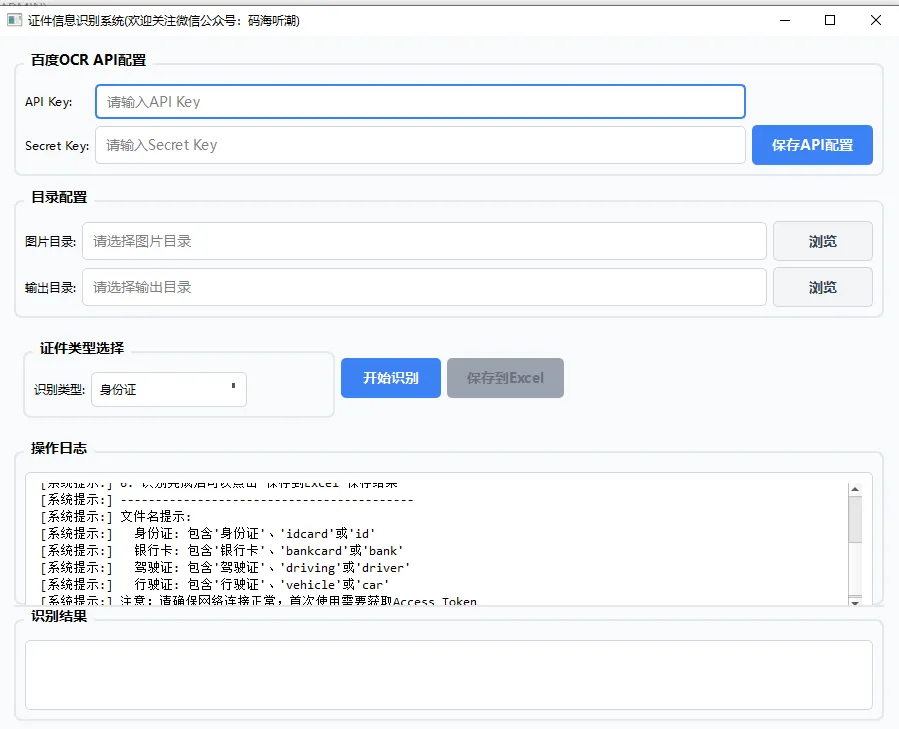
import osimport sysimport jsonfrom datetime import datetimefrom pathlib import Pathfrom typing import Dict, Listfrom PyQt6.QtWidgets import ( QApplication, QMainWindow, QWidget, QVBoxLayout, QHBoxLayout, QLabel, QLineEdit, QPushButton, QComboBox, QTextEdit, QGroupBox, QGridLayout, QFileDialog, QMessageBox, QFrame, QProgressBar, QTableWidget, QTableWidgetItem, QHeaderView, QSplitter)from PyQt6.QtCore import Qtfrom PyQt6.QtGui import QFont, QPalette, QColor, QTextCursor# 初始API配置DEFAULT_CONFIG = { "api_key": "", "secret_key": "", "image_dir_path": "", "output_dir_path": "", "selected_ocr_type": "idcard"}class StyledLineEdit(QLineEdit): """自定义样式输入框""" def __init__(self, placeholder="", parent=None): super().__init__(parent) self.setPlaceholderText(placeholder) self.setMinimumHeight(35) self.setStyleSheet(""" QLineEdit { border: 1px solid #d1d5db; border-radius: 5px; padding: 8px; background-color: white; font-size: 14px; } QLineEdit:focus { border: 2px solid #3b82f6; } QLineEdit:hover { border: 1px solid #9ca3af; } """)class StyledButton(QPushButton): """自定义样式按钮""" def __init__(self, text="", primary=False, parent=None): super().__init__(text, parent) self.setMinimumHeight(40) self.setMinimumWidth(100) self.setCursor(Qt.CursorShape.PointingHandCursor) if primary: self.setStyleSheet(""" QPushButton { background-color: #3b82f6; color: white; border: none; border-radius: 5px; padding: 10px 20px; font-weight: bold; font-size: 14px; } QPushButton:hover { background-color: #2563eb; } QPushButton:pressed { background-color: #1d4ed8; } QPushButton:disabled { background-color: #9ca3af; color: #6b7280; } """) else: self.setStyleSheet(""" QPushButton { background-color: #f3f4f6; color: #374151; border: 1px solid #d1d5db; border-radius: 5px; padding: 10px 20px; font-weight: bold; font-size: 14px; } QPushButton:hover { background-color: #e5e7eb; border-color: #9ca3af; } QPushButton:pressed { background-color: #d1d5db; } QPushButton:disabled { background-color: #f3f4f6; color: #9ca3af; border-color: #e5e7eb; } """)class StyledTextEdit(QTextEdit): """自定义样式文本编辑框""" def __init__(self, parent=None): super().__init__(parent) self.setReadOnly(True) self.setMinimumHeight(150) self.setStyleSheet(""" QTextEdit { border: 1px solid #d1d5db; border-radius: 5px; padding: 10px; background-color: white; font-family: 'Consolas', 'Monaco', monospace; font-size: 13px; } QTextEdit:focus { border: 2px solid #3b82f6; } """)class OCRMainWindow(QMainWindow): """主窗口""" def __init__(self): super().__init__() self.config_file = "ocr_config.json" self.config = DEFAULT_CONFIG.copy() self.all_results = {} self.setup_ui() self.load_config() self.setup_styles() self.show_initial_tips() def setup_ui(self): """设置界面""" self.setWindowTitle("证件信息识别系统(欢迎关注微信公众号:码海听潮)") self.setGeometry(100, 100, 900, 700) self.setMinimumSize(800, 600) # 中央部件 central_widget = QWidget() self.setCentralWidget(central_widget) # 主布局 main_layout = QVBoxLayout(central_widget) main_layout.setContentsMargins(15, 15, 15, 15) main_layout.setSpacing(12) # API配置区域 api_group = QGroupBox("百度OCR API配置") api_group.setStyleSheet(""" QGroupBox { font-weight: bold; font-size: 14px; border: 2px solid #e2e8f0; border-radius: 8px; margin-top: 12px; padding-top: 10px; } QGroupBox::title { subcontrol-origin: margin; left: 10px; padding: 0 5px 0 5px; } """) api_layout = QGridLayout(api_group) self.api_key_edit = StyledLineEdit("请输入API Key") self.api_key_edit.setText(self.config["api_key"]) api_layout.addWidget(QLabel("API Key:"), 0, 0) api_layout.addWidget(self.api_key_edit, 0, 1) self.secret_key_edit = StyledLineEdit("请输入Secret Key") self.secret_key_edit.setText(self.config["secret_key"]) api_layout.addWidget(QLabel("Secret Key:"), 1, 0) api_layout.addWidget(self.secret_key_edit, 1, 1) self.save_api_btn = StyledButton("保存API配置", primary=True) self.save_api_btn.clicked.connect(self.save_api_config) api_layout.addWidget(self.save_api_btn, 1, 2) main_layout.addWidget(api_group) # 目录配置区域 dir_group = QGroupBox("目录配置") dir_group.setStyleSheet(api_group.styleSheet()) dir_layout = QGridLayout(dir_group) self.image_dir_edit = StyledLineEdit("请选择图片目录") self.image_dir_edit.setText(self.config["image_dir_path"]) dir_layout.addWidget(QLabel("图片目录:"), 0, 0) dir_layout.addWidget(self.image_dir_edit, 0, 1) self.browse_image_btn = StyledButton("浏览") self.browse_image_btn.clicked.connect(self.browse_image_dir) dir_layout.addWidget(self.browse_image_btn, 0, 2) self.output_dir_edit = StyledLineEdit("请选择输出目录") self.output_dir_edit.setText(self.config["output_dir_path"]) dir_layout.addWidget(QLabel("输出目录:"), 1, 0) dir_layout.addWidget(self.output_dir_edit, 1, 1) self.browse_output_btn = StyledButton("浏览") self.browse_output_btn.clicked.connect(self.browse_output_dir) dir_layout.addWidget(self.browse_output_btn, 1, 2) main_layout.addWidget(dir_group) # 证件类型和操作区域 control_frame = QFrame() control_layout = QHBoxLayout(control_frame) type_group = QGroupBox("证件类型选择") type_group.setStyleSheet(api_group.styleSheet()) type_layout = QHBoxLayout(type_group) type_layout.addWidget(QLabel("识别类型:")) self.type_combo = QComboBox() self.type_combo.addItems(["身份证", "银行卡", "驾驶证", "行驶证"]) self.type_combo.setCurrentText(self.get_ocr_type_name(self.config["selected_ocr_type"])) self.type_combo.currentTextChanged.connect(self.update_ocr_type_config) self.type_combo.setMinimumHeight(35) self.type_combo.setStyleSheet(""" QComboBox { border: 1px solid #d1d5db; border-radius: 5px; padding: 8px; background-color: white; min-width: 120px; } QComboBox:hover { border-color: #9ca3af; } QComboBox::drop-down { border: none; } QComboBox::down-arrow { image: none; border-left: 5px solid transparent; border-right: 5px solid transparent; border-top: 5px solid #4b5563; margin-right: 10px; } """) type_layout.addWidget(self.type_combo) type_layout.addStretch() control_layout.addWidget(type_group) # 操作按钮 self.start_btn = StyledButton("开始识别", primary=True) self.start_btn.clicked.connect(self.start_processing) self.start_btn.setMinimumWidth(100) self.save_btn = StyledButton("保存到Excel", primary=True) self.save_btn.clicked.connect(self.save_to_excel) self.save_btn.setEnabled(False) self.save_btn.setMinimumWidth(100) control_layout.addWidget(self.start_btn) control_layout.addWidget(self.save_btn) control_layout.addStretch() main_layout.addWidget(control_frame) # 进度条 self.progress_bar = QProgressBar() self.progress_bar.setVisible(False) self.progress_bar.setStyleSheet(""" QProgressBar { border: 1px solid #d1d5db; border-radius: 5px; text-align: center; background-color: white; height: 25px; } QProgressBar::chunk { background-color: #3b82f6; border-radius: 5px; } """) main_layout.addWidget(self.progress_bar) # 创建分割器,包含日志和结果区域 splitter = QSplitter(Qt.Orientation.Vertical) splitter.setStyleSheet(""" QSplitter::handle { background-color: #e5e7eb; height: 2px; } """) # 日志区域 log_group = QGroupBox("操作日志") log_group.setStyleSheet(api_group.styleSheet()) log_layout = QVBoxLayout(log_group) self.log_text = StyledTextEdit() log_layout.addWidget(self.log_text) splitter.addWidget(log_group) # 结果表格区域 result_group = QGroupBox("识别结果") result_group.setStyleSheet(api_group.styleSheet()) result_layout = QVBoxLayout(result_group) self.result_table = QTableWidget() self.result_table.setStyleSheet(""" QTableWidget { border: 1px solid #d1d5db; border-radius: 5px; background-color: white; gridline-color: #e5e7eb; } QTableWidget::item { padding: 8px; border-bottom: 1px solid #f3f4f6; } QTableWidget::item:selected { background-color: #dbeafe; } QHeaderView::section { background-color: #f8fafc; padding: 10px; border: none; border-right: 1px solid #e5e7eb; border-bottom: 2px solid #e5e7eb; font-weight: bold; color: #374151; } """) self.result_table.horizontalHeader().setSectionResizeMode(QHeaderView.ResizeMode.Stretch) self.result_table.setAlternatingRowColors(True) result_layout.addWidget(self.result_table) splitter.addWidget(result_group) # 设置分割器比例 splitter.setSizes([350, 350]) main_layout.addWidget(splitter, 1) def setup_styles(self): """设置全局样式""" palette = self.palette() palette.setColor(QPalette.ColorRole.Window, QColor(249, 250, 251)) palette.setColor(QPalette.ColorRole.WindowText, QColor(31, 41, 55)) palette.setColor(QPalette.ColorRole.Base, QColor(255, 255, 255)) palette.setColor(QPalette.ColorRole.AlternateBase, QColor(248, 250, 252)) palette.setColor(QPalette.ColorRole.Text, QColor(31, 41, 55)) palette.setColor(QPalette.ColorRole.Button, QColor(59, 130, 246)) palette.setColor(QPalette.ColorRole.ButtonText, QColor(255, 255, 255)) self.setPalette(palette) # 设置字体 font = QFont("Microsoft YaHei", 9) self.setFont(font) def load_config(self): """加载配置文件""" try: if os.path.exists(self.config_file): with open(self.config_file, 'r', encoding='utf-8') as f: saved_config = json.load(f) self.config.update(saved_config) self.api_key_edit.setText(self.config["api_key"]) self.secret_key_edit.setText(self.config["secret_key"]) self.image_dir_edit.setText(self.config["image_dir_path"]) self.output_dir_edit.setText(self.config["output_dir_path"]) self.type_combo.setCurrentText( self.get_ocr_type_name(self.config["selected_ocr_type"]) ) except Exception as e: QMessageBox.critical(self, "配置错误", f"加载配置文件失败: {str(e)}") def save_config(self): """保存当前配置到文件""" try: with open(self.config_file, 'w', encoding='utf-8') as f: json.dump(self.config, f, indent=2, ensure_ascii=False) except Exception as e: QMessageBox.critical(self, "配置错误", f"保存配置文件失败: {str(e)}") def get_ocr_type_name(self, ocr_type: str) -> str: """获取证件类型显示名称""" names = { 'idcard': '身份证', 'bankcard': '银行卡', 'driving_license': '驾驶证', 'vehicle_license': '行驶证' } return names.get(ocr_type, '身份证') def get_ocr_type_code(self, name: str) -> str: """获取证件类型代码""" codes = { '身份证': 'idcard', '银行卡': 'bankcard', '驾驶证': 'driving_license', '行驶证': 'vehicle_license' } return codes.get(name, 'idcard') def save_api_config(self): """保存API配置""" self.config["api_key"] = self.api_key_edit.text() self.config["secret_key"] = self.secret_key_edit.text() self.save_config() self.log("API配置已保存") def browse_image_dir(self): """选择图片目录""" path = QFileDialog.getExistingDirectory( self, "选择图片目录", self.config["image_dir_path"] or str(Path.home()) ) if path: self.image_dir_edit.setText(path) self.config["image_dir_path"] = path self.save_config() self.log(f"已选择图片目录: {path}") def browse_output_dir(self): """选择输出目录""" path = QFileDialog.getExistingDirectory( self, "选择输出目录", self.config["output_dir_path"] or str(Path.home()) ) if path: self.output_dir_edit.setText(path) self.config["output_dir_path"] = path self.save_config() self.log(f"已选择输出目录: {path}") def update_ocr_type_config(self, name: str): """更新OCR类型配置""" ocr_type = self.get_ocr_type_code(name) if self.config["selected_ocr_type"] != ocr_type: self.config["selected_ocr_type"] = ocr_type self.save_config() self.log(f"已选择证件类型: {name}") def log(self, message: str): """记录日志信息""" self.log_text.append(f"[系统提示:] {message}") self.log_text.moveCursor(QTextCursor.MoveOperation.End) def show_initial_tips(self): """显示初始操作提示""" tips = [ "操作提示:", "1. 请先设置百度OCR的API Key和Secret Key", "2. 选择包含证件图片的目录", "3. 选择结果输出目录", "4. 选择要识别的证件类型(身份证/银行卡/驾驶证/行驶证)", "5. 点击'开始识别'进行识别", "6. 识别完成后可以点击'保存到Excel'保存结果", "------------------------------------------", "文件名提示:", " 身份证: 包含'身份证'、'idcard'或'id'", " 银行卡: 包含'银行卡'、'bankcard'或'bank'", " 驾驶证: 包含'驾驶证'、'driving'或'driver'", " 行驶证: 包含'行驶证'、'vehicle'或'car'", "注意:请确保网络连接正常,首次使用需要获取Access Token" ] for tip in tips: self.log(tip) def start_processing(self): """开始处理""" if not self.config["api_key"] or not self.config["secret_key"]: QMessageBox.warning(self, "警告", "请先设置百度OCR的API Key和Secret Key!") return if not self.config["image_dir_path"]: QMessageBox.warning(self, "警告", "请先选择图片目录!") return # 更新配置 self.config["image_dir_path"] = self.image_dir_edit.text() self.config["output_dir_path"] = self.output_dir_edit.text() self.save_config() # 禁用按钮,显示进度条 self.start_btn.setEnabled(False) self.save_btn.setEnabled(False) self.progress_bar.setVisible(True) self.progress_bar.setValue(0) # 清空结果 self.all_results = {} self.result_table.clear() self.log("开始识别功能需要OCR工作线程支持") # 模拟处理完成 self.on_processing_finished({}) def update_progress(self, current: int, total: int, filename: str): """更新进度条""" progress = int((current / total) * 100) if total > 0 else 0 self.progress_bar.setValue(progress) self.progress_bar.setFormat(f"{current}/{total} - {filename}") def on_processing_finished(self, results: dict): """处理完成""" self.all_results = results self.start_btn.setEnabled(True) self.save_btn.setEnabled(bool(results)) self.progress_bar.setVisible(False) if results: self.display_results(results) self.log(f"处理完成,共识别 {len(results)} 个文件") else: self.log("处理完成,但未识别到有效结果") def on_processing_error(self, error_msg: str): """处理错误""" self.start_btn.setEnabled(True) self.progress_bar.setVisible(False) QMessageBox.critical(self, "错误", error_msg) def display_results(self, results: dict): """显示识别结果到表格""" if not results: return # 收集所有可能的字段 all_fields = set() for result in results.values(): all_fields.update(result.keys()) all_fields = sorted(all_fields) # 设置表格 self.result_table.setRowCount(len(results)) self.result_table.setColumnCount(len(all_fields) + 1) # 加一列用于文件名 headers = ["文件名"] + list(all_fields) self.result_table.setHorizontalHeaderLabels(headers) # 填充数据 for row, (filename, result) in enumerate(results.items()): # 文件名列 self.result_table.setItem(row, 0, QTableWidgetItem(filename)) # 其他字段 for col, field in enumerate(all_fields, 1): value = result.get(field, "") item = QTableWidgetItem(str(value)) self.result_table.setItem(row, col, item) # 调整列宽 self.result_table.resizeColumnsToContents() def save_to_excel(self): """保存结果到Excel""" if not self.all_results: QMessageBox.warning(self, "警告", "没有可保存的结果!") return if not self.config["output_dir_path"]: QMessageBox.warning(self, "警告", "请先选择输出目录!") return try: self.log("保存到Excel功能需要openpyxl支持") QMessageBox.information(self, "提示", "保存到Excel功能需要安装openpyxl库") except Exception as e: self.log(f"保存Excel失败: {str(e)}") QMessageBox.critical(self, "错误", f"保存Excel失败:\n{str(e)}")def main(): """主函数""" app = QApplication(sys.argv) app.setStyle("Fusion") window = OCRMainWindow() window.show() sys.exit(app.exec())if __name__ == "__main__": main()






 10个月宝宝每天需要喝多少奶粉?