1. 创始时间与作者
2. 官方资源
Python 文档地址:https://docs.python.org/3/library/io.html
源代码位置:https://github.com/python/cpython/blob/main/Lib/io.py
Python 官方网站:https://www.python.org/
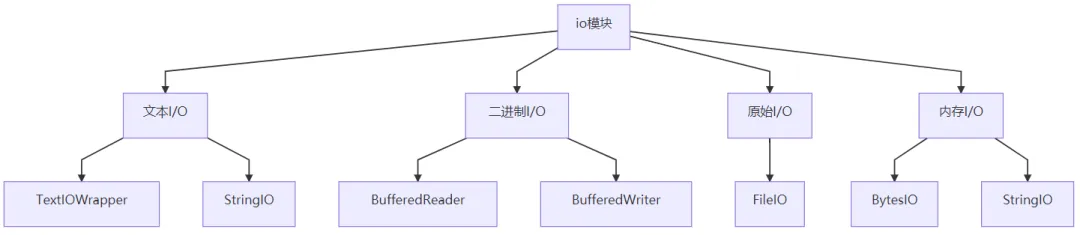
3. 核心功能
4. 应用场景
1. 文本文件读写
import io# 写入文本文件with io.open('example.txt', 'w', encoding='utf-8') as f:f.write('Hello, World!\n')f.write('这是第二行\n')f.write('Third line with emoji 😊\n')# 读取文本文件with io.open('example.txt', 'r', encoding='utf-8') as f:content = f.read()print("文件内容:")print(content)# 逐行读取with io.open('example.txt', 'r', encoding='utf-8') as f:print("\n逐行读取:")for i, line in enumerate(f, 1):print(f"行 {i}: {line.strip()}")2. 二进制文件操作
import io# 写入二进制数据binary_data = b'\x48\x65\x6c\x6c\x6f\x20\x57\x6f\x72\x6c\x64'# "Hello World" in byteswith io.open('binary_data.bin', 'wb') as f:f.write(binary_data)# 读取二进制文件with io.open('binary_data.bin', 'rb') as f:data = f.read()print(f"二进制数据: {data}")print(f"转换为文本: {data.decode('utf-8')}")# 使用缓冲读写提高性能with io.open('large_file.bin', 'rb', buffering=8192) as f:chunk = f.read(1024) # 读取1KB块while chunk:process_chunk(chunk)chunk = f.read(1024)3. 内存流操作
import io# 使用 StringIO 进行内存文本操作text_stream = io.StringIO()text_stream.write("第一行文本\n")text_stream.write("第二行文本\n")text_stream.write("第三行文本\n")# 获取写入的内容print("StringIO 内容:")text_stream.seek(0) # 回到开头print(text_stream.read())# 使用 BytesIO 进行内存二进制操作binary_stream = io.BytesIO()binary_stream.write(b'Binary data: ')binary_stream.write(b'\x01\x02\x03\x04\x05')print("\nBytesIO 内容:")binary_stream.seek(0)print(binary_stream.read())# 从字符串创建 StringIOexisting_text = "已有文本\n更多内容"text_stream = io.StringIO(existing_text)print(f"\n从现有文本创建: {text_stream.read()}")4. 高级 I/O 操作
import ioclass CustomTextWrapper(io.TextIOWrapper):"""自定义文本包装器,添加行号"""def readline(self, size=-1):line = super().readline(size)if line:return f"{self._line_number}: {line}"return linedef __init__(self, *args, **kwargs):super().__init__(*args, **kwargs)self._line_number = 1# 使用自定义包装器with open('example.txt', 'rb') as binary_file:with CustomTextWrapper(binary_file, encoding='utf-8') as text_file:for line in text_file:print(line.strip())# 缓冲读写操作def efficient_copy(source_path, dest_path, buffer_size=8192):"""高效文件复制"""with io.open(source_path, 'rb') as source:with io.open(dest_path, 'wb') as dest:while True:chunk = source.read(buffer_size)if not chunk:breakdest.write(chunk)print(f"文件复制完成: {source_path} -> {dest_path}")# 使用示例efficient_copy('example.txt', 'example_copy.txt')
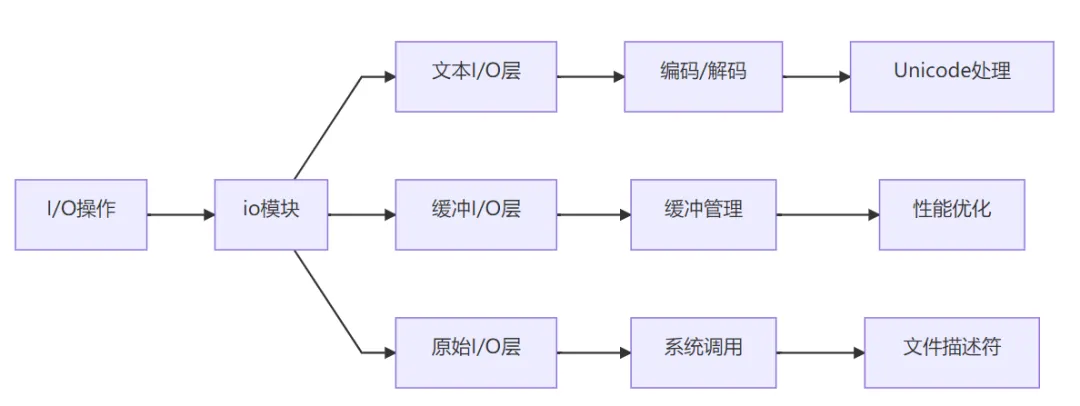
5. 底层逻辑与技术原理
核心架构
关键技术
I/O 层次结构:
缓冲机制:
使用内存缓冲区减少系统调用次数
支持全缓冲、行缓冲和无缓冲模式
自动刷新和手动刷新控制
编码处理:
自动处理文本编码和解码
支持错误处理和编码检测
Unicode 规范化处理
流接口:
统一的读写接口
支持随机访问和顺序访问
上下文管理器支持
6. 安装与配置
安装说明
# io 是 Python 标准库的一部分,无需单独安装# 从 Python 2.6+ 开始内置支持# 检查 Python 版本python --version# 导入测试python -c"import io; print('io 模块可用')"版本兼容性
| Python 版本 | io 功能支持 |
|---|
| 2.6+ | 基本 I/O 功能 |
| 3.0+ | 改进的 Unicode 支持 |
| 3.1+ | io.open() 函数 |
| 3.2+ | 性能改进和新特性 |
| 3.7+ | 新的文本模式特性 |
依赖关系
必需依赖:无(Python 标准库组件)
系统依赖:
环境要求
| 组件 | 最低要求 | 推荐配置 |
|---|
| Python | 2.6+ | 3.8+ |
| 内存 | 取决于文件大小和缓冲设置 | 充足内存处理大文件 |
| 文件系统 | 支持标准文件操作 | 快速 SSD 存储 |
7. 性能特点
| I/O 类型 | 性能 | 内存使用 | 适用场景 |
|---|
| 原始 I/O | 高 | 低 | 大文件、二进制数据 |
| 缓冲 I/O | 非常高 | 中等 | 大多数文件操作 |
| 文本 I/O | 高 | 中等 | 文本文件处理 |
| 内存 I/O | 极高 | 取决于数据大小 | 临时数据处理 |
注:性能特征基于典型使用场景,实际性能受硬件和操作系统影响
8. 高级功能使用
1. 自定义 I/O 类
import ioimport timeclass TimedFileWrapper(io.TextIOWrapper):"""带计时功能的文件包装器"""def __init__(self, *args, **kwargs):super().__init__(*args, **kwargs)self._operation_count = 0self._total_time = 0.0def read(self, size=-1):start_time = time.time()result = super().read(size)self._record_operation(time.time() -start_time)return resultdef write(self, text):start_time = time.time()result = super().write(text)self._record_operation(time.time() -start_time)return resultdef _record_operation(self, duration):self._operation_count += 1self._total_time += durationdef get_stats(self):return {'operations': self._operation_count,'total_time': self._total_time,'avg_time': self._total_time/self._operation_count if self._operation_count else 0 }# 使用示例with open('test_file.txt', 'w+b') asraw_file:with TimedFileWrapper(raw_file, encoding='utf-8') as timed_file:timed_file.write("测试文本\n"*1000)timed_file.seek(0)content = timed_file.read()stats = timed_file.get_stats()print(f"操作统计: {stats}")2. 流处理和管道
import ioimport gzipimport jsondef create_processing_pipeline():"""创建数据处理管道"""# 模拟数据处理函数def compress_data(data):"""压缩数据"""bio = io.BytesIO()with gzip.GzipFile(fileobj=bio, mode='wb') as gz:if isinstance(data, str):data = data.encode('utf-8')gz.write(data)return bio.getvalue()def decompress_data(data):"""解压数据"""bio = io.BytesIO(data)with gzip.GzipFile(fileobj=bio, mode='rb') as gz:return gz.read().decode('utf-8')def process_json_data(data_str):"""处理 JSON 数据"""data = json.loads(data_str)# 添加处理时间戳data['processed_at'] = time.time()return json.dumps(data, ensure_ascii=False)return compress_data, decompress_data, process_json_data# 使用管道compress, decompress, process_json = create_processing_pipeline()# 原始数据original_data = {'name': 'Alice', 'age': 30, 'city': 'Beijing'}json_str = json.dumps(original_data)# 通过管道处理compressed = compress(json_str)processed_compressed = compress(process_json(json_str))print(f"原始大小: {len(json_str)} 字节")print(f"压缩后大小: {len(compressed)} 字节")print(f"处理并压缩后大小: {len(processed_compressed)} 字节")# 解压验证decompressed = decompress(processed_compressed)print(f"解压后数据: {decompressed}")3. 高级缓冲策略
import ioimport threadingclass ThreadSafeBuffer(io.BytesIO):"""线程安全的缓冲区"""def __init__(self, *args, **kwargs):super().__init__(*args, **kwargs)self._lock = threading.RLock()def read(self, size=-1):with self._lock:return super().read(size)def write(self, data):with self._lock:return super().write(data)def seek(self, pos, whence=io.SEEK_SET):with self._lock:return super().seek(pos, whence)def tell(self):with self._lock:return super().tell()class SmartBuffer(io.BufferedRandom):"""智能缓冲区,根据访问模式优化"""def __init__(self, raw, buffer_size=io.DEFAULT_BUFFER_SIZE):super().__init__(raw, buffer_size)self._read_pattern = []self._write_pattern = []def read(self, size=-1):start_pos = self.tell()data = super().read(size)end_pos = self.tell()# 记录读取模式self._read_pattern.append((start_pos, end_pos-start_pos))return datadef write(self, data):start_pos = self.tell()result = super().write(data)end_pos = self.tell()# 记录写入模式self._write_pattern.append((start_pos, len(data)))return resultdef get_access_patterns(self):"""获取访问模式分析"""return {'read_patterns': self._read_pattern,'write_patterns': self._write_pattern,'total_reads': len(self._read_pattern),'total_writes': len(self._write_pattern) }# 使用示例def demonstrate_smart_buffer():bio = io.BytesIO(b'0'*1024) # 1KB 初始数据smart_buf = SmartBuffer(bio)# 模拟一些操作smart_buf.write(b'Hello')smart_buf.seek(0)data = smart_buf.read(10)smart_buf.write(b'World')smart_buf.seek(5)data = smart_buf.read(5)patterns = smart_buf.get_access_patterns()print("访问模式分析:")for key, value in patterns.items():print(f" {key}: {value}")demonstrate_smart_buffer()4. I/O 监控和调试
import ioimport functoolsdef monitor_io_operations(stream):"""监控 I/O 操作的装饰器"""class MonitoredStream:def __init__(self, wrapped):self._wrapped = wrappedself.operations = []def __getattr__(self, name):returngetattr(self._wrapped, name)def _record_operation(self, op_name, args, kwargs, result):self.operations.append({'operation': op_name,'args': args,'kwargs': kwargs,'result': result,'timestamp': time.time() })def read(self, size=-1):result = self._wrapped.read(size)self._record_operation('read', (size,), {}, result)return resultdef write(self, data):result = self._wrapped.write(data)self._record_operation('write', (data,), {}, result)return resultdef seek(self, pos, whence=io.SEEK_SET):result = self._wrapped.seek(pos, whence)self._record_operation('seek', (pos, whence), {}, result)return resultdef get_operations_report(self):"""获取操作报告"""report = {'total_operations': len(self.operations),'read_operations': len([opforopinself.operationsifop['operation'] == 'read']),'write_operations': len([opforopinself.operationsifop['operation'] == 'write']),'seek_operations': len([opforopinself.operationsifop['operation'] == 'seek']),'operations': self.operations }return reportreturn MonitoredStream(stream)# 使用示例def demonstrate_io_monitoring():# 创建被监控的流original_stream = io.BytesIO()monitored_stream = monitor_io_operations(original_stream)# 执行一些操作monitored_stream.write(b'Hello, ')monitored_stream.write(b'World!')monitored_stream.seek(0)data = monitored_stream.read()monitored_stream.seek(7)partial_data = monitored_stream.read(5)# 获取监控报告report = monitored_stream.get_operations_report()print("I/O 操作监控报告:")print(f"总操作数: {report['total_operations']}")print(f"读取操作: {report['read_operations']}")print(f"写入操作: {report['write_operations']}")print(f"定位操作: {report['seek_operations']}")print("\n详细操作记录:")for i, op in enumerate(report['operations']):print(f" {i+1}. {op['operation']}: {op['args']} -> {op['result']}")demonstrate_io_monitoring()
9. 与相关工具对比
| 特性 | io 模块 | 内置 open() | 第三方 I/O 库 | 低级 os I/O |
|---|
| 统一性 | ⭐⭐⭐⭐⭐ | ⭐⭐⭐⭐ | ⭐⭐ | ⭐ |
| 功能丰富度 | ⭐⭐⭐⭐ | ⭐⭐⭐ | ⭐⭐⭐⭐⭐ | ⭐⭐ |
| 性能 | ⭐⭐⭐⭐ | ⭐⭐⭐⭐ | ⭐⭐⭐ | ⭐⭐⭐⭐⭐ |
| 易用性 | ⭐⭐⭐⭐ | ⭐⭐⭐⭐⭐ | ⭐⭐ | ⭐ |
| 扩展性 | ⭐⭐⭐⭐ | ⭐⭐ | ⭐⭐⭐⭐⭐ | ⭐⭐⭐ |
| 标准库 | ✅ | ✅ | ❌ | ✅ |
10. 最佳实践案例
大文件处理:
import iodef process_large_file(file_path, chunk_size=8192):"""处理大文件,内存高效"""with io.open(file_path, 'rb', buffering=chunk_size) as f:while True:chunk = f.read(chunk_size)if not chunk:break# 处理每个块yield process_chunk(chunk)def process_chunk(chunk):"""处理数据块"""# 模拟处理逻辑return len(chunk)# 使用示例for chunk_size in process_large_file('large_file.dat'):print(f"处理了 {chunk_size} 字节")数据格式转换:
import ioimport csvimport jsondef csv_to_json(csv_file_path, json_file_path):"""CSV 转 JSON 格式"""with io.open(csv_file_path, 'r', encoding='utf-8') as csv_file:# 读取 CSVreader = csv.DictReader(csv_file)data = list(reader)with io.open(json_file_path, 'w', encoding='utf-8') as json_file:# 写入 JSONjson.dump(data, json_file, ensure_ascii=False, indent=2)def json_to_csv(json_file_path, csv_file_path):"""JSON 转 CSV 格式"""with io.open(json_file_path, 'r', encoding='utf-8') as json_file:data = json.load(json_file)if data:with io.open(csv_file_path, 'w', encoding='utf-8', newline='') as csv_file:writer = csv.DictWriter(csv_file, fieldnames=data[0].keys())writer.writeheader()writer.writerows(data)
网络数据流处理:
import ioimport requestsdef stream_download(url, output_path, chunk_size=8192):"""流式下载大文件"""response = requests.get(url, stream=True)response.raise_for_status()with io.open(output_path, 'wb') as f:for chunk in response.iter_content(chunk_size=chunk_size):if chunk:f.write(chunk)def process_streaming_data(stream_url, processor):"""处理流式数据"""response = requests.get(stream_url, stream=True)# 使用 StringIO 或 BytesIO 作为缓冲区buffer = io.BytesIO()for chunk in response.iter_content(chunk_size=1024):if chunk:buffer.write(chunk)# 检查是否完成一个完整的数据单元if b'\n' in chunk:buffer.seek(0)data = buffer.read().decode('utf-8')for line in data.split('\n'):if line.strip():processor(line.strip())buffer = io.BytesIO()配置管理系统:
import ioimport configparserclass ConfigManager:"""配置管理器,支持内存和文件配置"""def __init__(self):self.config = configparser.ConfigParser()self.in_memory_config = io.StringIO()def load_from_file(self, file_path):"""从文件加载配置"""with io.open(file_path, 'r', encoding='utf-8') as f:self.config.read_file(f)def load_from_string(self, config_text):"""从字符串加载配置"""self.in_memory_config = io.StringIO(config_text)self.in_memory_config.seek(0)self.config.read_file(self.in_memory_config)def save_to_file(self, file_path):"""保存配置到文件"""with io.open(file_path, 'w', encoding='utf-8') as f:self.config.write(f)def get_in_memory_config(self):"""获取内存中的配置文本"""self.in_memory_config.seek(0)return self.in_memory_config.read()
总结
io 是 Python 输入输出的核心模块,核心价值在于:
统一接口:提供一致的 I/O 操作接口
性能优化:通过缓冲机制提高 I/O 性能
编码支持:自动处理文本编码和解码
内存效率:支持流式处理,减少内存占用
技术亮点:
分层的 I/O 架构设计
智能缓冲和性能优化
完整的 Unicode 支持
可扩展的流接口
适用场景:
文件读写和数据处理
内存中的临时数据操作
网络流和数据管道
大文件处理和流式处理
数据格式转换和序列化
使用方式:
import io# Python 标准库,无需安装
学习资源:
官方文档:https://docs.python.org/3/library/io.html
I/O 编程指南:Python I/O 教程,https://docs.python.org/3/tutorial/inputoutput.html
高级用法:Real Python File I/O,https://realpython.com/read-write-files-python/
作为 Python 标准库的一部分,io 模块是现代 Python I/O 操作的基础,遵循 Python 软件基金会许可证,可免费用于任何 Python 项目。



 10个月宝宝每天需要喝多少奶粉?