当前位置:首页>java>读懂 PyTorch 代码所必需的最少 Python

读懂 PyTorch 代码所必需的最少 Python

  • 2026-02-05 00:41:30
读懂 PyTorch 代码所必需的最少 Python

如果你还未搭建好如果你还未搭建好工作环境,可以参考这篇文章:

从零开始,在 Windows 上搭建你的第一个 AI + Python 工作环境

00

文章脉络

读懂 PyTorch 代码所必需的最少 Python ├── 接近自然语言的编程语言 ├── 读懂代码的最小语法单位 │   ├── 缩进 │   ├── 注释 │   ├── import │   ├── 变量和赋值 │   └── print ├── 控制代码流程的基本结构 │   ├── for 循环 │   └── if 条件 └── 组织与抽象代码的核心机制   ├── 函数 def   ├── 类 class   └── with

01

接近自然语言的编程语言

`Python` 核心开发者 `Tim Peters` 曾对 `Python` 语言的设计哲学进行总结:

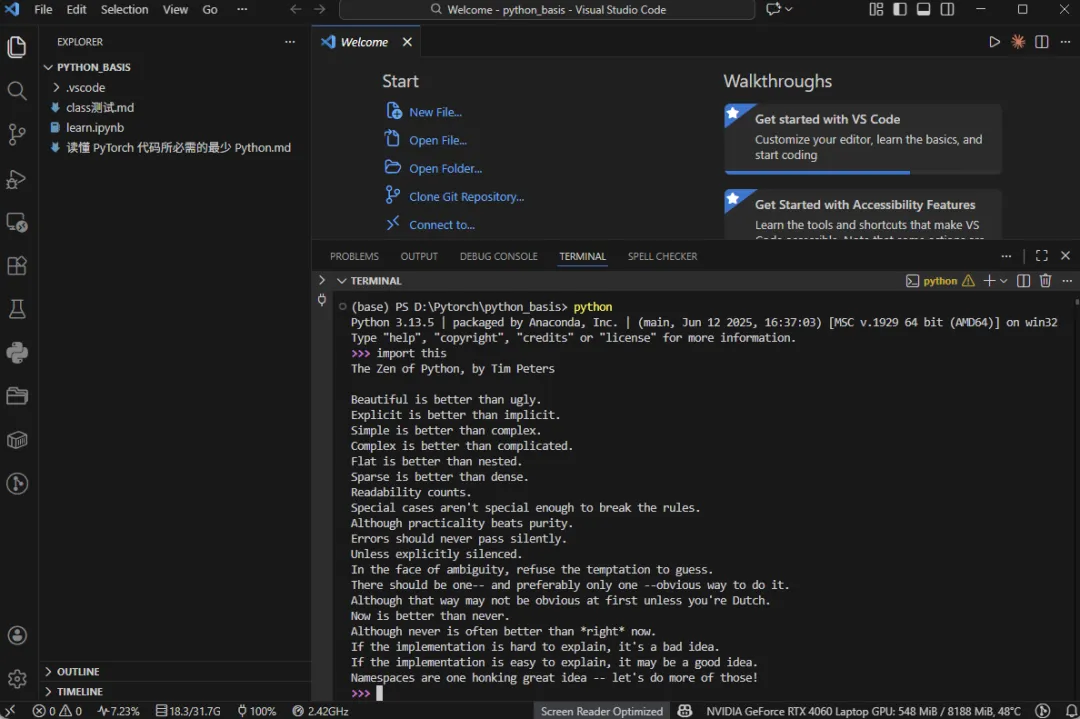
打开你的 `VS Code` ,打开终端,输入 `python` ,进入一个可以直接与 `Python` 对话的环境,

接着,输入 `import this` ,你就会看到《The Zen of Python》(Python 之禅)

The Zen of Python, by Tim Peters

Beautiful is better than ugly.

Explicit is better than implicit.

Simple is better than complex.

Complex is better than complicated.

Flat is better than nested.

Sparse is better than dense.

Readability counts.

Special cases aren't special enough to break the rules.

Although practicality beats purity.

Errors should never pass silently.

Unless explicitly silenced.

In the face of ambiguity, refuse the temptation to guess.

There should be one-- and preferably only one --obvious way to do it.

Although that way may not be obvious at first unless you're Dutch.

Now is better than never.

Although never is often better than *right* now.

If the implementation is hard to explain, it's a bad idea.

If the implementation is easy to explain, it may be a good idea.

Namespaces are one honking great idea -- let's do more of those!

简洁、清晰、明确、可读、优雅,是 Python 一直追求的风格。

这也使得 Python 非常接近自然语言,学习门槛较低。

大量复杂的实现已经被 PyTorch 封装好了,初学者只需要理解少量核心代码,就可以看懂并运行一个完整的模型。  

再加上 AI 工具的辅助,即使遇到不熟悉的语法,也可以随时查清楚其含义。

但要真正读懂这些代码,仍然需要对其中反复出现的基础语法有基本认识。

因此,在入门 PyTorch 时,并不需要系统地学习大量 Python 语法。  

相反,只需掌握少量、但高频且关键的 Python 基础,就足以看懂并理解大部分 PyTorch 代码。

本介绍正是围绕这些内容展开。

02

读懂代码的最小语法单位

i

缩进

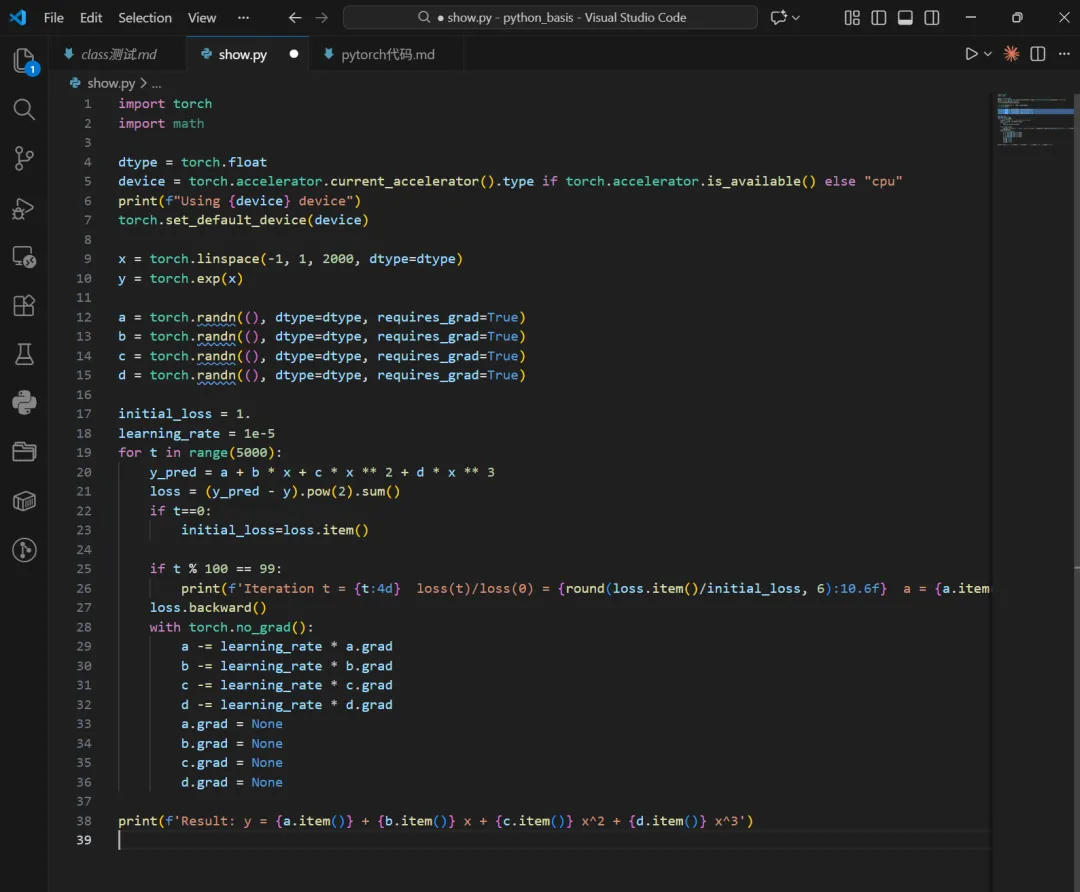
初学者第一次看到 `Python` 代码,往往会看到类似这样的电脑界面:

会发现并不是所有代码的开头都在同一列,有的在前,有的在后,看起来很整齐、也很有规律。  

这并不仅仅是为了好看,而是因为在 Python 中,缩进本身就是语法的一部分。

缩进不像 `if` `for` 那样有复杂的语法形式,

它只是告诉你一点:哪些代码是属于同一个层级的

比如:

if x > 0:  print("positive")  print("done")

这里的两个 `print` 处在同一个缩进层级中,  

它们都属于 `if x > 0:` 这个条件之下,  

而 `if` 本身则处在更外面的一层。

再看一个稍微复杂一点的例子:

scores = [85, 42, 90, 66]print("start program")           # 第 0 层:整个程序for score in scores:    print("check score:", score) # 第 1 层:for 循环    if score >= 60:        print(score, "pass")     # 第 2 层:if 条件    else:        print(score, "fail")     # 第 2 层:elseprint("end program")             # 第 0 层:程序结束

可以看到,一共有三个主要的层级,  

并且每一层都对应着不同位置的 `print`。

缩进在这里体现的是代码之间的逻辑关系。  

如果没有缩进,Python 就无法判断哪些代码属于哪一部分,  

程序也就无法正确理解你想表达的逻辑。

现在如果还不能完全理解缩进的含义,也不用着急。  

只需要记住:缩进是语法的一部分,用来表示代码的层级关系。

具体它的作用,会在后面的各种语法中慢慢体会到。

ii

注释

注释,不是 `Python` 语法的一部分,不会影响代码的执行,而是写给人看的

既是我们对自己代码的解释,也是阅读其他人代码,了解他人代码逻辑的关键

注释语法非常简单,只需在所需注释文字前面加上 `#`,比如这样

for t inrange(2000):  # To apply our Function, we use Function.apply method. We alias this as 'P3'.  P3 = LegendrePolynomial3.apply  # Forward pass: compute predicted y using operations; we compute  # P3 using our custom autograd operation.  y_pred = a + b * P3(c + d * x)  # Compute and print loss  loss = (y_pred - y).pow(2).sum()  if t % 100 == 99:    print(t, loss.item())  # Use autograd to compute the backward pass.  loss.backward()  # Update weights using gradient descent  with torch.no_grad():    a -= learning_rate * a.grad    b -= learning_rate * b.grad    c -= learning_rate * c.grad    d -= learning_rate * d.grad    # Manually zero the gradients after updating weights    a.grad = None    b.grad = None    c.grad = None    d.grad = Noneprint(f'Result: y = {a.item()} + {b.item()} * P3({c.item()} + {d.item()} x)')

不需要看懂这些代码是什么意思,

只需要知道 # 符号后面的文字并不会影响代码运行,

完全是写给人看的。

iii

import

import 是什么?import 是 Python 中用于引入已有代码的关键字。

import 的字面意思是引入,

它的作用是:将已经存在的代码引入到当前程序中,以便可以直接使用。

这些已经存在的代码,叫做库(Library)。

库是什么?

根据来源不同,Python 的库可以分为两类:

- 标准库(Python 自带)

- 第三方库(需要额外安装)

标准库比如有:

import mathimport osimport time

这些库在安装 Python 时已经包含在内,

即使你没有安装这些库,输入这些代码,也不会出现错误信息。

第三方库比如:

import requestsimport numpyimport pandas

输入这些代码的时候,如果你没有事先安装的话,就会报出错误信息。

使用 pip 安装第三方库

`Python` 中通常使用 `pip` 来安装第三方库

在命令行中执行以下命令:

pip install numpy

安装完成之后,import这个库时就不会再出现报错信息了。

补充:

除了 `pip` ,`conda` 也可以安装第三方库,

不同的是,conda 不仅可以管理第三方库,还可以管理 Python 环境。

其语法如下:

conda install numpy

如果你是按照篇首给出的文章链接搭建工作环境,已经安装miniconda,

并且创建了虚拟环境,使用虚拟环境管理自己的 Python 项目

建议在虚拟环境内,优先使用 conda 安装第三方库,

如果 conda 安装不了,再使用 pip 进行安装

import 的两种写法

第一种:直接 import 模块

import torch

这是第一种写法,意思是

把`torch`这个“大工具箱”准备好,使用时需要写`torch`来取用工具

比如这样使用:

torch.tensor([1,2,3])

从`torch`中拿出一个名为`tensor`的工具,并使用。

第二种:from ... import ...

from torch import nn

这是第二种写法,意思是

从`torch`这个工具箱中,只拿其中的一个小工具箱`nn`,

使用时,直接使用,不需要指明来自`torch`

例如:

nn.Linear(105)

而不是:

torch.nn.Linear(105)

当只需要模块中的某一部分时,这种写法更简洁。

iv

变量和赋值

为什么需要变量?

在程序中,我们经常需要反复使用某个值,

或者在程序运行过程中不断修改某个值。

如果每次都直接写具体的数值的话,

代码会变得难以修改,也不好理解,

这时候就会需要变量

什么是变量?

这行代码中,`x` 就是一个变量

这里的 `=` 不是”相等“的意思,而是”赋值“的意思

可以理解为:

把右边的值,交给左边的名字

看一个稍微复杂一点的例子

a = 10b = a

第一行代码表示:  

把 `10` 赋值给 `a`,此时 `a` 代表的值是 `10`。

第二行代码表示:  

先读取 `a` 当前代表的值,  

再把这个值赋值给变量 `b`,  

因此 `b` 代表的值也是 `10`。

此时,程序中存在的状态是:

a = 10b = 10

如果我进一步写:

a = 20

那么会得到什么结果呢?

结果是:

a = 20b = 10

这是因为变量的值是可以改变的。  

当我给 `a` 重新赋值为 `20` 后,`a` 代表的值发生了变化,

但是并没有再次给 b 赋值,所以 b 仍然是 10

v

print

基础用法

print("Hello,World!")

最基础的用法就是输出打印结果到终端,

如果打印的内容是字符串(就像例子一样),必需放在引号之间(单引号也可以)

如果打印的内容仅仅是数值,不需要加引号

print(3.14)

实际用途

`print` 的实际用途,并不仅仅是”打印给用户看“,而是:

- 观察程序当前的状态

- 验证变量的值是否符合预期

- 排查程序哪里出现问题

有时候,我们只是想知道,

程序运行到这里时,变量现在是什么值?

a = 10b = 5a = a + bprint(a)

运行结果是:

15

通过 `print(a)`,我们可以看到:  

在这一行代码执行之后,`a` 当前的值是 `15`。

这可以帮助我们观察程序在某一步时的状态

有时候,我们对结果有一个预期,  

而 `print` 可以用来验证这个预期是否正确。

price = 100discount = 20final_price = price - discountprint(final_price)

如果我们预期最终价格是 `80`,  

那么当终端输出:

80

就说明程序的计算结果是正确的。

如果输出结果和预期不一致,  

就说明代码中可能存在问题,需要进一步检查。

当程序结果不对时,可以在不同位置加入 `print`,  

一步一步查看变量的变化过程。

a = 10b = aprint(a, b)a = a + 5print(a, b)b = b + 20print(a, b)

终端输出:

101015101530

通过这些输出,我们可以清楚地看到:

- 程序一开始:`a = 10`,`b = 10`

- 修改 `a` 后:`a = 15`,`b` 没有变化

- 修改 `b` 后:`b = 30`

这样就能快速判断:  

是哪一行代码导致变量发生了变化,  

也就更容易找到程序出问题的位置。

虽然 `print` 只是把内容输出到终端,  

但通过在关键位置输出变量的值,  

我们可以观察程序的运行状态、  

验证结果是否符合预期,  

并在程序出错时快速定位问题。

03

控制代码流程的基本结构

i

for 循环

循环非常好理解,唯一需要关注的,是for循环的语法结构。

基础语法结构

它的基本语法结构如下:

for 变量 in 一组数据:# 注意一定有冒号  需要重复执行的代码 # 注意缩进

你可能会想:

如果只是重复执行,看起来好像只需要关心“重复多少次”,这个变量和一组数据是什么意思?

下面我用几个例子,

一方面来说明for的语法,另一方面也回答了不是直接写循环次数这么简单

scores = [85, 42, 90, 66]for score in scores:  print("check score:", score)

首先定义了一个列表变量,

列表用 [ ] 包裹,里面可以存放一组数据

如果现在还不太理解也没有关系,  

可以先简单地把 `scores` 看成是存放了四个成绩。

在 `for` 循环中,每一次循环都会执行一次缩进中的代码,  

并打印当前的 `score`。

score 是哪里来的呢?

”score in scores“

程序会在循环过程中,依次从 `scores` 中取出每一个值,  

并把它临时赋给变量 `score`。

输出结果如下:

check score: 85 # 第一次循环check score: 42 # 第二次循环check score: 90 # 第三次循环check score: 66 # 第四次循环

因为 `scores` 中一共只有四个数据,  

当这四个值都被依次取完后,循环就会自动结束。

对一组数做同样的数学操作

values = [1.02.03.04.0]for v in values:    result = v * 2    print(result)

在这个例子中:

- `values` 是一组数

- `v` 是 for 循环中临时使用的变量

- 每次循环,`v` 都会被依次赋值为 `values` 中的一个数

在循环内部:

- 用当前的 `v` 计算一个新的结果 `result`

- 并把结果打印出来

由于 `v` 在每一次循环中都会发生变化,  

所以 `result` 的值也会随着 `v` 的变化而变化。

结果如下:

2.04.06.08.0

累积计算

losses = [1, 6, 4]total_loss = 0for loss in losses:    total_loss = total_loss + lossprint("total loss:", total_loss)

关键在于这一行代码

total_loss = total_loss + loss

可以理解为:

- `total_loss` 一开始是 0

- 每次循环,就把 `losses` 中的一个值加到 `total_loss` 上

- for 循环结束后,`total_loss` 中保存的就是所有数值的总和

也就是说:

for 循环在这里的作用,是不断更新同一个变量的值

结果如下:

total loss: 11

for + range

这是一种控制循环次数的常见写法。

for epoch inrange(3):    print("epoch:", epoch)

关键是要理解这个 range 是什么意思

range(3) 会返回一组数据:0,1,2

类似的,range(10) 就会返回:0,1,2,3,4,5,6,7,8,9

需要注意两点:

- 数字是从 0 开始的

- 不包含括号中的那个数本身

因此:

- `range(3)` 会循环 3 次

- `range(10)` 会循环 10 次

运行结果如下:

epoch0 epoch1 epoch2

嵌套 for 循环

data = [    [1.0, 2.0],    [3.0, 4.0],    [5.0, 6.0]]for sample in data:    for value in sample:        print(value)

这个 data 看着有点复杂,其实可以这样理解:

- 最外层的 `[]`,表示这是一个列表

- 列表里面的每一项,本身也是一个列表

所以这是一个:

列表里套着列表”的数据结构

这样的列表叫做**二维列表**

你现在不需要记住这个名字,只需要知道:  

这是“分层”的数据。

我们先看第一层循环

data是一整批数据,其中有三个元素

- [1.0, 2.0]

- [3.0, 4.0]

- [5.0, 6.0]

每一个小元素都是一个列表

sample 是临时定义的变量,在外层循环中,被依次赋值为这三个元素

然后再看第二层循环

此时的 sample 本身也是一个列表

value 又是一个临时定义的变量,

在内层循环中,被依次赋值为当前 sample 列表中的变量

所以整体来看,这个循环,就是遍历二维列表所有的值

运行结果如下:

1.02.03.04.05.06.0

ii

if 条件

基本语法结构

最基本的 if 语法结构如下

x = 5if x > 3:   # 注意冒号    print("x is greater than 3")   # 注意缩进

if 语句的结构可以分成三部分:

1. `if`:表示“如果”

2. `x > 3`:这是一个条件

3. 冒号 `:` 后面缩进的代码:  

只有在条件成立时才会执行

运行结果如下:

x is greater than 3

什么是条件?

条件通常是一个比较结果,例如:

- `>`:大于

- `<`:小于

- `==`:等于

- `!=`:不等于

- `>=`:大于等于

- `<=`:小于等于

注意

- 表示等于的符号是 `==`

- 表示赋值的符号是 `=`

比如:

x = 2if x == 2:    print("x equals 2")

这里的 `x == 2`,会得到一个结果:

- 要么是 `True`(成立)

- 要么是 `False`(不成立)

只有当结果是 `True` 时,if 下面的代码才会执行。

 if 中的缩进

看下面的例子:

x = 1if x > 0:    print("positive")    print("this line is also inside if")print("this line is outside if")

此时 if 成立,因此结果如下:

positivethis line is also inside ifthis line is outside if

如果 if 不成立,比如说:

x = -1if x > 0:    print("positive")    print("this line is also inside if")print("this line is outside if")

结果输出如下:

this line is outside if

if ... else ...

这里非常好理解,就是英文本来的意思,

结合代码例子理解

x = 0if x > 0:  print("x > 0")elif x < 0: # 意思是elseif  print("x < 0")else:  print("x = 0")

`else` 中定义了条件之外的情况

这个例子结果如下:

x = 0

04

组织与抽象代码的核心机制

i

函数 def

函数(function)英文是功能,

在python中,函数只解决一件事:

把一段重复使用的代码,打包成一个名字

基本的 def 语法结构

defcheck_positive(x):    if x > 0:        print("positive")

函数的结构可以分成以下几个部分:

1. `def`:表示“定义一个函数(define)”

2. `check_positive`:函数的名字

3. `(x)`:函数的输入(参数)

4. 冒号 `:` 后面缩进的代码:  

函数真正要执行的内容

5. `return`(可选):函数的输出结果

调用函数

定义函数并不会立刻执行它。  

只有在调用函数时,代码才会运行。

check_positive(3)check_positive(-2)

运行结果如下:

positive

第二次调用没有输出,因为 if 条件不成立。

函数的执行顺序

print("before")defsay_hello():    print("hello")print("after")say_hello()

定义函数时,并不会运行函数内的代码,

只有调用函数时,才会运行函数内的代码

输出结果如下:

beforeafterhello

return:函数的输出

如果函数中没有写 `return`,

函数计算得到的结果,就不会返回给程序使用

因此也就不能被一个新的变量“接住”。

比如:

defsquare(x):  return x * x # 这个运算符表示乘法运算y = square(3)print(y)

调用函数时,`square(3)`

3是传入函数的值,也就是定义函数时的 `x`

这个函数返回的值是两个 x 相乘的结果

返回的值,被赋值给  y

因此结果如下:

9

参数:函数的输入

函数的输入并没有数量上的限制

结合 if 条件句,函数的参数往往会影响函数输出的结果

def threshold(x, t):    if x > t:        return 1    else:        return 0print(threshold(0.70.5))print(threshold(0.30.5))

运行的结果如下:

10

ii

类 class

在 Python 中,`class` 可以理解为一种更高级的“打包”方式。

如果说函数解决的是:

把一段重复使用的代码,打包成一个名字

那么 class 解决的是:

把“数据”和“操作这些数据的函数”,一起打包成一个名字

为什么需要 class

函数只能完成一次计算,  

但在很多场景中,我们希望:

- 一次创建

- 多次使用

- 并且在使用过程中,保留一些“状态”(数据)

这时,函数就不够用了,  

于是就需要 class。

最基本的 class 语法结构

classPerson:    defsay_hello(self):        print("hello")

class 的结构可以分成以下几个部分:

1. `class`:表示“定义一个类”

2. `Person`:类的名字

3. `say_hello`:定义在类里面的函数(也叫方法)

4. `self`:表示“这个对象本身”

创建对象并调用方法

定义 class 并不会立刻执行其中的代码,  

和函数一样,只有在调用时,代码才会运行。

p = Person()p.say_hello()

解释如下:

- `Person()`:创建一个对象

- `p`:这个对象的变量名字

- `p.say_hello()`:调用这个对象里面的函数

self 是什么

`self` 可以简单理解为:

“这个对象自己”

当我们调用:

p.say_hello()

实际上,Python 会自动把 `p` 传给函数里的 `self`。

所以,下面两种写法在效果上是等价的(理解即可):

Person.say_hello(p)p.say_hello()

 __init__:在创建对象时做初始化

在很多情况下,我们希望在创建对象时,  

就把一些数据保存下来。

这时,可以使用 `__init__` 方法。

classPatient:    def __init__(self, age):        self.age = age

使用这个类:

p = Patient(60)print(p.age)

解释如下:

- `Patient(60)`:创建对象时传入参数

- `__init__` 会自动被调用

- `self.age = age`:把参数保存为对象的属性

对象的属性

通过 `self.xxx` 定义的变量,  

称为这个对象的属性

classPatient:    def__init__(self, age):        self.age = age    defis_old(self):        if self.age > 65:            returnTrue        else:            returnFalsep1 = Patient(70)p2 = Patient(30)print(p1.is_old())print(p2.is_old())

运行结果如下:

TrueFalse

说明:

- 不同对象,属性值可以不同

- 方法可以使用对象内部保存的数据

小结

- class 用来把数据函数放在一起

- `__init__` 用来在创建对象时保存数据

- `self` 表示“这个对象本身”

- class 非常适合用来描述“模型”这种需要反复使用的结构

iii

with

with 语法

在 Python 中,`with` 用来解决这样一类问题:

在使用某个资源之前,需要先“准备”;  

使用结束后,还需要“收尾”。

如果这些步骤每次都手动写,很容易出错,  

`with` 就是用来自动完成这些事情的。

一个最常见的例子:文件操作

在不使用 `with` 的情况下,读一个文件通常要这样写:

f = open("data.txt""r"# 打开文件名为 data.txt 的文件,文件对象赋值给fcontent = f.read() # 读取文件内容,赋值给 contentf.close() # 关闭文件

这里有一个问题:

- 如果中途出错,`f.close()` 可能不会被执行(前面的代码出现问题,后面的代码不会执行)

使用 with 的写法

使用 `with`,可以写成:

withopen("data.txt""r"as f:    content = f.read()

解释如下:

- `open("data.txt", "r")`:打开文件

- `as f`:把打开的文件对象赋值给 `f`

- `with` 语句结束后,文件会被自动关闭

也就是说:

不管中间发生什么,收尾工作都会被正确执行。

with 语句的执行顺序

可以把 `with` 理解为三个阶段:

1. 进入 with:准备资源

2. 执行缩进代码:使用资源

3. 离开 with:自动清理资源

这三个步骤,由 Python 自动完成。

为什么科研 / PyTorch 代码中经常使用 with?

在科研和深度学习代码中,  

有很多“需要临时切换状态”的场景,例如:

- 只在某一段代码中关闭梯度计算

- 只在某一段代码中使用某个设备或模式

如果手动控制这些状态,代码会变得很乱,  

而 `with` 可以把“作用范围”写得非常清楚。

后面我们会看到,在验证和推理阶段,

`with torch.no_grad()` 几乎是一个固定写法。
最新文章

随机文章

基本 文件 流程 错误 SQL 调试
  1. 请求信息 : 2026-02-07 12:13:04 HTTP/2.0 GET : https://f.mffb.com.cn/a/472201.html
  2. 运行时间 : 0.110483s [ 吞吐率:9.05req/s ] 内存消耗:4,721.20kb 文件加载:140
  3. 缓存信息 : 0 reads,0 writes
  4. 会话信息 : SESSION_ID=1f37ced5897f48cc5c05b3ceb920cd7a
  1. /yingpanguazai/ssd/ssd1/www/f.mffb.com.cn/public/index.php ( 0.79 KB )
  2. /yingpanguazai/ssd/ssd1/www/f.mffb.com.cn/vendor/autoload.php ( 0.17 KB )
  3. /yingpanguazai/ssd/ssd1/www/f.mffb.com.cn/vendor/composer/autoload_real.php ( 2.49 KB )
  4. /yingpanguazai/ssd/ssd1/www/f.mffb.com.cn/vendor/composer/platform_check.php ( 0.90 KB )
  5. /yingpanguazai/ssd/ssd1/www/f.mffb.com.cn/vendor/composer/ClassLoader.php ( 14.03 KB )
  6. /yingpanguazai/ssd/ssd1/www/f.mffb.com.cn/vendor/composer/autoload_static.php ( 4.90 KB )
  7. /yingpanguazai/ssd/ssd1/www/f.mffb.com.cn/vendor/topthink/think-helper/src/helper.php ( 8.34 KB )
  8. /yingpanguazai/ssd/ssd1/www/f.mffb.com.cn/vendor/topthink/think-validate/src/helper.php ( 2.19 KB )
  9. /yingpanguazai/ssd/ssd1/www/f.mffb.com.cn/vendor/topthink/think-orm/src/helper.php ( 1.47 KB )
  10. /yingpanguazai/ssd/ssd1/www/f.mffb.com.cn/vendor/topthink/think-orm/stubs/load_stubs.php ( 0.16 KB )
  11. /yingpanguazai/ssd/ssd1/www/f.mffb.com.cn/vendor/topthink/framework/src/think/Exception.php ( 1.69 KB )
  12. /yingpanguazai/ssd/ssd1/www/f.mffb.com.cn/vendor/topthink/think-container/src/Facade.php ( 2.71 KB )
  13. /yingpanguazai/ssd/ssd1/www/f.mffb.com.cn/vendor/symfony/deprecation-contracts/function.php ( 0.99 KB )
  14. /yingpanguazai/ssd/ssd1/www/f.mffb.com.cn/vendor/symfony/polyfill-mbstring/bootstrap.php ( 8.26 KB )
  15. /yingpanguazai/ssd/ssd1/www/f.mffb.com.cn/vendor/symfony/polyfill-mbstring/bootstrap80.php ( 9.78 KB )
  16. /yingpanguazai/ssd/ssd1/www/f.mffb.com.cn/vendor/symfony/var-dumper/Resources/functions/dump.php ( 1.49 KB )
  17. /yingpanguazai/ssd/ssd1/www/f.mffb.com.cn/vendor/topthink/think-dumper/src/helper.php ( 0.18 KB )
  18. /yingpanguazai/ssd/ssd1/www/f.mffb.com.cn/vendor/symfony/var-dumper/VarDumper.php ( 4.30 KB )
  19. /yingpanguazai/ssd/ssd1/www/f.mffb.com.cn/vendor/topthink/framework/src/think/App.php ( 15.30 KB )
  20. /yingpanguazai/ssd/ssd1/www/f.mffb.com.cn/vendor/topthink/think-container/src/Container.php ( 15.76 KB )
  21. /yingpanguazai/ssd/ssd1/www/f.mffb.com.cn/vendor/psr/container/src/ContainerInterface.php ( 1.02 KB )
  22. /yingpanguazai/ssd/ssd1/www/f.mffb.com.cn/app/provider.php ( 0.19 KB )
  23. /yingpanguazai/ssd/ssd1/www/f.mffb.com.cn/vendor/topthink/framework/src/think/Http.php ( 6.04 KB )
  24. /yingpanguazai/ssd/ssd1/www/f.mffb.com.cn/vendor/topthink/think-helper/src/helper/Str.php ( 7.29 KB )
  25. /yingpanguazai/ssd/ssd1/www/f.mffb.com.cn/vendor/topthink/framework/src/think/Env.php ( 4.68 KB )
  26. /yingpanguazai/ssd/ssd1/www/f.mffb.com.cn/app/common.php ( 0.03 KB )
  27. /yingpanguazai/ssd/ssd1/www/f.mffb.com.cn/vendor/topthink/framework/src/helper.php ( 18.78 KB )
  28. /yingpanguazai/ssd/ssd1/www/f.mffb.com.cn/vendor/topthink/framework/src/think/Config.php ( 5.54 KB )
  29. /yingpanguazai/ssd/ssd1/www/f.mffb.com.cn/config/app.php ( 0.95 KB )
  30. /yingpanguazai/ssd/ssd1/www/f.mffb.com.cn/config/cache.php ( 0.78 KB )
  31. /yingpanguazai/ssd/ssd1/www/f.mffb.com.cn/config/console.php ( 0.23 KB )
  32. /yingpanguazai/ssd/ssd1/www/f.mffb.com.cn/config/cookie.php ( 0.56 KB )
  33. /yingpanguazai/ssd/ssd1/www/f.mffb.com.cn/config/database.php ( 2.48 KB )
  34. /yingpanguazai/ssd/ssd1/www/f.mffb.com.cn/vendor/topthink/framework/src/think/facade/Env.php ( 1.67 KB )
  35. /yingpanguazai/ssd/ssd1/www/f.mffb.com.cn/config/filesystem.php ( 0.61 KB )
  36. /yingpanguazai/ssd/ssd1/www/f.mffb.com.cn/config/lang.php ( 0.91 KB )
  37. /yingpanguazai/ssd/ssd1/www/f.mffb.com.cn/config/log.php ( 1.35 KB )
  38. /yingpanguazai/ssd/ssd1/www/f.mffb.com.cn/config/middleware.php ( 0.19 KB )
  39. /yingpanguazai/ssd/ssd1/www/f.mffb.com.cn/config/route.php ( 1.89 KB )
  40. /yingpanguazai/ssd/ssd1/www/f.mffb.com.cn/config/session.php ( 0.57 KB )
  41. /yingpanguazai/ssd/ssd1/www/f.mffb.com.cn/config/trace.php ( 0.34 KB )
  42. /yingpanguazai/ssd/ssd1/www/f.mffb.com.cn/config/view.php ( 0.82 KB )
  43. /yingpanguazai/ssd/ssd1/www/f.mffb.com.cn/app/event.php ( 0.25 KB )
  44. /yingpanguazai/ssd/ssd1/www/f.mffb.com.cn/vendor/topthink/framework/src/think/Event.php ( 7.67 KB )
  45. /yingpanguazai/ssd/ssd1/www/f.mffb.com.cn/app/service.php ( 0.13 KB )
  46. /yingpanguazai/ssd/ssd1/www/f.mffb.com.cn/app/AppService.php ( 0.26 KB )
  47. /yingpanguazai/ssd/ssd1/www/f.mffb.com.cn/vendor/topthink/framework/src/think/Service.php ( 1.64 KB )
  48. /yingpanguazai/ssd/ssd1/www/f.mffb.com.cn/vendor/topthink/framework/src/think/Lang.php ( 7.35 KB )
  49. /yingpanguazai/ssd/ssd1/www/f.mffb.com.cn/vendor/topthink/framework/src/lang/zh-cn.php ( 13.70 KB )
  50. /yingpanguazai/ssd/ssd1/www/f.mffb.com.cn/vendor/topthink/framework/src/think/initializer/Error.php ( 3.31 KB )
  51. /yingpanguazai/ssd/ssd1/www/f.mffb.com.cn/vendor/topthink/framework/src/think/initializer/RegisterService.php ( 1.33 KB )
  52. /yingpanguazai/ssd/ssd1/www/f.mffb.com.cn/vendor/services.php ( 0.14 KB )
  53. /yingpanguazai/ssd/ssd1/www/f.mffb.com.cn/vendor/topthink/framework/src/think/service/PaginatorService.php ( 1.52 KB )
  54. /yingpanguazai/ssd/ssd1/www/f.mffb.com.cn/vendor/topthink/framework/src/think/service/ValidateService.php ( 0.99 KB )
  55. /yingpanguazai/ssd/ssd1/www/f.mffb.com.cn/vendor/topthink/framework/src/think/service/ModelService.php ( 2.04 KB )
  56. /yingpanguazai/ssd/ssd1/www/f.mffb.com.cn/vendor/topthink/think-trace/src/Service.php ( 0.77 KB )
  57. /yingpanguazai/ssd/ssd1/www/f.mffb.com.cn/vendor/topthink/framework/src/think/Middleware.php ( 6.72 KB )
  58. /yingpanguazai/ssd/ssd1/www/f.mffb.com.cn/vendor/topthink/framework/src/think/initializer/BootService.php ( 0.77 KB )
  59. /yingpanguazai/ssd/ssd1/www/f.mffb.com.cn/vendor/topthink/think-orm/src/Paginator.php ( 11.86 KB )
  60. /yingpanguazai/ssd/ssd1/www/f.mffb.com.cn/vendor/topthink/think-validate/src/Validate.php ( 63.20 KB )
  61. /yingpanguazai/ssd/ssd1/www/f.mffb.com.cn/vendor/topthink/think-orm/src/Model.php ( 23.55 KB )
  62. /yingpanguazai/ssd/ssd1/www/f.mffb.com.cn/vendor/topthink/think-orm/src/model/concern/Attribute.php ( 21.05 KB )
  63. /yingpanguazai/ssd/ssd1/www/f.mffb.com.cn/vendor/topthink/think-orm/src/model/concern/AutoWriteData.php ( 4.21 KB )
  64. /yingpanguazai/ssd/ssd1/www/f.mffb.com.cn/vendor/topthink/think-orm/src/model/concern/Conversion.php ( 6.44 KB )
  65. /yingpanguazai/ssd/ssd1/www/f.mffb.com.cn/vendor/topthink/think-orm/src/model/concern/DbConnect.php ( 5.16 KB )
  66. /yingpanguazai/ssd/ssd1/www/f.mffb.com.cn/vendor/topthink/think-orm/src/model/concern/ModelEvent.php ( 2.33 KB )
  67. /yingpanguazai/ssd/ssd1/www/f.mffb.com.cn/vendor/topthink/think-orm/src/model/concern/RelationShip.php ( 28.29 KB )
  68. /yingpanguazai/ssd/ssd1/www/f.mffb.com.cn/vendor/topthink/think-helper/src/contract/Arrayable.php ( 0.09 KB )
  69. /yingpanguazai/ssd/ssd1/www/f.mffb.com.cn/vendor/topthink/think-helper/src/contract/Jsonable.php ( 0.13 KB )
  70. /yingpanguazai/ssd/ssd1/www/f.mffb.com.cn/vendor/topthink/think-orm/src/model/contract/Modelable.php ( 0.09 KB )
  71. /yingpanguazai/ssd/ssd1/www/f.mffb.com.cn/vendor/topthink/framework/src/think/Db.php ( 2.88 KB )
  72. /yingpanguazai/ssd/ssd1/www/f.mffb.com.cn/vendor/topthink/think-orm/src/DbManager.php ( 8.52 KB )
  73. /yingpanguazai/ssd/ssd1/www/f.mffb.com.cn/vendor/topthink/framework/src/think/Log.php ( 6.28 KB )
  74. /yingpanguazai/ssd/ssd1/www/f.mffb.com.cn/vendor/topthink/framework/src/think/Manager.php ( 3.92 KB )
  75. /yingpanguazai/ssd/ssd1/www/f.mffb.com.cn/vendor/psr/log/src/LoggerTrait.php ( 2.69 KB )
  76. /yingpanguazai/ssd/ssd1/www/f.mffb.com.cn/vendor/psr/log/src/LoggerInterface.php ( 2.71 KB )
  77. /yingpanguazai/ssd/ssd1/www/f.mffb.com.cn/vendor/topthink/framework/src/think/Cache.php ( 4.92 KB )
  78. /yingpanguazai/ssd/ssd1/www/f.mffb.com.cn/vendor/psr/simple-cache/src/CacheInterface.php ( 4.71 KB )
  79. /yingpanguazai/ssd/ssd1/www/f.mffb.com.cn/vendor/topthink/think-helper/src/helper/Arr.php ( 16.63 KB )
  80. /yingpanguazai/ssd/ssd1/www/f.mffb.com.cn/vendor/topthink/framework/src/think/cache/driver/File.php ( 7.84 KB )
  81. /yingpanguazai/ssd/ssd1/www/f.mffb.com.cn/vendor/topthink/framework/src/think/cache/Driver.php ( 9.03 KB )
  82. /yingpanguazai/ssd/ssd1/www/f.mffb.com.cn/vendor/topthink/framework/src/think/contract/CacheHandlerInterface.php ( 1.99 KB )
  83. /yingpanguazai/ssd/ssd1/www/f.mffb.com.cn/app/Request.php ( 0.09 KB )
  84. /yingpanguazai/ssd/ssd1/www/f.mffb.com.cn/vendor/topthink/framework/src/think/Request.php ( 55.78 KB )
  85. /yingpanguazai/ssd/ssd1/www/f.mffb.com.cn/app/middleware.php ( 0.25 KB )
  86. /yingpanguazai/ssd/ssd1/www/f.mffb.com.cn/vendor/topthink/framework/src/think/Pipeline.php ( 2.61 KB )
  87. /yingpanguazai/ssd/ssd1/www/f.mffb.com.cn/vendor/topthink/think-trace/src/TraceDebug.php ( 3.40 KB )
  88. /yingpanguazai/ssd/ssd1/www/f.mffb.com.cn/vendor/topthink/framework/src/think/middleware/SessionInit.php ( 1.94 KB )
  89. /yingpanguazai/ssd/ssd1/www/f.mffb.com.cn/vendor/topthink/framework/src/think/Session.php ( 1.80 KB )
  90. /yingpanguazai/ssd/ssd1/www/f.mffb.com.cn/vendor/topthink/framework/src/think/session/driver/File.php ( 6.27 KB )
  91. /yingpanguazai/ssd/ssd1/www/f.mffb.com.cn/vendor/topthink/framework/src/think/contract/SessionHandlerInterface.php ( 0.87 KB )
  92. /yingpanguazai/ssd/ssd1/www/f.mffb.com.cn/vendor/topthink/framework/src/think/session/Store.php ( 7.12 KB )
  93. /yingpanguazai/ssd/ssd1/www/f.mffb.com.cn/vendor/topthink/framework/src/think/Route.php ( 23.73 KB )
  94. /yingpanguazai/ssd/ssd1/www/f.mffb.com.cn/vendor/topthink/framework/src/think/route/RuleName.php ( 5.75 KB )
  95. /yingpanguazai/ssd/ssd1/www/f.mffb.com.cn/vendor/topthink/framework/src/think/route/Domain.php ( 2.53 KB )
  96. /yingpanguazai/ssd/ssd1/www/f.mffb.com.cn/vendor/topthink/framework/src/think/route/RuleGroup.php ( 22.43 KB )
  97. /yingpanguazai/ssd/ssd1/www/f.mffb.com.cn/vendor/topthink/framework/src/think/route/Rule.php ( 26.95 KB )
  98. /yingpanguazai/ssd/ssd1/www/f.mffb.com.cn/vendor/topthink/framework/src/think/route/RuleItem.php ( 9.78 KB )
  99. /yingpanguazai/ssd/ssd1/www/f.mffb.com.cn/route/app.php ( 1.72 KB )
  100. /yingpanguazai/ssd/ssd1/www/f.mffb.com.cn/vendor/topthink/framework/src/think/facade/Route.php ( 4.70 KB )
  101. /yingpanguazai/ssd/ssd1/www/f.mffb.com.cn/vendor/topthink/framework/src/think/route/dispatch/Controller.php ( 4.74 KB )
  102. /yingpanguazai/ssd/ssd1/www/f.mffb.com.cn/vendor/topthink/framework/src/think/route/Dispatch.php ( 10.44 KB )
  103. /yingpanguazai/ssd/ssd1/www/f.mffb.com.cn/app/controller/Index.php ( 4.81 KB )
  104. /yingpanguazai/ssd/ssd1/www/f.mffb.com.cn/app/BaseController.php ( 2.05 KB )
  105. /yingpanguazai/ssd/ssd1/www/f.mffb.com.cn/vendor/topthink/think-orm/src/facade/Db.php ( 0.93 KB )
  106. /yingpanguazai/ssd/ssd1/www/f.mffb.com.cn/vendor/topthink/think-orm/src/db/connector/Mysql.php ( 5.44 KB )
  107. /yingpanguazai/ssd/ssd1/www/f.mffb.com.cn/vendor/topthink/think-orm/src/db/PDOConnection.php ( 52.47 KB )
  108. /yingpanguazai/ssd/ssd1/www/f.mffb.com.cn/vendor/topthink/think-orm/src/db/Connection.php ( 8.39 KB )
  109. /yingpanguazai/ssd/ssd1/www/f.mffb.com.cn/vendor/topthink/think-orm/src/db/ConnectionInterface.php ( 4.57 KB )
  110. /yingpanguazai/ssd/ssd1/www/f.mffb.com.cn/vendor/topthink/think-orm/src/db/builder/Mysql.php ( 16.58 KB )
  111. /yingpanguazai/ssd/ssd1/www/f.mffb.com.cn/vendor/topthink/think-orm/src/db/Builder.php ( 24.06 KB )
  112. /yingpanguazai/ssd/ssd1/www/f.mffb.com.cn/vendor/topthink/think-orm/src/db/BaseBuilder.php ( 27.50 KB )
  113. /yingpanguazai/ssd/ssd1/www/f.mffb.com.cn/vendor/topthink/think-orm/src/db/Query.php ( 15.71 KB )
  114. /yingpanguazai/ssd/ssd1/www/f.mffb.com.cn/vendor/topthink/think-orm/src/db/BaseQuery.php ( 45.13 KB )
  115. /yingpanguazai/ssd/ssd1/www/f.mffb.com.cn/vendor/topthink/think-orm/src/db/concern/TimeFieldQuery.php ( 7.43 KB )
  116. /yingpanguazai/ssd/ssd1/www/f.mffb.com.cn/vendor/topthink/think-orm/src/db/concern/AggregateQuery.php ( 3.26 KB )
  117. /yingpanguazai/ssd/ssd1/www/f.mffb.com.cn/vendor/topthink/think-orm/src/db/concern/ModelRelationQuery.php ( 20.07 KB )
  118. /yingpanguazai/ssd/ssd1/www/f.mffb.com.cn/vendor/topthink/think-orm/src/db/concern/ParamsBind.php ( 3.66 KB )
  119. /yingpanguazai/ssd/ssd1/www/f.mffb.com.cn/vendor/topthink/think-orm/src/db/concern/ResultOperation.php ( 7.01 KB )
  120. /yingpanguazai/ssd/ssd1/www/f.mffb.com.cn/vendor/topthink/think-orm/src/db/concern/WhereQuery.php ( 19.37 KB )
  121. /yingpanguazai/ssd/ssd1/www/f.mffb.com.cn/vendor/topthink/think-orm/src/db/concern/JoinAndViewQuery.php ( 7.11 KB )
  122. /yingpanguazai/ssd/ssd1/www/f.mffb.com.cn/vendor/topthink/think-orm/src/db/concern/TableFieldInfo.php ( 2.63 KB )
  123. /yingpanguazai/ssd/ssd1/www/f.mffb.com.cn/vendor/topthink/think-orm/src/db/concern/Transaction.php ( 2.77 KB )
  124. /yingpanguazai/ssd/ssd1/www/f.mffb.com.cn/vendor/topthink/framework/src/think/log/driver/File.php ( 5.96 KB )
  125. /yingpanguazai/ssd/ssd1/www/f.mffb.com.cn/vendor/topthink/framework/src/think/contract/LogHandlerInterface.php ( 0.86 KB )
  126. /yingpanguazai/ssd/ssd1/www/f.mffb.com.cn/vendor/topthink/framework/src/think/log/Channel.php ( 3.89 KB )
  127. /yingpanguazai/ssd/ssd1/www/f.mffb.com.cn/vendor/topthink/framework/src/think/event/LogRecord.php ( 1.02 KB )
  128. /yingpanguazai/ssd/ssd1/www/f.mffb.com.cn/vendor/topthink/think-helper/src/Collection.php ( 16.47 KB )
  129. /yingpanguazai/ssd/ssd1/www/f.mffb.com.cn/vendor/topthink/framework/src/think/facade/View.php ( 1.70 KB )
  130. /yingpanguazai/ssd/ssd1/www/f.mffb.com.cn/vendor/topthink/framework/src/think/View.php ( 4.39 KB )
  131. /yingpanguazai/ssd/ssd1/www/f.mffb.com.cn/vendor/topthink/framework/src/think/Response.php ( 8.81 KB )
  132. /yingpanguazai/ssd/ssd1/www/f.mffb.com.cn/vendor/topthink/framework/src/think/response/View.php ( 3.29 KB )
  133. /yingpanguazai/ssd/ssd1/www/f.mffb.com.cn/vendor/topthink/framework/src/think/Cookie.php ( 6.06 KB )
  134. /yingpanguazai/ssd/ssd1/www/f.mffb.com.cn/vendor/topthink/think-view/src/Think.php ( 8.38 KB )
  135. /yingpanguazai/ssd/ssd1/www/f.mffb.com.cn/vendor/topthink/framework/src/think/contract/TemplateHandlerInterface.php ( 1.60 KB )
  136. /yingpanguazai/ssd/ssd1/www/f.mffb.com.cn/vendor/topthink/think-template/src/Template.php ( 46.61 KB )
  137. /yingpanguazai/ssd/ssd1/www/f.mffb.com.cn/vendor/topthink/think-template/src/template/driver/File.php ( 2.41 KB )
  138. /yingpanguazai/ssd/ssd1/www/f.mffb.com.cn/vendor/topthink/think-template/src/template/contract/DriverInterface.php ( 0.86 KB )
  139. /yingpanguazai/ssd/ssd1/www/f.mffb.com.cn/runtime/temp/067d451b9a0c665040f3f1bdd3293d68.php ( 11.98 KB )
  140. /yingpanguazai/ssd/ssd1/www/f.mffb.com.cn/vendor/topthink/think-trace/src/Html.php ( 4.42 KB )
  1. CONNECT:[ UseTime:0.000621s ] mysql:host=127.0.0.1;port=3306;dbname=f_mffb;charset=utf8mb4
  2. SHOW FULL COLUMNS FROM `fenlei` [ RunTime:0.001003s ]
  3. SELECT * FROM `fenlei` WHERE `fid` = 0 [ RunTime:0.001117s ]
  4. SELECT * FROM `fenlei` WHERE `fid` = 63 [ RunTime:0.000533s ]
  5. SHOW FULL COLUMNS FROM `set` [ RunTime:0.000484s ]
  6. SELECT * FROM `set` [ RunTime:0.000200s ]
  7. SHOW FULL COLUMNS FROM `article` [ RunTime:0.000605s ]
  8. SELECT * FROM `article` WHERE `id` = 472201 LIMIT 1 [ RunTime:0.001075s ]
  9. UPDATE `article` SET `lasttime` = 1770437584 WHERE `id` = 472201 [ RunTime:0.002474s ]
  10. SELECT * FROM `fenlei` WHERE `id` = 65 LIMIT 1 [ RunTime:0.000271s ]
  11. SELECT * FROM `article` WHERE `id` < 472201 ORDER BY `id` DESC LIMIT 1 [ RunTime:0.000601s ]
  12. SELECT * FROM `article` WHERE `id` > 472201 ORDER BY `id` ASC LIMIT 1 [ RunTime:0.000441s ]
  13. SELECT * FROM `article` WHERE `id` < 472201 ORDER BY `id` DESC LIMIT 10 [ RunTime:0.007861s ]
  14. SELECT * FROM `article` WHERE `id` < 472201 ORDER BY `id` DESC LIMIT 10,10 [ RunTime:0.010125s ]
  15. SELECT * FROM `article` WHERE `id` < 472201 ORDER BY `id` DESC LIMIT 20,10 [ RunTime:0.012293s ]
0.112211s