一、什么是元组?
元组是Python中的有序不可变数据结构,一旦创建就不能修改。# 基本示例fruits = ('apple', 'banana', 'orange')numbers = (1, 2, 3, 4, 5)mixed = (1, 'hello', 3.14, True, [1, 2, 3])
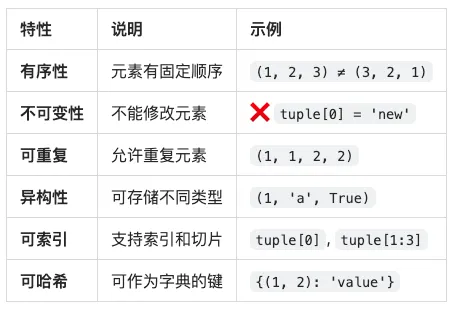
🔑 元组的核心特性
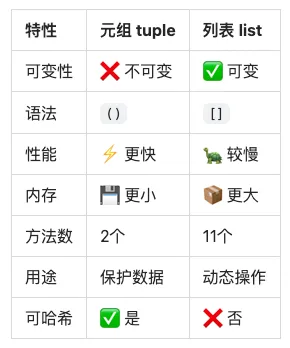
📊 元组 vs 列表核心区别
二、元组的创建方式
方式1:直接创建
# 使用圆括号fruits = ('apple', 'banana', 'orange')print(fruits) # 输出: ('apple', 'banana', 'orange')# 不使用圆括号(推荐加括号)numbers = 1, 2, 3, 4, 5print(numbers) # 输出: (1, 2, 3, 4, 5)print(type(numbers)) # 输出: <class 'tuple'># 空元组empty_tuple = ()print(empty_tuple) # 输出: ()print(len(empty_tuple)) # 输出: 0
方式2:单元素元组(重要!)
# ❌ 错误:这不是元组,是整数not_tuple = (1)print(type(not_tuple)) # 输出: <class 'int'># ✅ 正确:单元素元组必须加逗号single_tuple = (1,)print(type(single_tuple)) # 输出: <class 'tuple'>print(single_tuple) # 输出: (1,)# 也可以不加括号single_tuple2 = 1,print(type(single_tuple2)) # 输出: <class 'tuple'># 字符串单元素元组str_tuple = ('hello',)print(str_tuple) # 输出: ('hello',)
方式3:使用 tuple() 构造函数
# 从列表创建list_data = [1, 2, 3, 4, 5]tuple_data = tuple(list_data)print(tuple_data) # 输出: (1, 2, 3, 4, 5)# 从字符串创建chars = tuple('hello')print(chars) # 输出: ('h', 'e', 'l', 'l', 'o')# 从range创建numbers = tuple(range(1, 6))print(numbers) # 输出: (1, 2, 3, 4, 5)# 从字典创建(只取键)dict_data = {'a': 1, 'b': 2, 'c': 3}keys = tuple(dict_data)print(keys) # 输出: ('a', 'b', 'c')# 从字典的items创建items = tuple(dict_data.items())print(items) # 输出: (('a', 1), ('b', 2), ('c', 3))
方式4:元组推导式(实际是生成器)
# ⚠️ 注意:这不是元组推导式,是生成器表达式gen = (x**2 for x in range(5))print(type(gen)) # 输出: <class 'generator'># 需要转换为元组squares = tuple(x**2 for x in range(5))print(squares) # 输出: (0, 1, 4, 9, 16)# 带条件evens = tuple(x for x in range(10) if x % 2 == 0)print(evens) # 输出: (0, 2, 4, 6, 8)
方式5:嵌套元组
# 二维元组matrix = ((1, 2, 3), (4, 5, 6), (7, 8, 9))print(matrix) # 输出: ((1, 2, 3), (4, 5, 6), (7, 8, 9))# 访问嵌套元素print(matrix[0]) # (1, 2, 3)print(matrix[0][0]) # 1print(matrix[1][2]) # 6# 混合嵌套mixed = (1, [2, 3], (4, 5), {'a': 6})print(mixed) # 输出: (1, [2, 3], (4, 5), {'a': 6})
三、元组的属性
1. 长度 - len()
fruits = ('apple', 'banana', 'orange')print(len(fruits)) # 输出: 3# 空元组empty = ()print(len(empty)) # 输出: 0# 嵌套元组nested = ((1, 2), (3, 4, 5))print(len(nested)) # 输出: 2 (只计算外层元素个数)
2. 索引访问
fruits = ('apple', 'banana', 'orange', 'grape', 'mango')# 正向索引(从0开始)print(fruits[0]) # appleprint(fruits[1]) # bananaprint(fruits[2]) # orange# 反向索引(从-1开始)print(fruits[-1]) # mango (最后一个)print(fruits[-2]) # grape (倒数第二个)print(fruits[-3]) # orange (倒数第三个)# ❌ 不能修改元素try: fruits[0] = 'pear'except TypeError as e: print(f"错误: {e}")# 输出: 错误: 'tuple' object does not support item assignment# 索引对照表# 索引: 0 1 2 3 4# 元素: 'apple' 'banana' 'orange' 'grape' 'mango'# 反向: -5 -4 -3 -2 -1
3. 切片操作
numbers = (0, 1, 2, 3, 4, 5, 6, 7, 8, 9)# 基本切片 [start:stop:step]print(numbers[2:5]) # (2, 3, 4)print(numbers[:5]) # (0, 1, 2, 3, 4)print(numbers[5:]) # (5, 6, 7, 8, 9)print(numbers[:]) # (0, 1, 2, 3, 4, 5, 6, 7, 8, 9)# 带步长的切片print(numbers[::2]) # (0, 2, 4, 6, 8)print(numbers[1::2]) # (1, 3, 5, 7, 9)print(numbers[::3]) # (0, 3, 6, 9)# 反向切片print(numbers[::-1]) # (9, 8, 7, 6, 5, 4, 3, 2, 1, 0)print(numbers[-3:]) # (7, 8, 9)print(numbers[:-3]) # (0, 1, 2, 3, 4, 5, 6)# 高级切片print(numbers[2:8:2]) # (2, 4, 6)print(numbers[8:2:-1]) # (8, 7, 6, 5, 4, 3)# ✅ 切片返回新元组,不修改原元组sliced = numbers[2:5]print(sliced) # (2, 3, 4)print(numbers) # (0, 1, 2, 3, 4, 5, 6, 7, 8, 9) (未改变)
4. 不可变性(核心特性)
# ❌ 不能修改元素fruits = ('apple', 'banana', 'orange')try: fruits[0] = 'pear'except TypeError as e: print(f"错误: {e}")# 输出: 错误: 'tuple' object does not support item assignment# ❌ 不能删除元素try: del fruits[0]except TypeError as e: print(f"错误: {e}")# 输出: 错误: 'tuple' object doesn't support item deletion# ❌ 不能添加元素try: fruits.append('grape')except AttributeError as e: print(f"错误: {e}")# 输出: 错误: 'tuple' object has no attribute 'append'# ✅ 可以删除整个元组del fruitstry: print(fruits)except NameError as e: print(f"错误: {e}")# 输出: 错误: name 'fruits' is not defined
5. 可哈希性(重要特性)
# ✅ 元组可以作为字典的键coordinates = { (0, 0): 'origin', (1, 0): 'right', (0, 1): 'up'}print(coordinates[(0, 0)]) # 输出: origin# ✅ 元组可以作为集合的元素point_set = {(0, 0), (1, 1), (2, 2)}print(point_set) # 输出: {(0, 0), (1, 1), (2, 2)}# ❌ 列表不能作为字典的键try: bad_dict = {[1, 2]: 'value'}except TypeError as e: print(f"错误: {e}")# 输出: 错误: unhashable type: 'list'# ⚠️ 注意:包含可变对象的元组不可哈希try: mixed_tuple = (1, [2, 3]) hash(mixed_tuple)except TypeError as e: print(f"错误: {e}")# 输出: 错误: unhashable type: 'list'# ✅ 纯不可变元素的元组可哈希pure_tuple = (1, 2, 'hello', (3, 4))print(hash(pure_tuple)) # 输出: 一个整数哈希值
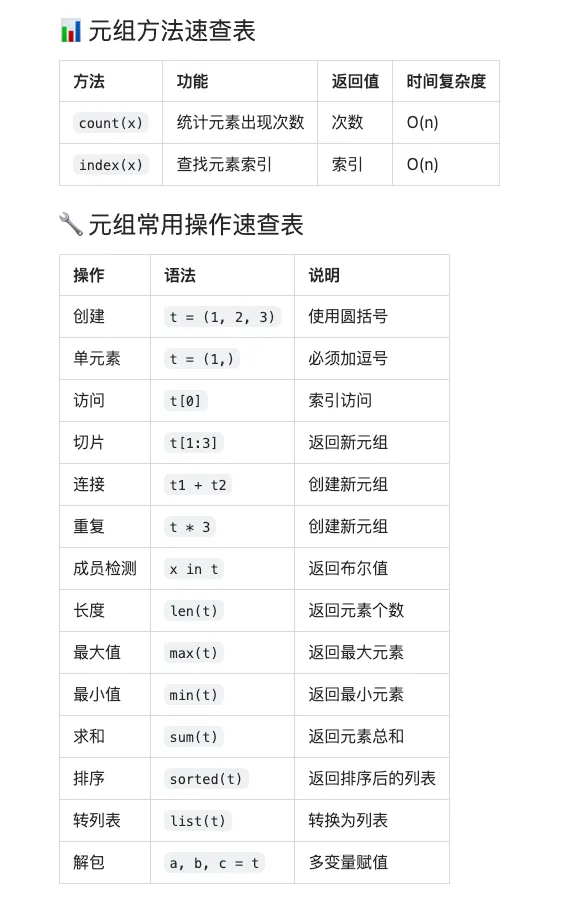
四、元组的核心方法(只有2个)
1️⃣ count() - 统计元素出现次数
numbers = (1, 2, 3, 2, 4, 2, 5, 2)# 统计元素出现次数count = numbers.count(2)print(count) # 输出: 4# 统计不存在的元素count = numbers.count(10)print(count) # 输出: 0 (不存在返回0,不会报错)# 统计字符串fruits = ('apple', 'banana', 'apple', 'orange', 'apple')count = fruits.count('apple')print(count) # 输出: 3# 统计嵌套元组nested = ((1, 2), (3, 4), (1, 2), (5, 6))count = nested.count((1, 2))print(count) # 输出: 2# 统计布尔值bools = (True, False, True, True, False)count = bools.count(True)print(count) # 输出: 3# ⚠️ 注意:1 和 True 被认为是相同的mixed = (1, True, 0, False, 1)print(mixed.count(1)) # 3 (包括True)print(mixed.count(True)) # 3 (包括1)print(mixed.count(0)) # 2 (包括False)print(mixed.count(False)) # 2 (包括0)
2️⃣ index() - 查找元素索引
fruits = ('apple', 'banana', 'orange', 'banana', 'grape')# 查找元素第一次出现的索引idx = fruits.index('banana')print(idx) # 输出: 1# 指定查找范围 [start, end)idx = fruits.index('banana', 2) # 从索引2开始查找print(idx) # 输出: 3idx = fruits.index('banana', 2, 4) # 在索引2-4之间查找print(idx) # 输出: 3# ❌ 元素不存在会报错try: fruits.index('kiwi')except ValueError as e: print(f"错误: {e}")# 输出: 错误: tuple.index(x): x not in tuple# ✅ 安全查找if 'kiwi' in fruits: idx = fruits.index('kiwi')else: idx = -1 print("元素不存在,返回 -1")# 输出: 元素不存在,返回 -1# 查找数字numbers = (10, 20, 30, 20, 40)idx = numbers.index(20)print(idx) # 输出: 1 (返回第一次出现的位置)# 查找嵌套元组nested = ((1, 2), (3, 4), (5, 6))idx = nested.index((3, 4))print(idx) # 输出: 1
五、元组的高级操作
1. 元组运算符
# + 连接元组tuple1 = (1, 2, 3)tuple2 = (4, 5, 6)result = tuple1 + tuple2print(result) # 输出: (1, 2, 3, 4, 5, 6)# * 重复元组tuple3 = (1, 2) * 3print(tuple3) # 输出: (1, 2, 1, 2, 1, 2)# in 成员检测print(2 in (1, 2, 3)) # Trueprint(5 in (1, 2, 3)) # False# not inprint(5 not in (1, 2, 3)) # True# 比较运算符(按字典序)print((1, 2, 3) < (1, 2, 4)) # Trueprint((1, 2, 3) == (1, 2, 3)) # Trueprint((1, 2, 3) > (1, 2, 2)) # True# 元组可以直接比较print((1, 2) < (2, 1)) # Trueprint(('a', 'b') < ('a', 'c')) # True
2. 元组解包(Unpacking)
# 基本解包a, b, c = (1, 2, 3)print(a, b, c) # 输出: 1 2 3# 不需要括号x, y, z = 10, 20, 30print(x, y, z) # 输出: 10 20 30# 使用 * 收集剩余元素first, *rest = (1, 2, 3, 4, 5)print(first) # 1print(rest) # [2, 3, 4, 5] (注意:rest是列表)*start, last = (1, 2, 3, 4, 5)print(start) # [1, 2, 3, 4]print(last) # 5first, *middle, last = (1, 2, 3, 4, 5)print(first) # 1print(middle) # [2, 3, 4]print(last) # 5# 交换变量(最优雅的方式)a, b = 1, 2a, b = b, aprint(a, b) # 2 1# 函数返回多个值(实际返回元组)def get_user_info(): return 'Alice', 25, 'Beijing'name, age, city = get_user_info()print(f"{name}, {age}, {city}") # 输出: Alice, 25, Beijing# 忽略某些值name, _, city = get_user_info()print(f"{name}, {city}") # 输出: Alice, Beijing# 嵌套解包point = ((1, 2), (3, 4))(x1, y1), (x2, y2) = pointprint(x1, y1, x2, y2) # 输出: 1 2 3 4
3. 元组的内置函数
numbers = (3, 1, 4, 1, 5, 9, 2, 6)# len() - 长度print(len(numbers)) # 8# max() - 最大值print(max(numbers)) # 9# min() - 最小值print(min(numbers)) # 1# sum() - 求和print(sum(numbers)) # 31# sorted() - 排序(返回列表)sorted_list = sorted(numbers)print(sorted_list) # 输出: [1, 1, 2, 3, 4, 5, 6, 9]print(type(sorted_list)) # 输出: <class 'list'># 降序排序sorted_desc = sorted(numbers, reverse=True)print(sorted_desc) # 输出: [9, 6, 5, 4, 3, 2, 1, 1]# 转回元组sorted_tuple = tuple(sorted(numbers))print(sorted_tuple) # 输出: (1, 1, 2, 3, 4, 5, 6, 9)# all() - 所有元素为Trueprint(all((True, True, True))) # Trueprint(all((True, False, True))) # Falseprint(all((1, 2, 3))) # Trueprint(all((1, 0, 3))) # False# any() - 任一元素为Trueprint(any((False, False, True))) # Trueprint(any((False, False, False))) # Falseprint(any((0, 0, 1))) # True# enumerate() - 枚举fruits = ('apple', 'banana', 'orange')for idx, fruit in enumerate(fruits): print(f"{idx}: {fruit}")# 输出:# 0: apple# 1: banana# 2: orange# zip() - 并行迭代names = ('Alice', 'Bob', 'Charlie')ages = (25, 30, 35)for name, age in zip(names, ages): print(f"{name}: {age}")# 输出:# Alice: 25# Bob: 30# Charlie: 35# 转换为元组列表pairs = tuple(zip(names, ages))print(pairs) # 输出: (('Alice', 25), ('Bob', 30), ('Charlie', 35))
4. 元组与列表的转换
# 元组转列表tuple_data = (1, 2, 3, 4, 5)list_data = list(tuple_data)print(list_data) # 输出: [1, 2, 3, 4, 5]# 修改列表list_data.append(6)list_data[0] = 999print(list_data) # 输出: [999, 2, 3, 4, 5, 6]# 列表转回元组new_tuple = tuple(list_data)print(new_tuple) # 输出: (999, 2, 3, 4, 5, 6)# 实际应用:修改元组内容fruits = ('apple', 'banana', 'orange')# 转换、修改、转回fruits_list = list(fruits)fruits_list.append('grape')fruits = tuple(fruits_list)print(fruits) # 输出: ('apple', 'banana', 'orange', 'grape')
5. 命名元组(namedtuple)
from collections import namedtuple# 创建命名元组类Point = namedtuple('Point', ['x', 'y'])# 创建实例p1 = Point(10, 20)print(p1) # 输出: Point(x=10, y=20)# 访问元素(两种方式)print(p1.x) # 10 (通过名称)print(p1[0]) # 10 (通过索引)print(p1.y) # 20print(p1[1]) # 20# 解包x, y = p1print(x, y) # 10 20# 不可修改try: p1.x = 30except AttributeError as e: print(f"错误: {e}")# 输出: 错误: can't set attribute# 创建学生记录Student = namedtuple('Student', ['name', 'age', 'grade'])s1 = Student('Alice', 20, 'A')print(s1.name) # Aliceprint(s1.age) # 20print(s1.grade) # A# 转换为字典print(s1._asdict()) # 输出: {'name': 'Alice', 'age': 20, 'grade': 'A'}# 替换值(返回新元组)s2 = s1._replace(age=21)print(s2) # 输出: Student(name='Alice', age=21, grade='A')print(s1) # 输出: Student(name='Alice', age=20, grade='A') (原元组未变)# 从可迭代对象创建data = ['Bob', 22, 'B']s3 = Student._make(data)print(s3) # 输出: Student(name='Bob', age=22, grade='B')
六、元组 vs 列表对比
1. 性能对比
import sysimport timeit# 内存占用对比list_data = [1, 2, 3, 4, 5]tuple_data = (1, 2, 3, 4, 5)print(f"列表内存: {sys.getsizeof(list_data)} 字节")print(f"元组内存: {sys.getsizeof(tuple_data)} 字节")# 输出:# 列表内存: 104 字节# 元组内存: 80 字节# 创建速度对比list_time = timeit.timeit('x = [1, 2, 3, 4, 5]', number=1000000)tuple_time = timeit.timeit('x = (1, 2, 3, 4, 5)', number=1000000)print(f"列表创建时间: {list_time:.4f}秒")print(f"元组创建时间: {tuple_time:.4f}秒")print(f"元组快 {list_time/tuple_time:.2f} 倍")# 输出示例:# 列表创建时间: 0.0523秒# 元组创建时间: 0.0156秒# 元组快 3.35 倍# 访问速度对比(几乎相同)list_access = timeit.timeit('x[2]', setup='x = [1, 2, 3, 4, 5]', number=1000000)tuple_access = timeit.timeit('x[2]', setup='x = (1, 2, 3, 4, 5)', number=1000000)print(f"列表访问时间: {list_access:.4f}秒")print(f"元组访问时间: {tuple_access:.4f}秒")
2. 功能对比
# 列表:可变,方法多my_list = [1, 2, 3]my_list.append(4) # ✅ 可以添加my_list[0] = 999 # ✅ 可以修改my_list.remove(2) # ✅ 可以删除my_list.sort() # ✅ 可以排序print(my_list) # [1, 3, 4, 999]# 元组:不可变,方法少my_tuple = (1, 2, 3)# my_tuple.append(4) # ❌ 没有append方法# my_tuple[0] = 999 # ❌ 不能修改# my_tuple.remove(2) # ❌ 没有remove方法# my_tuple.sort() # ❌ 没有sort方法# 元组只有2个方法print(my_tuple.count(2)) # ✅ 统计print(my_tuple.index(2)) # ✅ 查找
3. 使用场景对比
# ✅ 使用列表的场景# 1. 需要频繁修改数据shopping_cart = ['apple', 'banana']shopping_cart.append('orange') # 添加商品shopping_cart.remove('banana') # 删除商品# 2. 需要排序scores = [85, 92, 78, 90]scores.sort()# 3. 需要动态增删todo_list = []todo_list.append('task1')todo_list.append('task2')# ✅ 使用元组的场景# 1. 数据不应该被修改(保护数据)WEEKDAYS = ('Mon', 'Tue', 'Wed', 'Thu', 'Fri', 'Sat', 'Sun')RGB_RED = (255, 0, 0)ORIGIN = (0, 0)# 2. 作为字典的键location_names = { (0, 0): 'Origin', (1, 0): 'East', (0, 1): 'North'}# 3. 函数返回多个值def get_min_max(numbers): return min(numbers), max(numbers)min_val, max_val = get_min_max([1, 2, 3, 4, 5])# 4. 数据库查询结果(通常是元组)# cursor.fetchone() 返回元组# result = (1, 'Alice', 25)# 5. 性能敏感的场景# 大量小数据结构,使用元组节省内存points = [(x, y) for x in range(100) for y in range(100)]
七、实战案例
案例1:坐标系统
# 定义点类型Point = tuple # 或使用 namedtuple# 创建点origin = (0, 0)point_a = (3, 4)point_b = (6, 8)# 计算距离def distance(p1, p2): x1, y1 = p1 x2, y2 = p2 return ((x2 - x1)**2 + (y2 - y1)**2)**0.5print(f"距离: {distance(origin, point_a):.2f}") # 输出: 距离: 5.00# 点集合(元组可哈希,可放入集合)unique_points = {(0, 0), (1, 1), (2, 2), (0, 0)}print(unique_points) # 输出: {(0, 0), (1, 1), (2, 2)}# 点字典(元组可作为键)point_labels = { (0, 0): 'Origin', (3, 4): 'Point A', (6, 8): 'Point B'}print(point_labels[(3, 4)]) # 输出: Point A
案例2:数据库记录
# 模拟数据库查询结果(通常返回元组)def fetch_users(): return [ (1, 'Alice', 25, 'alice@example.com'), (2, 'Bob', 30, 'bob@example.com'), (3, 'Charlie', 35, 'charlie@example.com') ]# 处理结果users = fetch_users()for user in users: user_id, name, age, email = user print(f"ID: {user_id}, Name: {name}, Age: {age}")# 输出:# ID: 1, Name: Alice, Age: 25# ID: 2, Name: Bob, Age: 30# ID: 3, Name: Charlie, Age: 35# 使用命名元组提高可读性from collections import namedtupleUser = namedtuple('User', ['id', 'name', 'age', 'email'])def fetch_users_named(): return [ User(1, 'Alice', 25, 'alice@example.com'), User(2, 'Bob', 30, 'bob@example.com'), User(3, 'Charlie', 35, 'charlie@example.com') ]users = fetch_users_named()for user in users: print(f"Name: {user.name}, Email: {user.email}")# 输出:# Name: Alice, Email: alice@example.com# Name: Bob, Email: bob@example.com# Name: Charlie, Email: charlie@example.com
案例3:配置管理
# 使用元组定义不可变配置DATABASE_CONFIG = ( 'localhost', # host 5432, # port 'mydb', # database 'user', # username 'password' # password)# 解包使用host, port, db, user, pwd = DATABASE_CONFIGprint(f"连接到 {host}:{port}/{db}")# 输出: 连接到 localhost:5432/mydb# 使用命名元组更清晰from collections import namedtupleDBConfig = namedtuple('DBConfig', ['host', 'port', 'database', 'user', 'password'])config = DBConfig( host='localhost', port=5432, database='mydb', user='user', password='password')print(f"连接到 {config.host}:{config.port}/{config.database}")# 输出: 连接到 localhost:5432/mydb# 配置不能被意外修改try: config.host = 'newhost'except AttributeError: print("配置是只读的,不能修改")# 输出: 配置是只读的,不能修改
案例4:函数返回多个值
# 统计分析函数def analyze_data(numbers): """返回数据的统计信息""" return ( min(numbers), max(numbers), sum(numbers) / len(numbers), # 平均值 len(numbers) )data = [10, 20, 30, 40, 50]min_val, max_val, avg, count = analyze_data(data)print(f"最小值: {min_val}")print(f"最大值: {max_val}")print(f"平均值: {avg}")print(f"数量: {count}")# 输出:# 最小值: 10# 最大值: 50# 平均值: 30.0# 数量: 5# 使用命名元组返回from collections import namedtupleStats = namedtuple('Stats', ['min', 'max', 'avg', 'count'])def analyze_data_named(numbers): return Stats( min=min(numbers), max=max(numbers), avg=sum(numbers) / len(numbers), count=len(numbers) )stats = analyze_data_named(data)print(f"统计结果: {stats}")print(f"平均值: {stats.avg}")# 输出:# 统计结果: Stats(min=10, max=50, avg=30.0, count=5)# 平均值: 30.0
案例5:RGB颜色管理
# 定义常用颜色(不可变)RED = (255, 0, 0)GREEN = (0, 255, 0)BLUE = (0, 0, 255)WHITE = (255, 255, 255)BLACK = (0, 0, 0)# 颜色混合def mix_colors(color1, color2, ratio=0.5): """混合两种颜色""" r1, g1, b1 = color1 r2, g2, b2 = color2 return ( int(r1 * ratio + r2 * (1 - ratio)), int(g1 * ratio + g2 * (1 - ratio)), int(b1 * ratio + b2 * (1 - ratio)) )purple = mix_colors(RED, BLUE)print(f"紫色: {purple}") # 输出: 紫色: (127, 0, 127)# 颜色字典color_names = { (255, 0, 0): 'Red', (0, 255, 0): 'Green', (0, 0, 255): 'Blue', (255, 255, 255): 'White', (0, 0, 0): 'Black'}print(color_names[RED]) # 输出: Red# 使用命名元组from collections import namedtupleColor = namedtuple('Color', ['r', 'g', 'b'])red = Color(255, 0, 0)green = Color(0, 255, 0)print(f"红色: R={red.r}, G={red.g}, B={red.b}")# 输出: 红色: R=255, G=0, B=0
八、性能优化技巧
1. 使用元组代替小列表
import sys# 内存对比small_list = [1, 2, 3]small_tuple = (1, 2, 3)print(f"列表: {sys.getsizeof(small_list)} 字节")print(f"元组: {sys.getsizeof(small_tuple)} 字节")print(f"节省: {sys.getsizeof(small_list) - sys.getsizeof(small_tuple)} 字节")# 输出:# 列表: 88 字节# 元组: 64 字节# 节省: 24 字节# 大量小数据结构时,差异明显# ❌ 使用列表points_list = [[x, y] for x in range(1000) for y in range(1000)]print(f"列表版本: {sys.getsizeof(points_list)} 字节")# ✅ 使用元组points_tuple = [(x, y) for x in range(1000) for y in range(1000)]print(f"元组版本: {sys.getsizeof(points_tuple)} 字节")
2. 元组作为字典键
# ✅ 使用元组作为复合键cache = {}def expensive_function(x, y, z): key = (x, y, z) # 元组作为键 if key in cache: return cache[key] # 模拟耗时计算 result = x + y + z cache[key] = result return resultprint(expensive_function(1, 2, 3)) # 计算print(expensive_function(1, 2, 3)) # 从缓存读取# ❌ 列表不能作为键try: bad_cache = {[1, 2]: 'value'}except TypeError as e: print(f"错误: {e}")# 输出: 错误: unhashable type: 'list'
3. 常量使用元组
# ✅ 配置常量使用元组ALLOWED_EXTENSIONS = ('jpg', 'png', 'gif', 'pdf')HTTP_METHODS = ('GET', 'POST', 'PUT', 'DELETE')WEEKDAYS = ('Mon', 'Tue', 'Wed', 'Thu', 'Fri', 'Sat', 'Sun')# 检查效率高filename = 'image.jpg'if filename.split('.')[-1] in ALLOWED_EXTENSIONS: print("文件类型允许")# ❌ 不要使用列表(可能被意外修改)# ALLOWED_EXTENSIONS = ['jpg', 'png', 'gif', 'pdf']# ALLOWED_EXTENSIONS.append('exe') # 意外修改!
4. 元组解包优化
# ✅ 使用元组解包交换变量(最快)a, b = 1, 2a, b = b, a# ❌ 使用临时变量(较慢)a, b = 1, 2temp = aa = bb = temp# 多变量交换a, b, c = 1, 2, 3a, b, c = c, a, bprint(a, b, c) # 3 1 2
九、常见陷阱与避坑指南
陷阱1:单元素元组忘记逗号
# ❌ 错误:忘记逗号not_tuple = (1)print(type(not_tuple)) # 输出: <class 'int'>not_tuple2 = ('hello')print(type(not_tuple2)) # 输出: <class 'str'># ✅ 正确:必须加逗号single_tuple = (1,)print(type(single_tuple)) # 输出: <class 'tuple'>str_tuple = ('hello',)print(type(str_tuple)) # 输出: <class 'tuple'># 实际问题示例# ❌ 错误def get_coordinates(): return (10) # 返回整数,不是元组x = get_coordinates()# x, y = get_coordinates() # 报错!# ✅ 正确def get_coordinates(): return (10,) # 返回单元素元组x, = get_coordinates() # 正确解包print(x) # 10
陷阱2:元组的"不可变"陷阱
# ⚠️ 元组本身不可变,但元素可能可变tuple_with_list = (1, 2, [3, 4])# ❌ 不能修改元组结构try: tuple_with_list[0] = 999except TypeError as e: print(f"错误: {e}")# 输出: 错误: 'tuple' object does not support item assignment# ✅ 但可以修改可变元素的内容tuple_with_list[2].append(5)print(tuple_with_list) # 输出: (1, 2, [3, 4, 5])# ⚠️ 这样的元组不可哈希try: hash(tuple_with_list)except TypeError as e: print(f"错误: {e}")# 输出: 错误: unhashable type: 'list'# ✅ 完全不可变的元组pure_tuple = (1, 2, (3, 4))print(hash(pure_tuple)) # 可以哈希
陷阱3:元组连接性能问题
# ❌ 低效:频繁连接元组result = ()for i in range(1000): result = result + (i,) # 每次创建新元组,O(n²)# ✅ 高效:先用列表,最后转元组result = []for i in range(1000): result.append(i) # O(1)result = tuple(result) # O(n)# 或使用生成器result = tuple(i for i in range(1000))
陷阱4:元组与列表的混淆
# ❌ 期望修改元组coordinates = (10, 20)try: coordinates[0] = 30except TypeError: print("元组不能修改!")# ✅ 正确方式:转换、修改、转回coordinates = list(coordinates)coordinates[0] = 30coordinates = tuple(coordinates)print(coordinates) # (30, 20)# 或直接创建新元组coordinates = (30, 20)
陷阱5:元组解包数量不匹配
# ❌ 解包数量不匹配data = (1, 2, 3)try: a, b = data # 需要3个变量except ValueError as e: print(f"错误: {e}")# 输出: 错误: too many values to unpack (expected 2)# ✅ 使用 * 收集多余值a, *rest = dataprint(a, rest) # 1 [2, 3]# 或忽略某些值a, _, c = dataprint(a, c) # 1 3# 或全部接收a, b, c = dataprint(a, b, c) # 1 2 3
陷阱6:空元组的比较
# 空元组比较empty1 = ()empty2 = ()print(empty1 == empty2) # True (值相等)print(empty1 is empty2) # True (Python优化,指向同一对象)# 但不要依赖 is 比较# ✅ 使用 == 比较值# ❌ 使用 is 比较身份(除非确实需要)
十、总结
🎯 核心要点
- 元组是不可变的:一旦创建不能修改
- 单元素元组要加逗号:(1,)不是 (1)
- 元组可哈希:可作为字典键和集合元素
- 性能更好:比列表更快、更省内存
- 只有2个方法:count()和 index()