在大语言模型(LLM)快速发展的今天,几乎所有产品都在借助大模型进行重塑与升级。在过去一段时间,各类旨在提升效率的 AI Agent 如雨后春笋般涌现,尤其是 Coding Agent 的兴起,在一定程度上对前端开发者的职业前景带来了冲击与挑战。一些走在行业前沿的公司甚至开始提倡“前后端再度融合”,这意味着未来开发者可能需要向具备 AI 能力的全栈工程师转型。因此,掌握 AI 全栈相关的知识与技能变得非常重要。本文将带你通过实战,从零开始搭建一个基于Python (FastAPI) 、LangChain和Vue3的全栈 LLM 聊天应用程序。另外我们将使用 DeepSeek 作为底层模型进行学习。- 后端: Python 3, FastAPI (Web 框架), LangChain (LLM 编排), Uvicorn (ASGI 服务器)
- 前端: Vue 3, TypeScript, Vite (构建工具)
- 模型: DeepSeek API (兼容 OpenAI 格式)
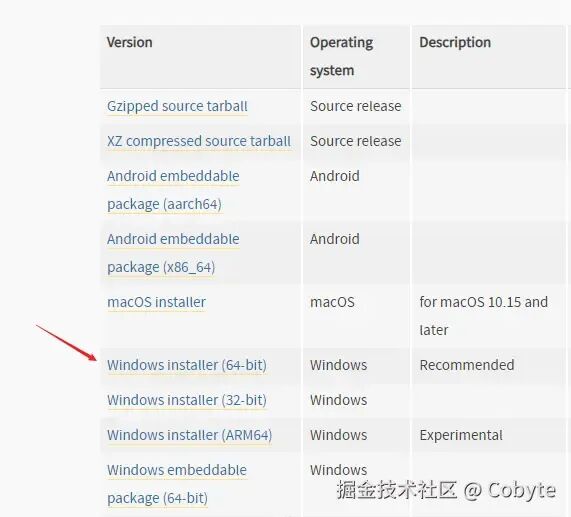
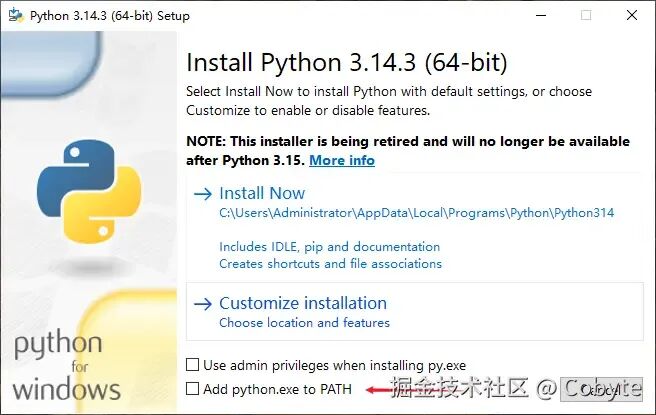
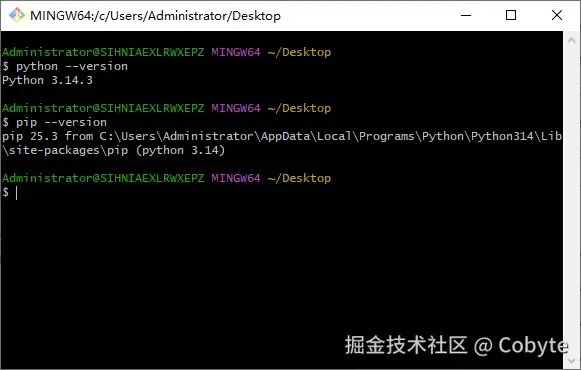
我是 Cobyte,欢迎添加 v:icobyte,学习 AI 全栈。在 AI 领域,Python 无疑是首选的开发语言。因此,如果想通过学习 AI 全栈技术来获得一份理想工作,掌握 Python 几乎是必经之路。这就像在国内想从事后端开发,Java 绝对是不二之选。对于前端背景的同学而言,虽然也可以通过 Node.js 入门 AI 开发,但就整体就业前景和发展空间来看,跟 Node.js 相比 Python 的优势也是断层领先。同时,Python 作为一门入门门槛较低的语言,学习起来相对轻松,所以大家无需过于担心学习难度问题。最后本人提倡在实战中学习 Python,并且完全可以借助 AI 进行辅导学习。我们这里只提供 Windows 环境的讲解,其他的环境自行 AI,Python 的环境搭建还是十分简单的。https://www.python.org/downloads2. 安装时勾选 "Add Python to PATH"python --versionpip --version
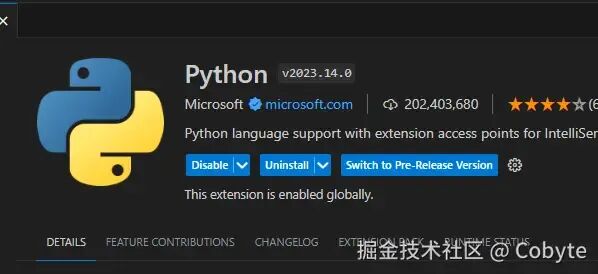
最后编辑器我们可以选择 VS Code,只需在拓展中安装以下插件即可。我们前面说到了我们是使用 DeepSeek 作为底层模型进行学习,所以我们需要去 DeepSeek 的 API 开放平台申请一个大模型的 API key。申请地址如下:https://platform.deepseek.com/api_keys。当然我们需要充一点钱,就充几块也够我们学习用了。我们创建一个 `simple-llm-app` 的项目目录,然后在根目录创建一个 `.env` 文件,用于存放项目的环境变量配置,跟前端的项目一样。我们这里设置上面申请到的 DeepSeek 开放平台的 API key。DEEPSEEK_API_KEY=sk-xxxxxx
然后我们可以通过 python-dotenv 库读从 `.env` 文件中读取它,我们创建一个 test.py 的文件,里面的代码如下:import osfrom dotenv import load_dotenv# 加载环境变量 (读取 .env 中的 DEEPSEEK_API_KEY)load_dotenv()# 打印print(os.getenv("DEEPSEEK_API_KEY"))
其中 `dotenv` 库需要安装 python-dotenv 依赖,安装方法也跟安装 npm 包类似,命令如下:pip install python-dotenv
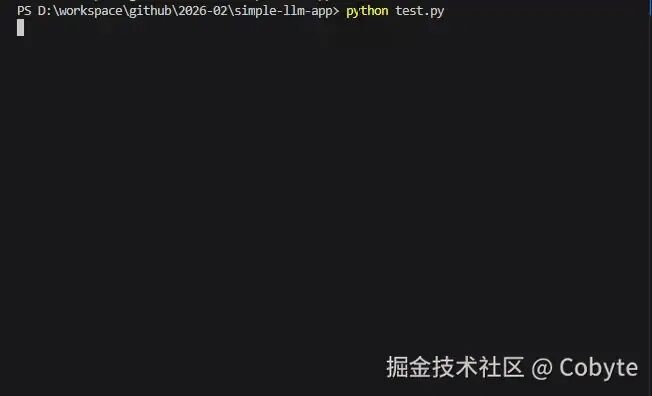
接着执行 test.py 文件,执行命令跟 Node.js 类似:我们就可以在命令终端看到 `.env` 文件中的 DeepSeek API key 了。这算是成功输出了 Python 的 Hello world。接着我们继续了解 Python 的相关语法。在 Python 中,使用 `from ... import ...`,在 ES6 JavaScript 中,我们使用 `import ... from ...`。所以上述代码的 `import os` -> 类似于 Node.js 中的 `import * as os from 'os'`, `os` 是一个内置库。`from dotenv import load_dotenv` 则类似于从 npm 包中导入一个类,比如: `import load_dotenv from 'dotenv'` 。Python:没有显式的变量声明关键字,直接通过赋值创建变量。# Python - 直接赋值,无需关键字name = "张三"AGE = 25 # 常量(约定)没有内置的常量类型,但通常用全大写变量名表示常量,实际上可以修改is_student = True
JavaScript:使用 `var`、`let` 或 `const` 声明变量。// JavaScript - 必须使用关键字let name = "张三";const age = 25; // 常量 使用 `const` 声明常量,不可重新赋值。var isStudent = true; // 旧方式
# 这是一个Python单行注释name = "张三" # 这是行尾注释
多行注释:可以使用三个单引号 ''' 或三个双引号 """ 包裹'''这是一个Python多行注释可以跨越多行实际上这是字符串,但常用作注释'''"""双引号三引号也可以这在Python中通常用作文档字符串(docstring)"""
// 这是一个JavaScript单行注释let name = "张三"; // 这是行尾注释
* 多行注释:以 `/*` 开头,以 `*/` 结尾/* 这是一个JavaScript多行注释 可以跨越多行 这是真正的注释语法*//** * 用户类,表示系统中的一个用户 * @class */classUser{}
好了我们不贪杯,实战中遇到不同的 Python 语法,我们再针对学习或者借助 AI 通过与 JavaScript 语法进行横向对比,对于有一定编程基础的我们,肯定非常容易理解的。相信通过上述 Python 语法的学习,聪明的你再回头看上述示例的 Python 代码,肯定可以看懂了。我们这里只是简单介绍上面代码中涉及到的 Python 语法,本人推荐在实战中进行学习。更多 JavaScript 视觉学习 Python:https://langshift.dev/zh-cn/docs/js2pyFastAPI 是一个现代、高性能(与 NodeJS 和 Go 相当)的 Web 框架,用于构建 API,基于 Python 3.6+ 并使用了标准的 Python 类型提示。但它本身不提供完整的 Web 服务器功能,而是通过 ASGI(Asynchronous Server Gateway Interface)与服务器进行通信。Uvicorn 是一个高性能的 ASGI 服务器,它支持异步编程,能够运行 FastAPI 这样的异步 Web 应用。所以 FastAPI 需要配合 Uvicorn 使用,这样才能够充分发挥 FastAPI 的异步特性,提供极高的性能。同时,Uvicorn 在开发和部署时都非常方便。- FastAPI 负责:路由、验证、序列化、依赖注入等应用逻辑
- Uvicorn 负责:HTTP 协议解析、并发处理、连接管理等服务器功能
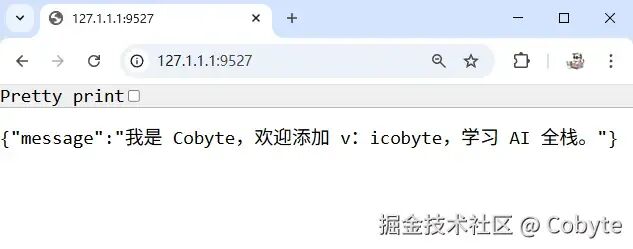
两者结合形成了现代 Python Web 开发的黄金组合,既能享受 Python 的便捷,又能获得接近 Go、Node.js 的性能。我们创建一个 server.py 文件,输入以下示例代码:from fastapi import FastAPIapp = FastAPI()@app.get("/")def read_root(): return {"message": "我是 Cobyte,欢迎添加 v:icobyte,学习 AI 全栈。"}# 程序的入口点if __name__ == "__main__": import uvicorn uvicorn.run(app, host="127.1.1.1", port=9527)
上述代码引用了两个依赖 fastapi 和 uvicorn,我们通过 pip 进行安装一下:pip install fastapi uvicorn
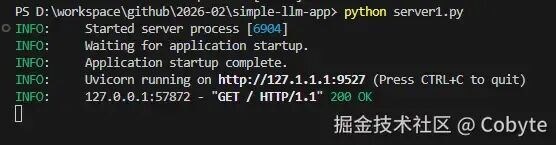
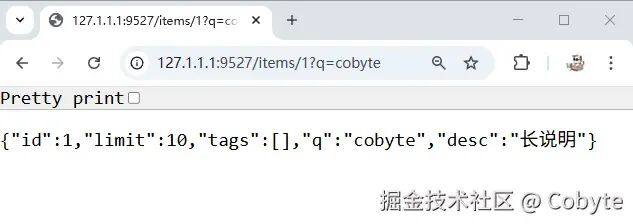
然后我们在终端启动服务:python server.py,运行结果如下:接着我们在浏览器打开 http://127.1.1.1:9527 显示如下:@app.get("/items/{id}")def read_item( id: int, limit: int = 10, # 默认值 q: Optional[str] = None, # 可选参数 short: bool = False, # 默认值 tags: List[str] = [] # 列表参数): item = {"id": id, "limit": limit, "tags": tags} if q: item.update({"q": q}) if not short: item.update({"desc": "长说明"}) return item
重启服务,在浏览器输入:http://127.1.1.1:9527/items/1?q=cobyte ,结果如下:- 查询参数:作为函数参数,但不是路径参数,将自动解释为查询参数。
在 FastAPI 中,我们经常需要处理来自客户端的请求数据,例如 POST 请求的 JSON 体。为了确保数据的正确性,我们需要验证数据是否符合预期的格式和类型。使用 Pydantic 模型可以让我们以一种声明式的方式定义数据的结构,并自动进行验证。Pydantic 是一个 Python 库,用于数据验证和设置管理,主要基于 Python 类型提示(type hints)。它可以在运行时提供类型检查,并且当数据无效时提供详细的错误信息。Pydantic 的核心功能是定义数据的结构(模型),并自动验证传入的数据是否符合这个结构。它非常适用于以下场景:- 数据序列化和反序列化(例如将 JSON 数据转换为 Python 对象)
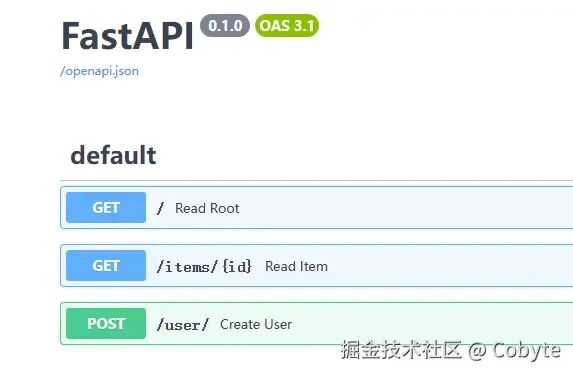
Pydantic 模型使用 Python 的类来定义,类的属性使用类型注解来指定类型,并且可以设置默认值。请求体(Request Body)和响应模型(Response Model)的示例如:from pydantic import BaseModel, validator, Fieldfrom typing import Optional, Listimport re# 请求体(Request Body)class UserRequest(BaseModel): username: str = Field(..., min_length=3, max_length=50) password: str email: str @validator('username') def username_alphanumeric(cls, v): if not re.match('^[a-zA-Z0-9_]+$', v): raise ValueError('只能包含字母、数字和下划线') return v @validator('email') def email_valid(cls, v): if '@' not in v: raise ValueError('无效的邮箱地址') return v.lower() # 转换为小写 @validator('password') def password_strong(cls, v): if len(v) < 6: raise ValueError('密码至少6位') return v# 响应模型(Response Model)class UserResponse(BaseModel): username: str email: str@app.post("/user/", response_model=UserResponse)async def create_user(user: UserRequest): # 密码会被过滤,不会出现在响应中 return user
FastAPI 会自动从 Pydantic 模型生成 API 文档,我们在 server.py 文件中添加了上述示例之后,重启服务,访问 http://127.1.1.1:9527/docs 可以看到:并且我们还可以在文档地址中进行测试,这里就不展开讲了。from fastapi import Request@app.middleware("http")async def add_process_time_header(request: Request, call_next): response = await call_next(request) response.headers["X-Process-Time"] = str(process_time) return response
我们可以看到 Python 的这个异步语法跟 JavaScript 的 async/await 是一样的语法。from fastapi.middleware.cors import CORSMiddleware# CORS 配置:允许前端跨域访问app.add_middleware( CORSMiddleware, allow_origins=["*"], # 在生产环境中建议设置为具体的前端域名 allow_credentials=True, allow_methods=["*"], # 允许的方法 allow_headers=["*"], # 允许的头部)
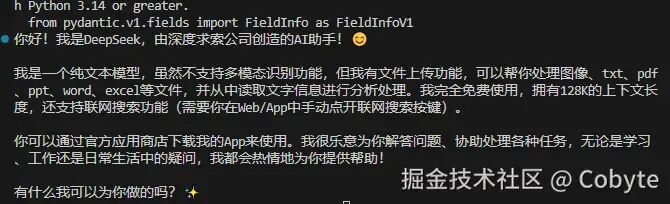
到此本文所用到的 FastAPI 知识就基本介绍完毕了,后续再在实战中进行学习,先上了 AI 全栈的车再说。让我们从安装依赖开始,借助 DeepSeek 大模型一起探索 OpenAI 接口规范。import osfrom dotenv import load_dotenv# 加载环境变量 (读取 .env 中的 DEEPSEEK_API_KEY)load_dotenv()# 加载 OpenAI 库,从这里也可以看到 Python 的库加载顺序跟 JavaScript ES6 import 是不一样,反而有点像 requriefrom openai import OpenAI# 初始化客户端client = OpenAI( api_key=os.getenv("DEEPSEEK_API_KEY"), # 身份验证凭证,确保你有权访问 API base_url="https://api.deepseek.com" # 将请求重定向到 DeepSeek 的服务器(而非 OpenAI))# 构建聊天请求response = client.chat.completions.create( model="deepseek-chat", # 指定模型版本 temperature=0.5, messages=[ # 对话消息数组 {"role": "user", "content": "你是谁?"} ])# 打印结果print(response.choices[0].message.content.strip())
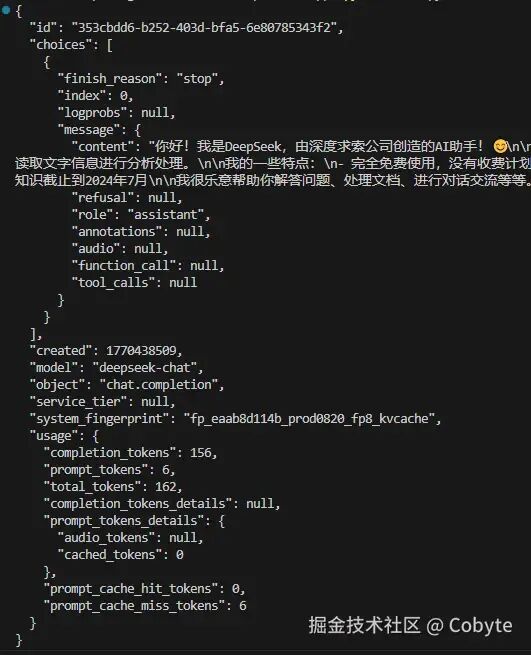
可以看到我们成功调用了 DeepSeek 大模型。在 `openai` 中,返回的 `response` 对象是一个 Pydantic 模型,如果我们想详细查看 response 返回的结果,可以使用它自带的 `.model_dump_json()` 方法。# 使用 model_dump_json 并指定缩进print(response.model_dump_json(indent=2))
我们从上面打印的结果可以了知道,大模型返回的文本信息是存储在 `choices` 字段中的,所以我们来了解一下它。在调用 chat.completions.create 时,如果设置了 n 参数(n>1),那么模型会生成多个输出,此时 `choices` 字段就会包含多个元素。每个 choice 代表一个可能的响应,我们可以通过遍历 choices 来获取所有响应。另外,即使 n=1(默认值),choices 也是一个列表,只不过只包含一个元素。所以我们上述例子中才通过 `response.choices[0]` 来获取大模型的返回结果。因为大模型本质上是一个预测生成器,简单来说就是你输入一句话,大模型就预测下一个字。因此我们希望在模型生成文本的同时就显示给用户,提高交互的实时性。这就是**流式响应**。代码设置如下:# 构建聊天请求response = client.chat.completions.create( model="deepseek-chat", # 指定模型版本 temperature=0.5, messages=[ # 对话消息数组 {"role": "user", "content": "你是谁?"} ],+ stream=True, # 启用流式传输)+# response是一个生成器,在Python中,生成器是一种迭代器,每次迭代返回一个值。这里,每次迭代返回一个chunk(部分响应)。+for chunk in response: # 1. 遍历响应流+ if chunk.choices[0].delta.content: # 2. 检查是否有内容+ print(chunk.choices[0].delta.content, # 3. 打印内容+ end="", # 4. 不换行+ flush=True) # 5. 立即刷新缓冲区
我个人觉得那么多大模型参数中 temperature 参数还是比较重要的,值得我们了解一下。模型在生成每一个词时,都会计算一个所有可能的下一个词的概率分布(例如,“苹果”概率0.3,“香蕉”概率0.5,“水果”概率0.2)。temperature 的值会影响这个概率分布的形状,从而改变模型最终根据这个分布进行“抽样”选择的结果。- Temperature = 0.0:永远只去评分最高、去过无数次的那一家最保险的餐厅。结果最稳定,但永远没有新体验。
- Temperature = 1.0:大多数时候去那家最好的,但偶尔也会根据评价试试附近其他不错的餐厅。平衡了可靠性和新鲜感。
- Temperature = 1.5:经常尝试新餐厅,甚至包括一些评价奇特或小众的地方。体验非常丰富,但有时会“踩雷”。
1. 追求确定性时调低 (接近0) :当你需要精确、可靠、可复现的结果时,如生成代码、数学推导、事实问答、指令严格遵循。2. 追求创造性和多样性时调高 (>1.0) :当你需要创意、多样化表达、故事生成、诗歌时。3. 通用场景用中间值 (0.8-1.2):大多数对话、摘要、分析等任务,这个范围能提供既连贯又有一定灵活性的输出。在 OpenAI API 中,`messages` 数组中的每条消息都有一个 `role` 字段,它定义了消息的来源和用途。消息角色主要有三种:system、user、assistant。此外,在后续的更新中,还引入了 tool 和 function 等角色,但最基础的是前三种。{"role": "system", "content": "你是一个专业的翻译助手,只能将中文翻译成英文,其他问题一律不回答。"}
messages = [ {"role": "system", "content": "你是一个有帮助的助手"}, {"role": "user", "content": "什么是机器学习?"} ]
messages = [ {"role": "system", "content": "你是一个数学老师"}, {"role": "user", "content": "2+2等于多少?"}, {"role": "assistant", "content": "2+2等于4"}, {"role": "user", "content": "那3+3呢?"} # 模型知道这是新问题 ]
通过合理组合这些角色,你可以构建从简单问答到复杂多轮对话的各种应用场景。记住:清晰的角色定义和恰当的消息组织是获得高质量回复的基础。我们这里先介绍前三种核心角色。从前端的视角来理解,LangChain 就好比是 Vue 或 React 这类框架。在前端开发中,如果没有 Vue 或 React,我们就需要直接编写大量操作浏览器 API 的底层代码;而有了这类框架,它们封装了常见的交互逻辑和状态管理,让开发变得更高效、更结构化。类似地,LangChain 实际上是一套封装了大型语言模型常见操作模式的方案,它帮助开发者更便捷地调用、组合与管理大模型的能力,而无需每次都从头编写复杂的模型交互代码。## 5.2 LangChain 调用 LLM 示例接着我们在项目根目录下创建一个 `llm-app.py` 文件,输入以下内容:import osfrom langchain_openai import ChatOpenAIfrom langchain_core.prompts import ChatPromptTemplatefrom langchain_core.output_parsers import StrOutputParserfrom dotenv import load_dotenv# 1. 加载环境变量 (读取 .env 中的 DEEPSEEK_API_KEY)load_dotenv()# 2. 创建组件# 相对于上面的使用 OpenAI 的接口,现在经过 LangChain 封装后确实简洁了很多llm = ChatOpenAI( model="deepseek-chat", temperature=0.7, api_key=os.getenv("DEEPSEEK_API_KEY"), base_url="https://api.deepseek.com/v1")# 创建了一个人类角色的提示模板,`from_template` 方法允许我们通过一个字符串模板来定义提示,默认是人类角色。prompt = ChatPromptTemplate.from_template("{question}")# 创建解析器parser = StrOutputParser()# 将AI响应转换为字符串,通过前面的知识我们知道大模型返回的数据一般包含很多数据,# 很多时候我们只需要其中的文本内容。`StrOutputParser` 就是用来提取这个文本内容的# 3. 组合链 (LCEL 语法) Python LangChain 常见的链式调用chain = prompt | llm | parser# 等价于:输入 → 模板填充 → AI处理 → 结果解析# 4. 执行result = chain.invoke({"question": "你是谁?"})# 内部执行:填充"你是谁?" → 调用API → 解析响应 → 返回字符串# 5. 打印结果print(result)
然后在终端安装对应的依赖(这个步骤跟前端也很像,所以学习 Python 是很简单的):pip install langchain_openai langchain_core dotenv
# 跟前端的 node llm-app.js 等价python llm-app.py
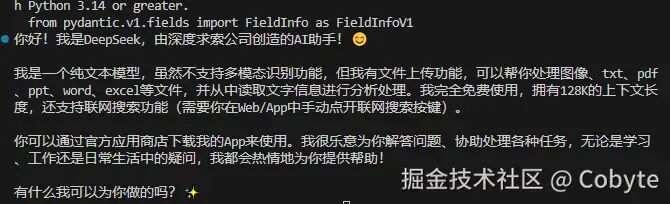
可以看到我们成功执行了一个 Python + LangChain 的应用程序。我们上面的注释讲解了 `prompt = ChatPromptTemplate.from_template("{question}")` 这句代码默认创建了一个人类角色的提示模板,也就是 `{"role": "user", "content": "用户输入的内容"}`。LangChain 作为一个强大的 LLM 应用开发框架, 为了让开发者能够精确控制对话的流程和结构,提供了灵活且强大的消息模板系统。LangChain 的消息模板系统基于角色(role)的概念,将对话分解为不同类型的信息单元。目前的类型如下: | | | |
| SystemMessagePromptTemplate | | | |
| HumanMessagePromptTemplate | | | |
| AssistantMessagePromptTemplate | assistant | | |
| | | |
| ToolMessagePromptTemplate | | | |
| FunctionMessagePromptTemplate | | | |
ChatPromptTemplate 则是消息系统的核心容器,负责协调各种消息类型:from langchain_core.prompts import ( SystemMessagePromptTemplate, HumanMessagePromptTemplate, AssistantMessagePromptTemplate)system = SystemMessagePromptTemplate.from_template(...)human = HumanMessagePromptTemplate.from_template(...)assistant = AssistantMessagePromptTemplate.from_template(...)prompt = ChatPromptTemplate.from_messages([system, human, assistant])
-from langchain_core.prompts import ChatPromptTemplate+from langchain_core.prompts import ChatPromptTemplate,HumanMessagePromptTemplate# 省略...-# 创建了一个人类角色的提示模板,`from_template` 方法允许我们通过一个字符串模板来定义提示,默认是人类角色。-prompt = ChatPromptTemplate.from_template("{question}")+human = HumanMessagePromptTemplate.from_template("{question}")+prompt = ChatPromptTemplate.from_messages([human])# 省略...
然后重新在终端执行 `python llm-app.py` 依然正常输出。同时通过 LangChain 消息模型来理解大模型的调用过程也变得十分的清晰,所以整个流程是:输入 → prompt → llm → parser → 输出 ↓ {"question": "你是谁?"} ↓ prompt 处理:创建消息 "你是谁?" ↓ llm 处理:调用 LLM 处理,返回 AIMessage 对象 ↓ parser 处理:提取文本内容 ↓ 最终结果字符串
在 LangChain 中还有一个最基础的模板类 PromptTemplate 用于构建字符串提示。下面我们也来了解一下它的基本用法。from langchain_core.prompts import PromptTemplate# 方式1:使用 from_template 类方法(最常用)prompt = PromptTemplate.from_template("请解释什么是{concept}。")# 方式2:直接实例化prompt = PromptTemplate( input_variables=["concept"], template="请解释什么是{concept}。")
综上所述我们通过理解和掌握 LangChain 这些核心概念,才能高效地构建可靠、可维护的 LLM 应用。此外,LangChain 的消息模板系统仍在不断发展当中,我们需要不断地持续关注。## 5.3 LangChain 链式调用(管道操作符)在 LangChain 中所谓的链式调用是通过管道操作符 `|` 来实现的,也就是通过 `|` 实现将一个函数的输出作为下一个函数的输入。# LangChain 中的管道操作chain = prompt | llm | output_parser
# 第一步:prompt 处理messages = prompt.invoke({"question": "你是谁?"})# messages = [HumanMessage(content="你是谁?")]# 第二步:llm 处理response = llm.invoke(messages)# response = AIMessage(content="我是DeepSeek...")# 第三步:parser 处理result = parser.invoke(response)# result = "我是DeepSeek..."
在标准 Python 语法中,`|` 是**按位或操作符**,用于:- 集合的并集运算:`{1, 2} | {2, 3} = {1, 2, 3}`
- 从 Python 3.10 开始,用于类型联合:`int | str`
但 LangChain 通过 重载(overload) `|` 操作符,赋予了它新的含义:- `|` 在 LangChain 中是一种**语法糖**,让链式操作更直观
- 它不是 Python 的新语法,而是通过操作符重载实现的框架特定功能
- 这种设计让 LangChain 的代码更加简洁和易读
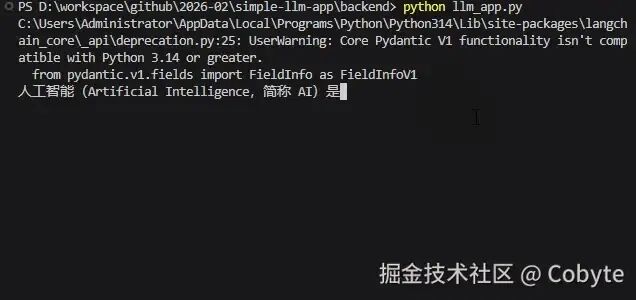
我们遵循单一职责原则(SRP)进行分层架构设计,将系统划分为API层、业务层和数据层,旨在实现高内聚、低耦合,提升代码的可维护性、可测试性和可扩展性。API层 专注于处理 HTTP 协议相关的逻辑,包括路由定义、请求验证、响应序列化和跨域处理等。它作为系统的入口点,负责与客户端进行通信,并将业务逻辑委托给下层。这种设计使得我们可以独立地调整 API 暴露方式(如支持 WebSocket)而不影响核心业务逻辑。业务层 封装 LLM 的核心应用逻辑,例如与 AI 模型的交互、对话历史管理和流式生成等。这一层独立于 Web 框架,使得业务逻辑可以复用于其他场景(如命令行界面或批处理任务)。同时,业务层的单一职责确保了我们能够针对 LLM 交互进行优化和测试,而无需关心 HTTP 细节。数据层 通过 Pydantic 定义系统的数据模型,包括请求、响应结构和内部数据传输对象。通过集中管理数据模型,我们确保了数据格式的一致性,并便于进行数据验证和类型提示。这种分离使得数据结构的变更更加可控,同时也为生成 API 文档提供了便利。实现业务层其实就是封装 LLM 的核心应用逻辑。通过将复杂的 LLM 调用逻辑、提示工程和流式处理封装在独立的类中,这样 API 层只需关注请求与响应,而无需了解 LangChain 或特定 API 的细节。这使得底层技术栈的迭代或更换(例如从 LangChain 切换到其他操作大模型的框架或更改 LangChain 最新的 API)变得轻而易举,只需修改封装类内部实现,而对外接口保持不变,实现了有效隔离。创建 `./backend/llm_app.py` 文件,内容如下:import osfrom typing import Generatorfrom dotenv import load_dotenvfrom langchain_openai import ChatOpenAIfrom langchain_core.prompts import PromptTemplatefrom langchain_core.output_parsers import StrOutputParser# 加载环境变量load_dotenv()class LLMApp: def __init__(self, model_name="deepseek-chat", temperature=0.7): """ 初始化 LLM 应用程序 """ # 检查 DeepSeek API 密钥 if not os.getenv("DEEPSEEK_API_KEY"): raise ValueError("请在 .env 文件中设置 DEEPSEEK_API_KEY 环境变量") # 初始化配置 self.model_name = model_name self.temperature = temperature self.api_key = os.getenv("DEEPSEEK_API_KEY") self.base_url = "https://api.deepseek.com/v1" # 初始化非流式 LLM (用于普通任务) self.llm = self._create_llm(streaming=False) # 初始化流式 LLM (用于流式对话) self.streaming_llm = self._create_llm(streaming=True) # 输出解析器 self.output_parser = StrOutputParser() # 初始化对话链 self._setup_chains() def _create_llm(self, streaming: bool = False): """创建 LLM 实例""" return ChatOpenAI( model_name=self.model_name, temperature=self.temperature, api_key=self.api_key, base_url=self.base_url, streaming=streaming ) def _setup_chains(self): """设置处理链""" # 带上下文的对话 Prompt conversation_prompt = PromptTemplate( input_variables=["chat_history", "user_input"], template="""你是一个有用的 AI 助手。请根据对话历史回答用户的问题。 对话历史: {chat_history} 用户:{user_input} 助手:""" ) # 注意:这里我们只定义 prompt,具体执行时再组合 self.conversation_prompt = conversation_prompt def format_history(self, history_list) -> str: """格式化聊天历史""" if not history_list: return "无历史对话" formatted = [] for msg in history_list: # 兼容 Pydantic model 或 dict if isinstance(msg, dict): role = msg.get('role', 'unknown') content = msg.get('content', '') else: role = getattr(msg, 'role', 'unknown') content = getattr(msg, 'content', '') formatted.append(f"{role}: {content}") return "\n".join(formatted[-10:]) # 只保留最近 10 条 def stream_chat(self, user_input: str, chat_history: list) -> Generator[str, None, None]: """流式对话生成器""" try: history_text = self.format_history(chat_history) # 构建链:Prompt | StreamingLLM | OutputParser chain = self.conversation_prompt | self.streaming_llm | self.output_parser # 执行流式生成 for chunk in chain.stream({ "chat_history": history_text, "user_input": user_input }): yield chunk except Exception as e: yield f"Error: {str(e)}"
接下来我们对上述封装的 LLM 类的功能进行测试,测试前先在 ./backend/.env 文件中添加 DeepSeek 开放平台的 API key。DEEPSEEK_API_KEY=sk-xxxxxx
接着创建 `./backend/test.py` 文件写上以下测试代码。from llm_app import LLMApp# 测试llmApp = LLMApp()# 模拟聊天历史chat_history = [ {"role": "user", "content": "你好"}, {"role": "assistant", "content": "你好!有什么可以帮助你的吗?"},]# 模拟用户输入user_input = "请介绍一下人工智能"# 收集流式响应response_chunks = []for chunk in llmApp.stream_chat(user_input, chat_history): response_chunks.append(chunk) # 模拟实时显示 print(chunk, end="", flush=True)# 合并响应full_response = "".join(response_chunks)print(f"\n完整响应: {full_response}")
接着我们通过 Pydantic 来定义数据的结构(模型)创建 ./backend/models.py 文件,内容如下:from pydantic import BaseModelfrom typing import List, Optionalclass ChatMessage(BaseModel): """单条聊天消息""" role: str # "user" 或 "assistant" content: strclass ChatRequest(BaseModel): """聊天请求模型""" message: str chat_history: Optional[List[ChatMessage]] = []
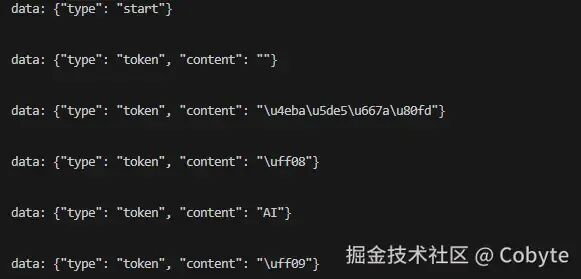
修改 `./backend/test.py` 文件,内容如下:import jsonimport asynciofrom llm_app import LLMAppfrom models import ChatRequest, ChatMessage# 测试llmApp = LLMApp()# 模拟聊天历史chat_history = [ {"role": "user", "content": "你好"}, {"role": "assistant", "content": "你好!有什么可以帮助你的吗?"},]# 模拟用户输入user_input = "请介绍一下人工智能"# 模拟 SSE 的流式聊天响应async def chat_stream(request: ChatRequest): # 1. 发送开始事件 yield f"data: {json.dumps({'type': 'start'})}\n\n" await asyncio.sleep(0.01) # 让出控制权,以便运行其他任务。 full_response = "" # 2. 生成并发送 token for token in llmApp.stream_chat(request.message, request.chat_history): full_response += token yield f"data: {json.dumps({'type': 'token', 'content': token})}\n\n" await asyncio.sleep(0.01) # 3. 发送结束事件 yield f"data: {json.dumps({'type': 'end', 'full_response': full_response})}\n\n"# 异步测试函数async def test_chat_stream(): # 使用 Pydantic 模型实现数据序列化和反序列化(即将JSON数据转换为Python对象) request = ChatRequest(message=user_input, chat_history=chat_history) async for chunk in chat_stream(request): print(chunk)# 在异步编程中,我们使用asyncio.run()来运行一个异步函数(coroutine)作为程序的入口点。asyncio.run(test_chat_stream())
在上述的测试代码中的 chat\_stream 函数实现一个基于 Server-Sent Events (SSE) 的流式聊天响应的异步生成器,它接收一个 `ChatRequest` 对象,然后逐步生成事件流。事件流格式遵循 SSE 规范,每个事件以 "data: " 开头,后跟 JSON 字符串,并以两个换行符结束。1. 首先,发送一个开始事件,通知客户端开始生成响应。2. 然后,通过调用 `llmApp.stream_chat` 方法,逐个获取 token,并将每个 token 作为一个事件发送。3. 在发送每个 token 事件后,使用 `await asyncio.sleep(0.01)` 来让出控制权,这样其他任务可以运行,避免阻塞。4. 同时,将每个 token 累加到 `full_response` 中,以便在最后发送整个响应。5. 最后,发送一个结束事件,并包含完整的响应内容。- 流式传输:可以逐步将响应发送给客户端,客户端可以实时看到生成的 token,提升用户体验(如打字机效果)。
- 异步:使用异步生成器,可以在等待模型生成下一个 token 时让出控制权,提高并发性能。
- 事件驱动:通过定义不同类型的事件(开始、token、结束),客户端可以方便地根据事件类型进行处理。
上面测试代码中实现的 chat\_stream 函数,其实就是我们接下来要实现的 流式对话接口,即接收用户的消息和聊天历史,通过流式方式返回 LLM 的响应。同时我们再实现一个健康检查接口,提供服务器的健康状态,包括 LLM 应用是否初始化成功、模型名称等,便于监控。根据上面所学的知识,我们实现一个基于 FastAPI 的 LLM 聊天 API 服务。我们创建 `./backend/server.py` 文件,内容如下:import jsonimport asynciofrom datetime import datetimefrom fastapi import FastAPI, HTTPExceptionfrom fastapi.middleware.cors import CORSMiddlewarefrom fastapi.responses import StreamingResponsefrom llm_app import LLMAppfrom models import ChatRequest, HealthResponseapp = FastAPI(title="Cobyte LLM Chat API")# CORS 配置:允许前端跨域访问app.add_middleware( CORSMiddleware, allow_origins=["*"], # 在生产环境中建议设置为具体的前端域名 allow_credentials=True, allow_methods=["*"], allow_headers=["*"],)# 全局 LLM 应用实例llm_app = None@app.on_event("startup")async def startup_event(): """应用启动时初始化 LLM""" global llm_app try: print("正在初始化 LLM 应用...") llm_app = LLMApp() print("✅ LLM 应用初始化成功") except Exception as e: print(f"❌ LLM 应用初始化失败: {e}")@app.get("/api/health")async def health_check(): """健康检查接口""" return HealthResponse( status="healthy" if llm_app else "unhealthy", model="deepseek-chat", api_configured=llm_app is not None, timestamp=datetime.now().isoformat() )@app.post("/api/chat/stream")async def chat_stream(request: ChatRequest): """流式对话接口""" if not llm_app: raise HTTPException(status_code=500, detail="LLM 服务未就绪") async def generate(): try: # 1. 发送开始事件 yield f"data: {json.dumps({'type': 'start'})}\n\n" await asyncio.sleep(0.01) # 让出控制权 full_response = "" # 2. 生成并发送 token # 注意:llm_app.stream_chat 是同步生成器,但在 FastAPI 中可以正常工作 # 如果需要完全异步,需要使用 AsyncChatOpenAI,这里为了简单保持同步调用 for token in llm_app.stream_chat(request.message, request.chat_history): full_response += token yield f"data: {json.dumps({'type': 'token', 'content': token})}\n\n" await asyncio.sleep(0.01) # 3. 发送结束事件 yield f"data: {json.dumps({'type': 'end', 'full_response': full_response})}\n\n" except Exception as e: error_msg = str(e) print(f"生成错误: {error_msg}") yield f"data: {json.dumps({'type': 'error', 'message': error_msg})}\n\n" return StreamingResponse(generate(), media_type="text/event-stream")if __name__ == "__main__": import uvicorn uvicorn.run(app, host="0.0.0.0", port=8000)
至此我们基于 FastAPI 实现了 API 层。核心功能就是提供了两个 API:1. 流式对话接口 `/api/chat/stream` 支持 Server-Sent Events (SSE) 流式响应为了更好地管理我们的依赖,我们可以创建一个 `./backend/requirements.txt` 文件,将使用到的依赖都设置到这个文件中:fastapi>=0.109.0uvicorn>=0.27.0python-dotenv>=1.0.0langchain>=1.2.9langchain-openai>=0.0.5pydantic>=2.5.0
# 安装依赖pip install -r requirements.txt
先创建一个 Vue3 + TS 的前端项目,我们在根目录下执行以下命令:npm create vite@latest frontend --template vue-ts
./frontend/src/types/chat.ts 文件如下:export interface Message { id: string role: 'user' | 'assistant' content: string timestamp: number streaming?: boolean // 是否正在流式生成}export interface ChatRequest { message: string chat_history: Array<{ role: string content: string }>}export interface SSEEvent { type: 'start' | 'token' | 'end' | 'error' content?: string full_response?: string message?: string}
./frontend/src/api/chat.ts 文件内容如下:import type { ChatRequest, SSEEvent } from '../types/chat'const API_BASE_URL = import.meta.env.VITE_API_BASE_URL || 'http://localhost:8000'export class ChatAPI { /** * 流式对话接口 */ static streamChat( payload: ChatRequest, onToken: (token: string) => void, onComplete: (fullResponse: string) => void, onError: (error: string) => void ): () => void { // 使用 fetch API 配合 ReadableStream 来处理 POST 请求的流式响应 // 因为标准的 EventSource 不支持 POST 请求 const controller = new AbortController() const fetchStream = async () => { try { const response = await fetch(`${API_BASE_URL}/api/chat/stream`, { method: 'POST', headers: { 'Content-Type': 'application/json', }, body: JSON.stringify(payload), signal: controller.signal, }) if (!response.ok) { throw new Error(`HTTP error! status: ${response.status}`) } const reader = response.body?.getReader() const decoder = new TextDecoder() if (!reader) throw new Error('Response body is null') let buffer = '' while (true) { const { done, value } = await reader.read() if (done) break const chunk = decoder.decode(value, { stream: true }) buffer += chunk // 处理 buffer 中的每一行 const lines = buffer.split('\n\n') buffer = lines.pop() || '' // 保留最后一个可能不完整的块 for (const line of lines) { if (line.startsWith('data: ')) { const jsonStr = line.slice(6) try { const data: SSEEvent = JSON.parse(jsonStr) switch (data.type) { case 'start': break case 'token': if (data.content) onToken(data.content) break case 'end': if (data.full_response) onComplete(data.full_response) return // 正常结束 case 'error': onError(data.message || 'Unknown error') return } } catch (e) { console.error('JSON parse error:', e) } } } } } catch (error: any) { if (error.name === 'AbortError') return onError(error.message) } } fetchStream() // 返回取消函数 return () => controller.abort() } /** * 健康检查 */ static async healthCheck() { try { const response = await fetch(`${API_BASE_URL}/api/health`) return await response.json() } catch (error) { console.error('Health check failed', error) return { status: 'error' } } }}
./frontend/src/composables/useChat.ts 文件内容如下:import { ref, nextTick } from 'vue'import type { Message } from '../types/chat'import { ChatAPI } from '../api/chat'export function useChat() { const messages = ref<Message[]>([]) const isLoading = ref(false) const currentStreamingMessage = ref<Message | null>(null) // 用于取消当前的请求 let cancelStream: (() => void) | null = null /** * 滚动到底部 */ const scrollToBottom = () => { nextTick(() => { const container = document.querySelector('.message-list') if (container) { container.scrollTo({ top: container.scrollHeight, behavior: 'smooth' }) } }) } /** * 发送消息 */ const sendMessage = async (content: string) => { if (!content.trim() || isLoading.value) return // 1. 添加用户消息 const userMessage: Message = { id: Date.now().toString(), role: 'user', content: content.trim(), timestamp: Date.now() } messages.value.push(userMessage) // 准备发送给后端的历史记录(去掉刚加的这一条,因为后端只要之前的) // 或者你可以根据设计决定是否包含当前条,通常 API 设计是:新消息 + 历史 // 我们的后端设计是:message + chat_history const historyPayload = messages.value.slice(0, -1).map(m => ({ role: m.role, content: m.content })) // 2. 创建 AI 消息占位符 const aiMessage: Message = { id: (Date.now() + 1).toString(), role: 'assistant', content: '', timestamp: Date.now(), streaming: true } messages.value.push(aiMessage) currentStreamingMessage.value = aiMessage isLoading.value = true scrollToBottom() // 3. 调用流式 API cancelStream = ChatAPI.streamChat( { message: content.trim(), chat_history: historyPayload }, // onToken (token) => { if (currentStreamingMessage.value) { currentStreamingMessage.value.content += token scrollToBottom() } }, // onComplete (fullResponse) => { if (currentStreamingMessage.value) { // 确保内容完整 if (currentStreamingMessage.value.content !== fullResponse && fullResponse) { currentStreamingMessage.value.content = fullResponse } currentStreamingMessage.value.streaming = false } currentStreamingMessage.value = null isLoading.value = false cancelStream = null scrollToBottom() }, // onError (error) => { if (currentStreamingMessage.value) { currentStreamingMessage.value.content += `\n[错误: ${error}]` currentStreamingMessage.value.streaming = false } currentStreamingMessage.value = null isLoading.value = false cancelStream = null scrollToBottom() } ) } /** * 清空历史 */ const clearHistory = () => { if (cancelStream) { cancelStream() cancelStream = null } messages.value = [] isLoading.value = false currentStreamingMessage.value = null } return { messages, isLoading, sendMessage, clearHistory }}
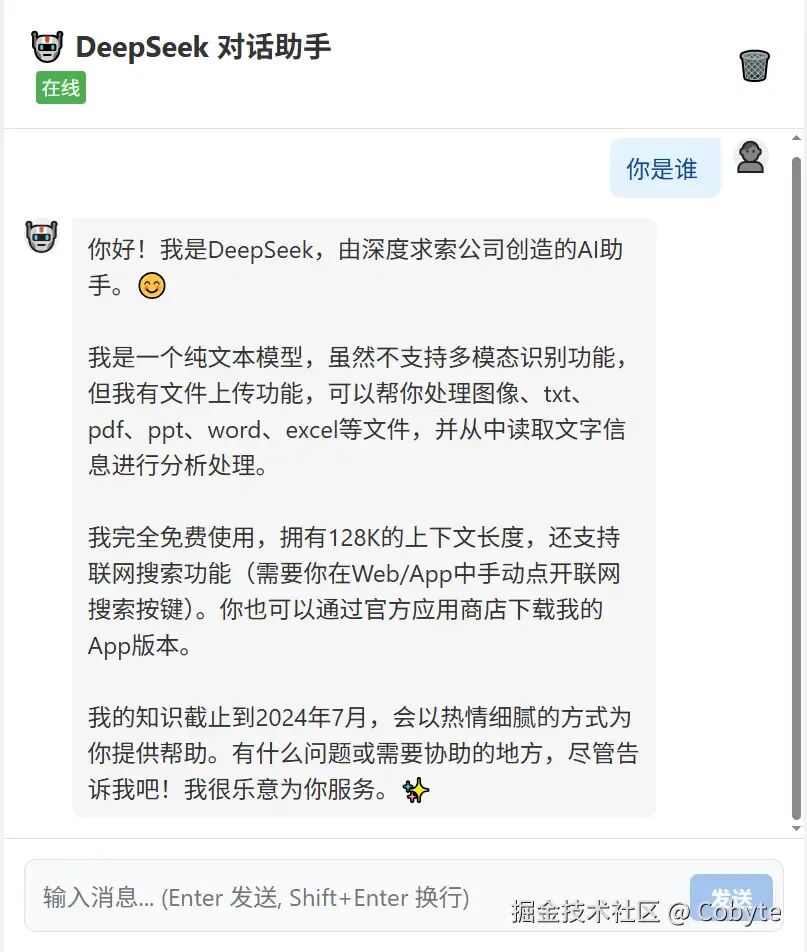
./frontend/src/App.vue 文件内容如下:<template> <divclass="app-container"> <headerclass="chat-header"> <divclass="header-content"> <h1>🤖 DeepSeek 对话助手</h1> <divclass="status-badge":class="{ online: isServerOnline }"> {{ isServerOnline ? '在线' : '离线' }} </div> </div> <button @click="clearHistory"class="clear-btn"title="清空对话"> 🗑️ </button> </header> <mainclass="message-list"> <divv-if="messages.length === 0"class="empty-state"> <p>👋 你好!我是基于 DeepSeek 的 AI 助手。</p> <p>请在下方输入问题开始对话。</p> </div> <div v-for="msg in messages" :key="msg.id" class="message-wrapper" :class="msg.role" > <divclass="avatar"> {{ msg.role === 'user' ? '👤' : '🤖' }} </div> <divclass="message-content"> <divclass="bubble"> {{ msg.content }} <spanv-if="msg.streaming"class="cursor">|</span> </div> </div> </div> </main> <footerclass="input-area"> <divclass="input-container"> <textarea v-model="inputContent" placeholder="输入消息... (Enter 发送, Shift+Enter 换行)" @keydown.enter.exact.prevent="handleSend" :disabled="isLoading" rows="1" ref="textareaRef" ></textarea> <button @click="handleSend" :disabled="isLoading || !inputContent.trim()" class="send-btn" > {{ isLoading ? '...' : '发送' }} </button> </div> </footer> </div></template><scriptsetuplang="ts">import { ref, onMounted, watch } from 'vue'import { useChat } from './composables/useChat'import { ChatAPI } from './api/chat'const { messages, isLoading, sendMessage, clearHistory } = useChat()const inputContent = ref('')const textareaRef = ref<HTMLTextAreaElement | null>(null)const isServerOnline = ref(false)// 检查服务器状态onMounted(async () => { const health = await ChatAPI.healthCheck() isServerOnline.value = health.status === 'healthy'})// 自动调整输入框高度watch(inputContent, () => { if (textareaRef.value) { textareaRef.value.style.height = 'auto' textareaRef.value.style.height = textareaRef.value.scrollHeight + 'px' }})const handleSend = () => { if (inputContent.value.trim() && !isLoading.value) { sendMessage(inputContent.value) inputContent.value = '' // 重置高度 if (textareaRef.value) { textareaRef.value.style.height = 'auto' } }}</script><style>:root { --primary-color: #4a90e2; --bg-color: #f5f7fa; --chat-bg: #ffffff; --user-msg-bg: #e3f2fd; --bot-msg-bg: #f5f5f5; --border-color: #e0e0e0;}* { box-sizing: border-box; margin: 0; padding: 0;}body { font-family: -apple-system, BlinkMacSystemFont, 'Segoe UI', Roboto, Oxygen, Ubuntu, Cantarell, 'Open Sans', 'Helvetica Neue', sans-serif; background-color: var(--bg-color); height: 100vh; overflow: hidden;}.app-container { max-width: 800px; margin: 0 auto; height: 100%; display: flex; flex-direction: column; background-color: var(--chat-bg); box-shadow: 0 0 20px rgba(0,0,0,0.05);}/* Header */.chat-header { padding: 1rem; border-bottom: 1px solid var(--border-color); display: flex; justify-content: space-between; align-items: center; background: white; z-index: 10;}.header-content h1 { font-size: 1.2rem; color: #333;}.status-badge { font-size: 0.8rem; padding: 2px 6px; border-radius: 4px; background: #ff5252; color: white; display: inline-block; margin-left: 8px;}.status-badge.online { background: #4caf50;}.clear-btn { background: none; border: none; cursor: pointer; font-size: 1.2rem; padding: 5px; border-radius: 50%; transition: background 0.2s;}.clear-btn:hover { background: #f0f0f0;}/* Message List */.message-list { flex: 1; overflow-y: auto; padding: 20px; display: flex; flex-direction: column; gap: 20px;}.empty-state { text-align: center; margin-top: 50px; color: #888;}.message-wrapper { display: flex; gap: 12px; max-width: 85%;}.message-wrapper.user { align-self: flex-end; flex-direction: row-reverse;}.avatar { width: 36px; height: 36px; border-radius: 50%; background: #eee; display: flex; align-items: center; justify-content: center; font-size: 1.2rem; flex-shrink: 0;}.bubble { padding: 12px 16px; border-radius: 12px; line-height: 1.5; white-space: pre-wrap; word-break: break-word;}.message-wrapper.user .bubble { background: var(--user-msg-bg); color: #0d47a1; border-radius: 12px 2px 12px 12px;}.message-wrapper.assistant .bubble { background: var(--bot-msg-bg); color: #333; border-radius: 2px 12px 12px 12px;}.cursor { display: inline-block; width: 2px; height: 1em; background: #333; animation: blink 1s infinite; vertical-align: middle;}@keyframes blink { 0%, 100% { opacity: 1; } 50% { opacity: 0; }}/* Input Area */.input-area { padding: 20px; border-top: 1px solid var(--border-color); background: white;}.input-container { display: flex; gap: 10px; align-items: flex-end; background: #f8f9fa; padding: 10px; border-radius: 12px; border: 1px solid var(--border-color);}textarea { flex: 1; border: none; background: transparent; resize: none; max-height: 150px; padding: 8px; font-size: 1rem; font-family: inherit; outline: none;}.send-btn { background: var(--primary-color); color: white; border: none; padding: 8px 20px; border-radius: 8px; cursor: pointer; font-weight: 600; transition: opacity 0.2s;}.send-btn:disabled { opacity: 0.5; cursor: not-allowed;}</style>
./frontend/src/style.css 文件内容如下::root { font-family: Inter, system-ui, Avenir, Helvetica, Arial, sans-serif; line-height: 1.5; font-weight: 400; color-scheme: light dark; color: rgba(255, 255, 255, 0.87); background-color: #242424; font-synthesis: none; text-rendering: optimizeLegibility; -webkit-font-smoothing: antialiased; -moz-osx-font-smoothing: grayscale;}body { margin: 0; display: flex; place-items: center; min-width: 320px; min-height: 100vh;}#app { width: 100%; height: 100vh;}.container { max-width: 600px; margin: 0 auto; padding: 2rem; background-color: #1a1a1a; border-radius: 12px; box-shadow: 0 4px 20px rgba(0, 0, 0, 0.3);}.header { text-align: center; margin-bottom: 2rem;}.header h1 { font-size: 2rem; color: #ffffff; margin: 0;}.header p { font-size: 1rem; color: #bbbbbb; margin: 0;}.form-group { margin-bottom: 1.5rem;}.form-group label { display: block; margin-bottom: 0.5rem; color: #ffffff; font-size: 0.9rem;}.form-group input { width: 100%; padding: 0.75rem; border: 1px solid #444; border-radius: 6px; background-color: #2a2a2a; color: #ffffff; font-size: 1rem;}.form-group textarea { width: 100%; padding: 0.75rem; border: 1px solid #444; border-radius: 6px; background-color: #2a2a2a; color: #ffffff; font-size: 1rem; resize: vertical;}.form-group button { width: 100%; padding: 0.75rem; border: none; border-radius: 6px; background-color: #4caf50; color: #ffffff; font-size: 1rem; cursor: pointer; transition: background-color 0.3s ease;}.form-group button:hover { background-color: #45a049;}.error-message { color: #ff4d4d; font-size: 0.8rem; margin-top: 0.5rem; display: none;}.success-message { color: #4caf50; font-size: 0.8rem; margin-top: 0.5rem; display: none;}@media (max-width: 600px) { .container { padding: 1rem; } .form-group input, .form-group textarea { font-size: 0.9rem; } .form-group button { font-size: 0.9rem; }}
cd backend# 1. 安装依赖pip install -r requirements.txt# 2. 设置 API Key (重要!)# 编辑 .env 文件,填入你的 DeepSeek API Key# DEEPSEEK_API_KEY=sk-... # 3. 启动服务器python server.py# 服务将运行在 http://0.0.0.0:8000
cd frontend# 1. 安装依赖npm install# 2. 启动开发服务器npm run dev
当你输入问题并点击发送时,请求会经过: `前端` -> `FastAPI` -> `LangChain` -> `DeepSeek API` -> `返回结果`。通过本文,我们完成了一个最小可行性产品(MVP)。从零开始搭建一个基于 Python (FastAPI) 、LangChain 和 Vue3 的全栈 LLM 聊天应用程序。这个项目虽然简单,但它包含了一个 AI 应用的完整骨架。你可以在此基础上扩展更多功能,例如添加对话历史记忆 (Memory) 或 RAG (知识库检索) 。接下来我将继续输出更多 AI 全栈的相关知识,欢迎大家关注本栏目。我是 Cobyte,欢迎添加 v:icobyte,学习 AI 全栈。
 10个月宝宝每天需要喝多少奶粉?