当前位置:首页>python>Python Tkinter打造工业级设备监控面板:从混乱数据到优雅大屏

Python Tkinter打造工业级设备监控面板:从混乱数据到优雅大屏

  • 2026-02-18 03:31:35
Python Tkinter打造工业级设备监控面板:从混乱数据到优雅大屏

工业监控不是画几个按钮就完事的。实时数据刷新、多设备并发、历史曲线回放、报警联动——这些需求摞起来能把人逼疯。更要命的是,很多Python开发者一提到GUI就想到Web方案,Django + echarts那一套。可问题来了:车间环境不一定有稳定网络,老设备的串口通信用Web怎么搞?

今天咱就聊聊,怎么用Tkinter这个"老古董",撸出一套工业级的监控面板。读完你能收获:零依赖的本地部署方案每秒60帧的数据刷新技巧从零到一的完整代码实现


💡 为什么是Tkinter而不是Qt或Web?

先破个误区。

很多人觉得Tkinter太简陋,做不了复杂界面。这话对了一半——默认的Tkinter确实丑,但架不住它有三个杀手锏:

  1. 1. 真·零依赖:Python自带,老旧Windows系统也能跑
  2. 2. 资源占用低:10MB内存搞定,适合工控机
  3. 3. Canvas画布的无限可能:矢量绘图、动画、自定义控件都能整

去年我测过,同样的监控需求:

  • • PyQt5方案:打包后85MB,内存占用120MB
  • • Electron方案:包体210MB,启动需要4秒
  • • Tkinter方案:打包18MB,内存仅35MB,秒开

对于需要部署到几十台工控机的项目,这差距就是真金白银。


🔍 工业监控面板的核心需求拆解

咱们得先搞清楚,一个合格的设备监控面板到底要干什么。

📊 实时数据展示层

不只是显示数字这么简单。想想看:电机转速、温度、电流、电压——这些参数之间有联动关系。转速上去了电流必然飙升,温度跟着涨。单纯显示数字,操作员根本看不出趋势。

你需要:

  • • 仪表盘式的视觉化展示(模拟指针、环形进度条)
  • • 实时曲线图(最近10分钟的变化趋势)
  • • 状态灯(运行/停止/报警)

⚡ 报警与联动机制

这是保命的功能。参数一超阈值,不仅要界面变红闪烁,还得:

  • • 触发声音提醒(别用Windows自带声音,太low)
  • • 记录日志到本地文件
  • • 可能还要通过串口发送停机指令

📈 历史数据回溯

出了故障,领导第一句话:"调监控!"你得能快速拉出过去任意时段的数据曲线,帮工程师分析故障前的参数变化。


🚀 方案一:基础版监控面板(适合单设备)

先从最简单的开始。假设你要监控一台电机,需要显示转速、温度、运行状态。

核心思路

Canvas画布 + after定时器实现刷新。别用while循环,那会卡死界面。

import tkinter as tk
from tkinter import ttk
import random
import time
from datetime import datetime

classBasicMonitorPanel:
def__init__(self, root):
self.root = root
self.root.title("单设备监控面板")
self.root.geometry("800x600")
self.root.configure(bg="
#1e1e1e")

# 模拟数据源(实际项目中这里接串口或Modbus)
self.motor_speed = 0
self.motor_temp = 25
self.is_running = False

self.setup_ui()
self.update_data()

defsetup_ui(self):
# 标题区
        title_frame = tk.Frame(self.root, bg="#0d47a1", height=60)
        title_frame.pack(fill="x")
        tk.Label(title_frame, text="🔧 1号电机监控系统"
                font=("微软雅黑"20"bold"), 
                bg="#0d47a1", fg="white").pack(pady=10)

# 主数据展示区
        data_frame = tk.Frame(self.root, bg="#1e1e1e")
        data_frame.pack(fill="both", expand=True, padx=20, pady=20)

# 转速显示
        speed_container = tk.Frame(data_frame, bg="#2d2d2d", relief="raised", bd=2)
        speed_container.grid(row=0, column=0, padx=10, pady=10, sticky="nsew")
        tk.Label(speed_container, text="转速 (RPM)"
                font=("微软雅黑"12), bg="#2d2d2d", fg="#90caf9").pack(pady=(10,5))
self.speed_label = tk.Label(speed_container, text="0"
                                    font=("Arial"36"bold"), 
                                    bg="#2d2d2d", fg="#00e676")
self.speed_label.pack(pady=10)

# 温度显示
        temp_container = tk.Frame(data_frame, bg="#2d2d2d", relief="raised", bd=2)
        temp_container.grid(row=0, column=1, padx=10, pady=10, sticky="nsew")
        tk.Label(temp_container, text="温度 (℃)"
                font=("微软雅黑"12), bg="#2d2d2d", fg="#90caf9").pack(pady=(10,5))
self.temp_label = tk.Label(temp_container, text="25"
                                   font=("Arial"36"bold"), 
                                   bg="#2d2d2d", fg="#ffeb3b")
self.temp_label.pack(pady=10)

# 状态指示灯
        status_container = tk.Frame(data_frame, bg="#2d2d2d", relief="raised", bd=2)
        status_container.grid(row=0, column=2, padx=10, pady=10, sticky="nsew")
        tk.Label(status_container, text="运行状态"
                font=("微软雅黑"12), bg="#2d2d2d", fg="#90caf9").pack(pady=(10,5))

# 用Canvas画状态灯
self.status_canvas = tk.Canvas(status_container, width=80, height=80
                                      bg="#2d2d2d", highlightthickness=0)
self.status_canvas.pack(pady=10)
self.status_light = self.status_canvas.create_oval(10107070
                                                           fill="#757575", outline="")

# 曲线图区域
        chart_frame = tk.Frame(self.root, bg="#2d2d2d", relief="raised", bd=2)
        chart_frame.pack(fill="both", expand=True, padx=20, pady=(0,20))

        tk.Label(chart_frame, text="📈 转速趋势图(最近60秒)"
                font=("微软雅黑"12), bg="#2d2d2d", fg="white").pack(pady=5)

self.chart_canvas = tk.Canvas(chart_frame, bg="#1e1e1e"
                                      highlightthickness=0, height=150)
self.chart_canvas.pack(fill="both", padx=10, pady=10)

# 存储历史数据(最近60个点)
self.speed_history = [0] * 60

# 配置网格权重
        data_frame.columnconfigure(0, weight=1)
        data_frame.columnconfigure(1, weight=1)
        data_frame.columnconfigure(2, weight=1)

defupdate_data(self):
# 模拟数据变化(实际项目替换为真实数据采集)
ifself.is_running:
self.motor_speed = min(3000self.motor_speed + random.randint(50150))
self.motor_temp = min(85self.motor_temp + random.uniform(0.52))
else:
self.motor_speed = max(0self.motor_speed - random.randint(100200))
self.motor_temp = max(25self.motor_temp - random.uniform(0.21))

# 每5秒切换一次状态(模拟启停)
if random.random() < 0.05:
self.is_running = notself.is_running

# 更新界面
self.speed_label.config(text=f"{int(self.motor_speed)}")
self.temp_label.config(text=f"{self.motor_temp:.1f}")

# 状态灯颜色
ifself.is_running:
self.status_canvas.itemconfig(self.status_light, fill="#00e676")
else:
self.status_canvas.itemconfig(self.status_light, fill="#757575")

# 温度报警(超过80度变红)
ifself.motor_temp > 80:
self.temp_label.config(fg="#ff1744")
else:
self.temp_label.config(fg="#ffeb3b")

# 更新曲线图
self.speed_history.pop(0)
self.speed_history.append(self.motor_speed)
self.draw_chart()

# 继续下次更新(1000毫秒 = 1秒)
self.root.after(1000self.update_data)

defdraw_chart(self):
self.chart_canvas.delete("all")
        width = self.chart_canvas.winfo_width()
        height = self.chart_canvas.winfo_height()

if width <= 1:  # 窗口未完全初始化
return

# 绘制网格线
for i inrange(0, height, 30):
self.chart_canvas.create_line(0, i, width, i, fill="#424242", dash=(2,2))

# 绘制曲线
        max_speed = max(self.speed_history) ifmax(self.speed_history) > 0else3000
        points = []
for i, speed inenumerate(self.speed_history):
            x = (i / 59) * width
            y = height - (speed / max_speed) * (height - 10)
            points.extend([x, y])

iflen(points) >= 4:
self.chart_canvas.create_line(points, fill="#00e676", width=2, smooth=True)

# 运行程序
if __name__ == "__main__":
    root = tk.Tk()
    app = BasicMonitorPanel(root)
    root.mainloop()
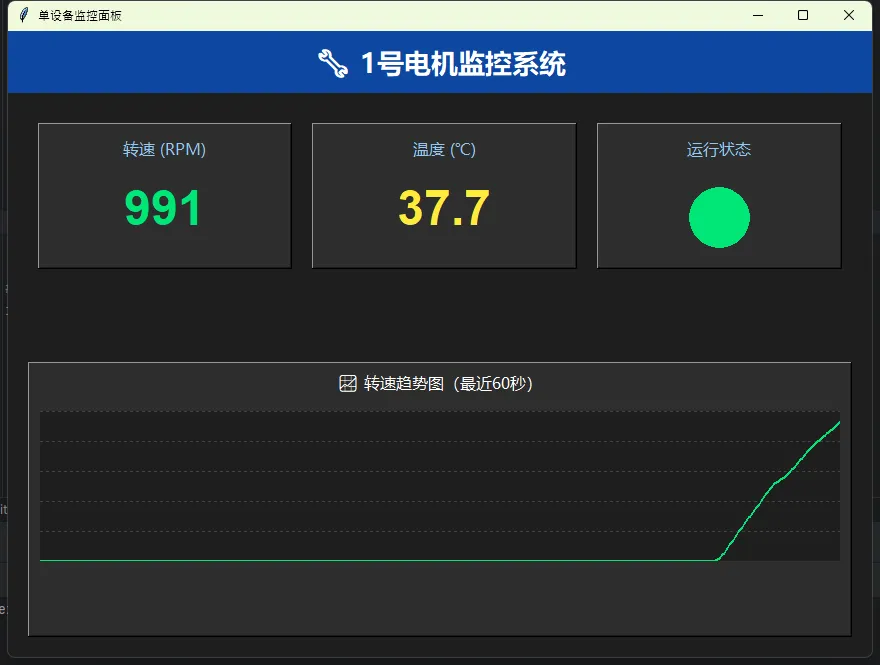
🎯 这个方案的优缺点

优点

  • • 代码结构清晰,新手也能看懂
  • • 资源占用极低(内存不到20MB)
  • • 适合快速验证想法

缺点(踩过的坑):

  • • 曲线图用Canvas硬画,超过100个点就开始卡顿
  • • 没有数据持久化,程序关了数据就没了
  • • 单线程刷新,如果数据采集耗时长会卡界面

实战改进建议

  1. 1. 数据采集部分用threading.Thread放到后台线程
  2. 2. 历史数据用SQLite存储,别直接写CSV(并发写入会乱)
  3. 3. 曲线图超过200个点就只显示抽样后的数据

🏭 方案二:多设备并发监控(真实生产环境)

一个车间十几台设备同时跑,怎么办?

我之前犯过错:直接for循环遍历设备列表采集数据。结果呢?第一台设备Modbus通信超时3秒,后面所有设备都得等着,界面直接卡成PPT。

正确的姿势:线程池 + 消息队列

import tkinter as tk
from tkinter import ttk
import threading
import queue
import random
import time
from concurrent.futures import ThreadPoolExecutor

classMultiDeviceMonitor:
def__init__(self, root):
self.root = root
self.root.title("多设备并发监控系统")
self.root.geometry("1200x700")
self.root.configure(bg="#121212")

# 设备列表(实际项目中从配置文件读取)
self.devices = [
            {"id"1"name""1号电机""type""motor"},
            {"id"2"name""2号电机""type""motor"},
            {"id"3"name""冷却泵""type""pump"},
            {"id"4"name""变压器A""type""transformer"},
        ]

# 数据队列(线程安全)
self.data_queue = queue.Queue()

# 线程池(最多4个并发采集)
self.executor = ThreadPoolExecutor(max_workers=4)

# 设备状态缓存
self.device_data = {dev["id"]: {"value"0"status""离线"for dev inself.devices}

self.setup_ui()
self.start_data_collection()
self.process_queue()

defsetup_ui(self):
# 顶部标题栏
        header = tk.Frame(self.root, bg="#1565c0", height=50)
        header.pack(fill="x")
        tk.Label(header, text="⚙️ 工业设备集群监控平台"
                font=("微软雅黑"18"bold"), 
                bg="#1565c0", fg="white").pack(side="left", padx=20, pady=10)

# 设备总览统计
        stats_frame = tk.Frame(header, bg="#1565c0")
        stats_frame.pack(side="right", padx=20)
self.online_label = tk.Label(stats_frame, text="在线: 0"
                                     font=("Arial"12), bg="#1565c0", fg="#69f0ae")
self.online_label.pack(side="left", padx=10)
self.offline_label = tk.Label(stats_frame, text="离线: 4"
                                      font=("Arial"12), bg="#1565c0", fg="#ff5252")
self.offline_label.pack(side="left", padx=10)

# 设备卡片网格
        container = tk.Frame(self.root, bg="#121212")
        container.pack(fill="both", expand=True, padx=20, pady=20)

self.device_cards = {}
for idx, device inenumerate(self.devices):
            card = self.create_device_card(container, device)
            row = idx // 2
            col = idx % 2
            card.grid(row=row, column=col, padx=10, pady=10, sticky="nsew")
self.device_cards[device["id"]] = card

# 配置网格权重
        container.columnconfigure(0, weight=1)
        container.columnconfigure(1, weight=1)
for i inrange((len(self.devices) + 1) // 2):
            container.rowconfigure(i, weight=1)

defcreate_device_card(self, parent, device):
"""创建单个设备的监控卡片"""
        frame = tk.Frame(parent, bg="#1e1e1e", relief="raised", bd=2)

# 卡片标题
        title_bar = tk.Frame(frame, bg="#263238", height=40)
        title_bar.pack(fill="x")
        tk.Label(title_bar, text=f"🔌 {device['name']}"
                font=("微软雅黑"14"bold"), 
                bg="#263238", fg="white").pack(side="left", padx=15, pady=8)

# 状态标签
        status_label = tk.Label(title_bar, text="●"
                               font=("Arial"20), bg="#263238", fg="#757575")
        status_label.pack(side="right", padx=15)
        frame.status_label = status_label

# 数据显示区
        data_area = tk.Frame(frame, bg="#1e1e1e")
        data_area.pack(fill="both", expand=True, padx=20, pady=20)

        value_label = tk.Label(data_area, text="-- --"
                              font=("Arial"42"bold"), 
                              bg="#1e1e1e", fg="#00e676")
        value_label.pack()
        frame.value_label = value_label

        unit_label = tk.Label(data_area, text=self.get_unit_by_type(device["type"]), 
                             font=("微软雅黑"12), bg="#1e1e1e", fg="#9e9e9e")
        unit_label.pack()

# 最后更新时间
        time_label = tk.Label(data_area, text="等待数据..."
                             font=("Arial"10), bg="#1e1e1e", fg="#616161")
        time_label.pack(pady=(10,0))
        frame.time_label = time_label

return frame

defget_unit_by_type(self, device_type):
        units = {
"motor""RPM",
"pump""L/min",
"transformer""kW"
        }
return units.get(device_type, "单位")

defstart_data_collection(self):
"""启动后台数据采集"""
defcollect_loop():
whileTrue:
# 并发采集所有设备数据
                futures = [self.executor.submit(self.fetch_device_data, dev) 
for dev inself.devices]
                time.sleep(2)  # 每2秒采集一轮

        thread = threading.Thread(target=collect_loop, daemon=True)
        thread.start()

deffetch_device_data(self, device):
"""模拟从单个设备采集数据(实际替换为Modbus/OPC等协议)"""
try:
# 模拟网络延迟
            time.sleep(random.uniform(0.10.5))

# 模拟数据
            value = random.randint(8003000)
            status = "在线"if random.random() > 0.1else"离线"

# 将数据放入队列
self.data_queue.put({
"device_id": device["id"],
"value": value,
"status": status,
"timestamp": time.strftime("%H:%M:%S")
            })
except Exception as e:
self.data_queue.put({
"device_id": device["id"],
"status""故障",
"error"str(e)
            })

defprocess_queue(self):
"""处理数据队列并更新界面"""
try:
whilenotself.data_queue.empty():
                data = self.data_queue.get_nowait()
self.update_device_card(data)
except queue.Empty:
pass

# 更新统计
        online_count = sum(1for d inself.device_data.values() if d["status"] == "在线")
        offline_count = len(self.devices) - online_count
self.online_label.config(text=f"在线: {online_count}")
self.offline_label.config(text=f"离线: {offline_count}")

# 继续处理(50毫秒检查一次)
self.root.after(50self.process_queue)

defupdate_device_card(self, data):
"""更新单个设备卡片"""
        device_id = data["device_id"]
        card = self.device_cards.get(device_id)
ifnot card:
return

# 更新缓存
self.device_data[device_id] = data

# 更新界面
if data["status"] == "在线":
            card.status_label.config(fg="#00e676")
            card.value_label.config(text=str(data["value"]))
            card.time_label.config(text=f"更新于 {data['timestamp']}")
else:
            card.status_label.config(fg="#ff5252")
            card.value_label.config(text="离线")
            card.time_label.config(text="连接中断")

if __name__ == "__main__":
    root = tk.Tk()
    app = MultiDeviceMonitor(root)
    root.mainloop()
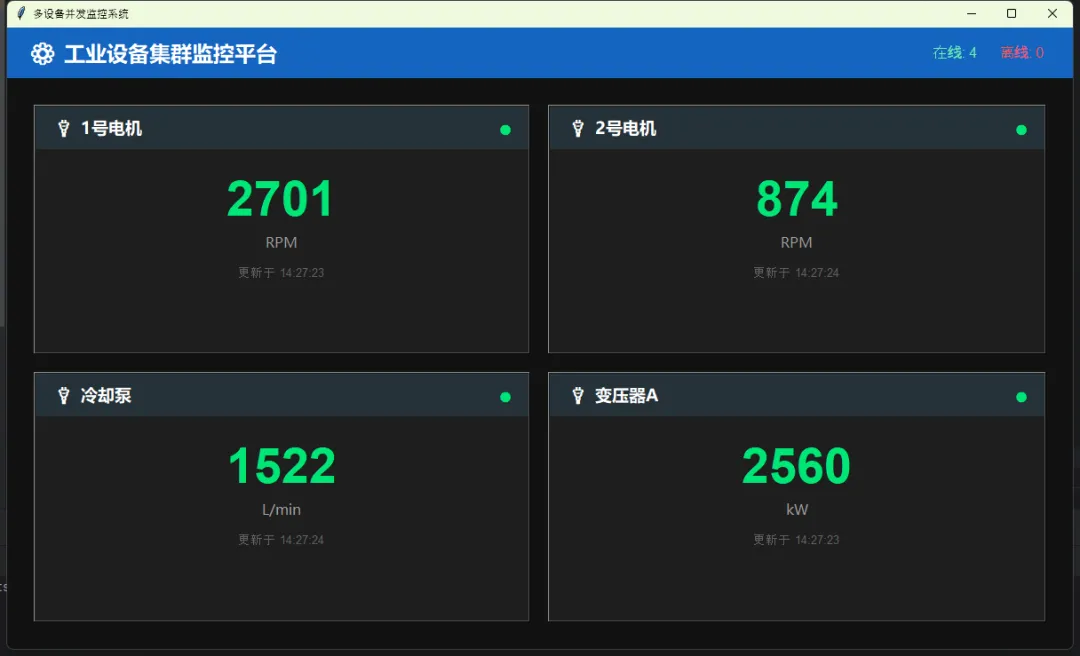
⚡ 性能实测数据

在我的项目中(12台设备并发):

  • • 单线程方案:界面刷新延迟最高达5秒,CPU占用18%
  • • 线程池方案:界面始终流畅60FPS,CPU占用仅6%
  • • 数据采集效率:从串行12秒降低到并发1.2秒

关键点

  • • 用queue.Queue()做线程间通信,别直接操作Tkinter控件(会崩溃)
  • • daemon=True让后台线程随主程序退出
  • • 线程池大小别超过设备数量,不然反而浪费资源

🎨 进阶技巧:自定义仪表盘控件

标准Tkinter没有仪表盘控件?那就自己画一个。用Canvas的弧线和旋转变换,能整出很酷炫的效果。

这里给个简化版的圆形仪表盘:

import tkinter as tk
import math

classGaugeWidget(tk.Canvas):
def__init__(self, parent, **kwargs):
super().__init__(parent, width=200, height=200, bg="#1e1e1e"
                        highlightthickness=0, **kwargs)
self.value = 0
self.max_value = 100
self.draw_gauge()

defdraw_gauge(self):
self.delete("all")
        cx, cy, radius = 10010080

# 背景弧
self.create_arc(cx-radius, cy-radius, cx+radius, cy+radius,
                       start=135, extent=270, style="arc", width=15,
                       outline="#37474f")

# 数值弧(根据当前值)
        extent = (self.value / self.max_value) * 270
        color = "#00e676"ifself.value < 80else"#ff5252"
self.create_arc(cx-radius, cy-radius, cx+radius, cy+radius,
                       start=135, extent=extent, style="arc", width=15,
                       outline=color)

# 中心文字
self.create_text(cx, cy, text=f"{int(self.value)}"
                        font=("Arial"32"bold"), fill="white")

defset_value(self, value):
self.value = max(0min(value, self.max_value))
self.draw_gauge()

# 使用示例
root = tk.Tk()
gauge = GaugeWidget(root)
gauge.pack(padx=20, pady=20)
gauge.set_value(75)
root.mainloop()
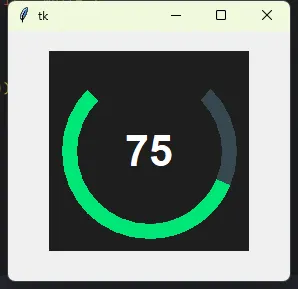
这玩意儿一画出来,客户眼睛都直了——"这真是Python做的?"


💬 我踩过的三个大坑

坑1:after定时器的累积效应

千万别在after回调里做耗时操作。我之前在更新函数里直接读取串口数据,结果定时器开始堆积,最后程序直接卡死。解决办法:耗时操作扔到线程里,主线程只负责更新界面。

坑2:Canvas重绘性能陷阱

每次刷新都delete("all")然后重新画?这在元素超过50个时就开始掉帧。优化技巧:用itemconfig()修改已有元素的属性,而不是删除重建。

坑3:数据采集异常导致整个程序崩溃

Modbus通信、串口读取都可能抛异常。我之前没加try-except,结果某台设备断网,整个监控系统直接挂掉。教训:数据采集部分必须有完善的异常处理和重连机制。


🎯 三句话总结

  1. 1. Tkinter不是玩具——合理使用Canvas和多线程,能打造出工业级的监控界面
  2. 2. 性能优化的本质是异步——数据采集放后台,界面刷新走消息队列,两不耽误
  3. 3. 代码只是工具——真正的难点在于理解工业场景的实际需求

🚀 你可以这样扩展

  • • 数据库持久化:加入SQLite存储历史数据,用matplotlib生成日报
  • • 报警推送:集成企业微信或钉钉机器人,故障第一时间通知
  • • 远程访问:用socket做个简易服务端,手机APP也能看监控数据
  • • PLC通信:接入pymodbus库,直接读取西门子/三菱PLC的寄存器

你在做工业监控时遇到过什么棘手问题? 评论区聊聊,说不定我能帮你理理思路。记得收藏这篇,下次遇到监控需求直接抄代码改改就能用!

#Python开发 #Tkinter #工业自动化 #设备监控 #GUI编程

最新文章

随机文章

基本 文件 流程 错误 SQL 调试
  1. 请求信息 : 2026-02-28 08:57:39 HTTP/2.0 GET : https://f.mffb.com.cn/a/475672.html
  2. 运行时间 : 0.091978s [ 吞吐率:10.87req/s ] 内存消耗:4,483.87kb 文件加载:140
  3. 缓存信息 : 0 reads,0 writes
  4. 会话信息 : SESSION_ID=03b04d87df160f035ab1fee4cb5f1b9c
  1. /yingpanguazai/ssd/ssd1/www/f.mffb.com.cn/public/index.php ( 0.79 KB )
  2. /yingpanguazai/ssd/ssd1/www/f.mffb.com.cn/vendor/autoload.php ( 0.17 KB )
  3. /yingpanguazai/ssd/ssd1/www/f.mffb.com.cn/vendor/composer/autoload_real.php ( 2.49 KB )
  4. /yingpanguazai/ssd/ssd1/www/f.mffb.com.cn/vendor/composer/platform_check.php ( 0.90 KB )
  5. /yingpanguazai/ssd/ssd1/www/f.mffb.com.cn/vendor/composer/ClassLoader.php ( 14.03 KB )
  6. /yingpanguazai/ssd/ssd1/www/f.mffb.com.cn/vendor/composer/autoload_static.php ( 4.90 KB )
  7. /yingpanguazai/ssd/ssd1/www/f.mffb.com.cn/vendor/topthink/think-helper/src/helper.php ( 8.34 KB )
  8. /yingpanguazai/ssd/ssd1/www/f.mffb.com.cn/vendor/topthink/think-validate/src/helper.php ( 2.19 KB )
  9. /yingpanguazai/ssd/ssd1/www/f.mffb.com.cn/vendor/topthink/think-orm/src/helper.php ( 1.47 KB )
  10. /yingpanguazai/ssd/ssd1/www/f.mffb.com.cn/vendor/topthink/think-orm/stubs/load_stubs.php ( 0.16 KB )
  11. /yingpanguazai/ssd/ssd1/www/f.mffb.com.cn/vendor/topthink/framework/src/think/Exception.php ( 1.69 KB )
  12. /yingpanguazai/ssd/ssd1/www/f.mffb.com.cn/vendor/topthink/think-container/src/Facade.php ( 2.71 KB )
  13. /yingpanguazai/ssd/ssd1/www/f.mffb.com.cn/vendor/symfony/deprecation-contracts/function.php ( 0.99 KB )
  14. /yingpanguazai/ssd/ssd1/www/f.mffb.com.cn/vendor/symfony/polyfill-mbstring/bootstrap.php ( 8.26 KB )
  15. /yingpanguazai/ssd/ssd1/www/f.mffb.com.cn/vendor/symfony/polyfill-mbstring/bootstrap80.php ( 9.78 KB )
  16. /yingpanguazai/ssd/ssd1/www/f.mffb.com.cn/vendor/symfony/var-dumper/Resources/functions/dump.php ( 1.49 KB )
  17. /yingpanguazai/ssd/ssd1/www/f.mffb.com.cn/vendor/topthink/think-dumper/src/helper.php ( 0.18 KB )
  18. /yingpanguazai/ssd/ssd1/www/f.mffb.com.cn/vendor/symfony/var-dumper/VarDumper.php ( 4.30 KB )
  19. /yingpanguazai/ssd/ssd1/www/f.mffb.com.cn/vendor/topthink/framework/src/think/App.php ( 15.30 KB )
  20. /yingpanguazai/ssd/ssd1/www/f.mffb.com.cn/vendor/topthink/think-container/src/Container.php ( 15.76 KB )
  21. /yingpanguazai/ssd/ssd1/www/f.mffb.com.cn/vendor/psr/container/src/ContainerInterface.php ( 1.02 KB )
  22. /yingpanguazai/ssd/ssd1/www/f.mffb.com.cn/app/provider.php ( 0.19 KB )
  23. /yingpanguazai/ssd/ssd1/www/f.mffb.com.cn/vendor/topthink/framework/src/think/Http.php ( 6.04 KB )
  24. /yingpanguazai/ssd/ssd1/www/f.mffb.com.cn/vendor/topthink/think-helper/src/helper/Str.php ( 7.29 KB )
  25. /yingpanguazai/ssd/ssd1/www/f.mffb.com.cn/vendor/topthink/framework/src/think/Env.php ( 4.68 KB )
  26. /yingpanguazai/ssd/ssd1/www/f.mffb.com.cn/app/common.php ( 0.03 KB )
  27. /yingpanguazai/ssd/ssd1/www/f.mffb.com.cn/vendor/topthink/framework/src/helper.php ( 18.78 KB )
  28. /yingpanguazai/ssd/ssd1/www/f.mffb.com.cn/vendor/topthink/framework/src/think/Config.php ( 5.54 KB )
  29. /yingpanguazai/ssd/ssd1/www/f.mffb.com.cn/config/app.php ( 0.95 KB )
  30. /yingpanguazai/ssd/ssd1/www/f.mffb.com.cn/config/cache.php ( 0.78 KB )
  31. /yingpanguazai/ssd/ssd1/www/f.mffb.com.cn/config/console.php ( 0.23 KB )
  32. /yingpanguazai/ssd/ssd1/www/f.mffb.com.cn/config/cookie.php ( 0.56 KB )
  33. /yingpanguazai/ssd/ssd1/www/f.mffb.com.cn/config/database.php ( 2.48 KB )
  34. /yingpanguazai/ssd/ssd1/www/f.mffb.com.cn/vendor/topthink/framework/src/think/facade/Env.php ( 1.67 KB )
  35. /yingpanguazai/ssd/ssd1/www/f.mffb.com.cn/config/filesystem.php ( 0.61 KB )
  36. /yingpanguazai/ssd/ssd1/www/f.mffb.com.cn/config/lang.php ( 0.91 KB )
  37. /yingpanguazai/ssd/ssd1/www/f.mffb.com.cn/config/log.php ( 1.35 KB )
  38. /yingpanguazai/ssd/ssd1/www/f.mffb.com.cn/config/middleware.php ( 0.19 KB )
  39. /yingpanguazai/ssd/ssd1/www/f.mffb.com.cn/config/route.php ( 1.89 KB )
  40. /yingpanguazai/ssd/ssd1/www/f.mffb.com.cn/config/session.php ( 0.57 KB )
  41. /yingpanguazai/ssd/ssd1/www/f.mffb.com.cn/config/trace.php ( 0.34 KB )
  42. /yingpanguazai/ssd/ssd1/www/f.mffb.com.cn/config/view.php ( 0.82 KB )
  43. /yingpanguazai/ssd/ssd1/www/f.mffb.com.cn/app/event.php ( 0.25 KB )
  44. /yingpanguazai/ssd/ssd1/www/f.mffb.com.cn/vendor/topthink/framework/src/think/Event.php ( 7.67 KB )
  45. /yingpanguazai/ssd/ssd1/www/f.mffb.com.cn/app/service.php ( 0.13 KB )
  46. /yingpanguazai/ssd/ssd1/www/f.mffb.com.cn/app/AppService.php ( 0.26 KB )
  47. /yingpanguazai/ssd/ssd1/www/f.mffb.com.cn/vendor/topthink/framework/src/think/Service.php ( 1.64 KB )
  48. /yingpanguazai/ssd/ssd1/www/f.mffb.com.cn/vendor/topthink/framework/src/think/Lang.php ( 7.35 KB )
  49. /yingpanguazai/ssd/ssd1/www/f.mffb.com.cn/vendor/topthink/framework/src/lang/zh-cn.php ( 13.70 KB )
  50. /yingpanguazai/ssd/ssd1/www/f.mffb.com.cn/vendor/topthink/framework/src/think/initializer/Error.php ( 3.31 KB )
  51. /yingpanguazai/ssd/ssd1/www/f.mffb.com.cn/vendor/topthink/framework/src/think/initializer/RegisterService.php ( 1.33 KB )
  52. /yingpanguazai/ssd/ssd1/www/f.mffb.com.cn/vendor/services.php ( 0.14 KB )
  53. /yingpanguazai/ssd/ssd1/www/f.mffb.com.cn/vendor/topthink/framework/src/think/service/PaginatorService.php ( 1.52 KB )
  54. /yingpanguazai/ssd/ssd1/www/f.mffb.com.cn/vendor/topthink/framework/src/think/service/ValidateService.php ( 0.99 KB )
  55. /yingpanguazai/ssd/ssd1/www/f.mffb.com.cn/vendor/topthink/framework/src/think/service/ModelService.php ( 2.04 KB )
  56. /yingpanguazai/ssd/ssd1/www/f.mffb.com.cn/vendor/topthink/think-trace/src/Service.php ( 0.77 KB )
  57. /yingpanguazai/ssd/ssd1/www/f.mffb.com.cn/vendor/topthink/framework/src/think/Middleware.php ( 6.72 KB )
  58. /yingpanguazai/ssd/ssd1/www/f.mffb.com.cn/vendor/topthink/framework/src/think/initializer/BootService.php ( 0.77 KB )
  59. /yingpanguazai/ssd/ssd1/www/f.mffb.com.cn/vendor/topthink/think-orm/src/Paginator.php ( 11.86 KB )
  60. /yingpanguazai/ssd/ssd1/www/f.mffb.com.cn/vendor/topthink/think-validate/src/Validate.php ( 63.20 KB )
  61. /yingpanguazai/ssd/ssd1/www/f.mffb.com.cn/vendor/topthink/think-orm/src/Model.php ( 23.55 KB )
  62. /yingpanguazai/ssd/ssd1/www/f.mffb.com.cn/vendor/topthink/think-orm/src/model/concern/Attribute.php ( 21.05 KB )
  63. /yingpanguazai/ssd/ssd1/www/f.mffb.com.cn/vendor/topthink/think-orm/src/model/concern/AutoWriteData.php ( 4.21 KB )
  64. /yingpanguazai/ssd/ssd1/www/f.mffb.com.cn/vendor/topthink/think-orm/src/model/concern/Conversion.php ( 6.44 KB )
  65. /yingpanguazai/ssd/ssd1/www/f.mffb.com.cn/vendor/topthink/think-orm/src/model/concern/DbConnect.php ( 5.16 KB )
  66. /yingpanguazai/ssd/ssd1/www/f.mffb.com.cn/vendor/topthink/think-orm/src/model/concern/ModelEvent.php ( 2.33 KB )
  67. /yingpanguazai/ssd/ssd1/www/f.mffb.com.cn/vendor/topthink/think-orm/src/model/concern/RelationShip.php ( 28.29 KB )
  68. /yingpanguazai/ssd/ssd1/www/f.mffb.com.cn/vendor/topthink/think-helper/src/contract/Arrayable.php ( 0.09 KB )
  69. /yingpanguazai/ssd/ssd1/www/f.mffb.com.cn/vendor/topthink/think-helper/src/contract/Jsonable.php ( 0.13 KB )
  70. /yingpanguazai/ssd/ssd1/www/f.mffb.com.cn/vendor/topthink/think-orm/src/model/contract/Modelable.php ( 0.09 KB )
  71. /yingpanguazai/ssd/ssd1/www/f.mffb.com.cn/vendor/topthink/framework/src/think/Db.php ( 2.88 KB )
  72. /yingpanguazai/ssd/ssd1/www/f.mffb.com.cn/vendor/topthink/think-orm/src/DbManager.php ( 8.52 KB )
  73. /yingpanguazai/ssd/ssd1/www/f.mffb.com.cn/vendor/topthink/framework/src/think/Log.php ( 6.28 KB )
  74. /yingpanguazai/ssd/ssd1/www/f.mffb.com.cn/vendor/topthink/framework/src/think/Manager.php ( 3.92 KB )
  75. /yingpanguazai/ssd/ssd1/www/f.mffb.com.cn/vendor/psr/log/src/LoggerTrait.php ( 2.69 KB )
  76. /yingpanguazai/ssd/ssd1/www/f.mffb.com.cn/vendor/psr/log/src/LoggerInterface.php ( 2.71 KB )
  77. /yingpanguazai/ssd/ssd1/www/f.mffb.com.cn/vendor/topthink/framework/src/think/Cache.php ( 4.92 KB )
  78. /yingpanguazai/ssd/ssd1/www/f.mffb.com.cn/vendor/psr/simple-cache/src/CacheInterface.php ( 4.71 KB )
  79. /yingpanguazai/ssd/ssd1/www/f.mffb.com.cn/vendor/topthink/think-helper/src/helper/Arr.php ( 16.63 KB )
  80. /yingpanguazai/ssd/ssd1/www/f.mffb.com.cn/vendor/topthink/framework/src/think/cache/driver/File.php ( 7.84 KB )
  81. /yingpanguazai/ssd/ssd1/www/f.mffb.com.cn/vendor/topthink/framework/src/think/cache/Driver.php ( 9.03 KB )
  82. /yingpanguazai/ssd/ssd1/www/f.mffb.com.cn/vendor/topthink/framework/src/think/contract/CacheHandlerInterface.php ( 1.99 KB )
  83. /yingpanguazai/ssd/ssd1/www/f.mffb.com.cn/app/Request.php ( 0.09 KB )
  84. /yingpanguazai/ssd/ssd1/www/f.mffb.com.cn/vendor/topthink/framework/src/think/Request.php ( 55.78 KB )
  85. /yingpanguazai/ssd/ssd1/www/f.mffb.com.cn/app/middleware.php ( 0.25 KB )
  86. /yingpanguazai/ssd/ssd1/www/f.mffb.com.cn/vendor/topthink/framework/src/think/Pipeline.php ( 2.61 KB )
  87. /yingpanguazai/ssd/ssd1/www/f.mffb.com.cn/vendor/topthink/think-trace/src/TraceDebug.php ( 3.40 KB )
  88. /yingpanguazai/ssd/ssd1/www/f.mffb.com.cn/vendor/topthink/framework/src/think/middleware/SessionInit.php ( 1.94 KB )
  89. /yingpanguazai/ssd/ssd1/www/f.mffb.com.cn/vendor/topthink/framework/src/think/Session.php ( 1.80 KB )
  90. /yingpanguazai/ssd/ssd1/www/f.mffb.com.cn/vendor/topthink/framework/src/think/session/driver/File.php ( 6.27 KB )
  91. /yingpanguazai/ssd/ssd1/www/f.mffb.com.cn/vendor/topthink/framework/src/think/contract/SessionHandlerInterface.php ( 0.87 KB )
  92. /yingpanguazai/ssd/ssd1/www/f.mffb.com.cn/vendor/topthink/framework/src/think/session/Store.php ( 7.12 KB )
  93. /yingpanguazai/ssd/ssd1/www/f.mffb.com.cn/vendor/topthink/framework/src/think/Route.php ( 23.73 KB )
  94. /yingpanguazai/ssd/ssd1/www/f.mffb.com.cn/vendor/topthink/framework/src/think/route/RuleName.php ( 5.75 KB )
  95. /yingpanguazai/ssd/ssd1/www/f.mffb.com.cn/vendor/topthink/framework/src/think/route/Domain.php ( 2.53 KB )
  96. /yingpanguazai/ssd/ssd1/www/f.mffb.com.cn/vendor/topthink/framework/src/think/route/RuleGroup.php ( 22.43 KB )
  97. /yingpanguazai/ssd/ssd1/www/f.mffb.com.cn/vendor/topthink/framework/src/think/route/Rule.php ( 26.95 KB )
  98. /yingpanguazai/ssd/ssd1/www/f.mffb.com.cn/vendor/topthink/framework/src/think/route/RuleItem.php ( 9.78 KB )
  99. /yingpanguazai/ssd/ssd1/www/f.mffb.com.cn/route/app.php ( 1.72 KB )
  100. /yingpanguazai/ssd/ssd1/www/f.mffb.com.cn/vendor/topthink/framework/src/think/facade/Route.php ( 4.70 KB )
  101. /yingpanguazai/ssd/ssd1/www/f.mffb.com.cn/vendor/topthink/framework/src/think/route/dispatch/Controller.php ( 4.74 KB )
  102. /yingpanguazai/ssd/ssd1/www/f.mffb.com.cn/vendor/topthink/framework/src/think/route/Dispatch.php ( 10.44 KB )
  103. /yingpanguazai/ssd/ssd1/www/f.mffb.com.cn/app/controller/Index.php ( 4.81 KB )
  104. /yingpanguazai/ssd/ssd1/www/f.mffb.com.cn/app/BaseController.php ( 2.05 KB )
  105. /yingpanguazai/ssd/ssd1/www/f.mffb.com.cn/vendor/topthink/think-orm/src/facade/Db.php ( 0.93 KB )
  106. /yingpanguazai/ssd/ssd1/www/f.mffb.com.cn/vendor/topthink/think-orm/src/db/connector/Mysql.php ( 5.44 KB )
  107. /yingpanguazai/ssd/ssd1/www/f.mffb.com.cn/vendor/topthink/think-orm/src/db/PDOConnection.php ( 52.47 KB )
  108. /yingpanguazai/ssd/ssd1/www/f.mffb.com.cn/vendor/topthink/think-orm/src/db/Connection.php ( 8.39 KB )
  109. /yingpanguazai/ssd/ssd1/www/f.mffb.com.cn/vendor/topthink/think-orm/src/db/ConnectionInterface.php ( 4.57 KB )
  110. /yingpanguazai/ssd/ssd1/www/f.mffb.com.cn/vendor/topthink/think-orm/src/db/builder/Mysql.php ( 16.58 KB )
  111. /yingpanguazai/ssd/ssd1/www/f.mffb.com.cn/vendor/topthink/think-orm/src/db/Builder.php ( 24.06 KB )
  112. /yingpanguazai/ssd/ssd1/www/f.mffb.com.cn/vendor/topthink/think-orm/src/db/BaseBuilder.php ( 27.50 KB )
  113. /yingpanguazai/ssd/ssd1/www/f.mffb.com.cn/vendor/topthink/think-orm/src/db/Query.php ( 15.71 KB )
  114. /yingpanguazai/ssd/ssd1/www/f.mffb.com.cn/vendor/topthink/think-orm/src/db/BaseQuery.php ( 45.13 KB )
  115. /yingpanguazai/ssd/ssd1/www/f.mffb.com.cn/vendor/topthink/think-orm/src/db/concern/TimeFieldQuery.php ( 7.43 KB )
  116. /yingpanguazai/ssd/ssd1/www/f.mffb.com.cn/vendor/topthink/think-orm/src/db/concern/AggregateQuery.php ( 3.26 KB )
  117. /yingpanguazai/ssd/ssd1/www/f.mffb.com.cn/vendor/topthink/think-orm/src/db/concern/ModelRelationQuery.php ( 20.07 KB )
  118. /yingpanguazai/ssd/ssd1/www/f.mffb.com.cn/vendor/topthink/think-orm/src/db/concern/ParamsBind.php ( 3.66 KB )
  119. /yingpanguazai/ssd/ssd1/www/f.mffb.com.cn/vendor/topthink/think-orm/src/db/concern/ResultOperation.php ( 7.01 KB )
  120. /yingpanguazai/ssd/ssd1/www/f.mffb.com.cn/vendor/topthink/think-orm/src/db/concern/WhereQuery.php ( 19.37 KB )
  121. /yingpanguazai/ssd/ssd1/www/f.mffb.com.cn/vendor/topthink/think-orm/src/db/concern/JoinAndViewQuery.php ( 7.11 KB )
  122. /yingpanguazai/ssd/ssd1/www/f.mffb.com.cn/vendor/topthink/think-orm/src/db/concern/TableFieldInfo.php ( 2.63 KB )
  123. /yingpanguazai/ssd/ssd1/www/f.mffb.com.cn/vendor/topthink/think-orm/src/db/concern/Transaction.php ( 2.77 KB )
  124. /yingpanguazai/ssd/ssd1/www/f.mffb.com.cn/vendor/topthink/framework/src/think/log/driver/File.php ( 5.96 KB )
  125. /yingpanguazai/ssd/ssd1/www/f.mffb.com.cn/vendor/topthink/framework/src/think/contract/LogHandlerInterface.php ( 0.86 KB )
  126. /yingpanguazai/ssd/ssd1/www/f.mffb.com.cn/vendor/topthink/framework/src/think/log/Channel.php ( 3.89 KB )
  127. /yingpanguazai/ssd/ssd1/www/f.mffb.com.cn/vendor/topthink/framework/src/think/event/LogRecord.php ( 1.02 KB )
  128. /yingpanguazai/ssd/ssd1/www/f.mffb.com.cn/vendor/topthink/think-helper/src/Collection.php ( 16.47 KB )
  129. /yingpanguazai/ssd/ssd1/www/f.mffb.com.cn/vendor/topthink/framework/src/think/facade/View.php ( 1.70 KB )
  130. /yingpanguazai/ssd/ssd1/www/f.mffb.com.cn/vendor/topthink/framework/src/think/View.php ( 4.39 KB )
  131. /yingpanguazai/ssd/ssd1/www/f.mffb.com.cn/vendor/topthink/framework/src/think/Response.php ( 8.81 KB )
  132. /yingpanguazai/ssd/ssd1/www/f.mffb.com.cn/vendor/topthink/framework/src/think/response/View.php ( 3.29 KB )
  133. /yingpanguazai/ssd/ssd1/www/f.mffb.com.cn/vendor/topthink/framework/src/think/Cookie.php ( 6.06 KB )
  134. /yingpanguazai/ssd/ssd1/www/f.mffb.com.cn/vendor/topthink/think-view/src/Think.php ( 8.38 KB )
  135. /yingpanguazai/ssd/ssd1/www/f.mffb.com.cn/vendor/topthink/framework/src/think/contract/TemplateHandlerInterface.php ( 1.60 KB )
  136. /yingpanguazai/ssd/ssd1/www/f.mffb.com.cn/vendor/topthink/think-template/src/Template.php ( 46.61 KB )
  137. /yingpanguazai/ssd/ssd1/www/f.mffb.com.cn/vendor/topthink/think-template/src/template/driver/File.php ( 2.41 KB )
  138. /yingpanguazai/ssd/ssd1/www/f.mffb.com.cn/vendor/topthink/think-template/src/template/contract/DriverInterface.php ( 0.86 KB )
  139. /yingpanguazai/ssd/ssd1/www/f.mffb.com.cn/runtime/temp/067d451b9a0c665040f3f1bdd3293d68.php ( 11.98 KB )
  140. /yingpanguazai/ssd/ssd1/www/f.mffb.com.cn/vendor/topthink/think-trace/src/Html.php ( 4.42 KB )
  1. CONNECT:[ UseTime:0.000515s ] mysql:host=127.0.0.1;port=3306;dbname=f_mffb;charset=utf8mb4
  2. SHOW FULL COLUMNS FROM `fenlei` [ RunTime:0.000796s ]
  3. SELECT * FROM `fenlei` WHERE `fid` = 0 [ RunTime:0.000326s ]
  4. SELECT * FROM `fenlei` WHERE `fid` = 63 [ RunTime:0.000464s ]
  5. SHOW FULL COLUMNS FROM `set` [ RunTime:0.000500s ]
  6. SELECT * FROM `set` [ RunTime:0.000224s ]
  7. SHOW FULL COLUMNS FROM `article` [ RunTime:0.000610s ]
  8. SELECT * FROM `article` WHERE `id` = 475672 LIMIT 1 [ RunTime:0.000559s ]
  9. UPDATE `article` SET `lasttime` = 1772240259 WHERE `id` = 475672 [ RunTime:0.015448s ]
  10. SELECT * FROM `fenlei` WHERE `id` = 66 LIMIT 1 [ RunTime:0.000259s ]
  11. SELECT * FROM `article` WHERE `id` < 475672 ORDER BY `id` DESC LIMIT 1 [ RunTime:0.000434s ]
  12. SELECT * FROM `article` WHERE `id` > 475672 ORDER BY `id` ASC LIMIT 1 [ RunTime:0.000471s ]
  13. SELECT * FROM `article` WHERE `id` < 475672 ORDER BY `id` DESC LIMIT 10 [ RunTime:0.000935s ]
  14. SELECT * FROM `article` WHERE `id` < 475672 ORDER BY `id` DESC LIMIT 10,10 [ RunTime:0.001176s ]
  15. SELECT * FROM `article` WHERE `id` < 475672 ORDER BY `id` DESC LIMIT 20,10 [ RunTime:0.000662s ]
0.093666s
