【Qwen3-Max:】
太棒了!欢迎来到 【跟着AI学Python】第23天!🎉今天我们将学习 用 Python 发起网络请求 —— 这是爬虫、API 调用、Web 自动化的基础!
💡 我们将使用 requests 库(Python 最流行的 HTTP 客户端),它简洁、强大、人性化!
🎯 第23天目标:
✅ 掌握 GET / POST 请求 的基本用法✅ 学会 获取并解析 JSON 数据(如调用天气 API)✅ 理解 响应状态码、头部、内容 的处理✅ 实战:获取实时天气信息
⚠️ 前提:已安装 requests(若未安装,请先执行 pip install requests)
📘 一、安装与导入
# 在虚拟环境中安装(推荐)$ pip install requests
📘 二、GET 请求:获取数据
🔹 基本语法
response = requests.get(url, params=query_params, headers=headers)
🔹 示例:获取网页内容
# 1. 最简单的 GETres = requests.get("https://httpbin.org/get")print(res.status_code) # 200 → 成功!print(res.text) # 响应的文本内容
🔹 带参数的 GET(查询字符串)
# 请求: https://httpbin.org/get?name=Alice&age=25params = {"name": "Alice", "age": 25}res = requests.get("https://httpbin.org/get", params=params)print(res.url) # 查看实际请求的 URL
📘 三、POST 请求:提交数据
🔹 基本语法
response = requests.post(url, data=form_data, json=json_data, headers=headers)
🔹 示例:提交表单 or JSON
# 1. 提交表单数据 (application/x-www-form-urlencoded)form_data = {"username": "alice", "password": "123456"}res = requests.post("https://httpbin.org/post", data=form_data)# 2. 提交 JSON 数据 (application/json)json_data = {"user": "alice", "action": "login"}res = requests.post("https://httpbin.org/post", json=json_data)print(res.json()) # 直接解析返回的 JSON
✅ 关键区别:
data=→ 发送表单(字典会被 urlencode)json=→ 自动设置 Content-Type: application/json并序列化
📘 四、解析响应内容
| |
|---|
.status_code | HTTP 状态码(200=成功,404=未找到,500=服务器错误) |
.headers | |
.text | |
.content | |
.json() | 将 JSON 响应解析为 Python 字典/列表 |
🔹 安全解析 JSON(带异常处理)
try: data = res.json()except requests.exceptions.JSONDecodeError: print("❌ 响应不是有效的 JSON!") print("原始内容:", res.text)
🌤️ 五、实战:获取实时天气(使用免费 API)
我们将使用 Open-Meteo(无需 API Key,免费公开):
- 文档:https://open-meteo.com/
- 接口:
https://api.open-meteo.com/v1/forecast
🔹 步骤:
🔹 代码实现
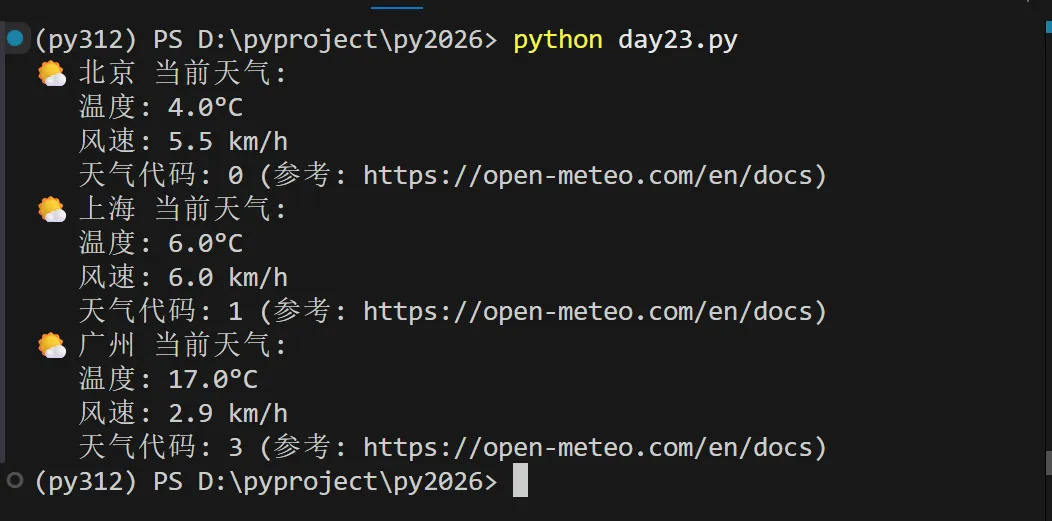
# 【跟着AI学Python】第23天:网络请求(requests)import requestsdef get_weather(lat=39.9042, lon=116.4074, city="北京"): """ 获取指定城市的当前天气 默认:北京 (纬度 39.9042, 经度 116.4074) """ url = "https://api.open-meteo.com/v1/forecast" params = { "latitude": lat, "longitude": lon, "current_weather": "true", "timezone": "Asia/Shanghai" } try: response = requests.get(url, params=params, timeout=10) response.raise_for_status() # 如果状态码不是 2xx,抛出异常 data = response.json() current = data["current_weather"] print(f"🌤️ {city} 当前天气:") print(f" 温度: {current['temperature']}°C") print(f" 风速: {current['windspeed']} km/h") print(f" 天气代码: {current['weathercode']} (参考: https://open-meteo.com/en/docs)") except requests.exceptions.RequestException as e: print(f"❌ 网络请求失败: {e}") except KeyError as e: print(f"❌ 响应数据格式异常: 缺少字段 {e}")# 使用示例if __name__ == "__main__": get_weather() # 北京 get_weather(31.2304, 121.4737, "上海") get_weather(23.1291, 113.2644, "广州")
📘 六、高级技巧(了解即可)
🔹 添加请求头(模拟浏览器)
headers = { "User-Agent": "Mozilla/5.0 (Windows NT 10.0; Win64; x64) AppleWebKit/537.36"}res = requests.get("https://example.com", headers=headers)
🔹 下载文件
res = requests.get("https://example.com/image.jpg")with open("image.jpg", "wb") as f: f.write(res.content) # .content 是字节
🔹 会话保持(Session)
session = requests.Session()session.get("https://example.com/login") # 自动处理 Cookiesession.post("https://example.com/data") # 后续请求携带 Cookie
✅ 今日小任务
1、用 GET 请求获取 https://httpbin.org/json 的 JSON 数据,并打印其中的 "slideshow" 标题2、用 POST 请求向 https://httpbin.org/post 发送 JSON {"task": "learn Python"},并打印响应中的 json 字段import requests# === 任务1:GET ===print("【任务1】")res1 = requests.get("https://httpbin.org/json")print("标题:", res1.json()["slideshow"]["title"])# === 任务2:POST ===print("\n【任务2】")payload = {"task": "learn Python"}res2 = requests.post("https://httpbin.org/post", json=payload)print("服务器收到:", res2.json()["json"])
📝 小结:requests 核心用法
| |
|---|
| GET 带参数 | requests.get(url, params={...}) |
| POST 表单 | requests.post(url, data={...}) |
| POST JSON | requests.post(url, json={...}) |
| 解析 JSON | response.json() |
| 错误处理 | try-except + response.raise_for_status() |
✅ 黄金法则:
- 永远检查
status_code 或使用 raise_for_status() - 敏感操作加
timeout 防止卡死 - 不要硬编码 API Key 到代码中(用环境变量)
🎉 恭喜完成第23天!你已掌握 与 Web 世界交互的核心技能,能轻松调用各种 API!
继续加油,你的 Python 已经能连接整个互联网了!🌐🐍
 10个月宝宝每天需要喝多少奶粉?