探秘Linux文件系统:从根目录到inode,你的文件究竟藏在哪里?
- 2026-10-10 23:49:08
往期精选文章
AddressSanitizer:C/C++内存问题的终极检测利器
从一个日常困惑开始
记得我刚接触Linux时,有个问题困扰了我很久:为什么在Windows下看到的是C盘、D盘,而Linux下只有一个/(根目录)?当我插入U盘、挂载新硬盘时,它们都神奇地出现在这个单一的树形结构中。这背后究竟发生了什么?
今天,让我们一起来深入了解Linux文件系统。读完这篇文章,你将理解:
什么是文件系统?
根目录为什么那么重要
inode到底是什么,为什么它决定了你能存多少文件
为什么明明还有磁盘空间却提示设备没有空间?
一、什么是文件系统?
Linux下的文件系统,简单来说,就是一种管理和组织磁盘上数据的规则。它决定了数据如何被存储、如何被命名、如何被读取以及如何被删除。如果没有文件系统,磁盘就只是一堆原始的数据块,操作系统无法知道哪些块是文件、哪些块是空闲的。
二、根文件系统:一切从这里开始
什么是根文件系统?
根文件系统 是 Linux 内核启动时挂载的第一个文件系统。它之所以叫"根",是因为它是加载其他文件系统的根基——没有根,其他文件系统无处可挂。

如上图所示,当执行pwd命令时看到的"/"就是根目录,所有其他目录(/home、/usr、/etc)都是这个树形结构的分支。
根文件系统里有什么?
让我们用ls -l /看看根目录下都有些什么:
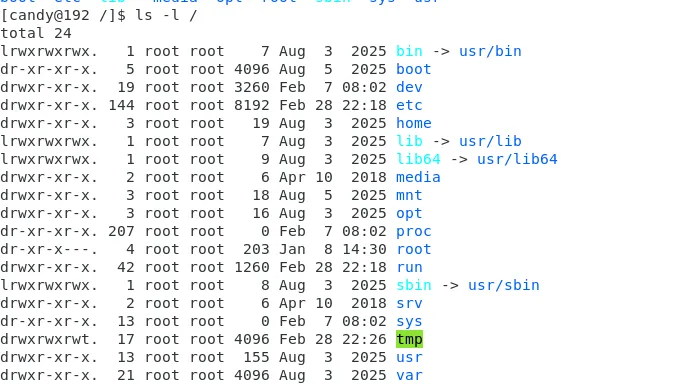
每个目录都有特定的用途,以下列举常用的目录解释:
/bin | ||
/etc | ||
/dev | ||
/lib | ||
/proc |
三、inode:文件的身份证
从文件名到inode的旅程
问题来了:我们在操作文件时用的是文件名(test.txt),但内核真正需要的是什么呢?
答案是:inode(索引节点)
让我们通过一例子来进行理解。下面是创建一个文件 test.txt 并查看它的inode信息:

-i选项显示的第一列 101484936 就是这个文件的inode编号。
inode是什么?inode里到底存了什么?
inode是一个数据结构,存储了文件的元信息,下面我们结合linux内核源码来看看:
/** Keep mostly read-only and often accessed (especially for* the RCU path lookup and 'stat' data) fields at the beginning* of the 'struct inode'*/struct inode {umode_t i_mode;unsigned short i_opflags;kuid_t i_uid;kgid_t i_gid;unsigned int i_flags;#ifdef CONFIG_FS_POSIX_ACLstruct posix_acl *i_acl;struct posix_acl *i_default_acl;#endifconst struct inode_operations *i_op;struct super_block *i_sb;struct address_space *i_mapping;#ifdef CONFIG_SECURITYvoid *i_security;#endif/* Stat data, not accessed from path walking */unsigned long i_ino;/** Filesystems may only read i_nlink directly. They shall use the* following functions for modification:** (set|clear|inc|drop)_nlink* inode_(inc|dec)_link_count*/union {const unsigned int i_nlink;unsigned int __i_nlink;};dev_t i_rdev;loff_t i_size;struct timespec i_atime;struct timespec i_mtime;struct timespec i_ctime;spinlock_t i_lock; /* i_blocks, i_bytes, maybe i_size */unsigned short i_bytes;unsigned int i_blkbits;blkcnt_t i_blocks;#ifdef __NEED_I_SIZE_ORDEREDseqcount_t i_size_seqcount;#endif/* Misc */unsigned long i_state;struct rw_semaphore i_rwsem;unsigned long dirtied_when; /* jiffies of first dirtying */unsigned long dirtied_time_when;struct hlist_node i_hash;struct list_head i_io_list; /* backing dev IO list */#ifdef CONFIG_CGROUP_WRITEBACKstruct bdi_writeback *i_wb; /* the associated cgroup wb *//* foreign inode detection, see wbc_detach_inode() */int i_wb_frn_winner;u16 i_wb_frn_avg_time;u16 i_wb_frn_history;#endifstruct list_head i_lru; /* inode LRU list */struct list_head i_sb_list;struct list_head i_wb_list; /* backing dev writeback list */union {struct hlist_head i_dentry;struct rcu_head i_rcu;};u64 i_version;atomic_t i_count;atomic_t i_dio_count;atomic_t i_writecount;#ifdef CONFIG_IMAatomic_t i_readcount; /* struct files open RO */#endifconst struct file_operations *i_fop; /* former ->i_op->default_file_ops */struct file_lock_context *i_flctx;struct address_space i_data;struct list_head i_devices;union {struct pipe_inode_info *i_pipe;struct block_device *i_bdev;struct cdev *i_cdev;char *i_link;unsigned i_dir_seq;};__u32 i_generation;#ifdef CONFIG_FSNOTIFY__u32 i_fsnotify_mask; /* all events this inode cares about */struct hlist_head i_fsnotify_marks;#endif#if IS_ENABLED(CONFIG_FS_ENCRYPTION)struct fscrypt_info *i_crypt_info;#endifvoid *i_private; /* fs or device private pointer */};
以上属性比较多,但是主要的信息基本就等同以下的伪代码信息
struct inode {mode_t mode; // 文件类型和权限uid_t uid; // 所有者IDgid_t gid; // 所属组IDoff_t size; // 文件大小time_t atime; // 最后访问时间time_t mtime; // 最后修改时间time_t ctime; // 状态改变时间int links_count; // 硬链接计数void *i_private // 私有字段,指向具体文件系统(比如ext4、nfs等)的相关信息};
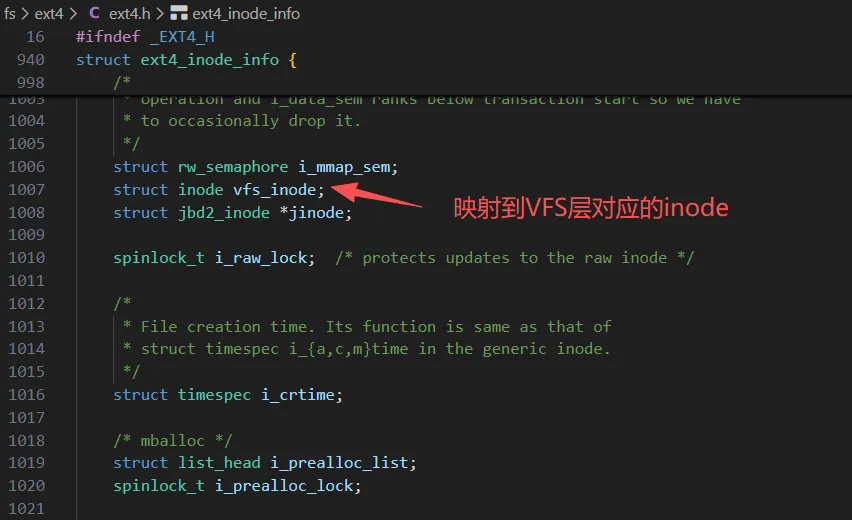
注意:这个inode是文件系统的公共数据结构,其中并不直接存储实际数据块的指向,而是通过私有字段 i_private 指向具体文件系统的节点元数据,比如 ext4 文件系统,那么这个私有字段就通常指向一个扩展结构 struct ext4_inode_info,其中包含一个 __le32 i_data[15] 数组,这就是 ext4 的数据块指针(直接/间接块指针),(这里主要以 ext4 文件系统为例进行说明,其它文件系统类似)如下所示:
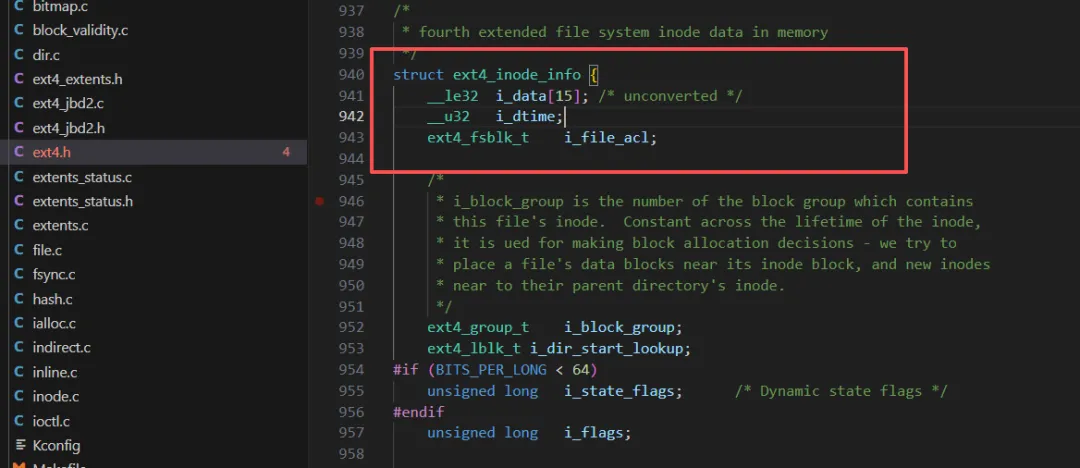
除了ext4_inode_info这个结构体外,还有一个数据结构ext4_inode
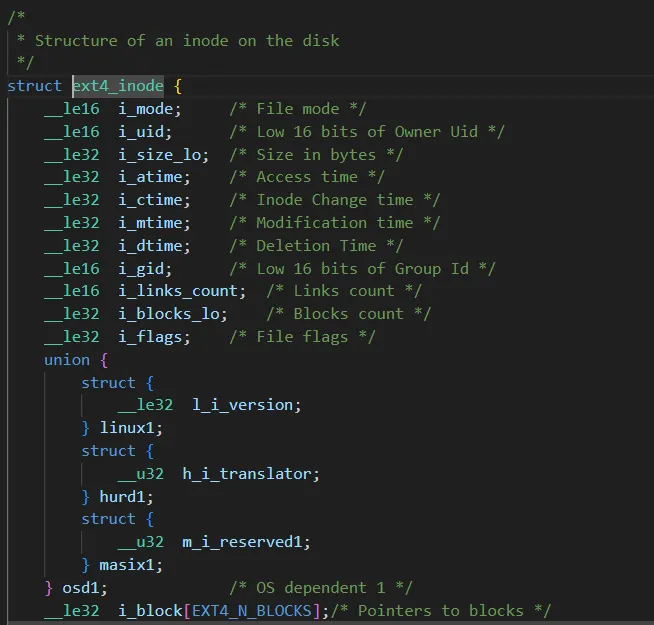
那么它们之间有什么关系呢?
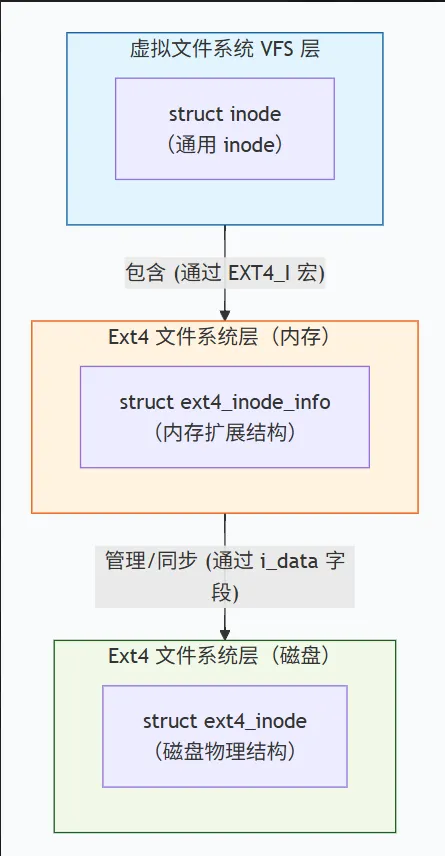
可见inode、ext4_inode_info、ext4_inode分别对应虚拟文件系统VFS、内存、磁盘中的数据结构。
那么这三者是如何协作的呢?这里拿访问一个文件的完整流程来说明,如下所示:
从磁盘到内存(加载):当要访问一个文件时,内核首先在 VFS 层找到一个 struct inode。如果它在内存中尚不存在,ext4 文件系统的代码会负责从磁盘上读取对应的 struct ext4_inode 数据。然后,内核会分配一个 struct ext4_inode_info 结构(它内部包含一个 struct inode,用于映射 VFS),并将从磁盘读取的数据填充到这个内存结构中。最后,VFS 层就可以通过这个内存中的 struct inode 来操作文件了。
在内存中工作:当应用程序读写文件、修改权限时,实际上是在操作 VFS 的 struct inode 和 ext4 的 struct ext4_inode_info。例如,通过 inode 拿到 ext4_inode_inf的数据数据块信息,EXT4_I(inode)->i_data 数组会在内存中被更新,以反映新的数据块映射关系。


从内存回写到磁盘(同步):当需要将修改同步到磁盘时(例如,调用 fsync()或内核触发回写),ext4_write_inode 或 ext4_do_update_inode 这个同步函数会被调用。这个函数的核心工作就是:
通过 EXT4_I(inode) 拿到 struct ext4_inode_info。
从 VFS 的 struct inode 中获取通用信息(如 i_mode, i_uid)。
从 struct ext4_inode_info 中获取 ext4 特有信息(如 i_data, i_disksize)。
然后将这些内存中的信息,经过必要的转换(如 CPU 字节序与磁盘字节序的转换),填充到一个临时的 struct ext4_inode 结构中,然后将这个结构写入磁盘的指定位置。
通过查看完整的 inode 等数据结构的信息可知,没有找到文件名的定义,那么一个文件的文件名到底存储在哪里?
答案:它被存储在一个特殊的文件中,俗称为"目录文件",它的内容就就是"文件名→inode编号"的映射表。下面通过具体代码例子来进行说明:
// main.c 读取目录内容,显示文件名和inode的映射#include<stdio.h>#include<string.h>#include<stdlib.h>#include<dirent.h>#include<sys/types.h>intmain(int argc, char *argv[]){if (argc != 2) {fprintf(stderr, "Usage: %s <directory>\n", argv[0]);exit(EXIT_FAILURE);}DIR *dir = opendir(argv[1]);if (!dir) {perror("opendir");exit(EXIT_FAILURE);}struct dirent *entry;printf("%-20s %-10s\n", "Filename", "Inode");printf("%-20s %-10s\n", "--------", "-----");while ((entry = readdir(dir)) != NULL) {// 跳过 "." 和 ".."if (strcmp(entry->d_name, ".") == 0 ||strcmp(entry->d_name, "..") == 0) {continue;}printf("%-20s %-10lu\n", entry->d_name,(unsigned long)entry->d_ino);}closedir(dir);return 0;}
编译代码:
gcc -o main main.c执行测试:
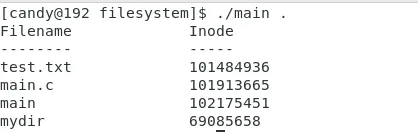
从上述结果可知,一个目录文件的内容就是负责存储该目录下的文件和inode编号的映射关系。
搞清楚了文件系统的概念,接下来看一个日常遇到过的问题:为什么明明磁盘还有空间,却无法创建新文件?
下面我们来手动创建一个用于测试的文件、文件系统来说明这个问题
1. 创建一个文件镜像
dd if=/dev/zero of=test.img bs=1M count=10
2. 格式化为ext4文件系统类型,仅仅分配10个inode
mkfs.ext4 -F -N 10 test.img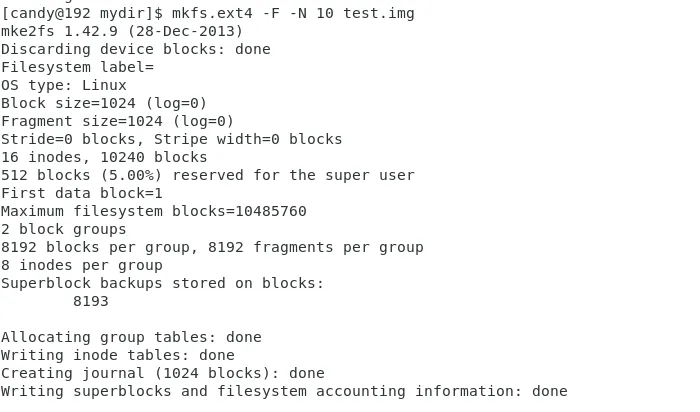
3. 挂载到一个指定目录
mkdir mntsudo mount -o loop test.img mnt

4. 查看挂载结果
df -h mnt
由上可知磁盘空间大小为9M,仅仅使用172k, 还剩余8.2M空间
5. 查看inode使用情况
df -i .
由上可知总共的inode数为16,还剩5个inode
6. 循环创建文件测试问题
// create.shfor i in {1..15}; do touch file$i; done
执行脚本:
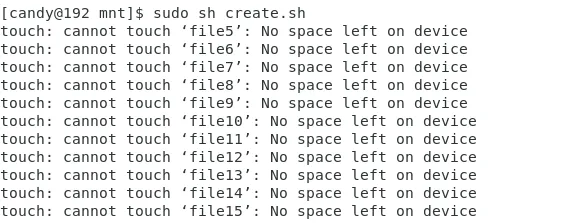

通过上述测试结果可知,仅仅创建了几个文件就提示磁盘空间不足了,那么来看看此时的inode和实际磁盘的使用情况。
当前inode的使用情况如下:

当前磁盘的实际使用情况如下:

由上述的inode使用+磁盘使用来看,此时磁盘空间还剩余很多,但是inode已经被使用完了,所以导致不能再创建文件了,提示了"磁盘空间不足"。这种情况一般出现在很多小文件的场景。
解决方法
1. 删除无用文件释放 inode。
2. 重新格式化时增加 inode 数量(减小 bytes-per-inode 或直接指定 -N)。
