
Climate Data Operators
在气象与气候数据处理中,Climate Data Operators(CDO) 一直是最常用、最成熟的一套工具之一。无论是时间平均、区域裁剪、重映射、统计分析,还是频繁使用的 mergetime、timmean、sellonlatbox、remapbil,很多科研工作流都离不开它。
但长期以来,CDO 在 Windows 环境下的使用门槛(可能)并不低(对于新手来说),而且CDO不支持Windows系统。
用户往往需要自己处理安装、动态库依赖、环境变量、NetCDF 与 ecCodes 相关配置,真正开始处理数据之前,往往先要花不少时间“配环境”。
现在,Skyborn 库增加了一个新的功能:skyborn.cdo。
这意味着,在支持的平台上,用户可以直接在Windows环境下使用 CDO,而不再需要单独记忆另一套导入方式。最直接的使用形式就是:
from skyborn.cdo import Cdo
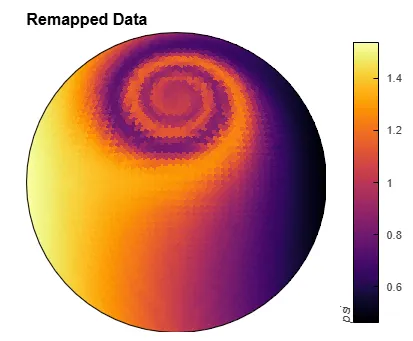
目前该版本支持HEALPix网格的数据处理。
如何安装?
如果你的环境还没有安装 Skyborn,最简单安装方式是:
pip install "skyborn[cdo]"
如果你已经安装了skyborn,需要更新到最新版本:
pip install -U skyborn
之后再单独补装:
pip install skyborn-cdo
安装完成后,就可以直接写:
from skyborn.cdo import Cdo
当前 skyborn.cdo 的可支持平台为:
当然,重点是在Windows。
快速上手
最简单的例子如下:
from skyborn.cdo import Cdocdo = Cdo()print(cdo.version())
如果你经常需要覆盖已有输出文件,建议一开始就加上 -O,如:
from skyborn.cdo import Cdocdo = Cdo(options="-O")print(cdo.version())
因为 CDO 默认不会覆盖已存在的输出文件。很多初次使用者遇到的第一个报错,往往就是输出文件已存在。因此,options="-O" 是一个默认设置。
如果你希望进一步减少命令行信息输出,也可以这样:
cdo = Cdo(options="-O -s")
多种使用风格
skyborn.cdo 提供多种使用方式。
1. 命令行风格
如果你已经很熟悉终端中的 CDO 命令,那么可以直接把命令字符串写进 Python:
from skyborn.cdo import Cdocdo = Cdo(options="-O")cdo("mergetime in1.nc in2.nc out.nc")cdo("-f nc4 sellonlatbox,70,140,15,55 input.nc output.nc")cdo("-f nc4 -fldmean -sellonlatbox,70,140,15,55 input.nc output.nc")
这种风格的优点是迁移成本很低。如果你原本已经有大量 shell 脚本或者终端命令,可以几乎原样复制到 Python 中。
2. 方法调用风格
如果你更喜欢 Python 风格接口,那么可以直接把 CDO 操作符当作方法来调用:
from skyborn.cdo import Cdocdo = Cdo(options="-O")cdo.sellonlatbox("70,140,15,55", input="global.nc", output="china.nc")cdo.timmean(input="china.nc", output="china_timmean.nc")cdo.remapbil("r360x180", input="input.nc", output="remapped.nc")cdo.mergetime(input=["jan.nc", "feb.nc", "mar.nc"], output="q1.nc")
这种写法更适合在 Python 脚本、函数封装和数据处理流程中长期维护。
3.Anaconda终端
在Anaconda终端下也可以像linux中使用cdo:
在终端调用skyborn-cdo来使用,如对mergetime的用法查询
(skyborn_env) PS C:\Users> skyborn-cdo mergetime --hNAME merge, mergetime - Merge datasetsSYNOPSIS cdo [options] merge infiles outfile cdo [options] mergetime[,parameters] infiles outfileDESCRIPTION This module reads datasets from several input files, merges them and writes the resulting dataset to outfile.OPERATORS merge Merge datasets with different fields Merges time series of different fields from several input datasets. The number of fields per timestep written to outfile is the sum of the field numbers per timestep in all input datasets. The time series on all input datasets are required to have different fields and the same number of timesteps. The fields in each different input file either have to be different variables or different levels of the same variable. A mixture of different variables on different levels in different input files is not allowed. mergetime Merge datasets sorted by date and time Merges all timesteps of all input files sorted by date and time. All input files need to have the same structure with the same variables on different timesteps. After this operation every input timestep is in outfile and all timesteps are sorted by date and time.PARAMETERS skip_same_time (BOOL) Skips all consecutive timesteps with a double entry of the same timestamp. names (STRING) Fill missing variable names with missing values (union) or use the intersection (intersect).OPTIONS -O, --overwrite to overwrite existing output file.NOTE Operators of this module need to open all input files simultaneously. The maximum number of open files depends on the operating system!
skyborn.cdo 适合什么人
- 刚刚接触python,或者刚刚学习cdo用法的初学者
几个最常见的使用示例
1. 区域裁剪
from skyborn.cdo import Cdocdo = Cdo(options="-O")cdo.sellonlatbox("70,140,15,55", input="era5.nc", output="china.nc")
2. 时间平均
from skyborn.cdo import Cdocdo = Cdo(options="-O")cdo.timmean(input="era5.nc", output="era5_timmean.nc")
3. 合并多个时间文件
from skyborn.cdo import Cdocdo = Cdo(options="-O")cdo.mergetime(input=["data_01.nc", "data_02.nc", "data_03.nc"], output="merged.nc")
4. 重映射到规则网格
from skyborn.cdo import Cdocdo = Cdo(options="-O")cdo.remapbil("r360x180", input="input.nc", output="output_1deg.nc")
5. 查看文件信息
from skyborn.cdo import Cdocdo = Cdo()print(cdo.sinfo(input="input.nc"))print(cdo.showname(input="input.nc"))print(cdo.showdate(input="input.nc"))
这类 info、sinfo、showname、griddes 等信息类操作不会生成输出文件,而是直接返回文本结果,适合在 Python 中快速检查数据结构。
总结
skyborn.cdo 的初衷,是降低气象初学者以及 Windows 用户使用 CDO 的门槛,使 CDO 能够更自然地融入 Python 数据处理工作流。
现在,可以直接这样开始:
from skyborn.cdo import Cdo
然后继续用熟悉的 CDO 操作符完成区域裁剪、时间统计、重映射、格式转换、信息查询,以及更多复杂的数据处理流程。
cdo的使用文档可以在https://code.mpimet.mpg.de/projects/cdo下载。
Reference
- https://code.mpimet.mpg.de/projects/cdo
往期回顾
