第20篇|用 Python 发送邮件 + 定时任务:打造个人自动化助手
- 2026-09-07 20:27:16
第20篇|用 Python 发送邮件 + 定时任务:打造个人自动化助手
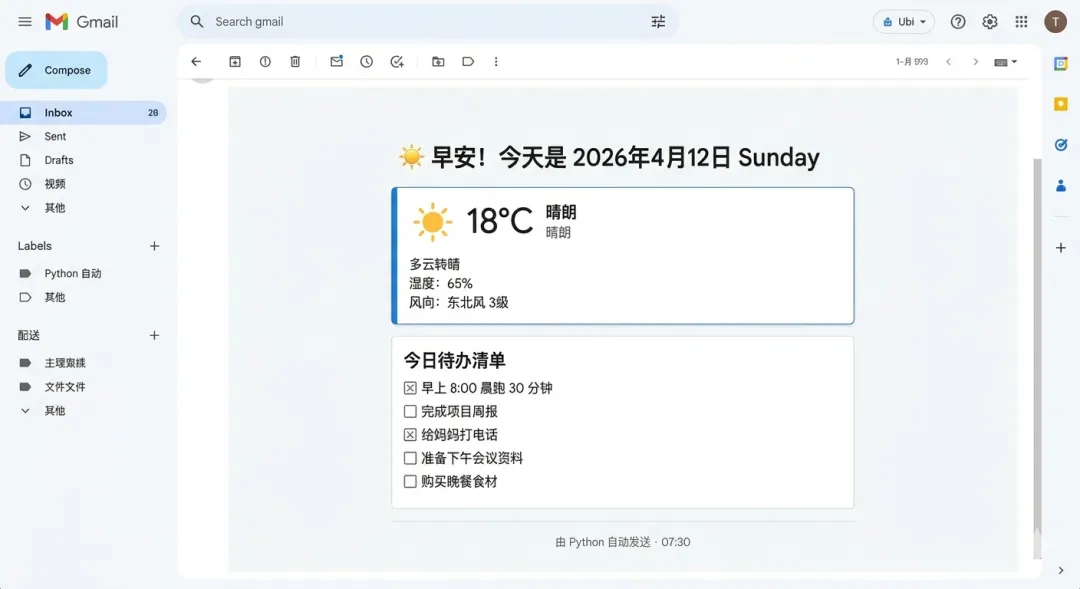
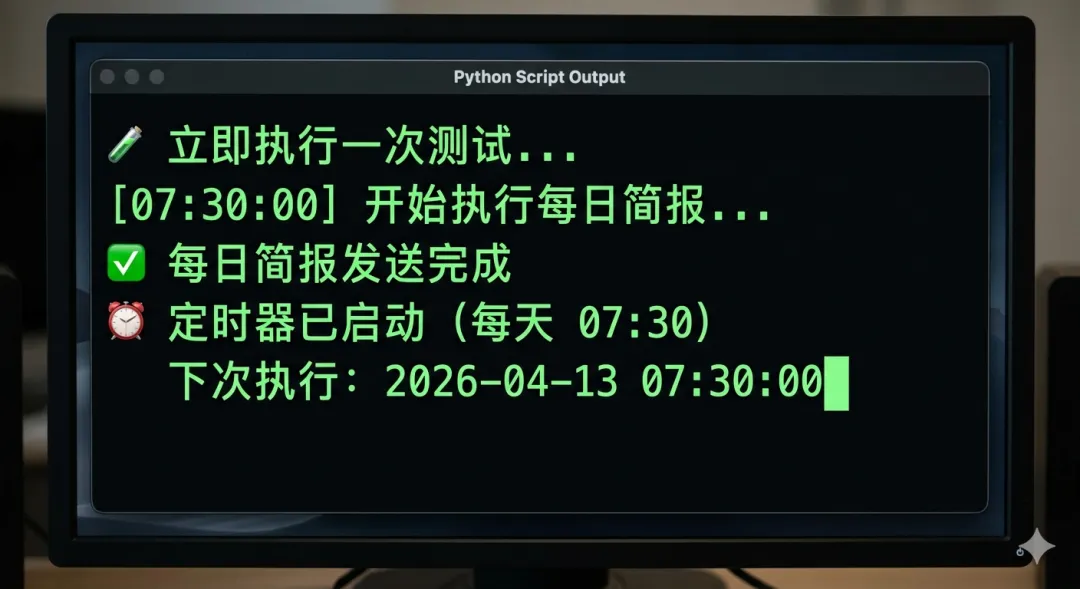
这篇文章把邮件发送、天气获取、定时调度三个能力组合起来,构建一个"每天早上自动推送天气+日程提醒"的自动化助手——从本地运行到部署上服务器,全程讲透。
前言
前两篇我们做了"生成文件"的自动化(CLI 工具、Excel 报表)。这一篇做"发送通知"的自动化。
设想这样一个场景:每天早上 7:30,你的手机收到一封邮件,里面有今天的天气预报、你在 TODO 文件里写下的待办事项,以及一句每日一言。这封邮件完全不需要你动手,Python 在服务器上静静地运行,每天准时发送。
听起来有点酷?全部代码加起来不超过 200 行,我们这就来做。
一、发送邮件:smtplib
Python 标准库里的 smtplib 可以直接发送邮件,不需要安装第三方库。
1.1 准备工作:获取授权码
以 QQ 邮箱为例(Gmail 类似):
登录 QQ 邮箱 → 设置 → 账户 找到"POP3/IMAP/SMTP/Exchange/CardDAV/CalDAV服务" 开启 SMTP 服务,按提示获取授权码(不是 QQ 密码)
⚠️ 授权码要保存好,不要写在代码里,用环境变量存储(后面会讲)。
1.2 发送纯文本邮件
import smtplib
from email.mime.text import MIMEText
from email.mime.multipart import MIMEMultipart
from email.header import Header

def send_email(
    to_addr: str,
    subject: str,
    body: str,
    from_addr: str,
    password: str,
    smtp_server: str = "smtp.qq.com",
    smtp_port: int = 465
) -> bool:
    """
    发送邮件(SSL 加密)

    Returns:
        True 发送成功,False 发送失败
    """
    try:
        # 构建邮件内容
        msg = MIMEMultipart("alternative")
        msg["From"] = Header(f"Python助手 <{from_addr}>", "utf-8")
        msg["To"] = to_addr
        msg["Subject"] = Header(subject, "utf-8")

        # 纯文本版本
        msg.attach(MIMEText(body, "plain", "utf-8"))

        # 使用 SSL 连接并发送
        with smtplib.SMTP_SSL(smtp_server, smtp_port) as server:
            server.login(from_addr, password)
            server.sendmail(from_addr, [to_addr], msg.as_string())

        print(f"✅ 邮件发送成功 → {to_addr}")
        return True

    except smtplib.SMTPAuthenticationError:
        print("❌ 认证失败:请检查邮箱地址和授权码")
    except smtplib.SMTPException as e:
        print(f"❌ 发送失败:{e}")

    return False
1.3 发送 HTML 邮件(更好看)
def send_html_email(
    to_addr: str,
    subject: str,
    html_body: str,
    from_addr: str,
    password: str,
) -> bool:
    """发送 HTML 格式邮件"""
    try:
        msg = MIMEMultipart("alternative")
        msg["From"] = Header(f"Python助手 <{from_addr}>", "utf-8")
        msg["To"] = to_addr
        msg["Subject"] = Header(subject, "utf-8")

        # 同时提供纯文本版本(有些邮件客户端不支持 HTML)
        text_body = "请使用支持 HTML 的邮件客户端查看本邮件"
        msg.attach(MIMEText(text_body, "plain", "utf-8"))
        msg.attach(MIMEText(html_body, "html", "utf-8"))

        with smtplib.SMTP_SSL("smtp.qq.com", 465) as server:
            server.login(from_addr, password)
            server.sendmail(from_addr, [to_addr], msg.as_string())

        return True
    except Exception as e:
        print(f"❌ 发送失败:{e}")
        return False
1.4 发送带附件的邮件
import smtplib
from email.mime.multipart import MIMEMultipart
from email.mime.text import MIMEText
from email.mime.base import MIMEBase
from email import encoders
from pathlib import Path

def send_with_attachment(
    to_addr: str,
    subject: str,
    body: str,
    attachment_path: str,
    from_addr: str,
    password: str
) -> bool:
    """发送带附件的邮件"""
    try:
        msg = MIMEMultipart()
        msg["From"] = from_addr
        msg["To"] = to_addr
        msg["Subject"] = subject
        msg.attach(MIMEText(body, "plain", "utf-8"))

        # 读取附件
        path = Path(attachment_path)
        with open(path, "rb") as f:
            part = MIMEBase("application", "octet-stream")
            part.set_payload(f.read())

        encoders.encode_base64(part)
        part.add_header(
            "Content-Disposition",
            f"attachment; filename={path.name}"
        )
        msg.attach(part)

        with smtplib.SMTP_SSL("smtp.qq.com", 465) as server:
            server.login(from_addr, password)
            server.sendmail(from_addr, [to_addr], msg.as_string())

        print(f"✅ 带附件邮件发送成功,附件:{path.name}")
        return True
    except Exception as e:
        print(f"❌ 发送失败:{e}")
        return False
二、获取天气数据
用免费的 wttr.in API,无需注册,直接调用:
import requests

def get_weather(city: str = "Beijing") -> dict:
    """
    获取城市天气(使用 wttr.in 免费 API)
    city 支持中文城市名或英文
    """
    try:
        url = f"https://wttr.in/{city}?format=j1&lang=zh"
        response = requests.get(url, timeout=10)
        response.raise_for_status()
        data = response.json()

        current = data["current_condition"][0]
        today = data["weather"][0]

        return {
            "city": city,
            "temp_c": current["temp_C"],
            "feels_like": current["FeelsLikeC"],
            "description": current["lang_zh"][0]["value"],
            "humidity": current["humidity"],
            "wind_speed": current["windspeedKmph"],
            "max_temp": today["maxtempC"],
            "min_temp": today["mintempC"],
        }
    except Exception as e:
        print(f"获取天气失败:{e}")
        return {}


def format_weather(weather: dict) -> str:
    if not weather:
        return "今日天气数据获取失败"
    return (
        f"🌡 {weather['city']} | {weather['description']}\n"
        f"   当前:{weather['temp_c']}°C(体感 {weather['feels_like']}°C)\n"
        f"   今日:{weather['min_temp']}°C ~ {weather['max_temp']}°C\n"
        f"   湿度:{weather['humidity']}% | 风速:{weather['wind_speed']}km/h"
    )
三、读取 TODO 文件
from pathlib import Path
from datetime import date

def read_todos(filepath: str = "todos.txt") -> list[str]:
    """从文本文件读取待办事项"""
    path = Path(filepath)
    if not path.exists():
        return []

    todos = []
    with open(path, encoding="utf-8") as f:
        for line in f:
            line = line.strip()
            if line and not line.startswith("#"):   # 忽略空行和注释
                todos.append(line)
    return todos
todos.txt 格式:
# 今天的待办
完成第 20 篇博客初稿
回复客户邮件
看完《Python 核心编程》第 5 章
去超市买蔬菜
四、构建 HTML 邮件模板
from datetime import datetime

def build_email_html(weather: dict, todos: list[str]) -> str:
    """生成 HTML 邮件正文"""
    today = datetime.now().strftime("%Y年%m月%d日 %A")

    # 待办事项列表
    if todos:
        todo_items = "".join(
            f'<li style="padding: 4px 0; color: #374151;">{todo}</li>'
            for todo in todos
        )
        todo_section = f"""
        <div style="background:#f9fafb;border-radius:8px;padding:16px;margin:16px 0;">
            <h3 style="margin:0 0 10px;color:#1f2937;font-size:15px;">📋 今日待办</h3>
            <ul style="margin:0;padding-left:20px;">
                {todo_items}
            </ul>
        </div>
        """
    else:
        todo_section = '<p style="color:#6b7280;font-style:italic;">暂无待办事项,好好休息 ☕</p>'

    # 天气模块
    if weather:
        weather_section = f"""
        <div style="background:#eff6ff;border-radius:8px;padding:16px;margin:16px 0;border-left:4px solid #3b82f6;">
            <h3 style="margin:0 0 8px;color:#1e40af;font-size:15px;">🌤 今日天气 · {weather.get('city','')}</h3>
            <p style="margin:4px 0;color:#374151;">{weather.get('description','')} | {weather.get('temp_c','')}°C(体感 {weather.get('feels_like','')}°C)</p>
            <p style="margin:4px 0;color:#374151;">今日温度:{weather.get('min_temp','')}°C ~ {weather.get('max_temp','')}°C</p>
            <p style="margin:4px 0;color:#374151;">湿度:{weather.get('humidity','')}% | 风速:{weather.get('wind_speed','')}km/h</p>
        </div>
        """
    else:
        weather_section = ""

    return f"""
    <!DOCTYPE html>
    <html>
    <body style="font-family:system-ui,sans-serif;max-width:560px;margin:0 auto;padding:20px;color:#111827;">
        <div style="border-bottom:2px solid #3b82f6;padding-bottom:12px;margin-bottom:20px;">
            <h2 style="margin:0;color:#1e40af;font-size:20px;">☀️ 早安!今天是 {today}</h2>
            <p style="margin:4px 0 0;color:#6b7280;font-size:13px;">你的每日自动简报</p>
        </div>

        {weather_section}
        {todo_section}

        <div style="margin-top:24px;padding-top:16px;border-top:1px solid #e5e7eb;font-size:12px;color:#9ca3af;text-align:center;">
            由 Python 自动发送 · {datetime.now().strftime("%H:%M")}
        </div>
    </body>
    </html>
    """
五、定时任务:schedule
pip install schedule
import schedule
import time
import threading

def run_daily_report() -> None:
    """每天执行的主任务"""
    print(f"[{datetime.now().strftime('%H:%M:%S')}] 开始执行每日简报...")

    weather = get_weather("北京")
    todos = read_todos("todos.txt")
    html = build_email_html(weather, todos)

    subject = f"☀️ 每日简报 | {datetime.now().strftime('%m月%d日')} {weather.get('description', '')}"

    send_html_email(
        to_addr=TO_EMAIL,
        subject=subject,
        html_body=html,
        from_addr=FROM_EMAIL,
        password=EMAIL_PASSWORD
    )
    print("✅ 每日简报发送完成")


# 设置定时任务
schedule.every().day.at("07:30").do(run_daily_report)

# 也可以设置多个时间点
# schedule.every().monday.at("09:00").do(weekly_summary)
# schedule.every(2).hours.do(some_task)

print("⏰ 定时任务已启动,等待执行...")
print(f"   下次执行时间:{schedule.next_run()}")

while True:
    schedule.run_pending()
    time.sleep(30)   # 每 30 秒检查一次是否有任务需要执行
六、完整项目:加入环境变量管理
把敏感信息(邮箱、密码)放进 .env 文件,不要硬编码在代码里:
pip install python-dotenv
# .env 文件(不要提交到 git!)
FROM_EMAIL=your_email@qq.com
EMAIL_PASSWORD=your_authorization_code
TO_EMAIL=target@example.com
CITY=北京
# daily_report.py(完整整合版)
import os
import smtplib
import schedule
import time
import requests
from pathlib import Path
from datetime import datetime
from email.mime.multipart import MIMEMultipart
from email.mime.text import MIMEText
from email.header import Header
from dotenv import load_dotenv

load_dotenv()   # 自动读取 .env 文件

FROM_EMAIL = os.getenv("FROM_EMAIL")
EMAIL_PASSWORD = os.getenv("EMAIL_PASSWORD")
TO_EMAIL = os.getenv("TO_EMAIL")
CITY = os.getenv("CITY", "Beijing")

# ... 上面的所有函数 ...

if __name__ == "__main__":
    # 立即执行一次测试
    print("🧪 立即执行一次测试...")
    run_daily_report()

    # 设置每天 7:30 定时执行
    schedule.every().day.at("07:30").do(run_daily_report)
    print(f"\n⏰ 定时器已启动(每天 07:30)")
    print(f"   下次执行:{schedule.next_run()}")

    while True:
        schedule.run_pending()
        time.sleep(30)
七、部署到服务器(可选)
如果想让脚本 24 小时运行,需要部署到服务器:
# 方案一:用 nohup 在后台运行(Linux 服务器)
nohup python daily_report.py > logs/report.log 2>&1 &

# 查看运行状态
ps aux | grep daily_report.py

# 方案二:用 systemd 开机自启(更稳定)
# /etc/systemd/system/daily-report.service
[Unit]
Description=Python Daily Report Service
After=network.target

[Service]
Type=simple
User=ubuntu
WorkingDirectory=/home/ubuntu/daily-report
ExecStart=/home/ubuntu/daily-report/venv/bin/python daily_report.py
Restart=always
RestartSec=10

[Install]
WantedBy=multi-user.target
# 启用并启动 systemd 服务
sudo systemctl enable daily-report
sudo systemctl start daily-report
sudo systemctl status daily-report   # 查看状态
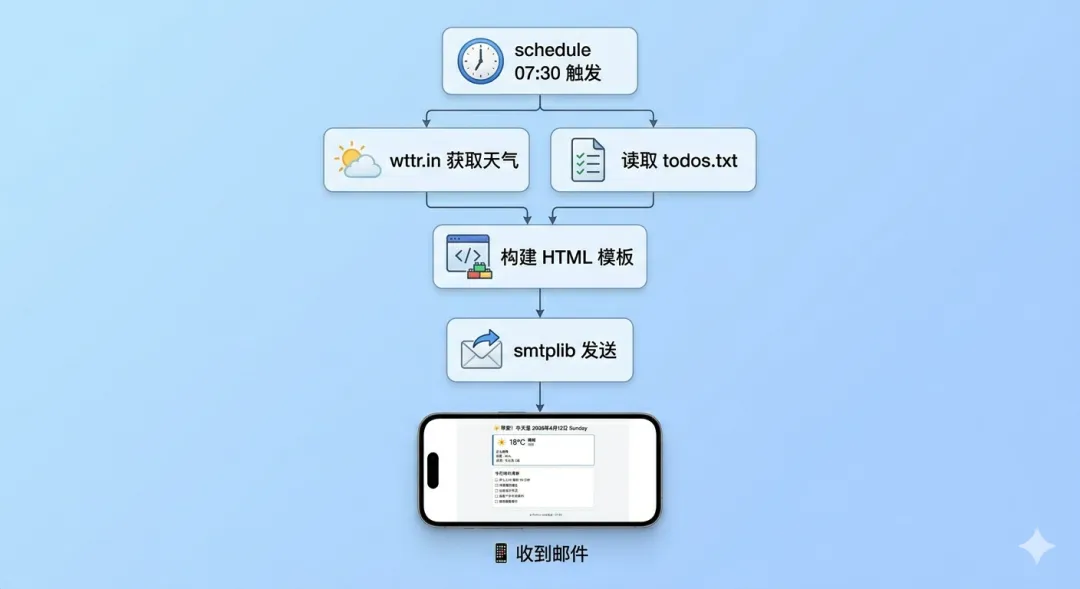
八、整个流程示意图
每天 07:30
    ↓
schedule 触发 run_daily_report()
    ↓
获取天气数据 (wttr.in API)
    ↓
读取 todos.txt 待办事项
    ↓
构建 HTML 邮件模板
    ↓
smtplib 通过 SMTP 发送邮件
    ↓
你的手机收到今日简报 📱
小结
smtplib | SMTP_SSL.sendmail() | |
email.mime.* | MIMEMultipartMIMEText | |
schedule | schedule.every().day.at("07:30").do(func) | |
python-dotenv | load_dotenv()os.getenv() | |
requests | wttr.in/{city}?format=j1 |
3 个最容易踩的坑:
发邮件用的是授权码不是登录密码,去邮箱设置里单独生成 QQ 邮箱用 SSL 端口 465,Gmail 用 TLS 端口 587(SMTP 而非 SMTP_SSL) 把密码放在 .env 文件里,.gitignore 里加上 .env,绝对不要提交到代码仓库
下篇预告
第 21 篇:用 Python 写一个网页数据监控脚本:降价了自动通知我
自动发邮件学会了,下一篇结合爬虫——监控某个商品的价格,一旦降价了就自动给你发通知。爬虫 + 自动化 + 通知,三合一综合应用。
本文来自网友投稿或网络内容,如有侵犯您的权益请联系我们删除,联系邮箱:596563534@qq.com 。
