第21篇|用 Python 写一个网页数据监控脚本:降价了自动通知我
- 2026-10-10 22:10:09
第21篇|用 Python 写一个网页数据监控脚本:降价了自动通知我
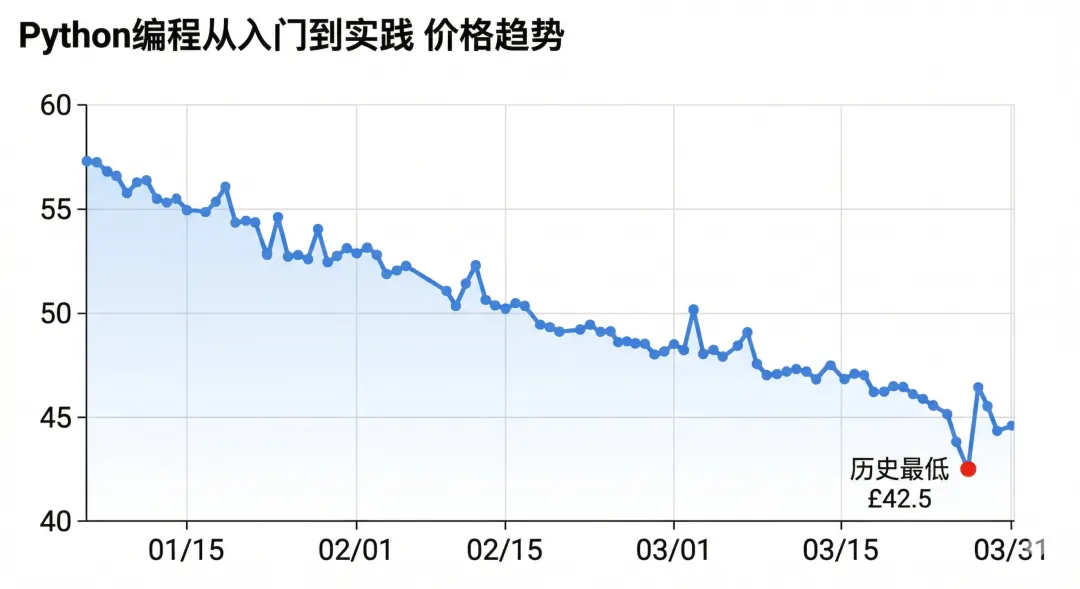
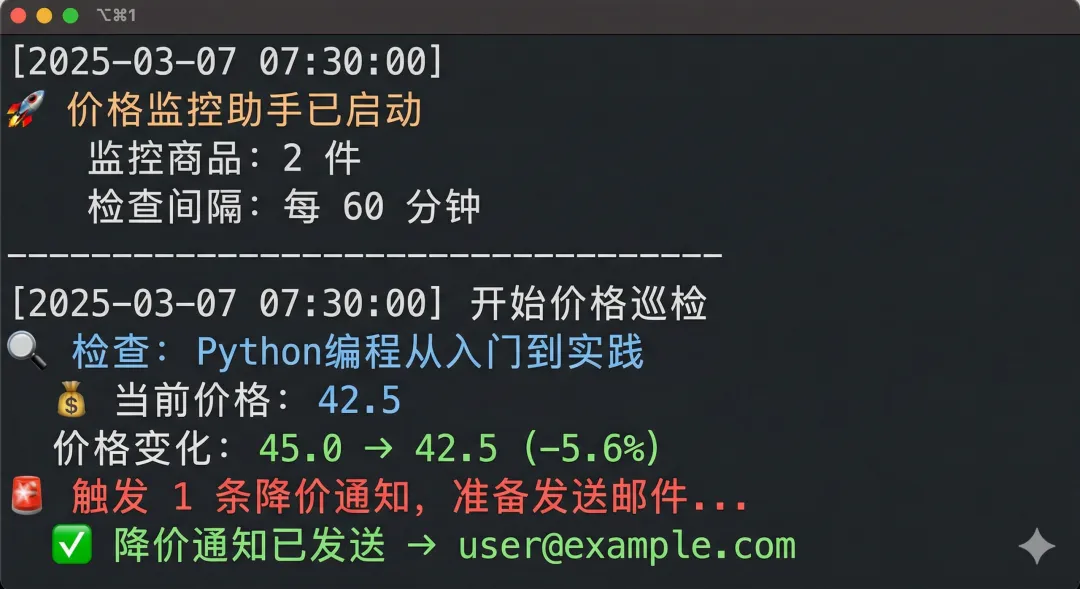

这篇文章把爬虫、数据存储、价格对比、邮件通知、定时任务五个能力合并成一个完整项目——商品降价监控器。代码可直接运行,场景真实,技术门槛不高。
前言
前两篇我们分别学了爬虫(第 15 篇)和自动化通知(第 20 篇)。这一篇把它们组合起来,做一个真正能解决现实问题的东西:商品降价监控器。
逻辑很简单:
定时爬取目标商品页面的价格 和上次的价格对比 如果降价了,发邮件通知你 把每次的价格记录存到 JSON 文件,顺便画个趋势图
整个项目不超过 250 行代码,用到的技术全是前面讲过的:requests、BeautifulSoup、json、smtplib、schedule、matplotlib。
一、项目设计
price_monitor/
├── monitor.py          # 主程序
├── config.json         # 监控配置(监控哪些商品、通知设置)
├── price_history.json  # 价格历史记录(自动维护)
├── .env                # 邮箱密码等敏感信息
└── requirements.txt
requirements.txt:
requests
beautifulsoup4
schedule
matplotlib
python-dotenv
二、配置文件设计
// config.json
{
  "targets": [
    {
      "id": "book_python",
      "name": "Python编程从入门到实践",
      "url": "https://books.toscrape.com/catalogue/a-light-in-the-attic_1000/index.html",
      "selector": "p.price_color",
      "threshold": 0.05,
      "comment": "价格下降超过 5% 才通知"
    }
  ],
  "notify": {
    "email": "your_email@qq.com"
  },
  "check_interval_minutes": 60
}
用配置文件而不是硬编码的好处:想监控新商品只需改 JSON,不用动代码。
三、核心模块:价格抓取
# monitor.py
import json
import os
import time
import smtplib
import schedule
import matplotlib
matplotlib.use("Agg")   # 无界面环境下生成图片
import matplotlib.pyplot as plt
import matplotlib.dates as mdates
import requests
from bs4 import BeautifulSoup
from pathlib import Path
from datetime import datetime
from email.mime.multipart import MIMEMultipart
from email.mime.text import MIMEText
from email.mime.base import MIMEBase
from email import encoders
from email.header import Header
from dotenv import load_dotenv

load_dotenv()

# ── 配置 ──
CONFIG_FILE = "config.json"
HISTORY_FILE = "price_history.json"
FROM_EMAIL = os.getenv("FROM_EMAIL")
EMAIL_PASSWORD = os.getenv("EMAIL_PASSWORD")


def load_config() -> dict:
    with open(CONFIG_FILE, encoding="utf-8") as f:
        return json.load(f)


def load_history() -> dict:
    """加载价格历史,文件不存在则返回空字典"""
    path = Path(HISTORY_FILE)
    if not path.exists():
        return {}
    with open(path, encoding="utf-8") as f:
        return json.load(f)


def save_history(history: dict) -> None:
    with open(HISTORY_FILE, "w", encoding="utf-8") as f:
        json.dump(history, f, indent=2, ensure_ascii=False)


def fetch_price(url: str, selector: str) -> float | None:
    """
    抓取目标页面的价格

    Args:
        url: 商品页面 URL
        selector: CSS 选择器,指向价格元素

    Returns:
        价格数字,失败返回 None
    """
    headers = {
        "User-Agent": "Mozilla/5.0 (Macintosh; Intel Mac OS X 10_15_7) "
                      "AppleWebKit/537.36 (KHTML, like Gecko) Chrome/120.0.0.0 Safari/537.36"
    }
    try:
        response = requests.get(url, headers=headers, timeout=15)
        response.raise_for_status()

        soup = BeautifulSoup(response.text, "html.parser")
        element = soup.select_one(selector)

        if not element:
            print(f"  ⚠️ 找不到价格元素:{selector}")
            return None

        # 提取数字(去掉货币符号、空格、换行)
        price_text = element.get_text(strip=True)
        price_text = price_text.replace("£", "").replace("¥", "").replace(",", "").strip()

        return float(price_text)

    except requests.RequestException as e:
        print(f"  ❌ 网络请求失败:{e}")
    except ValueError as e:
        print(f"  ❌ 价格解析失败:{price_text!r} → {e}")

    return None
四、价格对比与告警判断
def check_price_drop(
    item_id: str,
    item_name: str,
    current_price: float,
    history: dict,
    threshold: float = 0.05
) -> dict | None:
    """
    检查价格是否下降

    Returns:
        如果触发通知,返回通知信息字典;否则返回 None
    """
    # 初始化该商品的历史记录
    if item_id not in history:
        history[item_id] = {
            "name": item_name,
            "records": []
        }

    records = history[item_id]["records"]
    timestamp = datetime.now().strftime("%Y-%m-%d %H:%M")

    # 记录本次价格
    records.append({
        "time": timestamp,
        "price": current_price
    })

    # 只有超过 1 条记录才能比较
    if len(records) < 2:
        print(f"  📝 首次记录价格:{current_price}")
        return None

    # 获取上次价格
    last_price = records[-2]["price"]
    change = (current_price - last_price) / last_price   # 负数表示降价

    print(f"  价格变化:{last_price} → {current_price}({change*100:+.1f}%)")

    # 历史最低价
    all_prices = [r["price"] for r in records]
    min_price = min(all_prices[:-1])   # 不含本次
    is_historical_low = current_price < min_price

    # 触发通知条件:降价幅度超过阈值,或达到历史最低
    if change <= -threshold or is_historical_low:
        return {
            "name": item_name,
            "last_price": last_price,
            "current_price": current_price,
            "change_pct": change * 100,
            "min_price": min(all_prices),
            "is_historical_low": is_historical_low,
            "timestamp": timestamp
        }

    return None
五、生成价格趋势图
def generate_price_chart(item_id: str, item_name: str, records: list) -> str | None:
    """
    用 matplotlib 生成价格趋势折线图

    Returns:
        生成的图片路径,失败返回 None
    """
    if len(records) < 2:
        return None

    try:
        times = [datetime.strptime(r["time"], "%Y-%m-%d %H:%M") for r in records]
        prices = [r["price"] for r in records]
        min_price = min(prices)
        min_idx = prices.index(min_price)

        fig, ax = plt.subplots(figsize=(10, 4))
        fig.patch.set_facecolor("#f8f9fa")
        ax.set_facecolor("#ffffff")

        # 主折线
        ax.plot(times, prices, color="#3b82f6", linewidth=2, marker="o",
                markersize=4, zorder=3, label="价格")

        # 填充区域(折线下方)
        ax.fill_between(times, prices, alpha=0.1, color="#3b82f6")

        # 标记最低点
        ax.scatter([times[min_idx]], [min_price], color="#ef4444", s=100,
                   zorder=5, label=f"历史最低 {min_price}")
        ax.annotate(
            f"历史最低\n{min_price}",
            xy=(times[min_idx], min_price),
            xytext=(15, 15),
            textcoords="offset points",
            fontsize=9,
            color="#ef4444",
            arrowprops=dict(arrowstyle="->", color="#ef4444")
        )

        # 标注最新价格
        ax.annotate(
            f"当前\n{prices[-1]}",
            xy=(times[-1], prices[-1]),
            xytext=(-40, 15),
            textcoords="offset points",
            fontsize=9,
            color="#1d4ed8"
        )

        # 样式
        ax.set_title(f"{item_name} 价格趋势", fontsize=13, pad=12,
                     fontproperties="SimHei" if os.name == "nt" else None)
        ax.set_xlabel("时间", fontsize=10)
        ax.set_ylabel("价格", fontsize=10)
        ax.xaxis.set_major_formatter(mdates.DateFormatter("%m/%d"))
        ax.xaxis.set_major_locator(mdates.AutoDateLocator())
        plt.xticks(rotation=30)
        ax.grid(axis="y", linestyle="--", alpha=0.5)
        ax.legend(fontsize=9)
        plt.tight_layout()

        # 保存图片
        chart_dir = Path("charts")
        chart_dir.mkdir(exist_ok=True)
        chart_path = str(chart_dir / f"{item_id}_trend.png")
        plt.savefig(chart_path, dpi=120, bbox_inches="tight")
        plt.close()

        return chart_path

    except Exception as e:
        print(f"  ⚠️ 图表生成失败:{e}")
        return None
六、发送降价通知邮件
def send_alert_email(
    to_addr: str,
    alerts: list[dict],
    chart_paths: list[str]
) -> bool:
    """发送降价通知邮件(含趋势图附件)"""

    # ── 构建 HTML 邮件正文 ──
    alert_cards = ""
    for alert in alerts:
        badge = "🏆 历史最低!" if alert["is_historical_low"] else "📉 价格下降"
        change_color = "#dc2626"
        alert_cards += f"""
        <div style="border:1px solid #e5e7eb;border-radius:8px;padding:16px;margin:12px 0;background:#fff;">
            <div style="display:flex;justify-content:space-between;align-items:center;margin-bottom:8px;">
                <strong style="font-size:15px;color:#111;">{alert['name']}</strong>
                <span style="background:#fef2f2;color:#dc2626;padding:2px 8px;border-radius:12px;font-size:12px;">{badge}</span>
            </div>
            <div style="display:flex;gap:24px;font-size:14px;">
                <div><span style="color:#6b7280;">上次价格</span><br><strong>{alert['last_price']}</strong></div>
                <div style="font-size:20px;line-height:40px;color:#9ca3af;">→</div>
                <div><span style="color:#6b7280;">当前价格</span><br><strong style="color:{change_color};font-size:18px;">{alert['current_price']}</strong></div>
                <div><span style="color:#6b7280;">降价幅度</span><br><strong style="color:{change_color};">{alert['change_pct']:.1f}%</strong></div>
                <div><span style="color:#6b7280;">历史最低</span><br><strong>{alert['min_price']}</strong></div>
            </div>
        </div>
        """

    html_body = f"""
    <!DOCTYPE html><html><body style="font-family:system-ui,sans-serif;max-width:600px;margin:0 auto;padding:20px;background:#f9fafb;">
        <div style="background:#fff;border-radius:12px;padding:24px;box-shadow:0 1px 3px rgba(0,0,0,0.1);">
            <h2 style="margin:0 0 4px;color:#dc2626;">🔔 降价提醒</h2>
            <p style="color:#6b7280;font-size:13px;margin:0 0 20px;">
                监控到 {len(alerts)} 个商品价格下降 · {datetime.now().strftime('%Y-%m-%d %H:%M')}
            </p>
            {alert_cards}
            <p style="color:#9ca3af;font-size:12px;margin-top:20px;border-top:1px solid #f3f4f6;padding-top:12px;">
                价格趋势图已作为附件发送 · 由 Python 价格监控助手自动发送
            </p>
        </div>
    </body></html>
    """

    try:
        msg = MIMEMultipart("mixed")
        msg["From"] = Header(f"价格监控助手 <{FROM_EMAIL}>", "utf-8")
        msg["To"] = to_addr
        msg["Subject"] = Header(f"🔔 降价提醒:{alerts[0]['name']} 等 {len(alerts)} 件商品", "utf-8")

        msg.attach(MIMEText(html_body, "html", "utf-8"))

        # 附加趋势图
        for chart_path in chart_paths:
            if chart_path and Path(chart_path).exists():
                with open(chart_path, "rb") as f:
                    part = MIMEBase("image", "png")
                    part.set_payload(f.read())
                encoders.encode_base64(part)
                part.add_header(
                    "Content-Disposition",
                    f"attachment; filename={Path(chart_path).name}"
                )
                msg.attach(part)

        with smtplib.SMTP_SSL("smtp.qq.com", 465) as server:
            server.login(FROM_EMAIL, EMAIL_PASSWORD)
            server.sendmail(FROM_EMAIL, [to_addr], msg.as_string())

        print(f"  ✅ 降价通知已发送 → {to_addr}")
        return True

    except Exception as e:
        print(f"  ❌ 邮件发送失败:{e}")
        return False
七、主监控循环
def run_check() -> None:
    """执行一轮价格检查"""
    print(f"\n{'='*50}")
    print(f"[{datetime.now().strftime('%Y-%m-%d %H:%M:%S')}] 开始价格巡检")

    config = load_config()
    history = load_history()
    alerts = []
    chart_paths = []

    for target in config["targets"]:
        item_id = target["id"]
        item_name = target["name"]
        print(f"\n🔍 检查:{item_name}")

        # 抓取当前价格
        price = fetch_price(target["url"], target["selector"])
        if price is None:
            print(f"  ⚠️ 价格获取失败,跳过")
            continue

        print(f"  💰 当前价格:{price}")

        # 检查是否需要告警
        alert = check_price_drop(
            item_id=item_id,
            item_name=item_name,
            current_price=price,
            history=history,
            threshold=target.get("threshold", 0.05)
        )

        if alert:
            alerts.append(alert)
            # 生成趋势图
            chart = generate_price_chart(
                item_id, item_name,
                history[item_id]["records"]
            )
            if chart:
                chart_paths.append(chart)
                print(f"  📊 趋势图已生成:{chart}")

        # 礼貌间隔
        time.sleep(2)

    # 保存更新后的历史记录
    save_history(history)
    print(f"\n💾 价格历史已更新")

    # 发送通知
    if alerts:
        print(f"\n🚨 触发 {len(alerts)} 条降价通知,准备发送邮件...")
        send_alert_email(
            to_addr=config["notify"]["email"],
            alerts=alerts,
            chart_paths=chart_paths
        )
    else:
        print(f"\n✅ 巡检完成,价格无异常变动")


def main() -> None:
    config = load_config()
    interval = config.get("check_interval_minutes", 60)

    print("🚀 价格监控助手已启动")
    print(f"   监控商品:{len(config['targets'])} 件")
    print(f"   检查间隔:每 {interval} 分钟")
    print(f"   通知邮箱:{config['notify']['email']}")

    # 立即执行一次
    run_check()

    # 设置定时
    schedule.every(interval).minutes.do(run_check)
    print(f"\n⏰ 定时任务已设置,下次检查:{schedule.next_run()}")

    while True:
        schedule.run_pending()
        time.sleep(30)


if __name__ == "__main__":
    main()
八、运行效果
# 启动监控
python monitor.py

# 输出:
# 🚀 价格监控助手已启动
#    监控商品:1 件
#    检查间隔:每 60 分钟
#    通知邮箱:your@email.com
# [2025-03-07 08:00:00] 开始价格巡检
# 🔍 检查:Python编程从入门到实践
#   💰 当前价格:42.5
#   价格变化:47.0 → 42.5(-9.6%)
# 🚨 触发 1 条降价通知,准备发送邮件...
#   📊 趋势图已生成:charts/book_python_trend.png
#   ✅ 降价通知已发送 → your@email.com
# ⏰ 定时任务已设置,下次检查:2025-03-07 09:00:00
小结
这个项目把前面多篇的技术串联起来:
requestsBeautifulSoup | ||
json | ||
smtplib | ||
schedule | ||
matplotlib | ||
python-dotenv |
扩展思路:
把监控目标扩展到多个电商平台(需要适配各自的 CSS 选择器) 增加微信通知(用 Server 酱,免费) 把价格数据存到 SQLite 数据库替代 JSON 部署到服务器,实现 7×24 小时监控
下篇预告
第 22 篇:Python 项目打包与部署:让别人也能用你写的工具
本地跑通只是第一步,下一篇讲怎么把 Python 项目打包、容器化、部署到云服务器,让任何人都能通过浏览器访问你的工具。
本文来自网友投稿或网络内容,如有侵犯您的权益请联系我们删除,联系邮箱:596563534@qq.com 。
