HyperMesh Python二次开发 自动替换Component名中的特定字符.
- 2026-10-11 08:09:50
HyperMesh Python二次开发 自动替换Component名中的特定字符.
之前搞的一个修改component名字的脚本中,包含增加前缀,增加后缀和完全重命名,如果只是单纯想替换名字中的某些字符串,只能用重命名模式,现增加一个replace的功能。 之前修改component名字文章链接如下: HyperMesh Python二次开发-自动修改Component名字 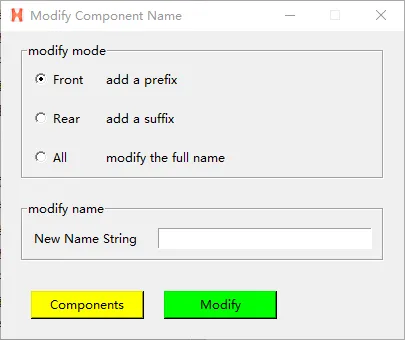
不想在原脚本上面修改,另写一个repalce的脚本: 运行脚本显示GUI界面如下: 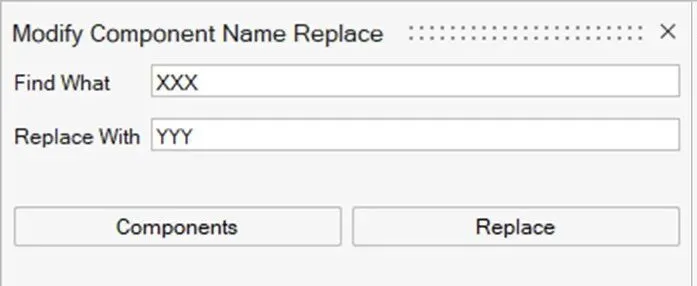
执行脚本前component名如下: 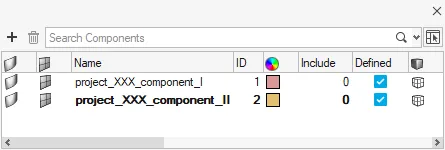
执行脚本后component名如下: 
脚本代码如下: 修改名字脚本还可进行优化: 比如: 1.名字中有两个一样的字符(component_same_same_name有两个same),只希望替换第一个或第二个。 2.名字中自动填入厚度信息。
「CAE仿真记」
愿与您一同,用代码提升效率!
import hmimport hm.entities as entfrom hwx import guidef modify_component_name_replace (): model = hm.Model()# 获取所有comp name,供后续判断 listallcomponentname = [] allcomponentcol = hm.Collection(model, ent.Component)for com in allcomponentcol: listallcomponentname.append(com.name)# selectcomponentcol = hm.CollectionByInteractiveSelection(model, ent.Component) ostring = str(lineeditfind.text) nstring = str(lineeditreplace.text)# 如果没有选择component 弹出一个消息框if len(selectcomponentcol) == 0: msg = gui.MessageDialog(message="Please select component") msg.show()# 如果有选择component 执行下面程序if len(selectcomponentcol) > 0:for com in selectcomponentcol:if com.name.replace(ostring,nstring) in listallcomponentname: def buttonClickCommand(buttonId):if buttonId == 0:# gui.tellUser("Accept button clicked.") passelse:# gui.tellUser("Reject button clicked.") pass gui.tellUser(f"{com.name.replace(ostring,nstring)} already exist in model.")else: com.name=com.name.replace(ostring,nstring)def select_component_name_replace (): global selectcomponentcol model = hm.Model() selectcomponentcol = hm.CollectionByInteractiveSelection(model, ent.Component)# GUIlabelfind = gui.Label(text="Find What")labelreplace = gui.Label(text="Replace With")lineeditfind = gui.LineEdit()lineeditreplace = gui.LineEdit()button = gui.Button("Replace", command=modify_component_name_replace)button1 = gui.Button("Components", command=select_component_name_replace)mainFrametop = gui.GridFrame( (labelfind,lineeditfind), (labelreplace,lineeditreplace))mainFramebottom = gui.GridFrame( (button1,button))mainFrame = gui.VFrame( mainFrametop, mainFramebottom)dialog = gui.Dialog(caption="Modify Component Name Replace", width=400, height=120)dialog.addChildren(mainFrame)dialog.show()往期文章
HyperMesh Python二次开发-自动修改Property属性
10分钟快速了解HyperMesh Python 二次开发(附源码-创建一个4节点shell单元)
HyperView 基于Tcl 二次开发常用功能合集
💡提示
如有问题,欢迎留言指正与交流。 本文已收录进合集,进入文末合集可查看更多笔记。
本文来自网友投稿或网络内容,如有侵犯您的权益请联系我们删除,联系邮箱:596563534@qq.com 。
随机文章
-
 10个月宝宝每天需要喝多少奶粉?
- 生产环境救急指南:Linux服务器忘记密码的N种解法,覆盖主流系统和云厂商
- 我他妈差点删了根目录,还好有这个Linux小技...
- 潜伏 9 年的 Linux 内核 "定时炸弹":一次性能优化如何酿成高危提权漏洞
- 为什么 Linux 基金会采纳了 MCP:对话 Jim Zemlin 与 Mazin Gilbert
- 在Linux上玩《小丑牌》
- python工具oletools,导出VBA代码,忘记VBA工程密码的最后一根救命稻草
- Python | 皮尔逊相关、偏相关与复相关
- bidi过检测自动化框架:新增linux/ubuntu下免费火狐配套指纹浏览器
- 只要我认真学python 就会得到
- python永远敌视你!