期刊图片复现|Python绘制相关性热图+特征重要性柱状图组合图
- 2026-10-11 07:57:21
期刊图片复现|Python绘制相关性热图+特征重要性柱状图组合图

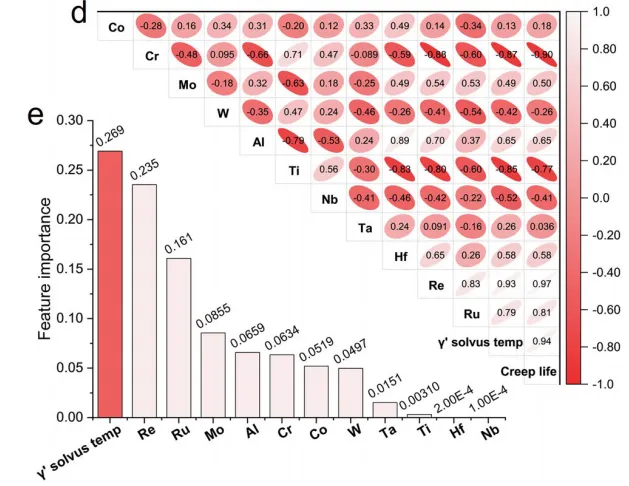
论文原图 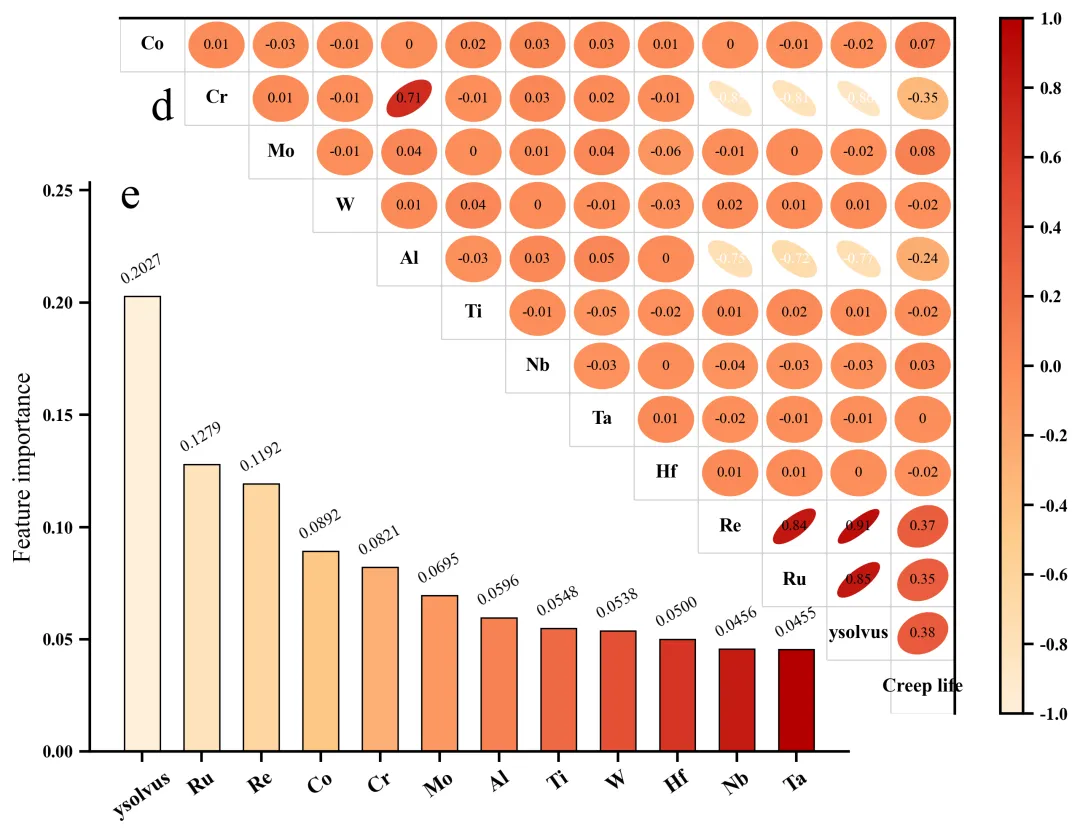
仿图 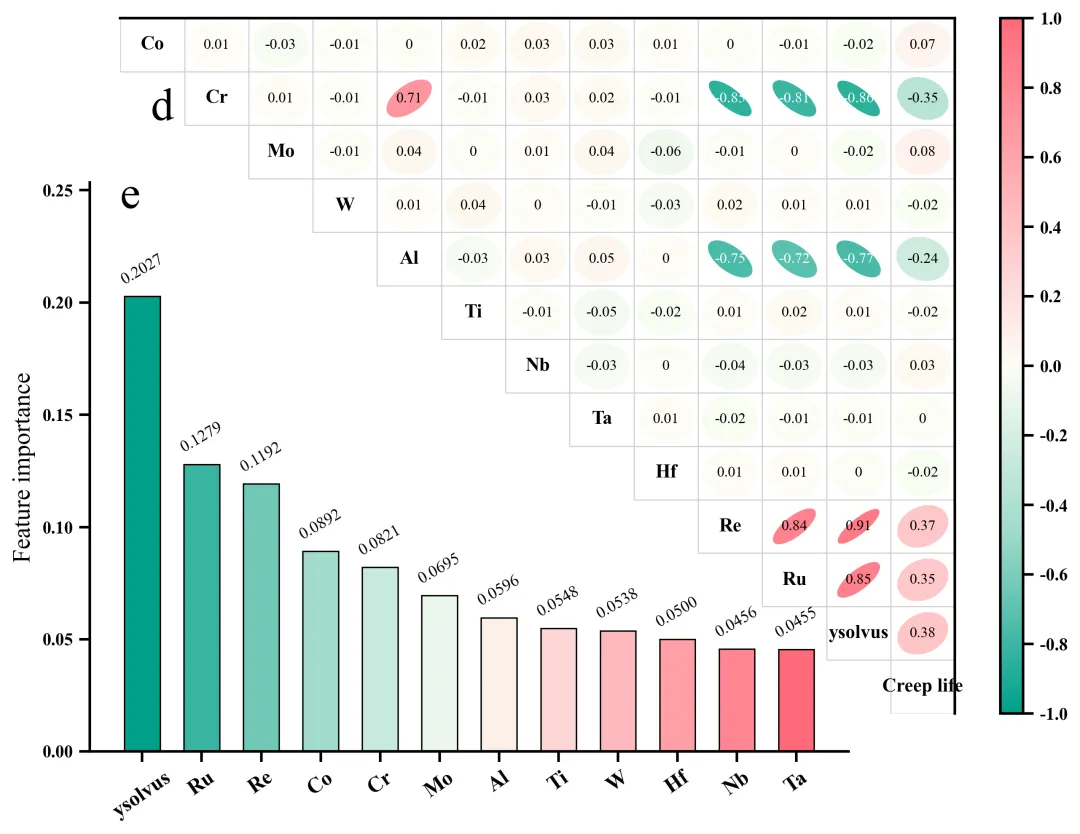
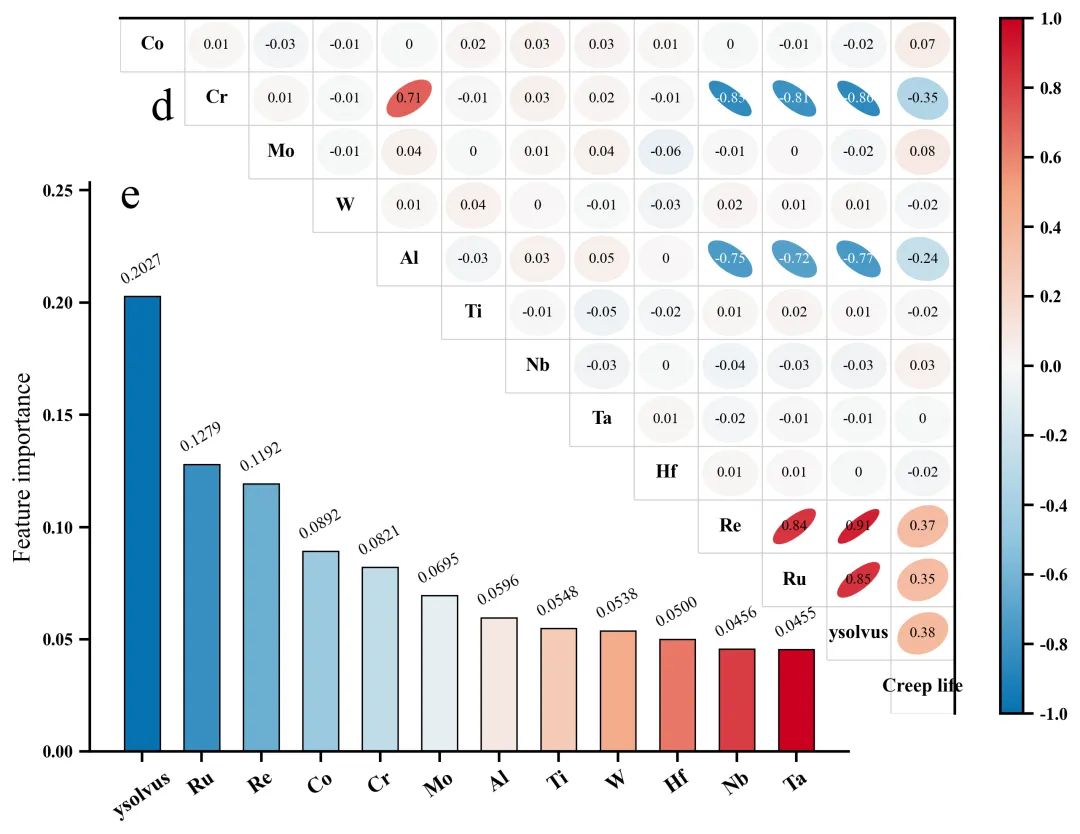
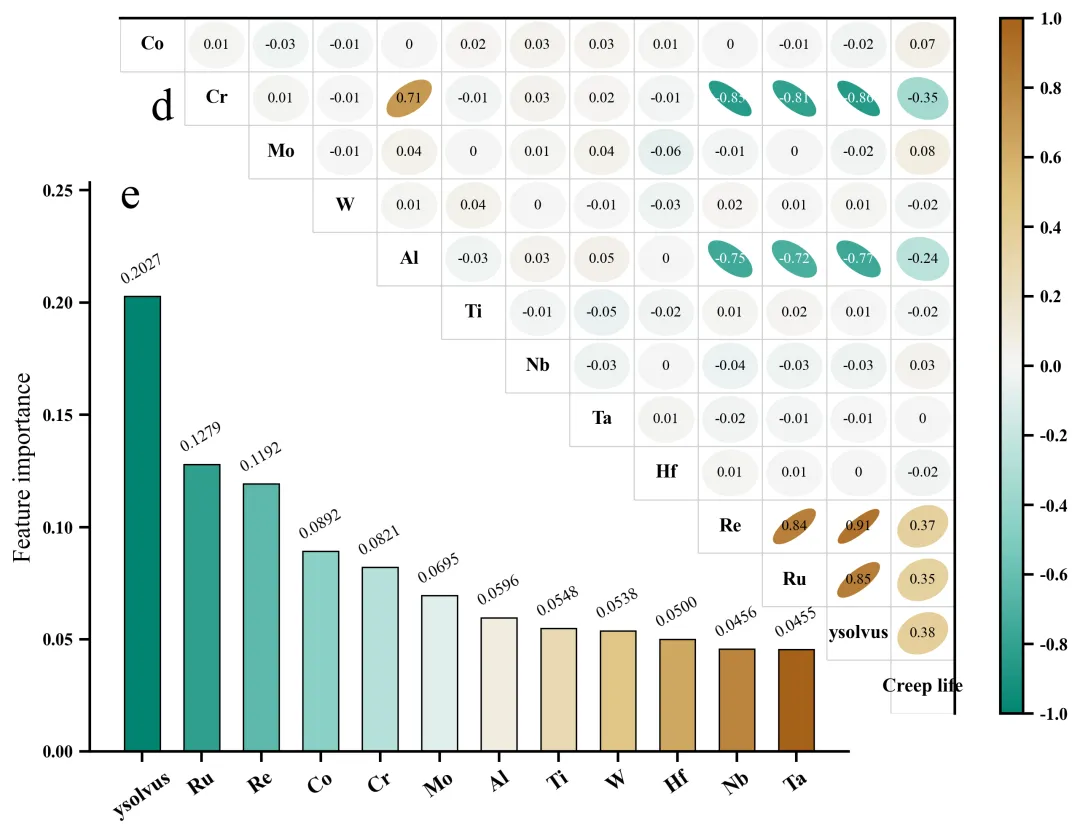
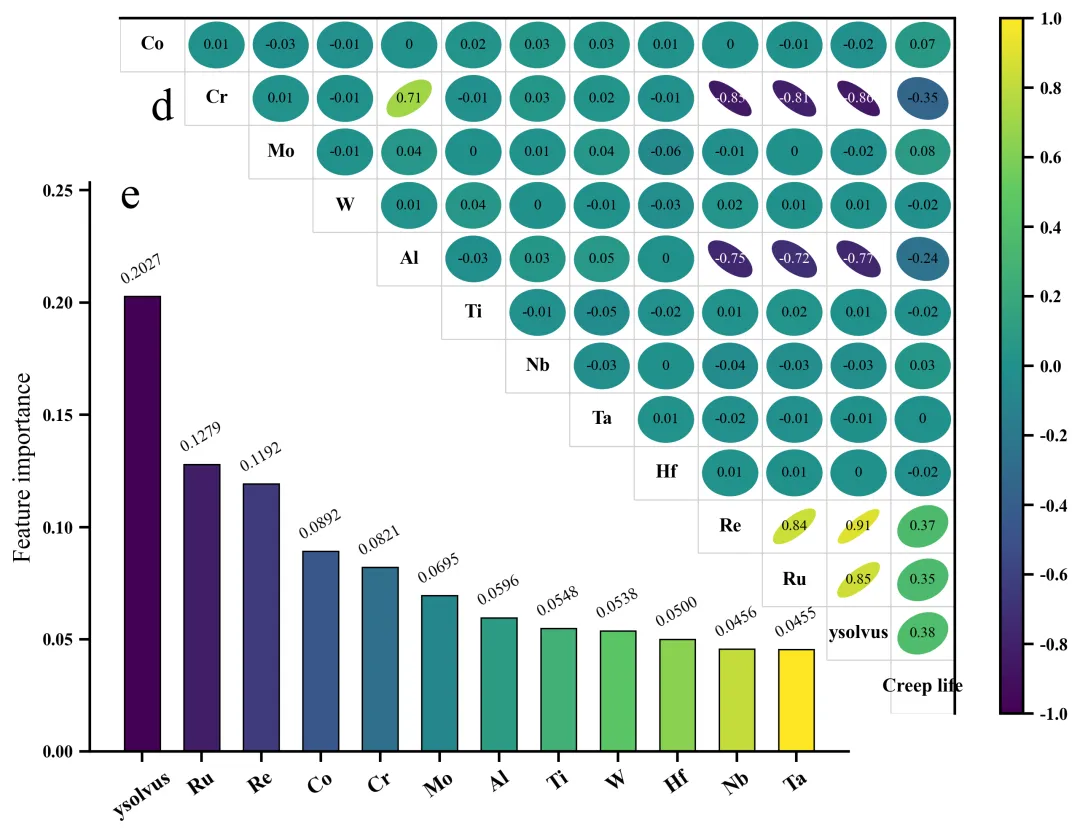
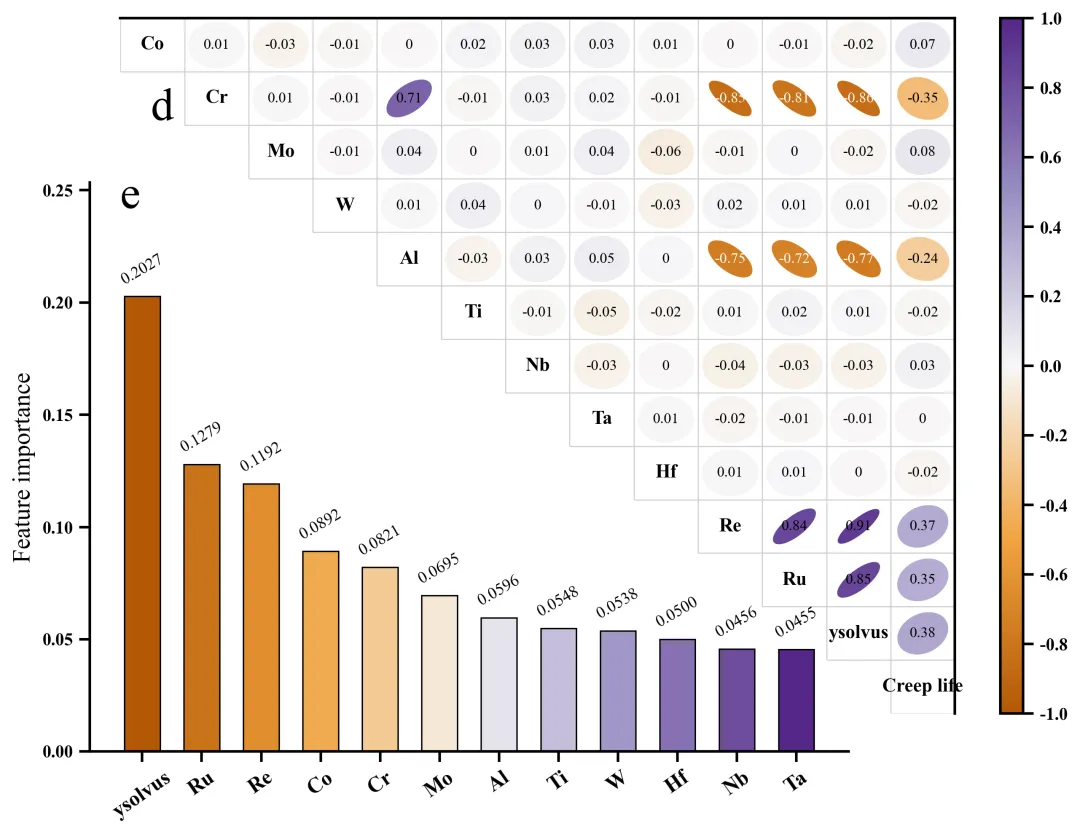
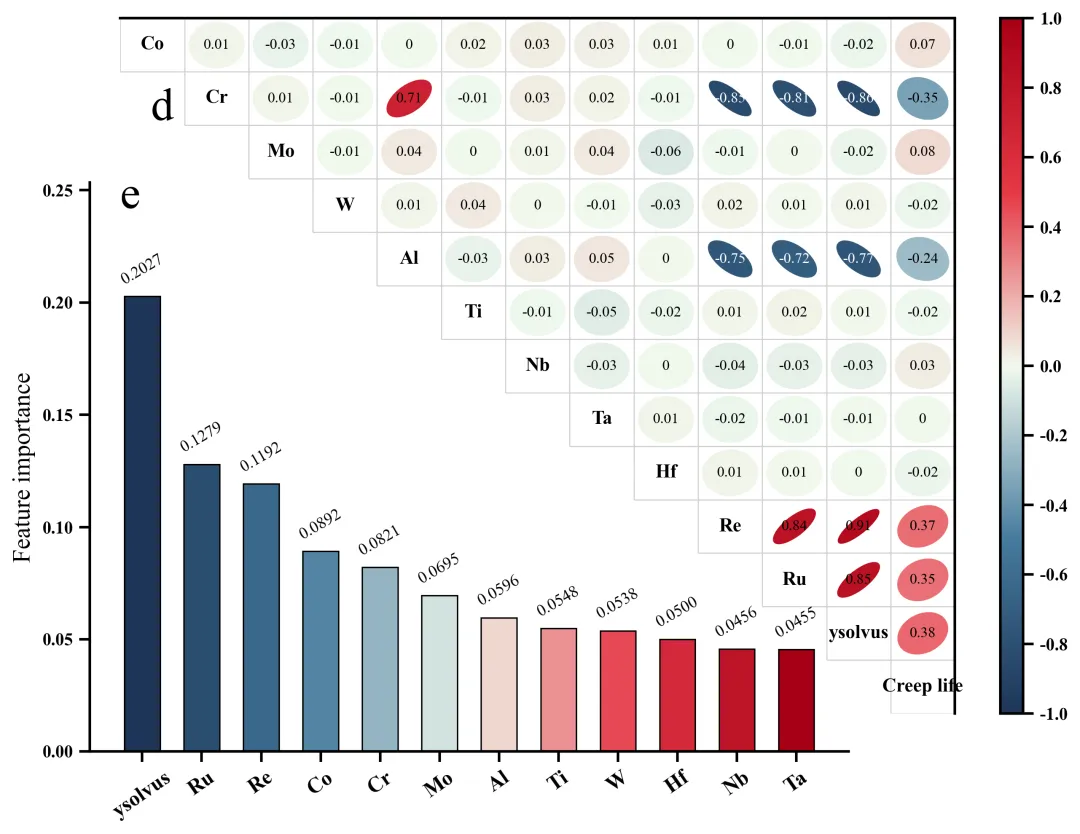
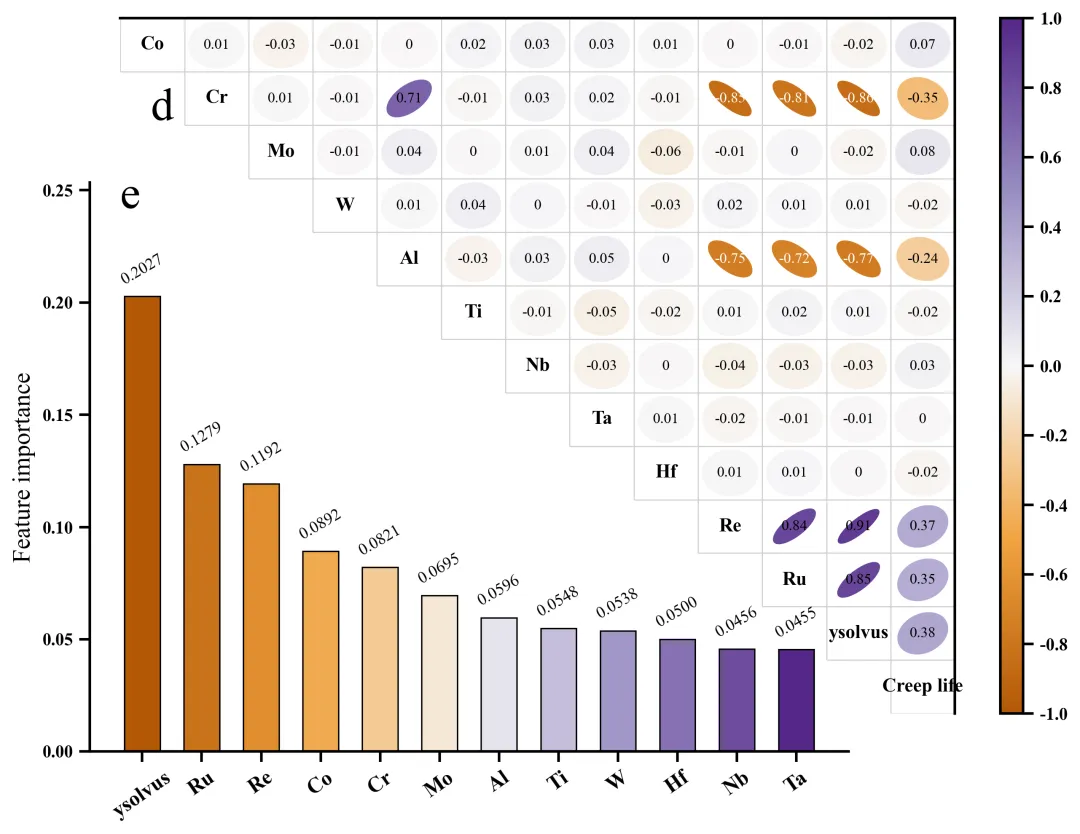
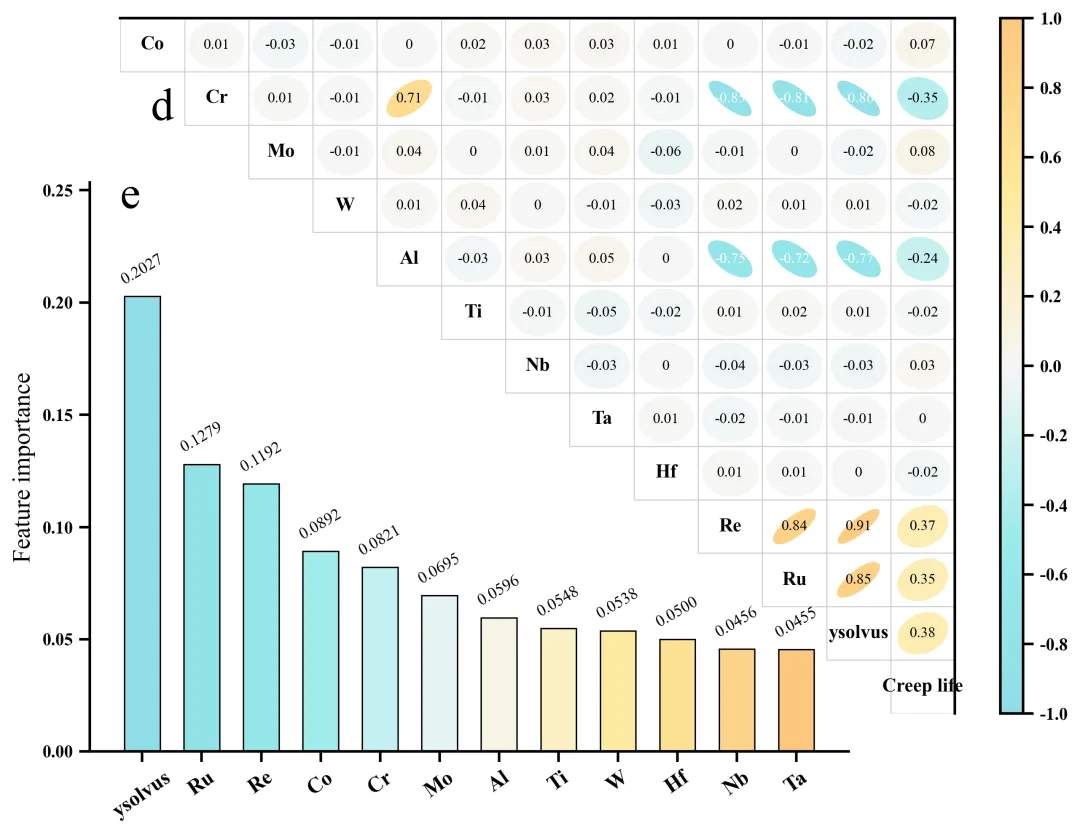
多种配色 



库的导入以及字体设置 

设置颜色库 

绘图函数:创建画布以及左上角相关性的热图框架 

绘图函数:开始绘制上热图的特征名称、相关系数、椭圆形等 

绘图函数:绘制特征重要性柱状图 

执行部分:包括数据读取、相关性分析、数据划分、标准化处理、网格搜索、模型评估、重要性分析、绘图等 



期刊图片复现|Python绘制二维偏依赖PDP图 期刊复现|python绘制基于SHAP分析和GAM模型拟合的单特征依赖图 期刊图片复现|python绘制带有渐变颜色shap特征重要性组合图(条形图+蜂巢图) 期刊复现|用Python绘制SHAP特征重要性总览图、依赖图、双特征交互效应SHAP图,解锁XGBoost模型的终极奥秘 期刊图片复现|Python绘制shap重要性蜂巢图+单特征依赖图+交互效应强度气泡图+交互效应依赖图(回归+二分类+分类) 

公众号中的所有所有的免费代码都已经下架了,都并入到付费部分里了,付费合集代码和数据的购买通道已经开通,全部合集100元,后续将会持续更新,决定购买请后台私信我,注意只会分享练习数据和代码文件,不会提供答疑服务,代码文件中已经包含了每行代码的完整注释,购买前请确保真的需要!!!
代码绘制成果展示
论文:Alloy design integrating natural language processing and machine learning: breakthrough development of low-cost,high-performance Ni-based single-crystal superalloys
此图将相关性分析与随机森林模型的特征重要性排序结合在一起,共同揭示了决定目标Y的关键特征。在相关性矩阵中,通过热图和椭圆斜率展示了各特征与目标之间的线性统计联系。又通过随机森林算法进一步量化了这些因素对Y的实际贡献度/特征重要性。之所以将这两种分析结合起来是因为仅靠成分间的简单线性关系无法精确捕捉复杂的非线性影响 。因此,引入机器学习的特征重要性分析可以从更高维度证明,某特征能显著提升对目标的预测精度 。
代码解释
第一部分
# =========================================================================================# ====================================== 1. 环境设置 =======================================# =========================================================================================import pandas as pdimport matplotlib.pyplot as pltimport numpy as npfrom matplotlib.patches import Ellipse
第二部分
# =========================================================================================# ====================================== 2. 颜色库 =======================================# =========================================================================================COLOR_SCHEMES = {1: #00A8A, #9BD89, '#FDFF5', '#FFBB9}
第三部分
# =========================================================================================# ====================================== 3. 绘图函数 =======================================# =========================================================================================def plot_figure(corr_matrix, sorted_features, sorted_importances, scheme_idx, show_plot=False):scheme_colors = COLOR_SCHEMES.get(scheme_idx, COLOR_SCHEMES[1]) # 提取配色方案# 创建画布fig = plt.figure(figsize=(12, 10))fig.patch.set_facecolor('white') # 主图背景色ax1 = fig.add_axes([0.32, 0.40, 0.55, 0.55]) # 添加第一个子图# 设置边框显示、粗细ax1.spines['top'].set_visible(True)ax1.spines['right'].set_visible(True)ax1.spines['top'].set_linewidth(1.5)ax1.spines['right'].set_linewidth(1.5)ax1.spines['bottom'].set_visible(False)ax1.spines['left'].set_visible(False)
第四部分
# 遍历相关矩阵行for i in range(n):# 遍历列ax1.add_patch(ell) # 加到子图上# 极小值if abs(r) < 0.005:text_str = "0"else: # 格式化text_str = f"{r:.2f}"if text_str == "-0.00":text_str = "0"text_color = 'white' if r < -0.7 else 'black' # 依据背景色的深浅反转字体颜色# 添加文本ax1.text(j, # xi, # ytext_str, # 文本ha='center', # 水平va='center', # 垂直fontsize=8.5, # 大小color=text_color) # 颜色
第五部分
# 添加第二个子图绘制重要性柱状图ax2 = fig.add_axes([0.3, 0.37, 0.50, 0.45])ax2.set_facecolor('none') # 背景色bar_colors = custom_cmap(np.linspace(0, 1, len(sorted_importances))) # 生成一组颜色用作柱子的颜色# 绘制柱状图bars = ax2.bar(sorted_features, # x特征名sorted_importances, # y特征重要性分数color=bar_colors, # 颜色edgecolor='black', # 边框色linewidth=0.8, # 边框线宽width=0.6) # 柱子宽# 设置轴标注加粗for label in ax2.get_xticklabels():label.set_fontweight('bold')for label in ax2.get_yticklabels():label.set_fontweight('bold')# 设置边框ax2.spines['top'].set_visible(False)ax2.spines['right'].set_visible(False)ax2.spines['bottom'].set_linewidth(1.5)ax2.spines['left'].set_linewidth(1.5)
第六部分
# =========================================================================================# ====================================== 4. 执行部分 =======================================# =========================================================================================if __name__ == "__main__":file_path = r"data.xlsx" # 原始数据df = pd.read_excel(file_path) # 读取数据corr_matrix = df.corr() # 相关性分析X = df.drop(columns=['Creep life']) #特征y = df['Creep life'] #目标rf_base = RandomForestRegressor(random_state=42)grid_search = GridSearchCV(estimator=rf_base, param_grid=param_grid,cv=5, scoring='r2', n_jobs=-1, verbose=2)grid_search.fit(X_train_scaled, y_train) #拟合网格搜索best_rf_model = grid_search.best_estimator_ #获取最佳模型#预测与评估y_train_pred = best_rf_model.predict(X_train_scaled)plot_figure(corr_matrix, sorted_features, sorted_importances, scheme_idx=TARGET_SCHEME, show_plot=True)
如何应用到你自己的数据
1.设置原始数据的保存路径,执行部分:
file_path = r"data.xlsx" # 原始数据2.划分数据集,执行部分:
X = df.drop(columns=['Creep life']) #特征y = df['Creep life'] #目标
3.设置超参数,执行部分:
param_grid = { 'n_estimators': range(100, 600, 100),'max_depth': range(1, 11, 2),}
4.设置是否要进行批量绘图,执行部分:
plot_all = True5.设置绘图结果的保存地址,绘图函数部分:
plt.savefig(fr"{scheme_idx}.png", dpi=300,bbox_inches='tight', facecolor='white')推荐
获取方式
本文来自网友投稿或网络内容,如有侵犯您的权益请联系我们删除,联系邮箱:596563534@qq.com 。
