当前位置:首页>python>Python学习|RS Python入门02:列表、字典与流程控制:像元集合的编队【六】函数

Python学习|RS Python入门02:列表、字典与流程控制:像元集合的编队【六】函数

  • 2026-06-24 09:21:13
Python学习|RS Python入门02:列表、字典与流程控制:像元集合的编队【六】函数

点击上方蓝字 关注我们

2026

诸位,在上一章《Python学习|RS Python入门02:列表、字典与流程控制:像元集合的编队【五】简单语句》中,我们学习了如何用循环让程序重复干活。但也许你可能已经发现:如果一段重复操作特别复杂,比如对一景遥感影像做辐射定标、大气校正、裁剪、计算NDVI……每次循环都写一遍这几十行代码,既臃肿又难维护。

这时候,我们来介绍一个新的工具,函数就登场了。

函数是什么?简单说,就是把一段有特定功能的代码打包,给它起个名字。以后想用这段功能,只需要“喊”它的名字就行,不用再把代码重新写一遍。

生活中,函数就像“菜谱”一样,想象你学会了做“西红柿炒鸡蛋”。只要记住这个名字,以后随时需要,就照菜谱做一遍,而不是每次都重新研究怎么切西红柿、怎么打鸡蛋。

遥感中的函数就像预处理流程一样重复使用。

在遥感数据处理中,函数可以把常用操作封装起来,大大提高工作效率:

  • 批量计算植被指数(如 NDVI、SAVI、EVI);

  • 统一对多景影像进行辐射定标、大气校正;

  • 将不同影像重采样到相同分辨率;

  • 对时间序列数据做平滑滤波(如 S-G 滤波);

  • 自动批量读取、预处理和保存遥感数据;

  • 实现质量控制掩膜(QA)的解码与筛选……

Part.01

函数的基础知识

1.1 定义和调用函数

大家学编程,最耳熟能详的便是hello world语句吧,好今天便继续来到这个语句,当然我们呢通过函数实现而非直接print他。

首先让我们来定义一个Hello函数,如下

def say_hello():    print("诸君,欢迎来到GeoPyLab!")    print("请保证你的思维时刻在线~")

好了我们应该如何去调用呢?

say_hello()

至此我们便可以得到如下的运行结果:

下面我们来观察一下定义到调用一个函数的一些关键点:

  • def 是关键词,表示定义二字,这是固定格式,熟记即可

  • say_hello是函数名,这个自己起,要见名知意,不要过于复杂,当然也要保证自己函数的可读性,即就是要保证别人拿到你的代码能够看明白你的目的是什么

  • () 用来放参数,倘若没有参数就空着

  • : 表示函数体开始,下面便要开始定义你的函数内容

  • 函数内部的代码要缩进

  • 定义函数时,函数体内的代码不会立即执行只有调用函数时,函数体内的代码才会运行

1.2 带参数的函数,即可给函数提供数据

很多时候,函数需要外部数据才能工作。比如写一个计算 NDVI 的函数,它需要知道红波段和近红外波段的数值。

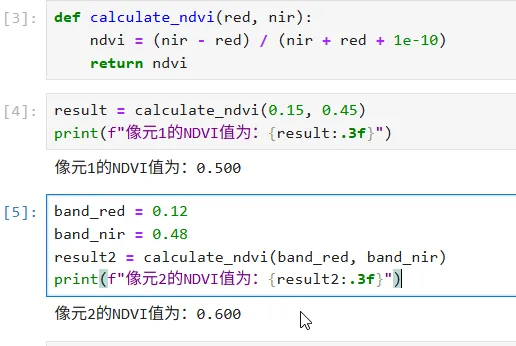
下面我们便开始进一步了解一些内容,我们先来定义一个计算NDVI的函数,具体计算公式我们不再展开赘述。

def calculate_ndvi(red, nir):    ndvi = (nir - red) / (nir + red + 1e-10)    return ndvi

好的我们下一步便开始在调用函数时传入一些数据:

result = calculate_ndvi(0.150.45)print(f"像元1的NDVI值为:{result:.3f}")

当然了,我们也可以直接传入一些变量:

band_red = 0.12band_nir = 0.48result2 = calculate_ndvi(band_red, band_nir)print(f"像元2的NDVI值为:{result2:.3f}")

运行之后我们便可以得到如下的结果:

总是我们可以看到两种函数均可完成参数的传入,在实际编程的过程中我们可以择优进行选取使用哪种方式。

好的,诸位我们来看一些关键点:

  • red, nir 是形参,即形式参数,就像菜谱里的鸡蛋 需要3 个一样

  • -0.15, 0.45是实参,也就是实际给的数据一样

  • return是返回值,也就是把计算结果送出来,函数的出口便在此处

Part.02

函数的进阶用法

2.1 带默认参数的函数,即可省去重复输入

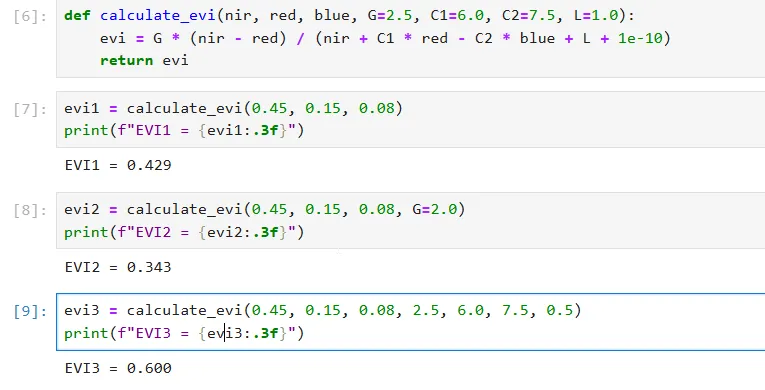
有些参数大部分情况都一样,可以设置默认值。下面我们来看一个关于植被指数计算的函数例子,我们定义一个计算EVI的函数,在其中我们可以使用一些默认参数:

def calculate_evi(nir, red, blue, G=2.5, C1=6.0, C2=7.5, L=1.0):    evi = G * (nir - red) / (nir + C1 * red - C2 * blue + L + 1e-10)    return evi

至此我们便完成了EVI计算的定义,诸位,下面便开始不同方式的调用:

首先我们只传入必要的参数,其他值均为函数定义时的默认值:

evi1 = calculate_evi(0.450.150.08)print(f"EVI1 = {evi1:.3f}")

当然我们也可以在调用函数时,手动修改一些默认参数的值:

evi1 = calculate_evi(0.450.150.08)print(f"EVI1 = {evi1:.3f}")

同样我们也可以按参数位置去逐个修改函数参数:

evi3 = calculate_evi(0.450.150.082.56.07.50.5)print(f"EVI3 = {evi3:.3f}")

运行上述结果我们便可以看到即便是传入的近红外、红外、蓝波段的数值一样,但是由于参数的不同我们得到的结果是不相同的:

在此向诸位提个小小的注意事项,就是在定义函数时带默认值的参数必须放在没有默认值的参数后面。

2.2 关键字参数,即便是打乱顺序也能传

如下我们来通过一个简单的小例子来对其进行说明:

def describe_image(name, sensor, resolution, date):    print(f"影像名称:{name}")    print(f"传感器:{sensor}")    print(f"分辨率:{resolution}米")    print(f"获取日期:{date}")

我们可以正常按位置进行传参:

describe_image("影像001""Landsat-8"30"2024-07-15")

当然也可以不按参数位置进行传参,这里便需要加上形参的名称:

describe_image(date="2024-07-15", name="影像002", resolution=10, sensor="Sentinel-2")

运行上述内容便可以得到如下的结果:

也就是说,关键字参数是为了让代码更易读,也更方便只修改某几个参数。

2.3 可变参数,处理不确定数量的输入

诸位,在有时候编程的过程中,你不知道用户会传几个值,比如要计算多个波段的平均值。

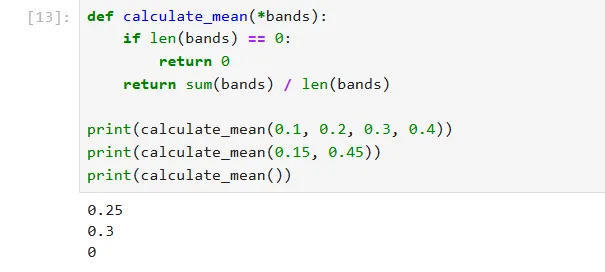
首先我们来看*args ,其可以接收任意多个位置参数,将其打包成元组,如下我们要计算某一像元多个波段的平均值:

def calculate_mean(*bands):    if len(bands) == 0:        return 0    return sum(bands) / len(bands)print(calculate_mean(0.10.20.30.4))print(calculate_mean(0.150.45))print(calculate_mean())

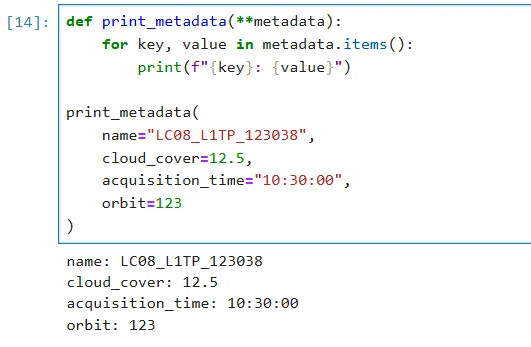
当然也可以使用**kwargs 接收任意多个关键字参数,将其传入的参数打包成字典,如下我们打印某一影像元数据:

def print_metadata(**metadata):      for key, value in metadata.items():            print(f"{key}{value}")print_metadata(      name="LC08_L1TP_123038",      cloud_cover=12.5,      acquisition_time="10:30:00",      orbit=123)

便可得到如下的结果:

Part.03

函数循环结合,实现批量处理

3.1 实战练习,二者结合批量计算 NDVI

首先我们假设有三景影像的波段均值,想批量计算 NDVI,不需要写三次公式,只需要定义函数,将其结合循环便可以实现批量循环处理:

首先我们来定义NDVI计算函数:

def ndvi(red, nir):      return (nir - red) / (nir + red + 1e-10)

而后我们来传入一些影像参数与波段值:

images = [    ("Landsat_01"0.120.38),    ("Landsat_02"0.140.42),    ("Sentinel_01"0.100.35),    ("Sentinel_02"0.110.40),]

接下来我们便可以使用for循环对其进行批量运算:

for name, r, n in images:    value = ndvi(r, n)    print(f"{name:12} red={r:.3f} nir={n:.3f} 经过计算其NDVI = {value:.3f}")

运行上述内容,我们便可以得到如下的结果:

3.2 条件筛选,进一步结合找出植被覆盖度高的影像

诸位,我们可以使用函数与循环结合,借助NDVI来招数植被覆盖较高的影像,首先我们定义这个函数:

def classify_vegetation(ndvi_value):    if ndvi_value < 0:        return "水体/非植被"    elif ndvi_value < 0.2:        return "裸土/稀疏植被"    elif ndvi_value < 0.4:        return "中等植被覆盖"    elif ndvi_value < 0.6:        return "高植被覆盖"    else:        return "极高植被覆盖"

而后我们使用循环进行逐个寻找:

for name, r, n in images:    value = ndvi(r, n)    category = classify_vegetation(value)    print(f"{name} NDVI={value:.3f} -> {category}")

运行上述内容,我们便可以得到如下的结果:

3.3 批量保存处理结果

我们先来模拟一个影像批处理过程:

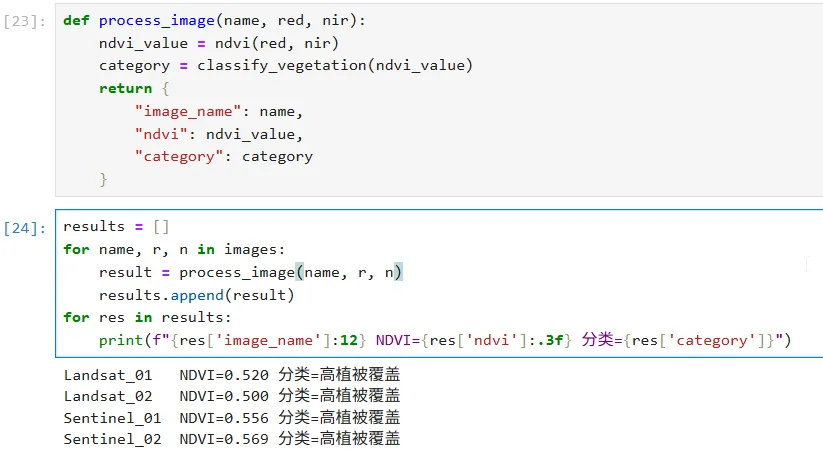
def process_image(name, red, nir):      ndvi_value = ndvi(red, nir)      category = classify_vegetation(ndvi_value)      return {            "image_name": name,            "ndvi": ndvi_value,            "category": category      }

而后我们创建结果并使用循环逐个保存:

results = []for name, r, n in images:      result = process_image(name, r, n)      results.append(result)for res in results:      print(f"{res['image_name']:12} NDVI={res['ndvi']:.3f} 分类={res['category']}")

即可得到如下的结果:

Part.04

综合实战,完整的遥感影像批处理框架

好了,经过上面的一些函数应用,诸位应该已经明白了函数的一些简便方法,下面我么来进行遥感影像批处理演示:

1. 定义各种植被指数的计算函数

2. 定义植被检查函数

3. 批量处理多景影像

4. 生成结果报告

好的,我们按上面的内容逐步完成:

首先我们先来定义一些植被指数的计算函数,如下:

import mathdef ndvi(red, nir, epsilon=1e-10):    return (nir - red) / (nir + red + epsilon)def ndwi(green, nir, epsilon=1e-10):    return (green - nir) / (green + nir + epsilon)def evi(nir, red, blue, G=2.5, C1=6.0, C2=7.5, L=1.0, epsilon=1e-10):    return G * (nir - red) / (nir + C1 * red - C2 * blue + L + epsilon)def savi(red, nir, L=0.5, epsilon=1e-10):    return ((nir - red) / (nir + red + L + epsilon)) * (1 + L)def msavi2(red, nir, epsilon=1e-10):    numerator = 2 * nir + 1 - math.sqrt((2 * nir + 1) ** 2 - 8 * (nir - red))    denominator = 2 + epsilon    return numerator / denominator

而后进一步定义植被检查函数,具体用于判读此处为何种地物:

def classify_vegetation(ndvi_value):    if ndvi_value < 0:        return "非植被"    elif ndvi_value < 0.2:        return "稀疏植被"    elif ndvi_value < 0.4:        return "中等植被"    elif ndvi_value < 0.6:        return "茂密植被"    else:        return "植被全覆盖"def water_detection(ndwi_value, threshold=0):    return ndwi_value > threshold

当计算与判读均已完成之后,我们下一步便是要进行影像的读取:

def process_single_image(image_id, bands, metadata=None):    result = {        "image_id": image_id,        "indices": {},        "classification": {},        "metadata": metadata or {}    }    blue = bands.get('blue'0)    green = bands.get('green'0)    red = bands.get('red'0)    nir = bands.get('nir'0)    result["indices"]["NDVI"] = ndvi(red, nir)    result["indices"]["NDWI"] = ndwi(green, nir)    result["indices"]["EVI"] = evi(nir, red, blue)    result["indices"]["SAVI"] = savi(red, nir)    result["indices"]["MSAVI2"] = msavi2(red, nir)    ndvi_val = result["indices"]["NDVI"]    result["classification"]["veg_type"] = classify_vegetation(ndvi_val)    result["classification"]["is_water"] = water_detection(result["indices"]["NDWI"])    return result

当然我们在实际应用中都是批量去生成、运行计算的,故而我们使用for循环进一步撰写批量运行处理函数:

def batch_process_images(image_dataset):    all_results = []    for idx, (img_id, bands, metadata) in enumerate(image_dataset, 1):        print(f"\n[{idx}/{len(image_dataset)}] 处理影像: {img_id}")        print(f"  波段值: B={bands.get('blue',0):.3f} G={bands.get('green',0):.3f} "              f"R={bands.get('red',0):.3f} NIR={bands.get('nir',0):.3f}")        result = process_single_image(img_id, bands, metadata)        all_results.append(result)        print(f"  NDVI = {result['indices']['NDVI']:.3f}")        print(f"  植被类型: {result['classification']['veg_type']}")        print(f"  是否水体: {'是'if result['classification']['is_water'else'否'}")    return all_results

而后我们便要对处理的结果做一些总结,以显示我们所要处理的目的:

def generate_report(results):    water_count = sum(1 for r in results if r['classification']['is_water'])    veg_stats = {}    for r in results:        veg_type = r['classification']['veg_type']        veg_stats[veg_type] = veg_stats.get(veg_type, 0) + 1    print(f"\n影像总数: {len(results)}")    print(f"包含水体影像数: {water_count}")    print("\n植被覆盖统计:")    for veg_type, count in veg_stats.items():        print(f"  {veg_type}{count} 景")    print("\n" + "-" * 60)    print(f"{'影像ID':<15}{'NDVI':<8}{'NDWI':<8}{'EVI':<8}{'植被分类':<15}")    print("-" * 60)    for r in results:        idx = r['indices']        print(f"{r['image_id']:<15}{idx['NDVI']:<8.3f}{idx['NDWI']:<8.3f} "              f"{idx['EVI']:<8.3f}{r['classification']['veg_type']:<15}")

最后我们便要做的是函数的调用,我们模拟一些数据来测试我们的函数是否正确运行:

if __name__ == "__main__":    test_dataset = [        ("LC08_20240715", {"blue"0.08"green"0.12"red"0.15"nir"0.45},         {"sensor""Landsat-8""cloud"5.2}),        ("LC08_20240801", {"blue"0.09"green"0.13"red"0.18"nir"0.42},         {"sensor""Landsat-8""cloud"8.1}),        ("S2A_20240720", {"blue"0.07"green"0.10"red"0.12"nir"0.48},         {"sensor""Sentinel-2""cloud"2.3}),        ("S2A_20240805", {"blue"0.10"green"0.15"red"0.22"nir"0.35},         {"sensor""Sentinel-2""cloud"15.6}),        ("LC08_20240820", {"blue"0.20"green"0.18"red"0.16"nir"0.20},         {"sensor""Landsat-8""cloud"0.5}),    ]    results = batch_process_images(test_dataset)    generate_report(results)

好了诸位,我们逐个运行上述代码便可以得到如下的结果:

至此,诸位,我们便已完成了整个函数流程的学习,同样,我们也完成了整个遥感影像的处理流程。

Part.5

思考与练习

函数是 Python 中实现代码复用的核心工具。通过 def 关键字,我们可以将一段具有特定功能的代码封装起来,给它起一个名字,然后反复调用。

当然诸位,本章的知识较为零碎,故而会刚开始实操可能会有的云里雾里,不过诸位,相信你们可以做到的。

好的,下面我们来做一个简短的知识梳理,帮助诸位更好的理解本章的内容。

好相信诸位已经跃跃欲试了吧,展示一下吧,下面来做两个思考:

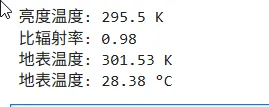
  1. 写一个函数,接收两个参数 temperature和 emissivity,返回地表温度计算公式T = brightness_temp / emissivity的结果。

def land_surface_temperature(brightness_temp, emissivity):    T = brightness_temp / emissivity    return Tbt = 295.5em = 0.98lst = land_surface_temperature(bt, em)print(f"亮度温度: {bt} K")print(f"比辐射率: {em}")print(f"地表温度: {lst:.2f} K")print(f"地表温度: {lst - 273.15:.2f} °C")

好的,通过上述的代码运行,我们便可以得到如下的结果:

2. 写一个函数 batch_ndvi,接收一个影像列表,为了简化诸位的思考,假设该列表为每个元素是红波段和近红外波段的列表,而后返回所有 NDVI 值列表,并用循环调用它。

def ndvi(red, nir):    epsilon = 1e-10    return (nir - red) / (nir + red + epsilon)def batch_ndvi(image_list):    results = []    for item in image_list:        name, red, nir = item        value = ndvi(red, nir)        results.append((name, value))        print(f"{name}: 红={red:.3f}, 近红={nir:.3f} -> NDVI={value:.4f}")    return resultsimages_with_names = [    ["Landsat_01"0.120.38],    ["Landsat_02"0.140.42],    ["Sentinel_01"0.100.35],    ["Sentinel_02"0.110.40],    ["GF1_01"0.130.37],]result = batch_ndvi(images_with_names)print("\nNDVI 值列表:")for name, value in result:    print(f"  {name}{value:.4f}")
我们通过上述两个小练习,应该更好的理解了函数这个工具。

如果你觉得“原来Python也能讲得这么遥感”点个关注,后续系列推文将第一时间推送:

  • 文件与目录操作

  • NumPy入门

你在处理遥感数据时,遇到过哪些让循环“卡住”的场景?是千万级像元的遍历太慢,还是海量文件的批处理总报错?评论区聊聊,下期可能就针对你的痛点来讲解

用Python讲遥感,我们不讲噱头,只讲干货。

附赠可运行的 Notebook 源码,自行上传即可上手。本公众号后台回复【RS Python入门02-6】即可获取本节 Notebook 源码。

最新文章

随机文章

基本 文件 流程 错误 SQL 调试
  1. 请求信息 : 2026-07-03 20:45:07 HTTP/2.0 GET : https://f.mffb.com.cn/a/492972.html
  2. 运行时间 : 0.109001s [ 吞吐率:9.17req/s ] 内存消耗:5,163.13kb 文件加载:140
  3. 缓存信息 : 0 reads,0 writes
  4. 会话信息 : SESSION_ID=222eb858d15de308d4fac7794439a7a6
  1. /yingpanguazai/ssd/ssd1/www/f.mffb.com.cn/public/index.php ( 0.79 KB )
  2. /yingpanguazai/ssd/ssd1/www/f.mffb.com.cn/vendor/autoload.php ( 0.17 KB )
  3. /yingpanguazai/ssd/ssd1/www/f.mffb.com.cn/vendor/composer/autoload_real.php ( 2.49 KB )
  4. /yingpanguazai/ssd/ssd1/www/f.mffb.com.cn/vendor/composer/platform_check.php ( 0.90 KB )
  5. /yingpanguazai/ssd/ssd1/www/f.mffb.com.cn/vendor/composer/ClassLoader.php ( 14.03 KB )
  6. /yingpanguazai/ssd/ssd1/www/f.mffb.com.cn/vendor/composer/autoload_static.php ( 4.90 KB )
  7. /yingpanguazai/ssd/ssd1/www/f.mffb.com.cn/vendor/topthink/think-helper/src/helper.php ( 8.34 KB )
  8. /yingpanguazai/ssd/ssd1/www/f.mffb.com.cn/vendor/topthink/think-validate/src/helper.php ( 2.19 KB )
  9. /yingpanguazai/ssd/ssd1/www/f.mffb.com.cn/vendor/topthink/think-orm/src/helper.php ( 1.47 KB )
  10. /yingpanguazai/ssd/ssd1/www/f.mffb.com.cn/vendor/topthink/think-orm/stubs/load_stubs.php ( 0.16 KB )
  11. /yingpanguazai/ssd/ssd1/www/f.mffb.com.cn/vendor/topthink/framework/src/think/Exception.php ( 1.69 KB )
  12. /yingpanguazai/ssd/ssd1/www/f.mffb.com.cn/vendor/topthink/think-container/src/Facade.php ( 2.71 KB )
  13. /yingpanguazai/ssd/ssd1/www/f.mffb.com.cn/vendor/symfony/deprecation-contracts/function.php ( 0.99 KB )
  14. /yingpanguazai/ssd/ssd1/www/f.mffb.com.cn/vendor/symfony/polyfill-mbstring/bootstrap.php ( 8.26 KB )
  15. /yingpanguazai/ssd/ssd1/www/f.mffb.com.cn/vendor/symfony/polyfill-mbstring/bootstrap80.php ( 9.78 KB )
  16. /yingpanguazai/ssd/ssd1/www/f.mffb.com.cn/vendor/symfony/var-dumper/Resources/functions/dump.php ( 1.49 KB )
  17. /yingpanguazai/ssd/ssd1/www/f.mffb.com.cn/vendor/topthink/think-dumper/src/helper.php ( 0.18 KB )
  18. /yingpanguazai/ssd/ssd1/www/f.mffb.com.cn/vendor/symfony/var-dumper/VarDumper.php ( 4.30 KB )
  19. /yingpanguazai/ssd/ssd1/www/f.mffb.com.cn/vendor/topthink/framework/src/think/App.php ( 15.30 KB )
  20. /yingpanguazai/ssd/ssd1/www/f.mffb.com.cn/vendor/topthink/think-container/src/Container.php ( 15.76 KB )
  21. /yingpanguazai/ssd/ssd1/www/f.mffb.com.cn/vendor/psr/container/src/ContainerInterface.php ( 1.02 KB )
  22. /yingpanguazai/ssd/ssd1/www/f.mffb.com.cn/app/provider.php ( 0.19 KB )
  23. /yingpanguazai/ssd/ssd1/www/f.mffb.com.cn/vendor/topthink/framework/src/think/Http.php ( 6.04 KB )
  24. /yingpanguazai/ssd/ssd1/www/f.mffb.com.cn/vendor/topthink/think-helper/src/helper/Str.php ( 7.29 KB )
  25. /yingpanguazai/ssd/ssd1/www/f.mffb.com.cn/vendor/topthink/framework/src/think/Env.php ( 4.68 KB )
  26. /yingpanguazai/ssd/ssd1/www/f.mffb.com.cn/app/common.php ( 0.03 KB )
  27. /yingpanguazai/ssd/ssd1/www/f.mffb.com.cn/vendor/topthink/framework/src/helper.php ( 18.78 KB )
  28. /yingpanguazai/ssd/ssd1/www/f.mffb.com.cn/vendor/topthink/framework/src/think/Config.php ( 5.54 KB )
  29. /yingpanguazai/ssd/ssd1/www/f.mffb.com.cn/config/app.php ( 0.95 KB )
  30. /yingpanguazai/ssd/ssd1/www/f.mffb.com.cn/config/cache.php ( 0.78 KB )
  31. /yingpanguazai/ssd/ssd1/www/f.mffb.com.cn/config/console.php ( 0.23 KB )
  32. /yingpanguazai/ssd/ssd1/www/f.mffb.com.cn/config/cookie.php ( 0.56 KB )
  33. /yingpanguazai/ssd/ssd1/www/f.mffb.com.cn/config/database.php ( 2.48 KB )
  34. /yingpanguazai/ssd/ssd1/www/f.mffb.com.cn/vendor/topthink/framework/src/think/facade/Env.php ( 1.67 KB )
  35. /yingpanguazai/ssd/ssd1/www/f.mffb.com.cn/config/filesystem.php ( 0.61 KB )
  36. /yingpanguazai/ssd/ssd1/www/f.mffb.com.cn/config/lang.php ( 0.91 KB )
  37. /yingpanguazai/ssd/ssd1/www/f.mffb.com.cn/config/log.php ( 1.35 KB )
  38. /yingpanguazai/ssd/ssd1/www/f.mffb.com.cn/config/middleware.php ( 0.19 KB )
  39. /yingpanguazai/ssd/ssd1/www/f.mffb.com.cn/config/route.php ( 1.89 KB )
  40. /yingpanguazai/ssd/ssd1/www/f.mffb.com.cn/config/session.php ( 0.57 KB )
  41. /yingpanguazai/ssd/ssd1/www/f.mffb.com.cn/config/trace.php ( 0.34 KB )
  42. /yingpanguazai/ssd/ssd1/www/f.mffb.com.cn/config/view.php ( 0.82 KB )
  43. /yingpanguazai/ssd/ssd1/www/f.mffb.com.cn/app/event.php ( 0.25 KB )
  44. /yingpanguazai/ssd/ssd1/www/f.mffb.com.cn/vendor/topthink/framework/src/think/Event.php ( 7.67 KB )
  45. /yingpanguazai/ssd/ssd1/www/f.mffb.com.cn/app/service.php ( 0.13 KB )
  46. /yingpanguazai/ssd/ssd1/www/f.mffb.com.cn/app/AppService.php ( 0.26 KB )
  47. /yingpanguazai/ssd/ssd1/www/f.mffb.com.cn/vendor/topthink/framework/src/think/Service.php ( 1.64 KB )
  48. /yingpanguazai/ssd/ssd1/www/f.mffb.com.cn/vendor/topthink/framework/src/think/Lang.php ( 7.35 KB )
  49. /yingpanguazai/ssd/ssd1/www/f.mffb.com.cn/vendor/topthink/framework/src/lang/zh-cn.php ( 13.70 KB )
  50. /yingpanguazai/ssd/ssd1/www/f.mffb.com.cn/vendor/topthink/framework/src/think/initializer/Error.php ( 3.31 KB )
  51. /yingpanguazai/ssd/ssd1/www/f.mffb.com.cn/vendor/topthink/framework/src/think/initializer/RegisterService.php ( 1.33 KB )
  52. /yingpanguazai/ssd/ssd1/www/f.mffb.com.cn/vendor/services.php ( 0.14 KB )
  53. /yingpanguazai/ssd/ssd1/www/f.mffb.com.cn/vendor/topthink/framework/src/think/service/PaginatorService.php ( 1.52 KB )
  54. /yingpanguazai/ssd/ssd1/www/f.mffb.com.cn/vendor/topthink/framework/src/think/service/ValidateService.php ( 0.99 KB )
  55. /yingpanguazai/ssd/ssd1/www/f.mffb.com.cn/vendor/topthink/framework/src/think/service/ModelService.php ( 2.04 KB )
  56. /yingpanguazai/ssd/ssd1/www/f.mffb.com.cn/vendor/topthink/think-trace/src/Service.php ( 0.77 KB )
  57. /yingpanguazai/ssd/ssd1/www/f.mffb.com.cn/vendor/topthink/framework/src/think/Middleware.php ( 6.72 KB )
  58. /yingpanguazai/ssd/ssd1/www/f.mffb.com.cn/vendor/topthink/framework/src/think/initializer/BootService.php ( 0.77 KB )
  59. /yingpanguazai/ssd/ssd1/www/f.mffb.com.cn/vendor/topthink/think-orm/src/Paginator.php ( 11.86 KB )
  60. /yingpanguazai/ssd/ssd1/www/f.mffb.com.cn/vendor/topthink/think-validate/src/Validate.php ( 63.20 KB )
  61. /yingpanguazai/ssd/ssd1/www/f.mffb.com.cn/vendor/topthink/think-orm/src/Model.php ( 23.55 KB )
  62. /yingpanguazai/ssd/ssd1/www/f.mffb.com.cn/vendor/topthink/think-orm/src/model/concern/Attribute.php ( 21.05 KB )
  63. /yingpanguazai/ssd/ssd1/www/f.mffb.com.cn/vendor/topthink/think-orm/src/model/concern/AutoWriteData.php ( 4.21 KB )
  64. /yingpanguazai/ssd/ssd1/www/f.mffb.com.cn/vendor/topthink/think-orm/src/model/concern/Conversion.php ( 6.44 KB )
  65. /yingpanguazai/ssd/ssd1/www/f.mffb.com.cn/vendor/topthink/think-orm/src/model/concern/DbConnect.php ( 5.16 KB )
  66. /yingpanguazai/ssd/ssd1/www/f.mffb.com.cn/vendor/topthink/think-orm/src/model/concern/ModelEvent.php ( 2.33 KB )
  67. /yingpanguazai/ssd/ssd1/www/f.mffb.com.cn/vendor/topthink/think-orm/src/model/concern/RelationShip.php ( 28.29 KB )
  68. /yingpanguazai/ssd/ssd1/www/f.mffb.com.cn/vendor/topthink/think-helper/src/contract/Arrayable.php ( 0.09 KB )
  69. /yingpanguazai/ssd/ssd1/www/f.mffb.com.cn/vendor/topthink/think-helper/src/contract/Jsonable.php ( 0.13 KB )
  70. /yingpanguazai/ssd/ssd1/www/f.mffb.com.cn/vendor/topthink/think-orm/src/model/contract/Modelable.php ( 0.09 KB )
  71. /yingpanguazai/ssd/ssd1/www/f.mffb.com.cn/vendor/topthink/framework/src/think/Db.php ( 2.88 KB )
  72. /yingpanguazai/ssd/ssd1/www/f.mffb.com.cn/vendor/topthink/think-orm/src/DbManager.php ( 8.52 KB )
  73. /yingpanguazai/ssd/ssd1/www/f.mffb.com.cn/vendor/topthink/framework/src/think/Log.php ( 6.28 KB )
  74. /yingpanguazai/ssd/ssd1/www/f.mffb.com.cn/vendor/topthink/framework/src/think/Manager.php ( 3.92 KB )
  75. /yingpanguazai/ssd/ssd1/www/f.mffb.com.cn/vendor/psr/log/src/LoggerTrait.php ( 2.69 KB )
  76. /yingpanguazai/ssd/ssd1/www/f.mffb.com.cn/vendor/psr/log/src/LoggerInterface.php ( 2.71 KB )
  77. /yingpanguazai/ssd/ssd1/www/f.mffb.com.cn/vendor/topthink/framework/src/think/Cache.php ( 4.92 KB )
  78. /yingpanguazai/ssd/ssd1/www/f.mffb.com.cn/vendor/psr/simple-cache/src/CacheInterface.php ( 4.71 KB )
  79. /yingpanguazai/ssd/ssd1/www/f.mffb.com.cn/vendor/topthink/think-helper/src/helper/Arr.php ( 16.63 KB )
  80. /yingpanguazai/ssd/ssd1/www/f.mffb.com.cn/vendor/topthink/framework/src/think/cache/driver/File.php ( 7.84 KB )
  81. /yingpanguazai/ssd/ssd1/www/f.mffb.com.cn/vendor/topthink/framework/src/think/cache/Driver.php ( 9.03 KB )
  82. /yingpanguazai/ssd/ssd1/www/f.mffb.com.cn/vendor/topthink/framework/src/think/contract/CacheHandlerInterface.php ( 1.99 KB )
  83. /yingpanguazai/ssd/ssd1/www/f.mffb.com.cn/app/Request.php ( 0.09 KB )
  84. /yingpanguazai/ssd/ssd1/www/f.mffb.com.cn/vendor/topthink/framework/src/think/Request.php ( 55.78 KB )
  85. /yingpanguazai/ssd/ssd1/www/f.mffb.com.cn/app/middleware.php ( 0.25 KB )
  86. /yingpanguazai/ssd/ssd1/www/f.mffb.com.cn/vendor/topthink/framework/src/think/Pipeline.php ( 2.61 KB )
  87. /yingpanguazai/ssd/ssd1/www/f.mffb.com.cn/vendor/topthink/think-trace/src/TraceDebug.php ( 3.40 KB )
  88. /yingpanguazai/ssd/ssd1/www/f.mffb.com.cn/vendor/topthink/framework/src/think/middleware/SessionInit.php ( 1.94 KB )
  89. /yingpanguazai/ssd/ssd1/www/f.mffb.com.cn/vendor/topthink/framework/src/think/Session.php ( 1.80 KB )
  90. /yingpanguazai/ssd/ssd1/www/f.mffb.com.cn/vendor/topthink/framework/src/think/session/driver/File.php ( 6.27 KB )
  91. /yingpanguazai/ssd/ssd1/www/f.mffb.com.cn/vendor/topthink/framework/src/think/contract/SessionHandlerInterface.php ( 0.87 KB )
  92. /yingpanguazai/ssd/ssd1/www/f.mffb.com.cn/vendor/topthink/framework/src/think/session/Store.php ( 7.12 KB )
  93. /yingpanguazai/ssd/ssd1/www/f.mffb.com.cn/vendor/topthink/framework/src/think/Route.php ( 23.73 KB )
  94. /yingpanguazai/ssd/ssd1/www/f.mffb.com.cn/vendor/topthink/framework/src/think/route/RuleName.php ( 5.75 KB )
  95. /yingpanguazai/ssd/ssd1/www/f.mffb.com.cn/vendor/topthink/framework/src/think/route/Domain.php ( 2.53 KB )
  96. /yingpanguazai/ssd/ssd1/www/f.mffb.com.cn/vendor/topthink/framework/src/think/route/RuleGroup.php ( 22.43 KB )
  97. /yingpanguazai/ssd/ssd1/www/f.mffb.com.cn/vendor/topthink/framework/src/think/route/Rule.php ( 26.95 KB )
  98. /yingpanguazai/ssd/ssd1/www/f.mffb.com.cn/vendor/topthink/framework/src/think/route/RuleItem.php ( 9.78 KB )
  99. /yingpanguazai/ssd/ssd1/www/f.mffb.com.cn/route/app.php ( 1.72 KB )
  100. /yingpanguazai/ssd/ssd1/www/f.mffb.com.cn/vendor/topthink/framework/src/think/facade/Route.php ( 4.70 KB )
  101. /yingpanguazai/ssd/ssd1/www/f.mffb.com.cn/vendor/topthink/framework/src/think/route/dispatch/Controller.php ( 4.74 KB )
  102. /yingpanguazai/ssd/ssd1/www/f.mffb.com.cn/vendor/topthink/framework/src/think/route/Dispatch.php ( 10.44 KB )
  103. /yingpanguazai/ssd/ssd1/www/f.mffb.com.cn/app/controller/Index.php ( 4.81 KB )
  104. /yingpanguazai/ssd/ssd1/www/f.mffb.com.cn/app/BaseController.php ( 2.05 KB )
  105. /yingpanguazai/ssd/ssd1/www/f.mffb.com.cn/vendor/topthink/think-orm/src/facade/Db.php ( 0.93 KB )
  106. /yingpanguazai/ssd/ssd1/www/f.mffb.com.cn/vendor/topthink/think-orm/src/db/connector/Mysql.php ( 5.44 KB )
  107. /yingpanguazai/ssd/ssd1/www/f.mffb.com.cn/vendor/topthink/think-orm/src/db/PDOConnection.php ( 52.47 KB )
  108. /yingpanguazai/ssd/ssd1/www/f.mffb.com.cn/vendor/topthink/think-orm/src/db/Connection.php ( 8.39 KB )
  109. /yingpanguazai/ssd/ssd1/www/f.mffb.com.cn/vendor/topthink/think-orm/src/db/ConnectionInterface.php ( 4.57 KB )
  110. /yingpanguazai/ssd/ssd1/www/f.mffb.com.cn/vendor/topthink/think-orm/src/db/builder/Mysql.php ( 16.58 KB )
  111. /yingpanguazai/ssd/ssd1/www/f.mffb.com.cn/vendor/topthink/think-orm/src/db/Builder.php ( 24.06 KB )
  112. /yingpanguazai/ssd/ssd1/www/f.mffb.com.cn/vendor/topthink/think-orm/src/db/BaseBuilder.php ( 27.50 KB )
  113. /yingpanguazai/ssd/ssd1/www/f.mffb.com.cn/vendor/topthink/think-orm/src/db/Query.php ( 15.71 KB )
  114. /yingpanguazai/ssd/ssd1/www/f.mffb.com.cn/vendor/topthink/think-orm/src/db/BaseQuery.php ( 45.13 KB )
  115. /yingpanguazai/ssd/ssd1/www/f.mffb.com.cn/vendor/topthink/think-orm/src/db/concern/TimeFieldQuery.php ( 7.43 KB )
  116. /yingpanguazai/ssd/ssd1/www/f.mffb.com.cn/vendor/topthink/think-orm/src/db/concern/AggregateQuery.php ( 3.26 KB )
  117. /yingpanguazai/ssd/ssd1/www/f.mffb.com.cn/vendor/topthink/think-orm/src/db/concern/ModelRelationQuery.php ( 20.07 KB )
  118. /yingpanguazai/ssd/ssd1/www/f.mffb.com.cn/vendor/topthink/think-orm/src/db/concern/ParamsBind.php ( 3.66 KB )
  119. /yingpanguazai/ssd/ssd1/www/f.mffb.com.cn/vendor/topthink/think-orm/src/db/concern/ResultOperation.php ( 7.01 KB )
  120. /yingpanguazai/ssd/ssd1/www/f.mffb.com.cn/vendor/topthink/think-orm/src/db/concern/WhereQuery.php ( 19.37 KB )
  121. /yingpanguazai/ssd/ssd1/www/f.mffb.com.cn/vendor/topthink/think-orm/src/db/concern/JoinAndViewQuery.php ( 7.11 KB )
  122. /yingpanguazai/ssd/ssd1/www/f.mffb.com.cn/vendor/topthink/think-orm/src/db/concern/TableFieldInfo.php ( 2.63 KB )
  123. /yingpanguazai/ssd/ssd1/www/f.mffb.com.cn/vendor/topthink/think-orm/src/db/concern/Transaction.php ( 2.77 KB )
  124. /yingpanguazai/ssd/ssd1/www/f.mffb.com.cn/vendor/topthink/framework/src/think/log/driver/File.php ( 5.96 KB )
  125. /yingpanguazai/ssd/ssd1/www/f.mffb.com.cn/vendor/topthink/framework/src/think/contract/LogHandlerInterface.php ( 0.86 KB )
  126. /yingpanguazai/ssd/ssd1/www/f.mffb.com.cn/vendor/topthink/framework/src/think/log/Channel.php ( 3.89 KB )
  127. /yingpanguazai/ssd/ssd1/www/f.mffb.com.cn/vendor/topthink/framework/src/think/event/LogRecord.php ( 1.02 KB )
  128. /yingpanguazai/ssd/ssd1/www/f.mffb.com.cn/vendor/topthink/think-helper/src/Collection.php ( 16.47 KB )
  129. /yingpanguazai/ssd/ssd1/www/f.mffb.com.cn/vendor/topthink/framework/src/think/facade/View.php ( 1.70 KB )
  130. /yingpanguazai/ssd/ssd1/www/f.mffb.com.cn/vendor/topthink/framework/src/think/View.php ( 4.39 KB )
  131. /yingpanguazai/ssd/ssd1/www/f.mffb.com.cn/vendor/topthink/framework/src/think/Response.php ( 8.81 KB )
  132. /yingpanguazai/ssd/ssd1/www/f.mffb.com.cn/vendor/topthink/framework/src/think/response/View.php ( 3.29 KB )
  133. /yingpanguazai/ssd/ssd1/www/f.mffb.com.cn/vendor/topthink/framework/src/think/Cookie.php ( 6.06 KB )
  134. /yingpanguazai/ssd/ssd1/www/f.mffb.com.cn/vendor/topthink/think-view/src/Think.php ( 8.38 KB )
  135. /yingpanguazai/ssd/ssd1/www/f.mffb.com.cn/vendor/topthink/framework/src/think/contract/TemplateHandlerInterface.php ( 1.60 KB )
  136. /yingpanguazai/ssd/ssd1/www/f.mffb.com.cn/vendor/topthink/think-template/src/Template.php ( 46.61 KB )
  137. /yingpanguazai/ssd/ssd1/www/f.mffb.com.cn/vendor/topthink/think-template/src/template/driver/File.php ( 2.41 KB )
  138. /yingpanguazai/ssd/ssd1/www/f.mffb.com.cn/vendor/topthink/think-template/src/template/contract/DriverInterface.php ( 0.86 KB )
  139. /yingpanguazai/ssd/ssd1/www/f.mffb.com.cn/runtime/temp/067d451b9a0c665040f3f1bdd3293d68.php ( 11.98 KB )
  140. /yingpanguazai/ssd/ssd1/www/f.mffb.com.cn/vendor/topthink/think-trace/src/Html.php ( 4.42 KB )
  1. CONNECT:[ UseTime:0.000578s ] mysql:host=127.0.0.1;port=3306;dbname=f_mffb;charset=utf8mb4
  2. SHOW FULL COLUMNS FROM `fenlei` [ RunTime:0.000905s ]
  3. SELECT * FROM `fenlei` WHERE `fid` = 0 [ RunTime:0.000411s ]
  4. SELECT * FROM `fenlei` WHERE `fid` = 63 [ RunTime:0.000321s ]
  5. SHOW FULL COLUMNS FROM `set` [ RunTime:0.000674s ]
  6. SELECT * FROM `set` [ RunTime:0.000254s ]
  7. SHOW FULL COLUMNS FROM `article` [ RunTime:0.000836s ]
  8. SELECT * FROM `article` WHERE `id` = 492972 LIMIT 1 [ RunTime:0.005538s ]
  9. UPDATE `article` SET `lasttime` = 1783082707 WHERE `id` = 492972 [ RunTime:0.000870s ]
  10. SELECT * FROM `fenlei` WHERE `id` = 66 LIMIT 1 [ RunTime:0.000288s ]
  11. SELECT * FROM `article` WHERE `id` < 492972 ORDER BY `id` DESC LIMIT 1 [ RunTime:0.000560s ]
  12. SELECT * FROM `article` WHERE `id` > 492972 ORDER BY `id` ASC LIMIT 1 [ RunTime:0.000701s ]
  13. SELECT * FROM `article` WHERE `id` < 492972 ORDER BY `id` DESC LIMIT 10 [ RunTime:0.004886s ]
  14. SELECT * FROM `article` WHERE `id` < 492972 ORDER BY `id` DESC LIMIT 10,10 [ RunTime:0.011979s ]
  15. SELECT * FROM `article` WHERE `id` < 492972 ORDER BY `id` DESC LIMIT 20,10 [ RunTime:0.011434s ]
0.110655s