Python练字字帖生成工具 v1.0
- 2026-10-11 08:03:55
✏️ 练字字帖生成工具 v1.0 — 让每一笔都有章可循
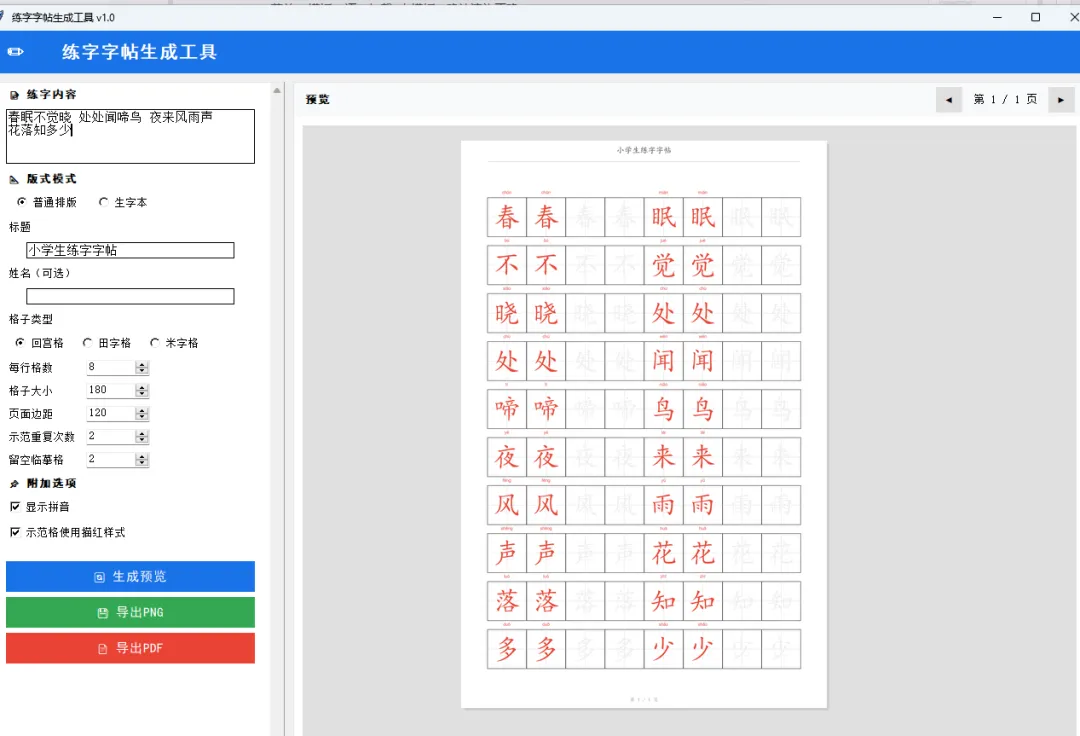
一款基于 Python Tkinter + Pillow 打造的桌面级练字字帖生成器,支持普通字帖与生字本双模式,内置回宫格/田字格/米字格,可自动生成示范字描红、留空临摹格与重复练习页,一键导出高清 PNG 与多页 PDF,是小学语文教学、书法启蒙和日常练字的得力助手。
✨ 开场白
汉字书写是中华文化传承的根基。无论是小学生初学写字,还是成年人重拾毛笔修身养性,一本好的字帖都是不可或缺的伴侣。然而市面上的字帖工具往往存在诸多不便:在线工具需要网络且格式受限,专业排版软件学习成本高昂,而手工制作字帖更是费时费力。
练字字帖生成工具正是为解决这些痛点而诞生的桌面应用。它完全基于 Python 生态构建,仅依赖 Tkinter 标准库和 Pillow 图像处理库,一个 .py 文件即可在 Windows/macOS/Linux 上运行,无需安装任何额外设计软件。
从教学场景出发,本工具精心设计了两种核心模式:普通排版模式适合整首诗词或段落的连续练习,每个字按设定次数重复示范后紧跟留空临摹格,形成"看一写一"的自然节奏;生字本模式则为每个生字分配独立一行,前几格为描红示范,后续全部留空供反复练习,特别适合低年级学生逐字攻克。
格子系统方面,工具内置了书法教学中最常用的三种格式——回宫格(带内框辅助定位笔画结构)、田字格(横竖中线划分四象限)和米字格(增加对角线引导撇捺走势),每种格子都经过精心绘制,线条粗细、颜色层次分明,既美观又实用。
附加功能上,工具支持自动标注汉字拼音(含声调)、示范格描红样式(红色半透明字迹引导临摹)、自定义标题与学生姓名、灵活的格子大小与边距调节、实时预览与翻页浏览,最终可导出 300DPI 高清 PNG 单页或完整多页 PDF 文件,直接打印即可使用。
整个项目约 400 行精炼的 Python 代码,结构清晰、逻辑分明,既是一个实用的教学辅助工具,也是学习 Tkinter GUI 开发、Pillow 图像绘制、坐标计算与文件导出的优秀实战案例。
📋 功能特性一览
🏗️ 第一部分:架构设计与数据模型
整体架构
程序采用单类 CalligraphyApp 封装所有逻辑,内部按职责划分为:
UI 构建层: _build_ui/_build_control_panel/_build_preview_panel排版引擎: _layout_normal/_layout_shengzi生成行数据渲染引擎: _render_page/_draw_row/_draw_grid_cell/_draw_char导出接口: _export_png/_export_pdf
拼音数据
内置常用汉字拼音映射表,支持声调标注:
PINYIN_MAP = {
'春': 'chūn', '眠': 'mián', '不': 'bù', '觉': 'jué', '晓': 'xiǎo',
'处': 'chù', '闻': 'wén', '啼': 'tí', '鸟': 'niǎo',
'夜': 'yè', '来': 'lái', '风': 'fēng', '雨': 'yǔ', '声': 'shēng',
'花': 'huā', '落': 'luò', '知': 'zhī', '多': 'duō', '少': 'shǎo',
}
排版数据结构
每一行由元组列表表示,每个元组为 (cell_type, char):
("demo", "春")— 示范格,显示描红或标准字("blank", "春")— 临摹格,显示极淡提示字("empty", "")— 空白填充格
🎯 第二部分:排版引擎与格子绘制
普通排版模式
每个字按顺序排列,先重复 N 次示范格,再跟 M 个留空临摹格,自动换行:
def_layout_normal(self, chars):
    rows = []
    current_row = []
for ch in chars:
for _ in range(self.demo_repeat):      # 示范格 x N
            current_row.append(("demo", ch))
if len(current_row) >= self.cols_per_row:
                rows.append(current_row)
                current_row = []
for _ in range(self.blank_count):       # 临摹格 x M
            current_row.append(("blank", ch))
if len(current_row) >= self.cols_per_row:
                rows.append(current_row)
                current_row = []
return rows
生字本模式
每个字独占一行,前面是示范格,后面全部留空:
def_layout_shengzi(self, chars):
    rows = []
for ch in chars:
        row = []
for _ in range(self.demo_repeat):
            row.append(("demo", ch))
while len(row) < self.cols_per_row:
            row.append(("blank", ch))
        rows.append(row[:self.cols_per_row])
return rows
三种格子绘制
格子绘制的核心在于辅助线的差异:
def_draw_grid_cell(self, draw, x, y, size):
    draw.rectangle([x, y, x + size, y + size], outline="#333333", width=2)
    cx, cy = x + size // 2, y + size // 2

if self.grid_type == "田字格":
        draw.line([(x, cy), (x + size, cy)], fill="#cccccc", width=1)
        draw.line([(cx, y), (cx, y + size)], fill="#cccccc", width=1)

elif self.grid_type == "米字格":
# 田字格基础 + 对角线
        draw.line([(x, cy), (x + size, cy)], fill="#cccccc", width=1)
        draw.line([(cx, y), (cx, y + size)], fill="#cccccc", width=1)
        draw.line([(x, y), (x + size, y + size)], fill="#cccccc", width=1)
        draw.line([(x + size, y), (x, y + size)], fill="#cccccc", width=1)

elif self.grid_type == "回宫格":
# 田字格基础 + 内框(1/3处)
        draw.line([(x, cy), (x + size, cy)], fill="#cccccc", width=1)
        draw.line([(cx, y), (cx, y + size)], fill="#cccccc", width=1)
        inner = size // 3
        draw.rectangle([x + inner, y + inner, x + size - inner, y + size - inner],
                       outline="#dddddd", width=1)
🖨️ 第三部分:渲染引擎与导出系统
页面渲染流程
_render_page 方法是整个工具的核心,完成从参数到图像的完整转换:
读取界面参数,提取有效汉字 根据模式调用排版引擎生成行数据 计算分页,确定当前页包含的行 创建白色背景 PIL Image 绘制标题区(标题 + 姓名 + 分隔线) 逐行绘制:拼音 → 格子 → 文字 绘制页码
描红样式实现
描红效果通过红色字体颜色实现视觉引导:
if self.use_miaohong:
    draw.text((tx, ty), ch, fill="#ffcccc", font=char_font)  # 底层浅红
    draw.text((tx, ty), ch, fill="#e74c3c", font=char_font)  # 上层红色
else:
    draw.text((tx, ty), ch, fill="#333333", font=char_font)   # 标准黑字
留空临摹格则使用极淡灰色 #f0f0f0 作为书写提示,打印后几乎不可见但能引导笔画走向。
PDF 多页导出
利用 Pillow 的 save_all 参数实现多页 PDF 一次性导出:
images[0].save(path, "PDF", resolution=300, save_all=True,
              append_images=images[1:])
💻 完整源代码
"""
练字字帖生成工具 v1.0
功能:支持普通字帖和生字本模式,可制作示范字、留空临摹格和重复练习页
支持回宫格/田字格/米字格,拼音显示,描红样式,PDF/PNG导出
"""

import tkinter as tk
from tkinter import ttk, filedialog, messagebox, simpledialog
from PIL import Image, ImageDraw, ImageFont, ImageTk
import math
import os

# ============ 拼音数据 ============
PINYIN_MAP = {
'春': 'chūn', '眠': 'mián', '不': 'bù', '觉': 'jué', '晓': 'xiǎo',
'处': 'chù', '闻': 'wén', '啼': 'tí', '鸟': 'niǎo',
'夜': 'yè', '来': 'lái', '风': 'fēng', '雨': 'yǔ', '声': 'shēng',
'花': 'huā', '落': 'luò', '知': 'zhī', '多': 'duō', '少': 'shǎo',
}


classCalligraphyApp:
def__init__(self, root):
        self.root = root
        self.root.title("练字字帖生成工具 v1.0")
        self.root.geometry("1300x850")
        self.root.configure(bg="#f0f0f0")

# 默认参数
        self.content = "春眠不觉晓 处处闻啼鸟 夜来风雨声 花落知多少"
        self.mode = "普通排版"# 普通排版 / 生字本
        self.title_text = "小学生练字字帖"
        self.student_name = ""
        self.grid_type = "回宫格"# 回宫格 / 田字格 / 米字格
        self.cols_per_row = 8
        self.cell_size = 180
        self.page_margin = 120
        self.demo_repeat = 2
        self.blank_count = 2
        self.current_page = 1
        self.show_pinyin = True
        self.use_miaohong = True# 描红样式

# 预览图缓存
        self._preview_img = None
        self._preview_tk = None

        self._build_ui()
        self._generate_preview()

def_build_ui(self):
# 顶部标题
        header = tk.Frame(self.root, bg="#1a73e8", height=50)
        header.pack(fill=tk.X)
        header.pack_propagate(False)
        tk.Label(header, text="✏️ 练字字帖生成工具", font=("SimHei", 16, "bold"),
                 bg="#1a73e8", fg="white").pack(side=tk.LEFT, padx=20, pady=10)

# 主体区域
        body = tk.Frame(self.root, bg="#f0f0f0")
        body.pack(fill=tk.BOTH, expand=True, padx=10, pady=10)

# 左侧控制面板
        self._build_control_panel(body)

# 右侧预览区
        self._build_preview_panel(body)

def_build_control_panel(self, parent):
        ctrl = tk.Frame(parent, bg="white", width=340, relief=tk.RIDGE, bd=1)
        ctrl.pack(side=tk.LEFT, fill=tk.Y, padx=(0, 10))
        ctrl.pack_propagate(False)

# 滚动支持
        canvas = tk.Canvas(ctrl, bg="white", highlightthickness=0)
        scrollbar = ttk.Scrollbar(ctrl, orient="vertical", command=canvas.yview)
        scroll_frame = tk.Frame(canvas, bg="white")

        scroll_frame.bind("<Configure>", lambda e: canvas.configure(scrollregion=canvas.bbox("all")))
        canvas.create_window((0, 0), window=scroll_frame, anchor="nw")
        canvas.configure(yscrollcommand=scrollbar.set)

        scrollbar.pack(side=tk.RIGHT, fill=tk.Y)
        canvas.pack(side=tk.LEFT, fill=tk.BOTH, expand=True)

        pad = {"padx": 12, "pady": 4}

# === 内容输入 ===
        tk.Label(scroll_frame, text="📝 练字内容", font=("SimHei", 10, "bold"),
                 bg="white").pack(anchor="w", **pad)
        self.content_text = tk.Text(scroll_frame, height=4, width=36, font=("SimSun", 11),
                                    wrap=tk.WORD, relief=tk.SOLID, bd=1)
        self.content_text.pack(**pad)
        self.content_text.insert("1.0", self.content)

# === 版式模式 ===
        tk.Label(scroll_frame, text="📐 版式模式", font=("SimHei", 10, "bold"),
                 bg="white").pack(anchor="w", **pad)
        self.mode_var = tk.StringVar(value=self.mode)
        mode_frame = tk.Frame(scroll_frame, bg="white")
        mode_frame.pack(anchor="w", **pad)
for m in ["普通排版", "生字本"]:
            tk.Radiobutton(mode_frame, text=m, variable=self.mode_var, value=m,
                          bg="white", font=("SimSun", 10)).pack(side=tk.LEFT, padx=8)

# === 标题 ===
        tk.Label(scroll_frame, text="标题", bg="white", font=("SimSun", 10)).pack(anchor="w", **pad)
        self.title_entry = tk.Entry(scroll_frame, font=("SimSun", 11), width=30, relief=tk.SOLID, bd=1)
        self.title_entry.pack(**pad)
        self.title_entry.insert(0, self.title_text)

# === 姓名 ===
        tk.Label(scroll_frame, text="姓名(可选)", bg="white", font=("SimSun", 10)).pack(anchor="w", **pad)
        self.name_entry = tk.Entry(scroll_frame, font=("SimSun", 11), width=30, relief=tk.SOLID, bd=1)
        self.name_entry.pack(**pad)

# === 格子类型 ===
        tk.Label(scroll_frame, text="格子类型", bg="white", font=("SimSun", 10)).pack(anchor="w", **pad)
        self.grid_var = tk.StringVar(value=self.grid_type)
        grid_frame = tk.Frame(scroll_frame, bg="white")
        grid_frame.pack(anchor="w", **pad)
for g in ["回宫格", "田字格", "米字格"]:
            tk.Radiobutton(grid_frame, text=g, variable=self.grid_var, value=g,
                          bg="white", font=("SimSun", 10)).pack(side=tk.LEFT, padx=6)

# === 数值参数 ===
        params = [
            ("每行格数", "cols_spin", 4, 16, self.cols_per_row),
            ("格子大小", "size_spin", 80, 300, self.cell_size),
            ("页面边距", "margin_spin", 40, 200, self.page_margin),
            ("示范重复次数", "demo_spin", 1, 8, self.demo_repeat),
            ("留空临摹格", "blank_spin", 0, 10, self.blank_count),
        ]

for label, attr, from_, to_, default in params:
            frame = tk.Frame(scroll_frame, bg="white")
            frame.pack(fill=tk.X, **pad)
            tk.Label(frame, text=label, bg="white", font=("SimSun", 10), width=12,
                     anchor="w").pack(side=tk.LEFT)
            spin = ttk.Spinbox(frame, from_=from_, to=to_, width=8, font=("SimSun", 10))
            spin.set(default)
            spin.pack(side=tk.LEFT, padx=4)
            setattr(self, attr, spin)

# === 附加选项 ===
        tk.Label(scroll_frame, text="📌 附加选项", font=("SimHei", 10, "bold"),
                 bg="white").pack(anchor="w", **pad)
        self.pinyin_var = tk.BooleanVar(value=True)
        tk.Checkbutton(scroll_frame, text="显示拼音", variable=self.pinyin_var,
                      bg="white", font=("SimSun", 10)).pack(anchor="w", **pad)
        self.miaohong_var = tk.BooleanVar(value=True)
        tk.Checkbutton(scroll_frame, text="示范格使用描红样式", variable=self.miaohong_var,
                      bg="white", font=("SimSun", 10)).pack(anchor="w", **pad)

# === 操作按钮 ===
        btn_frame = tk.Frame(scroll_frame, bg="white")
        btn_frame.pack(fill=tk.X, pady=15, padx=12)

        tk.Button(btn_frame, text="🔄 生成预览", command=self._generate_preview,
                 font=("SimHei", 11), bg="#1a73e8", fg="white", relief=tk.FLAT,
                 padx=15, pady=6).pack(fill=tk.X, pady=3)
        tk.Button(btn_frame, text="💾 导出PNG", command=self._export_png,
                 font=("SimHei", 11), bg="#34a853", fg="white", relief=tk.FLAT,
                 padx=15, pady=6).pack(fill=tk.X, pady=3)
        tk.Button(btn_frame, text="📄 导出PDF", command=self._export_pdf,
                 font=("SimHei", 11), bg="#ea4335", fg="white", relief=tk.FLAT,
                 padx=15, pady=6).pack(fill=tk.X, pady=3)

def_build_preview_panel(self, parent):
        preview_frame = tk.Frame(parent, bg="white", relief=tk.RIDGE, bd=1)
        preview_frame.pack(side=tk.LEFT, fill=tk.BOTH, expand=True)

# 预览标题栏
        top_bar = tk.Frame(preview_frame, bg="#f8f9fa", height=40)
        top_bar.pack(fill=tk.X)
        top_bar.pack_propagate(False)
        tk.Label(top_bar, text="预览", font=("SimHei", 10, "bold"),
                 bg="#f8f9fa").pack(side=tk.LEFT, padx=10, pady=8)

# 页码控制
        page_frame = tk.Frame(top_bar, bg="#f8f9fa")
        page_frame.pack(side=tk.RIGHT, padx=10)
        tk.Button(page_frame, text="◀", command=self._prev_page, width=3,
                 relief=tk.FLAT, bg="#e0e0e0").pack(side=tk.LEFT, padx=2)
        self.page_label = tk.Label(page_frame, text="第 1 页", bg="#f8f9fa",
                                   font=("SimSun", 10))
        self.page_label.pack(side=tk.LEFT, padx=8)
        tk.Button(page_frame, text="▶", command=self._next_page, width=3,
                 relief=tk.FLAT, bg="#e0e0e0").pack(side=tk.LEFT, padx=2)

# 画布预览
        self.preview_canvas = tk.Canvas(preview_frame, bg="#e0e0e0", highlightthickness=0)
        self.preview_canvas.pack(fill=tk.BOTH, expand=True, padx=10, pady=10)

def_prev_page(self):
if self.current_page > 1:
            self.current_page -= 1
            self._generate_preview()

def_next_page(self):
        self.current_page += 1
        self._generate_preview()

def_read_params(self):
"""从界面读取当前参数"""
        self.content = self.content_text.get("1.0", tk.END).strip()
        self.mode = self.mode_var.get()
        self.title_text = self.title_entry.get().strip()
        self.student_name = self.name_entry.get().strip()
        self.grid_type = self.grid_var.get()
        self.cols_per_row = int(self.cols_spin.get())
        self.cell_size = int(self.size_spin.get())
        self.page_margin = int(self.margin_spin.get())
        self.demo_repeat = int(self.demo_spin.get())
        self.blank_count = int(self.blank_spin.get())
        self.show_pinyin = self.pinyin_var.get()
        self.use_miaohong = self.miaohong_var.get()

def_get_chars(self):
"""提取练字字符(去除空格和标点)"""
        chars = []
for ch in self.content:
if ch.strip() and'\u4e00' <= ch <= '\u9fff':
                chars.append(ch)
return chars

def_get_font(self, size, bold=False):
"""获取字体"""
        weight = "bold"if bold else"normal"
try:
return ImageFont.truetype("simkai.ttf", size)
except:
try:
return ImageFont.truetype("simsun.ttc", size)
except:
try:
return ImageFont.truetype("msyh.ttc", size)
except:
return ImageFont.load_default()

def_get_pinyin_font(self, size):
"""获取拼音字体"""
try:
return ImageFont.truetype("arial.ttf", size)
except:
try:
return ImageFont.truetype("msyh.ttc", size)
except:
return ImageFont.load_default()

def_render_page(self, page_num=1):
"""渲染指定页面为 PIL Image"""
        self._read_params()
        chars = self._get_chars()

# 页面尺寸 (A4 竖向 300DPI 等效)
        page_w = self.page_margin * 2 + self.cols_per_row * self.cell_size
# 计算行高
        row_height = self.cell_size
if self.show_pinyin:
            row_height = self.cell_size + 40# 拼音区域

# 标题区高度
        header_h = 100

# 每页可容纳行数
        available_h = 2800# 固定页面高度
        rows_per_page = max(1, (available_h - header_h - self.page_margin * 2) // row_height)

# 根据模式生成行数据
if self.mode == "普通排版":
            all_rows = self._layout_normal(chars)
else:
            all_rows = self._layout_shengzi(chars)

# 总页数
        total_pages = max(1, math.ceil(len(all_rows) / rows_per_page))
if page_num > total_pages:
            page_num = total_pages
            self.current_page = page_num

# 当前页的行
        start_row = (page_num - 1) * rows_per_page
        end_row = min(start_row + rows_per_page, len(all_rows))
        page_rows = all_rows[start_row:end_row]

# 计算实际页面高度
        page_h = header_h + self.page_margin * 2 + len(page_rows) * row_height + 60

# 创建图像
        img = Image.new("RGB", (page_w, page_h), "#FFFFFF")
        draw = ImageDraw.Draw(img)

# 绘制标题
        self._draw_header(draw, page_w, header_h)

# 绘制格子和文字
        y_offset = header_h + self.page_margin
for row_data in page_rows:
            self._draw_row(draw, img, row_data, self.page_margin, y_offset, page_w)
            y_offset += row_height

# 绘制页码
        page_font = self._get_font(24)
        page_text = f"第 {page_num} / {total_pages} 页"
        bbox = draw.textbbox((0, 0), page_text, font=page_font)
        tw = bbox[2] - bbox[0]
        draw.text(((page_w - tw) // 2, page_h - 50), page_text,
                  fill="#999999", font=page_font)

        self.page_label.config(text=f"第 {page_num} / {total_pages} 页")
return img

def_layout_normal(self, chars):
"""普通排版:每个字重复 demo_repeat 次 + blank_count 个空格"""
        rows = []
        current_row = []
for ch in chars:
# 示范格(描红)
for _ in range(self.demo_repeat):
                current_row.append(("demo", ch))
if len(current_row) >= self.cols_per_row:
                    rows.append(current_row)
                    current_row = []
# 留空临摹格
for _ in range(self.blank_count):
                current_row.append(("blank", ch))
if len(current_row) >= self.cols_per_row:
                    rows.append(current_row)
                    current_row = []
if current_row:
# 补齐空格
while len(current_row) < self.cols_per_row:
                current_row.append(("empty", ""))
            rows.append(current_row)
return rows

def_layout_shengzi(self, chars):
"""生字本模式:每个字占一整行,先示范后留空"""
        rows = []
for ch in chars:
            row = []
for _ in range(self.demo_repeat):
                row.append(("demo", ch))
for _ in range(self.blank_count):
                row.append(("blank", ch))
# 剩余填空格
while len(row) < self.cols_per_row:
                row.append(("blank", ch))
            rows.append(row[:self.cols_per_row])
return rows

def_draw_header(self, draw, page_w, header_h):
"""绘制页面标题区"""
# 标题
        title_font = self._get_font(36, bold=True)
if self.title_text:
            bbox = draw.textbbox((0, 0), self.title_text, font=title_font)
            tw = bbox[2] - bbox[0]
            draw.text(((page_w - tw) // 2, 25), self.title_text,
                      fill="#333333", font=title_font)

# 姓名
if self.student_name:
            name_font = self._get_font(24)
            name_text = f"姓名:{self.student_name}"
            draw.text((self.page_margin, 75), name_text, fill="#666666", font=name_font)

# 分隔线
        draw.line([(self.page_margin, header_h - 5),
                   (page_w - self.page_margin, header_h - 5)],
                  fill="#cccccc", width=2)

def_draw_row(self, draw, img, row_data, x_start, y_start, page_w):
"""绘制一行格子"""
        cell = self.cell_size
        pinyin_h = 40if self.show_pinyin else0

for col_idx, (cell_type, ch) in enumerate(row_data):
            x = x_start + col_idx * cell
            y = y_start + pinyin_h

# 绘制拼音
if self.show_pinyin and ch and cell_type == "demo":
                pinyin = PINYIN_MAP.get(ch, "")
if pinyin:
                    py_font = self._get_pinyin_font(20)
                    bbox = draw.textbbox((0, 0), pinyin, font=py_font)
                    pw = bbox[2] - bbox[0]
                    draw.text((x + (cell - pw) // 2, y_start + 5), pinyin,
                              fill="#e74c3c", font=py_font)

# 绘制格子
            self._draw_grid_cell(draw, x, y, cell)

# 绘制文字
if cell_type == "demo"and ch:
                self._draw_char(draw, ch, x, y, cell, is_demo=True)
elif cell_type == "blank"and ch:
# 留空格只画淡色提示
                self._draw_char(draw, ch, x, y, cell, is_demo=False)

def_draw_grid_cell(self, draw, x, y, size):
"""绘制单个格子"""
# 外框
        draw.rectangle([x, y, x + size, y + size], outline="#333333", width=2)

        grid_type = self.grid_type
        cx, cy = x + size // 2, y + size // 2

if grid_type == "田字格":
# 横竖中线
            draw.line([(x, cy), (x + size, cy)], fill="#cccccc", width=1)
            draw.line([(cx, y), (cx, y + size)], fill="#cccccc", width=1)

elif grid_type == "米字格":
# 横竖中线 + 对角线
            draw.line([(x, cy), (x + size, cy)], fill="#cccccc", width=1)
            draw.line([(cx, y), (cx, y + size)], fill="#cccccc", width=1)
            draw.line([(x, y), (x + size, y + size)], fill="#cccccc", width=1)
            draw.line([(x + size, y), (x, y + size)], fill="#cccccc", width=1)

elif grid_type == "回宫格":
# 横竖中线
            draw.line([(x, cy), (x + size, cy)], fill="#cccccc", width=1)
            draw.line([(cx, y), (cx, y + size)], fill="#cccccc", width=1)
# 内框(1/3处)
            inner_margin = size // 3
            ix1 = x + inner_margin
            iy1 = y + inner_margin
            ix2 = x + size - inner_margin
            iy2 = y + size - inner_margin
            draw.rectangle([ix1, iy1, ix2, iy2], outline="#dddddd", width=1)

def_draw_char(self, draw, ch, x, y, size, is_demo=True):
"""绘制字符"""
        font_size = int(size * 0.7)
        char_font = self._get_font(font_size)

        bbox = draw.textbbox((0, 0), ch, font=char_font)
        cw = bbox[2] - bbox[0]
        ch_h = bbox[3] - bbox[1]

        tx = x + (size - cw) // 2
        ty = y + (size - ch_h) // 2 - bbox[1]

if is_demo:
if self.use_miaohong:
# 描红样式:红色半透明
                draw.text((tx, ty), ch, fill="#ffcccc", font=char_font)
# 再画一层轮廓感
                draw.text((tx, ty), ch, fill="#e74c3c", font=char_font)
else:
                draw.text((tx, ty), ch, fill="#333333", font=char_font)
else:
# 留空临摹:极淡提示
            draw.text((tx, ty), ch, fill="#f0f0f0", font=char_font)

def_generate_preview(self):
"""生成预览"""
try:
            img = self._render_page(self.current_page)
            self._preview_img = img

# 缩放适配预览区
            canvas_w = self.preview_canvas.winfo_width()
            canvas_h = self.preview_canvas.winfo_height()
if canvas_w < 100:
                canvas_w = 800
if canvas_h < 100:
                canvas_h = 700

            img_w, img_h = img.size
            scale = min(canvas_w / img_w, canvas_h / img_h, 1.0) * 0.95
            new_w = int(img_w * scale)
            new_h = int(img_h * scale)

            preview = img.resize((new_w, new_h), Image.LANCZOS)
            self._preview_tk = ImageTk.PhotoImage(preview)

            self.preview_canvas.delete("all")
            cx = canvas_w // 2
            cy = canvas_h // 2
# 阴影
            self.preview_canvas.create_rectangle(cx - new_w // 2 + 4, cy - new_h // 2 + 4,
                                                  cx + new_w // 2 + 4, cy + new_h // 2 + 4,
                                                  fill="#cccccc", outline="")
            self.preview_canvas.create_image(cx, cy, image=self._preview_tk)
except Exception as e:
            messagebox.showerror("预览错误", str(e))

def_export_png(self):
"""导出PNG"""
        self._read_params()
        path = filedialog.asksaveasfilename(defaultextension=".png",
                                            filetypes=[("PNG图片", "*.png")])
ifnot path:
return
try:
            img = self._render_page(self.current_page)
            img.save(path, dpi=(300, 300))
            messagebox.showinfo("导出成功", f"已保存到:\n{path}")
except Exception as e:
            messagebox.showerror("导出失败", str(e))

def_export_pdf(self):
"""导出PDF(所有页)"""
        self._read_params()
        path = filedialog.asksaveasfilename(defaultextension=".pdf",
                                            filetypes=[("PDF文件", "*.pdf")])
ifnot path:
return
try:
            chars = self._get_chars()
if self.mode == "普通排版":
                all_rows = self._layout_normal(chars)
else:
                all_rows = self._layout_shengzi(chars)

            row_height = self.cell_size + (40if self.show_pinyin else0)
            rows_per_page = max(1, (2800 - 100 - self.page_margin * 2) // row_height)
            total_pages = max(1, math.ceil(len(all_rows) / rows_per_page))

            images = []
for p in range(1, total_pages + 1):
                img = self._render_page(p)
if img.mode == "RGBA":
                    bg = Image.new("RGB", img.size, (255, 255, 255))
                    bg.paste(img, mask=img.split()[3])
                    img = bg
                images.append(img)

if images:
                images[0].save(path, "PDF", resolution=300, save_all=True,
                              append_images=images[1:])
                messagebox.showinfo("导出成功", f"PDF已保存到:\n{path}\n共 {total_pages} 页")
except Exception as e:
            messagebox.showerror("导出失败", str(e))


# ============ 程序入口 ============
if __name__ == "__main__":
    root = tk.Tk()
    app = CalligraphyApp(root)
    root.mainloop()
知识点总结
1. Tkinter GUI 开发技巧
双栏布局:左侧固定宽度控制面板 + 右侧自适应预览区,使用 pack(side=LEFT/RIGHT)配合pack_propagate(False)实现滚动面板:通过 Canvas + Scrollbar + Frame 组合实现可滚动的参数面板 Spinbox 数值输入: ttk.Spinbox提供带范围限制的数值输入,比 Entry 更适合参数调节RadioButton 分组:通过共享 StringVar实现互斥选择(模式切换、格子类型)CheckButton 开关: BooleanVar绑定实现功能开关(拼音显示、描红样式)Canvas 图片显示: ImageTk.PhotoImage将 PIL Image 转为 Tkinter 可显示对象
2. Pillow 图像绘制
**Image.new()**:创建指定尺寸的空白画布 ImageDraw.rectangle/line/text:绘制几何图形和文字 **ImageFont.truetype()**:加载系统 TrueType 字体 **textbbox()**:精确计算文字边界框,用于居中对齐 resize() + LANCZOS:高质量图像缩放用于预览 PDF 多页保存: save_all=True+append_images实现多页 PDF
3. 坐标计算与排版算法
格子定位: x = margin + col_idx * cell_size,行列索引直接映射像素坐标文字居中:通过 textbbox获取文字实际宽高,计算偏移量实现格内居中分页算法:总行数 每页行数 = 总页数,切片获取当前页数据 自动换行:当前行满 cols_per_row格时自动推入行列表并开新行
4. 字帖设计原理
描红:红色半透明字迹作为书写引导,学生在其上覆写加深肌肉记忆 临摹:极淡提示字(几乎不可见)引导笔画结构,培养独立书写能力 回宫格:内框帮助定位字的重心和笔画分布,是书法教学的经典辅助工具 重复练习:同一字多次书写形成肌肉记忆,符合运动学习的间隔重复原则
5. 软件工程实践
参数集中管理:所有可调参数在 __init__中统一初始化,_read_params统一读取渲染与 UI 分离: _render_page返回纯 PIL Image,不依赖 Tkinter,便于测试和复用容错设计:字体加载采用多级 fallback,确保在不同系统上都能正常运行 预览缩放:根据画布实际尺寸动态计算缩放比例,适配不同屏幕分辨率
拓展场景与测试步骤
测试步骤
环境准备
pip install Pillow
python 练字字帖生成工具.py
界面验证
启动后确认窗口正常显示(1300x850) 左侧控制面板各控件可正常操作 右侧预览区显示默认字帖内容 模式切换测试
切换"普通排版":观察字符连续排列,每字2格示范+2格留空 切换"生字本":观察每字独占一行,前2格描红后6格留空 格子类型测试
回宫格:外框 + 十字线 + 内框 田字格:外框 + 十字线 米字格:外框 + 十字线 + 对角线 参数调节测试
修改每行格数(4~16),观察布局变化 调整格子大小(80~300),观察缩放效果 修改示范次数和留空格数,验证排版逻辑 附加功能测试
勾选/取消"显示拼音",验证拼音显示切换 勾选/取消"描红样式",验证红色/黑色切换 输入标题和姓名,验证页眉显示 导出测试
导出 PNG:验证 300DPI 高清输出,格子清晰 导出 PDF:验证多页完整输出,可正常打印
拓展场景
进阶优化方向
接入完整拼音库(pypinyin),支持任意汉字自动注音 添加笔顺动画演示功能 支持自定义字体上传(楷体/行书/隶书) 增加字帖模板(古诗词库、成语库、课文生字表) 支持横向/竖向排版切换 添加水印和页眉页脚自定义 批量生成多份不同内容的字帖 支持英文字母和数字练习模式
随机文章
-
 10个月宝宝每天需要喝多少奶粉?
- 小白学Python,从这篇开始!
- Python办公自动化,九大常见场景技术!!
- 高危预警!Linux核弹级提权漏洞CVE-2026-31431爆发,可秒提Root、逃逸容器
- 阅读量破 5 万+!Python 单线程性能真的超过 Java 了吗?
- python经典100道练习题-2026最新版
- Python 零基础 100 天 — Day11 集合
- 什么是 Python 中的三元表达式?
- sqlalchemy,一个强悍的 Python 库
- linux文件权限
- Python、BMA-Stacking融合LightGBM、GBDT、KNN多模型电商交易欺诈风险预警研究|附代码数据