欢迎来到【一起学Python】第94天!
昨天我们掌握了 Pandas 的两大基石 Series 和 DataFrame。今天,我们进入实战第一步:数据输入与输出(I/O)。
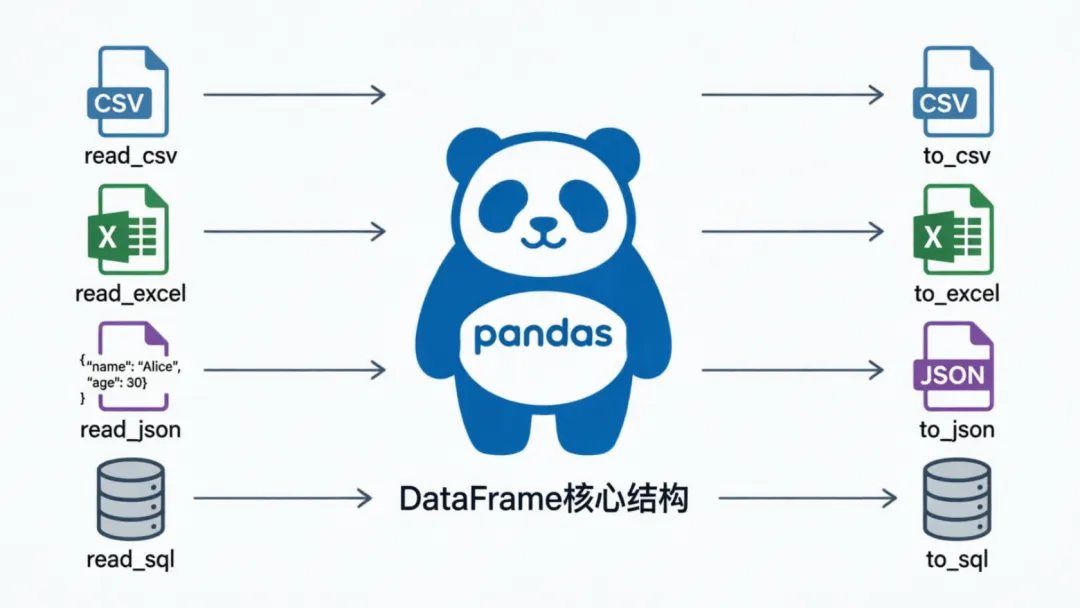
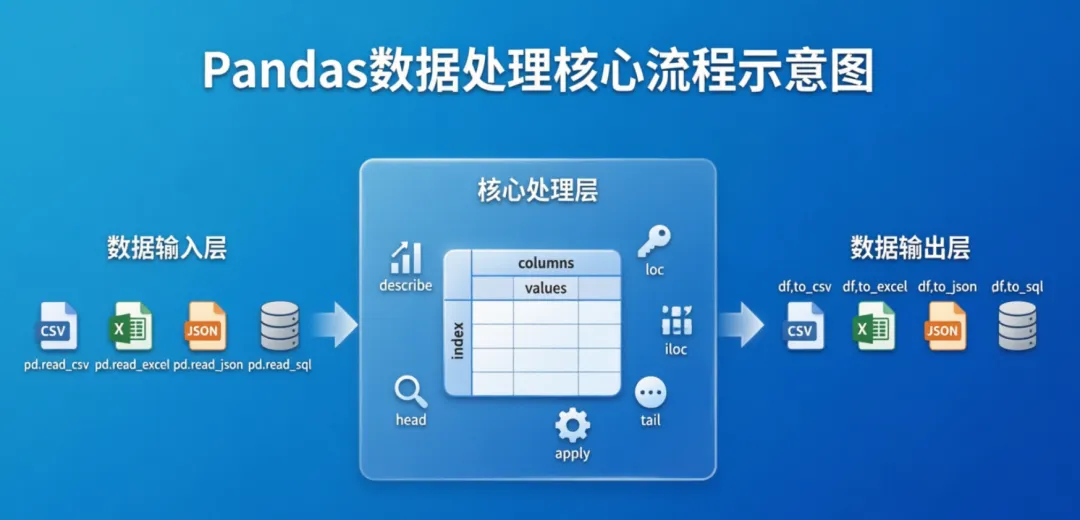
数据分析的完整生命周期是:数据读取 → 清洗分析 → 结果导出。掌握 Pandas 的 I/O 能力,就能对接本地文件、网络接口和关系型数据库,实现高效数据处理。
CSV 文件:最轻量、最通用
CSV(逗号分隔值)是数据分析的默认格式,体积小、兼容性强。
🔹 读取与写入
import pandas as pd# 1️⃣ 一次性读取整个CSV(推荐)df_csv = pd.read_csv('data.csv')print("读取的CSV数据:\n", df_csv)# 2️⃣ 写入CSV(务必加 index=False,避免多出空白索引列)df_csv.to_csv('output.csv', index=False)print("✅ 数据已写入 output.csv")
🔍 大文件逐行处理(内存受限时)
# 逐行读取with open('data.csv', 'r') as f: for line in f: print(line.strip()) # strip() 去除末尾换行符# 逐行写入with open('output_row.csv', 'w') as f: for _, row in df_csv.iterrows(): f.write(','.join(map(str, row.values)) + '\n')
适用场景:文件超过机器内存(如 >2GB),或需要实时流式解析时,逐行操作比一次性加载更稳妥。
Excel 文件:办公协作标配
Pandas 读写 Excel 依赖第三方引擎,首次使用前请运行:pip install openpyxl
🔹 读取与写入
# 1️⃣ 读取指定工作表df_excel = pd.read_excel('data.xlsx', sheet_name='Sheet1')# 2️⃣ 写入Excel并指定工作表名df_excel.to_excel('output.xlsx', index=False, sheet_name='Results')
🔍 逐行写入(动态追加场景)
with pd.ExcelWriter('output_row.xlsx', engine='openpyxl') as writer: for idx, row in df_excel.iterrows(): row_df = pd.DataFrame([row]) # 第一行写表头,后续行追加数据 row_df.to_excel(writer, index=False, header=(idx == 0), startrow=idx)
JSON 文件:Web API & 日志标配
JSON 结构灵活,是前后端交互、爬虫数据的常见格式。
🔹 读取与写入
import json# 1️⃣ Pandas 直接读取df_json = pd.read_json('data.json')# 2️⃣ 写入为"每行一个JSON对象"格式(大数据/流式友好)df_json.to_json('output.json', orient='records', lines=True)
🔍 配合标准库处理复杂结构
# 逐行解析 JSON(适合嵌套深或格式不规整的文件)with open('data.json', 'r') as f: json_data = json.load(f) for record in json_data: print("记录:", record)# 逐行写入with open('output_row.json', 'w') as f: for _, row in df_json.iterrows(): f.write(json.dumps(row.to_dict()) + '\n')
SQLite 数据库:轻量级关系存储
Pandas 可直接与数据库对话,无需编写繁琐的游标循环。
🔹 读取与写入
import sqlite3# 建立连接(文件不存在会自动创建)conn = sqlite3.connect('example.db')# 1️⃣ SQL查询直接转DataFramedf_sql = pd.read_sql_query("SELECT * FROM users", conn)# 2️⃣ DataFrame直接入库(核心参数 if_exists)df_sql.to_sql('users_backup', conn, if_exists='replace', index=False)# if_exists: 'fail'(默认报错) / 'replace'(覆盖) / 'append'(追加)conn.close()
🔍 逐行插入(实时入库场景)
conn = sqlite3.connect('example.db')for _, row in df_sql.iterrows(): row.to_frame().T.to_sql('users_log', conn, if_exists='append', index=False)conn.close()
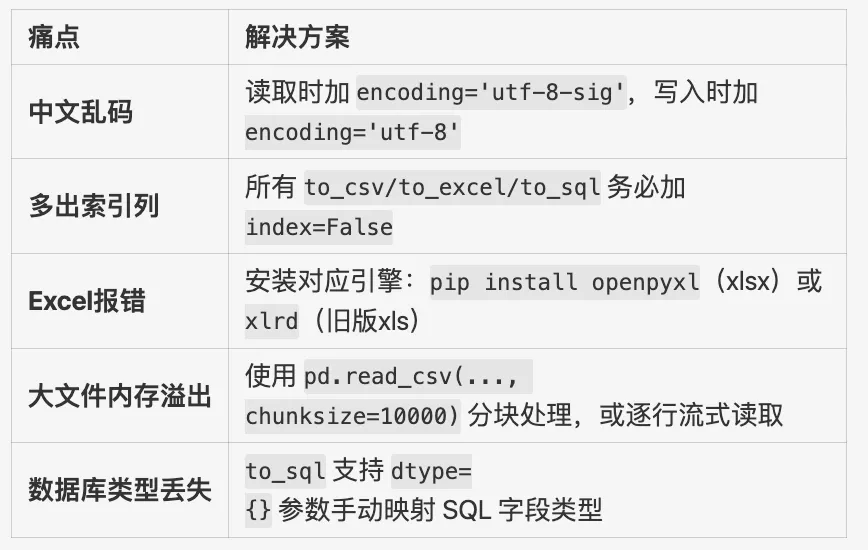
⚠️ 核心避坑指南(实战必看)
综合实战:一气呵成
将今日知识点串联,建议新建项目目录并放置测试文件后运行:
import pandas as pdimport sqlite3import json# 1. CSV 读写df_csv = pd.read_csv('data.csv')df_csv.to_csv('output.csv', index=False)# 2. Excel 读写df_excel = pd.read_excel('data.xlsx', sheet_name='Sheet1')df_excel.to_excel('output.xlsx', index=False, sheet_name='Results')# 3. JSON 读写df_json = pd.read_json('data.json')df_json.to_json('output.json', orient='records', lines=True)# 4. SQLite 读写conn = sqlite3.connect('example.db')df_sql = pd.read_sql_query("SELECT * FROM sample_table", conn)df_sql.to_sql('backup_table', conn, if_exists='replace', index=False)conn.close()print("🎉 所有数据读写任务执行完毕!")
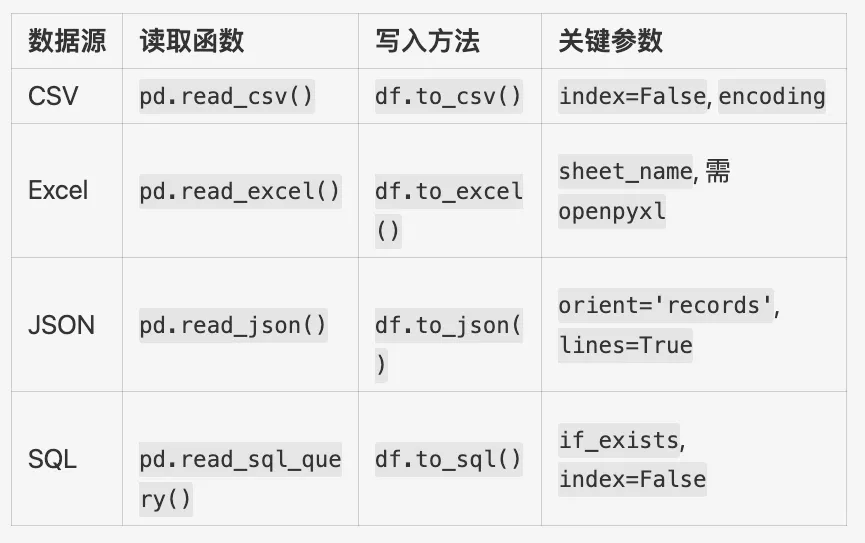
📝 今日知识速记卡
💬 互动话题:
你在实际项目中,最常处理哪种格式的数据?遇到过哪些"文件打不开/乱码/类型错乱"的坑?欢迎在评论区分享你的实战经验或求助。
📌 点赞 + 在看 + 星标,明天推送准时送达!我们第95天见!
 10个月宝宝每天需要喝多少奶粉?