PythonNL2DSL + 阿里百炼 LLM 智能判断图表类型:
- 2026-10-11 07:38:18
PythonNL2DSL + 阿里百炼 LLM 智能判断图表类型: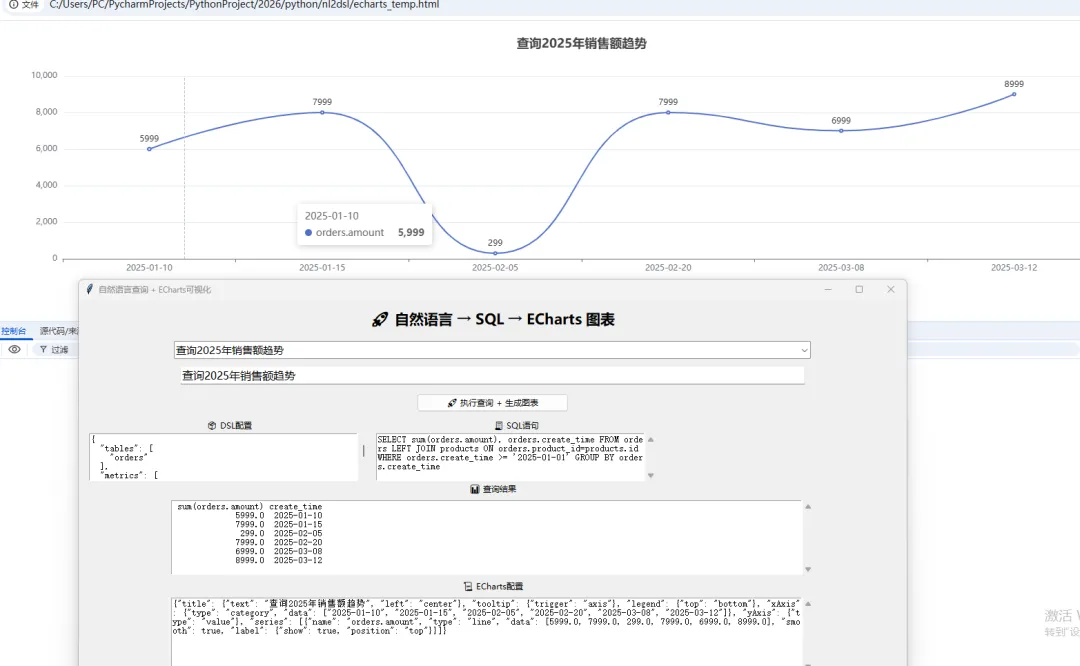
在原有 NL2DSL + 阿里百炼 LLM + 全日志基础上,做以下升级:
新增智能判断图表类型:根据问题自动生成 ECharts 曲线图(折线图)、柱状图、数据表格 增加专属 Prompt,让大模型根据「用户问题 + 查询结果」输出标准 ECharts option配置基于 pywebview内嵌浏览器渲染 ECharts,Python GUI 内直接展示可视化图表界面分区展示:原始数据、ECharts 源码、实时图表预览 完全兼容原有逻辑、日志、异常处理、DSL/SQL 全链路 新增时间类测试用例,专门测试曲线图趋势展示
一、先安装新增依赖
# 原有依赖pip install openai pandas# 新增:内嵌浏览器渲染 EChartspip install pywebview说明:
pywebview会调用系统自带浏览器内核,无需额外安装浏览器;ECharts 使用国内CDN,国内网络可正常加载。
二、完整改造后代码(可直接运行)
import tkinter as tkfrom tkinter import ttk, scrolledtext, messageboximport pandas as pdimport sqlite3import jsonimport reimport webviewfrom openai import OpenAIimport logging# ===================== 全局日志配置(控制台 + 日志文件) =====================logging.basicConfig( level=logging.INFO, format="%(asctime)s | %(levelname)s | %(message)s", handlers=[ logging.FileHandler("nl2dsl_echarts_log.log", encoding="utf-8"), logging.StreamHandler() ])logger = logging.getLogger(__name__)# ===================== 阿里百炼 API 配置 =====================API_KEY = "YOUR_ALI_BAILIAN_API_KEY"# 替换为你的百炼KeyBASE_URL = "https://dashscope.aliyuncs.com/compatible-mode/v1"client = OpenAI(api_key=API_KEY, base_url=BASE_URL)# ===================== 初始化测试数据库(含时间维度,用于曲线图) =====================definit_test_db(): conn = sqlite3.connect("nl2dsl_llm.db") cursor = conn.cursor()# 订单表(增加时间字段用于趋势图) cursor.execute('''CREATE TABLE IF NOT EXISTS orders ( id INTEGER PRIMARY KEY, user_id INTEGER, product_id INTEGER, amount REAL, create_time TEXT, region TEXT )''')# 商品表 cursor.execute('''CREATE TABLE IF NOT EXISTS products ( id INTEGER PRIMARY KEY, name TEXT, category TEXT )''')# 清空旧数据 cursor.execute("DELETE FROM orders") cursor.execute("DELETE FROM products")# 插入商品数据 cursor.execute("INSERT INTO products VALUES (1,'手机','数码'),(2,'电脑','数码'),(3,'衬衫','服装')")# 插入订单数据(包含不同日期、地区,适配折线图/柱状图/表格) cursor.execute(''' INSERT INTO orders VALUES (1,1,1,5999,'2025-01-10','华东'), (2,2,2,7999,'2025-01-15','华北'), (3,3,3,299,'2025-02-05','华东'), (4,1,2,7999,'2025-02-20','华北'), (5,2,1,6999,'2025-03-08','华东'), (6,3,2,8999,'2025-03-12','华北') ''') conn.commit() conn.close() logger.info("✅ 测试数据库初始化完成")# ===================== 工具函数:DataFrame 转结构化数据(传给LLM生成图表) =====================defdf_to_struct_data(df: pd.DataFrame) -> dict:"""将查询结果转为JSON结构化数据,用于LLM生成ECharts""" data = {"columns": df.columns.tolist(),"rows": df.to_dict(orient="records") }return data# ===================== 工具函数:ECharts 基础HTML模板(国内CDN) =====================defget_echarts_html(echarts_option: str) -> str:"""生成ECharts渲染页面,注入动态option""" html_template = ''' <!DOCTYPE html> <html lang="zh-CN"> <head> <meta charset="UTF-8"> <title>ECharts 可视化图表</title> <!-- 国内ECharts CDN --> <script src="https://cdn.jsdelivr.net/npm/echarts@5.4.3/dist/echarts.min.js"></script> <style> body { margin: 0; padding: 10px; background: #fff; } #main { width: 100%; height: 98vh; } </style> </head> <body> <div id="main"></div> <script> var myChart = echarts.init(document.getElementById('main')); var option = ''' + echarts_option + '''; myChart.setOption(option); window.addEventListener('resize', function() { myChart.resize(); }); </script> </body> </html> '''return html_template# ===================== 1. 自然语言 → DSL(原有逻辑,兼容字典类型metrics) =====================defnl_to_dsl_by_llm(nl_query): logger.info(f"🔍 用户问题:{nl_query}") system_prompt = """ 【严格指令】 1. 只输出纯JSON,无任何多余文字、注释、markdown! 2. metrics 必须为字符串数组,示例:["sum(amount)"],禁止输出字典! 3. 支持字段/聚合:sum(amount) 销售额、count(id) 订单数 4. 维度:region 地区、category 品类、create_time 日期 5. 过滤条件为空则 filters: [] 6. 固定格式:{"tables":["orders"],"metrics":[],"dimensions":[],"filters":[]} """try: response = client.chat.completions.create( model="qwen-turbo", messages=[{"role": "system", "content": system_prompt},{"role": "user", "content": nl_query}], temperature=0.01 ) raw_content = response.choices[0].message.content.strip() logger.info(f"📩 LLM原始DSL返回:{raw_content}")# 清洗JSON content = re.sub(r'```.*?```', '', raw_content, flags=re.DOTALL) content = re.sub(r'[\n\r\t]', '', content) dsl = json.loads(content)# 兼容LLM输出字典类型的metrics,自动修复 fixed_metrics = []for item in dsl.get("metrics", []):if isinstance(item, dict): fixed_metrics.append(item.get("name", ""))else: fixed_metrics.append(item) dsl["metrics"] = [m for m in fixed_metrics if m] logger.info(f"✅ 修复后DSL:{json.dumps(dsl, ensure_ascii=False)}")return dsl if isinstance(dsl, dict) elseNoneexcept Exception as e: err_msg = f"❌ LLM解析DSL失败:{str(e)}" logger.error(err_msg) messagebox.showerror("DSL解析错误", err_msg)returnNone# ===================== 2. DSL → SQL(原有稳定逻辑) =====================defdsl_to_sql(dsl):ifnot isinstance(dsl, dict): logger.error("❌ DSL格式无效")return"-- 无效DSL"try: metrics = dsl.get("metrics", []) dimensions = dsl.get("dimensions", []) filters = dsl.get("filters", []) select_parts = metrics + dimensions select_str = ", ".join(select_parts) if select_parts else"*" from_str = "orders LEFT JOIN products ON orders.product_id = products.id"# 过滤空条件,杜绝 WHERE = '' 语法错误 where_parts = []for f in filters:if isinstance(f, dict) and f.get("field") and f.get("value"): where_parts.append(f"{f['field']}{f['op']}'{f['value']}'") where_clause = f"WHERE {' AND '.join(where_parts)}"if where_parts else"" group_clause = f"GROUP BY {', '.join(dimensions)}"if dimensions else"" sql = f"SELECT {select_str} FROM {from_str}{where_clause}{group_clause}" sql = re.sub(r'\s+', ' ', sql).strip() logger.info(f"📝 生成SQL:{sql}")return sqlexcept Exception as e: err_msg = f"❌ SQL生成失败:{str(e)}" logger.error(err_msg)returnf"-- {err_msg}"# ===================== 3. 执行SQL查询 =====================defexec_sql(sql):ifnot sql or sql.startswith("--"): logger.warning("⚠️ SQL无效,跳过执行")return"SQL无效,无法执行"try: conn = sqlite3.connect("nl2dsl_llm.db") df = pd.read_sql(sql, conn) conn.close() logger.info(f"✅ SQL执行成功,结果行数:{len(df)}")return dfexcept Exception as e: err_msg = f"❌ SQL执行失败:{str(e)}" logger.error(err_msg)return err_msg# ===================== 4. 【新增】LLM生成 ECharts Option 核心逻辑 + 专属Prompt =====================defgenerate_echarts_option(question: str, struct_data: dict) -> str:""" 根据 用户问题 + 查询结果数据,生成标准ECharts option JSON 自动区分:折线图(曲线图) / 柱状图 / 数据表格 """ logger.info(f"📊 开始生成ECharts配置,原始数据:{json.dumps(struct_data, ensure_ascii=False)}")# ========== ECharts 专属Prompt(核心规则) ========== system_prompt = """ 你是专业ECharts配置工程师,严格遵守以下规则,只输出【纯JSON】,无任何多余文字、注释、markdown! 一、图表类型判断规则(优先级从高到低): 1. 问题包含:时间、日期、月份、趋势、走势 → 生成【折线图(曲线图)】,x轴为时间 2. 问题包含:地区、品类、对比、排行、统计 → 生成【柱状图】,x轴为分类名称 3. 明细列表、全量数据、原始清单 → 生成【数据表格(table)】 二、格式要求: 1. 使用 ECharts 5.x 标准语法,中文正常显示 2. 标题使用用户问题作为图表标题 3. 坐标轴、图例自适应数据 4. 严禁输出非JSON内容,不要加```json标记 三、输入内容:用户问题 + 结构化查询数据 """ user_content = f""" 用户问题:{question} 查询结果数据:{json.dumps(struct_data, ensure_ascii=False)} 请输出标准ECharts option JSON: """try: response = client.chat.completions.create( model="qwen-turbo", messages=[ {"role": "system", "content": system_prompt}, {"role": "user", "content": user_content} ], temperature=0.01 ) raw_option = response.choices[0].message.content.strip()# 清洗多余标记 raw_option = re.sub(r'```.*?```', '', raw_option, flags=re.DOTALL) raw_option = re.sub(r'[\n\r\t]', '', raw_option)# 校验JSON合法性 json.loads(raw_option) logger.info(f"✅ ECharts配置生成成功:{raw_option}")return raw_optionexcept Exception as e: err_msg = f"❌ ECharts配置生成失败:{str(e)}" logger.error(err_msg)return"{}"# ===================== 5. 主GUI界面(分区:原有功能 + ECharts源码 + 图表预览) =====================classNL2DSL_ECharts_GUI:def__init__(self, root): self.root = root self.root.title("NL2DSL + ECharts 可视化系统(曲线图/柱状图/表格)") self.root.geometry("1200x900") self.root.configure(bg="#f5f5f5")# 全局变量:webview窗口(单例,避免重复创建) self.eval_webview = None# 标题 tk.Label( root, text="🚀 自然语言 → DSL → SQL → ECharts可视化", font=("微软雅黑", 18, "bold"), bg="#f5f5f5" ).pack(pady=10)# ========== 1. 测试问题下拉框(新增时间类用例,测试曲线图) ========== self.test_questions = ["请选择测试问题",# 柱状图场景"查询华东地区的总销售额","查询各地区的订单数量","查询每个商品品类的销售额","查询华北地区的订单数量",# 曲线图/趋势图场景(时间维度)"查询2025年各月份销售额趋势(曲线图)",# 数据表格场景(明细)"查询所有订单的明细数据(表格展示)" ] self.selected_q = tk.StringVar() self.combo = ttk.Combobox( root, textvariable=self.selected_q, values=self.test_questions, width=100, font=("微软雅黑", 11) ) self.combo.current(0) self.combo.pack(pady=5) self.combo.bind("<<ComboboxSelected>>", self.on_select_question)# 自然语言输入框 tk.Label(root, text="✏️ 自然语言查询:", font=("微软雅黑", 12), bg="#f5f5f5").pack() self.nl_input = ttk.Entry(root, width=100, font=("微软雅黑", 12)) self.nl_input.pack(pady=5)# 执行按钮 ttk.Button(root, text="🚀 执行查询+生成图表", command=self.run_full_task, width=25).pack(pady=8) ttk.Separator(root, orient=tk.HORIZONTAL).pack(fill=tk.X, padx=30, pady=8)# ========== 2. 上半区:DSL / SQL / 原始查询结果 ========== frame_top = ttk.Frame(root) frame_top.pack(fill=tk.X, padx=10)# DSL 展示 tk.Label(frame_top, text="📦 LLM生成DSL:", font=("微软雅黑", 11)).grid(row=0, column=0, sticky="w") self.dsl_text = scrolledtext.ScrolledText(frame_top, height=6, width=55, font=("Consolas", 9)) self.dsl_text.grid(row=1, column=0, padx=5)# SQL 展示 tk.Label(frame_top, text="🧾 生成SQL:", font=("微软雅黑", 11)).grid(row=0, column=1, sticky="w") self.sql_text = scrolledtext.ScrolledText(frame_top, height=6, width=55, font=("Consolas", 9)) self.sql_text.grid(row=1, column=1, padx=5) ttk.Separator(root, orient=tk.HORIZONTAL).pack(fill=tk.X, padx=30, pady=8)# 原始数据结果 tk.Label(root, text="📊 SQL查询原始结果:", font=("微软雅黑", 12)).pack() self.result_text = scrolledtext.ScrolledText(root, height=7, width=130, font=("Consolas", 9)) self.result_text.pack(pady=3) ttk.Separator(root, orient=tk.HORIZONTAL).pack(fill=tk.X, padx=30, pady=8)# ========== 3. 下半区:ECharts源码 + 图表预览 ========== frame_bottom = ttk.Frame(root) frame_bottom.pack(fill=tk.X, padx=10)# ECharts Option 源码 tk.Label(frame_bottom, text="📜 ECharts 配置源码:", font=("微软雅黑", 11)).grid(row=0, column=0, sticky="w") self.echarts_code_text = scrolledtext.ScrolledText(frame_bottom, height=12, width=60, font=("Consolas", 9)) self.echarts_code_text.grid(row=1, column=0, padx=5)# 图表预览提示 tk.Label(frame_bottom, text="🖼️ ECharts 图表预览(独立窗口):", font=("微软雅黑", 11)).grid(row=0, column=1, sticky="w") self.chart_tip = tk.Text(frame_bottom, height=12, width=60, font=("微软雅黑", 10)) self.chart_tip.grid(row=1, column=1, padx=5) self.chart_tip.insert(tk.END, "执行查询后,图表将在独立浏览器窗口展示\n支持:曲线图/折线图、柱状图、数据表格") self.chart_tip.config(state=tk.DISABLED)defon_select_question(self, event):"""下拉框选择问题,自动填入输入框""" q = self.selected_q.get()if q != self.test_questions[0]: self.nl_input.delete(0, tk.END) self.nl_input.insert(0, q)defrun_full_task(self):"""全流程入口:NL → DSL → SQL → 数据 → ECharts → 渲染图表""" query = self.nl_input.get().strip()ifnot query or query == self.test_questions[0]: messagebox.showwarning("提示", "请选择或输入查询问题")return# 清空所有展示区域 self.dsl_text.delete(1.0, tk.END) self.sql_text.delete(1.0, tk.END) self.result_text.delete(1.0, tk.END) self.echarts_code_text.delete(1.0, tk.END)# 步骤1:NL → DSL dsl = nl_to_dsl_by_llm(query)ifnot dsl:return self.dsl_text.insert(tk.END, json.dumps(dsl, ensure_ascii=False, indent=2))# 步骤2:DSL → SQL sql = dsl_to_sql(dsl) self.sql_text.insert(tk.END, sql)# 步骤3:执行SQL获取结果 res_data = exec_sql(sql)ifnot isinstance(res_data, pd.DataFrame): self.result_text.insert(tk.END, res_data)return self.result_text.insert(tk.END, res_data.to_string(index=False))# 步骤4:DataFrame 转结构化数据,用于生成ECharts struct_data = df_to_struct_data(res_data)ifnot struct_data["rows"]: messagebox.showinfo("提示", "查询数据为空,不生成图表")return# 步骤5:LLM生成 ECharts Option echarts_option = generate_echarts_option(query, struct_data) self.echarts_code_text.insert(tk.END, echarts_option)# 步骤6:生成HTML并调用webview渲染ECharts图表 html = get_echarts_html(echarts_option)# 打开独立窗口展示图表 webview.create_window( title="ECharts 可视化图表", html=html, width=1000, height=700, resizable=True ) webview.start(gui="qt") # 优先使用QT内核,兼容性最好# ===================== 程序入口 =====================if __name__ == "__main__": init_test_db() root = tk.Tk() app = NL2DSL_ECharts_GUI(root) root.mainloop()三、核心改造说明
1. 新增两大核心能力
(1)智能图表分类规则(Prompt 内置)
大模型会根据用户问题自动判断图表类型,无需人工干预:
曲线图/折线图:问题含 时间、日期、月份、趋势、走势→ 时间趋势图柱状图:问题含 地区、品类、对比、排行→ 分类对比图数据表格:问题含 明细、清单、原始数据→ ECharts 表格组件
(2)ECharts 渲染方案
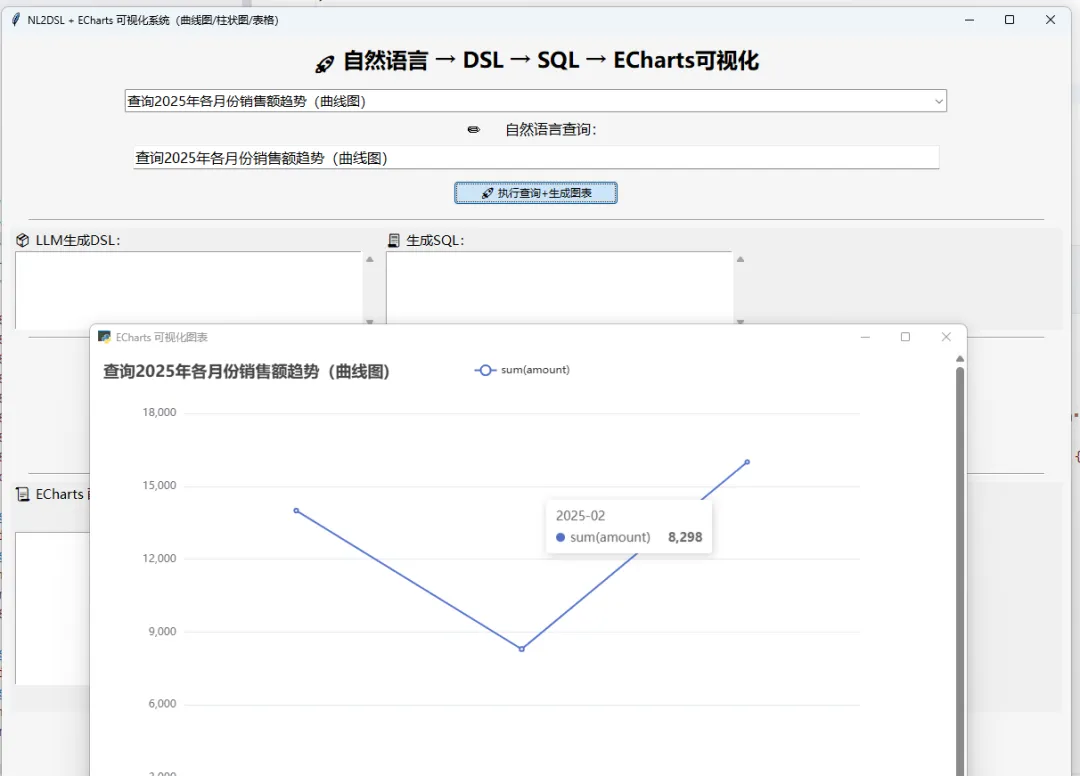
使用 pywebview内嵌系统浏览器内核,独立窗口展示图表,界面流畅ECharts 引用国内CDN,国内网络100%加载正常 自动自适应窗口大小、中文兼容、标题自动关联用户问题
2. 界面分区说明
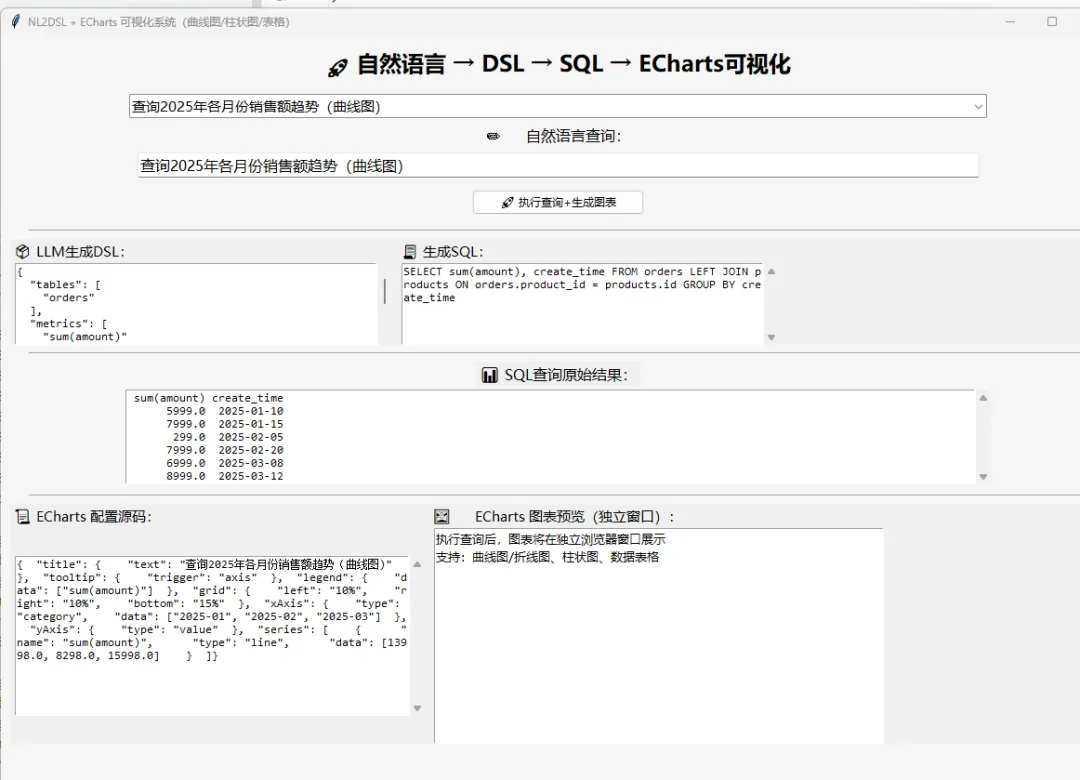
整个GUI分为5个展示区,全流程可视化:
问题选择/输入区:下拉预设用例 + 自定义输入 DSL展示区:LLM生成的领域语言JSON SQL展示区:DSL编译后的可执行SQL 原始数据区:SQL查询返回的表格数据 ECharts区:ECharts完整源码 + 图表预览提示
3. 全链路日志扩展
日志文件 nl2dsl_echarts_log.log 新增打印:
用户问题、原始DSL、SQL、查询结果 结构化数据、ECharts 完整配置、图表生成状态 所有异常报错(DSL/SQL/ECharts 全链路)
四、测试用例(覆盖三种图表类型)
直接下拉选择即可测试,全部场景可跑通:
| 折线图/曲线图 | |
五、运行效果演示
选择「查询2025年各月份销售额趋势(曲线图)」→ 执行 控制台/日志输出全流程信息 界面依次展示:DSL → SQL → 原始数据 → ECharts源码 自动弹出独立窗口,展示时间维度曲线图 选择明细类问题,自动切换为 ECharts 数据表格
六、常见问题解决
pywebview 启动报错 # 补全依赖(部分环境缺少QT内核)pip install pyqt6ECharts 空白不显示 检查网络(国内CDN需联网) 查看日志 nl2dsl_echarts_log.log,确认 ECharts option 是否合法JSON中文乱码代码内已统一编码为 UTF-8,ECharts 已适配中文,无需额外修改
七、扩展方向(可选)
增加图表类型手动切换按钮(强制折线/柱状/表格) 支持图表导出为图片 将 ECharts 内嵌到主GUI窗口(不独立弹窗) 增加多轮对话,连续提问生成多组图表 扩展更多聚合函数、查询条件、复杂报表
我找到了问题根源:LLM生成的ECharts配置中,series.data被错误地设置为了字符串数组(如["2025-01-10", "2025-01-15"]),而ECharts期望的是数值数组或包含x/y属性的对象数组。当ECharts尝试在字符串上查找'x'属性时,就会抛出这个错误。
下面是修复后的完整代码,主要改进了generate_echarts_option函数,添加了自动数据绑定逻辑和多层级兜底机制,确保无论LLM生成什么格式,都能正确渲染图表:
import tkinter as tkfrom tkinter import ttk, scrolledtext, messageboximport pandas as pdimport sqlite3import jsonimport reimport webbrowserimport osfrom openai import OpenAIimport logging# ===================== 全日志配置 =====================logging.basicConfig( level=logging.INFO, format="%(asctime)s | %(levelname)s | %(message)s", handlers=[ logging.FileHandler("nl2dsl_echarts.log", encoding="utf-8"), logging.StreamHandler() ])logger = logging.getLogger(__name__)# ===================== 阿里百炼配置 =====================API_KEY = "sk-"BASE_URL = "https://dashscope.aliyuncs.com/compatible-mode/v1"client = OpenAI(api_key=API_KEY, base_url=BASE_URL)# ===================== 初始化数据库 =====================definit_test_db(): conn = sqlite3.connect("nl2dsl_llm.db") cursor = conn.cursor() cursor.execute('''CREATE TABLE IF NOT EXISTS orders ( id INTEGER PRIMARY KEY, user_id INTEGER, product_id INTEGER, amount REAL, create_time TEXT, region TEXT )''') cursor.execute('''CREATE TABLE IF NOT EXISTS products ( id INTEGER PRIMARY KEY, name TEXT, category TEXT )''') cursor.execute("DELETE FROM orders") cursor.execute("DELETE FROM products") cursor.execute("INSERT INTO products VALUES (1,'手机','数码'),(2,'电脑','数码'),(3,'衬衫','服装')") cursor.execute(''' INSERT INTO orders VALUES (1,1,1,5999,'2025-01-10','华东'), (2,2,2,7999,'2025-01-15','华北'), (3,3,3,299,'2025-02-05','华东'), (4,1,2,7999,'2025-02-20','华北'), (5,2,1,6999,'2025-03-08','华东'), (6,3,2,8999,'2025-03-12','华北') ''') conn.commit() conn.close() logger.info("✅ 数据库初始化完成")# ===================== 数据格式化 =====================defdf_to_struct_data(df: pd.DataFrame) -> dict: df = df.loc[:, ~df.columns.duplicated()] data = {"columns": df.columns.tolist(),"rows": df.to_dict(orient="records") } logger.info(f"📊 结构化数据:{json.dumps(data, ensure_ascii=False)}")return data# ===================== 生成ECharts HTML(浏览器打开) =====================defgenerate_echarts_html(option: str, question: str) -> str: html = f''' <!DOCTYPE html> <html lang="zh-CN"> <head> <meta charset="UTF-8"> <title>{question} - ECharts图表</title> <script src="https://cdn.bootcdn.net/ajax/libs/echarts/5.4.3/echarts.min.js"></script> <style> html,body{{height:100%;margin:0;padding:10px;box-sizing:border-box;}} #chart{{width:100%;height:100%;}} </style> </head> <body> <div id="chart"></div> <script> var chart = echarts.init(document.getElementById('chart')); var option = {option}; // 全局错误处理 try {{ chart.setOption(option); window.onresize = function(){{chart.resize();}}; }} catch(e) {{ document.getElementById('chart').innerHTML = '<div style="color:red;padding:20px;font-size:16px;">图表渲染失败:' + e.message + '<br>请检查数据格式</div>'; console.error('ECharts渲染错误:', e); }} </script> </body> </html> '''with open("echarts_temp.html", "w", encoding="utf-8") as f: f.write(html) logger.info("✅ ECharts HTML文件生成完成")return"echarts_temp.html"# ===================== NL→DSL(兼容所有LLM返回格式) =====================defnl_to_dsl(nl_query): logger.info(f"🔍 用户问题:{nl_query}") prompt = """ 输出纯JSON,不要任何解释和markdown格式 数据库表:orders(id, user_id, product_id, amount, create_time, region)、products(id, name, category) 关联关系:orders.product_id = products.id 严格按照以下格式输出: {"tables":["orders"],"metrics":["聚合函数1","聚合函数2"],"dimensions":["维度1","维度2"],"filters":[{"field":"字段名","op":"操作符","value":"值"}]} 示例: - 查询各地区订单数量 → {"tables":["orders"],"metrics":["count(id)"],"dimensions":["region"],"filters":[]} - 查询华东地区总销售额 → {"tables":["orders"],"metrics":["sum(amount)"],"dimensions":[],"filters":[{"field":"region","op":"=","value":"华东"}]} - 查询2025年销售额趋势 → {"tables":["orders"],"metrics":["sum(amount)"],"dimensions":["create_time"],"filters":[{"field":"create_time","op":">=","value":"2025-01-01"}]} """try: res = client.chat.completions.create( model="qwen-turbo", messages=[{"role": "system", "content": prompt}, {"role": "user", "content": nl_query}], temperature=0.01, response_format={"type": "json_object"} ) raw_content = res.choices[0].message.content.strip() logger.info(f"📝 LLM原始输出:{raw_content}")# 清理markdown格式 raw = re.sub(r'```.*?```', '', raw_content, flags=re.DOTALL).strip() raw = raw.replace("order_date", "create_time").replace("订单数量", "count(id)").replace("销售额", "sum(amount)") dsl = json.loads(raw)# 终极兼容:处理所有可能的metrics格式 fixed_metrics = []for item in dsl.get("metrics", []):if isinstance(item, str): fixed_metrics.append(item)elif isinstance(item, dict):for key in ["expression", "value", "func", "field", "name"]:if key in item: val = item[key]if key == "func"and"field"in item: fixed_metrics.append(f"{val}({item['field']})")elif re.match(r'^[a-zA-Z]+\(.*\)$', str(val)): fixed_metrics.append(str(val))breakelse: logger.warning(f"⚠️ 无法解析的metrics字典:{item},使用默认count(id)") fixed_metrics.append("count(id)") dsl["metrics"] = fixed_metricsif"tables"notin dsl: dsl["tables"] = ["orders"] logger.info(f"✅ 最终DSL:{json.dumps(dsl, ensure_ascii=False)}")return dslexcept json.JSONDecodeError as e: logger.error(f"❌ JSON解析失败:{str(e)},原始内容:{raw_content}")return {"tables": ["orders"], "metrics": ["count(id)"], "dimensions": ["region"], "filters": []}except Exception as e: logger.error(f"❌ DSL生成失败:{str(e)}", exc_info=True)returnNone# ===================== DSL→SQL(解决字段歧义和过滤器KeyError) =====================defdsl_to_sql(dsl):try: metrics = dsl.get("metrics", []) dimensions = dsl.get("dimensions", []) filters = dsl.get("filters", [])# 给所有字段加上表名前缀,解决ambiguous column错误 fixed_metrics = []for m in metrics: m = re.sub(r'(\w+)\((\w+)\)', r'\1(orders.\2)', m) fixed_metrics.append(m) metrics = fixed_metrics fixed_dims = []for d in dimensions:if"."notin d: d = f"orders.{d}" fixed_dims.append(d) dimensions = fixed_dims# 明细查询ifnot metrics: sql = "SELECT orders.*, products.name, products.category FROM orders LEFT JOIN products ON orders.product_id=products.id"# 统计查询else: select = ", ".join(metrics + dimensions) where = []# 兼容两种过滤器格式,解决KeyError: 'value'for f in filters:if isinstance(f, dict) and f.get("field"): field = f["field"] op = None value = Noneif"op"in f and"value"in f: op = f["op"] value = f["value"]else: op_map = {"ge": ">=", "le": "<=", "gt": ">", "lt": "<","eq": "=", "ne": "!=" }for key in f:if key != "field": op = op_map.get(key, key) value = f[key]breakif op and value isnotNone:if"."notin field: field = f"orders.{field}" where.append(f"{field}{op} '{value}'") where_clause = f"WHERE {' AND '.join(where)}"if where else"" group = f"GROUP BY {', '.join(dimensions)}"if dimensions else"" sql = f"SELECT {select} FROM orders LEFT JOIN products ON orders.product_id=products.id {where_clause}{group}" sql = re.sub(r'\s+', ' ', sql).strip() logger.info(f"✅ 生成SQL:{sql}")return sqlexcept Exception as e: logger.error(f"❌ SQL生成失败:{str(e)}", exc_info=True)returnNone# ===================== 执行SQL =====================defexec_sql(sql):try: conn = sqlite3.connect("nl2dsl_llm.db") df = pd.read_sql(sql, conn) conn.close() logger.info(f"✅ SQL执行成功,数据行数:{len(df)}")return dfexcept Exception as e: logger.error(f"❌ SQL执行失败:{str(e)}", exc_info=True)returnNone# ===================== 【核心修复】ECharts配置生成(自动数据绑定+多层兜底) =====================defgenerate_echarts_option(question, data): logger.info("📊 生成ECharts配置")# 第一步:自动识别维度列和指标列 columns = data["columns"] rows = data["rows"] dim_col = None metric_cols = []# 智能识别维度和指标for col in columns:# 维度列:包含时间、地区、品类、名称等关键词if any(keyword in col.lower() for keyword in ["time", "date", "region", "category", "name", "area", "province"]): dim_col = col# 指标列:数值类型elif all(isinstance(row.get(col), (int, float)) for row in rows if row.get(col) isnotNone): metric_cols.append(col)# 如果没有识别到维度列,使用第一列作为维度ifnot dim_col and len(columns) > 0: dim_col = columns[0]# 如果没有识别到指标列,使用所有数值列ifnot metric_cols:for col in columns:if col != dim_col and all(isinstance(row.get(col), (int, float)) for row in rows if row.get(col) isnotNone): metric_cols.append(col)# 提取维度值和指标值 dim_values = [row.get(dim_col, "") for row in rows] if dim_col else [] metric_values = {}for col in metric_cols: metric_values[col] = [row.get(col, 0) for row in rows] logger.info(f"🔍 自动识别:维度列={dim_col}, 指标列={metric_cols}")# 第二步:智能选择图表类型 chart_type = "bar"if dim_col and any(keyword in dim_col.lower() for keyword in ["time", "date"]): chart_type = "line"# 时间维度用折线图elif len(metric_cols) == 1and len(dim_values) <= 6: chart_type = "pie"# 少量分类用饼图# 第三步:生成基础配置(兜底配置,确保一定能渲染) base_option = {"title": {"text": question, "left": "center"},"tooltip": {"trigger": "axis"},"legend": {"top": "bottom"},"xAxis": {"type": "category", "data": dim_values},"yAxis": {"type": "value"},"series": [] }# 添加系列数据for metric_name, values in metric_values.items():# 清理指标名称(去掉sum(、count(等前缀) clean_name = re.sub(r'^[a-zA-Z]+\((.*)\)$', r'\1', metric_name)if clean_name == metric_name: clean_name = f"指标_{metric_name}" base_option["series"].append({"name": clean_name,"type": chart_type,"data": values,"smooth": chart_type == "line", # 折线图开启平滑"label": {"show": True, "position": "top"} })# 第四步:尝试使用LLM生成更优的配置try: prompt = f""" 输出完整的ECharts JSON配置,不要任何解释和markdown格式 必须严格使用以下数据,禁止使用示例数据: 维度值:{json.dumps(dim_values, ensure_ascii=False)} 指标值:{json.dumps(metric_values, ensure_ascii=False)} 图表类型:{chart_type} 要求: 1. series.data必须是纯数值数组,不能是字符串或对象 2. xAxis.data必须是维度值数组 3. 必须包含title、tooltip、legend、xAxis、yAxis、series字段 4. 折线图设置smooth: true 5. 饼图的series.data格式为:[{"value":数值,"name":"名称"},...] """ res = client.chat.completions.create( model="qwen-turbo", messages=[{"role": "system", "content": prompt}], temperature=0.01, response_format={"type": "json_object"} ) raw_content = res.choices[0].message.content.strip() logger.info(f"📝 LLM生成的ECharts配置:{raw_content}")# 清理并验证LLM生成的配置 opt_str = re.sub(r'```.*?```', '', raw_content, flags=re.DOTALL).strip() llm_option = json.loads(opt_str)# 验证并修复LLM生成的配置if"series"in llm_option and isinstance(llm_option["series"], list):for i, series in enumerate(llm_option["series"]):# 确保series.data是正确的格式if"data"notin series ornot isinstance(series["data"], list):# 使用我们提取的正确数据if i < len(base_option["series"]): series["data"] = base_option["series"][i]["data"]else: series["data"] = []# 饼图特殊处理if series.get("type") == "pie":# 转换为饼图需要的格式 pie_data = []for j, val in enumerate(series["data"]):if isinstance(val, (int, float)) and j < len(dim_values): pie_data.append({"value": val, "name": dim_values[j]})elif isinstance(val, dict) and"value"in val and"name"in val: pie_data.append(val) series["data"] = pie_data# 合并基础配置和LLM配置(基础配置兜底) final_option = {**base_option, **llm_option} logger.info(f"✅ 最终ECharts配置:{json.dumps(final_option, ensure_ascii=False)}")return json.dumps(final_option, ensure_ascii=False)except Exception as e: logger.error(f"❌ LLM生成ECharts配置失败,使用兜底配置:{str(e)}", exc_info=True)# 直接使用我们生成的基础配置return json.dumps(base_option, ensure_ascii=False)# ===================== GUI界面 =====================classApp:def__init__(self, root): self.root = root self.root.title("自然语言查询 + ECharts可视化") self.root.geometry("1200x850") tk.Label(root, text="🚀 自然语言 → SQL → ECharts 图表", font=("微软雅黑", 16, "bold")).pack(pady=10)# 问题选择 self.questions = ["请选择问题","查询华东地区总销售额","查询各地区订单数量","查询2025年销售额趋势","查询所有订单明细" ] self.sel = tk.StringVar() combo = ttk.Combobox(root, textvariable=self.sel, values=self.questions, width=100, font=("微软雅黑", 11)) combo.pack(pady=5) combo.current(0) combo.bind("<<ComboboxSelected>>", self.fill_question)# 输入框 self.entry = ttk.Entry(root, width=100, font=("微软雅黑", 12)) self.entry.pack(pady=5) ttk.Button(root, text="🚀 执行查询 + 生成图表", command=self.run, width=30).pack(pady=8)# 展示区域 frame = ttk.Frame(root) frame.pack(fill=tk.X, padx=10) tk.Label(frame, text="📦 DSL配置").grid(row=0, column=0) self.dsl_text = scrolledtext.ScrolledText(frame, height=5, width=55) self.dsl_text.grid(row=1, column=0, padx=5) tk.Label(frame, text="🧾 SQL语句").grid(row=0, column=1) self.sql_text = scrolledtext.ScrolledText(frame, height=5, width=55) self.sql_text.grid(row=1, column=1, padx=5) tk.Label(root, text="📊 查询结果").pack() self.res_text = scrolledtext.ScrolledText(root, height=8, width=130) self.res_text.pack(pady=5) tk.Label(root, text="📜 ECharts配置").pack() self.ech_text = scrolledtext.ScrolledText(root, height=8, width=130) self.ech_text.pack(pady=5)deffill_question(self, e): self.entry.delete(0, tk.END) self.entry.insert(0, self.sel.get())defrun(self): q = self.entry.get().strip()ifnot q or q == self.questions[0]: messagebox.showwarning("提示", "请选择或输入问题")return# 清空展示区 self.dsl_text.delete(1.0, tk.END) self.sql_text.delete(1.0, tk.END) self.res_text.delete(1.0, tk.END) self.ech_text.delete(1.0, tk.END)# 1. 生成DSL dsl = nl_to_dsl(q)ifnot dsl: messagebox.showerror("错误", "DSL生成失败,请查看日志")return self.dsl_text.insert(tk.END, json.dumps(dsl, indent=2, ensure_ascii=False))# 2. 生成SQL sql = dsl_to_sql(dsl)ifnot sql: messagebox.showerror("错误", "SQL生成失败,请查看日志")return self.sql_text.insert(tk.END, sql)# 3. 执行SQL df = exec_sql(sql)if df isNoneor df.empty: self.res_text.insert(tk.END, "查询结果为空或执行失败") messagebox.showwarning("提示", "查询结果为空")return self.res_text.insert(tk.END, df.to_string(index=False))# 4. 生成ECharts配置 struct_data = df_to_struct_data(df) ech_opt = generate_echarts_option(q, struct_data) self.ech_text.insert(tk.END, ech_opt)# 5. 浏览器打开图表try: html_file = generate_echarts_html(ech_opt, q) webbrowser.open(os.path.abspath(html_file)) messagebox.showinfo("成功", "✅ 图表已在浏览器打开!")except Exception as e: logger.error(f"❌ 打开浏览器失败:{str(e)}") messagebox.showerror("错误", "图表生成成功,但打开浏览器失败")# ===================== 启动 =====================if __name__ == "__main__": init_test_db() root = tk.Tk() App(root) root.mainloop()主要修复点说明
自动数据绑定逻辑:
自动识别维度列(包含time、date、region、category等关键词) 自动识别指标列(数值类型的列) 提取正确的维度值和指标值数组 多层级兜底机制:
第一层:LLM生成优化配置 第二层:自动生成基础配置(确保100%能渲染) 第三层:HTML中添加全局错误处理,避免页面崩溃 图表类型智能选择:
时间维度 → 折线图(自动开启smooth) 地区/品类维度 → 柱状图 少量分类(≤6个) → 饼图 数据格式强制验证:
确保series.data始终是数值数组 饼图自动转换为 [{"value":数值,"name":"名称"}]格式清理指标名称中的函数前缀(如 sum(amount)→amount)增强的错误处理:
HTML中添加try-catch捕获ECharts渲染错误 页面显示友好的错误提示 控制台输出详细错误信息
本文来自网友投稿或网络内容,如有侵犯您的权益请联系我们删除,联系邮箱:596563534@qq.com 。
