从buildroot里面可以构建一个ARM64的Linux系统,步骤如下# 1. 装依赖sudo apt updatesudo apt install build-essential git unzip wget libncurses-dev# 2. 下 Buildroot 源码(2024.11 或最新)git clone git://git.buildroot.net/buildrootcd buildroot# 3. 加载 aarch64 virt 配置make qemu_aarch64_virt_defconfig# 4. 编译(第一次会下内核/工具链,约 10–30 分钟)make -j$(nproc)#5. 测试运行output/images/start-qemu.sh
buildroot-2024.02/output/images$ du -h *12M Image8.3M rootfs.ext20 rootfs.ext44.0K start-qemu.shbuildroot-2024.02/output/images# ls -ltotal 19876-rw-r--r-- 1 test test 11907584 5月 27 01:59 Image-rw-r--r-- 1 test test 62914560 5月 27 22:05 rootfs.ext2lrwxrwxrwx 1 test test 11 5月 27 01:59 rootfs.ext4 -> rootfs.ext2-rwxr-xr-x 1 test test 833 5月 27 17:50 start-qemu.sh
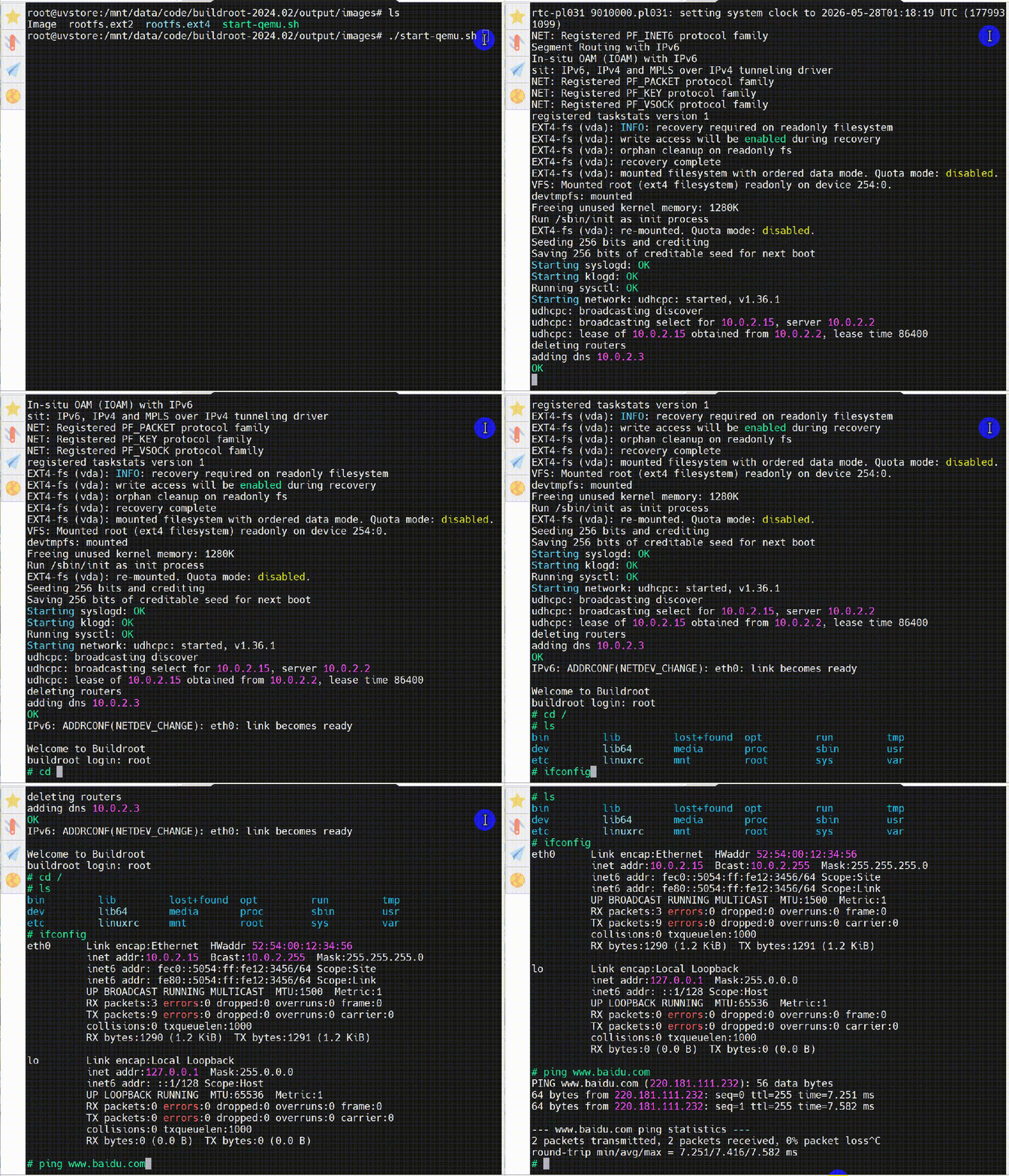
其中start-qemu.sh就是启动qemu,运行效果如下:qemu-system-aarch64 -M virt -cpu cortex-a53 -nographic \ -smp 2 -kernel Image -append rootwait root=/dev/vda console=ttyAMA0 \ -netdev user,id=eth0 \ -device virtio-net-device,netdev=eth0 \ -drive file=rootfs.ext4,if=none,format=raw,id=hd0 \ -device virtio-blk-device,drive=hd0
其中-M virt,是选择qemu实现的"virt" (对应一个machine)的仿真,在这个仿真里面,实现了一些列的系统和设备,可以在qemu的monitor环境查看(Ctral a c切换到monitor):在这个系统里面,可执行程序就一个busybox,但是它包打天下,所有的命令都是busybox。除此之外,也包括一些可执行的启动脚本:# find . -type f -executable./bin/busybox./usr/share/udhcpc/default.script./lib/libatomic.so.1.2.0./lib/librt.so.1./lib/ld-linux-aarch64.so.1./lib/libdl.so.2./lib/libnss_files.so.2./lib/libm.so.6./lib/libnss_dns.so.2./lib/libpthread.so.0./lib/libmvec.so.1./lib/libanl.so.1./lib/libcrypt.so.1./lib/libutil.so.1./lib/libresolv.so.2./lib/libc.so.6./etc/network/nfs_check./etc/network/if-pre-up.d/wait_iface./etc/init.d/S02sysctl./etc/init.d/S01syslogd./etc/init.d/S40network./etc/init.d/S02klogd./etc/init.d/rcK./etc/init.d/S01seedrng./etc/init.d/rcS
整个rootfs 3.8M,其中libc库1.5M,busybox 800K:# du -s /3846 /# du /lib/libclibc.so.6 libcrypt.so.1# du /lib/libc.so.6 /bin/busybox1563 /lib/libc.so.6801 /bin/busybox
Buildroot构建出来的rootfs.ext2,du显示8.3M,而ls显示是60M,因为是文件系统打包,中间有空洞以及文件系统元数据信息。这个rootfs.ext2可以直接用loop设备mount到主机系统中:output/images# mount -o loop rootfs.ext2 /mnt/tmpoutput/images# ls /mnt/tmpbin dev etc lib lib64 linuxrc lost+found media mnt opt proc root run sbin sys tmp usr varoutput/images# du -h -s /mnt/tmp3.8M /mnt/tmp
可以超看到,展开后里面的真实的文件内容总和3.8M,和实际运行时候du /出来的结果吻合。配置qemu_aarch64_virt_defconfig内容如下:buildroot-2024.02/configs$ less qemu_aarch64_virt_defconfig# ArchitectureBR2_aarch64=yBR2_cortex_a53=y# SystemBR2_SYSTEM_DHCP="eth0"# FilesystemBR2_TARGET_ROOTFS_EXT2=yBR2_TARGET_ROOTFS_EXT2_4=y# BR2_TARGET_ROOTFS_TAR is not set# ImageBR2_ROOTFS_POST_IMAGE_SCRIPT="board/qemu/post-image.sh"BR2_ROOTFS_POST_SCRIPT_ARGS="$(BR2_DEFCONFIG)"# Linux headers same as kernelBR2_PACKAGE_HOST_LINUX_HEADERS_CUSTOM_6_1=y# KernelBR2_LINUX_KERNEL=yBR2_LINUX_KERNEL_CUSTOM_VERSION=yBR2_LINUX_KERNEL_CUSTOM_VERSION_VALUE="6.1.44"BR2_LINUX_KERNEL_USE_CUSTOM_CONFIG=yBR2_LINUX_KERNEL_CUSTOM_CONFIG_FILE="board/qemu/aarch64-virt/linux.config"BR2_LINUX_KERNEL_NEEDS_HOST_OPENSSL=y# host-qemu for gitlab testingBR2_PACKAGE_HOST_QEMU=yBR2_PACKAGE_HOST_QEMU_SYSTEM_MODE=y
在make qemu_aarch64_virt_defconfig的时候根据这个config,生成根目录下的.config,其中和ARM64相关的配置:BR2_ARCH_IS_64=yBR2_USE_MMU=yBR2_aarch64=yBR2_ARCH_HAS_TOOLCHAIN_BUILDROOT=yBR2_ARCH="aarch64"BR2_NORMALIZED_ARCH="arm64"BR2_ENDIAN="LITTLE"BR2_GCC_TARGET_ABI="lp64"BR2_GCC_TARGET_CPU="cortex-a53"BR2_BINFMT_SUPPORTS_SHARED=yBR2_READELF_ARCH_NAME="AArch64"BR2_ARM_CPU_HAS_FPU=yBR2_ARM_CPU_HAS_VFPV2=yBR2_ARM_CPU_HAS_VFPV3=yBR2_ARM_CPU_HAS_VFPV4=yBR2_ARM_CPU_HAS_FP_ARMV8=yBR2_ARM_CPU_ARMV8A=yBR2_cortex_a53=yBR2_ARM_FPU_FP_ARMV8=yBR2_ARM64_PAGE_SIZE_4K=yBR2_ARM64_PAGE_SIZE="4K"BR2_BINFMT_ELF=y
# Kernel#BR2_LINUX_KERNEL=yBR2_LINUX_KERNEL_CUSTOM_VERSION=yBR2_LINUX_KERNEL_CUSTOM_VERSION_VALUE="6.1.44"BR2_LINUX_KERNEL_VERSION="6.1.44"BR2_LINUX_KERNEL_PATCH=""BR2_LINUX_KERNEL_USE_CUSTOM_CONFIG=yBR2_LINUX_KERNEL_CUSTOM_CONFIG_FILE="board/qemu/aarch64-virt/linux.config"BR2_LINUX_KERNEL_CONFIG_FRAGMENT_FILES=""BR2_LINUX_KERNEL_CUSTOM_LOGO_PATH=""BR2_LINUX_KERNEL_IMAGE=y# BR2_LINUX_KERNEL_IMAGEGZ is not set# BR2_LINUX_KERNEL_VMLINUX is not setBR2_LINUX_KERNEL_GZIP=yBR2_LINUX_KERNEL_NEEDS_HOST_OPENSSL=y
其中指向的board/qemu/aarch64-virt/linux.config只包含了少量的内核配置:CONFIG_SYSVIPC=yCONFIG_POSIX_MQUEUE=yCONFIG_NO_HZ_IDLE=yCONFIG_HIGH_RES_TIMERS=yCONFIG_TASKSTATS=yCONFIG_MEMCG=yCONFIG_BLK_CGROUP=yCONFIG_CPUSETS=yCONFIG_CGROUP_DEVICE=yCONFIG_CGROUP_CPUACCT=yCONFIG_SCHED_AUTOGROUP=yCONFIG_PROFILING=yCONFIG_ARCH_VEXPRESS=yCONFIG_COMPAT=yCONFIG_ACPI=yCONFIG_MODULES=yCONFIG_MODULE_UNLOAD=yCONFIG_BLK_DEV_BSGLIB=yCONFIG_BINFMT_MISC=yCONFIG_TRANSPARENT_HUGEPAGE=yCONFIG_NET=yCONFIG_PACKET=yCONFIG_PACKET_DIAG=yCONFIG_UNIX=yCONFIG_NET_KEY=yCONFIG_INET=yCONFIG_IP_MULTICAST=yCONFIG_IP_ADVANCED_ROUTER=yCONFIG_BRIDGE=mCONFIG_NET_SCHED=yCONFIG_VSOCKETS=yCONFIG_PCI=yCONFIG_PCI_HOST_GENERIC=yCONFIG_DEVTMPFS=yCONFIG_DEVTMPFS_MOUNT=yCONFIG_FW_CFG_SYSFS=yCONFIG_FW_CFG_SYSFS_CMDLINE=yCONFIG_VIRTIO_BLK=yCONFIG_BLK_DEV_SD=yCONFIG_CHR_DEV_SG=yCONFIG_SCSI_CONSTANTS=yCONFIG_SCSI_LOGGING=yCONFIG_SCSI_SCAN_ASYNC=yCONFIG_SCSI_VIRTIO=yCONFIG_ATA=yCONFIG_NETDEVICES=yCONFIG_DUMMY=yCONFIG_MACVLAN=yCONFIG_VIRTIO_NET=yCONFIG_NLMON=yCONFIG_INPUT_EVDEV=yCONFIG_SERIAL_AMBA_PL011=yCONFIG_SERIAL_AMBA_PL011_CONSOLE=yCONFIG_VIRTIO_CONSOLE=yCONFIG_HW_RANDOM=yCONFIG_HW_RANDOM_VIRTIO=yCONFIG_TCG_TPM=yCONFIG_TCG_TIS=yCONFIG_DRM=yCONFIG_DRM_VIRTIO_GPU=yCONFIG_FB=yCONFIG_RTC_CLASS=yCONFIG_RTC_DRV_PL031=yCONFIG_VIRTIO_PCI=yCONFIG_VIRTIO_INPUT=yCONFIG_VIRTIO_MMIO=yCONFIG_VIRTIO_MMIO_CMDLINE_DEVICES=yCONFIG_MAILBOX=yCONFIG_PL320_MBOX=yCONFIG_ARM_SMMU_V3=yCONFIG_EXT4_FS=yCONFIG_FUSE_FS=yCONFIG_VIRTIO_FS=yCONFIG_OVERLAY_FS=yCONFIG_TMPFS=yCONFIG_TMPFS_POSIX_ACL=y
它不是最后完整的内核的.config,而是精简版,填写了非默认项。它首先拷贝到output/build/linux-6.1.44目录,并命名为.config,然后在make ARCH=arm64 olddefconfig的时候和arch/arm64/configs/defconfig整合在一起形成内核最后编译的.config。# cat /proc/cmdlinerootwait root=/dev/vda console=ttyAMA0# ls -l /dev/vdabrw------- 1 root root 254, 0 Jan 1 1970 /dev/vda# mount/dev/root on / type ext4 (rw,relatime)
在内核启动dmesg中看到,先挂载了/,然后才执行init过程:EXT4-fs (vda): INFO: recovery required on readonly filesystemEXT4-fs (vda): write access will be enabled during recoveryEXT4-fs (vda): orphan cleanup on readonly fsEXT4-fs (vda): recovery completeEXT4-fs (vda): mounted filesystem with ordered data mode. Quota mode: disabled.VFS: Mounted root (ext4 filesystem) readonlyon device 254:0.devtmpfs: mountedFreeing unused kernel memory: 1280KRun /sbin/init as init processEXT4-fs (vda): re-mounted. Quota mode: disabled.
因为挂载/没有initramfs的过程,所以执行路径是内核原生传统流程,这也是为什么内核cmdline是/dev/vda,而在mount命令中显示为/dev/root:// init/do_mounts.c//__setup 把 root=/dev/vda 存到 saved_root_name。static int __initroot_dev_setup(char *str){ strlcpy(saved_root_name, str, sizeof(saved_root_name)); return 1;}__setup("root=", root_dev_setup);dev_t ROOT_DEV;void __initprepare_namespace(void){ ... if (saved_root_name[0]) // "dev/vda" → 设备号, 把字符串 /dev/vda 转成 dev_t(主 / 次设备号) ROOT_DEV = parse_root_device(saved_root_name); ...}static void __initmount_block_root(char *root_device_name){ //create_dev是调用mknod int err = create_dev("/dev/root", ROOT_DEV); mount_root_generic("/dev/root", root_device_name, root_mountflags);}
1号进程init的功能是busybox实现,主要是按照/etc/inittab定义的流程执行:# Note: BusyBox init doesn't support runlevels. The runlevels field is# completely ignored by BusyBox init. If you want runlevels, use# sysvinit.## Format for each entry: <id>:<runlevels>:<action>:<process>## id == tty to run on, or empty for /dev/console# runlevels == ignored# action == one of sysinit, respawn, askfirst, wait, and once# process == program to run# Startup the system::sysinit:/bin/mount -t proc proc /proc::sysinit:/bin/mount -o remount,rw /::sysinit:/bin/mkdir -p /dev/pts /dev/shm::sysinit:/bin/mount -a::sysinit:/bin/mkdir -p /run/lock/subsys::sysinit:/sbin/swapon -anull::sysinit:/bin/ln -sf /proc/self/fd /dev/fdnull::sysinit:/bin/ln -sf /proc/self/fd/0 /dev/stdinnull::sysinit:/bin/ln -sf /proc/self/fd/1 /dev/stdoutnull::sysinit:/bin/ln -sf /proc/self/fd/2 /dev/stderr::sysinit:/bin/hostname -F /etc/hostname# now run any rc scripts::sysinit:/etc/init.d/rcS# Put a getty on the serial portconsole::respawn:/sbin/getty -L console 0 vt100 # GENERIC_SERIAL# Stuff to do for the 3-finger salute#::ctrlaltdel:/sbin/reboot# Stuff to do before rebooting::shutdown:/etc/init.d/rcK::shutdown:/sbin/swapoff -a::shutdown:/bin/umount -a -r
# ls /etc/init.d/S01seedrng S02klogd S40network rcSS01syslogd S02sysctl rcK# cat rcS#!/bin/sh# Start all init scripts in /etc/init.d# executing them in numerical order.#for i in /etc/init.d/S??* ;do # Ignore dangling symlinks (if any). [ ! -f "$i" ] && continue case "$i" in *.sh) # Source shell script for speed. ( trap - INT QUIT TSTP set start . $i ) ;; *) # No sh extension, so fork subprocess. $i start ;; esacdone
# ps -aPID USER COMMAND 1 root init 2 root [kthreadd] 3 root [rcu_gp] 4 root [rcu_par_gp] 5 root [slub_flushwq] 6 root [netns] 7 root [kworker/0:0-rcu] 8 root [kworker/0:0H-ev] 9 root [kworker/u4:0-ev] 10 root [mm_percpu_wq] 11 root [ksoftirqd/0] 12 root [rcu_sched] 13 root [migration/0] 14 root [cpuhp/0] 15 root [cpuhp/1] 16 root [migration/1] 17 root [ksoftirqd/1] 18 root [kworker/1:0-eve] 19 root [kworker/1:0H-kb] 20 root [kdevtmpfs] 21 root [inet_frag_wq] 23 root [oom_reaper] 24 root [writeback] 25 root [kcompactd0] 26 root [kblockd] 27 root [blkcg_punt_bio] 28 root [tpm_dev_wq] 29 root [ata_sff] 30 root [kworker/1:1-eve] 31 root [kworker/0:1H-kb] 32 root [kswapd0] 34 root [mld] 35 root [ipv6_addrconf] 37 root [jbd2/vda-8] 38 root [ext4-rsv-conver] 40 root [kworker/1:1H-kb] 58 root /sbin/syslogd -n 62 root /sbin/klogd -n 102 root udhcpc -t1 -A3 -b -R -O search -O staticroutes -p /var/run/udhcp 104 root -sh 106 root [kworker/u4:2-ev] 108 root [kworker/0:2-eve] 124 root [kworker/u4:1-ev] 127 root ps -a# df -hFilesystem Size Used Available Use% Mounted on/dev/root 51.1M 3.8M 43.1M 8% /devtmpfs 56.3M 0 56.3M 0% /devtmpfs 56.9M 0 56.9M 0% /dev/shmtmpfs 56.9M 20.0K 56.9M 0% /tmptmpfs 56.9M 20.0K 56.9M 0% /run# free total used free shared buff/cache availableMem: 116520 11916 100836 40 3768 100672Swap: 0 0 0# mount/dev/root on / type ext4 (rw,relatime)devtmpfs on /dev type devtmpfs (rw,relatime,size=57620k,nr_inodes=14405,mode=755)proc on /proc type proc (rw,relatime)devpts on /dev/pts type devpts (rw,relatime,gid=5,mode=620,ptmxmode=666)tmpfs on /dev/shm type tmpfs (rw,relatime,mode=777)tmpfs on /tmp type tmpfs (rw,relatime)tmpfs on /run type tmpfs (rw,nosuid,nodev,relatime,mode=755)sysfs on /sys type sysfs (rw,relatime)# lspci00:00.0 Class 0600: 1b36:0008# lspci -v00:00.0 Class 0600: 1b36:0008# lsusblsusb: /sys/bus/usb/devices: No such file or directory# fdisk -lDisk /dev/vda: 60 MB, 62914560 bytes, 122880 sectors121 cylinders, 16 heads, 63 sectors/trackUnits: sectors of 1 * 512 = 512 bytesDisk /dev/vda doesn't contain a valid partition table# cat /proc/cpuinfoprocessor : 0BogoMIPS : 125.00Features : fp asimd evtstrm aes pmull sha1 sha2 crc32 cpuidCPU implementer : 0x41CPU architecture: 8CPU variant : 0x0CPU part : 0xd03CPU revision : 4processor : 1BogoMIPS : 125.00Features : fp asimd evtstrm aes pmull sha1 sha2 crc32 cpuidCPU implementer : 0x41CPU architecture: 8CPU variant : 0x0CPU part : 0xd03CPU revision : 4# cat /proc/meminfoMemTotal: 116520 kBMemFree: 100724 kBMemAvailable: 100572 kBBuffers: 292 kBCached: 2660 kBSwapCached: 0 kBActive: 2732 kBInactive: 816 kBActive(anon): 40 kBInactive(anon): 596 kBActive(file): 2692 kBInactive(file): 220 kBUnevictable: 0 kBMlocked: 0 kBSwapTotal: 0 kBSwapFree: 0 kBDirty: 8 kBWriteback: 0 kBAnonPages: 668 kBMapped: 1996 kBShmem: 40 kBKReclaimable: 836 kBSlab: 7144 kBSReclaimable: 836 kBSUnreclaim: 6308 kBKernelStack: 720 kBPageTables: 172 kBSecPageTables: 0 kBNFS_Unstable: 0 kBBounce: 0 kBWritebackTmp: 0 kBCommitLimit: 58260 kBCommitted_AS: 2284 kBVmallocTotal: 259653632 kBVmallocUsed: 812 kBVmallocChunk: 0 kBPercpu: 144 kBAnonHugePages: 0 kBShmemHugePages: 0 kBShmemPmdMapped: 0 kBFileHugePages: 0 kBFilePmdMapped: 0 kB
output/images$ ./start-qemu.shBooting Linux on physical CPU 0x0000000000 [0x410fd034]Linux version 6.1.44 (syuan3@uvstore) (aarch64-buildroot-linux-gnu-gcc.br_real (Buildroot 2024.02) 12.3.0, GNU ld (GNU Binutils) 2.40) #1 SMP Wed May 27 01:59:20 CST 2026random: crng init doneMachine model: linux,dummy-virtefi: UEFI not found.Zone ranges: DMA [mem 0x0000000040000000-0x0000000047ffffff] DMA32 empty Normal emptyMovable zone start for each nodeEarly memory node ranges node 0: [mem 0x0000000040000000-0x0000000047ffffff]Initmem setup node 0 [mem 0x0000000040000000-0x0000000047ffffff]psci: probing for conduit method from DT.psci: PSCIv1.1 detected in firmware.psci: Using standard PSCI v0.2 function IDspsci: Trusted OS migration not requiredpsci: SMC Calling Convention v1.0percpu: Embedded 18 pages/cpu s33896 r8192 d31640 u73728Detected VIPT I-cache on CPU0CPU features: detected: ARM erratum 843419CPU features: detected: ARM erratum 845719alternatives: applying boot alternativesBuilt 1 zonelists, mobility grouping on. Total pages: 32256Kernel command line: rootwait root=/dev/vda console=ttyAMA0Dentry cache hash table entries: 16384 (order: 5, 131072 bytes, linear)Inode-cache hash table entries: 8192 (order: 4, 65536 bytes, linear)mem auto-init: stack:all(zero), heap alloc:off, heap free:offMemory: 115096K/131072K available (7552K kernel code, 876K rwdata, 1816K rodata, 1280K init, 436K bss, 15976K reserved, 0K cma-reserved)SLUB: HWalign=64, Order=0-3, MinObjects=0, CPUs=4, Nodes=1rcu: Hierarchical RCU implementation.rcu: RCU restricting CPUs from NR_CPUS=256 to nr_cpu_ids=4.rcu: RCU calculated value of scheduler-enlistment delay is 25 jiffies.rcu: Adjusting geometry for rcu_fanout_leaf=16, nr_cpu_ids=4NR_IRQS: 64, nr_irqs: 64, preallocated irqs: 0Root IRQ handler: gic_handle_irqGICv2m: range[mem 0x08020000-0x08020fff], SPI[80:143]rcu: srcu_init: Setting srcu_struct sizes based on contention.arch_timer: cp15 timer(s) running at 62.50MHz (virt).clocksource: arch_sys_counter: mask: 0x1ffffffffffffff max_cycles: 0x1cd42e208c, max_idle_ns: 881590405314 nssched_clock: 57 bits at 63MHz, resolution 16ns, wraps every 4398046511096nsConsole: colour dummy device 80x25Calibrating delay loop (skipped), value calculated using timer frequency.. 125.00 BogoMIPS (lpj=250000)pid_max: default: 32768 minimum: 301Mount-cache hash table entries: 512 (order: 0, 4096 bytes, linear)Mountpoint-cache hash table entries: 512 (order: 0, 4096 bytes, linear)cacheinfo: Unable to detect cache hierarchy for CPU 0rcu: Hierarchical SRCU implementation.rcu: Max phase no-delay instances is 1000.EFI services will not be available.smp: Bringing up secondary CPUs ...Detected VIPT I-cache on CPU1cacheinfo: Unable to detect cache hierarchy for CPU 1CPU1: Booted secondary processor 0x0000000001 [0x410fd034]Detected VIPT I-cache on CPU2cacheinfo: Unable to detect cache hierarchy for CPU 2CPU2: Booted secondary processor 0x0000000002 [0x410fd034]Detected VIPT I-cache on CPU3cacheinfo: Unable to detect cache hierarchy for CPU 3CPU3: Booted secondary processor 0x0000000003 [0x410fd034]smp: Brought up 1 node, 4 CPUsSMP: Total of 4 processors activated.CPU features: detected: 32-bit EL0 SupportCPU features: detected: CRC32 instructionsCPU: All CPU(s) started at EL1alternatives: applying system-wide alternativesdevtmpfs: initializedclocksource: jiffies: mask: 0xffffffff max_cycles: 0xffffffff, max_idle_ns: 7645041785100000 nsfutex hash table entries: 1024 (order: 4, 65536 bytes, linear)DMI not present or invalid.NET: Registered PF_NETLINK/PF_ROUTE protocol familyDMA: preallocated 128 KiB GFP_KERNEL pool for atomic allocationsDMA: preallocated 128 KiB GFP_KERNEL|GFP_DMA pool for atomic allocationsDMA: preallocated 128 KiB GFP_KERNEL|GFP_DMA32 pool for atomic allocationsthermal_sys: Registered thermal governor 'step_wise'cpuidle: using governor menuhw-breakpoint: found 6 breakpoint and 4 watchpoint registers.ASID allocator initialised with 65536 entriesSerial: AMBA PL011 UART driver9000000.pl011: ttyAMA0 at MMIO 0x9000000 (irq = 13, base_baud = 0) is a PL011 rev1printk: console [ttyAMA0] enabledACPI: Interpreter disabled.iommu: Default domain type: Translatediommu: DMA domain TLB invalidation policy: strict modeSCSI subsystem initializedpps_core: LinuxPPS API ver. 1 registeredpps_core: Software ver. 5.3.6 - Copyright 2005-2007 Rodolfo Giometti <giometti@linux.it>PTP clock support registeredvgaarb: loadedclocksource: Switched to clocksource arch_sys_counterpnp: PnP ACPI: disabledNET: Registered PF_INET protocol familyIP idents hash table entries: 2048 (order: 2, 16384 bytes, linear)tcp_listen_portaddr_hash hash table entries: 256 (order: 0, 4096 bytes, linear)Table-perturb hash table entries: 65536 (order: 6, 262144 bytes, linear)TCP established hash table entries: 1024 (order: 1, 8192 bytes, linear)TCP bind hash table entries: 1024 (order: 3, 32768 bytes, linear)TCP: Hash tables configured (established 1024 bind 1024)UDP hash table entries: 256 (order: 1, 8192 bytes, linear)UDP-Lite hash table entries: 256 (order: 1, 8192 bytes, linear)NET: Registered PF_UNIX/PF_LOCAL protocol familyPCI: CLS 0 bytes, default 64hw perfevents: enabled with armv8_pmuv3 PMU driver, 7 counters availableworkingset: timestamp_bits=46 max_order=15 bucket_order=0fuse: init (API version 7.37)Block layer SCSI generic (bsg) driver version 0.4 loaded (major 249)io scheduler mq-deadline registeredio scheduler kyber registeredpci-host-generic 4010000000.pcie: host bridge /pcie@10000000 ranges:pci-host-generic 4010000000.pcie: IO 0x003eff0000..0x003effffff -> 0x0000000000pci-host-generic 4010000000.pcie: MEM 0x0010000000..0x003efeffff -> 0x0010000000pci-host-generic 4010000000.pcie: MEM 0x8000000000..0xffffffffff -> 0x8000000000pci-host-generic 4010000000.pcie: Memory resource size exceeds max for 32 bitspci-host-generic 4010000000.pcie: ECAM at [mem 0x4010000000-0x401fffffff] for [bus 00-ff]pci-host-generic 4010000000.pcie: PCI host bridge to bus 0000:00pci_bus 0000:00: root bus resource [bus 00-ff]pci_bus 0000:00: root bus resource [io 0x0000-0xffff]pci_bus 0000:00: root bus resource [mem 0x10000000-0x3efeffff]pci_bus 0000:00: root bus resource [mem 0x8000000000-0xffffffffff]pci 0000:00:00.0: [1b36:0008] type 00 class 0x060000cacheinfo: Unable to detect cache hierarchy for CPU 0virtio_blk virtio0: 1/0/0 default/read/poll queuesvirtio_blk virtio0: [vda] 122880 512-byte logical blocks (62.9 MB/60.0 MiB)rtc-pl031 9010000.pl031: registered as rtc0rtc-pl031 9010000.pl031: setting system clock to 2026-05-27T09:53:50 UTC (1779875630)NET: Registered PF_INET6 protocol familySegment Routing with IPv6In-situ OAM (IOAM) with IPv6sit: IPv6, IPv4 and MPLS over IPv4 tunneling driverNET: Registered PF_PACKET protocol familyNET: Registered PF_KEY protocol familyNET: Registered PF_VSOCK protocol familyregistered taskstats version 1EXT4-fs (vda): INFO: recovery required on readonly filesystemEXT4-fs (vda): write access will be enabled during recoveryEXT4-fs (vda): orphan cleanup on readonly fsEXT4-fs (vda): recovery completeEXT4-fs (vda): mounted filesystem with ordered data mode. Quota mode: disabled.VFS: Mounted root (ext4 filesystem) readonly on device 254:0.devtmpfs: mountedFreeing unused kernel memory: 1280KRun /sbin/init as init processEXT4-fs (vda): re-mounted. Quota mode: disabled.Seeding 256 bits and creditingSaving 256 bits of creditable seed for next bootStarting syslogd: OKStarting klogd: OKRunning sysctl: OKStarting network: udhcpc: started, v1.36.1udhcpc: broadcasting discoverudhcpc: broadcasting select for 10.0.2.15, server 10.0.2.2udhcpc: lease of 10.0.2.15 obtained from 10.0.2.2, lease time 86400deleting routersadding dns 10.0.2.3OKWelcome to Buildrootbuildroot login: IPv6: ADDRCONF(NETDEV_CHANGE): eth0: link becomes readyWelcome to Buildrootbuildroot login:

 10个月宝宝每天需要喝多少奶粉?