Python 实战-上传图片自动识别GPS坐标并在地图上精准标注
- 2026-10-11 07:19:43
Python 实战 | 一个桌面工具搞定照片定位:上传图片自动识别GPS坐标并在地图上精准标注
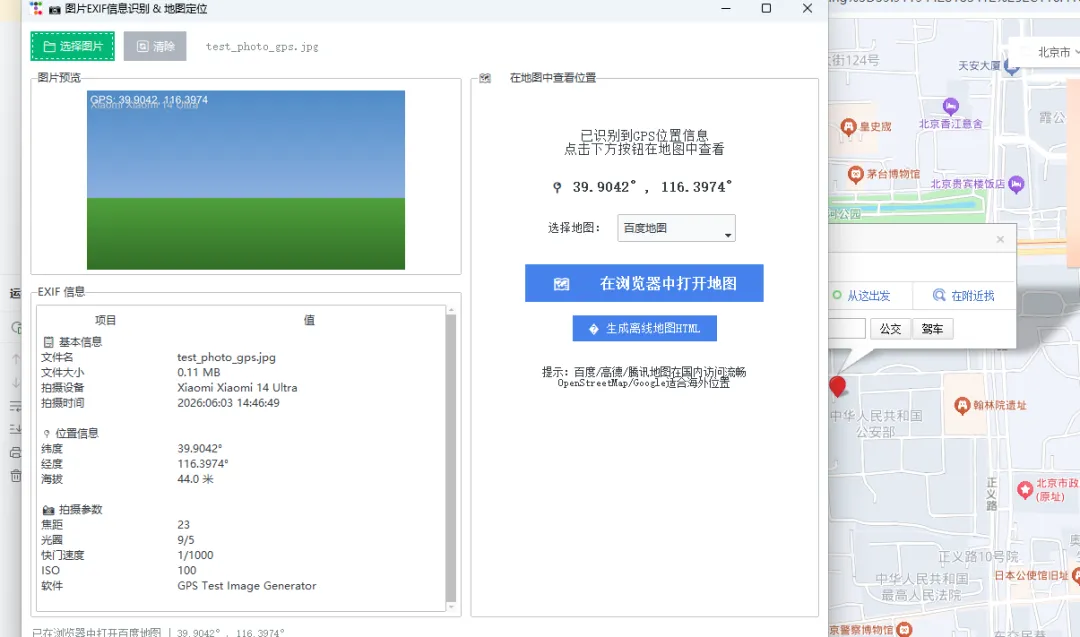
开场白
你有没有想过,每一张用手机拍下的照片,都在默默记录着你的行踪?
没错,现代智能手机拍摄的每一张照片,都会在文件中嵌入一组叫做 EXIF(Exchangeable Image File Format)的元数据。这组数据不仅包含了拍摄设备、光圈、快门、ISO 等摄影参数,更关键的是——如果你拍照时开启了定位,照片里还会藏着精确到小数点后六位的 GPS 经纬度坐标。
这意味着什么?意味着一张看似普通的风景照,实际上暗含了你在哪个城市、哪条街道、甚至哪栋楼拍下它的信息。对于摄影爱好者来说,这是整理旅行轨迹的宝藏数据;对于安全意识强的人来说,这是发朋友圈前需要注意清除的隐私信息。
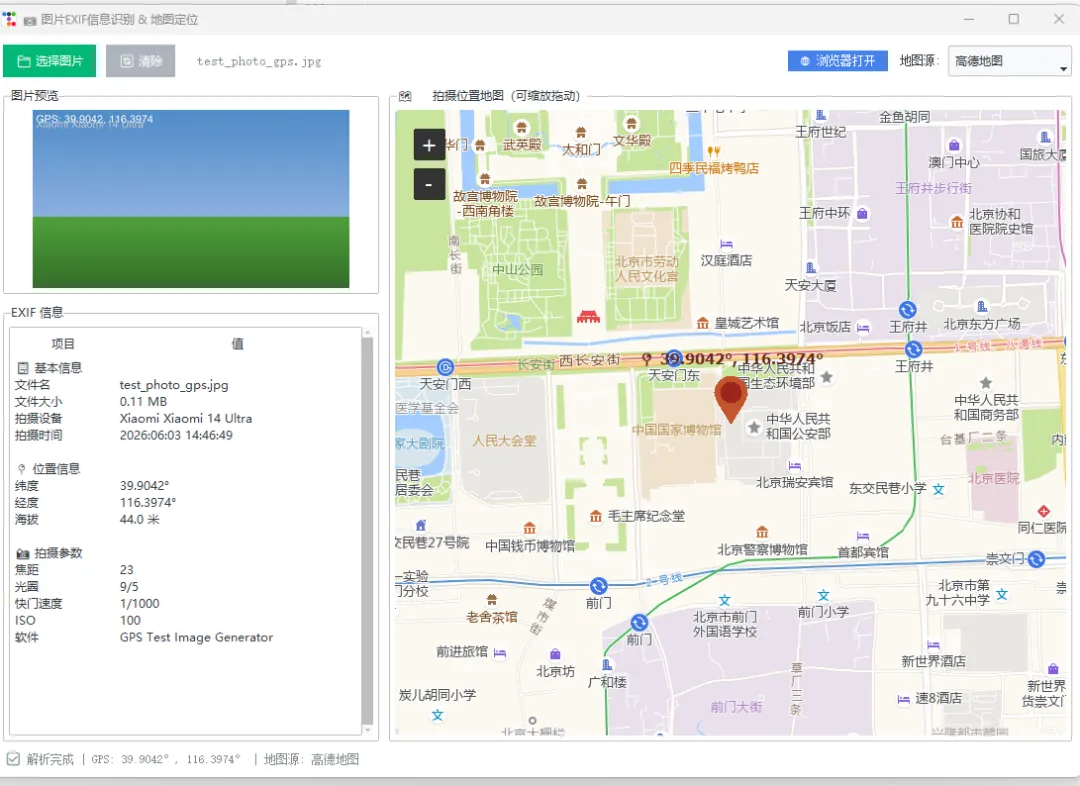
今天,我们用 Python + Tkinter 打造一款桌面级的照片 EXIF 识别工具。它不是一个简陋的命令行脚本,而是一个拥有浅色精致界面、左右分栏布局、内嵌可交互地图的完整桌面应用。你只需要选择一张照片,程序就会自动解析出所有拍摄信息,以美观的表格呈现,并且在右侧的地图上用红色标记精准定位拍摄地点——支持百度地图、高德地图、高德卫星图、腾讯地图、OpenStreetMap 五种地图源一键切换。
整个工具的技术栈非常轻量:核心逻辑不到 300 行 Python 代码,依赖仅需 Pillow、exifread、tkintermapview 三个库,无需注册任何 API Key,无需联网认证,开箱即用。无论你是想学习 EXIF 解析、坐标系转换、GUI 开发,还是想做一个实用的照片管理小工具,这篇文章都会给你完整的代码和思路。
接下来,我们从架构设计、核心代码、坐标转换、地图集成四个维度,逐步拆解这个工具的实现过程。文章末尾附上完整可运行代码,复制即可使用。
一、工具效果预览
┌─────────────────────────────────────────────────────────────────────────┐
│  📷 图片EXIF信息识别 & 地图定位                                          │
│                                                                         │
│  [📁 选择图片] [🔄 清除]  test_photo.jpg       地图源: [高德地图 ▼] [🌐] │
│                                                                         │
│  ┌─ 图片预览 ──────────┐    ┌─ 🗺️ 拍摄位置地图(可缩放拖动)──────────┐ │
│  │                     │    │                                          │ │
│  │    [照片缩略图]      │    │         ┌──────────────────┐            │ │
│  │                     │    │         │   可交互地图区域   │            │ │
│  └─────────────────────┘    │         │   支持缩放/拖动   │            │ │
│                              │         │                  │            │ │
│  ┌─ EXIF 信息 ─────────┐    │         │    📍 标记点      │            │ │
│  │ 项目    │ 值         │    │         │                  │            │ │
│  │─────────┼───────────│    │         └──────────────────┘            │ │
│  │ 文件名  │ photo.jpg  │    │                                          │ │
│  │ 文件大小│ 3.52 MB    │    │  支持:百度/高德/高德卫星/腾讯/OSM        │ │
│  │ 拍摄设备│ Xiaomi 14  │    │                                          │ │
│  │ 拍摄时间│ 2024:06:03 │    └──────────────────────────────────────────┘ │
│  │ 纬度   │ 39.9042°   │                                                 │
│  │ 经度   │ 116.3974°  │                                                 │
│  │ 光圈   │ F/1.8      │                                                 │
│  │ 快门   │ 1/1000     │                                                 │
│  └─────────┴───────────┘                                                 │
│                                                                           │
│  ✅ 解析完成 | GPS: 39.9042°, 116.3974° | 地图源: 高德地图                │
└───────────────────────────────────────────────────────────────────────────┘
核心功能一览:
二、核心技术解析
2.1 EXIF 信息提取
EXIF 是嵌入在图片文件头部的元数据标准。我们使用 exifread 库来解析,它能读取几乎所有 JPEG/TIFF 格式图片的 EXIF 标签。
GPS 坐标在 EXIF 中以度/分/秒(DMS)格式存储,例如:
GPS GPSLatitude: [39, 54, 15.12]
GPS GPSLatitudeRef: N
GPS GPSLongitude: [116, 23, 50.64]
GPS GPSLongitudeRef: E
我们需要将其转换为十进制度数:
defconvert_to_degrees(value):
"""度/分/秒 → 十进制度数"""
    d = float(value.values[0].num) / float(value.values[0].den)
    m = float(value.values[1].num) / float(value.values[1].den)
    s = float(value.values[2].num) / float(value.values[2].den)
return d + (m / 60.0) + (s / 3600.0)
公式:十进制度 = 度 + 分/60 + 秒/3600
2.2 坐标系转换(WGS84 → GCJ02 → BD09)
这是国内地图开发绕不开的话题。中国的地图服务使用加密坐标系:
如果把 WGS84 坐标直接放到高德/百度地图上,标注点会偏移几百米。所以必须做坐标转换:
defwgs84_to_gcj02(lat, lon):
"""WGS84 → GCJ02(用于高德/腾讯地图)"""
# 基于国测局的加密算法
    a = 6378245.0# 长半轴
    ee = 0.00669342162296594323# 偏心率平方
# ... 完整转换算法见下方代码 ...

defgcj02_to_bd09(lat, lon):
"""GCJ02 → BD09(用于百度地图)"""
# 百度在火星坐标基础上的二次加密
    x_pi = 3.14159265358979324 * 3000.0 / 180.0
# ... 完整算法见下方代码 ...
2.3 内嵌地图实现(tkintermapview + 瓦片源切换)
tkintermapview 是一个基于 Tkinter 的地图控件,默认使用 OpenStreetMap 瓦片。但 OSM 在国内访问不稳定,所以我们替换为高德瓦片:
# 高德地图瓦片(国内秒加载,无需Key)
TILE_SERVERS = {
"高德地图": "https://webrd02.is.autonavi.com/appmaptile?lang=zh_cn&size=1&scale=1&style=8&x={x}&y={y}&z={z}",
"高德卫星": "https://webst02.is.autonavi.com/appmaptile?style=6&x={x}&y={y}&z={z}",
"OpenStreetMap": "https://tile.openstreetmap.org/{z}/{x}/{y}.png",
}

# 一行代码切换瓦片源
self.map_widget.set_tile_server(TILE_SERVERS["高德地图"])
瓦片 URL 中的 {x}, {y}, {z} 是标准的墨卡托投影切片坐标,tkintermapview 会自动计算并请求对应的地图方块图片。
三、完整代码
以下是完整的可运行代码,复制保存为 gui_app.py 即可使用:
"""
图片EXIF信息识别 + 地图定位 - GUI桌面版
功能:选择图片 → 解析EXIF → 表格展示 → GUI内嵌地图显示(支持百度/高德/OpenStreetMap切换)
依赖:pip install Pillow exifread tkintermapview
可选:pip install ttkbootstrap(美化界面)
"""
import tkinter as tk
from tkinter import ttk, filedialog, messagebox
import os
import webbrowser
import exifread
from PIL import Image, ImageTk

# 尝试导入美化主题
try:
import ttkbootstrap as ttkb
from ttkbootstrap.constants import *
    USE_BOOTSTRAP = True
except ImportError:
    USE_BOOTSTRAP = False

# 导入地图组件
try:
import tkintermapview
    HAS_MAP = True
except ImportError:
    HAS_MAP = False

# 浅色主题配色
COLORS = {
'bg': '#f5f7fa',
'card_bg': '#ffffff',
'text': '#2c3e50',
'text_light': '#7f8c8d',
'accent': '#3498db',
'accent_green': '#27ae60',
'border': '#e0e6ed',
'canvas_bg': '#ecf0f1',
}

# 地图瓦片源配置
TILE_SERVERS = {
"百度地图": "https://maponline0.bdimg.com/tile/?qt=vtile&x={x}&y={y}&z={z}&styles=pl&scaler=1&udt=20240101",
"高德地图": "https://webrd02.is.autonavi.com/appmaptile?lang=zh_cn&size=1&scale=1&style=8&x={x}&y={y}&z={z}",
"高德卫星": "https://webst02.is.autonavi.com/appmaptile?style=6&x={x}&y={y}&z={z}",
"OpenStreetMap": "https://tile.openstreetmap.org/{z}/{x}/{y}.png",
"腾讯地图": "https://rt0.map.gtimg.com/tile?z={z}&x={x}&y={y}&type=vector&styleid=0",
}

DEFAULT_TILE = "高德地图"


defconvert_to_degrees(value):
"""将EXIF GPS坐标(度/分/秒)转换为十进制度数"""
    d = float(value.values[0].num) / float(value.values[0].den)
    m = float(value.values[1].num) / float(value.values[1].den)
    s = float(value.values[2].num) / float(value.values[2].den)
return d + (m / 60.0) + (s / 3600.0)


defwgs84_to_gcj02(lat, lon):
"""WGS84坐标转GCJ02(高德/腾讯坐标系)"""
import math
    a = 6378245.0
    ee = 0.00669342162296594323

def_transform_lat(x, y):
        ret = -100.0 + 2.0 * x + 3.0 * y + 0.2 * y * y + 0.1 * x * y + 0.2 * math.sqrt(abs(x))
        ret += (20.0 * math.sin(6.0 * x * math.pi) + 20.0 * math.sin(2.0 * x * math.pi)) * 2.0 / 3.0
        ret += (20.0 * math.sin(y * math.pi) + 40.0 * math.sin(y / 3.0 * math.pi)) * 2.0 / 3.0
        ret += (160.0 * math.sin(y / 12.0 * math.pi) + 320.0 * math.sin(y * math.pi / 30.0)) * 2.0 / 3.0
return ret

def_transform_lon(x, y):
        ret = 300.0 + x + 2.0 * y + 0.1 * x * x + 0.1 * x * y + 0.1 * math.sqrt(abs(x))
        ret += (20.0 * math.sin(6.0 * x * math.pi) + 20.0 * math.sin(2.0 * x * math.pi)) * 2.0 / 3.0
        ret += (20.0 * math.sin(x * math.pi) + 40.0 * math.sin(x / 3.0 * math.pi)) * 2.0 / 3.0
        ret += (150.0 * math.sin(x / 12.0 * math.pi) + 300.0 * math.sin(x / 30.0 * math.pi)) * 2.0 / 3.0
return ret

    dlat = _transform_lat(lon - 105.0, lat - 35.0)
    dlon = _transform_lon(lon - 105.0, lat - 35.0)
    radlat = lat / 180.0 * math.pi
    magic = math.sin(radlat)
    magic = 1 - ee * magic * magic
    sqrtmagic = math.sqrt(magic)
    dlat = (dlat * 180.0) / ((a * (1 - ee)) / (magic * sqrtmagic) * math.pi)
    dlon = (dlon * 180.0) / (a / sqrtmagic * math.cos(radlat) * math.pi)
return lat + dlat, lon + dlon


defgcj02_to_bd09(lat, lon):
"""GCJ02坐标转BD09(百度坐标系)"""
import math
    x_pi = 3.14159265358979324 * 3000.0 / 180.0
    z = math.sqrt(lon * lon + lat * lat) + 0.00002 * math.sin(lat * x_pi)
    theta = math.atan2(lat, lon) + 0.000003 * math.cos(lon * x_pi)
    bd_lon = z * math.cos(theta) + 0.0065
    bd_lat = z * math.sin(theta) + 0.006
return bd_lat, bd_lon


defwgs84_to_bd09(lat, lon):
"""WGS84直接转百度坐标"""
    gcj_lat, gcj_lon = wgs84_to_gcj02(lat, lon)
return gcj02_to_bd09(gcj_lat, gcj_lon)


defextract_exif(filepath):
"""提取图片的EXIF信息"""
    info = {
'gps': None,
'datetime': None,
'device': None,
'resolution': None,
'details': {}
    }

with open(filepath, 'rb') as f:
        tags = exifread.process_file(f, details=True)

ifnot tags:
return info

    lat_tag = tags.get('GPS GPSLatitude')
    lat_ref = tags.get('GPS GPSLatitudeRef')
    lon_tag = tags.get('GPS GPSLongitude')
    lon_ref = tags.get('GPS GPSLongitudeRef')

if lat_tag and lon_tag and lat_ref and lon_ref:
        lat = convert_to_degrees(lat_tag)
        lon = convert_to_degrees(lon_tag)
if str(lat_ref) == 'S':
            lat = -lat
if str(lon_ref) == 'W':
            lon = -lon
        info['gps'] = {'lat': round(lat, 6), 'lon': round(lon, 6)}

        alt_tag = tags.get('GPS GPSAltitude')
if alt_tag:
            alt = float(alt_tag.values[0].num) / float(alt_tag.values[0].den)
            info['gps']['alt'] = round(alt, 1)

    dt_tag = tags.get('EXIF DateTimeOriginal') or tags.get('Image DateTime')
if dt_tag:
        info['datetime'] = str(dt_tag)

    make = tags.get('Image Make')
    model = tags.get('Image Model')
if make or model:
        info['device'] = f"{make or''}{model or''}".strip()

    width = tags.get('EXIF ExifImageWidth') or tags.get('Image ImageWidth')
    height = tags.get('EXIF ExifImageLength') or tags.get('Image ImageLength')
if width and height:
        info['resolution'] = f"{width} × {height}"

    detail_keys = {
'EXIF FocalLength': '焦距',
'EXIF FNumber': '光圈',
'EXIF ExposureTime': '快门速度',
'EXIF ISOSpeedRatings': 'ISO',
'EXIF Flash': '闪光灯',
'EXIF LensModel': '镜头',
'EXIF WhiteBalance': '白平衡',
'Image Software': '软件',
    }
for key, label in detail_keys.items():
if key in tags:
            info['details'][label] = str(tags[key])

return info


classPhotoMapApp:
def__init__(self):
if USE_BOOTSTRAP:
            self.root = ttkb.Window(title="图片EXIF信息识别 & 地图定位", themename="litera")
else:
            self.root = tk.Tk()
            self.root.title("图片EXIF信息识别 & 地图定位")
            self.root.configure(bg=COLORS['bg'])

        self.root.geometry("1100x750")
        self.root.minsize(900, 600)

        self.current_image_path = None
        self.photo_image = None
        self.current_gps = None

        self._build_ui()

def_build_ui(self):
ifnot USE_BOOTSTRAP:
            style = ttk.Style()
            style.theme_use('clam')
            style.configure('TFrame', background=COLORS['bg'])
            style.configure('TLabel', background=COLORS['bg'], foreground=COLORS['text'])
            style.configure('TLabelframe', background=COLORS['card_bg'], foreground=COLORS['accent'])
            style.configure('TLabelframe.Label', background=COLORS['bg'], foreground=COLORS['accent'],
                            font=('', 10, 'bold'))
            style.configure('Treeview', background=COLORS['card_bg'], foreground=COLORS['text'],
                            fieldbackground=COLORS['card_bg'], rowheight=26)
            style.configure('Treeview.Heading', background=COLORS['border'], foreground=COLORS['text'],
                            font=('', 9, 'bold'))
            style.map('Treeview', background=[('selected', '#d4e6f7')],
                      foreground=[('selected', COLORS['text'])])

        main_frame = ttk.Frame(self.root, padding=10)
        main_frame.pack(fill=tk.BOTH, expand=True)

# 顶部按钮区
        top_frame = ttk.Frame(main_frame)
        top_frame.pack(fill=tk.X, pady=(0, 10))

if USE_BOOTSTRAP:
            btn_open = ttkb.Button(top_frame, text="选择图片", command=self.open_file, bootstyle="success")
            btn_clear = ttkb.Button(top_frame, text="清除", command=self.clear_all, bootstyle="secondary")
else:
            btn_open = tk.Button(top_frame, text="📁 选择图片", command=self.open_file,
                                 bg=COLORS['accent_green'], fg='white', font=('', 10, 'bold'),
                                 padx=15, pady=5, relief=tk.FLAT, cursor='hand2')
            btn_clear = tk.Button(top_frame, text="🔄 清除", command=self.clear_all,
                                  bg=COLORS['border'], fg=COLORS['text'], font=('', 10),
                                  padx=15, pady=5, relief=tk.FLAT, cursor='hand2')

        btn_open.pack(side=tk.LEFT, padx=(0, 10))
        btn_clear.pack(side=tk.LEFT)

        self.file_label = ttk.Label(top_frame, text="未选择文件", font=("", 10),
                                     foreground=COLORS['text_light'])
        self.file_label.pack(side=tk.LEFT, padx=20)

# 地图源选择
        map_select_frame = ttk.Frame(top_frame)
        map_select_frame.pack(side=tk.RIGHT)

        ttk.Label(map_select_frame, text="地图源:", font=('', 9)).pack(side=tk.LEFT, padx=(0, 5))
        self.tile_choice = tk.StringVar(value=DEFAULT_TILE)
        tile_combo = ttk.Combobox(map_select_frame, textvariable=self.tile_choice,
                                   values=list(TILE_SERVERS.keys()), state='readonly', width=14)
        tile_combo.pack(side=tk.LEFT)
        tile_combo.bind('<<ComboboxSelected>>', self._on_tile_change)

        btn_browser = tk.Button(top_frame, text="🌐 浏览器打开", command=self._open_in_browser,
                                bg=COLORS['accent'], fg='white', font=('', 9),
                                padx=10, pady=3, relief=tk.FLAT, cursor='hand2')
        btn_browser.pack(side=tk.RIGHT, padx=(0, 10))

# 中部左右分栏
        content_frame = ttk.Frame(main_frame)
        content_frame.pack(fill=tk.BOTH, expand=True)

# 左侧
        left_frame = ttk.Frame(content_frame, width=380)
        left_frame.pack(side=tk.LEFT, fill=tk.BOTH, padx=(0, 5))
        left_frame.pack_propagate(False)

        preview_lf = ttk.LabelFrame(left_frame, text="图片预览", padding=5)
        preview_lf.pack(fill=tk.X, pady=(0, 10))

        self.preview_canvas = tk.Canvas(preview_lf, height=180, bg=COLORS['canvas_bg'],
                                         highlightthickness=1, highlightbackground=COLORS['border'])
        self.preview_canvas.pack(fill=tk.X)
        self.preview_canvas.create_text(190, 90, text="请选择一张图片",
                                         fill=COLORS['text_light'], font=("", 11))

        info_lf = ttk.LabelFrame(left_frame, text="EXIF 信息", padding=5)
        info_lf.pack(fill=tk.BOTH, expand=True)

        columns = ('field', 'value')
        self.tree = ttk.Treeview(info_lf, columns=columns, show='headings', height=14)
        self.tree.heading('field', text='项目')
        self.tree.heading('value', text='值')
        self.tree.column('field', width=90, minwidth=70)
        self.tree.column('value', width=230, minwidth=120)

        scrollbar = ttk.Scrollbar(info_lf, orient=tk.VERTICAL, command=self.tree.yview)
        self.tree.configure(yscrollcommand=scrollbar.set)
        self.tree.pack(side=tk.LEFT, fill=tk.BOTH, expand=True)
        scrollbar.pack(side=tk.RIGHT, fill=tk.Y)

# 右侧地图
        right_frame = ttk.Frame(content_frame)
        right_frame.pack(side=tk.RIGHT, fill=tk.BOTH, expand=True, padx=(5, 0))

        map_lf = ttk.LabelFrame(right_frame, text="拍摄位置地图(可缩放拖动)", padding=5)
        map_lf.pack(fill=tk.BOTH, expand=True)

if HAS_MAP:
            self.map_widget = tkintermapview.TkinterMapView(map_lf, corner_radius=8)
            self.map_widget.pack(fill=tk.BOTH, expand=True)
            self.map_widget.set_tile_server(TILE_SERVERS[DEFAULT_TILE])
            self.map_widget.set_position(39.9042, 116.3974)
            self.map_widget.set_zoom(5)
else:
            placeholder = tk.Frame(map_lf, bg=COLORS['canvas_bg'])
            placeholder.pack(fill=tk.BOTH, expand=True)
            tk.Label(placeholder,
                     text="地图组件未安装\n\n执行: pip install tkintermapview\n\n安装后重启即可显示",
                     bg=COLORS['canvas_bg'], fg=COLORS['text_light'],
                     font=("", 11), justify=tk.CENTER
                     ).place(relx=0.5, rely=0.5, anchor=tk.CENTER)

# 底部状态栏
        self.status_var = tk.StringVar(value="就绪 | 支持: JPG / JPEG / PNG / TIFF")
        ttk.Label(main_frame, textvariable=self.status_var, font=("", 9),
                  foreground=COLORS['text_light']).pack(fill=tk.X, pady=(10, 0))

def_on_tile_change(self, event=None):
ifnot HAS_MAP:
return
        choice = self.tile_choice.get()
        tile_url = TILE_SERVERS.get(choice)
if tile_url:
            self.map_widget.set_tile_server(tile_url)
            self.status_var.set(f"已切换地图源: {choice}")
if self.current_gps:
                self._update_map_marker()

def_update_map_marker(self):
ifnot HAS_MAP ornot self.current_gps:
return
        lat = self.current_gps['lat']
        lon = self.current_gps['lon']
        choice = self.tile_choice.get()

if choice in ("高德地图", "高德卫星", "腾讯地图"):
            map_lat, map_lon = wgs84_to_gcj02(lat, lon)
elif choice == "百度地图":
            map_lat, map_lon = wgs84_to_gcj02(lat, lon)
else:
            map_lat, map_lon = lat, lon

        self.map_widget.delete_all_marker()
        self.map_widget.set_position(map_lat, map_lon)
        self.map_widget.set_zoom(15)
        self.map_widget.set_marker(map_lat, map_lon, text=f"{lat}, {lon}")

def_open_in_browser(self):
ifnot self.current_gps:
            messagebox.showinfo("提示", "请先选择包含GPS信息的图片")
return
        lat = self.current_gps['lat']
        lon = self.current_gps['lon']
        choice = self.tile_choice.get()

if choice in ("百度地图",):
            bd_lat, bd_lon = wgs84_to_bd09(lat, lon)
            url = f"https://api.map.baidu.com/marker?location={bd_lat},{bd_lon}&title=拍摄位置&output=html&coord_type=bd09ll"
elif choice in ("高德地图", "高德卫星"):
            gcj_lat, gcj_lon = wgs84_to_gcj02(lat, lon)
            url = f"https://uri.amap.com/marker?position={gcj_lon},{gcj_lat}&name=拍摄位置"
else:
            url = f"https://www.openstreetmap.org/?mlat={lat}&mlon={lon}#map=16/{lat}/{lon}"

        webbrowser.open(url)

defopen_file(self):
        filetypes = [("图片文件", "*.jpg *.jpeg *.png *.tiff *.tif *.heic"), ("所有文件", "*.*")]
        filepath = filedialog.askopenfilename(title="选择图片", filetypes=filetypes)
ifnot filepath:
return

        self.current_image_path = filepath
        self.file_label.config(text=os.path.basename(filepath))
        self._show_preview(filepath)

try:
            exif_info = extract_exif(filepath)
            self._show_info(exif_info, filepath)
if exif_info['gps']:
                self.current_gps = exif_info['gps']
                self._update_map_marker()
else:
                self.current_gps = None
if HAS_MAP:
                    self.map_widget.delete_all_marker()
                    self.map_widget.set_position(39.9042, 116.3974)
                    self.map_widget.set_zoom(5)
except Exception as e:
            messagebox.showerror("错误", f"解析失败:\n{str(e)}")

def_show_preview(self, filepath):
try:
            img = Image.open(filepath)
            canvas_width = self.preview_canvas.winfo_width() or370
            max_h = 180
            ratio = min(canvas_width / img.width, max_h / img.height)
            img = img.resize((int(img.width * ratio), int(img.height * ratio)), Image.LANCZOS)
            self.photo_image = ImageTk.PhotoImage(img)
            self.preview_canvas.delete("all")
            self.preview_canvas.config(bg=COLORS['card_bg'])
            self.preview_canvas.create_image(canvas_width // 2, max_h // 2,
                                              image=self.photo_image, anchor=tk.CENTER)
except Exception:
            self.preview_canvas.delete("all")
            self.preview_canvas.create_text(190, 90, text="无法预览", fill=COLORS['text_light'])

def_show_info(self, info, filepath):
for item in self.tree.get_children():
            self.tree.delete(item)

        self.tree.insert('', tk.END, values=('📋 基本信息', ''))
        self.tree.insert('', tk.END, values=('文件名', os.path.basename(filepath)))
        filesize = os.path.getsize(filepath) / 1024 / 1024
        self.tree.insert('', tk.END, values=('文件大小', f'{filesize:.2f} MB'))
if info['device']:
            self.tree.insert('', tk.END, values=('拍摄设备', info['device']))
if info['datetime']:
            self.tree.insert('', tk.END, values=('拍摄时间', info['datetime']))
if info['resolution']:
            self.tree.insert('', tk.END, values=('分辨率', info['resolution']))

        self.tree.insert('', tk.END, values=('', ''))
        self.tree.insert('', tk.END, values=('📍 位置信息', ''))
if info['gps']:
            self.tree.insert('', tk.END, values=('纬度', f"{info['gps']['lat']}°"))
            self.tree.insert('', tk.END, values=('经度', f"{info['gps']['lon']}°"))
if'alt'in info['gps']:
                self.tree.insert('', tk.END, values=('海拔', f"{info['gps']['alt']} 米"))
            self.status_var.set(f"✅ GPS: {info['gps']['lat']}°, {info['gps']['lon']}° | {self.tile_choice.get()}")
else:
            self.tree.insert('', tk.END, values=('状态', '无GPS信息'))
            self.status_var.set("✅ 解析完成 | 无GPS信息")

if info['details']:
            self.tree.insert('', tk.END, values=('', ''))
            self.tree.insert('', tk.END, values=('📸 拍摄参数', ''))
for key, value in info['details'].items():
                self.tree.insert('', tk.END, values=(key, value))

defclear_all(self):
        self.current_image_path = None
        self.photo_image = None
        self.current_gps = None
        self.file_label.config(text="未选择文件")
        self.preview_canvas.delete("all")
        self.preview_canvas.config(bg=COLORS['canvas_bg'])
        self.preview_canvas.create_text(190, 90, text="请选择一张图片",
                                         fill=COLORS['text_light'], font=("", 11))
for item in self.tree.get_children():
            self.tree.delete(item)
if HAS_MAP:
            self.map_widget.delete_all_marker()
            self.map_widget.set_position(39.9042, 116.3974)
            self.map_widget.set_zoom(5)
        self.status_var.set("就绪 | 支持: JPG / JPEG / PNG / TIFF")

defrun(self):
        self.root.mainloop()


if __name__ == '__main__':
    app = PhotoMapApp()
    app.run()
四、知识点总结
4.1 EXIF 元数据
4.2 坐标系体系
4.3 地图瓦片原理
4.4 Python GUI 开发
五、拓展场景与测试步骤
5.1 测试步骤
# 1. 安装依赖
pip install Pillow exifread tkintermapview

# 2. 运行程序
python gui_app.py

# 3. 测试操作
# - 点击「选择图片」选择一张手机拍的原图(不是截图、不是微信传的图)
# - 左侧表格应显示设备、时间、GPS等信息
# - 右侧地图应自动定位到拍摄位置并显示标记
# - 切换顶部「地图源」下拉框,地图瓦片应实时切换
# - 点击「浏览器打开」应跳转到网页版地图

# 4. 如果没有带GPS的照片,可以用生成器创建测试图片:
pip install piexif
python create_test_image_gui.py
# 生成后用 gui_app.py 打开验证
5.2 可拓展方向
本文代码已开源,复制即可运行。觉得有用就点个在看,下期我们用 Python 做更好玩的事。
