Hyperview Python 二次开发,自动为曲线添加标记
- 2026-10-11 06:10:42
Hyperview Python 二次开发,自动为曲线添加标记
往期文章 CAE仿真 孔边网格必须分布偶数节点的一种解释
CAE仿真 网格评价中的雅可比为什么是0-1?及参数单元是什么
HyperView Python 二次开发 自动调整曲线legend字体大小
HyperView Python 二次开发 告别手动调整曲线颜色,线形,粗细
HyperMesh Python二次开发-自动修改Component名字
「CAE仿真记」
愿与您一同,用代码提升效率!
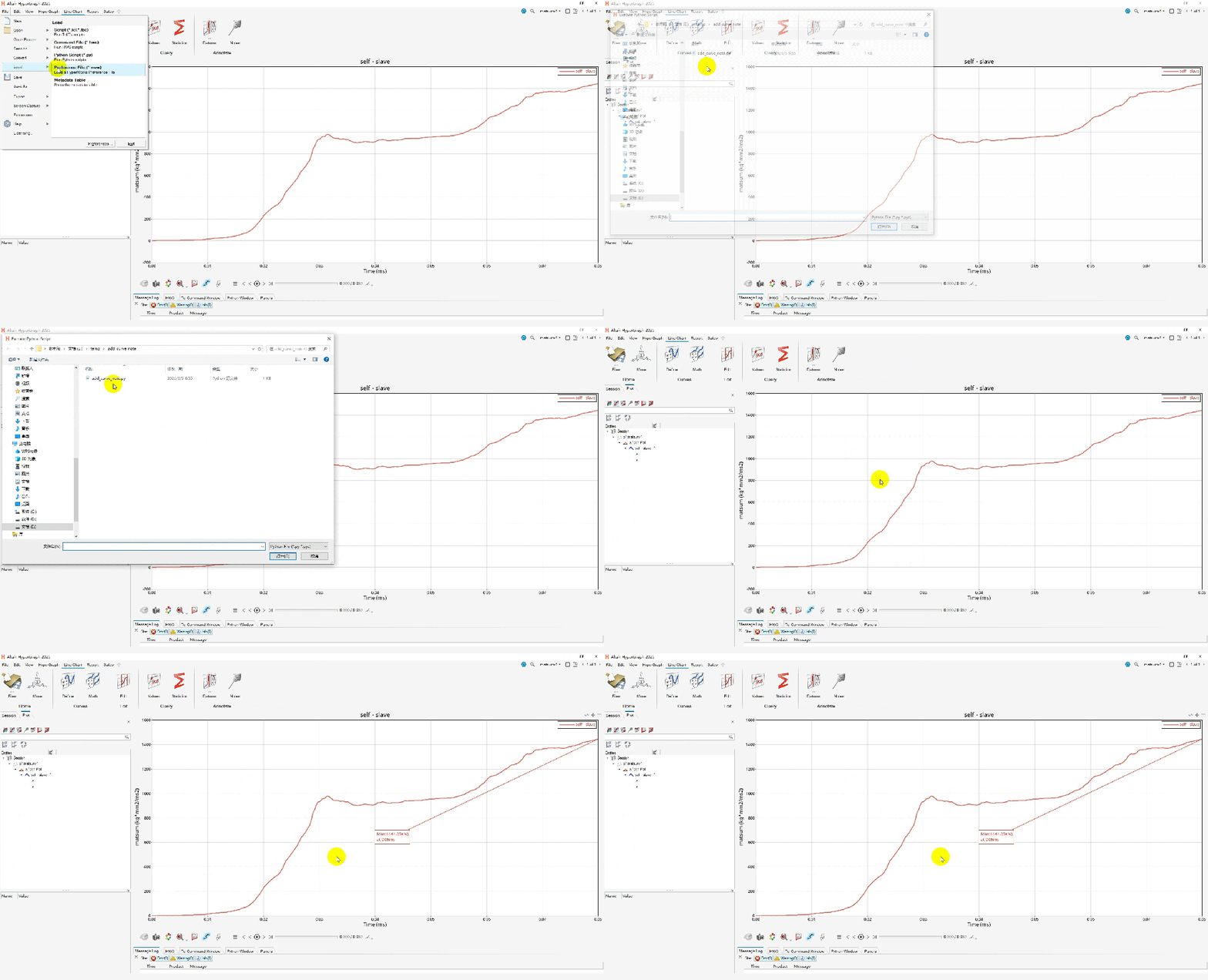
仿真工程师在编写报告时,报告中大量曲线需要标记最大最小值,手动标记耗费时间,使用脚本1秒钟。
此篇说明怎样通过HyperView二次开发自动标记曲线极值,告别手动标记。
HyperView基于tcl语言实现自动标记曲线极值方法:
Hyperview二次开发之自动曲线绘制(安全带固定点强度加载曲线)
备注:此处超链接,内有基于tcl语言实现曲线极值标记方法
HyperView基于Python语言实现自动标记曲线极值方法:
def add_note_for_curve (curveid,yunit,xunit): import hw import hw.hg as hg ses = hw.Session() page = ses.get(hw.Page) win = ses.get(hw.Window) curve = ses.get(hg.CurveXY,id=curveid)# 增加一个note note = hg.Note( attachTo="curve", attachmentCurve= curveid , attachmentPoint="indexofmax(c" + str(curveid) + ".y)", text="Max:{y,%3.2f}"+str(yunit)+"}\nat {x,%3.2f}"+str(xunit)+"", autoPosition=True,# autoPositionStrategy=autoPos, curveColor=True, ) noteid = note.id win.update()return noteidadd_note_for_curve(1,"KN","ms")💡提示
curvedid是曲线id,xunit和yunit分别是横纵坐标单位标识
如有问题,欢迎留言指正与交流。 本文已收录进合集,进入文末合集可查看更多笔记。
本文来自网友投稿或网络内容,如有侵犯您的权益请联系我们删除,联系邮箱:596563534@qq.com 。
随机文章
-
 10个月宝宝每天需要喝多少奶粉?
- Linux 容器化服务管理:Docker + Podman + Systemd 集成运维实战
- Linux内核防线被AI报告“淹死”,Claude Mythos却被主动封印
- Greg: “Rust将拯救Linux,抵御AI掀起的漏洞发现潮”
- 年薪70个W,强烈推荐Linux C++进阶路线图
- 针对 Linux 内核 6.19+ 上 MongoDB 8 启动失败的故障排除指南
- Lomiri 技术会议回顾 | 开放 Linux 用户体验遇上 RISC-V 计算
- 99% 的 Python 新手都分不清的两件事
- Python期末考试,练完这100题考试稳过啊
- 不要盲目的自学Python那样只会毁了你!
- 升学分享|Python仅入门,三年后同时拿下NUS和NTU计算机offer