AI辅助科研第一期 | GEE+Python,通关地表温度(LST)时空演变剖面图!
- 2026-09-10 18:38:02
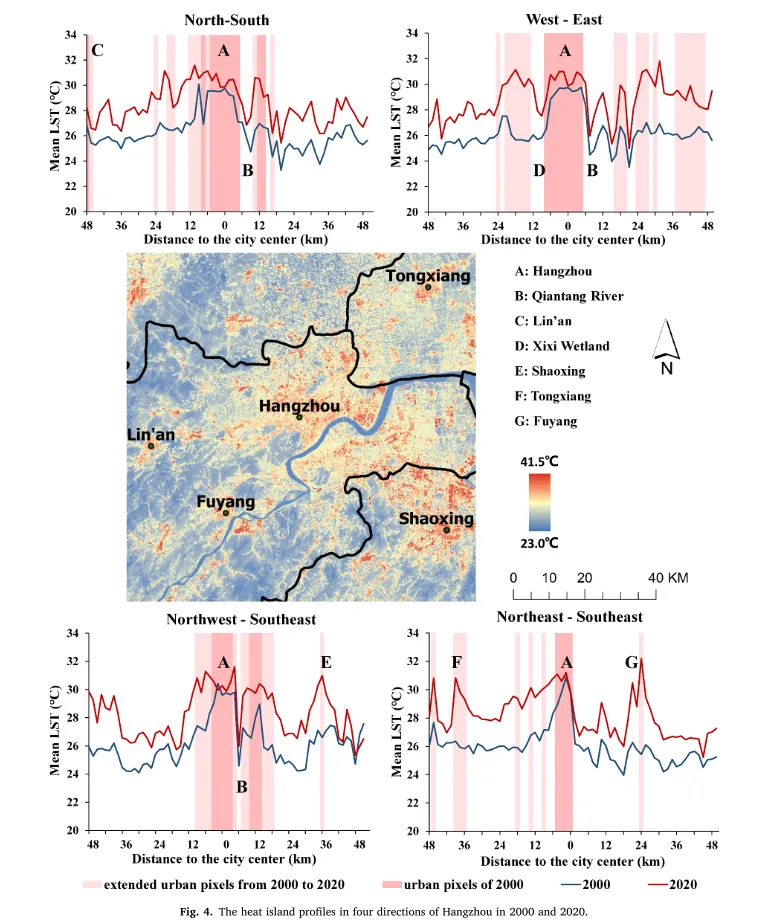
💡 核心实战工作流拆解
本次复现实战,我们将抛弃传统的“手动点点点”,直接引入目前最高效的 AI 辅助编程工作流。整体分为两大核心模块:第一步用 GEE 完成剖线采样并生成 CSV 数据,第二步用 Python 完成最终的可视化出图。
📍 Part 1:AI 赋能 GEE,完成空间采样与 CSV 导出
第一步,我们需要在 GEE 中生成贯穿城市的剖面线,并沿线高频提取 LST 和建成区数据,最终导出为 CSV 宽表。写代码前先写好“需求文档”,你可以直接一键复制下方框内的“万能图表复现 AI 提示词模板”,让大模型(如 ChatGPT、Claude 或 Gemini)为你写出极具学术素养的 GEE 底层代码:
【专家角色、文献基准与核心参数】
你是一位精通 Google Earth Engine (GEE) JavaScript API 的城市气候与遥感空间分析专家。请你参考我发你的文献方法论和图片,帮我编写一段 GEE 代码,用于复现我的研究区域LST剖面时空演变分析图。

本项研究的数据与核心参数:
1. 研究区 (ROI):重庆市中心九区,使用左侧 Assets 导入的矢量边界 table。
2. 城市中心点:[重庆朝天门 106.59, 29.57]。
3. 研究年份:2002年(Landsat 5 LT05)、2013年和2023年(Landsat 8 LC08)。选取每年 06-01 至 10-01 的影像。

【具体步骤与技术要求】

* 步骤 1:动态 ROI 与字段名自动检测。 将地图中心锁定为研究区,缩放级别为 10。读取 ROI 矢量的属性表,自动检测并提取代表“行政区划名称”的字段(候选列表:['地名', 'NAME', 'ADNAME', 'District', 'NAME_CHN', 'Name', 'Region'])。根据中心点坐标和 ROI 的 bounding box 计算出一个动态距离 d,用于构建剖面线。
* 步骤 2:构建空间剖面线。 以城市中心点为交点,生成 4 条贯穿研究区的剖面线:南北走向、东西走向、西北-东南走向、西南-东北走向。将生成的线段与 ROI 进行相交裁剪,并保留方向名称(Transect)。
* 步骤 3:遥感数据预处理。 编写云去掩膜函数(基于 QA_PIXEL)并取中值。利用 Landsat 热红外波段反演 LST。利用归一化差值阈值法提取三大年份建成区。生成三个时期的独立扩张图层,最后将所有 LST 和扩张图层合并为一张多波段影像。
* 步骤 4:沿线切片采样与空间连接。 使用 sample() 沿 4 条剖面线每间隔 30 米提取像素值。提取每条线展平坐标(flatten)的第一组点作为起点,计算相对坐标 Plot_X。使用 ee.Join.saveFirst 将采样点与 roi 矢量连接,赋值给 District 属性。
* 步骤 5:可视化与导出。 加载矢量边界,将涵盖 Transect, Plot_X, District, 扩张分类与历年 LST 的结果导出为 CSV 到 Google Drive。
为了让大家直观感受 AI 的强大,这里直接展示 AI 根据上方指令“一秒生成”的完整 GEE 源码。代码逻辑严密、注释清晰,完美契合了我们的顶刊复现需求:
// 步骤 1: 动态 ROI 与字段名自动检测及参数计算
// ==========================================

// 1.1 地图中心锁定研究区
var roi = table;
Map.centerObject(roi, 10);

// 1.2 自动检测代表“行政区划名称”的字段
var candidates = ee.List(['地名', 'NAME', 'ADNAME', 'District', 'NAME_CHN', 'Name', 'Region']);
var firstFeature = roi.first();
var propertyNames = firstFeature.propertyNames();

var districtFieldList = candidates.map(function(name) {
return propertyNames.contains(name) ? name : null;
}).removeAll([null]);

// 如果候选列表均未匹配,则默认取第一个属性字段
var districtField = ee.Algorithms.If(districtFieldList.size().gt(0), districtFieldList.get(0), propertyNames.get(0));
print('自动检测到的行政区划字段名为 (District Field):', districtField);

// 1.3 定义城市中心点并计算动态剖面距离 d
var lonCenter = 106.59;
var latCenter = 29.57;
var center = ee.Geometry.Point([lonCenter, latCenter]);

// 根据 ROI 的 Bounding Box 计算对角线距离,并转换为度数用于构建剖面线
var bounds = roi.geometry().bounds();
var coords = ee.List(bounds.coordinates().get(0));
var p1 = ee.Geometry.Point(coords.get(0));
var p2 = ee.Geometry.Point(coords.get(2));
var d = p1.distance(p2).multiply(1.2); // 适当放大确保贯穿整个研究区

// 经纬度转换系数 (基于中心点纬度进行余弦修正)
var dDegLat = d.divide(111320);
var dDegLon = d.divide(111320.0 * Math.cos(latCenter * Math.PI / 180));

// ==========================================
// 步骤 2: 构建空间剖面线 (4条贯穿剖面线)
// ==========================================

var lon = ee.Number(lonCenter);
var lat = ee.Number(latCenter);

// 1. 东西走向 (West - East)
var lineWE = ee.Geometry.LineString([[lon.subtract(dDegLon), lat], [lon.add(dDegLon), lat]]).intersection(roi.geometry(), 10);
// 2. 南北走向 (North - South)
var lineNS = ee.Geometry.LineString([[lon, lat.subtract(dDegLat)], [lon, lat.add(dDegLat)]]).intersection(roi.geometry(), 10);
// 3. 西北-东南走向 (Northwest - Southeast)
var lineNW_SE = ee.Geometry.LineString([
  [lon.subtract(dDegLon.multiply(0.707)), lat.add(dDegLat.multiply(0.707))],
  [lon.add(dDegLon.multiply(0.707)), lat.subtract(dDegLat.multiply(0.707))]
]).intersection(roi.geometry(), 10);
// 4. 西南-东北走向 (Southwest - Northeast)
var lineNE_SW = ee.Geometry.LineString([
  [lon.subtract(dDegLon.multiply(0.707)), lat.subtract(dDegLat.multiply(0.707))],
  [lon.add(dDegLon.multiply(0.707)), lat.add(dDegLat.multiply(0.707))]
]).intersection(roi.geometry(), 10);

// 合并剖面线矢量集并保留 Transect 属性
var transects = ee.FeatureCollection([
  ee.Feature(lineNS, {Transect: 'NS'}),
  ee.Feature(lineWE, {Transect: 'WE'}),
  ee.Feature(lineNW_SE, {Transect: 'NW_SE'}),
  ee.Feature(lineNE_SW, {Transect: 'NE_SW'})
]);

// ==========================================
// 步骤 3: 遥感数据预处理与指标反演
// ==========================================

// 3.1 Landsat 5 (Collection 2 Level 2) 去云与重缩放函数
functionmaskL5(image) {
var qa = image.select('QA_PIXEL');
var cloudShadowBitMask = 1 << 4;
var cloudsBitMask = 1 << 3;
var mask = qa.bitwiseAnd(cloudShadowBitMask).eq(0).and(qa.bitwiseAnd(cloudsBitMask).eq(0));

var srBands = image.select('SR_B.').multiply(0.0000275).add(-0.2);
var stBand = image.select('ST_B6').multiply(0.00341802).add(149.0).subtract(273.15).rename('LST');
return image.addBands(srBands, null, true).addBands(stBand, null, true).updateMask(mask);
}

// 3.2 Landsat 8 (Collection 2 Level 2) 去云与重缩放函数
functionmaskL8(image) {
var qa = image.select('QA_PIXEL');
var cloudShadowBitMask = 1 << 4;
var cloudsBitMask = 1 << 3;
var mask = qa.bitwiseAnd(cloudShadowBitMask).eq(0).and(qa.bitwiseAnd(cloudsBitMask).eq(0));

var srBands = image.select('SR_B.').multiply(0.0000275).add(-0.2);
var stBand = image.select('ST_B10').multiply(0.00341802).add(149.0).subtract(273.15).rename('LST');
return image.addBands(srBands, null, true).addBands(stBand, null, true).updateMask(mask);
}

// --- 2002年数据处理 (Landsat 5) ---
var l5_2002 = ee.ImageCollection('LANDSAT/LT05/C02/T1_L2')
  .filterBounds(roi).filterDate('2002-06-01', '2002-10-01').map(maskL5).median().clip(roi);

var ndvi_2002 = l5_2002.normalizedDifference(['SR_B4', 'SR_B3']);
var ndbi_2002 = l5_2002.normalizedDifference(['SR_B5', 'SR_B4']);
// 阈值法提取建成区 (NDBI > NDVI 且 NDVI 处于非极稠密植被区)
var built_2002 = ndbi_2002.gt(ndvi_2002).and(ndvi_2002.lt(0.4)).rename('BuiltUp_2002');
var lst_2002 = l5_2002.select('LST').rename('LST_2002');

// --- 2013年数据处理 (Landsat 8) ---
var l8_2013 = ee.ImageCollection('LANDSAT/LC08/C02/T1_L2')
  .filterBounds(roi).filterDate('2013-06-01', '2013-10-01').map(maskL8).median().clip(roi);

var ndvi_2013 = l8_2013.normalizedDifference(['SR_B5', 'SR_B4']);
var ndbi_2013 = l8_2013.normalizedDifference(['SR_B6', 'SR_B5']);
var built_2013 = ndbi_2013.gt(ndvi_2013).and(ndvi_2013.lt(0.4)).rename('BuiltUp_2013');
var lst_2013 = l8_2013.select('LST').rename('LST_2013');

// --- 2023年数据处理 (Landsat 8) ---
var l8_2023 = ee.ImageCollection('LANDSAT/LC08/C02/T1_L2')
  .filterBounds(roi).filterDate('2023-06-01', '2023-10-01').map(maskL8).median().clip(roi);

var ndvi_2023 = l8_2023.normalizedDifference(['SR_B5', 'SR_B4']);
var ndbi_2023 = l8_2023.normalizedDifference(['SR_B6', 'SR_B5']);
var built_2023 = ndbi_2023.gt(ndvi_2023).and(ndvi_2023.lt(0.4)).rename('BuiltUp_2023');
var lst_2023 = l8_2023.select('LST').rename('LST_2023');

// 合并多期多要素为一张多波段主影像
var masterImage = lst_2002.addBands(built_2002)
                           .addBands(lst_2013)
                           .addBands(built_2013)
                           .addBands(lst_2023)
                           .addBands(built_2023);

// ==========================================
// 步骤 4: 沿线切片采样与空间连接 (1D 展平分析)
// ==========================================

// 4.1 沿剖面线按 30 米分辨率提取像素
var sampledPoints = masterImage.sampleRegions({
collection: transects,
properties: ['Transect'],
scale: 30,
geometries: true
});

// 4.2 计算相对坐标 Plot_X (定义城市中心 kilometer 为 0 轴点)
var processedPoints = sampledPoints.map(function(feat) {
var geom = feat.geometry();
var distFromCenter = geom.distance(center); // 计算距市中心的绝对距离 (米)

var ptCoords = geom.coordinates();
var ptLon = ee.Number(ptCoords.get(0));
var ptLat = ee.Number(ptCoords.get(1));
var transect = feat.get('Transect');

// 根据不同的剖面走向,为市中心两侧的点赋予符号,以便绘制从一侧到另一侧的连续曲线图
var sign = ee.Algorithms.If(
    ee.Algorithms.IsEqual(transect, 'WE'),
    ee.Algorithms.If(ptLon.gte(lonCenter), 1, -1),
    ee.Algorithms.If(
      ee.Algorithms.IsEqual(transect, 'NS'),
      ee.Algorithms.If(ptLat.gte(latCenter), 1, -1),
      ee.Algorithms.If(
        ee.Algorithms.IsEqual(transect, 'NE_SW'),
        ee.Algorithms.If(ptLon.gte(lonCenter), 1, -1),
        ee.Algorithms.If(ptLon.gte(lonCenter), 1, -1) // 对 NW_SE 走向同样利用经度区分两侧
      )
    )
  );

// 计算最终的 Plot_X
var plotX = distFromCenter.multiply(ee.Number(sign));
return feat.set('Plot_X', plotX);
});

// 4.3 空间连接 (Join) 自动回填行政区划属性
var spatialFilter = ee.Filter.intersects({
leftField: '.geo',
rightField: '.geo'
});

var spatialJoin = ee.Join.saveFirst({
matchKey: 'roi_match'
});

var joinedPoints = spatialJoin.apply(processedPoints, roi, spatialFilter);

var finalPoints = joinedPoints.map(function(feat) {
var roiMatch = ee.Feature(feat.get('roi_match'));
var districtName = ee.Algorithms.If(roiMatch, roiMatch.get(districtField), 'Unknown');
return feat.set('District', districtName);
});

// ==========================================
// 步骤 5: 可视化与导出部署
// ==========================================

// 5.1 加载底图与图层
Map.addLayer(roi, {color: 'CCCCCC', strokeWidth: 1.5}, '研究区边界', true);
var lstVis = {min: 22, max: 42, palette: ['#313695', '#4575b4', '#e0f3f8', '#fee090', '#f46d43', '#a50026']};
Map.addLayer(masterImage.select('LST_2023'), lstVis, '2023年地表温度(LST)');
Map.addLayer(masterImage.select('BuiltUp_2023').updateMask(masterImage.select('BuiltUp_2023')), {palette: ['#800080']}, '2023年建成区范围', false);
Map.addLayer(transects, {color: '00FF00', strokeWidth: 2}, '四向空间剖面线(Transects)');

// 5.2 导出结果到 Google Drive (CSV 格式)
Export.table.toDrive({
collection: finalPoints,
description: 'High_Density_City_LST_Expansion_Profile',
fileFormat: 'CSV',
selectors: ['Transect', 'Plot_X', 'District', 'LST_2002', 'BuiltUp_2002', 'LST_2013', 'BuiltUp_2013', 'LST_2023', 'BuiltUp_2023']
});

print('数据流配置成功!请在右侧 Task 面板中点击 Run 提交导出任务。');
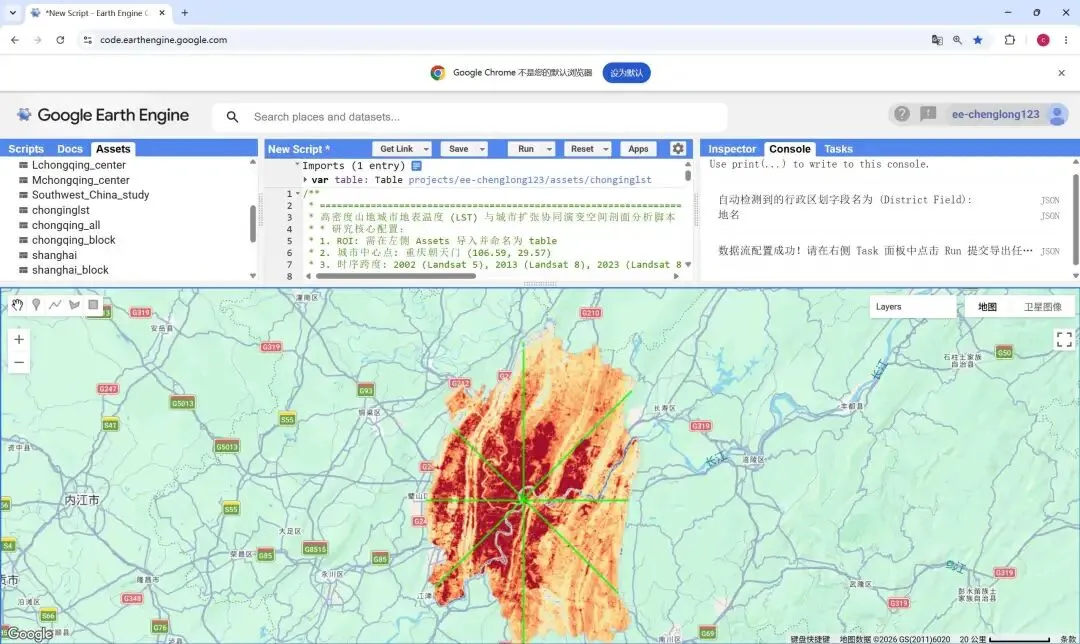
拿到上述 AI 生成的代码后,直接丢进 Google Earth Engine 的 JavaScript 编译器中运行即可,然后从task中下载csv数据。如下图:
🎨 Part 2:Python 进阶,完成顶刊级可视化出图
从 GEE 成功导出 CSV 数据后,就到了最后“惊险一跃”的时刻。我们将打开 Jupyter Notebook,利用 Python (Pandas + Matplotlib/Seaborn) 把枯燥的百万级长表,转化为具有高级学术美感的图表。
同样地,我们不需要从零手敲绘图代码,直接复制下方这段“Python 顶刊出图 AI 提示词模板”喂给大模型:
【专家角色与任务目标】
你是一位精通 Python (Pandas/Matplotlib/Seaborn) 的数据科学家,深谙一区顶刊的图表排版美学。请帮我编写一段 Python 代码,利用我从 GEE 导出的 LST 剖面采样 CSV 数据,绘制出与文献图片风格一致的高清空间演进图。

【数据结构说明】
我拥有的 CSV 文件包含以下列:
`Transect` (剖面方向), `Plot_X` (距中心点相对距离/km), `LST_2002`, `LST_2013`, `LST_2023` (历年地表温度), 以及 `BuiltUp_2002`, `BuiltUp_2013`, `BuiltUp_2023` (值为0或1,代表该采样点属于哪个时期的建成区)。

【具体视觉与技术要求】
1. 数据重构:使用 pandas 将宽表的温度数据转换为长表格式 (melt),以便进行分组绘图。
2. 美学映射与平滑:请勿使用普通的折线图。请使用 seaborn.lmplot (配合 lowess=True) 或引入 statsmodels 的 GAM 模型对散点进行平滑拟合,展现 LST 的演进趋势。
3. 空间背景标注:利用 matplotlib 的 fill_between 绘制半透明色块(alpha=0.1),清晰标注出底层城市各个时期的扩张区间范围。
4. 顶刊排版定制:利用 plt.rcParams 全局接管样式,强制统一为 Arial 字体。去掉冗余的内部网格线,仅保留左侧和下方的 L 型实心坐标轴线 (spines)。
5. 终极防卡死导出:因为沿线每 30m 采样的散点数据量极大,请务必在散点绘制代码中加入 `rasterized=True` 参数。最后将图表导出为 300 DPI 或以上的 PDF 格式。
6. 风格参考:请严格参考文献附件中(请查阅我一同发送的截图)的图片视觉风格进行配色和细节排版,确保完美复现顶刊视觉体验。
将上述提示词喂给大模型后,我们就能得到类似下方这样可以直接跑通的完整 Python 绘图源码。只需修改文件路径,一键运行即可出图:
import os
import pandas as pd
import matplotlib.pyplot as plt
import matplotlib as mpl
from matplotlib.lines import Line2D
from matplotlib.patches import Patch
import numpy as np

# ==========================================
# 1. 学术绘图参数设置
# ==========================================
mpl.rcParams['font.family'] = 'serif'
mpl.rcParams['font.serif'] = ['Times New Roman']
plt.rcParams['font.sans-serif'] = ['Times New Roman']
plt.rcParams['font.weight'] = 'bold'
plt.rcParams['axes.labelweight'] = 'bold'
plt.rcParams['axes.titleweight'] = 'bold'
plt.rcParams['axes.unicode_minus'] = False
plt.rcParams['axes.xmargin'] = 0

# 确保导出的 SVG 图片字体在 AI 中可编辑,不被强制转为死路径
mpl.rcParams['svg.fonttype'] = 'none'

# ==========================================
# 2. 读取与清洗数据
# ==========================================
# 请将此处的路径替换为您自己电脑上的 CSV 路径
file_path = "C://Users//15790//Desktop//x//paper _3//LST_剖面线图//Chongqing_LST_Profile_Data_Final.csv"
df = pd.read_csv(file_path)

district_map = {
'渝中区': 'Yuzhong', '渝北区': 'Yubei', '南岸区': 'Nanan',
'巴南区': 'Banan', '沙坪坝区': 'Shapingba', '大渡口区': 'Dadukou',
'九龙坡区': 'Jiulongpo', '江北区': 'Jiangbei', '北碚区': 'Beibei',
'璧山区': 'Bishan', '合川区': 'Hechuan'
}

df = df.dropna(subset=['Plot_X', 'LST_2002', 'LST_2013', 'LST_2023', 'District', 'urban_2002', 'exp_2002_2013', 'exp_2013_2023'])
df = df[df['District'] != 'Unknown']
df = df[(df['LST_2002'] > 15) & (df['LST_2013'] > 15) & (df['LST_2023'] > 15)]

df['District_EN'] = df['District'].map(district_map).fillna(df['District'])

y_min = df[['LST_2002', 'LST_2013', 'LST_2023']].min().min()
y_max = df[['LST_2002', 'LST_2013', 'LST_2023']].max().max()
y_lims = (y_min - 1.5, y_max + 3.0)

# ==========================================
# 3. 4行1列 绘图与保存循环
# ==========================================
transects = df['Transect'].unique()
chunk_size = 4# 每 4 个样带分为一组

for group_idx in range(0, len(transects), chunk_size):
# 【排版调整 1】:创建 4 行 1 列画布,高度按比例拉长至 16
    fig, axes = plt.subplots(4, 1, figsize=(15, 16))

# 确保 axes 是可迭代的数组
ifnot isinstance(axes, np.ndarray): axes = [axes]

    current_transects = transects[group_idx : group_idx + chunk_size]

for i, tName in enumerate(current_transects):
        ax = axes[i]
        subset = df[df['Transect'] == tName].sort_values('Plot_X').copy()

        ax.margins(x=0.02)

# 宏观斑块平滑
        window = 20
        subset['u02_sm'] = subset['urban_2002'].rolling(window=window, center=True, min_periods=1).max()
        subset['e0213_sm'] = subset['exp_2002_2013'].rolling(window=window, center=True, min_periods=1).max()
        subset['e1323_sm'] = subset['exp_2013_2023'].rolling(window=window, center=True, min_periods=1).max()

# 绘制背景(城市扩张斑块)
        ax.fill_between(subset['Plot_X'], y_lims[0], y_lims[1], where=subset['e1323_sm'] == 1, color='#ffcccc', alpha=0.5, step='mid', zorder=0)
        ax.fill_between(subset['Plot_X'], y_lims[0], y_lims[1], where=subset['e0213_sm'] == 1, color='#ffcc99', alpha=0.5, step='mid', zorder=0)
        ax.fill_between(subset['Plot_X'], y_lims[0], y_lims[1], where=subset['u02_sm'] == 1, color='#ff9999', alpha=0.5, step='mid', zorder=0)

# 绘制行政区划文字(高低错开,去除垂直边界线)
        subset['block_id'] = (subset['District_EN'] != subset['District_EN'].shift()).cumsum()
        d_blocks = subset.groupby(['block_id', 'District_EN'])['Plot_X'].agg(['min', 'max']).reset_index()
for idx_row, row in d_blocks.iterrows():
if (row['max'] - row['min']) > 2.0:
                y_pos = y_lims[1] - 0.5if idx_row % 2 == 0else y_lims[1] - 1.5
                ax.text((row['min'] + row['max']) / 2, y_pos, row['District_EN'],
                        ha='center', va='top', fontsize=10, fontweight='bold', fontname='Times New Roman', zorder=6)

# 折线图
        ax.axvline(x=0, color='black', linestyle='--', linewidth=0.8, zorder=3)
        ax.plot(subset['Plot_X'], subset['LST_2002'], color='#1f77b4', linewidth=1.2, zorder=4)
        ax.plot(subset['Plot_X'], subset['LST_2013'], color='#ff7f0e', linewidth=1.2, zorder=4)
        ax.plot(subset['Plot_X'], subset['LST_2023'], color='#d62728', linewidth=1.2, zorder=4)

# 样式配置
        ax.set_ylim(y_lims)
        x_min, x_max = subset['Plot_X'].min(), subset['Plot_X'].max()
        ticks = np.arange(int(np.floor(x_min/5)*5), int(np.ceil(x_max/5)*5)+1, 5)
        ax.set_xticks(ticks)

# 显式指定刻度标签加粗
        ax.set_xticklabels([str(abs(int(x))) for x in ticks], fontweight='bold')
        plt.setp(ax.get_yticklabels(), fontweight='bold')

        ax.set_xlabel('Distance to the city center (km)', fontsize=14, fontweight='bold', fontname='Times New Roman')
        ax.set_ylabel('LST (°C)', fontsize=14, fontweight='bold', fontname='Times New Roman')

# 标题左对齐
        ax.set_title(tName, fontsize=16, fontweight='bold', fontname='Times New Roman', loc='left')

# 图例设置
        handles_lines = [
            Line2D([0], [0], color='#1f77b4', lw=1.5, label='LST 2002'),
            Line2D([0], [0], color='#ff7f0e', lw=1.5, label='LST 2013'),
            Line2D([0], [0], color='#d62728', lw=1.5, label='LST 2023')
        ]

        handles_patches = [
            Patch(facecolor='#ff9999', alpha=0.5, label='Urban pixels of 2002'),
            Patch(facecolor='#ffcc99', alpha=0.5, label='Extended urban pixels from 2002 to 2013'),
            Patch(facecolor='#ffcccc', alpha=0.5, label='Extended urban pixels from 2013 to 2023')
        ]

        handles_all = handles_lines + handles_patches

# 合并图例,并微调至图表右上角外侧
        ax.legend(handles=handles_all, loc='upper right', bbox_to_anchor=(1.08, 1.1), frameon=False,
                  prop={'family': 'Times New Roman', 'weight': 'bold', 'size': 10})

        ax.spines['top'].set_visible(False)
        ax.spines['right'].set_visible(False)

# 隐藏不满 4 个的空白画板
for j in range(len(current_transects), 4):
        axes[j].axis('off')

# 自动紧凑布局,防止各行坐标轴重叠
    plt.tight_layout()

# 【排版调整 2】:使用 Group ID 命名,防止覆盖
    group_name = f"Group_{group_idx // 4 + 1}"
# 请将此处的保存路径替换为您自己电脑上的路径
    save_path = f"C://Users//15790//Desktop//x//paper _3//LST_剖面线图//LST_Profile_Col4_{group_name}.svg"
    plt.savefig(save_path, format='svg', bbox_inches='tight', dpi=300)
    print(f"已成功保存: {save_path}")

    plt.show()
运行这一部分代码,我们就成功得到了与文献中一致的自己研究区域(重庆市中心九区)不同方向的 LST 时序剖面图!如下图:

⚠️ 注意事项
虽然我们通过 AI 辅助快速实现了剖面图的复现,但还有几点关键差异需要特别注意:
分辨率与网格差异:请注意,本期流程采用的是 Landsat 原始像元分辨率(30m)。而文献中为了用的是1500×1500m的标准网格。 建成区提取阈值:由于文献中并没有提及城市像元的提取方式,我们采用了通用的 NDBI 阈值法。但在实际研究中,不同城市的建筑反射率差异巨大。建议根据研究区实际的遥感影像直方图,对阈值进行多地采样验证(Calibration),而非简单套用统一标准。 LST 反演算法:本管线基于 GEE 官方的 Collection 2 Level 2 反演产品,其考虑了大气校正。但如果你的研究区气象站数据非常完备,考虑引入 Split-Window(劈窗算法)手动反演,可能会比现有通用产品拥有更好的局部适应性。 平滑拟合策略:我们使用了 rolling窗口平滑。需要提醒的是,窗口大小(window=20)决定了曲线的平滑程度。如果窗口设置过大,会抹除城市内部重要的空间异质性细节;设置过小,则曲线会过于震荡。建议在论文中说明该窗口参数的选择依据。
随机文章
-
 10个月宝宝每天需要喝多少奶粉?
- 青少儿信息素养大赛题目分析!Python/Scratch/C++全解
- Python六大经典算法!小白必备
- Python如何让保存路径为程序所在目录的踩坑经验总结:成功可以模仿,KISS 原则,AI的智慧还需耐心喂养!
- 为什么我学Python的时候不知道这个APP
- 这个项目网站让我对Python兴趣达到了1000%
- 推荐收藏!8个 Python 加速运行神操作!
- 公司来了个半吊子,连最基础的python代码都看不懂!
- 限时免费!20G Python资料助力0基础学编程,轻松迈入智能时代
- python-escpos:Python打印机神器来袭!用Python轻松玩转ESC/POS打印机
- Python 零基础100天—Day35 装饰器进阶