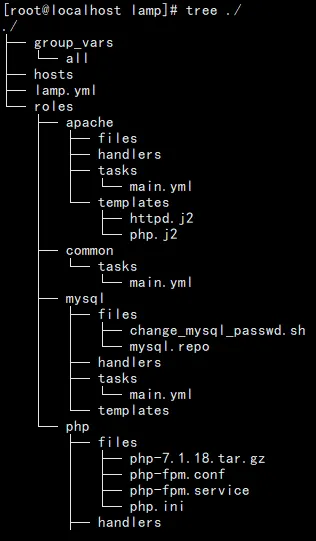
1、创建roles目录
mkdir -p lamp/{group_vars,roles}
cd lamp/roles
mkdir common apache php wordpress
mkdir {common,apache,php,mysql}/tasks
mkdir {apache,php,mysql}/{files,handlers}
mkdir {apache,mysql}/templates
2、roles基本配置
cd lamp
2.1、hosts配置
cat hosts
[webservers]
192.168.52.16
2.2、site.yml配置
cat site.yml---- name: Install apache, PHP-FPM and mysql hosts: webservers remote_user: devops become: yes roles: - role: common - role: apache tags: ["apache"] - role: php tags: ["php"] - role: mysql tags: ["mysql"]
2.3、group_vars配置
cat group_vars/all
---
# ssh
ansible_ssh_user: root
ansible_ssh_pass: cjm@168
# Nginx
nginx_version: 1.15.3
http_port: 80
# PHP
php_version: 7.1.18
2.4、common配置
cat roles/common/tasks/main.yml
---
- name: Install deps
yum:name={{ item }} state=present
with_items:
-gcc
-make
-zlib-devel
-openssl-devel
-pcre-devel
2.5、apache配置
cat roles/apache/tasks/main.yml---- name: Install httpd yum: name: httpd state: present- name: httpd config template: src: httpd.j2 dest: /etc/httpd/conf/httpd.conf- name: httpd php config template: src: php.j2 dest: /etc/httpd/conf.d/php.conf- name: index.php file: path: /var/www/html/index.php state: touch- name: index lineinfile: path: /var/www/html/index.php line: | <?php phpinfo(); ?> state: present- name: httpd is enabled service: name: httpd enabled: yes state: started
cat roles/apache/templates/php.j2<VirtualHost *:80> DocumentRoot "/var/www/html/" ServerName {{ ansible_default_ipv4.address }} ProxyRequests off ProxyPassMatch ^/(.*\.php)$ fcgi://127.0.0.1:9000/var/www/html/$1 <Directory "/var/www/html"> Options Indexes FollowSymLinks AllowOverride All Require all granted </Directory></VirtualHost>
2.6、mysql配置
cat roles/mysql/files/change_mysql_passwd.sh
#!/bin/bash
OLD_PASSWD=$(grep 'temporary password' /var/log/mysqld.log |awk '{print $NF}')
NEW_PASSWD='MyNewPass4@'
mysqladmin -uroot -p$OLD_PASSWD password $NEW_PASSWD
#mysql -uroot -p'$OLD_PASSWD' -e "ALTER USER 'root'@'localhost' IDENTIFIED BY '$NEW_PASSWD';"
cat roles/mysql/files/my.cnf
[mysql]
socket = /var/lib/mysql/mysql.sock
[mysqld]
user = mysql
port = 3306
datadir = /var/lib/mysql
socket = /var/lib/mysql/mysql.sock
bind-address = 0.0.0.0
pid-file = /var/run/mysqld/mysqld.pid
character-set-server = utf8
collation-server = utf8_general_ci
log-error = /var/log/mysqld.log
max_connections = 10240
open_files_limit = 65535
innodb_buffer_pool_size = 1G
innodb_flush_log_at_trx_commit = 2
innodb_log_file_size = 256M
cat roles/mysql/files/mysql.repo
# Enable to use MySQL 5.7
[mysql57-community]
name=MySQL 5.7 Community Server
baseurl=http://repo.mysql.com/yum/mysql-5.7-community/el/7/$basearch/
enabled=1
gpgcheck=0
gpgkey=file:///etc/pki/rpm-gpg/RPM-GPG-KEY-mysql
cat roles/mysql/tasks/main.yml
---
# tasks file for mysql
- name: Install Package
yum:name=yum-utils state=present
- name: Install expect Package
yum:name=expect state=present
- name: Copy mysql repo
copy:src=mysql.repo dest=/etc/yum.repos.d
- name: Install mysql
yum:name=mysql-server state=latest
- name: Start Mysql Service
service:name=mysqld enabled=yes state=started
- name: Copy mysql file
copy:src=change_mysql_passwd.sh dest=/opt
- name: change mysql root passwd
shell:bash /opt/change_mysql_passwd.sh
- name: Copy mysql config
copy:src=my.cnf dest=/etc/my.cnf
- name: Start Mysql Service
service:name=mysqld state=restarted
2.7、php配置
ls roles/php/files/
php-7.1.18.tar.gz#准备好
php-fpm.conf#准备好
php-fpm.service
php.ini#准备好
cat roles/php/files/php-fpm.service
[Unit]
Description=The PHP FastCGI Process Manager
After=syslog.target network.target
[Service]
Type=simple
PIDFile=/var/run/php-fpm.pid
ExecStart=/usr/local/php/sbin/php-fpm --nodaemonize --fpm-config /usr/local/php/etc/php-fpm.conf
ExecReload=/bin/kill -USR2 $MAINPID
[Install]
WantedBy=multi-user.target
cat roles/php/handlers/main.yml---- name: restart php-fpm service: name=php-fpm state=restarted
cat roles/php/tasks/main.yml---- name: Install php deps yum: name={{ item }} state=present with_items: - gd-devel - libxml2-devel - libcurl-devel - libjpeg-devel - libpng-devel- name: Copy php source pkg #get_url: url=http://docs.php.net/distributions/php-{{ php_version }}.tar.gz dest=/tmp/nginx-{{ php_version }}.tar.gz copy: src=php-{{ php_version }}.tar.gz dest=/tmp- name: Install php shell: cd /tmp && tar zxf php-{{ php_version }}.tar.gz && cd php-{{ php_version }} && ./configure --prefix=/usr/local/php --with-config-file-path=/usr/local/php/etc \ --with-mysql --with-mysqli --with-openssl --with-zlib --with-curl --with-gd \ --with-jpeg-dir --with-png-dir --with-iconv --enable-fpm --enable-zip --enable-mbstring && make -j 4 && make install- name: Copy php configuration file copy: src=php.ini dest=/usr/local/php/etc/ notify: restart php-fpm- name: Copy php-fpm configuration file copy: src=php-fpm.conf dest=/usr/local/php/etc/ notify: restart php-fpm- name: Copy php-fpm.service copy: src=php-fpm.service dest=/usr/lib/systemd/system/- name: start php-fpm service: name=php-fpm state=started enabled=yes
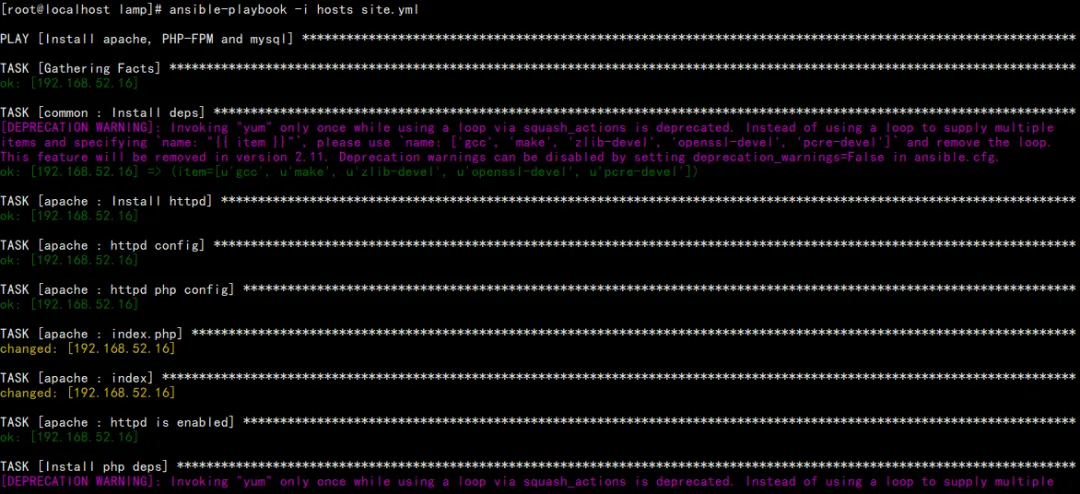
3、php服务器部暑
ansible-playbook site.yml --syntax-check#语法检查
ansible-playbook -i hosts site.yml
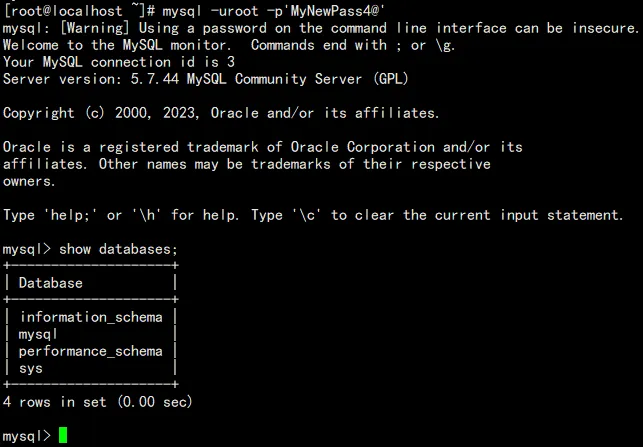
4、验证
mysql -uroot -p'MyNewPass4@'
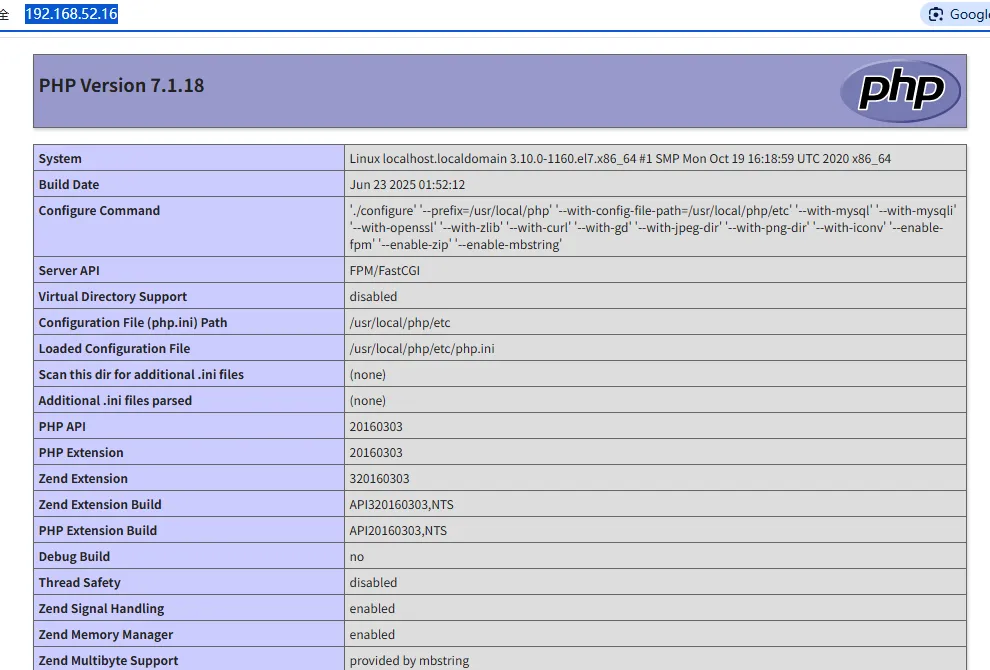
访问php:http://192.168.52.16