当前位置:首页>Linux>【Linux 系统监控】Node Exporter + Prometheus + Grafana

【Linux 系统监控】Node Exporter + Prometheus + Grafana

  • 2026-06-29 21:32:12
【Linux 系统监控】Node Exporter + Prometheus + Grafana

Node Exporter + Prometheus + Grafana

本文档介绍如何在 Ubuntu 24.04 上安装 Node Exporter、Prometheus 和 Grafana。

软件
安装
说明
Node Exporter
Github release 包
安装在宿主机上
Prometheus
docker 安装
无宿主机依赖要求,用 docker 安装
Grafana
docker 安装
无宿主机依赖要求,用 docker 安装

一、Node Exporter

Github node_exporter

(https://github.com/prometheus/node_exporter)

(一)下载 release 包

wget https://github.com/prometheus/node_exporter/releases/download/v1.11.1/node_exporter-1.11.1.linux-amd64.tar.gz

(二)解压

tar -zxvf node_exporter-1.11.1.linux-amd64.tar.gz
# 目录中包含 node_exporter 可执行文件node_exporter-1.11.1.linux-amd64$ lsLICENSE node_exporter NOTICE

(三)移动专属目录

1. 创建专属目录

sudo mkdir /opt/node_exporter 

2. 复制 node_exporter 可执行文件到专属目录

sudo cp ./node_exporter /opt/node_exporter/ 

3. 给 node_exporter 可执行文件添加执行权限

sudo chmod +x /opt/node_exporter/node_exporter 

(四)配置 Systemd 服务

1. 创建 Systemd 服务文件

sudo nano /etc/systemd/system/node_exporter.service 

写入以下内容(注意 ExecStart 的路径):

[Unit]Description=Prometheus Node ExporterAfter=network-online.target[Service]User=node_exporterGroup=node_exporterType=simpleExecStart=/opt/node_exporter/node_exporter[Install]WantedBy=multi-user.target

2. 创建专用 node_exporter 用户

创建用户

sudo useradd --no-create-home --shell /bin/false node_exporter 

参数解释:

  • --no-create-home : 不创建用户家目录
  • --shell /bin/false : 将该用户的默认 Shell 设置为 /bin/false,防止用户登录
  • node_exporter : 用户名

读取和执行权限

sudo chown -R node_exporter:node_exporter /opt/node_exporter 

(五)启动并验证服务

1. 重新加载 Systemd 配置

sudo systemctl daemon-reload 

2. 启动服务并设置开机自启

sudo systemctl enable --now node_exporter 

3. 检查运行状态

sudo systemctl status node_exporter 

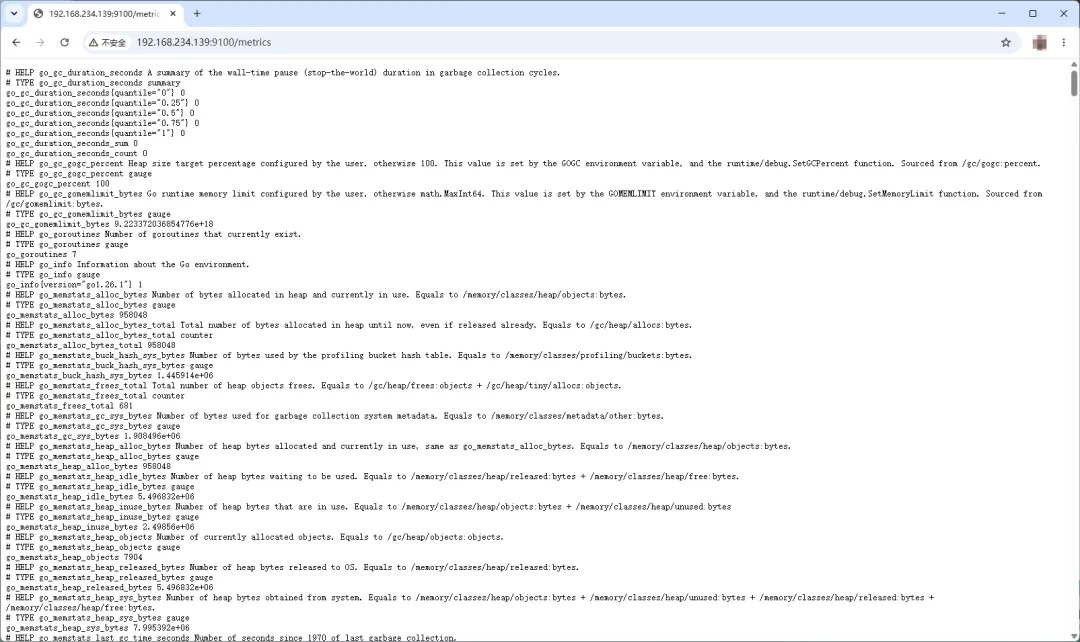
(六)验证数据

1. 在浏览器中验证(最直观)

打开浏览器(主机就可以,不需要虚拟机),在地址栏输入:

http://<您虚拟机的IP地址>:9100/metrics

2. 在终端中验证(最快)

在当前的终端中,执行以下命令:

curl -s http://localhost:9100/metrics | head -n 15 

如果一切正常,会看到类似下面这样的文本输出,包含大量的HELP 和 node_ 开头的指标数据:

# HELP go_gc_duration_seconds A summary of the wall-time pause (stop-the-world) duration in garbage collection cycles.# TYPE go_gc_duration_seconds summarygo_gc_duration_seconds{quantile=”0”} 1.9215e-05go_gc_duration_seconds{quantile=”0.25”} 3.921e-05go_gc_duration_seconds{quantile=”0.5”} 8.7665e-05go_gc_duration_seconds{quantile=”0.75”} 0.000221364go_gc_duration_seconds{quantile=”1”} 0.000286378go_gc_duration_seconds_sum 0.000653832go_gc_duration_seconds_count 5# HELP go_gc_gogc_percent Heap size target percentage configured by the user, otherwise 100. This value is set by the GOGC environment variable, and the runtime/debug.SetGCPercent function. Sourced from /gc/gogc:percent.# TYPE go_gc_gogc_percent gaugego_gc_gogc_percent 100# HELP go_gc_gomemlimit_bytes Go runtime memory limit configured by the user, otherwise math.MaxInt64. This value is set by the GOMEMLIMIT environment variable, and the runtime/debug.SetMemoryLimit function. Sourced from /gc/gomemlimit:bytes.# TYPE go_gc_gomemlimit_bytes gaugego_gc_gomemlimit_bytes 9.223372036854776e+18

二、docker & docker compose

Prometheus 和 Grafana 使用 docker 安装,这里介绍安装 docker 和 docker compose。

(一)安装必要依赖

sudo apt update 
sudo apt install -y ca-certificates curl gnupg 

(二)创建密钥环目录并添加 Docker 官方的 GPG 密钥(使用阿里云加速)

sudo install -m 0755 -d /etc/apt/keyrings 
sudo curl -fsSL https://mirrors.aliyun.com/docker-ce/linux/ubuntu/gpg -o /etc/apt/keyrings/docker.asc
sudo chmod a+r /etc/apt/keyrings/docker.asc 

(三)将 Docker 的 apt 仓库源添加到系统中

echo \  "deb [arch=$(dpkg --print-architecture) signed-by=/etc/apt/keyrings/docker.asc] https://mirrors.aliyun.com/docker-ce/linux/ubuntu \  $(. /etc/os-release && echo "$VERSION_CODENAME") stable" | \  sudo tee /etc/apt/sources.list.d/docker.list > /dev/null

(四)再次更新 apt 索引,并安装 Docker 引擎及 Compose V2 插件

sudo apt update 
sudo apt install -y docker-ce docker-ce-cli containerd.io docker-buildx-plugin docker-compose-plugin 

(五)将当前用户加入 docker 组(免 sudo 执行 docker 命令)

sudo usermod -aG docker $USER 

(六)验证安装

sudo docker --version 
# 注意:compose 后面是空格,不是连字符sudo docker compose version 

(七)让当前终端立刻生效 docker 组权限(这样后面敲命令就不用一直加 sudo 了)

newgrp docker 

三、Prometheus

(一)创建目录结构与设置权限

1. 创建主目录和 Prometheus 的专属子目录(包含配置目录和数据目录)

sudo mkdir -p /opt/monitoring/prometheus/data 

2. 给 Prometheus 的数据目录赋予正确的权限 (容器内是 nobody 用户,UID 65534)

sudo chown -R 65534:65534 /opt/monitoring/prometheus/data

3. 进入主工作目录

cd /opt/monitoring

(二)编写 Prometheus 配置文件

在 Prometheus 自己的目录下,创建它的配置文件:

sudo nano prometheus/prometheus.yml

粘贴以下内容,保存并退出

global:  scrape_interval: 15sscrape_configs:  - job_name: 'prometheus'    static_configs:      - targets: ['localhost:9090']  - job_name: 'node_exporter'    static_configs:      # 使用魔法域名跨越网络访问宿主机上的 Node Exporter      - targets: ['host.docker.internal:9100']

(三)编写 docker-compose.yml (仅包含 Prometheus)

在主目录(monitoring/)下,创建总控文件。注意看 volumes 里的路径,现在它们指向了子文件夹。

sudom nano docker-compose.yml

粘贴以下内容,保存并退出:

services:  prometheus:    image: prom/prometheus:latest    container_name: prometheus    restart: unless-stopped    volumes:      # 注意这里的路径变化:指向了 prometheus 子文件夹      - ./prometheus/prometheus.yml:/etc/prometheus/prometheus.yml      - ./prometheus/data:/prometheus    ports:      - "9090:9090"    # 核心魔法:让容器能通过 host.docker.internal 访问宿主机    extra_hosts:      - "host.docker.internal:host-gateway"

(四)启动 Prometheus

确保还在 monitoring/ 主目录下(也就是 docker-compose.yml 所在的目录),执行:

docker compose up -d

第一次运行会下载镜像,看到 Started 即可。

/opt/monitoring$ docker compose up -d[+] up 13/13 ✔ Image prom/prometheus:latest Pulled 28.4s ✔ Network monitoring_default Created 0.8s ✔ Container prometheus Started 12.9s

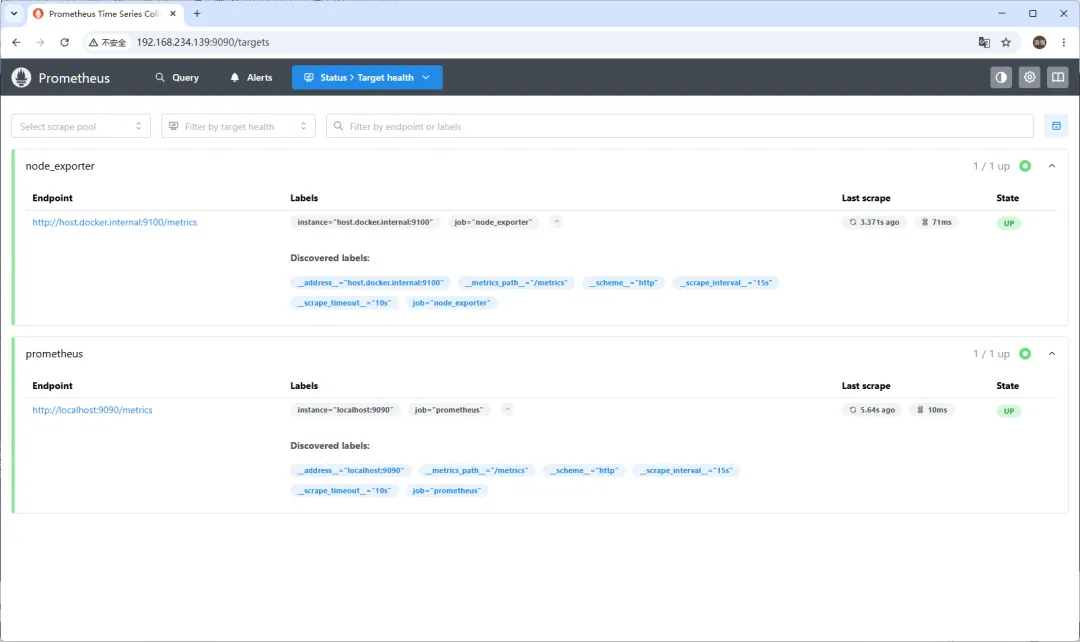
(五)验证 Prometheus

确保 Prometheus 已经成功启动打开浏览器,访问:http://<您的虚拟机IP>:9090/targets

验收标准:

  • 页面能正常打开。
  • 在 "Targets" 列表中,prometheus 状态是绿色的 UP。
  • 最重要的一点:node_exporter 状态也必须是绿色的 UP。(如果 node_exporter 是红色的 DOWN,通常是宿主机防火墙拦截了,请在终端执行 sudo ufw allow 9100/tcp 后刷新页面重试。)

四、Grafana

(一)创建目录结构与设置权限

1. 创建主目录和 Grafana 的专属子目录(用于持久化仪表盘/数据)

sudo mkdir -p /opt/monitoring/grafana 

2. 给 Grafana 的数据目录赋予正确的权限

Grafana 容器内使用 grafana 用户 (UID 472)

sudo chown -R 472:472 /opt/monitoring/grafana 

(二)编写 docker-compose.yml (追加 Grafana 服务)

打开 compose 文件

nano docker-compose.yml 

在文件末尾(prometheus 服务后面)添加以下内容:

   grafana:    image: grafana/grafana:latest    container_name: grafana    ports:      - "3000:3000"    volumes:      - ./grafana:/var/lib/grafana    depends_on:      - prometheus    restart: unless-stopped

(三)启动 Grafana

确保还在 monitoring/ 主目录下(也就是 docker-compose.yml 所在的目录),执行:

docker compose up -d

第一次运行会下载镜像,看到 Started 即可。

/opt/monitoring$ docker compose up -d [+] up 14/14 ✔ Image grafana/grafana:latest Pulled 158.7s ✔ Container prometheus Running 0.0s ✔ Container grafana Started 7.4s

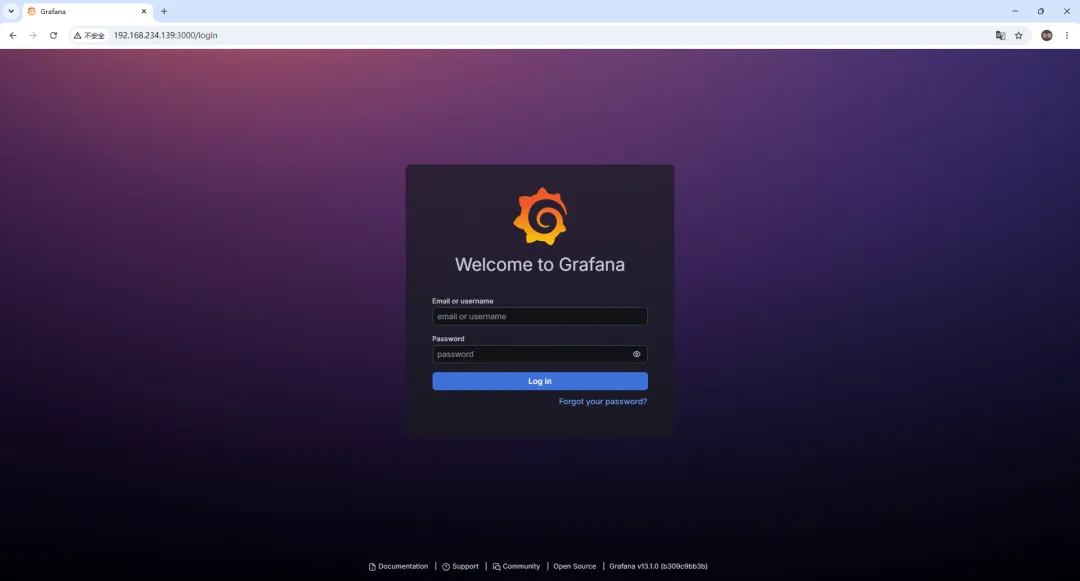
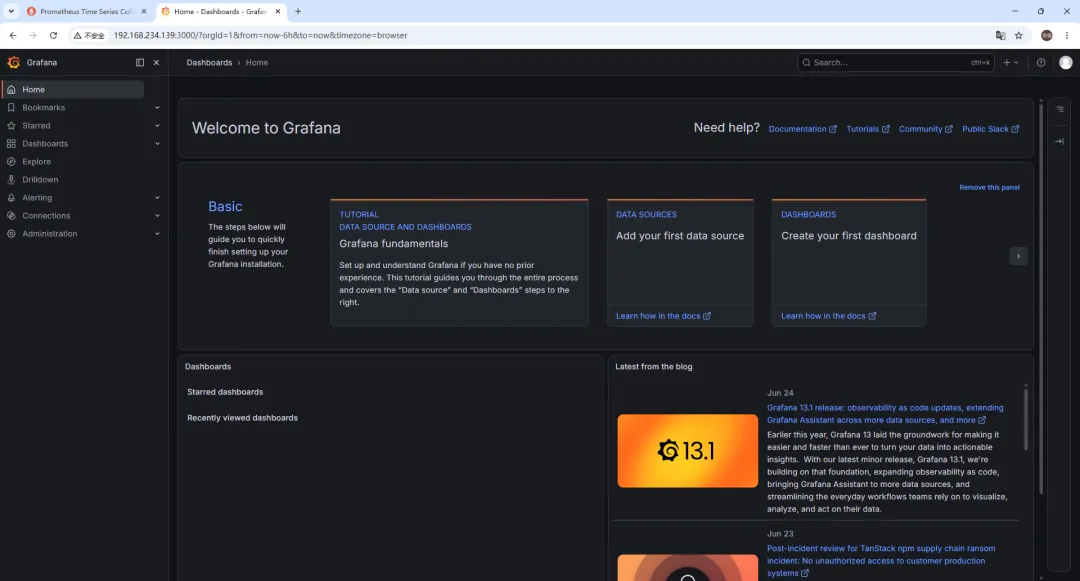
(四)验证 Grafana

打开浏览器,访问:http://<您的虚拟机IP>:3000验收标准:

  • 页面能正常打开。
  • 登录时,用户名是 admin,密码是admin。

五、Grafana 配置 Prometheus 数据源

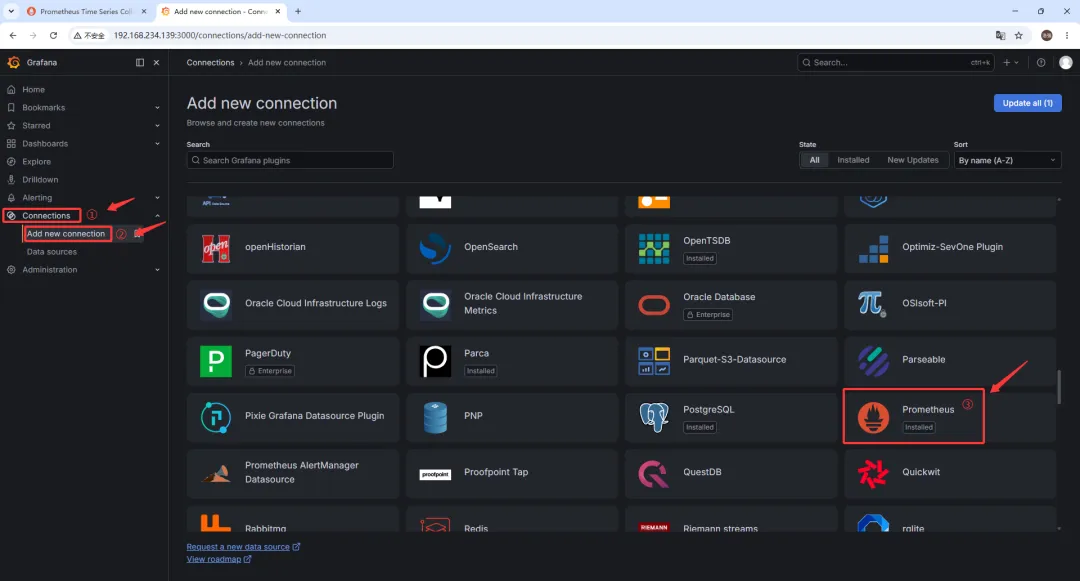
1. 点击 Connections ➡️ Add new conncetion ➡️ Prometheus

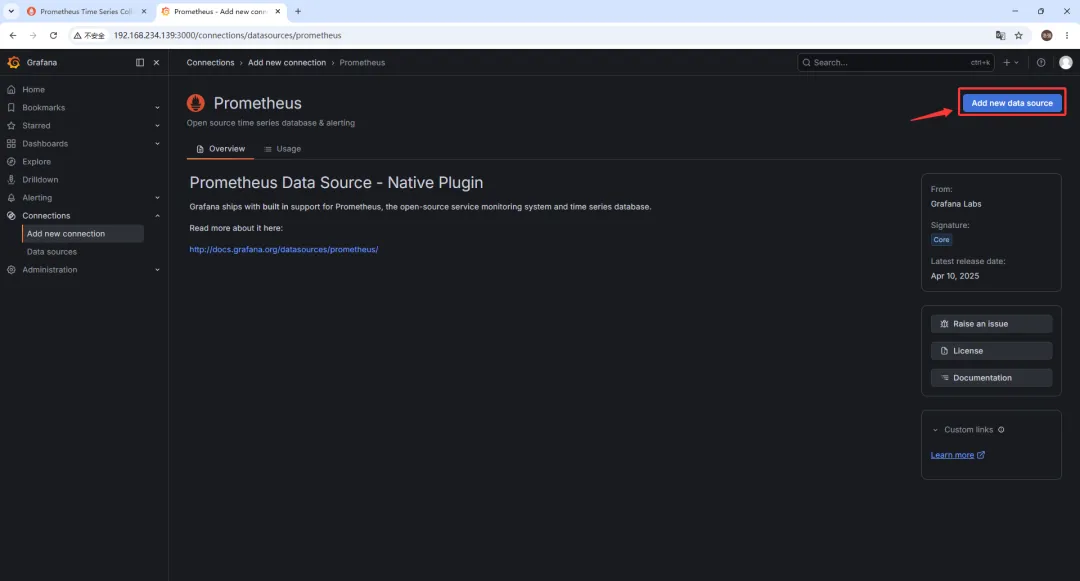
2. 点击 Add new data source

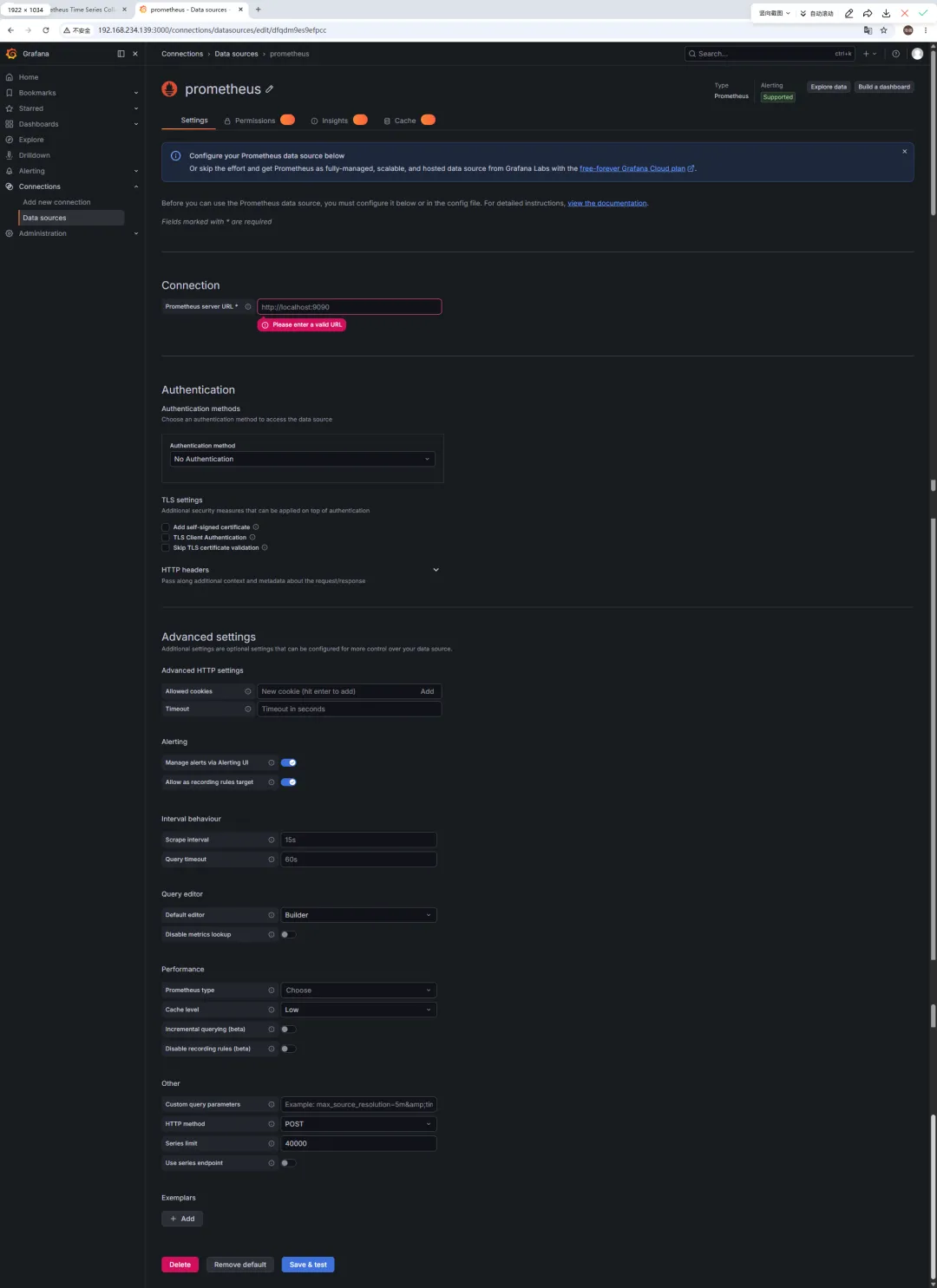
3. 填写相关数据信息

精简配置:

配置项
当前错误值
正确值
为什么?
Prometheus server URL
http://localhost:9090http://prometheus:9090
✅ Docker Compose 服务名自动解析为容器 IP
Authentication method
No Authentication
保持默认
✅ 我们没设置 Prometheus 认证
Scrape interval
15s
保持默认
✅ 与 Prometheus 配置一致

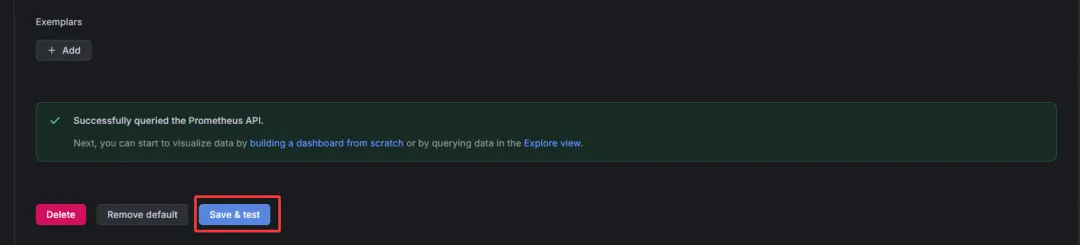
4. 点击 Save & Test


六、Grafana 配置 Dashboards 仪表盘

Grafana dashboards 上有很多可用的仪表盘。在导入界面也有链接可跳转找到心仪的仪表盘。

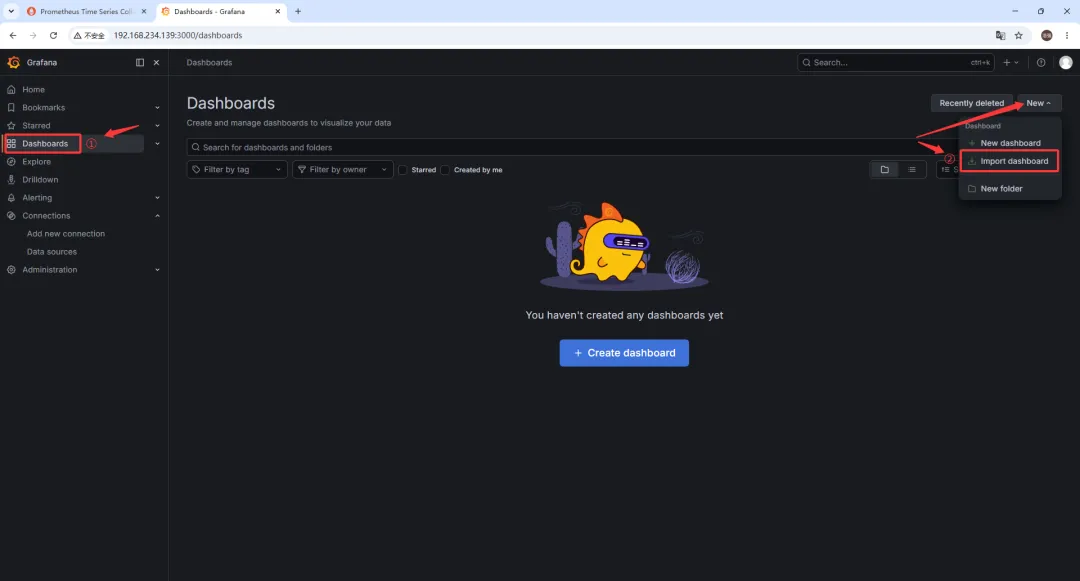
1. 点击 Dashboards ➡️ New ➡️ Import dashboard

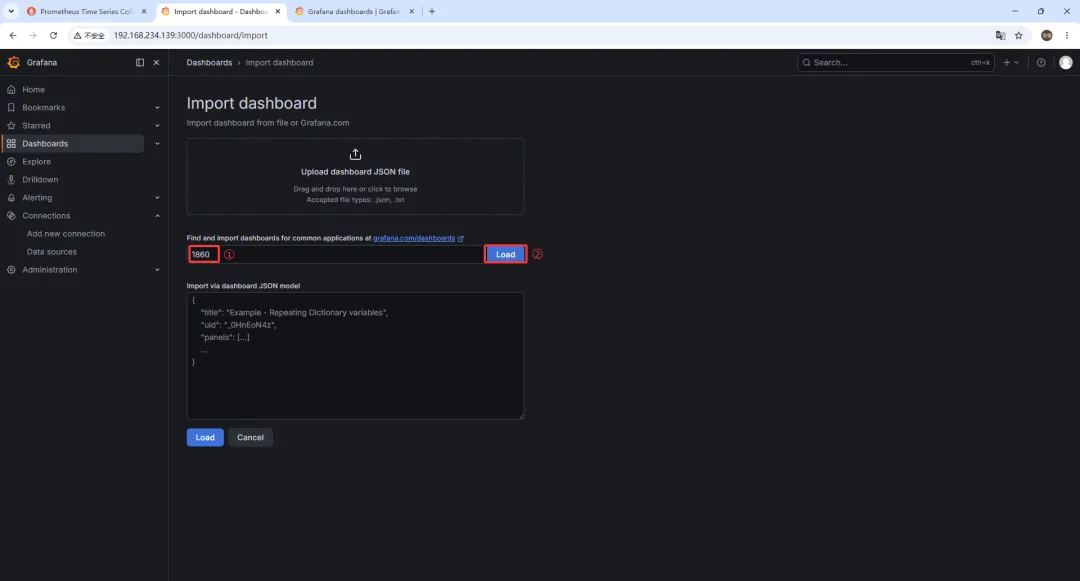
2. 导入 1860 仪表盘

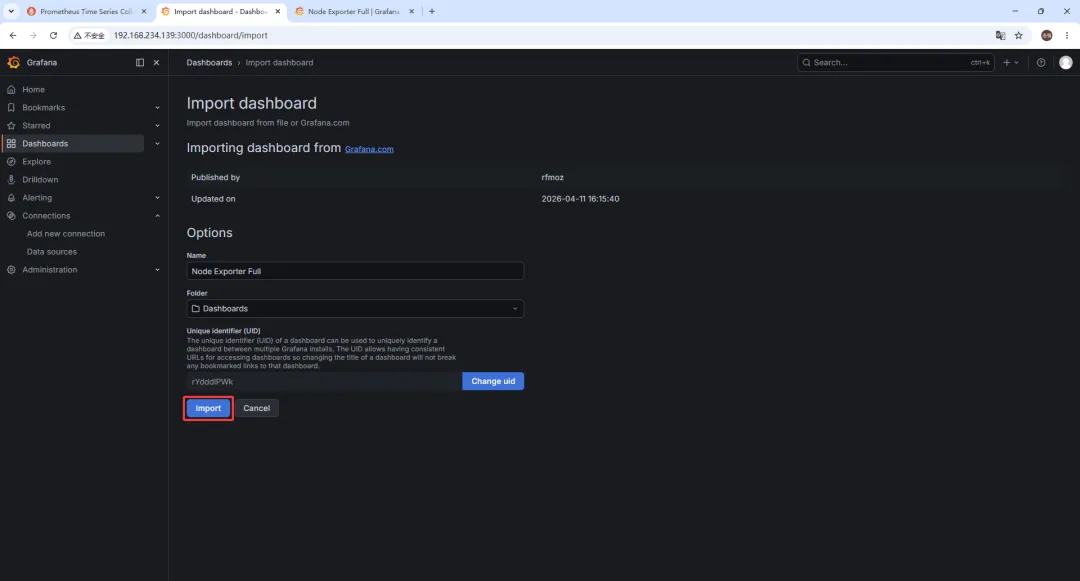
3. 点击 Import

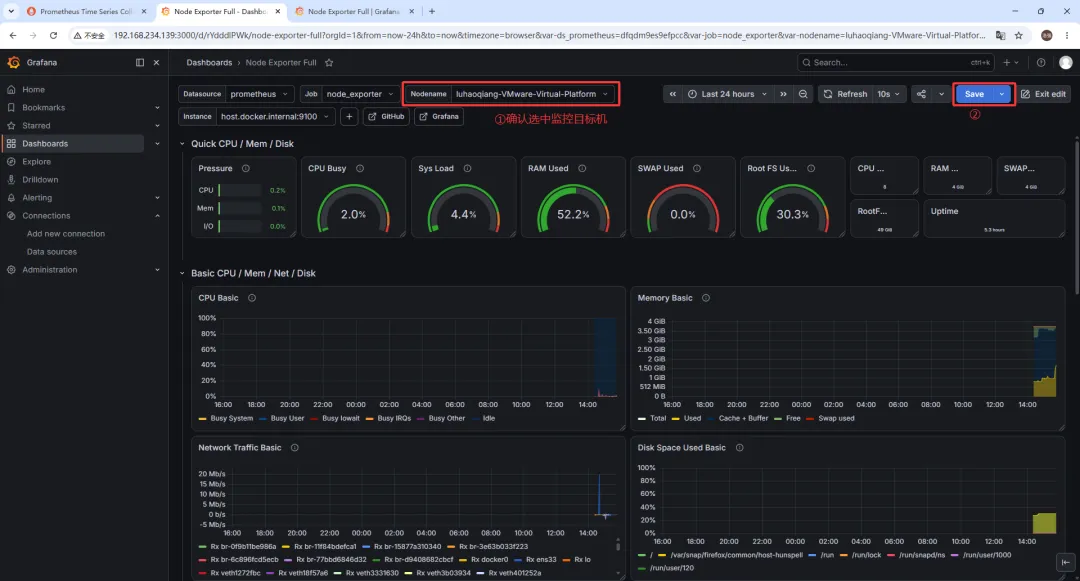
4. 确认并保存(如需 Edit)

如果需要编辑仪表盘,点击 Edit 按钮,进入编辑模式,修改完成后点击 Save 保存。

有关问题

(一)镜像下载网络问题

1. 问题现象

/opt/monitoring$ docker compose up -d[+] up 1/1 ✘ Image prom/prometheus:latest Error failed to resolve reference ”docker.io/prom/prometheus:latest”: failed to do request: Head ”https://registry-1.docker.io/v2/prom/prometheus/manifests/latest”: dial tcp 108.160.172.232:443: connect: connection refused 21.3sError response from daemon: failed to resolve reference ”docker.io/prom/prometheus:latest”: failed to do request: Head ”https://registry-1.docker.io/v2/prom/prometheus/manifests/latest”: dial tcp 108.160.172.232:443: connect: connection refused

2. 问题原因

典型的网络问题!错误信息里的 connection refused 和访问 registry-1.docker.io 失败,表明您的虚拟机当前无法直接连接到 Docker Hub 的官方服务器(这是国内网络环境的常见限制)。需要给 Docker 配置一个国内镜像加速器,让它从国内的代理节点下载镜像。或者给 Docker 配置代理软件,让它通过代理下载镜像。

3. 解决方法

这里通过配置代理软件来解决。我的代理软件运行在 Windows 宿主机

第一步:创建 Docker 的 systemd 代理配置

在终端执行以下命令,直接通过 echo 把配置写入文件

1. 创建存放 Docker 服务覆盖配置的目录
sudo mkdir -p /etc/systemd/system/docker.service.d
2. 将代理配置写入文件 (直接使用 Windows IP 和 代理端口)
sudo tee /etc/systemd/system/docker.service.d/http-proxy.conf <<-'EOF'[Service]Environment="HTTP_PROXY=http://192.168.1.13:7890"Environment="HTTPS_PROXY=http://192.168.1.13:7890"Environment="NO_PROXY=localhost,127.0.0.0/8,192.168.0.0/16,10.0.0.0/8,172.16.0.0/12"EOF

💡 注意:NO_PROXY 里的 192.168.0.0/16 很重要,它确保了以后 Grafana 容器通过局域网 IP 连接 Prometheus 容器时,不会傻傻地去绕一圈 Windows 代理,而是直接在内网通信。

第二步:重载配置并重启 Docker

sudo systemctl daemon-reload
sudo systemctl restart docker

第三步:验证代理是否配置成功

执行以下命令检查 Docker 是否已经吃到了代理环境变量:

sudo systemctl show --property=Environment docker

(二)docker & docker compose

Docker 是什么?做什么用的?

Docker 是一个开源的应用容器引擎,它是整个容器化生态的“底座”。

做什么用?

它允许开发者把应用程序以及它运行所需的所有依赖(代码、运行环境、系统工具、数据库驱动等)打包成一个轻量级、可移植的 “镜像(Image)”。这个镜像可以运行在任何安装了 Docker 的机器上运行,运行起来的实例叫做 “容器(Container)”

解决的核心痛点

彻底消灭了“这段代码在我的电脑上明明能跑,怎么到你那里就报错了”的环境不一致问题。

Docker Compose 是什么?做什么用的?

Docker Compose 是建立在 Docker 之上的一个多容器编排工具

做什么用?

在实际开发中,一个完整的项目往往不止一个服务。比如一个典型的Web应用可能包含:前端 Nginx + 后端 Node.js/Java + MySQL 数据库 + Redis 缓存。如果用纯 Docker,需要手动敲4条 docker run 命令,还要手动配置它们之间的网络互通和启动顺序,非常繁琐且容易出错。

解决的核心痛点

它允许你通过一个 YAML 格式的配置文件(通常叫 docker-compose.yml),把整个项目的所有服务、网络、数据卷一次性定义好,然后一键启动/停止整个项目集群。

两者关系

  1. 依赖关系:Docker Compose 是 Docker 的补充和高级封装。没有 Docker,Docker Compose 就无法工作(Compose 底层调用的依然是 Docker 的 API 来创建和管理容器)。
  2. 分工明确
    Docker 负责“制造和管理单个集装箱”(构建镜像、运行单个容器)。
    Docker Compose 负责“编排一堆集装箱”(管理多个容器组成的微服务架构)。

核心区别对比

对比维度
Docker
Docker Compose
管理对象
单个容器 / 镜像
多个容器组成的应用服务栈
配置文件
Dockerfile
(用于定义如何构建单个镜像)
compose.yaml
(用于定义如何编排多个容器)
启动命令
docker run [一长串参数] [镜像名]docker compose up
(自动读取配置,一键启动)
网络管理
需要手动创建网络、配置容器互联
自动为项目创建一个隔离的默认网络,容器间可通过服务名直接互相访问
依赖与顺序
难以控制多个容器的启动先后顺序
支持配置 depends_on,确保数据库等基础服务先于应用服务启动
适用场景
运行单一服务(如单纯跑个 MySQL 或 Nginx 测试)
运行完整的本地开发环境、微服务架构、CI/CD 自动化测试环境

补充说明:命令的演进

网上资料,可能会有两种写法: docker-compose 和 docker compose带横杠空格隔开

  • 过去(V1 版本): docker-compose 是一个用 Python 写的独立脚本需要额外单独安装,命令带横杠。目前已被官方废弃。
  • 现在(V2 版本): docker compose 是用 Go 语言重写的,已经作为原生插件直接集成到了 Docker CLI 中。只要安装了较新的 Docker,就自带这个命令(中间是空格)。

(三)Node Exporter 监控问题

node exporter 如果使用 docker 镜像安装启动,则 node exporter 的监控对象,取决于启动 Docker 容器时的配置方式

简答来说:

  • 如果直接启动(不做特殊配置):它监控的只是 Docker 容器自身 的信息(这通常毫无意义)。
  • 如果做了正确配置:它监控的就是 宿主机 的信息。

为什么默认监控的是 Docker 容器自身?

Node Exporter 采集系统指标(如 CPU、内存、磁盘、网络)的原理,是读取 Linux 系统的虚拟文件系统(主要是 /proc 和 /sys)。由于 Docker 容器具有 命名空间隔离(Namespace) 特性,容器内部有自己独立的 /proc 和 /sys。如果你只是简单地运行 docker run prom/node-exporter,它读取到的仅仅是这个容器内部的资源使用情况,而不是宿主机的。

如何让 Docker 版 Node Exporter 监控宿主机?

为了让容器内的 Node Exporter 看到宿主机的真实数据,需要在启动时做三件事:

  1. 挂载宿主机的目录到容器内。
  2. 共享网络和 PID 命名空间,让容器能看到宿主机的网络接口和进程。
  3. 通过启动参数告诉 Node Exporter 去读取挂载进来的宿主机路径。

方式一:使用 docker run 命令

docker run -d \  --name node_exporter \  --restart=unless-stopped \  --net="host" \  --pid="host" \  -v "/:/host:ro,rslave" \  -v "/proc:/host/proc:ro" \  -v "/sys:/host/sys:ro" \  prom/node-exporter:latest \  --path.rootfs=/host \  --path.procfs=/host/proc \  --path.sysfs=/host/sys

方式二:使用 docker-compose.yml

version: '3.8'services:  node_exporter:    image: prom/node-exporter:latest    container_name: node_exporter    restart: unless-stopped    network_mode: host    pid: host    volumes:      - /:/host:ro,rslave      - /proc:/host/proc:ro      - /sys:/host/sys:ro    command:      - '--path.rootfs=/host'      - '--path.procfs=/host/proc'      - '--path.sysfs=/host/sys'

关键参数原理解析

参数
作用解释
--net="host"共享网络命名空间。让 Node Exporter 能采集到宿主机真实的网卡信息(如 eth0bond0)和网络流量,而不是容器虚拟的 eth0
--pid="host"共享 PID 命名空间。让 Node Exporter 能看到宿主机上所有的进程信息,从而正确统计系统负载(load average)和进程状态。
-v "/proc:/host/proc:ro"
将宿主机的 /proc(包含 CPU、内存、负载等内核信息)以只读方式挂载到容器的 /host/proc
-v "/sys:/host/sys:ro"
将宿主机的 /sys(包含硬件设备、内核模块等信息)以只读方式挂载到容器的 /host/sys
-v "/:/host:ro,rslave"
将宿主机的根目录挂载进去,主要用于采集磁盘/文件系统的使用情况(如 /dev/sda1 挂载在 / 上的空间使用率)。rslave 确保宿主机后续的挂载事件能传播到容器内。
--path.rootfs=/host
告诉 Node Exporter 程序:“宿主机的根文件系统在 /host 目录下,请去那里读取磁盘信息”。

最新文章

随机文章

基本 文件 流程 错误 SQL 调试
  1. 请求信息 : 2026-07-02 23:33:22 HTTP/2.0 GET : https://f.mffb.com.cn/a/502307.html
  2. 运行时间 : 0.327590s [ 吞吐率:3.05req/s ] 内存消耗:4,420.45kb 文件加载:140
  3. 缓存信息 : 0 reads,0 writes
  4. 会话信息 : SESSION_ID=ee1d5cddf338da36b534b99f4b97cd3c
  1. /yingpanguazai/ssd/ssd1/www/f.mffb.com.cn/public/index.php ( 0.79 KB )
  2. /yingpanguazai/ssd/ssd1/www/f.mffb.com.cn/vendor/autoload.php ( 0.17 KB )
  3. /yingpanguazai/ssd/ssd1/www/f.mffb.com.cn/vendor/composer/autoload_real.php ( 2.49 KB )
  4. /yingpanguazai/ssd/ssd1/www/f.mffb.com.cn/vendor/composer/platform_check.php ( 0.90 KB )
  5. /yingpanguazai/ssd/ssd1/www/f.mffb.com.cn/vendor/composer/ClassLoader.php ( 14.03 KB )
  6. /yingpanguazai/ssd/ssd1/www/f.mffb.com.cn/vendor/composer/autoload_static.php ( 4.90 KB )
  7. /yingpanguazai/ssd/ssd1/www/f.mffb.com.cn/vendor/topthink/think-helper/src/helper.php ( 8.34 KB )
  8. /yingpanguazai/ssd/ssd1/www/f.mffb.com.cn/vendor/topthink/think-validate/src/helper.php ( 2.19 KB )
  9. /yingpanguazai/ssd/ssd1/www/f.mffb.com.cn/vendor/topthink/think-orm/src/helper.php ( 1.47 KB )
  10. /yingpanguazai/ssd/ssd1/www/f.mffb.com.cn/vendor/topthink/think-orm/stubs/load_stubs.php ( 0.16 KB )
  11. /yingpanguazai/ssd/ssd1/www/f.mffb.com.cn/vendor/topthink/framework/src/think/Exception.php ( 1.69 KB )
  12. /yingpanguazai/ssd/ssd1/www/f.mffb.com.cn/vendor/topthink/think-container/src/Facade.php ( 2.71 KB )
  13. /yingpanguazai/ssd/ssd1/www/f.mffb.com.cn/vendor/symfony/deprecation-contracts/function.php ( 0.99 KB )
  14. /yingpanguazai/ssd/ssd1/www/f.mffb.com.cn/vendor/symfony/polyfill-mbstring/bootstrap.php ( 8.26 KB )
  15. /yingpanguazai/ssd/ssd1/www/f.mffb.com.cn/vendor/symfony/polyfill-mbstring/bootstrap80.php ( 9.78 KB )
  16. /yingpanguazai/ssd/ssd1/www/f.mffb.com.cn/vendor/symfony/var-dumper/Resources/functions/dump.php ( 1.49 KB )
  17. /yingpanguazai/ssd/ssd1/www/f.mffb.com.cn/vendor/topthink/think-dumper/src/helper.php ( 0.18 KB )
  18. /yingpanguazai/ssd/ssd1/www/f.mffb.com.cn/vendor/symfony/var-dumper/VarDumper.php ( 4.30 KB )
  19. /yingpanguazai/ssd/ssd1/www/f.mffb.com.cn/vendor/topthink/framework/src/think/App.php ( 15.30 KB )
  20. /yingpanguazai/ssd/ssd1/www/f.mffb.com.cn/vendor/topthink/think-container/src/Container.php ( 15.76 KB )
  21. /yingpanguazai/ssd/ssd1/www/f.mffb.com.cn/vendor/psr/container/src/ContainerInterface.php ( 1.02 KB )
  22. /yingpanguazai/ssd/ssd1/www/f.mffb.com.cn/app/provider.php ( 0.19 KB )
  23. /yingpanguazai/ssd/ssd1/www/f.mffb.com.cn/vendor/topthink/framework/src/think/Http.php ( 6.04 KB )
  24. /yingpanguazai/ssd/ssd1/www/f.mffb.com.cn/vendor/topthink/think-helper/src/helper/Str.php ( 7.29 KB )
  25. /yingpanguazai/ssd/ssd1/www/f.mffb.com.cn/vendor/topthink/framework/src/think/Env.php ( 4.68 KB )
  26. /yingpanguazai/ssd/ssd1/www/f.mffb.com.cn/app/common.php ( 0.03 KB )
  27. /yingpanguazai/ssd/ssd1/www/f.mffb.com.cn/vendor/topthink/framework/src/helper.php ( 18.78 KB )
  28. /yingpanguazai/ssd/ssd1/www/f.mffb.com.cn/vendor/topthink/framework/src/think/Config.php ( 5.54 KB )
  29. /yingpanguazai/ssd/ssd1/www/f.mffb.com.cn/config/app.php ( 0.95 KB )
  30. /yingpanguazai/ssd/ssd1/www/f.mffb.com.cn/config/cache.php ( 0.78 KB )
  31. /yingpanguazai/ssd/ssd1/www/f.mffb.com.cn/config/console.php ( 0.23 KB )
  32. /yingpanguazai/ssd/ssd1/www/f.mffb.com.cn/config/cookie.php ( 0.56 KB )
  33. /yingpanguazai/ssd/ssd1/www/f.mffb.com.cn/config/database.php ( 2.48 KB )
  34. /yingpanguazai/ssd/ssd1/www/f.mffb.com.cn/vendor/topthink/framework/src/think/facade/Env.php ( 1.67 KB )
  35. /yingpanguazai/ssd/ssd1/www/f.mffb.com.cn/config/filesystem.php ( 0.61 KB )
  36. /yingpanguazai/ssd/ssd1/www/f.mffb.com.cn/config/lang.php ( 0.91 KB )
  37. /yingpanguazai/ssd/ssd1/www/f.mffb.com.cn/config/log.php ( 1.35 KB )
  38. /yingpanguazai/ssd/ssd1/www/f.mffb.com.cn/config/middleware.php ( 0.19 KB )
  39. /yingpanguazai/ssd/ssd1/www/f.mffb.com.cn/config/route.php ( 1.89 KB )
  40. /yingpanguazai/ssd/ssd1/www/f.mffb.com.cn/config/session.php ( 0.57 KB )
  41. /yingpanguazai/ssd/ssd1/www/f.mffb.com.cn/config/trace.php ( 0.34 KB )
  42. /yingpanguazai/ssd/ssd1/www/f.mffb.com.cn/config/view.php ( 0.82 KB )
  43. /yingpanguazai/ssd/ssd1/www/f.mffb.com.cn/app/event.php ( 0.25 KB )
  44. /yingpanguazai/ssd/ssd1/www/f.mffb.com.cn/vendor/topthink/framework/src/think/Event.php ( 7.67 KB )
  45. /yingpanguazai/ssd/ssd1/www/f.mffb.com.cn/app/service.php ( 0.13 KB )
  46. /yingpanguazai/ssd/ssd1/www/f.mffb.com.cn/app/AppService.php ( 0.26 KB )
  47. /yingpanguazai/ssd/ssd1/www/f.mffb.com.cn/vendor/topthink/framework/src/think/Service.php ( 1.64 KB )
  48. /yingpanguazai/ssd/ssd1/www/f.mffb.com.cn/vendor/topthink/framework/src/think/Lang.php ( 7.35 KB )
  49. /yingpanguazai/ssd/ssd1/www/f.mffb.com.cn/vendor/topthink/framework/src/lang/zh-cn.php ( 13.70 KB )
  50. /yingpanguazai/ssd/ssd1/www/f.mffb.com.cn/vendor/topthink/framework/src/think/initializer/Error.php ( 3.31 KB )
  51. /yingpanguazai/ssd/ssd1/www/f.mffb.com.cn/vendor/topthink/framework/src/think/initializer/RegisterService.php ( 1.33 KB )
  52. /yingpanguazai/ssd/ssd1/www/f.mffb.com.cn/vendor/services.php ( 0.14 KB )
  53. /yingpanguazai/ssd/ssd1/www/f.mffb.com.cn/vendor/topthink/framework/src/think/service/PaginatorService.php ( 1.52 KB )
  54. /yingpanguazai/ssd/ssd1/www/f.mffb.com.cn/vendor/topthink/framework/src/think/service/ValidateService.php ( 0.99 KB )
  55. /yingpanguazai/ssd/ssd1/www/f.mffb.com.cn/vendor/topthink/framework/src/think/service/ModelService.php ( 2.04 KB )
  56. /yingpanguazai/ssd/ssd1/www/f.mffb.com.cn/vendor/topthink/think-trace/src/Service.php ( 0.77 KB )
  57. /yingpanguazai/ssd/ssd1/www/f.mffb.com.cn/vendor/topthink/framework/src/think/Middleware.php ( 6.72 KB )
  58. /yingpanguazai/ssd/ssd1/www/f.mffb.com.cn/vendor/topthink/framework/src/think/initializer/BootService.php ( 0.77 KB )
  59. /yingpanguazai/ssd/ssd1/www/f.mffb.com.cn/vendor/topthink/think-orm/src/Paginator.php ( 11.86 KB )
  60. /yingpanguazai/ssd/ssd1/www/f.mffb.com.cn/vendor/topthink/think-validate/src/Validate.php ( 63.20 KB )
  61. /yingpanguazai/ssd/ssd1/www/f.mffb.com.cn/vendor/topthink/think-orm/src/Model.php ( 23.55 KB )
  62. /yingpanguazai/ssd/ssd1/www/f.mffb.com.cn/vendor/topthink/think-orm/src/model/concern/Attribute.php ( 21.05 KB )
  63. /yingpanguazai/ssd/ssd1/www/f.mffb.com.cn/vendor/topthink/think-orm/src/model/concern/AutoWriteData.php ( 4.21 KB )
  64. /yingpanguazai/ssd/ssd1/www/f.mffb.com.cn/vendor/topthink/think-orm/src/model/concern/Conversion.php ( 6.44 KB )
  65. /yingpanguazai/ssd/ssd1/www/f.mffb.com.cn/vendor/topthink/think-orm/src/model/concern/DbConnect.php ( 5.16 KB )
  66. /yingpanguazai/ssd/ssd1/www/f.mffb.com.cn/vendor/topthink/think-orm/src/model/concern/ModelEvent.php ( 2.33 KB )
  67. /yingpanguazai/ssd/ssd1/www/f.mffb.com.cn/vendor/topthink/think-orm/src/model/concern/RelationShip.php ( 28.29 KB )
  68. /yingpanguazai/ssd/ssd1/www/f.mffb.com.cn/vendor/topthink/think-helper/src/contract/Arrayable.php ( 0.09 KB )
  69. /yingpanguazai/ssd/ssd1/www/f.mffb.com.cn/vendor/topthink/think-helper/src/contract/Jsonable.php ( 0.13 KB )
  70. /yingpanguazai/ssd/ssd1/www/f.mffb.com.cn/vendor/topthink/think-orm/src/model/contract/Modelable.php ( 0.09 KB )
  71. /yingpanguazai/ssd/ssd1/www/f.mffb.com.cn/vendor/topthink/framework/src/think/Db.php ( 2.88 KB )
  72. /yingpanguazai/ssd/ssd1/www/f.mffb.com.cn/vendor/topthink/think-orm/src/DbManager.php ( 8.52 KB )
  73. /yingpanguazai/ssd/ssd1/www/f.mffb.com.cn/vendor/topthink/framework/src/think/Log.php ( 6.28 KB )
  74. /yingpanguazai/ssd/ssd1/www/f.mffb.com.cn/vendor/topthink/framework/src/think/Manager.php ( 3.92 KB )
  75. /yingpanguazai/ssd/ssd1/www/f.mffb.com.cn/vendor/psr/log/src/LoggerTrait.php ( 2.69 KB )
  76. /yingpanguazai/ssd/ssd1/www/f.mffb.com.cn/vendor/psr/log/src/LoggerInterface.php ( 2.71 KB )
  77. /yingpanguazai/ssd/ssd1/www/f.mffb.com.cn/vendor/topthink/framework/src/think/Cache.php ( 4.92 KB )
  78. /yingpanguazai/ssd/ssd1/www/f.mffb.com.cn/vendor/psr/simple-cache/src/CacheInterface.php ( 4.71 KB )
  79. /yingpanguazai/ssd/ssd1/www/f.mffb.com.cn/vendor/topthink/think-helper/src/helper/Arr.php ( 16.63 KB )
  80. /yingpanguazai/ssd/ssd1/www/f.mffb.com.cn/vendor/topthink/framework/src/think/cache/driver/File.php ( 7.84 KB )
  81. /yingpanguazai/ssd/ssd1/www/f.mffb.com.cn/vendor/topthink/framework/src/think/cache/Driver.php ( 9.03 KB )
  82. /yingpanguazai/ssd/ssd1/www/f.mffb.com.cn/vendor/topthink/framework/src/think/contract/CacheHandlerInterface.php ( 1.99 KB )
  83. /yingpanguazai/ssd/ssd1/www/f.mffb.com.cn/app/Request.php ( 0.09 KB )
  84. /yingpanguazai/ssd/ssd1/www/f.mffb.com.cn/vendor/topthink/framework/src/think/Request.php ( 55.78 KB )
  85. /yingpanguazai/ssd/ssd1/www/f.mffb.com.cn/app/middleware.php ( 0.25 KB )
  86. /yingpanguazai/ssd/ssd1/www/f.mffb.com.cn/vendor/topthink/framework/src/think/Pipeline.php ( 2.61 KB )
  87. /yingpanguazai/ssd/ssd1/www/f.mffb.com.cn/vendor/topthink/think-trace/src/TraceDebug.php ( 3.40 KB )
  88. /yingpanguazai/ssd/ssd1/www/f.mffb.com.cn/vendor/topthink/framework/src/think/middleware/SessionInit.php ( 1.94 KB )
  89. /yingpanguazai/ssd/ssd1/www/f.mffb.com.cn/vendor/topthink/framework/src/think/Session.php ( 1.80 KB )
  90. /yingpanguazai/ssd/ssd1/www/f.mffb.com.cn/vendor/topthink/framework/src/think/session/driver/File.php ( 6.27 KB )
  91. /yingpanguazai/ssd/ssd1/www/f.mffb.com.cn/vendor/topthink/framework/src/think/contract/SessionHandlerInterface.php ( 0.87 KB )
  92. /yingpanguazai/ssd/ssd1/www/f.mffb.com.cn/vendor/topthink/framework/src/think/session/Store.php ( 7.12 KB )
  93. /yingpanguazai/ssd/ssd1/www/f.mffb.com.cn/vendor/topthink/framework/src/think/Route.php ( 23.73 KB )
  94. /yingpanguazai/ssd/ssd1/www/f.mffb.com.cn/vendor/topthink/framework/src/think/route/RuleName.php ( 5.75 KB )
  95. /yingpanguazai/ssd/ssd1/www/f.mffb.com.cn/vendor/topthink/framework/src/think/route/Domain.php ( 2.53 KB )
  96. /yingpanguazai/ssd/ssd1/www/f.mffb.com.cn/vendor/topthink/framework/src/think/route/RuleGroup.php ( 22.43 KB )
  97. /yingpanguazai/ssd/ssd1/www/f.mffb.com.cn/vendor/topthink/framework/src/think/route/Rule.php ( 26.95 KB )
  98. /yingpanguazai/ssd/ssd1/www/f.mffb.com.cn/vendor/topthink/framework/src/think/route/RuleItem.php ( 9.78 KB )
  99. /yingpanguazai/ssd/ssd1/www/f.mffb.com.cn/route/app.php ( 1.72 KB )
  100. /yingpanguazai/ssd/ssd1/www/f.mffb.com.cn/vendor/topthink/framework/src/think/facade/Route.php ( 4.70 KB )
  101. /yingpanguazai/ssd/ssd1/www/f.mffb.com.cn/vendor/topthink/framework/src/think/route/dispatch/Controller.php ( 4.74 KB )
  102. /yingpanguazai/ssd/ssd1/www/f.mffb.com.cn/vendor/topthink/framework/src/think/route/Dispatch.php ( 10.44 KB )
  103. /yingpanguazai/ssd/ssd1/www/f.mffb.com.cn/app/controller/Index.php ( 4.81 KB )
  104. /yingpanguazai/ssd/ssd1/www/f.mffb.com.cn/app/BaseController.php ( 2.05 KB )
  105. /yingpanguazai/ssd/ssd1/www/f.mffb.com.cn/vendor/topthink/think-orm/src/facade/Db.php ( 0.93 KB )
  106. /yingpanguazai/ssd/ssd1/www/f.mffb.com.cn/vendor/topthink/think-orm/src/db/connector/Mysql.php ( 5.44 KB )
  107. /yingpanguazai/ssd/ssd1/www/f.mffb.com.cn/vendor/topthink/think-orm/src/db/PDOConnection.php ( 52.47 KB )
  108. /yingpanguazai/ssd/ssd1/www/f.mffb.com.cn/vendor/topthink/think-orm/src/db/Connection.php ( 8.39 KB )
  109. /yingpanguazai/ssd/ssd1/www/f.mffb.com.cn/vendor/topthink/think-orm/src/db/ConnectionInterface.php ( 4.57 KB )
  110. /yingpanguazai/ssd/ssd1/www/f.mffb.com.cn/vendor/topthink/think-orm/src/db/builder/Mysql.php ( 16.58 KB )
  111. /yingpanguazai/ssd/ssd1/www/f.mffb.com.cn/vendor/topthink/think-orm/src/db/Builder.php ( 24.06 KB )
  112. /yingpanguazai/ssd/ssd1/www/f.mffb.com.cn/vendor/topthink/think-orm/src/db/BaseBuilder.php ( 27.50 KB )
  113. /yingpanguazai/ssd/ssd1/www/f.mffb.com.cn/vendor/topthink/think-orm/src/db/Query.php ( 15.71 KB )
  114. /yingpanguazai/ssd/ssd1/www/f.mffb.com.cn/vendor/topthink/think-orm/src/db/BaseQuery.php ( 45.13 KB )
  115. /yingpanguazai/ssd/ssd1/www/f.mffb.com.cn/vendor/topthink/think-orm/src/db/concern/TimeFieldQuery.php ( 7.43 KB )
  116. /yingpanguazai/ssd/ssd1/www/f.mffb.com.cn/vendor/topthink/think-orm/src/db/concern/AggregateQuery.php ( 3.26 KB )
  117. /yingpanguazai/ssd/ssd1/www/f.mffb.com.cn/vendor/topthink/think-orm/src/db/concern/ModelRelationQuery.php ( 20.07 KB )
  118. /yingpanguazai/ssd/ssd1/www/f.mffb.com.cn/vendor/topthink/think-orm/src/db/concern/ParamsBind.php ( 3.66 KB )
  119. /yingpanguazai/ssd/ssd1/www/f.mffb.com.cn/vendor/topthink/think-orm/src/db/concern/ResultOperation.php ( 7.01 KB )
  120. /yingpanguazai/ssd/ssd1/www/f.mffb.com.cn/vendor/topthink/think-orm/src/db/concern/WhereQuery.php ( 19.37 KB )
  121. /yingpanguazai/ssd/ssd1/www/f.mffb.com.cn/vendor/topthink/think-orm/src/db/concern/JoinAndViewQuery.php ( 7.11 KB )
  122. /yingpanguazai/ssd/ssd1/www/f.mffb.com.cn/vendor/topthink/think-orm/src/db/concern/TableFieldInfo.php ( 2.63 KB )
  123. /yingpanguazai/ssd/ssd1/www/f.mffb.com.cn/vendor/topthink/think-orm/src/db/concern/Transaction.php ( 2.77 KB )
  124. /yingpanguazai/ssd/ssd1/www/f.mffb.com.cn/vendor/topthink/framework/src/think/log/driver/File.php ( 5.96 KB )
  125. /yingpanguazai/ssd/ssd1/www/f.mffb.com.cn/vendor/topthink/framework/src/think/contract/LogHandlerInterface.php ( 0.86 KB )
  126. /yingpanguazai/ssd/ssd1/www/f.mffb.com.cn/vendor/topthink/framework/src/think/log/Channel.php ( 3.89 KB )
  127. /yingpanguazai/ssd/ssd1/www/f.mffb.com.cn/vendor/topthink/framework/src/think/event/LogRecord.php ( 1.02 KB )
  128. /yingpanguazai/ssd/ssd1/www/f.mffb.com.cn/vendor/topthink/think-helper/src/Collection.php ( 16.47 KB )
  129. /yingpanguazai/ssd/ssd1/www/f.mffb.com.cn/vendor/topthink/framework/src/think/facade/View.php ( 1.70 KB )
  130. /yingpanguazai/ssd/ssd1/www/f.mffb.com.cn/vendor/topthink/framework/src/think/View.php ( 4.39 KB )
  131. /yingpanguazai/ssd/ssd1/www/f.mffb.com.cn/vendor/topthink/framework/src/think/Response.php ( 8.81 KB )
  132. /yingpanguazai/ssd/ssd1/www/f.mffb.com.cn/vendor/topthink/framework/src/think/response/View.php ( 3.29 KB )
  133. /yingpanguazai/ssd/ssd1/www/f.mffb.com.cn/vendor/topthink/framework/src/think/Cookie.php ( 6.06 KB )
  134. /yingpanguazai/ssd/ssd1/www/f.mffb.com.cn/vendor/topthink/think-view/src/Think.php ( 8.38 KB )
  135. /yingpanguazai/ssd/ssd1/www/f.mffb.com.cn/vendor/topthink/framework/src/think/contract/TemplateHandlerInterface.php ( 1.60 KB )
  136. /yingpanguazai/ssd/ssd1/www/f.mffb.com.cn/vendor/topthink/think-template/src/Template.php ( 46.61 KB )
  137. /yingpanguazai/ssd/ssd1/www/f.mffb.com.cn/vendor/topthink/think-template/src/template/driver/File.php ( 2.41 KB )
  138. /yingpanguazai/ssd/ssd1/www/f.mffb.com.cn/vendor/topthink/think-template/src/template/contract/DriverInterface.php ( 0.86 KB )
  139. /yingpanguazai/ssd/ssd1/www/f.mffb.com.cn/runtime/temp/067d451b9a0c665040f3f1bdd3293d68.php ( 11.98 KB )
  140. /yingpanguazai/ssd/ssd1/www/f.mffb.com.cn/vendor/topthink/think-trace/src/Html.php ( 4.42 KB )
  1. CONNECT:[ UseTime:0.000482s ] mysql:host=127.0.0.1;port=3306;dbname=f_mffb;charset=utf8mb4
  2. SHOW FULL COLUMNS FROM `fenlei` [ RunTime:0.000665s ]
  3. SELECT * FROM `fenlei` WHERE `fid` = 0 [ RunTime:0.000297s ]
  4. SELECT * FROM `fenlei` WHERE `fid` = 63 [ RunTime:0.000299s ]
  5. SHOW FULL COLUMNS FROM `set` [ RunTime:0.000691s ]
  6. SELECT * FROM `set` [ RunTime:0.000294s ]
  7. SHOW FULL COLUMNS FROM `article` [ RunTime:0.000753s ]
  8. SELECT * FROM `article` WHERE `id` = 502307 LIMIT 1 [ RunTime:0.006775s ]
  9. UPDATE `article` SET `lasttime` = 1783006402 WHERE `id` = 502307 [ RunTime:0.001545s ]
  10. SELECT * FROM `fenlei` WHERE `id` = 67 LIMIT 1 [ RunTime:0.000311s ]
  11. SELECT * FROM `article` WHERE `id` < 502307 ORDER BY `id` DESC LIMIT 1 [ RunTime:0.001224s ]
  12. SELECT * FROM `article` WHERE `id` > 502307 ORDER BY `id` ASC LIMIT 1 [ RunTime:0.014390s ]
  13. SELECT * FROM `article` WHERE `id` < 502307 ORDER BY `id` DESC LIMIT 10 [ RunTime:0.018586s ]
  14. SELECT * FROM `article` WHERE `id` < 502307 ORDER BY `id` DESC LIMIT 10,10 [ RunTime:0.018286s ]
  15. SELECT * FROM `article` WHERE `id` < 502307 ORDER BY `id` DESC LIMIT 20,10 [ RunTime:0.060999s ]
0.331709s