python之fastAPI实战篇(1)
今天通过一个新闻案例来讲一下fastapi模块化路由的使用
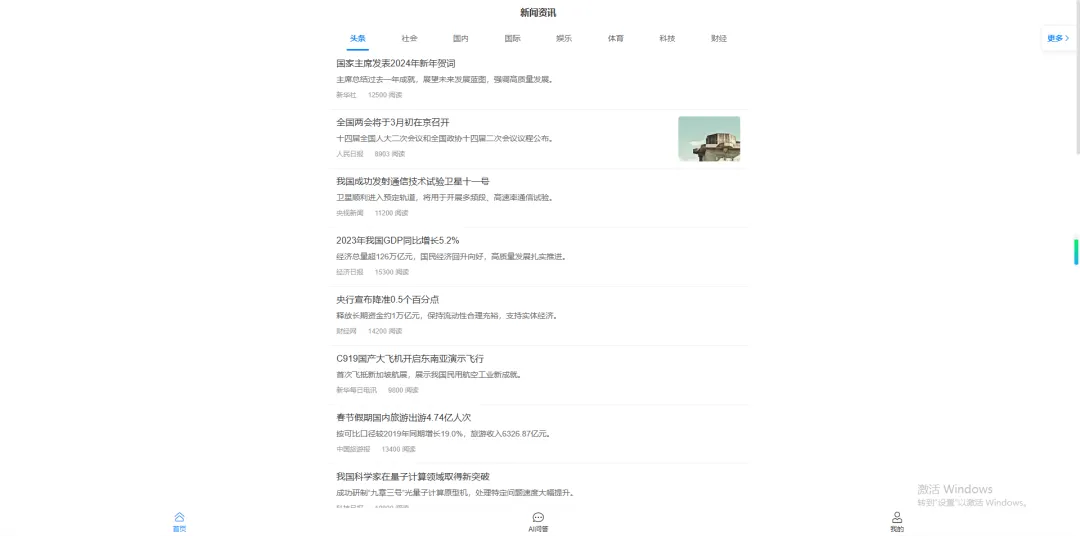

首先项目结构如下
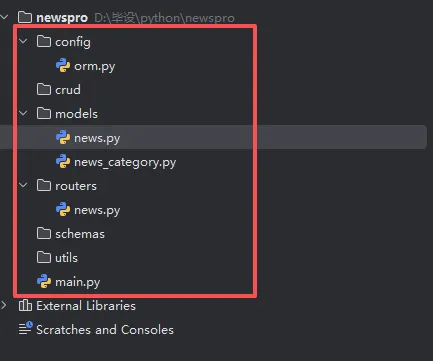
config里面写数据库的配置,具体代码讲解上一讲讲过,这里不再赘述
from sqlalchemy.ext.asyncio import create_async_engine, async_sessionmaker, AsyncSession
ASYNC_DATABASE_URL="mysql+aiomysql://root:@localhost:3306/news_app?charset=utf8mb4"

async_engine=create_async_engine(
    ASYNC_DATABASE_URL,
echo=True,
    pool_size=10,
    max_overflow=20
)
#异步会话工厂
AsyncSessionLocal=async_sessionmaker(
bind=async_engine,
    class_=AsyncSession,
    expire_on_commit=False
)
#依赖项:获取数据库会话
async  def getdatabase():
    async  with AsyncSessionLocal() as session:
        try:
            yield session
            await session.commit()
        except Exception:
            await session.rollback()
            raise
        finally:
            await session.close()
models里面注册数据模型 news.py
from datetime import datetime

from typing import Optional

from sqlalchemy import Index, String, Integer, Text, ForeignKey, DateTime, func
from sqlalchemy.orm import Mapped, mapped_column, DeclarativeBase


class Base(DeclarativeBase):
    created_at: Mapped[datetime] = mapped_column(
        DateTime, insert_default=func.now(), default=datetime.now, comment="创建时间")
    updated_at: Mapped[datetime] = mapped_column(
        DateTime, insert_default=func.now(), onupdate=func.now(), default=datetime.now, comment="修改时间")
class News(Base):
    __tablename__ = "news"
# 创建索引:提升查询速度
    __table_args__ = (
        Index('fk_news_category_idx', 'category_id'),
        Index('idx_publish_time', 'publish_time')
    )

    id: Mapped[int] = mapped_column(Integer, primary_key=True, autoincrement = True, comment = "新闻ID")
    title: Mapped[str] = mapped_column(String(255), nullable=False, comment = "新闻标题")
    description: Mapped[Optional[str]] = mapped_column(String(500), comment = "新闻简介")
    content: Mapped[str] = mapped_column(Text, nullable=False, comment="新闻内容")
    image: Mapped[Optional[str]] = mapped_column(String(255), comment="封图⽚URL")
    author: Mapped[Optional[str]] = mapped_column(String(50), comment="作者")
    category_id: Mapped[int] = mapped_column(Integer)
    views: Mapped[int] = mapped_column(Integer, default=0, nullable=False,
                                       comment="浏览量")
    publish_time: Mapped[datetime] = mapped_column(DateTime, default=datetime.now, comment = "发布时间")

    def __repr__(self):
return f"<News(id={self.id}, title='{self.title}', views={self.views})>"
router里面是路由,例如获取新闻的接口我们写在router下面的news.py
1.注册路由
router=APIRouter(prefix="/api/news",tags=["news"])
2.在main.js里面引入router,通过include_router注册路由
from fastapi import FastAPI, HTTPException
import uvicorn
app=FastAPI()
app.include_router(news.router)

if __name__=="__main__":
    uvicorn.run(app,host="0.0.0.0",port=8000)
3.写一个新闻分类列表接口
@router.get("/categories")
async def getcategory(db:AsyncSession=Depends(getdatabase)):
    result=await db.execute(select(NewsCategory))
    data=result.scalars().all()

return {"msg":"获取成功","data":data,"code":200}
这时候会出现跨域,我们在main.js里面解决跨域问题
orgin=["http://localhost",
"http://localhost:8000",
"https://your-frontend-domain.com"]
app=FastAPI()
app.add_middleware(
    CORSMiddleware,
    allow_origins=["*"],  # 允许访问的源
    allow_credentials=True,  # 允许携带 Cookie
    allow_methods=["*"],  # 允许所有请求方法
    allow_headers=["*"],  # 允许所有请求头
)
这样就能获取数据了。
分页接口,和上一讲一样,这里不再赘述,其中hasmore是为了判断是否有更多数据,公式是偏移量+pagesize<总数
@router.get("/list")
async def getlist(page:int=1,pageSize:int =10,categoryId:int=1,db:AsyncSession=Depends(getdatabase)):
    skip=(page-1)*pageSize
    stmt=select(News).where(News.category_id == categoryId).offset(skip).limit(pageSize)
    result=await  db.execute(stmt)
    food=result.scalars().all()
    totalfunc=select(func.count(News.id)).where(News.category_id == categoryId)
    totalresult=await db.execute(totalfunc)
    total=totalresult.scalar_one()
    hasmore=(skip+len(food))<total
return {"msg":"获取成功","code":200,"data":{
"list":food,
"total":total,
"hasMore":hasmore
    }}
详情逻辑:通过id获取详情,同时修改文章的浏览量
@router.get("/detail")
async def detail(id:int=1,db:AsyncSession=Depends(getdatabase)):
    stmt = select(News).where(News.id== id)
    result=await db.execute(stmt)
    news=result.scalar_one_or_none()
if news is None:
        raise HTTPException(status_code=404, detail="Book not found")

    news.views+=1
    await db.commit()
return {
"msg": "获取成功", "code": 200, "data":news
    }
简单吧,下一讲会讲更好玩的
需要了解服务器和域名的购买以及返佣政策的可以找我,我有朋友做这方面对这些比较了解。第一个群:只讨论java+vue的项目,学历提升和卖服务器的就别进了,进了也会被踢。第二个群:只讨论python项目,以后python的代码和教程会在群里开源,学历提升和卖服务器的就别进了,进了也会被踢。


 10个月宝宝每天需要喝多少奶粉?