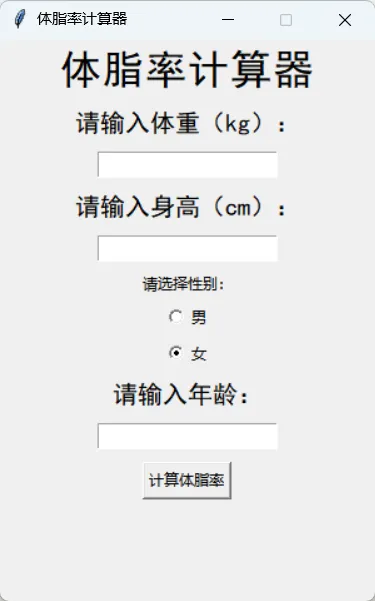
import tkinter as tkfrom tkinter import messageboxroot=tk.Tk() #创建主窗口的实例对象rootroot.title("体脂率计算器")root.geometry("300x450+600+200")root.resizable(False,False)sex_var=tk.IntVar()def calculator(): #获取数据,根据公式计算体脂率 w=int(weight.get()) #体重,单位kg h=int(height.get()) #身高,单位cm s=sex_var.get() #性别编号:男1,女0 a=int(age.get()) #年龄 if s==1: #男性计算公式 bmi=w/((h/100)**2) body_fat=1.2*bmi+0.23*a-5.4-10.8*s messagebox.showinfo("男性体脂率","你的体脂率是{:0.2%}".format(body_fat/100)) else: bmi=w/((h/100)**2) body_fat=1.2*bmi+0.23*a-5.4-10.8*s messagebox.showinfo("女性体脂率","你的体脂率是{:0.2%}".format(body_fat/100))#标题label=tk.Label(root,text="体脂率计算器",font=("黑体",25,"normal"))label.pack(pady=5)#输入体重weight_label=tk.Label(root,text="请输入体重(kg):",font=("黑体",15,"normal"))weight_label.pack(pady=5)weight=tk.Entry(root,width=20)weight.pack(pady=5)#输入身高height_label=tk.Label(root,text="请输入身高(cm):",font=("黑体",15,"normal"))height_label.pack(pady=5)height=tk.Entry(root,width=20)height.pack(pady=5)#选择性别sex_label=tk.Label(root,text="请选择性别:")sex_label.pack(pady=1)radio_man=tk.Radiobutton(root,text="男",value=1,variable=sex_var)radio_man.pack(pady=1)radio_woman=tk.Radiobutton(root,text="女",value=0,variable=sex_var)radio_woman.pack(pady=1)#输入年龄age_label=tk.Label(root,text="请输入年龄:",font=("黑体",15,"normal"))age_label.pack(pady=5)age=tk.Entry(root,width=20)age.pack(pady=5)#按钮bt=tk.Button(root,text="计算体脂率",command=calculator)bt.pack(pady=5)tk.mainloop()