Python微信表情包工具集
- 2026-10-11 05:43:40
Python微信表情包工具集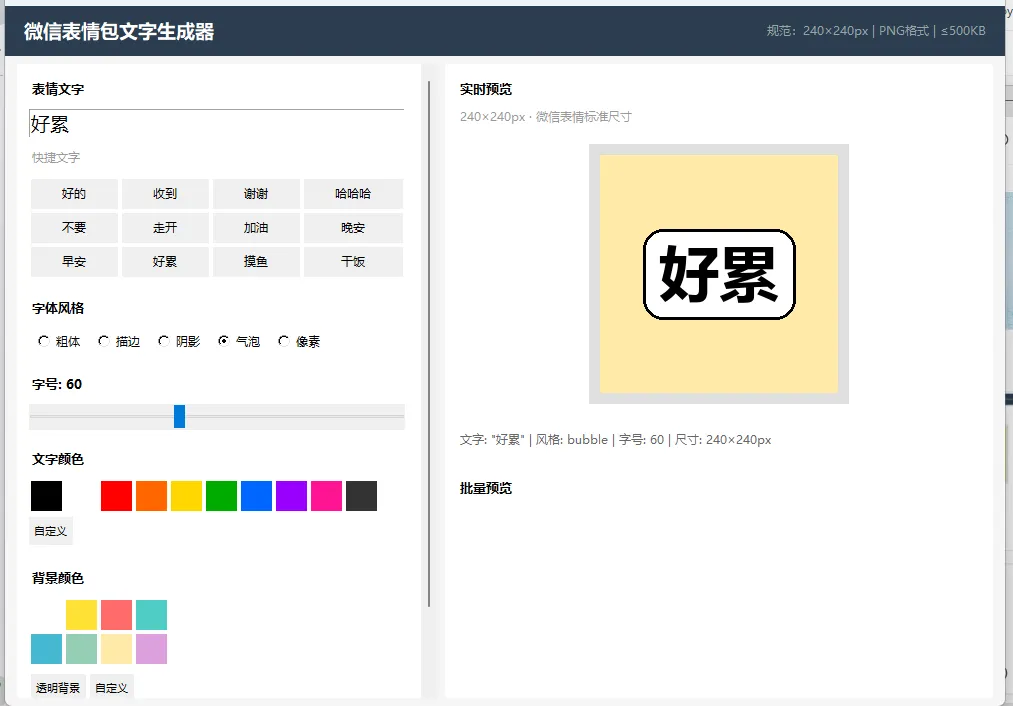
微信表情包工具集
包含两个工具:基础版文字表情生成器 + Pro版(简笔画生成+图片处理)。
微信表情开放平台规范
安装依赖
pip install Pillow工具一:文字表情生成器(sticker_maker.py)
启动
cd wechat-sticker-makerpython sticker_maker.py功能
纯文字表情包生成(无需素材图片) 5种艺术字体风格:粗体、描边、阴影、气泡、像素 自定义文字颜色(10种预设 + 自定义取色器) 自定义背景颜色(8种预设 + 透明背景 + 自定义) 字号滑块实时调节(20-120px) 输入即预览,所见即所得 24个常用表情快捷文字按钮 单张保存为PNG 一键批量生成16张一套表情包 自动适配文字宽度(过长自动缩小)
使用步骤
在左侧输入框输入表情文字(或点击快捷文字按钮) 选择字体风格:粗体/描边/阴影/气泡/像素 调节字号大小 选择文字颜色和背景颜色 右侧实时预览效果 点击「保存当前」导出单张PNG 点击「批量生成」一键生成16张一套表情包到指定目录
工具二:Pro版 - 简笔画生成 & 图片处理(sticker_pro.py)
启动
cd wechat-sticker-makerpython sticker_pro.py功能概览
三个标签页:
Tab1:简笔画表情生成
预设动作(19种)
界面布局
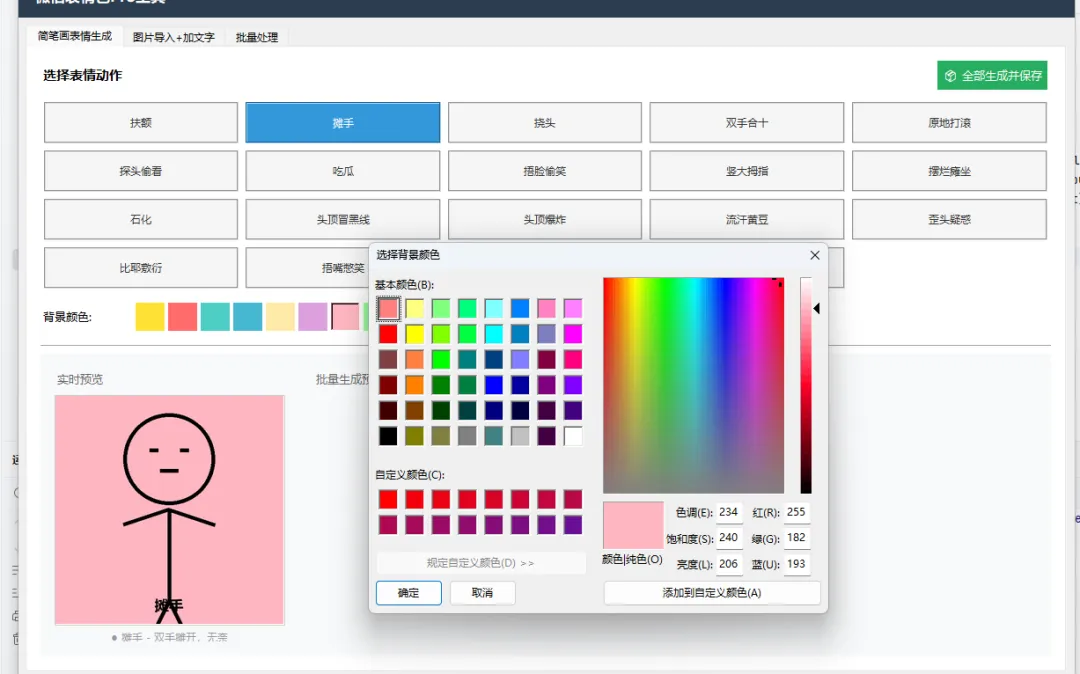
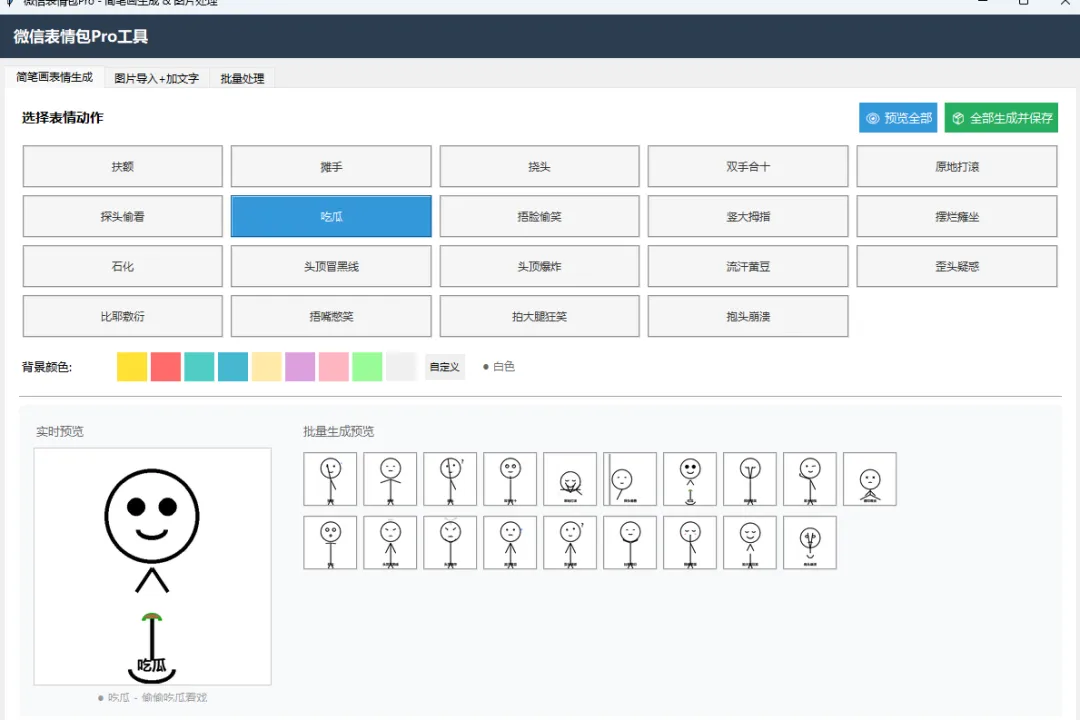
上方:19个动作按钮以5列网格排列,点击高亮选中 中间:背景颜色选择条(10种预设色 + 自定义取色器) 下方左侧:260×260实时大图预览 下方右侧:批量缩略图网格(每行10个)
背景颜色
支持10种预设背景色:
也可点「自定义」打开取色器选择任意颜色。切换颜色后,预览会自动刷新。
操作流程
点击动作按钮 → 左下方实时预览大图 选择背景颜色 → 预览自动更新 点击「👁 预览全部」→ 下方显示19张缩略图网格(不保存文件),可点击缩略图放大预览 点击「📦 全部生成并保存」→ 选择目录 → 生成19张240×240 PNG + 显示缩略图
输出规格
内部渲染:480×480(高清) 导出尺寸:240×240(微信标准) 格式:PNG 命名: 01_扶额.png、02_摊手.png...
Tab2:图片导入+加文字
操作流程
点击「选择图片」→ 选择本地图片文件 自动居中裁切为正方形 + 缩放到240×240 在文字输入框填写底部标注文字 点击「添加文字并保存」→ 选择保存路径
支持格式
PNG、JPG、JPEG、GIF、BMP、WEBP
文字效果
底部半透明黑色背景条 + 白色文字 自动居中
Tab3:批量处理
操作流程
点击「选择输入文件夹」→ 选择包含图片的文件夹 填写文字列表(逗号分隔),如: 好的,收到,谢谢,哈哈,加油,晚安,摸鱼,干饭点击「开始批量处理」→ 选择输出目录 自动处理所有图片:裁切+缩放+加文字+保存
处理规则
所有图片居中裁切为正方形 统一缩放到240×240 按文件名排序 文字列表按顺序对应每张图片 输出命名: sticker_01.png、sticker_02.png...
项目结构
wechat-sticker-maker/├── sticker_maker.py # 基础版:纯文字表情生成器├── sticker_pro.py # Pro版:简笔画生成 + 图片处理 + 批量└── README.md # 本文档技术栈
Python 3.8+ Tkinter(GUI界面) Pillow(图片渲染/处理)
导出后提交微信平台
使用工具生成16或24张表情到一个文件夹 登录 微信表情开放平台 创建表情包 → 上传PNG文件 填写表情包名称、简介、作者信息 提交审核
常见问题
Q: 运行报错 ModuleNotFoundError: No module named 'PIL'
pip install PillowQ: 中文字体显示为方块
工具会按顺序尝试以下字体:微软雅黑粗体 → 微软雅黑 → 黑体 → 宋体。如果都找不到会用系统默认字体。确保Windows系统有中文字体即可。
Q: 生成的图片超过500KB
纯简笔画几乎不可能超过500KB。如果是导入高分辨率图片后超出,建议缩小原图或降低复杂度。
Q: 如何修改预设动作的文字列表
编辑 sticker_pro.py 中的 EXPRESSIONS 字典,可增减动作。每个动作包含:face(表情)、left_arm/right_arm(手臂)、body(身体姿态)、extras(装饰效果)。
"""微信表情包Pro工具 - 导入图片+加文字+批量处理+SVG简笔画生成功能:导入图片素材 → 裁切/缩放到240x240 → 加文字标注 → 导出SVG简笔画表情自动生成(火柴人/大头风格)批量处理整个文件夹实时预览 + 一键导出依赖: pip install Pillow cairosvg(cairosvg可选,没有则用Pillow直接渲染简笔画)"""import tkinter as tkfrom tkinter import ttk, filedialog, messagebox, colorchooserfrom PIL import Image, ImageDraw, ImageFont, ImageTkimport osimport mathimport random============ 常量 ============STICKER_SIZE = 240STICKER_SIZE_HD = 480============ SVG简笔画表情定义 ============每个表情由绘制指令组成:头部+身体+手臂+表情细节EXPRESSIONS = {"扶额": {"desc": "单手扶额,无奈表情","face": "sweat","left_arm": "forehead","right_arm": "down","body": "stand","extras": ["sweat_drop"]},"摊手": {"desc": "双手摊开,无奈","face": "flat","left_arm": "spread","right_arm": "spread","body": "stand","extras": []},"挠头": {"desc": "单手挠头,困惑","face": "confused","left_arm": "head_scratch","right_arm": "down","body": "stand","extras": ["question_mark"]},"双手合十": {"desc": "双手合十,求求了","face": "pleading","left_arm": "pray","right_arm": "pray","body": "stand","extras": ["sparkle"]},"原地打滚": {"desc": "躺地上打滚","face": "cry_laugh","left_arm": "up","right_arm": "up","body": "roll","extras": ["motion_lines"]},"探头偷看": {"desc": "从边缘探头","face": "sneaky","left_arm": "hide","right_arm": "hide","body": "peek","extras": []},"吃瓜": {"desc": "偷偷吃瓜看戏","face": "excited","left_arm": "hold","right_arm": "hold","body": "sit","extras": ["watermelon"]},"捂脸偷笑": {"desc": "双手捂脸偷笑","face": "laugh_hide","left_arm": "cover_face","right_arm": "cover_face","body": "stand","extras": []},}EXPRESSIONS.update({"竖大拇指": {"desc": "竖起大拇指嘲讽","face": "smirk","left_arm": "thumbs_up","right_arm": "down","body": "stand","extras": []},"摆烂瘫坐": {"desc": "瘫坐摆烂","face": "dead","left_arm": "limp","right_arm": "limp","body": "slump","extras": ["soul_out"]},"石化": {"desc": "原地石化","face": "shock","left_arm": "stiff","right_arm": "stiff","body": "stand","extras": ["crack_lines"]},"头顶冒黑线": {"desc": "无语黑线","face": "annoyed","left_arm": "down","right_arm": "down","body": "stand","extras": ["black_lines"]},"头顶爆炸": {"desc": "气到爆炸","face": "angry","left_arm": "fist","right_arm": "fist","body": "stand","extras": ["explosion"]},"流汗黄豆": {"desc": "尴尬流汗","face": "awkward","left_arm": "down","right_arm": "down","body": "stand","extras": ["big_sweat"]},"歪头疑惑": {"desc": "歪头问号","face": "confused","left_arm": "down","right_arm": "down","body": "tilt","extras": ["question_mark"]},"比耶敷衍": {"desc": "双手比耶","face": "flat","left_arm": "peace","right_arm": "peace","body": "stand","extras": []},"捂嘴憋笑": {"desc": "单手捂嘴偷笑","face": "hold_laugh","left_arm": "cover_mouth","right_arm": "down","body": "stand","extras": ["blush"]},"拍大腿狂笑": {"desc": "拍大腿笑","face": "rofl","left_arm": "slap_leg","right_arm": "slap_leg","body": "bend","extras": ["tears"]},"抱头崩溃": {"desc": "双手抱头崩溃","face": "despair","left_arm": "head_hold","right_arm": "head_hold","body": "crouch","extras": ["crack_lines"]},})class StickFigureRenderer:"""简笔画火柴人/大头表情渲染器"""def __init__(self, size=480):self.size = sizeself.line_width = max(4, size // 60)self.bg_color = "#FFFFFF"def render(self, expression_key, text_label=""):"""渲染一个表情"""expr = EXPRESSIONS.get(expression_key)if not expr:return self._render_default(text_label)# 使用设定的背景色bg = self.bg_color if self.bg_color else "#FFFFFF"img = Image.new('RGBA', (self.size, self.size), bg)draw = ImageDraw.Draw(img)cx, cy = self.size // 2, self.size // 2head_r = self.size // 5 # 大头body_top = cy - head_r // 2lw = self.line_width# 根据body类型调整位置body_type = expr.get("body", "stand")head_cy = cy - head_r - 10if body_type == "roll":head_cy = cy + 20self._draw_roll_body(draw, cx, cy, head_r, lw)elif body_type == "peek":cx = self.size // 3head_cy = cyself._draw_peek_body(draw, cx, head_cy, head_r, lw)elif body_type == "sit":head_cy = cy - head_r - 5self._draw_sit_body(draw, cx, cy + head_r, head_r, lw)elif body_type == "slump":head_cy = cyself._draw_slump_body(draw, cx, cy, head_r, lw)elif body_type == "crouch":head_cy = cy - head_r // 2self._draw_crouch_body(draw, cx, cy + head_r // 2, head_r, lw)elif body_type == "bend":head_cy = cy - head_rself._draw_bend_body(draw, cx, cy, head_r, lw)elif body_type == "tilt":head_cy = cy - head_r - 10self._draw_stand_body(draw, cx, cy, head_r, lw)# 歪头用旋转效果模拟else:head_cy = cy - head_r - 10self._draw_stand_body(draw, cx, cy, head_r, lw)# 画头(大圆)draw.ellipse([cx - head_r, head_cy - head_r, cx + head_r, head_cy + head_r],outline="black", width=lw)# 画表情self._draw_face(draw, cx, head_cy, head_r, expr.get("face", "normal"), lw)# 画手臂arm_y = head_cy + head_r + 10self._draw_arms(draw, cx, head_cy, arm_y, head_r, expr, lw)# 画额外装饰for extra in expr.get("extras", []):self._draw_extra(draw, cx, head_cy, head_r, extra, lw)# 底部文字标注if text_label:self._draw_label(draw, text_label)return imgdef _draw_stand_body(self, draw, cx, cy, hr, lw):"""站立身体"""body_top = cy + 5body_bottom = cy + hr * 2# 身体线draw.line([cx, body_top, cx, body_bottom], fill="black", width=lw)# 腿draw.line([cx, body_bottom, cx - hr//2, body_bottom + hr], fill="black", width=lw)draw.line([cx, body_bottom, cx + hr//2, body_bottom + hr], fill="black", width=lw)def _draw_roll_body(self, draw, cx, cy, hr, lw):"""打滚身体"""# 横躺的身体draw.line([cx - hr, cy + hr, cx + hr, cy + hr], fill="black", width=lw)# 腿朝上draw.line([cx + hr//2, cy + hr, cx + hr, cy + hr//2], fill="black", width=lw)draw.line([cx + hr//2, cy + hr, cx + hr + 10, cy + hr + hr//2], fill="black", width=lw)def _draw_peek_body(self, draw, cx, cy, hr, lw):"""探头身体(大半被遮挡)"""# 画一个竖线代表墙壁/遮挡物wall_x = cx - hr - 20draw.line([wall_x, 0, wall_x, self.size], fill="#999999", width=lw * 2)# 只露出头和一只手draw.line([cx, cy + hr, cx - hr//2, cy + hr * 2], fill="black", width=lw)def _draw_sit_body(self, draw, cx, body_y, hr, lw):"""坐姿"""draw.line([cx, body_y, cx, body_y + hr], fill="black", width=lw)# 盘腿draw.arc([cx - hr//2, body_y + hr - 10, cx + hr//2, body_y + hr + hr//2],0, 180, fill="black", width=lw)def _draw_slump_body(self, draw, cx, cy, hr, lw):"""瘫坐"""body_y = cy + hrdraw.line([cx, body_y, cx, body_y + hr//2], fill="black", width=lw)# 摊开的腿draw.line([cx, body_y + hr//2, cx - hr, body_y + hr], fill="black", width=lw)draw.line([cx, body_y + hr//2, cx + hr, body_y + hr], fill="black", width=lw)def _draw_crouch_body(self, draw, cx, body_y, hr, lw):"""蹲下"""draw.line([cx, body_y, cx, body_y + hr//2], fill="black", width=lw)draw.arc([cx - hr//3, body_y + hr//3, cx + hr//3, body_y + hr],0, 180, fill="black", width=lw)def _draw_bend_body(self, draw, cx, cy, hr, lw):"""弯腰"""body_top = cy + hr + 5draw.line([cx, body_top, cx, body_top + hr], fill="black", width=lw)# 弯腰腿draw.line([cx, body_top + hr, cx - hr//3, body_top + hr * 2 - 20], fill="black", width=lw)draw.line([cx, body_top + hr, cx + hr//3, body_top + hr * 2 - 20], fill="black", width=lw)def _draw_face(self, draw, cx, cy, hr, face_type, lw):"""画面部表情"""eye_y = cy - hr // 5eye_dist = hr // 3eye_r = hr // 10mouth_y = cy + hr // 4if face_type == "sweat":# 无奈微笑draw.ellipse([cx - eye_dist - eye_r, eye_y - eye_r, cx - eye_dist + eye_r, eye_y + eye_r], fill="black")draw.ellipse([cx + eye_dist - eye_r, eye_y - eye_r, cx + eye_dist + eye_r, eye_y + eye_r], fill="black")draw.arc([cx - hr//4, mouth_y - 5, cx + hr//4, mouth_y + hr//5], 0, 180, fill="black", width=lw)elif face_type == "flat":# 面无表情draw.line([cx - eye_dist - eye_r, eye_y, cx - eye_dist + eye_r, eye_y], fill="black", width=lw)draw.line([cx + eye_dist - eye_r, eye_y, cx + eye_dist + eye_r, eye_y], fill="black", width=lw)draw.line([cx - hr//5, mouth_y, cx + hr//5, mouth_y], fill="black", width=lw)elif face_type == "confused":# 困惑draw.ellipse([cx - eye_dist - eye_r, eye_y - eye_r, cx - eye_dist + eye_r, eye_y + eye_r], fill="black")draw.ellipse([cx + eye_dist - eye_r, eye_y - eye_r*2, cx + eye_dist + eye_r, eye_y], fill="black")draw.arc([cx - hr//5, mouth_y, cx + hr//5, mouth_y + hr//5], 0, 180, fill="black", width=lw)elif face_type == "pleading":# 恳求(大眼水汪汪)er = eye_r * 2draw.ellipse([cx - eye_dist - er, eye_y - er, cx - eye_dist + er, eye_y + er], outline="black", width=lw)draw.ellipse([cx + eye_dist - er, eye_y - er, cx + eye_dist + er, eye_y + er], outline="black", width=lw)# 高光draw.ellipse([cx - eye_dist - er//3, eye_y - er//2, cx - eye_dist, eye_y - er//4], fill="black")draw.ellipse([cx + eye_dist - er//3, eye_y - er//2, cx + eye_dist, eye_y - er//4], fill="black")draw.arc([cx - hr//4, mouth_y, cx + hr//4, mouth_y + hr//6], 0, 180, fill="black", width=lw)elif face_type in ("cry_laugh", "rofl"):# 笑哭draw.arc([cx - eye_dist - eye_r*2, eye_y - eye_r, cx - eye_dist + eye_r*2, eye_y + eye_r*2], 0, 180, fill="black", width=lw)draw.arc([cx + eye_dist - eye_r*2, eye_y - eye_r, cx + eye_dist + eye_r*2, eye_y + eye_r*2], 0, 180, fill="black", width=lw)draw.arc([cx - hr//3, mouth_y - hr//8, cx + hr//3, mouth_y + hr//3], 0, 180, fill="black", width=lw+1)elif face_type == "sneaky":# 贼兮兮draw.line([cx - eye_dist - eye_r, eye_y, cx - eye_dist + eye_r, eye_y - 3], fill="black", width=lw)draw.line([cx + eye_dist - eye_r, eye_y - 3, cx + eye_dist + eye_r, eye_y], fill="black", width=lw)draw.ellipse([cx - eye_dist - 2, eye_y, cx - eye_dist + 2, eye_y + 4], fill="black")draw.ellipse([cx + eye_dist - 2, eye_y, cx + eye_dist + 2, eye_y + 4], fill="black")draw.arc([cx - hr//6, mouth_y, cx + hr//6, mouth_y + hr//6], 0, 180, fill="black", width=lw)elif face_type == "excited":# 兴奋draw.ellipse([cx - eye_dist - eye_r*2, eye_y - eye_r*2, cx - eye_dist + eye_r*2, eye_y + eye_r*2], fill="black")draw.ellipse([cx + eye_dist - eye_r*2, eye_y - eye_r*2, cx + eye_dist + eye_r*2, eye_y + eye_r*2], fill="black")draw.arc([cx - hr//3, mouth_y - hr//6, cx + hr//3, mouth_y + hr//4], 0, 180, fill="black", width=lw+1)elif face_type in ("laugh_hide", "hold_laugh"):# 偷笑draw.arc([cx - eye_dist - eye_r*2, eye_y - eye_r, cx - eye_dist + eye_r*2, eye_y + eye_r*2], 0, 180, fill="black", width=lw)draw.arc([cx + eye_dist - eye_r*2, eye_y - eye_r, cx + eye_dist + eye_r*2, eye_y + eye_r*2], 0, 180, fill="black", width=lw)elif face_type == "smirk":# 嘲讽笑draw.ellipse([cx - eye_dist - eye_r, eye_y - eye_r, cx - eye_dist + eye_r, eye_y + eye_r], fill="black")draw.line([cx + eye_dist - eye_r*2, eye_y, cx + eye_dist + eye_r*2, eye_y - 4], fill="black", width=lw)draw.arc([cx - hr//5, mouth_y - hr//8, cx + hr//4, mouth_y + hr//6], 0, 180, fill="black", width=lw)elif face_type == "dead":# 死鱼眼draw.line([cx - eye_dist - eye_r, eye_y - eye_r, cx - eye_dist + eye_r, eye_y + eye_r], fill="black", width=lw)draw.line([cx - eye_dist + eye_r, eye_y - eye_r, cx - eye_dist - eye_r, eye_y + eye_r], fill="black", width=lw)draw.line([cx + eye_dist - eye_r, eye_y - eye_r, cx + eye_dist + eye_r, eye_y + eye_r], fill="black", width=lw)draw.line([cx + eye_dist + eye_r, eye_y - eye_r, cx + eye_dist - eye_r, eye_y + eye_r], fill="black", width=lw)draw.arc([cx - hr//5, mouth_y, cx + hr//5, mouth_y + hr//6], 180, 360, fill="black", width=lw)elif face_type == "shock":# 震惊draw.ellipse([cx - eye_dist - eye_r*2, eye_y - eye_r*2, cx - eye_dist + eye_r*2, eye_y + eye_r*2], outline="black", width=lw)draw.ellipse([cx + eye_dist - eye_r*2, eye_y - eye_r*2, cx + eye_dist + eye_r*2, eye_y + eye_r*2], outline="black", width=lw)draw.ellipse([cx - hr//8, mouth_y, cx + hr//8, mouth_y + hr//4], outline="black", width=lw)elif face_type == "annoyed":# 不爽draw.line([cx - eye_dist - eye_r*2, eye_y - eye_r, cx - eye_dist + eye_r, eye_y + 2], fill="black", width=lw)draw.line([cx + eye_dist - eye_r, eye_y + 2, cx + eye_dist + eye_r*2, eye_y - eye_r], fill="black", width=lw)draw.ellipse([cx - eye_dist - 2, eye_y + 2, cx - eye_dist + 3, eye_y + 7], fill="black")draw.ellipse([cx + eye_dist - 2, eye_y + 2, cx + eye_dist + 3, eye_y + 7], fill="black")draw.arc([cx - hr//5, mouth_y + hr//8, cx + hr//5, mouth_y + hr//4], 180, 360, fill="black", width=lw)elif face_type == "angry":# 愤怒draw.line([cx - eye_dist - eye_r*2, eye_y - eye_r*2, cx - eye_dist + eye_r, eye_y], fill="black", width=lw+1)draw.line([cx + eye_dist - eye_r, eye_y, cx + eye_dist + eye_r*2, eye_y - eye_r*2], fill="black", width=lw+1)draw.ellipse([cx - eye_dist - 3, eye_y, cx - eye_dist + 3, eye_y + 6], fill="black")draw.ellipse([cx + eye_dist - 3, eye_y, cx + eye_dist + 3, eye_y + 6], fill="black")draw.arc([cx - hr//4, mouth_y + hr//6, cx + hr//4, mouth_y + hr//3], 180, 360, fill="black", width=lw+1)elif face_type == "awkward":# 尴尬draw.ellipse([cx - eye_dist - eye_r, eye_y - eye_r, cx - eye_dist + eye_r, eye_y + eye_r], fill="black")draw.ellipse([cx + eye_dist - eye_r, eye_y - eye_r, cx + eye_dist + eye_r, eye_y + eye_r], fill="black")draw.line([cx - hr//5, mouth_y + 5, cx + hr//5, mouth_y + 5], fill="black", width=lw)elif face_type == "despair":# 绝望draw.ellipse([cx - eye_dist - eye_r*2, eye_y - eye_r, cx - eye_dist + eye_r*2, eye_y + eye_r*2], outline="black", width=lw)draw.ellipse([cx + eye_dist - eye_r*2, eye_y - eye_r, cx + eye_dist + eye_r*2, eye_y + eye_r*2], outline="black", width=lw)draw.arc([cx - hr//4, mouth_y + hr//8, cx + hr//4, mouth_y + hr//3], 180, 360, fill="black", width=lw)else:# 默认普通表情draw.ellipse([cx - eye_dist - eye_r, eye_y - eye_r, cx - eye_dist + eye_r, eye_y + eye_r], fill="black")draw.ellipse([cx + eye_dist - eye_r, eye_y - eye_r, cx + eye_dist + eye_r, eye_y + eye_r], fill="black")draw.arc([cx - hr//4, mouth_y, cx + hr//4, mouth_y + hr//5], 0, 180, fill="black", width=lw)def _draw_arms(self, draw, cx, head_cy, arm_y, hr, expr, lw):"""画手臂"""left = expr.get("left_arm", "down")right = expr.get("right_arm", "down")# 左臂self._draw_single_arm(draw, cx, head_cy, arm_y, hr, left, -1, lw)# 右臂self._draw_single_arm(draw, cx, head_cy, arm_y, hr, right, 1, lw)def _draw_single_arm(self, draw, cx, head_cy, arm_y, hr, arm_type, side, lw):"""画单只手臂 side: -1左 1右"""sx = cx # 肩膀xsy = arm_y # 肩膀yarm_len = hrif arm_type == "down":draw.line([sx, sy, sx + side * hr//2, sy + arm_len], fill="black", width=lw)elif arm_type == "spread":draw.line([sx, sy, sx + side * arm_len, sy + hr//3], fill="black", width=lw)elif arm_type == "forehead":# 手伸到额头draw.line([sx, sy, sx + side * hr//3, head_cy - hr//3], fill="black", width=lw)draw.ellipse([sx + side*hr//3 - 6, head_cy - hr//3 - 6, sx + side*hr//3 + 6, head_cy - hr//3 + 6], fill="black")elif arm_type == "head_scratch":draw.line([sx, sy, sx + side * hr//4, head_cy - hr + 5], fill="black", width=lw)elif arm_type == "pray":# 合十(两臂向中间)draw.line([sx, sy, cx, sy - hr//3], fill="black", width=lw)elif arm_type == "up":draw.line([sx, sy, sx + side * hr//2, sy - arm_len], fill="black", width=lw)elif arm_type == "hide":pass # 隐藏elif arm_type == "hold":draw.line([sx, sy, sx + side * hr//3, sy + hr//2], fill="black", width=lw)elif arm_type == "cover_face":draw.line([sx, sy, cx + side * hr//6, head_cy], fill="black", width=lw)draw.ellipse([cx + side*hr//6 - 5, head_cy - 5, cx + side*hr//6 + 5, head_cy + 5], fill="black")elif arm_type == "thumbs_up":draw.line([sx, sy, sx + side * hr, sy - hr//3], fill="black", width=lw)# 大拇指ex = sx + side * hrey = sy - hr//3draw.line([ex, ey, ex, ey - hr//4], fill="black", width=lw + 2)elif arm_type == "limp":draw.line([sx, sy, sx + side * hr//2, sy + hr//2], fill="black", width=lw)elif arm_type == "stiff":draw.line([sx, sy, sx + side * hr//2, sy + 5], fill="black", width=lw)elif arm_type == "fist":draw.line([sx, sy, sx + side * hr//2, sy - hr//3], fill="black", width=lw)ex = sx + side * hr//2ey = sy - hr//3draw.ellipse([ex - 6, ey - 6, ex + 6, ey + 6], fill="black")elif arm_type == "peace":draw.line([sx, sy, sx + side * hr * 2//3, sy - hr//4], fill="black", width=lw)ex = sx + side * hr * 2//3ey = sy - hr//4draw.line([ex, ey, ex - 5, ey - 15], fill="black", width=lw)draw.line([ex, ey, ex + 5, ey - 15], fill="black", width=lw)elif arm_type == "cover_mouth":draw.line([sx, sy, cx, head_cy + hr//3], fill="black", width=lw)draw.ellipse([cx - 6, head_cy + hr//3 - 4, cx + 6, head_cy + hr//3 + 4], fill="black")elif arm_type == "slap_leg":draw.line([sx, sy, sx + side * hr//3, sy + hr * 2//3], fill="black", width=lw)elif arm_type == "head_hold":draw.line([sx, sy, cx + side * hr//4, head_cy - hr//2], fill="black", width=lw)def _draw_extra(self, draw, cx, head_cy, hr, extra_type, lw):"""画装饰效果"""if extra_type == "sweat_drop":# 汗滴sx = cx + hr + 5sy = head_cy - hr//2draw.polygon([(sx, sy - 10), (sx - 5, sy + 5), (sx + 5, sy + 5)], fill="#4488ff")elif extra_type == "question_mark":font = self._get_font(hr//2)draw.text((cx + hr + 5, head_cy - hr), "?", fill="black", font=font)elif extra_type == "sparkle":for dx, dy in [(-hr-10, -hr//2), (hr+10, -hr//2), (0, -hr-10)]:x, y = cx + dx, head_cy + dydraw.line([x-5, y, x+5, y], fill="#FFD700", width=2)draw.line([x, y-5, x, y+5], fill="#FFD700", width=2)elif extra_type == "motion_lines":for i in range(3):y = head_cy + hr + 10 + i * 12draw.line([cx - hr - 20, y, cx - hr - 5, y], fill="#999", width=2)draw.line([cx + hr + 5, y, cx + hr + 20, y], fill="#999", width=2)elif extra_type == "watermelon":# 简笔西瓜wy = head_cy + hr * 2 + 20draw.arc([cx - 20, wy - 15, cx + 20, wy + 15], 180, 360, fill="#22aa22", width=lw)draw.chord([cx - 18, wy - 13, cx + 18, wy + 5], 180, 360, fill="#ff4444", outline="#22aa22", width=2)elif extra_type == "black_lines":# 头顶黑线for i in range(3):x = cx - 15 + i * 15draw.line([x, head_cy - hr - 5, x, head_cy - hr - 25], fill="black", width=2)elif extra_type == "explosion":# 爆炸效果top_y = head_cy - hr - 10points = []for i in range(8):angle = i * (360 / 8)r_out = hr // 2 + 10r_in = hr // 4r = r_out if i % 2 == 0 else r_inpx = cx + int(r * math.cos(math.radians(angle)))py = top_y - 20 + int(r * math.sin(math.radians(angle)))points.append((px, py))draw.polygon(points, outline="black", width=2)elif extra_type == "big_sweat":sx = cx + hrsy = head_cy - hr//3draw.ellipse([sx, sy, sx + 15, sy + 20], fill="#66aaff", outline="#4488dd", width=1)elif extra_type == "crack_lines":# 裂纹效果for _ in range(4):x1 = cx + random.randint(-hr, hr)y1 = head_cy + hr + random.randint(10, hr)draw.line([x1, y1, x1 + random.randint(-10, 10), y1 + random.randint(10, 20)],fill="#999", width=1)elif extra_type == "soul_out":# 灵魂出窍draw.arc([cx - 10, head_cy - hr - 40, cx + 10, head_cy - hr - 10],0, 360, fill="#cccccc", width=1)draw.text((cx - 5, head_cy - hr - 35), "~", fill="#ccc")elif extra_type == "blush":# 腮红draw.ellipse([cx - hr//2 - 10, head_cy + hr//6, cx - hr//2 + 10, head_cy + hr//4 + 5],fill="#ffaaaa")draw.ellipse([cx + hr//2 - 10, head_cy + hr//6, cx + hr//2 + 10, head_cy + hr//4 + 5],fill="#ffaaaa")elif extra_type == "tears":# 眼泪draw.line([cx - hr//3, head_cy, cx - hr//3 - 5, head_cy + hr//2], fill="#4488ff", width=2)draw.line([cx + hr//3, head_cy, cx + hr//3 + 5, head_cy + hr//2], fill="#4488ff", width=2)def _draw_label(self, draw, text):"""底部文字"""font = self._get_font(self.size // 16)bbox = draw.textbbox((0, 0), text, font=font)tw = bbox[2] - bbox[0]x = (self.size - tw) // 2y = self.size - self.size // 8draw.text((x, y), text, fill="black", font=font)def _get_font(self, size):paths = ["C:/Windows/Fonts/msyhbd.ttc", "C:/Windows/Fonts/msyh.ttc","C:/Windows/Fonts/simhei.ttf", "/System/Library/Fonts/PingFang.ttc"]for p in paths:if os.path.exists(p):try:return ImageFont.truetype(p, size)except:continuereturn ImageFont.load_default()def _render_default(self, text):img = Image.new('RGBA', (self.size, self.size), (255, 255, 255, 255))draw = ImageDraw.Draw(img)font = self._get_font(self.size // 6)draw.text((self.size//4, self.size//3), text or "?", fill="black", font=font)return img============ 图片处理工具 ============class ImageProcessor:"""图片导入+加文字+裁切工具"""@staticmethoddef load_and_resize(filepath, size=STICKER_SIZE):"""加载图片并裁切为正方形"""img = Image.open(filepath).convert('RGBA')# 居中裁切为正方形w, h = img.sizes = min(w, h)left = (w - s) // 2top = (h - s) // 2img = img.crop((left, top, left + s, top + s))img = img.resize((size, size), Image.LANCZOS)return img@staticmethoddef add_text(img, text, position="bottom", text_color="#FFFFFF",bg_color="#000000AA", font_size=28):"""给图片添加文字标注"""draw = ImageDraw.Draw(img)paths = ["C:/Windows/Fonts/msyhbd.ttc", "C:/Windows/Fonts/msyh.ttc","C:/Windows/Fonts/simhei.ttf"]font = ImageFont.load_default()for p in paths:if os.path.exists(p):try:font = ImageFont.truetype(p, font_size)breakexcept:continuebbox = draw.textbbox((0, 0), text, font=font)tw = bbox[2] - bbox[0]th = bbox[3] - bbox[1]w, h = img.sizeif position == "bottom":x = (w - tw) // 2y = h - th - 16# 半透明背景条overlay = Image.new('RGBA', img.size, (0, 0, 0, 0))od = ImageDraw.Draw(overlay)od.rectangle([0, y - 8, w, h], fill=(0, 0, 0, 140))img = Image.alpha_composite(img, overlay)draw = ImageDraw.Draw(img)draw.text((x, y), text, fill=text_color, font=font)elif position == "top":x = (w - tw) // 2y = 10draw.text((x, y), text, fill=text_color, font=font)elif position == "center":x = (w - tw) // 2y = (h - th) // 2draw.text((x, y), text, fill=text_color, font=font)return img@staticmethoddef batch_process(folder_path, output_folder, text_list=None, size=STICKER_SIZE):"""批量处理文件夹中的图片"""os.makedirs(output_folder, exist_ok=True)supported = ('.png', '.jpg', '.jpeg', '.gif', '.bmp', '.webp')files = [f for f in os.listdir(folder_path) if f.lower().endswith(supported)]files.sort()results = []for i, filename in enumerate(files):filepath = os.path.join(folder_path, filename)img = ImageProcessor.load_and_resize(filepath, size)# 如果有对应文字则加上if text_list and i < len(text_list):img = ImageProcessor.add_text(img, text_list[i])output_path = os.path.join(output_folder, f"sticker_{i+1:02d}.png")img.save(output_path, "PNG", optimize=True)results.append(output_path)return results============ GUI主程序 ============class StickerProApp:def init(self, root):self.root = rootself.root.title("微信表情包Pro - 简笔画生成 & 图片处理")self.root.geometry("1200x800")self.root.configure(bg="#f0f0f0")self.renderer = StickFigureRenderer(STICKER_SIZE_HD)self.current_images = {}self.tk_thumbs = []self._current_expr_key = Noneself.bg_color_var = "#FFFFFF"self._build_ui()def _build_ui(self):"""构建界面"""# 顶部header = tk.Frame(self.root, bg="#2c3e50", height=48)header.pack(fill=tk.X)header.pack_propagate(False)tk.Label(header, text="微信表情包Pro工具", font=("Microsoft YaHei", 13, "bold"),bg="#2c3e50", fg="white").pack(side=tk.LEFT, padx=16, pady=10)# Notebook标签页notebook = ttk.Notebook(self.root)notebook.pack(fill=tk.BOTH, expand=True, padx=8, pady=8)# Tab1: 简笔画生成tab1 = tk.Frame(notebook, bg="#ffffff")notebook.add(tab1, text=" 简笔画表情生成 ")self._build_stickfigure_tab(tab1)# Tab2: 图片处理tab2 = tk.Frame(notebook, bg="#ffffff")notebook.add(tab2, text=" 图片导入+加文字 ")self._build_image_tab(tab2)# Tab3: 批量处理tab3 = tk.Frame(notebook, bg="#ffffff")notebook.add(tab3, text=" 批量处理 ")self._build_batch_tab(tab3)def _build_stickfigure_tab(self, parent):"""简笔画表情生成标签页 - 网格布局"""# 上方:表情动作网格 + 背景色选择top_area = tk.Frame(parent, bg="#ffffff")top_area.pack(fill=tk.X, padx=16, pady=(16, 8))# 标题行title_row = tk.Frame(top_area, bg="#ffffff")title_row.pack(fill=tk.X, pady=(0, 10))tk.Label(title_row, text="选择表情动作", font=("Microsoft YaHei", 11, "bold"),bg="#ffffff").pack(side=tk.LEFT)tk.Button(title_row, text="📦 全部生成并保存", font=("Microsoft YaHei", 10),bg="#27ae60", fg="white", relief=tk.FLAT, cursor="hand2",command=self._generate_all).pack(side=tk.RIGHT, padx=4)tk.Button(title_row, text="👁 预览全部", font=("Microsoft YaHei", 10),bg="#3498db", fg="white", relief=tk.FLAT, cursor="hand2",command=self._preview_all).pack(side=tk.RIGHT, padx=4)# 表情动作网格(5列)grid_frame = tk.Frame(top_area, bg="#ffffff")grid_frame.pack(fill=tk.X)self.expr_buttons = {}cols = 5for i, (key, val) in enumerate(EXPRESSIONS.items()):btn = tk.Button(grid_frame, text=key, font=("Microsoft YaHei", 9),bg="#f5f5f5", fg="#333", relief=tk.GROOVE, cursor="hand2",width=8, height=2,command=lambda k=key: self._preview_expression(k))btn.grid(row=i // cols, column=i % cols, padx=4, pady=4, sticky="ew")self.expr_buttons[key] = btnfor c in range(cols):grid_frame.columnconfigure(c, weight=1)# 背景颜色选择行bg_row = tk.Frame(top_area, bg="#ffffff")bg_row.pack(fill=tk.X, pady=(12, 0))tk.Label(bg_row, text="背景颜色:", font=("Microsoft YaHei", 10),bg="#ffffff").pack(side=tk.LEFT, padx=(0, 8))self.bg_color_var = "#FFFFFF"bg_colors = [("#FFFFFF", "白色"), ("#FFE135", "柠檬黄"), ("#FF6B6B", "珊瑚红"),("#4ECDC4", "薄荷绿"), ("#45B7D1", "天空蓝"), ("#FFEAA7", "奶油黄"),("#DDA0DD", "淡紫"), ("#FFB6C1", "粉色"), ("#98FB98", "浅绿"),("#F0F0F0", "浅灰"),]self.bg_btn_refs = []for color, name in bg_colors:btn = tk.Button(bg_row, bg=color, width=3, height=1, relief=tk.FLAT,cursor="hand2", highlightthickness=2, highlightbackground="#ddd",command=lambda c=color: self._set_sticker_bg(c))btn.pack(side=tk.LEFT, padx=2)self.bg_btn_refs.append((btn, color))tk.Button(bg_row, text="自定义", font=("Microsoft YaHei", 8), relief=tk.FLAT,bg="#f0f0f0", cursor="hand2",command=self._pick_sticker_bg).pack(side=tk.LEFT, padx=8)# 当前选中颜色指示self.bg_indicator = tk.Label(bg_row, text="● 白色", font=("Microsoft YaHei", 9),bg="#ffffff", fg="#666")self.bg_indicator.pack(side=tk.LEFT, padx=8)# 分隔线ttk.Separator(parent, orient="horizontal").pack(fill=tk.X, padx=16, pady=8)# 下方:预览区bottom_area = tk.Frame(parent, bg="#f8f9fa")bottom_area.pack(fill=tk.BOTH, expand=True, padx=16, pady=(0, 16))# 预览左侧:大图preview_left = tk.Frame(bottom_area, bg="#f8f9fa")preview_left.pack(side=tk.LEFT, padx=(16, 24), pady=16)tk.Label(preview_left, text="实时预览", font=("Microsoft YaHei", 10),bg="#f8f9fa", fg="#666").pack(anchor="w", pady=(0, 6))self.sticker_canvas = tk.Canvas(preview_left, width=260, height=260, bg="#ffffff",highlightthickness=1, highlightbackground="#ccc")self.sticker_canvas.pack()self.sticker_info = tk.Label(preview_left, text="← 点击上方表情动作查看预览",font=("Microsoft YaHei", 9), bg="#f8f9fa", fg="#999")self.sticker_info.pack(pady=(8, 0))# 预览右侧:缩略图网格preview_right = tk.Frame(bottom_area, bg="#f8f9fa")preview_right.pack(side=tk.LEFT, fill=tk.BOTH, expand=True, padx=8, pady=16)tk.Label(preview_right, text="批量生成预览", font=("Microsoft YaHei", 10),bg="#f8f9fa", fg="#666").pack(anchor="w", pady=(0, 6))self.thumb_frame = tk.Frame(preview_right, bg="#f8f9fa")self.thumb_frame.pack(fill=tk.BOTH, expand=True)def _set_sticker_bg(self, color):"""设置简笔画背景色"""self.bg_color_var = color# 更新指示文字color_names = {"#FFFFFF": "白色", "#FFE135": "柠檬黄", "#FF6B6B": "珊瑚红","#4ECDC4": "薄荷绿", "#45B7D1": "天空蓝", "#FFEAA7": "奶油黄","#DDA0DD": "淡紫", "#FFB6C1": "粉色", "#98FB98": "浅绿", "#F0F0F0": "浅灰"}name = color_names.get(color, color)self.bg_indicator.config(text=f"● {name}")# 高亮选中按钮for btn, c in self.bg_btn_refs:if c == color:btn.config(highlightbackground="#333", relief=tk.SUNKEN)else:btn.config(highlightbackground="#ddd", relief=tk.FLAT)# 如果当前有预览则刷新if hasattr(self, '_current_expr_key') and self._current_expr_key:self._preview_expression(self._current_expr_key)def _pick_sticker_bg(self):"""自定义背景色"""color = colorchooser.askcolor(title="选择背景颜色", initialcolor=self.bg_color_var)if color[1]:self._set_sticker_bg(color[1])def _build_image_tab(self, parent):"""图片导入标签页"""tk.Label(parent, text="导入图片 → 裁切为240×240 → 添加文字 → 导出",font=("Microsoft YaHei", 10), bg="#ffffff", fg="#666").pack(padx=12, pady=12)ctrl = tk.Frame(parent, bg="#ffffff")ctrl.pack(fill=tk.X, padx=12)tk.Button(ctrl, text="选择图片", font=("Microsoft YaHei", 10),bg="#3498db", fg="white", relief=tk.FLAT, cursor="hand2",command=self._import_image).pack(side=tk.LEFT, padx=4)tk.Label(ctrl, text="底部文字:", bg="#ffffff", font=("Microsoft YaHei", 9)).pack(side=tk.LEFT, padx=(16, 4))self.img_text_entry = tk.Entry(ctrl, font=("Microsoft YaHei", 11), width=15)self.img_text_entry.pack(side=tk.LEFT, padx=4)self.img_text_entry.insert(0, "好的")tk.Button(ctrl, text="添加文字并保存", font=("Microsoft YaHei", 10),bg="#27ae60", fg="white", relief=tk.FLAT, cursor="hand2",command=self._save_with_text).pack(side=tk.LEFT, padx=8)# 预览self.img_preview_canvas = tk.Canvas(parent, width=240, height=240, bg="#eeeeee",highlightthickness=1, highlightbackground="#ddd")self.img_preview_canvas.pack(pady=16)self.imported_img = Nonedef _build_batch_tab(self, parent):"""批量处理标签页"""tk.Label(parent, text="批量导入图片文件夹 → 全部裁切为240×240 → 可选加文字 → 导出",font=("Microsoft YaHei", 10), bg="#ffffff", fg="#666").pack(padx=12, pady=12)ctrl = tk.Frame(parent, bg="#ffffff")ctrl.pack(fill=tk.X, padx=12)tk.Button(ctrl, text="选择输入文件夹", font=("Microsoft YaHei", 10),bg="#3498db", fg="white", relief=tk.FLAT, cursor="hand2",command=self._batch_select_input).pack(side=tk.LEFT, padx=4)self.batch_input_label = tk.Label(ctrl, text="未选择", bg="#ffffff", fg="#999",font=("Microsoft YaHei", 9))self.batch_input_label.pack(side=tk.LEFT, padx=8)ctrl2 = tk.Frame(parent, bg="#ffffff")ctrl2.pack(fill=tk.X, padx=12, pady=8)tk.Label(ctrl2, text="文字列表(逗号分隔,可为空):", bg="#ffffff",font=("Microsoft YaHei", 9)).pack(anchor="w")self.batch_text_entry = tk.Entry(ctrl2, font=("Microsoft YaHei", 10), width=50)self.batch_text_entry.pack(fill=tk.X, pady=4)self.batch_text_entry.insert(0, "好的,收到,谢谢,哈哈,加油,晚安,摸鱼,干饭")tk.Button(ctrl2, text="开始批量处理", font=("Microsoft YaHei", 11),bg="#e74c3c", fg="white", relief=tk.FLAT, cursor="hand2",command=self._batch_run).pack(pady=12)self.batch_result = tk.Label(parent, text="", bg="#ffffff", fg="#333",font=("Microsoft YaHei", 9))self.batch_result.pack(padx=12)# ============ 事件处理 ============def _preview_expression(self, key):"""预览简笔画表情"""self._current_expr_key = key# 高亮当前选中的表情按钮for k, btn in self.expr_buttons.items():if k == key:btn.config(bg="#3498db", fg="white")else:btn.config(bg="#f5f5f5", fg="#333")# 渲染时使用选择的背景色self.renderer.bg_color = self.bg_color_varimg = self.renderer.render(key, key)# 缩小显示display = img.resize((260, 260), Image.LANCZOS)self.tk_preview = ImageTk.PhotoImage(display)self.sticker_canvas.delete("all")self.sticker_canvas.create_image(130, 130, image=self.tk_preview)self.sticker_info.config(text=f"● {key} - {EXPRESSIONS[key]['desc']}")def _generate_all(self):"""生成全部简笔画表情并保存"""folder = filedialog.askdirectory(title="选择保存目录")if not folder:return# 清除旧缩略图for w in self.thumb_frame.winfo_children():w.destroy()self.tk_thumbs = []self.renderer.bg_color = self.bg_color_varcount = 0row_frame = Nonefor i, (key, val) in enumerate(EXPRESSIONS.items()):# HD渲染再缩小img_hd = self.renderer.render(key, key)img_out = img_hd.resize((STICKER_SIZE, STICKER_SIZE), Image.LANCZOS)filepath = os.path.join(folder, f"{i+1:02d}_{key}.png")img_out.save(filepath, "PNG", optimize=True)count += 1# 缩略图if i % 10 == 0:row_frame = tk.Frame(self.thumb_frame, bg="#f8f9fa")row_frame.pack(fill=tk.X, pady=2)thumb = img_hd.resize((48, 48), Image.LANCZOS)tk_thumb = ImageTk.PhotoImage(thumb)self.tk_thumbs.append(tk_thumb)lbl = tk.Label(row_frame, image=tk_thumb, bg="#f8f9fa", relief=tk.GROOVE)lbl.pack(side=tk.LEFT, padx=2, pady=2)messagebox.showinfo("完成", f"已生成 {count} 张简笔画表情包\n保存到: {folder}\n尺寸: 240×240px")def _preview_all(self):"""预览全部19张表情缩略图(不保存文件)"""for w in self.thumb_frame.winfo_children():w.destroy()self.tk_thumbs = []self.renderer.bg_color = self.bg_color_varrow_frame = Nonefor i, (key, val) in enumerate(EXPRESSIONS.items()):img_hd = self.renderer.render(key, key)if i % 10 == 0:row_frame = tk.Frame(self.thumb_frame, bg="#f8f9fa")row_frame.pack(fill=tk.X, pady=2)thumb = img_hd.resize((56, 56), Image.LANCZOS)tk_thumb = ImageTk.PhotoImage(thumb)self.tk_thumbs.append(tk_thumb)lbl = tk.Label(row_frame, image=tk_thumb, bg="#ffffff", relief=tk.GROOVE,cursor="hand2")lbl.pack(side=tk.LEFT, padx=3, pady=3)lbl.bind("<Button-1>", lambda e, k=key: self._preview_expression(k))def _import_image(self):"""导入图片"""filepath = filedialog.askopenfilename(filetypes=[("图片文件", "*.png *.jpg *.jpeg *.gif *.bmp *.webp")])if not filepath:returnself.imported_img = ImageProcessor.load_and_resize(filepath, STICKER_SIZE)display = self.imported_img.copy()self.tk_img_preview = ImageTk.PhotoImage(display)self.img_preview_canvas.delete("all")self.img_preview_canvas.create_image(120, 120, image=self.tk_img_preview)def _save_with_text(self):"""保存加文字后的图片"""if not self.imported_img:messagebox.showwarning("提示", "请先导入图片")returntext = self.img_text_entry.get().strip()img = self.imported_img.copy()if text:img = ImageProcessor.add_text(img, text)filepath = filedialog.asksaveasfilename(defaultextension=".png", filetypes=[("PNG", "*.png")],initialfile=f"sticker_{text}.png")if filepath:img.save(filepath, "PNG", optimize=True)messagebox.showinfo("成功", f"已保存: {filepath}")def _batch_select_input(self):"""选择批量输入文件夹"""folder = filedialog.askdirectory(title="选择图片文件夹")if folder:self.batch_input_folder = foldercount = len([f for f in os.listdir(folder) if f.lower().endswith(('.png','.jpg','.jpeg','.gif','.webp'))])self.batch_input_label.config(text=f"{folder} ({count}张图片)")def _batch_run(self):"""执行批量处理"""if not hasattr(self, 'batch_input_folder'):messagebox.showwarning("提示", "请先选择输入文件夹")returnoutput = filedialog.askdirectory(title="选择输出目录")if not output:returntext_str = self.batch_text_entry.get().strip()text_list = [t.strip() for t in text_str.split(",")] if text_str else Noneresults = ImageProcessor.batch_process(self.batch_input_folder, output, text_list)self.batch_result.config(text=f"✅ 完成!处理 {len(results)} 张图片,保存到: {output}")messagebox.showinfo("完成", f"批量处理完成\n共 {len(results)} 张\n输出目录: {output}")def main():root = tk.Tk()app = StickerProApp(root)root.mainloop()if name == 'main':main()
本文来自网友投稿或网络内容,如有侵犯您的权益请联系我们删除,联系邮箱:596563534@qq.com 。
随机文章
-
 10个月宝宝每天需要喝多少奶粉?
- 一站式通关!Python 从零基础到 AI 完整部署全流程
- AI驱动科研范式变革实战营:Python全栈建模、Transformer前沿架构、可解释因果分析、大模型赋能科研自动化
- Python 零基础100天—Day56 RESTful API
- 邪修学Python——普通人三天速成!告别低效自学! (附pdf完整版)
- 原来室友每天晚上玩的不是游戏而是Python!
- 高薪数分岗必备,50个Python核心库完整清单
- 8 个提升 Python 数据分析效率的代码技巧
- 【体系教程】AI+Python驱动的无人机生态三维建模与碳储/生物量/LULC估算全流程实战
- 2026年还不会Python?我统计了1000个技术岗位,结果有点意外
- Python爬虫必备:10分钟用写一个爬虫