目录
1.知识回顾
2.让exec系列函数执行自己的可执行文件
3.让exec系列函数利用bash执行shell脚本文件
写一个简单的shell脚本
使用exec系列函数调用shell脚本
4.验证exec系列函数传入了参数
5.验证exec系列函数传入了环境变量
6.给子进程传递环境变量的方法
putenv函数
自定义环境变量,彻底替换原有的环境变量
7.execve系统调用
8.从源代码说明6个exec内部都使用了execve系统调用
1.知识回顾
参见OS24.【Linux】进程等待 (下) 和 进程程序替换(上)文章
2.让exec系列函数执行自己的可执行文件
mycommand.c编译为mycommand可执行文件
#include<stdio.h>intmain(){ printf("Mycommand is running ......\n"); return 0;}
main.c编译为main可执行文件
#include<stdio.h>#include<unistd.h>intmain(){ printf("即将执行execl\n"); execl("mycommand","mycommand",NULL);//mycommand可以不用加具体的路径,因为mycommand和main在同一个目录下 printf("execl已经执行完了\n"); return 0;}
编写makefile,让其生成多个可执行文件
.PHONY:allall:mycommand mainmycommand:mycommand.c gcc -o $@ $^ -std=c99main:main.c gcc -o $@ $^ -std=c99.PHONY:cleanclean: rm -f mycommand main
注意: .PHONY:all和all:mycommand main是必须要加的,否则make会gcc只生成一个写在前的可执行文件(即只生成mycommand,而不生成main)
运行结果:
3.让exec系列函数利用bash执行shell脚本文件
让exec系列函数利用bash执行shell脚本文件来演示C语言调用脚本语言
写一个简单的shell脚本
新建一个shell.sh,sh是shell脚本的后缀名
脚本语言由解释器解释,因此必须在shell.sh中注明用哪个解释器解释
下面填上路径即可:
通过#!来设置运行shell创建一个什么样的进程来执行此脚本,而且#!可以调用任何一个解释器,例如python
然后添加要执行的命令:
#! /usr/bin/bashecho "Hello World!"
检查是否能正常运行可以手动使用bash命令:
使用exec系列函数调用shell脚本
test.c写入:
#include<stdio.h>#include<unistd.h>intmain(){ printf("即将执行test.sh\n"); sleep(1); execl("/usr/bin/bash","bash","test.sh",NULL);//注意第一个/要加! return 0;}
运行结果:
当然也可以写python脚本(前提要安装python),test.sh改成:
#! /usr/bin/python3print("Hello Python!")
main.c改成:
#include<stdio.h>#include<unistd.h>intmain(){ printf("即将执行test.sh\n"); sleep(1); execl("/usr/bin/python3","python3","test.sh",NULL);//注意第一个/要加! return 0;}
运行结果:
结论:不同语言之间可以相互调用,因为无论是哪个语言编写的程序,其运行起来本质都是进程
4.验证exec系列函数传入了参数
编译main.c
#include<stdio.h>#include<unistd.h>intmain(){ char *const argv[]={"mycommand","-a","-b","-c",NULL}; execv("./mycommand",argv); return 0;}
编译mycommand.c
#include<stdio.h>intmain(int argc,char* argv[]){ for (int i=0;argv[i];i++) printf("%s\n",argv[i]); return 0;}
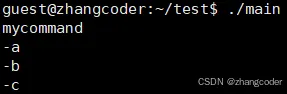
将mycommand和main放在同一目录下,运行结果:
5.验证exec系列函数传入了环境变量
将main可执行文件中自制的环境变量传到mycommand,然后mycommand调用env命令打印
编译main.c
#include<stdio.h>#include<unistd.h>intmain(int argc,char* argv[],char* envp[]){ execle("./mycommand","mycommand",NULL,envp); return 0;}
编译mycommand.c
#include<stdio.h>#include<unistd.h>intmain(int argc,char* argv[],char* envp[]){ execle("/usr/bin/env","env",NULL,envp); return 0;}
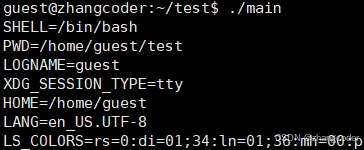
将mycommand和main放在同一目录下,运行结果:
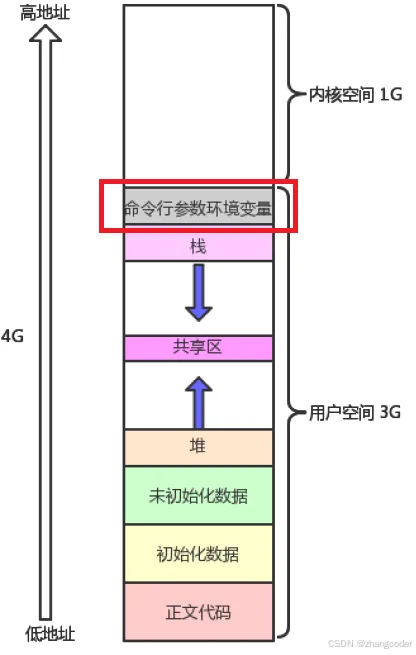
之前在OS22.【Linux】初识进程地址空间文章提到过:进程地址空间是含有存放命令行参数和环境变量的区域的
环境变量也是数据,创建子进程的时候,环境变量就已经被子进程(上方的main进程)继承下去了
结论:程序替换执行时,环境变量不会被替换
6.给子进程传递环境变量的方法
由于环境变量信息不随程序替换而替换,而是会一路让所有子进程继承.那么给子进程传递环境变量的方法:
1. 新增环境变量 2. 彻底替换
putenv函数
putenv将环境变量添加到调用进程的上下文
编译main.c
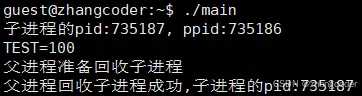
#include<stdio.h>#include<unistd.h>#include<stdlib.h>#include<sys/wait.h>intmain(){ pid_t id = fork(); putenv("TEST=100"); if(id < 0) { perror("fork"); return 1; } else if(id == 0)//子进程 { printf("子进程的pid:%d, ppid:%d\n", getpid(), getppid()); execlp("./mycommand","mycommand",NULL); } else//父进程得到子进程的PID { sleep(2); printf("父进程准备回收子进程\n"); sleep(2); pid_t ret = wait(NULL); if(ret < 0)//返回-1等待失败 { perror("wait failed"); } if (ret == id) { printf("父进程回收子进程成功,子进程的pid:%d\n", ret); } sleep(2); } return 0;}
编译mycommand.c
#include<stdio.h>#include<unistd.h>intmain(){ execlp("env","env",NULL);//ls没有带路径 return 0;}
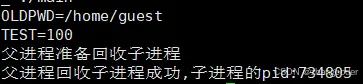
将mycommand和main放在同一目录下,运行结果:
但bash查不到:
TEST是在./main进程下产生的,具有临时性,./main结束后,TEST也就销毁了
结论: 新增环境变量可以使用putenv,将环境变量添加到调用进程的上下文,这样就能被子进程继承
自定义环境变量,彻底替换原有的环境变量
编译main.c
#include<stdio.h>#include<unistd.h>#include<sys/wait.h>intmain(){ pid_t id = fork(); if(id < 0) { perror("fork"); return 1; } else if(id == 0)//子进程 { printf("子进程的pid:%d, ppid:%d\n", getpid(), getppid()); char *const envp[]={"TEST=100",NULL}; //彻底替换从./main那里继承而来的环境变量 //./main的环境变量又是从bash那里继承而来的 //bash的环境变量又是从操作系统那里继承而来的 execle("./mycommand","./mycommand",NULL,envp); } else//父进程得到子进程的PID { sleep(2); printf("父进程准备回收子进程\n"); sleep(2); pid_t ret = wait(NULL); if(ret < 0)//返回-1等待失败 { perror("wait failed"); } if (ret == id) { printf("父进程回收子进程成功,子进程的pid:%d\n", ret); } sleep(2); } return 0;}
编译mycommand.c
#include<stdio.h>#include<unistd.h>intmain(int argc,char* argv[],char* envp[]){ execlp("env","env",NULL);//ls没有带路径 return 0;}
将mycommand和main放在同一目录下,运行结果:老的环境变量被覆盖了,即彻底替换
结论:像这样execle("./mycommand","./mycommand",NULL,envp)的是环境变量的覆盖,不是追加,老的环境变量不在了
7.execve系统调用
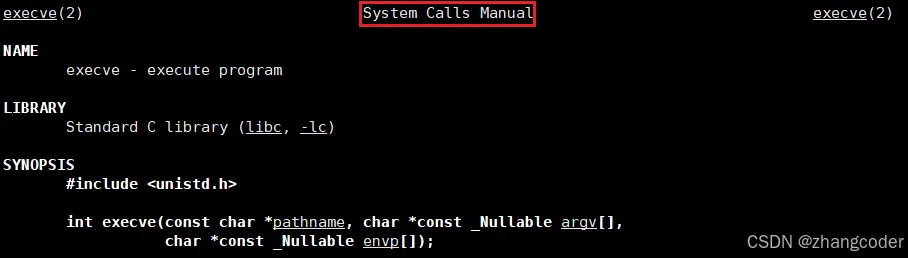
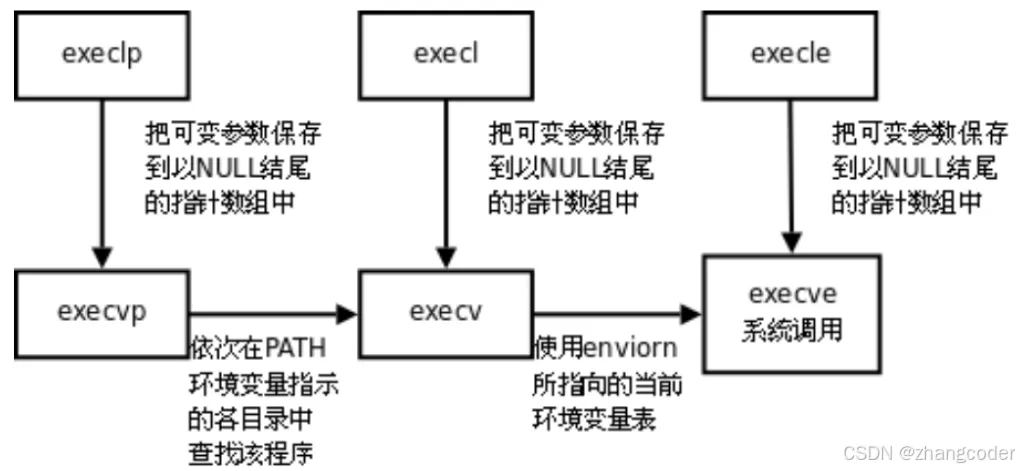
上面6个函数的底层最终都调用了execve
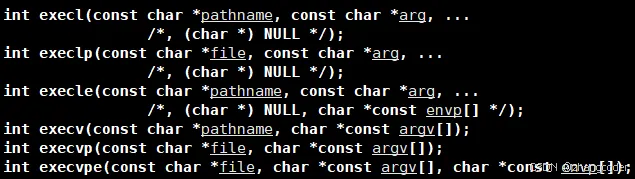
注意到:上面6个函数位于3号手册,是库函数
而execve处于2号手册,是系统调用
8.从源代码说明6个exec内部都使用了execve系统调用
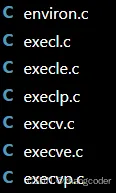
在glibc-2.42(2025-07-28发布,可以从https://ftp.gnu.org/gnu/libc/?C=M;O=A下载)源代码的posix的文件夹中,有exec系列函数和execve系统调用的源代码:
execv函数:
/* Execute PATH with arguments ARGV and environment from `environ'. */intexecv (constchar *path, char *const argv[]){ return __execve (path, argv, __environ);}
execl函数:
节选了关键代码
intexecl (constchar *path, constchar *arg, ...){ //...... int ret = __execve (path, (char *const *) argv, __environ); //...... return ret;}libc_hidden_def (execl)
execle函数:
节选了关键代码
/* Execute PATH with all arguments after PATH until a NULL pointer, and the argument after that for environment. */intexecle (constchar *path, constchar *arg, ...){ //...... int ret = __execve (path, (char *const *) argv, (char *const *) envp); //...... return ret;}libc_hidden_def (execle)
execvp函数:
节选了关键代码
/* Execute FILE, searching in the `PATH' environment variable if it contains no slashes, with arguments ARGV and environment from `environ'. */intexecvp(file, argv)const char* file;char* const argv[];{ if (strchr(file, '/') != NULL) { /* Don't search when it contains a slash. */ __execve(file, argv, __environ); if (errno == ENOEXEC) { //...... if (script_argv != NULL) { scripts_argv(file, argv, argc, script_argv); __execve(script_argv[0], script_argv, __environ); free(ptr); } } } else { //...... do { //...... __execve(startp, argv, __environ); if (errno == ENOEXEC) { //...... __execve(script_argv[0], script_argv, __environ); } //...... } while (*p++ != '\0'); //...... } /* Return the error from the last attempt (probably ENOENT). */ return -1;}libc_hidden_def(execvp)
execlp函数:
节选了关键代码,内部调用了execvp函数
/* Execute FILE, searching in the `PATH' environment variable if it contains no slashes, with all arguments after FILE until a NULL pointer and environment from `environ'. */intexeclp(constchar* file, constchar* arg, ...){ //...... int ret = execvp(file, (char* const*)argv); //...... return ret;}libc_hidden_def(execlp)
execvpe函数:
节选了关键代码,其中weak_alias (__execvpe, execvpe)说明execvpe是__execvpe函数的别名, __execvpe调用了__execvpe_common函数,后者又调用了__execve
/* Execute FILE, searching in the `PATH' environment variable if it contains no slashes, with arguments ARGV and environment from ENVP. */int__execvpe (const char *file, char *const argv[], char *const envp[]){ return __execvpe_common (file, argv, envp, true);}weak_alias (__execvpe, execvpe)static int __execvpe_common(const char* file, char* const argv[], char* const envp[], bool exec_script){ //...... /* Don't search when it contains a slash. */ if (strchr(file, '/') != NULL) { __execve(file, argv, envp); if (errno == ENOEXEC && exec_script) maybe_script_execute(file, argv, envp); return -1; } //...... for (const char* p = path; ; p = subp) { //...... __execve(buffer, argv, envp); //...... } //...... return -1;}
结论:6个exec内部都使用了execve系统调用(__execve)









 10个月宝宝每天需要喝多少奶粉?