注意:别指望 Cython 能绝对"加密",它只是把 .py 编译成二进制的 .pyd(Win)或 .so(Linux/Mac),让直接看源码变难了而已。真要逆向,费点功夫还是能搞。放项目里做代码保护够用。
第一步:安装 Cython
一般系统都自带,没有就装一下。
第二步:写 setup.py,编译
先来个测试脚本 hello.py:
def hello(): print("Hello World!")
同目录下建 setup.py:
from setuptools import setupfrom Cython.Build import cythonizesetup( name='hello', ext_modules=cythonize("hello.py", language_level="3"))
注:
| Python 版本 | setup 从哪导 |
|---|
| ≤ 3.9 | from distutils.core import setup |
| 3.10 ~ 3.11 | 过渡期,推荐用 setuptools,distutils 已标记弃用 |
| ≥ 3.12 | 必须from setuptools import setup |
在 setup.py 所在目录跑:
python setup.py build_ext --inplace
跑完后目录下会多出几个东西:
清理中间文件:
# Windowsdel hello.c# Linux / Macrm hello.c
如果改完 hello.py 重新编译发现没生效,加 --force:
python setup.py build_ext --inplace --force
第三步:导入使用
同目录下写个 app.py:
from hello import hellohello()
python app.py,输出 Hello World!。搞定。
Windows 上报 Microsoft Visual C++ 14.0 or greater is required 怎么搞
完整报错长这样:
error: Microsoft Visual C++ 14.0 or greater is required.Get it with "Microsoft C++ Build Tools": https://visualstudio.microsoft.com/...
错误提示点进去会让你装 Visual Studio,但那玩意太大了,装完几 G,纯属浪费。你只需要装 Build Tools。
直接去这里下:https://visualstudio.microsoft.com/visual-cpp-build-tools/
安装时勾选「C++ 生成工具」那项就行,装完重启一下终端,再跑编译命令就能过了。
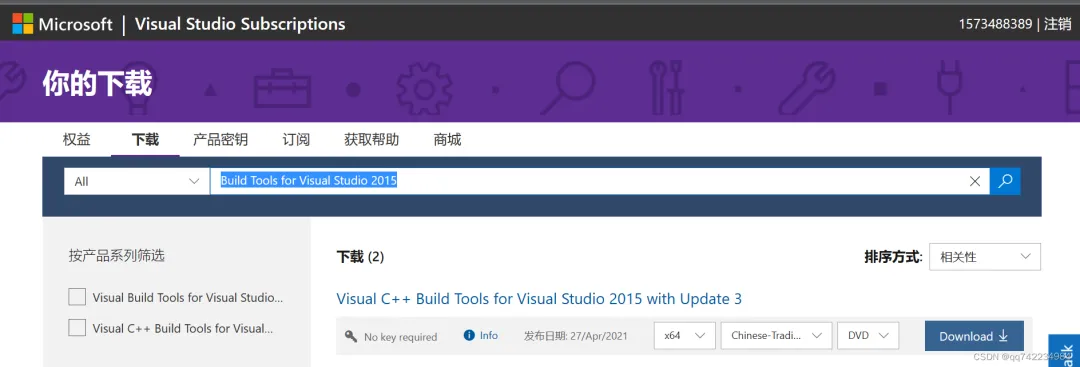
或(直接安装Microsoft C++ Build Tools:Visual Studio Subscriptions 在下载页面搜索Build Tools for Visual Studio 2015,进行安装。)
附:多个文件一起编译
项目里要编译的不止一个 .py,可以这样写:
from setuptools import setupfrom Cython.Build import cythonizesetup( name='my_project', ext_modules=cythonize([ "module_a.py", "module_b.py", "utils/*.py", # 也支持通配符 ], language_level="3"))
 10个月宝宝每天需要喝多少奶粉?