当前位置:首页>python>Python模块包与文件操作

Python模块包与文件操作

  • 2026-08-18 23:11:18
Python模块包与文件操作

📦 模块和包——代码的"乐高积木"

🤔 什么是封装?

先来回顾一下我们学过的各种"封装":

封装层级
封装内容
例子
📦 容器
数据
列表、字典、集合等
🔧 函数
语句/代码块
def calculate():
🏗️ 
数据 + 方法
class Student:
📁 模块
多个函数和类
一个 .py 文件
🎁 
多个模块
一个文件夹

一句话理解模块模块就是程序!每一个 .py 文件都是一个独立的模块。

💡 想象你在玩乐高:函数是小积木块,类是组合好的小组件,模块是完整的部件包,包就是装满部件的盒子!

🎮 实战:把猜数字游戏变成模块

假设我们把猜数字游戏保存为 猜数字.py

 import random    def get_valid_input():      """获取有效的数字输入"""      input_string = input("设了个数字,你来猜猜看:")      while not input_string.isdigit():          input_string = input("❌ 输入错误!请输入正确的数字:")      return int(input_string)    def game():      """猜数字游戏主函数"""      secret_number = random.randint(0, 10)      guess_number = get_valid_input()            while guess_number != secret_number:          if guess_number > secret_number:              print("📉 不好意思,您猜大了")          else:              print("📈 您猜的有点小")          guess_number = get_valid_input()            print("🎉 大吉大利,今晚吃鸡!")    # 如果这个文件直接运行,就启动游戏  if __name__ == "__main__":      game()

🎯 在另一个文件中使用这个模块

创建 玩猜数字.py,放在同一文件夹下:

 import 猜数字    print("=== 开始游戏 ===")  猜数字.game()  # 调用模块中的函数

运行结果

 === 开始游戏 ===  设了个数字,你来猜猜看:5  📈 您猜的有点小  ...  🎉 大吉大利,今晚吃鸡!

💡 关键点import 猜数字 导入模块后,通过 猜数字.函数名() 调用模块中的函数!

🧩 模块的核心特性

1️⃣ 模块是什么?

  • 📄 每个 .py 文件就是一个独立的模块

  • 🔄 可以被其他程序 import 导入使用

  • 🌍 模块名就是文件名(去掉 .py

2️⃣ 为什么要用模块?

好处
说明
✅ 可维护性
代码分模块管理,修改一处不影响全局
✅ 可重用性
写好的工具函数,到处都能用
✅ 避免冲突
不同模块可以有同名函数,互不干扰

3️⃣ Python模块的三种类型

 ┌─────────────────────────────────────────────────────────┐  │                    Python 模块分类                       │  ├──────────────┬─────────────────┬────────────────────────┤  │   内置模块    │   第三方模块     │      自定义模块         │  │  (标准库)     │   (PyPI)        │     (自己写的)         │  ├──────────────┼─────────────────┼────────────────────────┤  │ • random     │ • numpy         │ • 猜数字.py            │  │ • time       │ • pandas        │ • my_utils.py          │  │ • math       │ • requests      │ • 任何 .py 文件         │  │ • json       │ • django        │                        │  │ • os         │ • flask         │                        │  ├──────────────┼─────────────────┼────────────────────────┤  │ 安装即自带    │ pip install xxx │ 自己编写                │  └──────────────┴─────────────────┴────────────────────────┘

4️⃣ ⚠️ 重要注意事项

 # ❌ 不要这样做!会覆盖系统模块  # 创建一个叫 random.py 的文件  import random  # 导入的是你自己的 random.py,不是系统的!    # ✅ 正确做法:模块名要有意义且不与系统模块冲突  # my_random.py ✓  # utils.py ✓  # random.py ✗ (系统已有)  # sys.py ✗ (系统已有)

5️⃣ 🔍 模块搜索路径

当 Python 执行 import xxx 时,会按以下顺序查找:

 1️⃣ 当前目录(运行程序的文件夹)      ↓  2️⃣ PYTHONPATH 环境变量中的目录      ↓  3️⃣ Python 安装目录的 Lib 文件夹

查看搜索路径

 import sys  print(sys.path)  # 打印所有搜索路径

🏷️ 命名空间——解决"撞名"问题

🤔 什么是命名空间?

命名空间(Namespace) = 标识符的"活动范围"

💡 生活例子:太阳希望小学1班有个叫"小花"的同学,2班也有个叫"小花"的同学。老师在班里点名"小花"没问题,但期末考试排名时,需要说"1班的小花"和"2班的小花"才能区分。

班级 = 命名空间

🎯 Python中的命名空间

每个模块都有自己的独立命名空间,就像不同的班级:

 # 模块A:math_utils.py  def add(a, b):      return a + b    # 模块B:string_utils.py    def add(str1, str2):      return str1 + str2    # 使用时要加上"班级名"(模块名)  import math_utils  import string_utils    result1 = math_utils.add(1, 2)      # 3  result2 = string_utils.add("Hello", "World")  # "HelloWorld"

关键点:即使函数名相同,只要模块不同,就不会冲突!

📥 模块导入的三种姿势

方式一:import 模块名

 import math    print(math.pi)        # 3.141592653589793  print(math.sqrt(16))  # 4.0

✅ 优点:明确知道函数来自哪个模块 ❌ 缺点:每次都要写模块名,有点长


方式二:from 模块名 import 函数名

 from math import pi, sqrt    print(pi)        # 直接写名字,不用加 math.  print(sqrt(16))  # 4.0

✅ 优点:代码更简洁 ❌ 缺点:不知道函数来自哪个模块,容易命名冲突


方式三:import 模块名 as 别名

 import numpy as np  # 科学计算库,名字太长,起个别名  import pandas as pd    arr = np.array([1, 2, 3])  # 用别名调用

✅ 优点:既简洁又明确 ❌ 缺点:需要记住别名约定(如 np、pd)


🎯 实际应用示例

 # 假设有个工具模块 utils.py  def add(a, b):      return a + b    def multiply(a, b):      return a * b
 # 使用方式对比    # 方式1:推荐!最清晰  import utils  result = utils.add(1, 2)    # 方式2:适合只用一两个函数  from utils import add  result = add(1, 2)    # 方式3:模块名太长时用  import very_long_module_name as vlmn  result = vlmn.some_function()

💡 建议:团队开发推荐方式1,个人小脚本可以用方式2

🌐 第三方模块——Python的"应用商店"

Python 拥有世界上最丰富的第三方库生态!访问 PyPI 可以查看所有开源模块。

📦 常用 pip 命令速查

# ========== 安装模块 ========== pip install 模块名              # 安装模块 pip install 模块名==1.2.3       # 安装指定版本 pip install -U 模块名           # 升级模块 (U = Upgrade)  # ========== 卸载模块 ========== pip uninstall 模块名            # 卸载模块  # ========== 查看已安装 ========== pip list                       # 列出所有已安装模块 pip show 模块名                 # 查看模块详细信息  # ========== 使用国内镜像加速 ========== # 默认从国外下载很慢,使用国内镜像源 pip install 模块名 -i https://pypi.tuna.tsinghua.edu.cn/simple  # 常用国内镜像源: # 清华:https://pypi.tuna.tsinghua.edu.cn/simple # 阿里云:http://mirrors.aliyun.com/pypi/simple/ # 豆瓣:http://pypi.douban.com/simple/

🎯 常用第三方模块推荐

模块名
用途
安装命令
requests
网络请求(比urllib好用)
pip install requests
numpy
科学计算、数组处理
pip install numpy
pandas
数据分析、表格处理
pip install pandas
matplotlib
数据可视化、画图
pip install matplotlib
flask
Web开发框架
pip install flask
django
大型Web框架
pip install django
pillow
图像处理
pip install pillow

🔧 离线安装(无网络环境)

# 1. 下载 .whl 或 .tar.gz 文件 # 2. 在文件所在目录执行:  # 安装 whl 文件 pip install xxx.whl  # 安装源码包 # 先解压,进入目录,然后: python setup.py build python setup.py install

🎁 包——模块的"文件夹"

📁 什么是包?

包就是将多个相关模块组织在一起的文件夹。就像你把相关的文件放在同一个文件夹里一样!

包的结构

 my_package/                 ← 包文件夹  ├── __init__.py            ← 必须有这个文件(可以是空的)  ├── module1.py             ← 模块1  ├── module2.py             ← 模块2  └── sub_package/           ← 子包      ├── __init__.py      └── module3.py

⚠️ 关键:文件夹里必须有 __init__.py 文件,Python 才认为这是一个包!


🎯 导入包的几种方式

 # 方式1:导入包中的模块  import my_package.module1  my_package.module1.some_function()    # 方式2:从包中导入指定模块  from my_package import module1  module1.some_function()    # 方式3:从模块中导入函数  from my_package.module1 import some_function  some_function()    # 方式4:导入包中所有模块(不推荐)  from my_package import *

📚 概念厘清:模块 vs 包 vs 库

概念
本质
比喻
例子
模块.py
 文件
一个工具
math.py
文件夹
工具箱
numpy/
 文件夹
模块+包的集合
工具仓库
Python标准库、第三方库

💡 记忆口诀:模块是文件,包是文件夹,库是大集合!

📄 文件读写——与硬盘"对话"

🤔 为什么要学文件操作?

想象你在写一篇文章:

  • 💾 保存 = 把内存中的数据写入文件(持久化)

  • 📂 打开 = 从文件中读取数据到内存

程序运行时的数据都在内存中,断电就消失!文件操作让数据可以永久保存


🔓 打开文件——open() 函数

使用文件前必须先打开,就像读书前要先翻开书一样!

 # 基本语法  文件对象 = open(文件名, 模式, encoding='utf-8')

🎯 参数说明

参数
说明
示例
filename
文件路径(必需)
'data.txt'
'D:/docs/test.txt'
mode
打开模式(默认 'r'
'r'
读、'w'写、'a'追加
encoding
编码格式
'utf-8'
(推荐)、'gbk'

📖 常用打开模式速查表

模式
含义
文件不存在
文件已存在
'r'
只读
❌ 报错
✅ 打开,指针在开头
'w'
只写
✅ 创建新文件
⚠️ 清空原有内容
'a'
追加
✅ 创建新文件
✅ 指针在末尾,追加内容
'x'
独占创建
✅ 创建新文件
❌ 报错(防止覆盖)
'r+'
读写
❌ 报错
✅ 可读写,指针在开头
'w+'
读写
✅ 创建新文件
⚠️ 清空后读写
'a+'
读写追加
✅ 创建新文件
✅ 指针在末尾
'b'
二进制模式
-
- 用于图片、音频等

💡 记忆技巧

  • r = read(读)

  • w = write(写)

  • a = append(追加)

  • + = 可读可写

  • b = binary(二进制)

🎯 with 语句——文件操作的"最佳实践"

❌ 传统写法(容易忘记关闭)

f = open('test.txt', 'r') content = f.read() print(content) f.close()  # 容易忘记!导致资源泄漏

✅ 推荐写法(自动关闭)

with open('test.txt', 'r', encoding='utf-8') as f:     content = f.read()     print(content) # 出了 with 代码块,文件自动关闭!

💡 为什么用 with?

  • ✅ 自动关闭文件,不用担心忘记 close()

  • ✅ 即使发生异常,也会正确关闭文件

  • ✅ 代码更简洁、更 Pythonic


📝 实战:写入九九乘法表

# 把九九乘法表写入文件 with open('九九乘法表.txt', 'w', encoding='utf-8') as f:     for i in range(1, 10):         for j in range(1, i + 1):             f.write(f'{j} × {i} = {i * j:2d}  ')         f.write('\n')  # 每行结束换行  print("✅ 九九乘法表已保存到文件!")

生成的文件内容

1 × 1 =  1   1 × 2 =  2  2 × 2 =  4   1 × 3 =  3  2 × 3 =  6  3 × 3 =  9   ...

📖 完整的 open() 参数说明

 open(filename, mode='r', buffering=-1, encoding=None,        errors=None, newline=None, closefd=True, opener=None)
参数
说明
filename
文件路径(相对或绝对)
mode
打开模式(见上表)
buffering
缓冲模式:0=不缓冲,1=行缓冲,>1=缓冲区大小
encoding
编码格式,推荐 'utf-8'
errors
编码错误处理方式
newline
换行符控制
closefd
传入文件句柄时设为 False
opener
自定义打开方式

💡 初学者重点掌握filenamemodeencoding 三个参数即可!

📖 文件操作方法大全

🔍 读取文件的三种方式

 # 假设文件内容:  # 第一行  # 第二行  # 第三行    # ========== 方式1:read() —— 读取全部 ==========  with open('test.txt', 'r', encoding='utf-8') as f:      content = f.read()       # 读取整个文件      print(content)    # 适合:小文件,需要一次性处理全部内容      # ========== 方式2:readline() —— 逐行读取 ==========  with open('test.txt', 'r', encoding='utf-8') as f:      line1 = f.readline()     # 读取第一行      line2 = f.readline()     # 读取第二行      print(line1, line2)    # 适合:只需要前几行,或逐行处理大文件      # ========== 方式3:readlines() —— 读取为列表 ==========  with open('test.txt', 'r', encoding='utf-8') as f:      lines = f.readlines()    # ['第一行\n', '第二行\n', '第三行\n']      for line in lines:          print(line.strip())  # strip() 去掉换行符    # 适合:需要按行处理,且文件不太大      # ========== 推荐方式:直接遍历文件对象 ==========  with open('test.txt', 'r', encoding='utf-8') as f:      for line in f:           # 最简洁!自动逐行读取          print(line.strip())    # ✅ 适合:所有情况,尤其是大文件(省内存)

✏️ 写入操作

# write() —— 写入字符串 with open('output.txt', 'w', encoding='utf-8') as f:     f.write('Hello, World!\n')  # 注意手动加换行符     f.write('第二行内容\n')  # writelines() —— 写入列表 lines = ['第一行\n', '第二行\n', '第三行\n'] with open('output.txt', 'w', encoding='utf-8') as f:     f.writelines(lines)

🎯 文件指针操作

想象文件指针就像书签,标记当前读写到哪个位置:

with open('test.txt', 'r+', encoding='utf-8') as f:     # tell() —— 查看当前位置     print(f.tell())          # 0,刚开始在文件开头          content = f.read(5)      # 读取5个字符     print(f.tell())          # 5,指针移动到了第5个字符后          # seek() —— 移动指针位置     f.seek(0)                # 回到文件开头     f.seek(0, 2)             # 跳到文件末尾(用于追加)
seek() 参数
含义
seek(0)
跳到文件开头
seek(n)
跳到第 n 个字节
seek(0, 2)
跳到文件末尾

📋 文件操作方法速查表

方法
功能
示例
read()
读取全部内容
f.read()
read(size)
读取指定字符数
f.read(100)
readline()
读取一行
f.readline()
readlines()
读取所有行,返回列表
f.readlines()
write(str)
写入字符串
f.write('hello')
writelines(list)
写入字符串列表
f.writelines(['a\n', 'b\n'])
tell()
返回当前指针位置
f.tell()
seek(pos)
移动指针位置
f.seek(0)
close()
关闭文件(with中不需要)
f.close()

🛡️ 异常处理——让程序更"健壮"

🤔 为什么要处理异常?

想象你在开车:

  • 🚗 正常情况:一路绿灯,顺利到达目的地

  • ⚠️ 异常情况:遇到红灯、堵车、轮胎爆胎...

异常处理就像汽车的保险系统——不能阻止问题发生,但能让问题不导致"车毁人亡"(程序崩溃)!


🚨 常见的异常类型

异常类型
触发场景
示例
ZeroDivisionError
除以零
10 / 0
ValueError
类型转换失败
int("abc")
FileNotFoundError
文件不存在
open('不存在的文件.txt')
IndexError
索引越界
lst[10]
(列表只有5个元素)
KeyError
字典key不存在
d['不存在的key']
TypeError
类型错误
'2' + 2

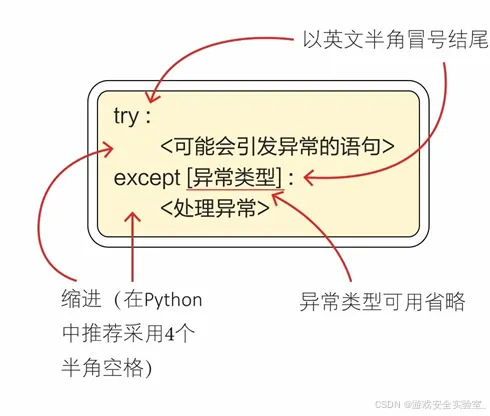
🎯 try-except —— 捕获异常的基本语法

 try:      # 可能出错的代码      可能引发异常的代码  except:      # 出错后执行的代码      异常处理代码

执行流程

 ┌─────────────┐  │  执行 try   │  │  中的代码   │  └──────┬──────┘         │     ┌───┴───┐     ▼       ▼  ┌──────┐ ┌────────┐  │正常  │ │发生异常│  └──┬───┘ └────┬───┘     │          │     ▼          ▼  ┌──────┐ ┌──────────┐  │跳过  │ │执行      │  │except│ │except代码 │  └──┬───┘ └────┬─────┘     │          │     └────┬─────┘          ▼     继续执行后面代码

📝 实战:除法计算器

❌ 没有异常处理(程序会崩溃)

 dividend = int(input("请输入被除数:"))  divisor = int(input("请输入除数:"))  result = dividend / divisor  print(f'{dividend} ÷ {divisor} = {result}')    # 如果输入除数为0:  # ZeroDivisionError: division by zero

✅ 有异常处理(程序优雅处理)

 try:      dividend = int(input("请输入被除数:"))      divisor = int(input("请输入除数:"))      result = dividend / divisor      print(f'{dividend} ÷ {divisor} = {result}')  except ZeroDivisionError:      print("❌ 错误:除数不能为0!")  except ValueError:      print("❌ 错误:请输入有效的数字!")  except Exception as e:      print(f"❌ 发生未知错误:{e}")

🎯 捕获多种异常

方式一:多个 except 代码块

 try:      # 可能引发多种异常的代码      num = int(input("请输入数字:"))      result = 100 / num      print(f"结果是:{result}")        except ValueError:      print("❌ 输入的不是数字!")        except ZeroDivisionError:      print("❌ 不能除以0!")        except Exception as e:      print(f"❌ 其他错误:{e}")

方式二:一个 except 捕获多种

try:     num = int(input("请输入数字:"))     result = 100 / num except (ValueError, ZeroDivisionError) as e:     print(f"❌ 输入错误:{e}")

🔄 try-except-else-finally 完整结构

try:     # 尝试执行的代码     print("尝试打开文件...")     f = open('data.txt', 'r')     content = f.read()      except FileNotFoundError:     # 发生异常时执行     print("❌ 文件不存在!")      else:     # 没有异常时执行(可选)     print(f"✅ 读取成功!内容长度:{len(content)}")     f.close()      finally:     # 无论是否异常都执行(可选)     print("🏁 程序执行完毕")

执行顺序

try → 正常? → else → finally   ↓ 异常? → except → finally

💡 finally 的应用场景:关闭文件、关闭数据库连接、释放锁等清理工作


🚀 主动抛出异常 —— raise

有时候你需要主动告诉调用者:"这里出错了!"

def divide(a, b):     if b == 0:         raise ZeroDivisionError("除数不能为0!")     return a / b  # 使用 try:     result = divide(10, 0) except ZeroDivisionError as e:     print(f"捕获到错误:{e}")

自定义异常

class ValidationError(Exception):     """自定义验证错误"""     pass  def set_age(age):     if age < 0:         raise ValidationError("年龄不能为负数!")     if age > 150:         raise ValidationError("年龄不能超过150!")     return age

🛡️ 异常处理最佳实践

# ✅ 好的做法:具体捕获,提供有用信息 try:     with open('data.txt', 'r', encoding='utf-8') as f:         data = json.load(f) except FileNotFoundError:     print("❌ 数据文件不存在,将使用默认配置")     data = {} except json.JSONDecodeError:     print("❌ 数据文件格式错误,请检查JSON格式")     data = {}  # ❌ 不好的做法:捕获所有异常但不处理 try:     do_something() except:  # 捕获所有异常但什么都不做     pass  # 静默吞掉错误,难以调试!
原则
说明
✅ 具体捕获
捕获具体的异常类型,不要裸 except:
✅ 提供信息
告诉用户发生了什么错误
✅ 优雅降级
出错时提供备选方案
❌ 不要静默
不要捕获异常后什么都不做
❌ 不要过度
不要所有代码都包在 try 里

📝 文档总结

一、核心知识点回顾

1. 模块(Module)——代码的"积木块"

核心概念

  • 📄 每个 .py 文件就是一个模块

  • 🔄 可以被其他程序 import 导入使用

  • 🎯 实现了代码的封装和复用

三种导入方式

方式
语法
适用场景
导入整个模块
import math
使用模块中多个功能
导入指定函数
from math import sqrt
只使用个别功能
使用别名
import numpy as np
模块名太长时

模块类型

  • 🔧 内置模块:Python自带(random、time、json等)

  • 📦 第三方模块:pip安装(requests、pandas等)

  • ✏️ 自定义模块:自己编写的 .py 文件


2. 包(Package)——模块的"文件夹"

核心概念

  • 📁 包含多个模块的文件夹

  • 📄 必须有 __init__.py 文件(可以是空的)

  • 🌲 支持嵌套(包中可以有子包)

概念对比

概念
本质
比喻
模块
.py
 文件
一个工具
文件夹
工具箱
模块+包集合
工具仓库

3. 文件操作——数据的"持久化"

打开模式速查

模式
含义
文件不存在
文件已存在
'r'
只读
❌ 报错
✅ 打开
'w'
只写
✅ 创建
⚠️ 清空
'a'
追加
✅ 创建
✅ 追加
'r+'
读写
❌ 报错
✅ 可读写
'b'
二进制
-
- 图片/音频

推荐写法(with语句)

# ✅ 推荐:自动关闭文件 with open('file.txt', 'r', encoding='utf-8') as f:     content = f.read()  # ❌ 不推荐:容易忘记close() f = open('file.txt', 'r') content = f.read() f.close()

常用方法

  • read() / read(size) —— 读取全部/指定大小

  • readline() —— 读取一行

  • readlines() —— 读取为列表

  • write(str) —— 写入字符串

  • writelines(list) —— 写入列表


4. 异常处理——程序的"保险丝"

基本结构

try:     # 可能出错的代码     可能引发异常的代码 except 具体异常类型:     # 异常处理     处理代码 else:     # 没有异常时执行(可选) finally:     # 无论是否异常都执行(可选)

常见异常类型

异常
触发场景
ZeroDivisionError
除以零
ValueError
类型转换失败
FileNotFoundError
文件不存在
IndexError
索引越界
KeyError
字典key不存在

最佳实践

  • ✅ 捕获具体异常,不要裸 except:

  • ✅ 提供有用的错误信息

  • ✅ 使用 finally 释放资源

  • ❌ 不要静默吞掉异常


二、知识图谱

Python代码组织与IO操作 │ ├── 📦 模块与包 │   ├── 模块(.py文件) │   │   ├── 导入方式:import / from...import / as │   │   ├── 内置模块:random, time, json... │   │   ├── 第三方模块:pip install │   │   └── 自定义模块:自己写的.py │   │ │   └── 包(文件夹) │       ├── __init__.py 标记 │       └── 层级导入:import pkg.module │ ├── 📄 文件操作 │   ├── 打开:open(filename, mode, encoding) │   ├── 模式:r/w/a/r+/b │   ├── 读取:read/readline/readlines │   ├── 写入:write/writelines │   └── with语句:自动关闭 │ └── 🛡️ 异常处理     ├── try-except:捕获异常     ├── else:无异常时执行     ├── finally:必定执行     └── raise:主动抛出

三、学习建议

  1. 模块是重用代码的基础:把常用的函数放到模块里,到处都能用

  2. 文件操作记住 with:既安全又简洁,是 Python 的惯用法

  3. 异常处理要具体:捕获具体的异常类型,提供有用的错误信息

  4. 编码问题要注意:文件操作务必指定 encoding='utf-8'


四、下篇预告

下一篇我们将学习:

  • 正则表达式(文本处理利器)

  • 迭代器与生成器

  • 装饰器

这些都是 Python 的高级特性,能让你的代码更加优雅高效!


🎮 动手练一练

学完不练,等于白学!下面几道题目帮你巩固今天学到的知识。

选择题

1. 以下关于模块导入的说法,正确的是?

  • A. import math 和 from math import * 效果完全一样

  • B. import numpy as np 中,as 是给模块起别名

  • C. 自定义模块名可以和系统模块名相同

  • D. 导入模块后,模块中的代码不会执行

💡 答案解析(点击展开)

正确答案:B

详细解析

  • 选项 A 错误:import math 使用时需要 math.sqrt(),而 from math import * 可以直接用 sqrt(),但后者会导入所有名称,可能引发命名冲突。

  • 选项 B 正确:as 关键字用于给模块或函数起别名,np 是 numpy 的常用别名,可以简化代码书写。

  • 选项 C 错误:绝对不要自定义与系统模块同名的模块!比如创建 random.py 会覆盖系统的 random 模块,导致 import random 导入的是你自己的文件。

  • 选项 D 错误:导入模块时,模块中的顶层代码会立即执行(函数定义不会执行,但函数外的 print 等会执行)。

记忆技巧import A as B 就像给好朋友起外号,叫起来更方便!

</details>


2. 以下代码执行后,文件内容是什么?

 with open('test.txt', 'w', encoding='utf-8') as f:      f.write('Hello')      f.write('World')
  • A. HelloWorld

  • B. Hello\nWorld

  • C. Hello World

  • D. 报错

💡 答案解析(点击展开)

正确答案:A

详细解析

  • write() 方法不会自动添加换行符,需要手动写 \n

  • 代码中先写 Hello,再写 World,两者会连在一起。

  • 如果要换行,应该写成:f.write('Hello\n') 或 f.write('Hello') 后 f.write('\n')

代码验证

 with open('test.txt', 'w', encoding='utf-8') as f:      f.write('Hello')      f.write('World')  # 文件内容:HelloWorld(没有换行)    with open('test.txt', 'w', encoding='utf-8') as f:      f.write('Hello\n')      f.write('World')  # 文件内容:  # Hello  # World

易错点:很多初学者以为 write() 会自动换行,记住:write 不会加换行,print 才会!

</details>


3. 以下关于异常处理的说法,错误的是?

  • A. try-except 可以捕获并处理异常,防止程序崩溃

  • B. finally 代码块无论是否发生异常都会执行

  • C. 使用裸 except: 可以捕获所有异常,是最佳实践

  • D. raise 语句可以主动抛出异常

💡 答案解析(点击展开)

正确答案:C

详细解析

  • 选项 A 正确:这是异常处理的核心作用,让程序优雅地处理错误而不是直接崩溃。

  • 选项 B 正确:finally 块用于释放资源,无论 try 中是否发生异常,finally 都会执行

  • 选项 C 错误:裸 except: 虽然能捕获所有异常,但会捕获包括 KeyboardInterrupt(Ctrl+C)和 SystemExit 在内的所有异常,不利于调试,也不是最佳实践。应该捕获具体的异常类型。

     # ❌ 不推荐  try:      do_something()  except:      pass  # 静默吞掉所有错误,难以调试    # ✅ 推荐  try:      do_something()  except ValueError as e:      print(f"值错误:{e}")  except FileNotFoundError:      print("文件不存在")
  • 选项 D 正确:raise ValueError("错误信息") 可以主动抛出异常,用于参数校验等场景。

最佳实践原则具体捕获、提供信息、优雅降级、不要静默

</details>


编程题

1. 创建一个简单的学生信息管理模块,包含添加学生、显示所有学生、保存到文件、从文件读取等功能。

💡 提示:使用 json 模块来保存和读取数据,使用 with 语句操作文件。

🔑 参考答案与解析(点击展开)

解题思路

  1. 创建一个 student_manager.py 模块

  2. 使用列表存储学生信息(每个学生是字典)

  3. 实现添加、显示、保存、读取四个功能

  4. 使用 json 模块进行数据持久化

  5. 添加异常处理,使程序更健壮

代码实现

 # student_manager.py  """学生信息管理模块"""  import json  import os    # 数据文件路径  DATA_FILE = 'students.json'    # 内存中的学生列表  students = []      def add_student(name, age, score):      """添加学生"""      student = {          'name': name,          'age': age,          'score': score      }      students.append(student)      print(f"✅ 已添加学生:{name}")      def show_all_students():      """显示所有学生"""      if not students:          print("📭 暂无学生信息")          return            print("\n" + "=" * 50)      print(f"{'姓名':<10}{'年龄':<10}{'成绩':<10}")      print("-" * 50)      for s in students:          print(f"{s['name']:<10}{s['age']:<10}{s['score']:<10}")      print("=" * 50)      def save_to_file():      """保存到文件"""      try:          with open(DATA_FILE, 'w', encoding='utf-8') as f:              json.dump(students, f, ensure_ascii=False, indent=2)          print(f"✅ 数据已保存到 {DATA_FILE}")      except Exception as e:          print(f"❌ 保存失败:{e}")      def load_from_file():      """从文件读取"""      global students            if not os.path.exists(DATA_FILE):          print(f"📭 文件 {DATA_FILE} 不存在,将创建新文件")          students = []          return            try:          with open(DATA_FILE, 'r', encoding='utf-8') as f:              students = json.load(f)          print(f"✅ 已加载 {len(students)} 条学生记录")      except json.JSONDecodeError:          print("❌ 文件格式错误,数据可能已损坏")          students = []      except Exception as e:          print(f"❌ 读取失败:{e}")          students = []      def main():      """主函数"""      # 启动时加载数据      load_from_file()            while True:          print("\n" + "=" * 30)          print("📚 学生信息管理系统")          print("=" * 30)          print("1. 添加学生")          print("2. 显示所有学生")          print("3. 保存数据")          print("4. 重新加载数据")          print("0. 退出")                    choice = input("\n请选择操作:")                    if choice == '1':              name = input("请输入姓名:")              try:                  age = int(input("请输入年龄:"))                  score = float(input("请输入成绩:"))                  add_student(name, age, score)              except ValueError:                  print("❌ 年龄和成绩必须是数字!")                            elif choice == '2':              show_all_students()                        elif choice == '3':              save_to_file()                        elif choice == '4':              load_from_file()                        elif choice == '0':              # 退出前保存              save_to_file()              print("👋 再见!")              break                        else:              print("❌ 无效的选择")      if __name__ == '__main__':      main()

使用示例

 # 在另一个文件中使用  import student_manager as sm    sm.load_from_file()  sm.add_student("张三", 18, 85.5)  sm.add_student("李四", 19, 92.0)  sm.show_all_students()  sm.save_to_file()

知识点总结

  • json.dump() / json.load():Python对象与JSON文件的转换

  • os.path.exists():检查文件是否存在

  • global 关键字:在函数内修改全局变量

  • if __name__ == '__main__'::模块直接运行时才执行

进阶挑战

  • 添加删除学生功能

  • 添加按成绩排序功能

  • 添加搜索学生功能

  • 使用类来重构代码

</details>


2. 编写一个函数,统计一个文本文件中每个单词出现的频率,并将结果保存到另一个文件中。

💡 提示:读取文件 → 分割单词 → 统计频率 → 排序 → 写入结果文件。注意处理文件不存在的情况。

🔑 参考答案与解析(点击展开)

解题思路

  1. 使用 with open() 读取源文件

  2. 将文本转为小写,使用正则表达式提取单词

  3. 用字典统计每个单词的出现次数

  4. 按频率排序

  5. 将结果写入目标文件

  6. 添加异常处理,处理文件不存在等情况

代码实现

 import re  from collections import Counter      def count_words_in_file(input_file, output_file):      """      统计文件中单词频率并保存结果            参数:          input_file: 输入文件路径          output_file: 输出文件路径      """      try:          # 1. 读取文件          with open(input_file, 'r', encoding='utf-8') as f:              text = f.read()                    print(f"✅ 成功读取文件:{input_file}")          print(f"📄 文件大小:{len(text)} 字符")                except FileNotFoundError:          print(f"❌ 错误:文件 '{input_file}' 不存在!")          return False      except UnicodeDecodeError:          print(f"❌ 错误:文件编码不正确,请使用 UTF-8 编码!")          return False      except Exception as e:          print(f"❌ 读取文件时发生错误:{e}")          return False            # 2. 提取单词(使用正则表达式)      # \b\w+\b 匹配单词边界之间的字符      words = re.findall(r'\b[a-zA-Z]+\b', text.lower())            if not words:          print("⚠️ 警告:未找到任何单词")          return False            print(f"🔤 找到 {len(words)} 个单词,不重复单词 {len(set(words))} 个")            # 3. 统计频率(使用 Counter 更方便)      word_counts = Counter(words)            # 4. 按频率降序排序      sorted_words = word_counts.most_common()            # 5. 写入结果文件      try:          with open(output_file, 'w', encoding='utf-8') as f:              f.write(f"{'='*50}\n")              f.write(f"单词频率统计结果\n")              f.write(f"源文件:{input_file}\n")              f.write(f"总单词数:{len(words)}\n")              f.write(f"不重复单词数:{len(sorted_words)}\n")              f.write(f"{'='*50}\n\n")                            f.write(f"{'排名':<6}{'单词':<20}{'次数':<10}{'频率':<10}\n")              f.write('-' * 50 + '\n')                            for rank, (word, count) in enumerate(sorted_words, 1):                  frequency = count / len(words) * 100                  f.write(f"{rank:<6}{word:<20}{count:<10}{frequency:.2f}%\n")                    print(f"✅ 统计结果已保存到:{output_file}")                    # 显示前10个高频词          print("\n📊 高频词 TOP 10:")          for word, count in sorted_words[:10]:              print(f"  {word}: {count} 次")                    return True                except Exception as e:          print(f"❌ 写入结果文件时发生错误:{e}")          return False      # 测试函数  def create_test_file():      """创建测试文件"""      test_content = """      Python is a great programming language.      Python is easy to learn.      I love Python programming.      Programming with Python is fun.      Python Python Python!      """      with open('test_input.txt', 'w', encoding='utf-8') as f:          f.write(test_content)      print("✅ 测试文件已创建:test_input.txt")      if __name__ == '__main__':      # 创建测试文件      create_test_file()            # 执行统计      count_words_in_file('test_input.txt', 'word_stats.txt')            # 测试文件不存在的情况      print("\n" + "="*50)      count_words_in_file('not_exist.txt', 'output.txt')

运行结果示例

 ✅ 测试文件已创建:test_input.txt  ✅ 成功读取文件:test_input.txt  📄 文件大小:156 字符  🔤 找到 24 个单词,不重复单词 11 个  ✅ 统计结果已保存到:word_stats.txt    📊 高频词 TOP 10:    python: 6 次    is: 3 次    programming: 3 次    a: 1 次    ...    ==================================================  ❌ 错误:文件 'not_exist.txt' 不存在!

知识点总结

  • re.findall(r'\b[a-zA-Z]+\b', text):使用正则提取单词

  • Counter 类:来自 collections 模块,专门用于计数

  • most_common():返回频率最高的元素

  • 全面的异常处理:分别处理文件不存在、编码错误等情况

进阶挑战

  • 添加命令行参数支持(使用 argparse 模块)

  • 支持中文分词(使用 jieba 库)

  • 生成词云图(使用 wordcloud 库)

  • 排除停用词(the, is, a 等常见词)

</details>


3. 编写一个日志记录装饰器,可以自动记录函数的调用时间、参数和返回值。

💡 提示:使用装饰器包装函数,在函数执行前后记录信息。需要用到 functools.wraps 保留原函数信息。

🔑 参考答案与解析(点击展开)

解题思路

  1. 创建装饰器函数 log_decorator

  2. 使用 functools.wraps 保留原函数的元数据

  3. 在函数执行前记录:时间、函数名、参数

  4. 执行原函数并捕获返回值

  5. 在函数执行后记录:返回值、执行耗时

  6. 将日志写入文件

  7. 添加异常处理,记录函数执行中的异常

代码实现

 import functools  import time  from datetime import datetime      def log_decorator(log_file='function_log.txt'):      """      日志记录装饰器            使用方式:          @log_decorator()          def my_function(x, y):              return x + y      """      def decorator(func):          @functools.wraps(func)  # 保留原函数的元数据          def wrapper(*args, **kwargs):              # 记录开始时间              start_time = time.time()              start_datetime = datetime.now().strftime('%Y-%m-%d %H:%M:%S')                            # 格式化参数信息              args_str = ', '.join([repr(a) for a in args])              kwargs_str = ', '.join([f"{k}={repr(v)}" for k, v in kwargs.items()])              all_args = ', '.join(filter(None, [args_str, kwargs_str]))                            # 写入开始日志              log_entry = f"""  {'='*60}  [{start_datetime}] 函数调用  函数名: {func.__name__}  参数: {all_args}  """                            try:                  # 执行原函数                  result = func(*args, **kwargs)                                    # 计算执行时间                  end_time = time.time()                  execution_time = (end_time - start_time) * 1000  # 转为毫秒                                    # 完成日志                  log_entry += f"""返回值: {repr(result)}  执行时间: {execution_time:.2f} ms  状态: ✅ 成功  {'='*60}  """                  print(f"✅ {func.__name__} 执行成功,耗时 {execution_time:.2f} ms")                                    return result                                except Exception as e:                  # 记录异常                  end_time = time.time()                  execution_time = (end_time - start_time) * 1000                                    log_entry += f"""异常类型: {type(e).__name__}  异常信息: {str(e)}  执行时间: {execution_time:.2f} ms  状态: ❌ 失败  {'='*60}  """                  print(f"❌ {func.__name__} 执行失败:{e}")                  raise  # 重新抛出异常                                finally:                  # 写入日志文件                  with open(log_file, 'a', encoding='utf-8') as f:                      f.write(log_entry)                    return wrapper      return decorator      # ========== 使用示例 ==========    @log_decorator('math_operations.log')  def add(a, b):      """加法运算"""      time.sleep(0.1)  # 模拟耗时操作      return a + b      @log_decorator('math_operations.log')  def divide(a, b):      """除法运算"""      time.sleep(0.05)      return a / b      @log_decorator('data_processing.log')  def process_data(data, multiplier=1):      """数据处理"""      time.sleep(0.2)      return [x * multiplier for x in data]      # 测试代码  def main():      print("🧪 测试日志装饰器\n")            # 测试正常执行      result1 = add(10, 20)      print(f"10 + 20 = {result1}\n")            result2 = divide(100, 5)      print(f"100 / 5 = {result2}\n")            result3 = process_data([1, 2, 3, 4, 5], multiplier=2)      print(f"process_data 结果: {result3}\n")            # 测试异常情况      try:          divide(10, 0)      except ZeroDivisionError:          print("捕获到除零异常(预期行为)\n")            print("📄 日志已保存到文件,请查看:")      print("  - math_operations.log")      print("  - data_processing.log")      if __name__ == '__main__':      main()

生成的日志文件示例(math_operations.log):

 ============================================================  [2024-01-15 10:30:25] 函数调用  函数名: add  参数: 10, 20  返回值: 30  执行时间: 105.23 ms  状态: ✅ 成功  ============================================================    ============================================================  [2024-01-15 10:30:25] 函数调用  函数名: divide  参数: 100, 5  返回值: 20.0  执行时间: 52.15 ms  状态: ✅ 成功  ============================================================    ============================================================  [2024-01-15 10:30:25] 函数调用  函数名: divide  参数: 10, 0  异常类型: ZeroDivisionError  异常信息: division by zero  执行时间: 0.52 ms  状态: ❌ 失败  ============================================================

知识点总结

  • 装饰器@decorator 语法糖,用于扩展函数功能

  • functools.wraps:保留原函数的 __name____doc__ 等属性

  • *args, **kwargs:接收任意数量和类型的参数

  • time.time():获取当前时间戳,用于计算执行时间

  • finally 块:确保日志一定被写入,即使发生异常

进阶挑战

  • 添加日志级别(DEBUG、INFO、ERROR)

  • 支持配置日志格式

  • 使用 logging 模块替代手动写文件

  • 添加函数调用链追踪(记录是哪个函数调用了当前函数)

</details>

最新文章

随机文章

基本 文件 流程 错误 SQL 调试
  1. 请求信息 : 2026-08-21 22:54:30 HTTP/2.0 GET : https://f.mffb.com.cn/a/506862.html
  2. 运行时间 : 0.253948s [ 吞吐率:3.94req/s ] 内存消耗:4,627.15kb 文件加载:140
  3. 缓存信息 : 0 reads,0 writes
  4. 会话信息 : SESSION_ID=e63e74d92c56877b66a505304a80d043
  1. /yingpanguazai/ssd/ssd1/www/f.mffb.com.cn/public/index.php ( 0.79 KB )
  2. /yingpanguazai/ssd/ssd1/www/f.mffb.com.cn/vendor/autoload.php ( 0.17 KB )
  3. /yingpanguazai/ssd/ssd1/www/f.mffb.com.cn/vendor/composer/autoload_real.php ( 2.49 KB )
  4. /yingpanguazai/ssd/ssd1/www/f.mffb.com.cn/vendor/composer/platform_check.php ( 0.90 KB )
  5. /yingpanguazai/ssd/ssd1/www/f.mffb.com.cn/vendor/composer/ClassLoader.php ( 14.03 KB )
  6. /yingpanguazai/ssd/ssd1/www/f.mffb.com.cn/vendor/composer/autoload_static.php ( 4.90 KB )
  7. /yingpanguazai/ssd/ssd1/www/f.mffb.com.cn/vendor/topthink/think-helper/src/helper.php ( 8.34 KB )
  8. /yingpanguazai/ssd/ssd1/www/f.mffb.com.cn/vendor/topthink/think-validate/src/helper.php ( 2.19 KB )
  9. /yingpanguazai/ssd/ssd1/www/f.mffb.com.cn/vendor/topthink/think-orm/src/helper.php ( 1.47 KB )
  10. /yingpanguazai/ssd/ssd1/www/f.mffb.com.cn/vendor/topthink/think-orm/stubs/load_stubs.php ( 0.16 KB )
  11. /yingpanguazai/ssd/ssd1/www/f.mffb.com.cn/vendor/topthink/framework/src/think/Exception.php ( 1.69 KB )
  12. /yingpanguazai/ssd/ssd1/www/f.mffb.com.cn/vendor/topthink/think-container/src/Facade.php ( 2.71 KB )
  13. /yingpanguazai/ssd/ssd1/www/f.mffb.com.cn/vendor/symfony/deprecation-contracts/function.php ( 0.99 KB )
  14. /yingpanguazai/ssd/ssd1/www/f.mffb.com.cn/vendor/symfony/polyfill-mbstring/bootstrap.php ( 8.26 KB )
  15. /yingpanguazai/ssd/ssd1/www/f.mffb.com.cn/vendor/symfony/polyfill-mbstring/bootstrap80.php ( 9.78 KB )
  16. /yingpanguazai/ssd/ssd1/www/f.mffb.com.cn/vendor/symfony/var-dumper/Resources/functions/dump.php ( 1.49 KB )
  17. /yingpanguazai/ssd/ssd1/www/f.mffb.com.cn/vendor/topthink/think-dumper/src/helper.php ( 0.18 KB )
  18. /yingpanguazai/ssd/ssd1/www/f.mffb.com.cn/vendor/symfony/var-dumper/VarDumper.php ( 4.30 KB )
  19. /yingpanguazai/ssd/ssd1/www/f.mffb.com.cn/vendor/topthink/framework/src/think/App.php ( 15.30 KB )
  20. /yingpanguazai/ssd/ssd1/www/f.mffb.com.cn/vendor/topthink/think-container/src/Container.php ( 15.76 KB )
  21. /yingpanguazai/ssd/ssd1/www/f.mffb.com.cn/vendor/psr/container/src/ContainerInterface.php ( 1.02 KB )
  22. /yingpanguazai/ssd/ssd1/www/f.mffb.com.cn/app/provider.php ( 0.19 KB )
  23. /yingpanguazai/ssd/ssd1/www/f.mffb.com.cn/vendor/topthink/framework/src/think/Http.php ( 6.04 KB )
  24. /yingpanguazai/ssd/ssd1/www/f.mffb.com.cn/vendor/topthink/think-helper/src/helper/Str.php ( 7.29 KB )
  25. /yingpanguazai/ssd/ssd1/www/f.mffb.com.cn/vendor/topthink/framework/src/think/Env.php ( 4.68 KB )
  26. /yingpanguazai/ssd/ssd1/www/f.mffb.com.cn/app/common.php ( 0.03 KB )
  27. /yingpanguazai/ssd/ssd1/www/f.mffb.com.cn/vendor/topthink/framework/src/helper.php ( 18.78 KB )
  28. /yingpanguazai/ssd/ssd1/www/f.mffb.com.cn/vendor/topthink/framework/src/think/Config.php ( 5.54 KB )
  29. /yingpanguazai/ssd/ssd1/www/f.mffb.com.cn/config/app.php ( 0.95 KB )
  30. /yingpanguazai/ssd/ssd1/www/f.mffb.com.cn/config/cache.php ( 0.78 KB )
  31. /yingpanguazai/ssd/ssd1/www/f.mffb.com.cn/config/console.php ( 0.23 KB )
  32. /yingpanguazai/ssd/ssd1/www/f.mffb.com.cn/config/cookie.php ( 0.56 KB )
  33. /yingpanguazai/ssd/ssd1/www/f.mffb.com.cn/config/database.php ( 2.48 KB )
  34. /yingpanguazai/ssd/ssd1/www/f.mffb.com.cn/vendor/topthink/framework/src/think/facade/Env.php ( 1.67 KB )
  35. /yingpanguazai/ssd/ssd1/www/f.mffb.com.cn/config/filesystem.php ( 0.61 KB )
  36. /yingpanguazai/ssd/ssd1/www/f.mffb.com.cn/config/lang.php ( 0.91 KB )
  37. /yingpanguazai/ssd/ssd1/www/f.mffb.com.cn/config/log.php ( 1.35 KB )
  38. /yingpanguazai/ssd/ssd1/www/f.mffb.com.cn/config/middleware.php ( 0.19 KB )
  39. /yingpanguazai/ssd/ssd1/www/f.mffb.com.cn/config/route.php ( 1.89 KB )
  40. /yingpanguazai/ssd/ssd1/www/f.mffb.com.cn/config/session.php ( 0.57 KB )
  41. /yingpanguazai/ssd/ssd1/www/f.mffb.com.cn/config/trace.php ( 0.34 KB )
  42. /yingpanguazai/ssd/ssd1/www/f.mffb.com.cn/config/view.php ( 0.82 KB )
  43. /yingpanguazai/ssd/ssd1/www/f.mffb.com.cn/app/event.php ( 0.25 KB )
  44. /yingpanguazai/ssd/ssd1/www/f.mffb.com.cn/vendor/topthink/framework/src/think/Event.php ( 7.67 KB )
  45. /yingpanguazai/ssd/ssd1/www/f.mffb.com.cn/app/service.php ( 0.13 KB )
  46. /yingpanguazai/ssd/ssd1/www/f.mffb.com.cn/app/AppService.php ( 0.26 KB )
  47. /yingpanguazai/ssd/ssd1/www/f.mffb.com.cn/vendor/topthink/framework/src/think/Service.php ( 1.64 KB )
  48. /yingpanguazai/ssd/ssd1/www/f.mffb.com.cn/vendor/topthink/framework/src/think/Lang.php ( 7.35 KB )
  49. /yingpanguazai/ssd/ssd1/www/f.mffb.com.cn/vendor/topthink/framework/src/lang/zh-cn.php ( 13.70 KB )
  50. /yingpanguazai/ssd/ssd1/www/f.mffb.com.cn/vendor/topthink/framework/src/think/initializer/Error.php ( 3.31 KB )
  51. /yingpanguazai/ssd/ssd1/www/f.mffb.com.cn/vendor/topthink/framework/src/think/initializer/RegisterService.php ( 1.33 KB )
  52. /yingpanguazai/ssd/ssd1/www/f.mffb.com.cn/vendor/services.php ( 0.14 KB )
  53. /yingpanguazai/ssd/ssd1/www/f.mffb.com.cn/vendor/topthink/framework/src/think/service/PaginatorService.php ( 1.52 KB )
  54. /yingpanguazai/ssd/ssd1/www/f.mffb.com.cn/vendor/topthink/framework/src/think/service/ValidateService.php ( 0.99 KB )
  55. /yingpanguazai/ssd/ssd1/www/f.mffb.com.cn/vendor/topthink/framework/src/think/service/ModelService.php ( 2.04 KB )
  56. /yingpanguazai/ssd/ssd1/www/f.mffb.com.cn/vendor/topthink/think-trace/src/Service.php ( 0.77 KB )
  57. /yingpanguazai/ssd/ssd1/www/f.mffb.com.cn/vendor/topthink/framework/src/think/Middleware.php ( 6.72 KB )
  58. /yingpanguazai/ssd/ssd1/www/f.mffb.com.cn/vendor/topthink/framework/src/think/initializer/BootService.php ( 0.77 KB )
  59. /yingpanguazai/ssd/ssd1/www/f.mffb.com.cn/vendor/topthink/think-orm/src/Paginator.php ( 11.86 KB )
  60. /yingpanguazai/ssd/ssd1/www/f.mffb.com.cn/vendor/topthink/think-validate/src/Validate.php ( 63.20 KB )
  61. /yingpanguazai/ssd/ssd1/www/f.mffb.com.cn/vendor/topthink/think-orm/src/Model.php ( 23.55 KB )
  62. /yingpanguazai/ssd/ssd1/www/f.mffb.com.cn/vendor/topthink/think-orm/src/model/concern/Attribute.php ( 21.05 KB )
  63. /yingpanguazai/ssd/ssd1/www/f.mffb.com.cn/vendor/topthink/think-orm/src/model/concern/AutoWriteData.php ( 4.21 KB )
  64. /yingpanguazai/ssd/ssd1/www/f.mffb.com.cn/vendor/topthink/think-orm/src/model/concern/Conversion.php ( 6.44 KB )
  65. /yingpanguazai/ssd/ssd1/www/f.mffb.com.cn/vendor/topthink/think-orm/src/model/concern/DbConnect.php ( 5.16 KB )
  66. /yingpanguazai/ssd/ssd1/www/f.mffb.com.cn/vendor/topthink/think-orm/src/model/concern/ModelEvent.php ( 2.33 KB )
  67. /yingpanguazai/ssd/ssd1/www/f.mffb.com.cn/vendor/topthink/think-orm/src/model/concern/RelationShip.php ( 28.29 KB )
  68. /yingpanguazai/ssd/ssd1/www/f.mffb.com.cn/vendor/topthink/think-helper/src/contract/Arrayable.php ( 0.09 KB )
  69. /yingpanguazai/ssd/ssd1/www/f.mffb.com.cn/vendor/topthink/think-helper/src/contract/Jsonable.php ( 0.13 KB )
  70. /yingpanguazai/ssd/ssd1/www/f.mffb.com.cn/vendor/topthink/think-orm/src/model/contract/Modelable.php ( 0.09 KB )
  71. /yingpanguazai/ssd/ssd1/www/f.mffb.com.cn/vendor/topthink/framework/src/think/Db.php ( 2.88 KB )
  72. /yingpanguazai/ssd/ssd1/www/f.mffb.com.cn/vendor/topthink/think-orm/src/DbManager.php ( 8.52 KB )
  73. /yingpanguazai/ssd/ssd1/www/f.mffb.com.cn/vendor/topthink/framework/src/think/Log.php ( 6.28 KB )
  74. /yingpanguazai/ssd/ssd1/www/f.mffb.com.cn/vendor/topthink/framework/src/think/Manager.php ( 3.92 KB )
  75. /yingpanguazai/ssd/ssd1/www/f.mffb.com.cn/vendor/psr/log/src/LoggerTrait.php ( 2.69 KB )
  76. /yingpanguazai/ssd/ssd1/www/f.mffb.com.cn/vendor/psr/log/src/LoggerInterface.php ( 2.71 KB )
  77. /yingpanguazai/ssd/ssd1/www/f.mffb.com.cn/vendor/topthink/framework/src/think/Cache.php ( 4.92 KB )
  78. /yingpanguazai/ssd/ssd1/www/f.mffb.com.cn/vendor/psr/simple-cache/src/CacheInterface.php ( 4.71 KB )
  79. /yingpanguazai/ssd/ssd1/www/f.mffb.com.cn/vendor/topthink/think-helper/src/helper/Arr.php ( 16.63 KB )
  80. /yingpanguazai/ssd/ssd1/www/f.mffb.com.cn/vendor/topthink/framework/src/think/cache/driver/File.php ( 7.84 KB )
  81. /yingpanguazai/ssd/ssd1/www/f.mffb.com.cn/vendor/topthink/framework/src/think/cache/Driver.php ( 9.03 KB )
  82. /yingpanguazai/ssd/ssd1/www/f.mffb.com.cn/vendor/topthink/framework/src/think/contract/CacheHandlerInterface.php ( 1.99 KB )
  83. /yingpanguazai/ssd/ssd1/www/f.mffb.com.cn/app/Request.php ( 0.09 KB )
  84. /yingpanguazai/ssd/ssd1/www/f.mffb.com.cn/vendor/topthink/framework/src/think/Request.php ( 55.78 KB )
  85. /yingpanguazai/ssd/ssd1/www/f.mffb.com.cn/app/middleware.php ( 0.25 KB )
  86. /yingpanguazai/ssd/ssd1/www/f.mffb.com.cn/vendor/topthink/framework/src/think/Pipeline.php ( 2.61 KB )
  87. /yingpanguazai/ssd/ssd1/www/f.mffb.com.cn/vendor/topthink/think-trace/src/TraceDebug.php ( 3.40 KB )
  88. /yingpanguazai/ssd/ssd1/www/f.mffb.com.cn/vendor/topthink/framework/src/think/middleware/SessionInit.php ( 1.94 KB )
  89. /yingpanguazai/ssd/ssd1/www/f.mffb.com.cn/vendor/topthink/framework/src/think/Session.php ( 1.80 KB )
  90. /yingpanguazai/ssd/ssd1/www/f.mffb.com.cn/vendor/topthink/framework/src/think/session/driver/File.php ( 6.27 KB )
  91. /yingpanguazai/ssd/ssd1/www/f.mffb.com.cn/vendor/topthink/framework/src/think/contract/SessionHandlerInterface.php ( 0.87 KB )
  92. /yingpanguazai/ssd/ssd1/www/f.mffb.com.cn/vendor/topthink/framework/src/think/session/Store.php ( 7.12 KB )
  93. /yingpanguazai/ssd/ssd1/www/f.mffb.com.cn/vendor/topthink/framework/src/think/Route.php ( 23.73 KB )
  94. /yingpanguazai/ssd/ssd1/www/f.mffb.com.cn/vendor/topthink/framework/src/think/route/RuleName.php ( 5.75 KB )
  95. /yingpanguazai/ssd/ssd1/www/f.mffb.com.cn/vendor/topthink/framework/src/think/route/Domain.php ( 2.53 KB )
  96. /yingpanguazai/ssd/ssd1/www/f.mffb.com.cn/vendor/topthink/framework/src/think/route/RuleGroup.php ( 22.43 KB )
  97. /yingpanguazai/ssd/ssd1/www/f.mffb.com.cn/vendor/topthink/framework/src/think/route/Rule.php ( 26.95 KB )
  98. /yingpanguazai/ssd/ssd1/www/f.mffb.com.cn/vendor/topthink/framework/src/think/route/RuleItem.php ( 9.78 KB )
  99. /yingpanguazai/ssd/ssd1/www/f.mffb.com.cn/route/app.php ( 1.72 KB )
  100. /yingpanguazai/ssd/ssd1/www/f.mffb.com.cn/vendor/topthink/framework/src/think/facade/Route.php ( 4.70 KB )
  101. /yingpanguazai/ssd/ssd1/www/f.mffb.com.cn/vendor/topthink/framework/src/think/route/dispatch/Controller.php ( 4.74 KB )
  102. /yingpanguazai/ssd/ssd1/www/f.mffb.com.cn/vendor/topthink/framework/src/think/route/Dispatch.php ( 10.44 KB )
  103. /yingpanguazai/ssd/ssd1/www/f.mffb.com.cn/app/controller/Index.php ( 4.81 KB )
  104. /yingpanguazai/ssd/ssd1/www/f.mffb.com.cn/app/BaseController.php ( 2.05 KB )
  105. /yingpanguazai/ssd/ssd1/www/f.mffb.com.cn/vendor/topthink/think-orm/src/facade/Db.php ( 0.93 KB )
  106. /yingpanguazai/ssd/ssd1/www/f.mffb.com.cn/vendor/topthink/think-orm/src/db/connector/Mysql.php ( 5.44 KB )
  107. /yingpanguazai/ssd/ssd1/www/f.mffb.com.cn/vendor/topthink/think-orm/src/db/PDOConnection.php ( 52.47 KB )
  108. /yingpanguazai/ssd/ssd1/www/f.mffb.com.cn/vendor/topthink/think-orm/src/db/Connection.php ( 8.39 KB )
  109. /yingpanguazai/ssd/ssd1/www/f.mffb.com.cn/vendor/topthink/think-orm/src/db/ConnectionInterface.php ( 4.57 KB )
  110. /yingpanguazai/ssd/ssd1/www/f.mffb.com.cn/vendor/topthink/think-orm/src/db/builder/Mysql.php ( 16.58 KB )
  111. /yingpanguazai/ssd/ssd1/www/f.mffb.com.cn/vendor/topthink/think-orm/src/db/Builder.php ( 24.06 KB )
  112. /yingpanguazai/ssd/ssd1/www/f.mffb.com.cn/vendor/topthink/think-orm/src/db/BaseBuilder.php ( 27.50 KB )
  113. /yingpanguazai/ssd/ssd1/www/f.mffb.com.cn/vendor/topthink/think-orm/src/db/Query.php ( 15.71 KB )
  114. /yingpanguazai/ssd/ssd1/www/f.mffb.com.cn/vendor/topthink/think-orm/src/db/BaseQuery.php ( 45.13 KB )
  115. /yingpanguazai/ssd/ssd1/www/f.mffb.com.cn/vendor/topthink/think-orm/src/db/concern/TimeFieldQuery.php ( 7.43 KB )
  116. /yingpanguazai/ssd/ssd1/www/f.mffb.com.cn/vendor/topthink/think-orm/src/db/concern/AggregateQuery.php ( 3.26 KB )
  117. /yingpanguazai/ssd/ssd1/www/f.mffb.com.cn/vendor/topthink/think-orm/src/db/concern/ModelRelationQuery.php ( 20.07 KB )
  118. /yingpanguazai/ssd/ssd1/www/f.mffb.com.cn/vendor/topthink/think-orm/src/db/concern/ParamsBind.php ( 3.66 KB )
  119. /yingpanguazai/ssd/ssd1/www/f.mffb.com.cn/vendor/topthink/think-orm/src/db/concern/ResultOperation.php ( 7.01 KB )
  120. /yingpanguazai/ssd/ssd1/www/f.mffb.com.cn/vendor/topthink/think-orm/src/db/concern/WhereQuery.php ( 19.37 KB )
  121. /yingpanguazai/ssd/ssd1/www/f.mffb.com.cn/vendor/topthink/think-orm/src/db/concern/JoinAndViewQuery.php ( 7.11 KB )
  122. /yingpanguazai/ssd/ssd1/www/f.mffb.com.cn/vendor/topthink/think-orm/src/db/concern/TableFieldInfo.php ( 2.63 KB )
  123. /yingpanguazai/ssd/ssd1/www/f.mffb.com.cn/vendor/topthink/think-orm/src/db/concern/Transaction.php ( 2.77 KB )
  124. /yingpanguazai/ssd/ssd1/www/f.mffb.com.cn/vendor/topthink/framework/src/think/log/driver/File.php ( 5.96 KB )
  125. /yingpanguazai/ssd/ssd1/www/f.mffb.com.cn/vendor/topthink/framework/src/think/contract/LogHandlerInterface.php ( 0.86 KB )
  126. /yingpanguazai/ssd/ssd1/www/f.mffb.com.cn/vendor/topthink/framework/src/think/log/Channel.php ( 3.89 KB )
  127. /yingpanguazai/ssd/ssd1/www/f.mffb.com.cn/vendor/topthink/framework/src/think/event/LogRecord.php ( 1.02 KB )
  128. /yingpanguazai/ssd/ssd1/www/f.mffb.com.cn/vendor/topthink/think-helper/src/Collection.php ( 16.47 KB )
  129. /yingpanguazai/ssd/ssd1/www/f.mffb.com.cn/vendor/topthink/framework/src/think/facade/View.php ( 1.70 KB )
  130. /yingpanguazai/ssd/ssd1/www/f.mffb.com.cn/vendor/topthink/framework/src/think/View.php ( 4.39 KB )
  131. /yingpanguazai/ssd/ssd1/www/f.mffb.com.cn/vendor/topthink/framework/src/think/Response.php ( 8.81 KB )
  132. /yingpanguazai/ssd/ssd1/www/f.mffb.com.cn/vendor/topthink/framework/src/think/response/View.php ( 3.29 KB )
  133. /yingpanguazai/ssd/ssd1/www/f.mffb.com.cn/vendor/topthink/framework/src/think/Cookie.php ( 6.06 KB )
  134. /yingpanguazai/ssd/ssd1/www/f.mffb.com.cn/vendor/topthink/think-view/src/Think.php ( 8.38 KB )
  135. /yingpanguazai/ssd/ssd1/www/f.mffb.com.cn/vendor/topthink/framework/src/think/contract/TemplateHandlerInterface.php ( 1.60 KB )
  136. /yingpanguazai/ssd/ssd1/www/f.mffb.com.cn/vendor/topthink/think-template/src/Template.php ( 46.61 KB )
  137. /yingpanguazai/ssd/ssd1/www/f.mffb.com.cn/vendor/topthink/think-template/src/template/driver/File.php ( 2.41 KB )
  138. /yingpanguazai/ssd/ssd1/www/f.mffb.com.cn/vendor/topthink/think-template/src/template/contract/DriverInterface.php ( 0.86 KB )
  139. /yingpanguazai/ssd/ssd1/www/f.mffb.com.cn/runtime/temp/067d451b9a0c665040f3f1bdd3293d68.php ( 11.98 KB )
  140. /yingpanguazai/ssd/ssd1/www/f.mffb.com.cn/vendor/topthink/think-trace/src/Html.php ( 4.42 KB )
  1. CONNECT:[ UseTime:0.000880s ] mysql:host=127.0.0.1;port=3306;dbname=f_mffb;charset=utf8mb4
  2. SHOW FULL COLUMNS FROM `fenlei` [ RunTime:0.001921s ]
  3. SELECT * FROM `fenlei` WHERE `fid` = 0 [ RunTime:0.000949s ]
  4. SELECT * FROM `fenlei` WHERE `fid` = 63 [ RunTime:0.000715s ]
  5. SHOW FULL COLUMNS FROM `set` [ RunTime:0.001743s ]
  6. SELECT * FROM `set` [ RunTime:0.000552s ]
  7. SHOW FULL COLUMNS FROM `article` [ RunTime:0.001603s ]
  8. SELECT * FROM `article` WHERE `id` = 506862 LIMIT 1 [ RunTime:0.004416s ]
  9. UPDATE `article` SET `lasttime` = 1787324071 WHERE `id` = 506862 [ RunTime:0.030568s ]
  10. SELECT * FROM `fenlei` WHERE `id` = 66 LIMIT 1 [ RunTime:0.000783s ]
  11. SELECT * FROM `article` WHERE `id` < 506862 ORDER BY `id` DESC LIMIT 1 [ RunTime:0.001415s ]
  12. SELECT * FROM `article` WHERE `id` > 506862 ORDER BY `id` ASC LIMIT 1 [ RunTime:0.001397s ]
  13. SELECT * FROM `article` WHERE `id` < 506862 ORDER BY `id` DESC LIMIT 10 [ RunTime:0.002200s ]
  14. SELECT * FROM `article` WHERE `id` < 506862 ORDER BY `id` DESC LIMIT 10,10 [ RunTime:0.038865s ]
  15. SELECT * FROM `article` WHERE `id` < 506862 ORDER BY `id` DESC LIMIT 20,10 [ RunTime:0.001914s ]
0.259003s