Linux启动报错XFS (dm-0) Internal error XFS_WANT_CORRUPTED_GOTO at line 1662 of file解决方法
昨天早上一客户来电说他们机房突然断电了,有台CentOS 7.6 Linux服务器还没来得急关机,UPS就没电了,然后电工解决断电问题后,那台Linux服务器开机启动报错,进不了系统。让我去现场帮忙解决下。一般启用LVM的系统分区,/dev/mapper下软链接都指向/dev/dm-0,所以这个错误会直接进入一个只有内核的急救模式。xfs_repair /dev/mapper/centos-root
如果报错:xfs_repair: cannot open /dev/dm-0: Device or resource busy,则先卸载系统分区,再执行修复。
umount /dev/mapper/centos-root
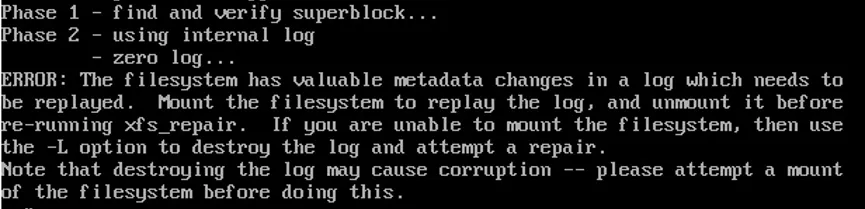
如果执行常规修复出现以下提示,添加-L参数强制修复
xfs_repair -L /dev/mapper/centos-root或者xfs_repair -v -L /dev/dm-0
服务器前面板开机按钮长按强制关机,等30秒再开机,在grub菜单时,按“e”键进入编辑模式,找到linux16或linux开头的行,在rhgb quiet后面添加rd.break,然后按Ctrl + X启动到单用户模式。xfs_repair /dev/mapper/dm-0#如果报以下错提示无法修复,则添加-L参数忽略不正确的元数据Phase 1 - find and verify superblock...Phase 2 - using internal log - zero log...ERROR: The filesystem has valuable metadata changes in a log which needs tobe replayed. Mount the filesystem to replay the log, and unmount it beforere-running xfs_repair. If you are unable to mount the filesystem, then usethe -L option to destroy the log and attempt a repair.Note that destroying the log may cause corruption -- please attempt a mountof the filesystem before doing this.xfs_repair -L /dev/mapper/dm-0