在第六课用列表和元组按“位置”管理数据。但想象一下,如果要存储全班同学的姓名和成绩,用两个列表分别存名字和分数,再通过相同的索引去对应,不仅麻烦还极易出错。有没有一种方式,能像查字典一样,通过“姓名”直接查到“成绩”?今天,我们将学习Python中最强大的两种数据结构——字典(dict)和 集合(set)。字典让你实现“键值对”的精准映射,集合则帮你轻松完成数据去重与集合运算。一、字典 dict:键值对的“智能词典”
字典用花括号 {} 定义,以 键: 值 的形式存储数据。它的核心特性是:通过键(key)快速访问值(value),且键必须唯一。
1. 创建与访问
student = {"name": "小明", "age": 18, "score": 92}print(student["name"]) # 输出:小明print(student.get("age")) # 输出:18(推荐用 get,更安全)print(student.get("gender", "未知")) # 键不存在时返回默认值"未知"
2. 常用操作:增删改查
# ➕ 增加 / ✏️ 修改(键存在则修改,不存在则新增)student["gender"] = "男"student["score"] = 95# ❌ 删除del student["age"] # 按键删除popped = student.pop("name") # 弹出并返回指定键的值# 🔍 查询print(len(student)) # 获取键值对数量print("score" in student) # 判断键是否存在(注意:检查的是键,不是值)# 🔄 遍历for key, value in student.items(): print(f"{key}: {value}")
3. 字典的键有什么要求?
- 必须是不可变类型:字符串、数字、元组都可以做键;列表不能做键(因为列表可变)。
- 必须唯一:同一个字典中不能有重复的键,后出现的会覆盖前面的。
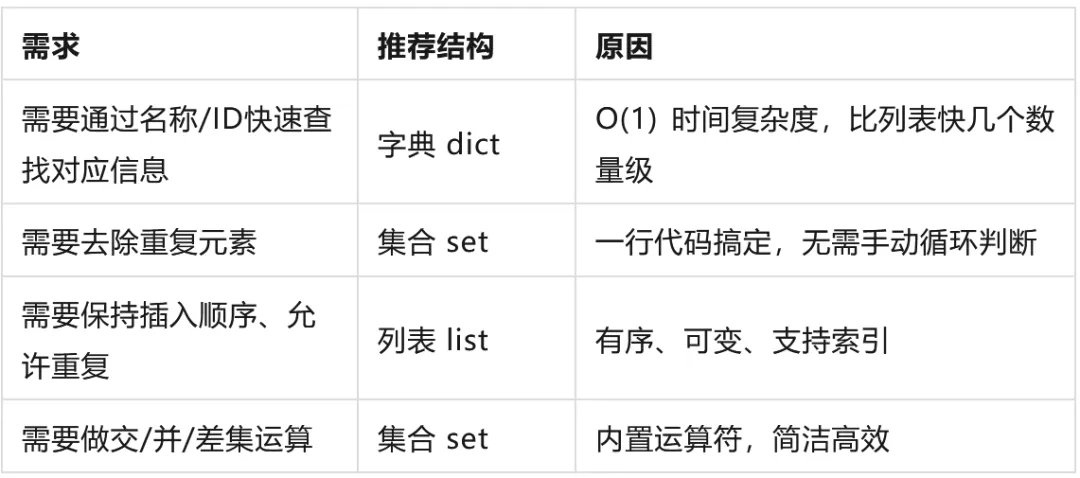
三、字典 vs 集合 vs 列表:如何选择?
综合运用字典操作和函数封装,写一个实用的通讯录工具:
def contact_book(): contacts = {} # 创建空字典 while True: cmd = input("\n命令(add/find/list/del/quit):").strip().lower() if cmd == "add": name = input("姓名:").strip() phone = input("电话:").strip() contacts[name] = phone print(f"✅ 已保存 {name} 的联系方式") elif cmd == "find": name = input("要查找的姓名:").strip() phone = contacts.get(name) if phone: print(f"📞 {name} 的电话:{phone}") else: print(f"❌ 未找到 {name} 的记录") elif cmd == "list": if contacts: print("📒 通讯录:") for name, phone in contacts.items(): print(f" {name}: {phone}") else: print("📭 通讯录为空") elif cmd == "del": name = input("要删除的姓名:").strip() if name in contacts: del contacts[name] print(f"🗑️ 已删除 {name}") else: print(f"❌ {name} 不存在") elif cmd == "quit": print("👋 再见!") break else: print("❌ 无效命令")contact_book()
五、新手避坑指南
- 空集合写成
{} - 用列表做字典的键:列表可变,不能作为键。如果需要,先转成元组
tuple(list)。 - 遍历时修改字典:不要在
for key in dict 循环中直接增删键,会导致 RuntimeError。正确做法是先收集要操作的键,循环结束后再统一处理。 - 混淆
in 的检查对象:x in dict 检查的是键,不是值。检查值需要用 x in dict.values()。 - 忽略字典的无序性(Python < 3.7):虽然 Python 3.7+ 字典保持插入顺序,但不要依赖这个特性做逻辑判断,尤其是需要兼容旧版本时。
六、总结
- 字典 dict
- 集合 set
- 安全访问:永远优先使用
dict.get() 而非 dict[]。 - 选择原则:查对应关系用字典,去重/集合运算用集合,有序可重复用列表。
 10个月宝宝每天需要喝多少奶粉?