Python 上位机开发:用 Queue + 线程任务基类,让 CustomTkinter 后台任务不再卡 UI
- 2026-10-11 05:52:25
在 Windows 桌面应用、工控上位机、数据采集工具里,最常见的问题之一不是算法多复杂,而是:一跑耗时任务,界面就卡住。串口读取、文件导入、网络请求、设备轮询,这些任务看起来各不相同,但它们都有一个共同点:不能直接堵在 UI 主线程里。我在做 Python 开发时发现,很多项目一开始只是随手开几个线程,后来日志、进度、取消、异常处理越写越乱,维护成本很快上来。本文用一个完整的 CustomTkinter 示例,把后台任务抽象成统一的线程任务基类,并用 Queue 做消息中间件。读完后,你可以掌握一套适合上位机、小工具、内部系统的后台任务架构,直接搬到项目里用。
🧩 问题从哪里来:为什么 Tkinter 程序一做任务就卡
很多刚开始写 Tkinter 或 CustomTkinter 的同学,都会写出类似这样的代码:
defon_click():
for i inrange(100):
        time.sleep(0.1)
        progress_bar.set(i / 100)
看起来很自然:按钮点击后开始处理任务,顺便更新进度条。
但问题在于,Tkinter 的 UI 事件循环也运行在主线程里。当你在按钮回调里执行 time.sleep()、文件读取、网络请求、串口等待时,主线程被占住了,界面自然无法响应。
表现出来就是:
• 窗口拖不动; • 按钮点了没反应; • 进度条不更新; • 日志区域不刷新; • Windows 标题栏出现“未响应”。
这玩意儿在业务系统里还好,用户可能等一会儿。但在上位机和设备控制软件里,就比较麻烦了。比如串口正在持续读取数据,界面又卡住,操作人员很难判断软件到底是在运行、卡死,还是设备断开。
所以,耗时任务必须丢到后台线程里。
但这里又有第二个坑:Tkinter / CustomTkinter 不建议在后台线程里直接更新 UI 控件。
也就是说,下面这种写法并不稳:
defworker():
    label.configure(text="后台线程更新 UI")
它可能在某些机器上没问题,但换个环境、换个任务强度、换个窗口操作节奏,就可能出现随机异常或界面状态错乱。
比较稳的做法是:后台线程只负责干活和发消息,主线程只负责收消息和更新 UI。
这就是本文要讲的核心。
🧠 核心思路:把 Queue 当成一个轻量级中间件
在复杂系统里,我们常说“消息队列”“事件总线”“中间件”。听起来挺大,其实放到桌面应用里,思路很朴素:
后台任务不直接碰 UI,而是往
Queue里放一条消息;UI 主线程定时检查Queue,根据消息内容更新界面。
咱们先把消息格式统一起来。
defsend_progress(q, value, text="", task_name=""):
    q.put({
"type": "progress",
"value": value,
"text": text,
"task_name": task_name
    })


defsend_log(q, text, task_name=""):
    q.put({
"type": "log",
"text": text,
"task_name": task_name
    })


defsend_done(q, result=None, task_name=""):
    q.put({
"type": "done",
"result": result,
"task_name": task_name
    })


defsend_error(q, error, task_name=""):
    q.put({
"type": "error",
"error": str(error),
"task_name": task_name
    })
这几类消息已经能覆盖大多数桌面工具场景:
• progress:更新进度条和状态文本;• log:追加日志;• done:任务完成,返回结果;• error:任务异常,返回错误信息。
这一步很关键。因为一旦消息协议统一了,UI 就不需要知道“这是串口任务还是文件任务”。它只需要关心:
msg_type = msg.get("type")这就是解耦。
从架构上看,Queue 就像一个小型中间件。它把任务层和 UI 层隔开,双方只通过消息协议沟通。任务层不用知道界面长什么样,UI 层也不用知道任务内部怎么跑。
🧱 任务基类设计:别让每个任务都重复写线程逻辑
如果项目里只有一个后台任务,直接写一个线程也没问题。但项目一旦变大,比如同时有:
• 串口读取任务; • 文件导入任务; • 网络请求任务; • 数据库同步任务; • 设备状态轮询任务;
如果每个任务都自己创建线程、捕获异常、发送进度、处理取消,代码很快会重复,而且风格不统一。
所以我们抽一个 ThreadTask 基类。
这个基类只管通用能力:
1. 创建线程; 2. 捕获异常; 3. 支持协作式取消; 4. 统一发送日志、进度、完成、错误消息; 5. 让子类只关心自己的业务逻辑。
classThreadTask:
def__init__(self, message_queue, task_name="后台任务"):
self.message_queue = message_queue
self.task_name = task_name
self._thread = None
self._cancel_event = threading.Event()

defstart(self):
ifself._thread andself._thread.is_alive():
self.log("任务已经在运行中")
return

self._cancel_event.clear()

self._thread = threading.Thread(
            target=self._run_wrapper,
            daemon=True
        )
self._thread.start()

defcancel(self):
self._cancel_event.set()
self.log("正在请求取消任务...")

defis_cancelled(self):
returnself._cancel_event.is_set()

def_run_wrapper(self):
try:
self.log("任务开始")
            result = self.execute()

ifself.is_cancelled():
self.log("任务已取消")
                send_done(
self.message_queue,
                    result={"cancelled": True},
                    task_name=self.task_name
                )
else:
                send_done(
self.message_queue,
                    result=result,
                    task_name=self.task_name
                )

except Exception:
            error_detail = traceback.format_exc()
            send_error(
self.message_queue,
                error_detail,
                task_name=self.task_name
            )

defexecute(self):
raise NotImplementedError("子类必须实现 execute() 方法")

defprogress(self, value, text=""):
        send_progress(
self.message_queue,
            value,
            text,
            task_name=self.task_name
        )

deflog(self, text):
        send_log(
self.message_queue,
            text,
            task_name=self.task_name
        )
这里有两个细节值得注意。
第一个是 daemon=True。它表示主程序退出时,后台线程不会阻止进程结束。对大多数工具型 GUI 程序来说,这个设置比较实用。
第二个是 threading.Event()。Python 线程不能被安全地强制杀掉,所以取消任务通常采用协作式取消。也就是说,UI 发出取消信号,后台任务自己在合适的位置检查:
ifself.is_cancelled():
return
这比粗暴终止线程安全得多。
🛠️ 完整可运行示例:CustomTkinter + Queue + 后台线程
下面是一份完整代码,直接保存为 app.py 即可运行。
运行前安装依赖:
pip install customtkinter📌 完整代码
import time
import queue
import threading
import traceback
import random
import customtkinter as ctk


defsend_progress(q, value, text="", task_name=""):
    q.put({
"type": "progress",
"value": value,
"text": text,
"task_name": task_name
    })


defsend_log(q, text, task_name=""):
    q.put({
"type": "log",
"text": text,
"task_name": task_name
    })


defsend_done(q, result=None, task_name=""):
    q.put({
"type": "done",
"result": result,
"task_name": task_name
    })


defsend_error(q, error, task_name=""):
    q.put({
"type": "error",
"error": str(error),
"task_name": task_name
    })


classThreadTask:
def__init__(self, message_queue, task_name="后台任务"):
self.message_queue = message_queue
self.task_name = task_name
self._thread = None
self._cancel_event = threading.Event()

defstart(self):
ifself._thread andself._thread.is_alive():
self.log("任务已经在运行中")
return

self._cancel_event.clear()

self._thread = threading.Thread(
            target=self._run_wrapper,
            daemon=True
        )
self._thread.start()

defcancel(self):
self._cancel_event.set()
self.log("正在请求取消任务...")

defis_cancelled(self):
returnself._cancel_event.is_set()

def_run_wrapper(self):
try:
self.log("任务开始")
            result = self.execute()

ifself.is_cancelled():
self.log("任务已取消")
                send_done(
self.message_queue,
                    result={"cancelled": True},
                    task_name=self.task_name
                )
else:
                send_done(
self.message_queue,
                    result=result,
                    task_name=self.task_name
                )

except Exception:
            error_detail = traceback.format_exc()
            send_error(
self.message_queue,
                error_detail,
                task_name=self.task_name
            )

defexecute(self):
raise NotImplementedError("子类必须实现 execute() 方法")

defprogress(self, value, text=""):
        send_progress(
self.message_queue,
            value,
            text,
            task_name=self.task_name
        )

deflog(self, text):
        send_log(
self.message_queue,
            text,
            task_name=self.task_name
        )


classSerialReadTask(ThreadTask):
def__init__(self, message_queue):
super().__init__(message_queue, task_name="串口读取任务")

defexecute(self):
        total = 20
        received_data = []

for i inrange(total):
ifself.is_cancelled():
return {
"message": "串口读取被取消",
"data": received_data
                }

            time.sleep(0.2)

            fake_data = f"DATA-{random.randint(1000, 9999)}"
            received_data.append(fake_data)

            percent = int((i + 1) / total * 100)

self.progress(
                percent,
f"正在读取串口数据:{i + 1}/{total}"
            )

self.log(f"收到串口数据:{fake_data}")

return {
"message": "串口读取完成",
"data": received_data
        }


classFileImportTask(ThreadTask):
def__init__(self, message_queue):
super().__init__(message_queue, task_name="文件导入任务")

defexecute(self):
        total_rows = 50
        imported_rows = 0

for row inrange(1, total_rows + 1):
ifself.is_cancelled():
return {
"message": "文件导入被取消",
"imported_rows": imported_rows
                }

            time.sleep(0.08)

            imported_rows += 1
            percent = int(imported_rows / total_rows * 100)

self.progress(
                percent,
f"正在导入文件:第 {row} 行 / 共 {total_rows} 行"
            )

if row % 10 == 0:
self.log(f"已导入 {row} 行数据")

return {
"message": "文件导入完成",
"imported_rows": imported_rows
        }


classNetworkRequestTask(ThreadTask):
def__init__(self, message_queue):
super().__init__(message_queue, task_name="网络请求任务")

defexecute(self):
        steps = [
"准备请求参数",
"连接服务器",
"发送请求",
"等待响应",
"解析响应数据",
"保存结果"
        ]

        result = {}

for index, step inenumerate(steps, start=1):
ifself.is_cancelled():
return {
"message": "网络请求被取消",
"partial_result": result
                }

            time.sleep(0.5)

            percent = int(index / len(steps) * 100)

self.progress(percent, step)
self.log(step)

        result = {
"status": 200,
"data": {
"name": "CustomTkinter",
"type": "GUI Demo",
"success": True
            }
        }

return {
"message": "网络请求完成",
"response": result
        }


classApp(ctk.CTk):
def__init__(self):
super().__init__()

self.title("CustomTkinter 线程任务基类示例")
self.geometry("780x560")

        ctk.set_appearance_mode("System")
        ctk.set_default_color_theme("blue")

self.message_queue = queue.Queue()
self.current_task = None

self._build_ui()

self.after(100, self.poll_message_queue)

def_build_ui(self):
self.grid_columnconfigure(0, weight=1)
self.grid_rowconfigure(3, weight=1)

        title_label = ctk.CTkLabel(
self,
            text="线程任务基类 + Queue 消息协议示例",
            font=ctk.CTkFont(size=22, weight="bold")
        )
        title_label.grid(
            row=0,
            column=0,
            padx=20,
            pady=(20, 10),
            sticky="w"
        )

        description_label = ctk.CTkLabel(
self,
            text="后台任务只负责发送消息,主线程只负责处理消息并更新 UI。",
            font=ctk.CTkFont(size=14)
        )
        description_label.grid(
            row=1,
            column=0,
            padx=20,
            pady=(0, 15),
            sticky="w"
        )

        button_frame = ctk.CTkFrame(self)
        button_frame.grid(
            row=2,
            column=0,
            padx=20,
            pady=10,
            sticky="ew"
        )

        button_frame.grid_columnconfigure((0, 1, 2, 3), weight=1)

self.serial_button = ctk.CTkButton(
            button_frame,
            text="启动串口读取",
            command=self.start_serial_task
        )
self.serial_button.grid(row=0, column=0, padx=10, pady=15, sticky="ew")

self.file_button = ctk.CTkButton(
            button_frame,
            text="启动文件导入",
            command=self.start_file_task
        )
self.file_button.grid(row=0, column=1, padx=10, pady=15, sticky="ew")

self.network_button = ctk.CTkButton(
            button_frame,
            text="启动网络请求",
            command=self.start_network_task
        )
self.network_button.grid(row=0, column=2, padx=10, pady=15, sticky="ew")

self.cancel_button = ctk.CTkButton(
            button_frame,
            text="取消当前任务",
            fg_color="#B23B3B",
            hover_color="#8F2F2F",
            command=self.cancel_current_task
        )
self.cancel_button.grid(row=0, column=3, padx=10, pady=15, sticky="ew")

        content_frame = ctk.CTkFrame(self)
        content_frame.grid(row=3, column=0, padx=20, pady=10, sticky="nsew")

        content_frame.grid_columnconfigure(0, weight=1)
        content_frame.grid_rowconfigure(4, weight=1)

self.status_label = ctk.CTkLabel(
            content_frame,
            text="状态:空闲",
            anchor="w",
            font=ctk.CTkFont(size=15)
        )
self.status_label.grid(row=0, column=0, padx=15, pady=(15, 5), sticky="ew")

self.progress_bar = ctk.CTkProgressBar(content_frame)
self.progress_bar.grid(row=1, column=0, padx=15, pady=10, sticky="ew")
self.progress_bar.set(0)

self.progress_label = ctk.CTkLabel(
            content_frame,
            text="进度:0%",
            anchor="w"
        )
self.progress_label.grid(row=2, column=0, padx=15, pady=(0, 10), sticky="ew")

        log_title = ctk.CTkLabel(
            content_frame,
            text="任务日志",
            anchor="w",
            font=ctk.CTkFont(size=15, weight="bold")
        )
        log_title.grid(row=3, column=0, padx=15, pady=(5, 5), sticky="ew")

self.log_textbox = ctk.CTkTextbox(content_frame)
self.log_textbox.grid(row=4, column=0, padx=15, pady=(0, 15), sticky="nsew")

defstart_serial_task(self):
self.start_task(SerialReadTask(self.message_queue))

defstart_file_task(self):
self.start_task(FileImportTask(self.message_queue))

defstart_network_task(self):
self.start_task(NetworkRequestTask(self.message_queue))

defstart_task(self, task):
ifself.current_task isnotNone:
            thread = self.current_task._thread
if thread and thread.is_alive():
self.append_log("当前已有任务正在运行,请先等待或取消。")
return

self.current_task = task

self.progress_bar.set(0)
self.progress_label.configure(text="进度:0%")
self.status_label.configure(text=f"状态:正在运行 - {task.task_name}")

self.append_log("")
self.append_log("=" * 60)
self.append_log(f"启动任务:{task.task_name}")

        task.start()

defcancel_current_task(self):
ifself.current_task isNone:
self.append_log("当前没有正在运行的任务。")
return

self.current_task.cancel()

defpoll_message_queue(self):
whileTrue:
try:
                msg = self.message_queue.get_nowait()
except queue.Empty:
break

self.handle_message(msg)

self.after(100, self.poll_message_queue)

defhandle_message(self, msg):
        msg_type = msg.get("type")
        task_name = msg.get("task_name", "未知任务")

if msg_type == "progress":
            value = msg.get("value", 0)
            text = msg.get("text", "")

self.progress_bar.set(value / 100)
self.progress_label.configure(text=f"进度:{value}%")
self.status_label.configure(text=f"状态:{task_name} - {text}")

elif msg_type == "log":
            text = msg.get("text", "")
self.append_log(f"[{task_name}] {text}")

elif msg_type == "done":
            result = msg.get("result")

ifisinstance(result, dict) and result.get("cancelled"):
self.status_label.configure(text=f"状态:{task_name} 已取消")
self.append_log(f"[{task_name}] 任务已取消")
else:
self.progress_bar.set(1)
self.progress_label.configure(text="进度:100%")
self.status_label.configure(text=f"状态:{task_name} 完成")
self.append_log(f"[{task_name}] 任务完成")
self.append_log(f"返回结果:{result}")

elif msg_type == "error":
            error = msg.get("error", "")
self.status_label.configure(text=f"状态:{task_name} 出错")
self.append_log(f"[{task_name}] 发生错误:")
self.append_log(error)

else:
self.append_log(f"收到未知消息:{msg}")

defappend_log(self, text):
self.log_textbox.insert("end", text + "\n")
self.log_textbox.see("end")


if __name__ == "__main__":
    app = App()
    app.mainloop()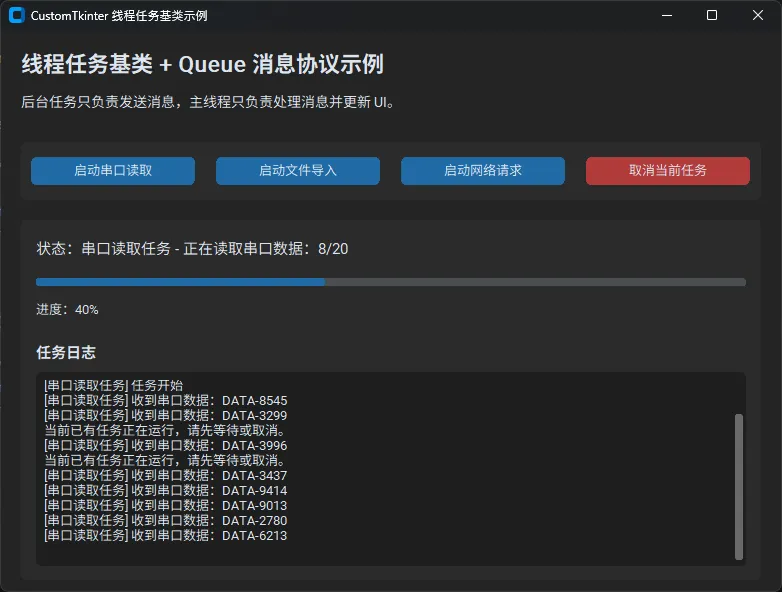
这份代码里有一个容易被忽略的小点:append_log() 里必须写成:
self.log_textbox.insert("end", text + "\n")不要把换行符拆成真实换行,否则 Python 字符串会出错。这类小问题在复制代码到公众号或文档时很常见,发布前最好重新运行一次。
📊 简单性能对比:卡 UI 和不卡 UI 的差别
为了让这个方案的收益更直观,我在本地做了一组小测试。
测试环境:
• 系统:Windows 11 • Python:3.11 • CustomTkinter:5.2.x • 任务类型:模拟文件导入 50 行,每行耗时 0.08 秒 • 总耗时:约 4 秒
这组数据不复杂,但在实际项目里很有代表性。很多上位机程序真正的性能优化,不一定是把算法快多少,而是让用户能清楚看到:软件还活着,任务在推进,异常能被看见,操作还能响应。
这就是桌面应用体验上的性能优化。
⚠️ 踩坑预警:这几个地方最容易写错
1. 不要在子线程里直接操作控件
后台线程里不要写:
self.label.configure(text="处理中")推荐写:
self.progress(50, "处理中")然后让主线程统一处理消息。
2. 不要用强制杀线程的思路
Python 标准线程没有安全的强制终止接口。正确做法是使用 threading.Event() 作为取消信号。
ifself.is_cancelled():
return
这叫协作式取消。它没有那么“暴力”,但足够安全。
3. 消息协议要稳定,不要一会儿一个格式
项目早期最容易偷懒,比如有的任务发:
{"msg": "done"}有的任务发:
{"type": "finish"}等 UI 层开始适配各种格式,代码就会越来越乱。建议从一开始就规定好基础消息类型:progress、log、done、error。
4. 轮询间隔不要太小
示例里使用:
self.after(100, self.poll_message_queue)100 毫秒对大多数桌面工具已经足够流畅。如果设置成 1 毫秒,反而会增加无意义的 UI 调度压力。
5. 多任务并发时要增加 task_id
本文为了示例清晰,只允许同一时间运行一个任务。如果你要支持多个任务并发,建议给消息增加 task_id:
{
"type": "progress",
"task_id": "file-import-001",
"value": 80
}
这样 UI 层可以把不同任务分发到不同的进度条、日志区域或任务卡片。
🧰 可复用模板:新增任务只需要继承 ThreadTask
以后你想新增一个数据库同步任务,不需要再重复写线程和异常处理逻辑,只要继承 ThreadTask:
classDatabaseSyncTask(ThreadTask):
def__init__(self, message_queue):
super().__init__(message_queue, task_name="数据库同步任务")

defexecute(self):
        total = 100

for i inrange(total):
ifself.is_cancelled():
return {
"message": "数据库同步被取消",
"synced": i
                }

            time.sleep(0.05)

            percent = int((i + 1) / total * 100)

self.progress(
                percent,
f"正在同步第 {i + 1}/{total} 条记录"
            )

if (i + 1) % 20 == 0:
self.log(f"已同步 {i + 1} 条记录")

return {
"message": "数据库同步完成",
"synced": total
        }
然后在 UI 里加一个启动方法:
defstart_database_task(self):
self.start_task(DatabaseSyncTask(self.message_queue))这就是这个架构最舒服的地方:新增任务时,业务代码只写业务,不再重复处理线程细节。
🧭 适合哪些项目使用
这套写法特别适合下面几类 Python 开发场景:
• 工控上位机; • 串口调试工具; • 数据采集软件; • 文件批量处理工具; • 内部运营桌面工具; • 需要进度条和日志区的小型 GUI 程序; • 网络请求、数据导入、设备轮询混合的应用。
如果项目继续变大,还可以继续演进:
• Queue升级为事件总线;• 消息字典升级为 dataclass;• 单任务 UI 升级为多任务面板; • 线程任务升级为线程池; • 本地任务和远程任务统一成同一套事件协议。
但我建议不要一开始就搞得太重。很多项目用一个 Queue、一个任务基类、一个统一消息协议,就已经能解决 80% 的问题。
💬 两个可以讨论的问题
1. 你在写 Python GUI 或上位机程序时,更常遇到的是 UI 卡顿、线程异常,还是任务取消难处理? 2. 如果要支持多个后台任务同时运行,你更倾向于“多个进度条卡片”,还是“一个全局任务管理面板”?
这两个问题没有绝对答案,和项目规模、用户习惯、任务复杂度都有关系。我的经验是:如果任务少,用一个全局状态区就够;如果任务多,而且每个任务耗时较长,就应该做任务面板,不然用户很难判断当前系统到底在忙什么。
🧠 三句话总结
第一,后台线程不要直接更新 UI,应该通过 Queue 把消息交给主线程处理。
第二,多个后台任务不要各写各的线程逻辑,抽一个 ThreadTask 基类能明显降低维护成本。
第三,消息协议越早统一,项目后期越容易扩展;这就是小型中间件思想在桌面应用里的落地。
🧱 学习路径建议
如果你想把这套方案继续用到真实项目里,可以按下面这个路线继续深入:
1. 先掌握 threading.Thread、threading.Event、queue.Queue的基础用法;2. 再理解 Tkinter / CustomTkinter 的主线程 UI 更新规则; 3. 接着学习事件驱动设计,把 progress、log、done、error抽象成稳定协议;4. 项目复杂后,再考虑 ThreadPoolExecutor、任务队列、事件总线和日志系统;5. 如果涉及大量 IO,例如网络请求、串口通信、文件读写,可以进一步研究异步 IO 与线程模型的取舍。
本文的完整源码已经在正文中给出,可以直接复制运行,也可以按自己的项目结构拆分成 tasks.py、messages.py、app.py 三个文件。希望这套写法能帮你把 CustomTkinter 项目从“能跑”推进到“好维护、好扩展、好排查问题”。
🏷️ 推荐标签
Python开发CustomTkinter上位机多线程中间件编程技巧性能优化
