260801期 | Linux多线程将SRA文件拆分成FQ文件 | pfastq-dump工具
- 2026-09-08 20:41:20
260801期 | Linux多线程将SRA文件拆分成FQ文件 | pfastq-dump工具
 生信服务器立减优惠活动:西柚云服务器立减优惠活动,或输入优惠码:
BioinfoDu。网址:
https://dayu.xiyoucloud.net/dayu/api/v1/anonymous/affiliate/BioinfoDu前言
下载组学数据一般为SRA文件格式,需要将其拆分为FQ文件格式,常用的工具是NCBI中的fastq-dump软件进行拆分。
但是,fastq-dump软件只能使用单线程运行,速度非常慢。可以看教程转录组上游分析教程 | NCBI转录组数据的下载
那么如何实现多线程快速拆分呢?今天我们推荐大家使用pfastq-dump工具,实现多线程运行,提供工作效率。
pfastq-dump安装
下载网址
https://github.com/inutano/pfastq-dump安装
可以直接使用git clone进行下载
$ git clone https://github.com/inutano/pfastq-dump$ cd pfastq-dump$ chmod a+x bin/pfastq-dump下载源码安装包
https://github.com/inutano/pfastq-dump/releases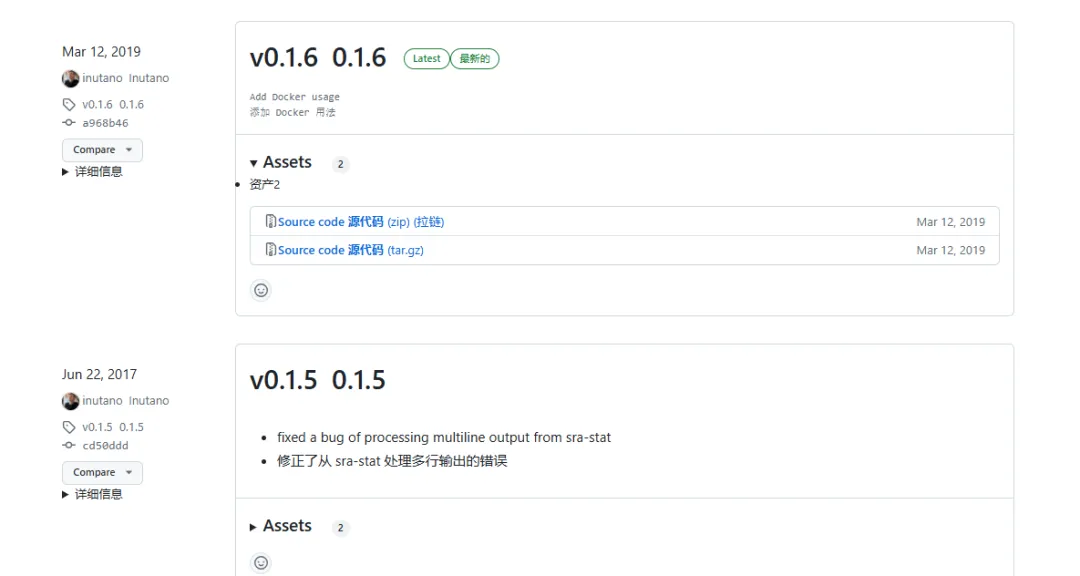 下载后解压,操作上同。
添加路径 将路径写到 ~/.bashrc中,输入命令vim ~/.bashrc。
PATH=$PATH:~/software/pfastq-dump/bin运行
pfastq-dump -hUsage:pfastq-dump --threads <number of threads> [options] <path> [<path>...]pfastq-dump option:-t|--threads number of threads-s|--sra-id SRA id-O|--outdir output directory--tmpdir temporary directoryExtra arguments will be passed throughOther:-v|--version show version info-h|--help program usagepfastq-dump使用与fastq-dump一致
## 双端数据pfastq-dump -t 58 --split-files *.sra## 单段数据fastq-dump -t 58 *.sra若我们的教程对你有所帮助,请
点赞+收藏+转发,这是对我们最大的支持。欢迎关注《BioinfoR生信笔记》
关于自我简介可查看「BioinfoR生信筆記」关注须知! BioinfoR生信筆記,仅有微信社群。关于社群请详细查看「BioinfoR生信筆記」入群声明,里面有你想了解的内容。由于微信改版,一直有同学反映。存在长时间接收不到公众号的推文。那么请跟随以下步骤,将BioinfoR生信筆記设置为星标,不错过每一条推文教程。
小杜的生信筆記 ,注于分享生物信息学相关知识和R语言绘图教程。发表论文投稿及招聘信息请使用word格式或MarkDown格式发送到bioinfor2025@163.com,均为无偿。
2025已离你我而去,2026加油!!往期部分文章
1. 最全WGCNA教程(替换数据即可出全部结果与图形)
推荐大家购买最新的教程,若是已经购买以前WGNCA教程的同学,可以在对应教程留言,即可获得最新的教程。(注:此教程也仅基于自己理解,不仅局限于此,难免有不恰当地方,请结合自己需求,进行改动。)
2. 精美图形绘制教程
3. 转录组分析教程
4. 转录组下游分析
小杜的生信筆記 ,注于分享生物信息学相关知识和R语言绘图教程。
本文来自网友投稿或网络内容,如有侵犯您的权益请联系我们删除,联系邮箱:596563534@qq.com 。
随机文章
-
 10个月宝宝每天需要喝多少奶粉?
- 【科普文】: Linux时钟频率暗藏的EMI与定时危机
- Python新手别再盲目收藏:5个学习网站,打通入门、刷题、算法与面试
- 零基础Python学习速记口诀
- Python 的条件、循环和函数,别再拆开学了
- 五分钟竟能轻松掌握 Python 自动化测试 Selenium !
- Java 21 有了虚拟线程,CompletableFuture 异步编程是不是可以替换了?
- 5 个实用的 Bash 脚本,实现 Linux 服务器日常运维监控任务自动化
- 奔驰原车风格8.4寸 Linux 双系统,适配ML-GL-GLE-GLS-SLK-CLS
- 如何在linux上玩到古早的psv平台游戏
- Linux-setcap命令(提权命令)