当前位置:首页>python>【Python数据分析案例(2025)】30——基于时空卷积神经网络的风速预测

【Python数据分析案例(2025)】30——基于时空卷积神经网络的风速预测

  • 2026-08-18 23:11:42
【Python数据分析案例(2025)】30——基于时空卷积神经网络的风速预测

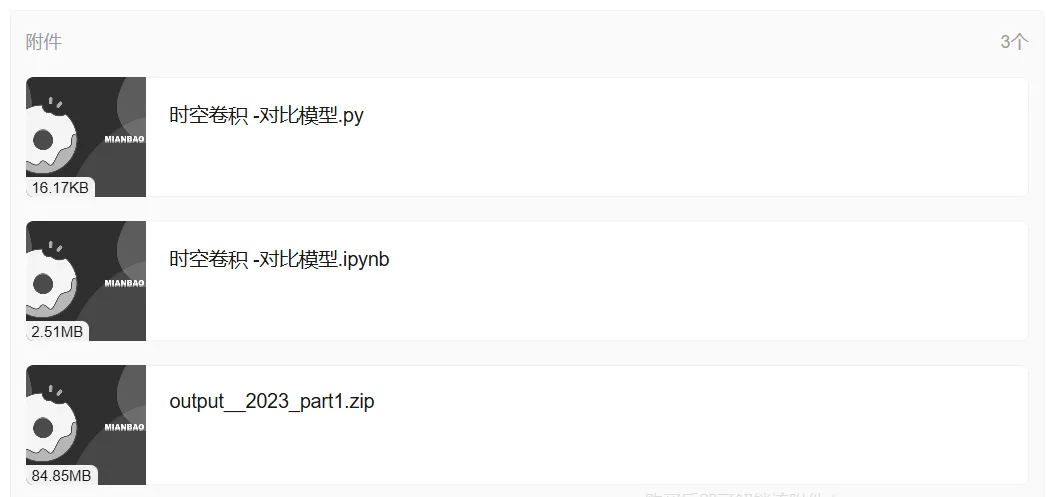
网盘截屏

案例背景

好久没更新了,最近上班也接触了不少新的模型和方法,现在先把手上的有价值的案例再做一个总结,太简单的案例就不写了。后面再把新东西做个总结。

本文使用时空卷积神经网络模型进行多个坐标轴上空间站点的风速进行预测,首先对本章所使用的经网络模型进行简介,然后进行高维特征数据集的预处理 ,整体的预测流程,然后进行实验对比分析。

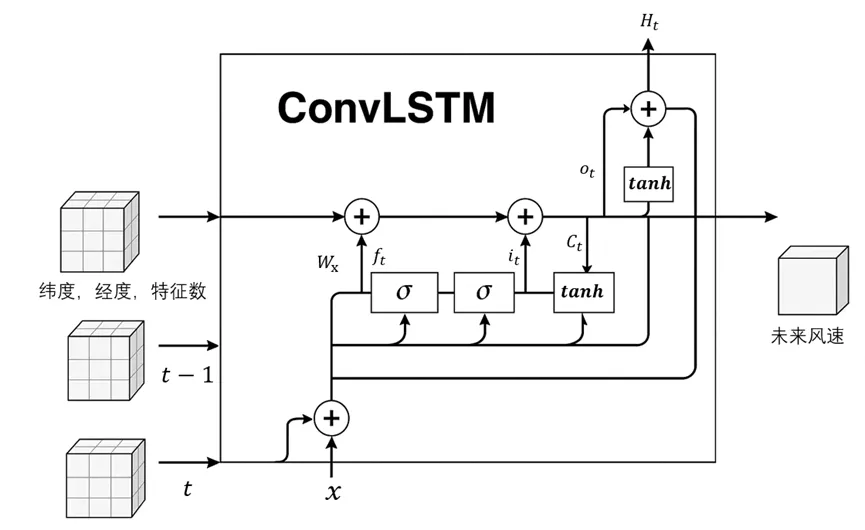
由于存在多个经纬度 坐标轴上的风速数据,传统的循环神经网络系列的模型(RNN,LSTM,GRU)无法考虑地理位置空间上的信息。所以需要引入新的模型方法。时空卷积神经网络(ConvLSTM)是一种结合卷积神经网络(CNN)和长短期记忆网络(LSTM)的混合深度学习模型,专门用于处理具有时空依赖性的序列数据。其核心思想是通过卷积操作提取空间特征,同时利用LSTM的门控机制建模时间动态,从而实现对时空数据的端到端学习。本章的多个空间站点风速预测任务中,输入数据表示为五维张量(样本量,时间步长,纬度,经度,特征数),其中时间步长代表历史风速序列的长度,纬度和经度构成空间网格,特征数可包含风速、风向等变量。其结构如图所示:
数据简介

风电数据集选取,本文选取一处风力发电场数据。该地区位于****,有多个不同经纬度上的坐标轴上的不同的风速观测情况的变量。在时间跨度上,本章选取数据集涵盖了从2023年1月1日00:00到2023年3月31日23:00的时间段,时间分辨率保持在1小时。2880个样本中,包括年月日时信息、10米高度的东向风速分量和北向风速分量、2米高度的气温、总降水量5个特征变量,目标变量为风速。(家用电脑跑不了多少数据量,只能弄个2000多的小样本)

原始数据坐标为维度40个和经度40个,总共1600个点的风速数据,但是原始数据过于庞大,本文只选取最靠前的2个维度和2个经度,总共4个坐标上相邻的风电场的数据情况,因为相邻的风电场可以更好的使得模型中学习到地理空间上的关联信息。经度取值为-0.25和-0.5纬度取值为53.75和54.0。交叉组合为如下4个地理位置:[‘-0.25’, ‘53.75’]、[‘-0.25’, ‘54.0’]、[‘-0.5′,’53.75’]和[‘-0.5’, ‘54.0’]。同样数据集通常划分为训练集、验证集和测试集,本章依旧采用70%的数据作为训练集、20%的数据作为验证集用于模型调参、10%的数据测试。

数据预处理

导入包,本文深度学习用的是keras框架。

import os,time

import datetime

import random as rn

import numpy as np

import pandas as pd

import matplotlib.pyplot as plt 

import seaborn as sns

plt.rcParams['font.sans-serif'] ='SimHei' #显示中文

plt.rcParams['axes.unicode_minus']=False #显示负号

from sklearn.model_selection import train_test_split

from sklearn.preprocessing import MinMaxScaler,StandardScaler

from sklearn.metrics import mean_absolute_error

from sklearn.metrics import mean_squared_error,r2_score

#import keras

#import keras.backend as K

import tensorflow as tf

from keras.layers import Layer

from keras.models import Model, Sequential

from keras.layers import GRU, Dense,Conv1D,Dropout,Flatten,SimpleRNN,LSTM, ConvLSTM2D ,Reshape, TimeDistributed #MaxPooling1D,GlobalMaxPooling1D,Embedding

#from keras.callbacks import EarlyStopping

#from tensorflow.keras import regularizers

#from keras.utils.np_utils import to_categorical

from tensorflow.keras  import optimizers

读取数据

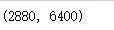
df=pd.read_csv('output__2023_part1.csv',parse_dates=['valid_time']).set_index('valid_time').iloc[:2880,:]

df.shape
展示前5行

df.head()
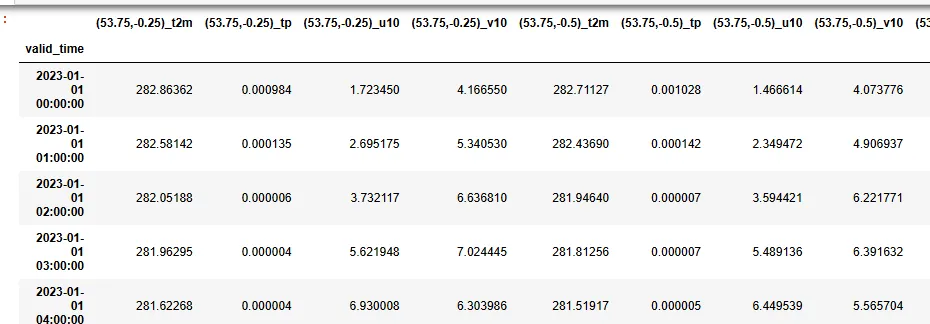
这个数据6400列,就是不同地理坐标上的各种特征:

月日时信息、10米高度的东向风速分量和北向风速分量、2米高度的气温、总降水量5个特征变量

很混乱,所以这个数据需要做预处理,整理为我们需要的样式。

## 1. 变量名称分开

split_cols = df.columns.str.extract(r'\(([^,]+),([^)]+)\)_([^_]+)').set_axis(['lat''lon''var'],axis=1)

# 步骤2:创建多层列索引

multi_cols = pd.MultiIndex.from_arrays([

    split_cols['lat'], split_cols['lon'],  split_cols['var']], names=['Latitude''Longitude''Variable'])

df.columns = multi_cols

步骤3:堆叠地理坐标到行索引

df = df.stack(['Latitude''Longitude']).reset_index()

df.head(2)

步骤4:设置最终索引结构

df = df.set_index(['valid_time''Latitude''Longitude']).sort_index()

df.index.names = ['Time''Latitude''Longitude']

5.计算风速

df['wind_speed']=np.sqrt(df['u10']**2 + df['v10']**2)

# 查看原始坐标轴

df.index.get_level_values(1).unique() , df.index.get_level_values(2).unique()

我们只选取4个点位,也就是横2个点。纵坐标2个点,2*2组合4个地理位置。(太多了计算会很慢)

## 只采样2 个点

lat_use_list=df.index.get_level_values(1).unique().to_numpy()[::20]

lon_use_list=df.index.get_level_values(2).unique().to_numpy()[::20]

lat_dim=len(lat_use_list); lon_dim=len(lon_use_list)

lat_use_list,lon_use_list

## 过滤掉其他坐标

df1=df.reset_index()

df1=df1[df1['Latitude'].isin(lat_use_list )]

df1=df1[df1['Longitude'].isin(lon_use_list )]

df1.shape
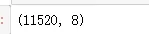
预处理格式完成

df1=df1.set_index(['Time''Latitude''Longitude'])

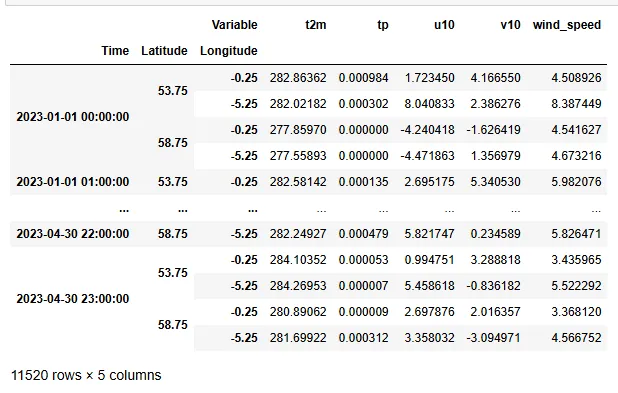
df1

前面的时间,经纬度设置为了索引,后面5列是我们的变量。

做一下索引交换,经度在前,维度在后

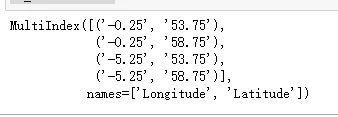
df_wind=df1.unstack(['Latitude''Longitude']).swaplevel(axis=1).sort_index(axis=1, level=[12], ascending=[TrueTrue])['wind_speed']

df_wind.columns

划分训练集验证集,测试集

train_ratio = 0.7

val_ratio = 0.2

n_samples = df_wind.shape[0]

train_end = int(n_samples * train_ratio)

val_end = train_end + int(n_samples * val_ratio)

画图展示

# 定义颜色和标签

colors = {'train''gold''val''lightblue''test''lightpink'}

labels = {'train''Train''val''Validation''test''Test'}

# 创建2x2子图

plt.figure(figsize=(1610),dpi=128)

for i, ((lon, lat), col)inenumerate(df_wind.items()):

    plt.subplot(22, i+1)

 # 分割数据

    train = df_wind.iloc[:train_end, i]

    val = df_wind.iloc[train_end:val_end, i]

    test = df_wind.iloc[val_end:, i]

 # 绘制三条线

    plt.plot(train.index, train, color=colors['train'], label=labels['train'])

    plt.plot(val.index, val, color=colors['val'], label=labels['val'])

    plt.plot(test.index, test, color=colors['test'], label=labels['test'])

 # 设置标题和图例

    plt.title(f'Lon: {lon}°, Lat: {lat}°', fontsize=16)

 #if i == 0:  # 只在第一个子图显示图例

    plt.legend()

plt.tight_layout()

plt.show()
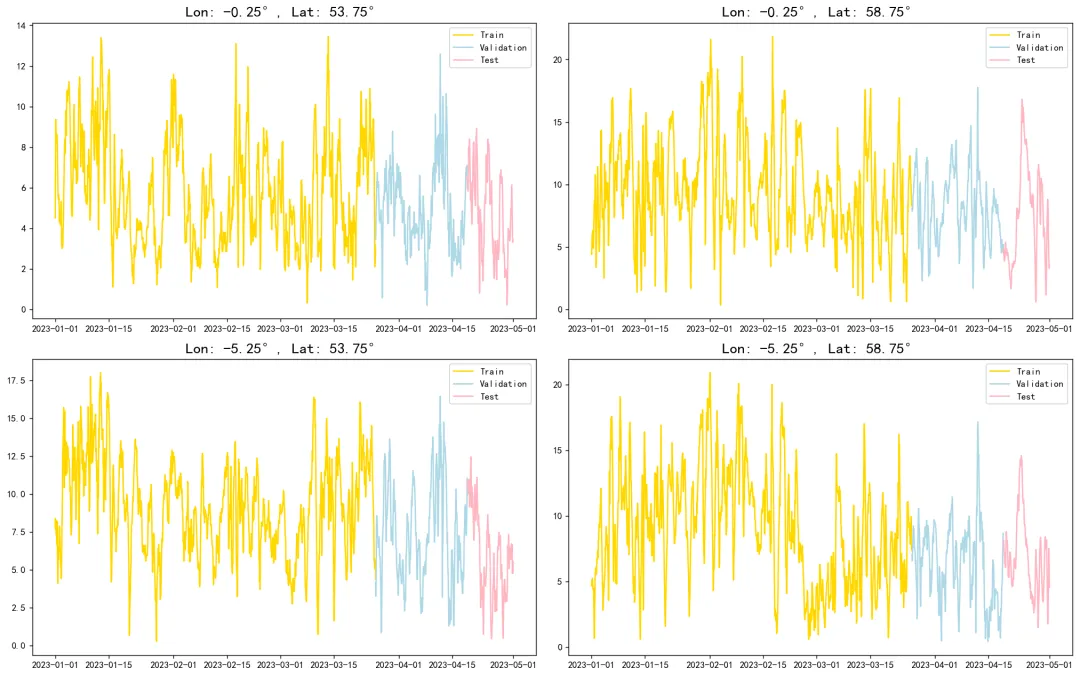
由于构建的是时空卷积神经网络的模型,数据的输入形状要构建为五维张量,其维度的含义分别是:样本量,时间步长,纬度,经度,特征数。本章节数据依旧采用滑动窗口法进行构建数据集。选用滑动窗口24(过去1天)的风速数据,加上其他特征,一起预测下一时刻的风速。整体而言对于单个样本X=xt-24,xt-23,xt-22,…,xt-1,xt ,去预测Y=xt+1 的数据。其中X 为四维数组,单个xt 为三维数组,表示为该t 时刻的在不同经度和不同维度上的特征向量,单个 Y=xt+1 为向量,表示不同坐标轴上的t+1 时刻的风速,

按照如上的方法进行窗口滑动,构建样本,最终形成的特征变量X 是五维张量,维度分别是样本量,时间步长,时间步长,纬度,经度,特征数。Y 是二维矩阵。

数据标准化

data=df1.to_numpy()

scaler = MinMaxScaler()

scaler = scaler.fit(data[:,:-1])

X=scaler.transform(data[:,:-1])

y_scaler = MinMaxScaler()

y_scaler = y_scaler.fit(data[:,-1].reshape(-1,1))

y=y_scaler.transform(data[:,-1].reshape(-1,1))

X.shape,y.shape

x和y标准化 好了,合并

df_data=pd.DataFrame(np.c_[X,y], index=df1.index, columns=df1.columns)

我们要把这个表格数据处理为5维的张量

## 转为5纬数据

defcreate_convlstm_dataset(df, window_size=6, target_col='wind_speed'):

 # 步骤1: 获取空间坐标的唯一值(按原始顺序)

 #unique_coords = df.index.get_level_values(['Latitude', 'Longitude']).unique()

    unique_lats = df.index.get_level_values('Latitude').unique().sort_values()

    unique_lons = df.index.get_level_values('Longitude').unique().sort_values()

 # 步骤2: 将数据重塑为4D张量 (时间步, 纬度, 经度, 特征)

 # 先 unstack 空间坐标到列

    tensor_4d = ( df.unstack(['Latitude''Longitude'])

        .swaplevel(axis=1).sort_index(axis=1, level=[12], ascending=[TrueTrue])

        .values.reshape(len(df.index.unique('Time'))len(unique_lats),    len(unique_lons),  len(df.columns)))

 # 步骤3: 创建滑动窗口序列

    samples = [];  targets = []

for i inrange(len(tensor_4d) - window_size):

 # 输入窗口: [i, i+window_size)

        samples.append(tensor_4d[i:i+window_size])

 # 目标值: 窗口后一时刻的全空间风速

        target_time_idx = i + window_size

        target = tensor_4d[target_time_idx, :, :, df.columns.get_loc(target_col)]

        targets.append(target.flatten()) # 展平为 (lat * lon,)

 # 转换为 numpy 数组

    X = np.array(samples) # (n_samples, window_size, lat, lon, features)

    y = np.array(targets) # (n_samples, lat * lon)

return X, y

window_size = 24 # 时间窗口大小

X, y = create_convlstm_dataset(df_data, window_size=window_size)

# 打印维度

print(f"输入维度: {X.shape} → (样本数, 时间步长, 纬度数, 经度数, 特征数)")

print(f"输出维度: {y.shape} → (样本数, 纬度*经度)")

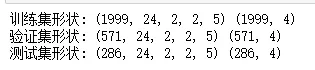
时间步长24是我们设定的,2,2是横纵两个维度,也就是空间上的经纬度。5就是特征数量,y自己也是可以拿来当特征的,用自己的前一秒的数值预测下一秒的数值并不算穿越泄露的问题。

y就是4个点,也就是下一个时刻4个坐标上的每个点位的风速。

# 按时间顺序划分 训练集,验证集,测试集

# 按时间顺序划分 训练集,验证集,测试集

train_ratio = 0.7

val_ratio = 0.2

n_samples = X.shape[0]

train_end = int(n_samples * train_ratio)

val_end = train_end + int(n_samples * val_ratio)

X_train, y_train = X[:train_end], y[:train_end]

X_val, y_val = X[train_end:val_end], y[train_end:val_end]

X_test, y_test = X[val_end:], y[val_end:]

# 转换为 float32 节省内存

X_train = X_train.astype('float32')

y_train = y_train.astype('float32')

print("训练集形状:", X_train.shape, y_train.shape)

print("验证集形状:", X_val.shape, y_val.shape)

print("测试集形状:", X_test.shape, y_test.shape)
定义随机数种子,评估函数。

def set_my_seed():

    os.environ['PYTHONHASHSEED'] = '0'

    np.random.seed(1)

    rn.seed(12345)

    tf.random.set_seed(123)

defevaluation(y_test, y_predict):

    mae = mean_absolute_error(y_test, y_predict)

    mse = mean_squared_error(y_test, y_predict)

    rmse = np.sqrt(mse)

    mape=(abs(y_predict -y_test)/ y_test).mean()

    r_2=r2_score(y_test, y_predict)

return mae,rmse, mape ,r_2

构建模型

就是四个模型,MLP,LSTM,GRU,ConvLSTM2D

def build_model(X_train, mode='LSTM', hidden_dim=[3216], lat_dim=2, lon_dim=2):

 # 自动计算输入形状

    timesteps, height, width, channels = X_train.shape[1:]

    input_shape = (timesteps, height, width, channels)

    model = Sequential()

if mode == 'MLP':

 # 直接展平所有维度

        model.add(Flatten(input_shape=input_shape))

        model.add(Dense(hidden_dim[0], activation='relu'))

        model.add(Dense(hidden_dim[1], activation='relu'))

        model.add(Dense(lat_dim * lon_dim, activation='linear'))

    elif mode in['LSTM''GRU']:

 # 先用 MLP 编码每个时间步的空间特征

        model.add(TimeDistributed(Flatten(), input_shape=input_shape)) # (timesteps, height*width*channels)

        model.add(TimeDistributed(Dense(hidden_dim[0], activation='relu'))) # 空间特征编码

 # 再输入时序层

if mode == 'LSTM':

            model.add(LSTM(hidden_dim[1], return_sequences=False))

else:

            model.add(GRU(hidden_dim[1], return_sequences=False))

        model.add(Dense(lat_dim * lon_dim, activation='linear'))

    elif mode == 'ConvLSTM2D':

 # 原始 ConvLSTM2D 处理

        model.add(ConvLSTM2D( filters=hidden_dim[0],   kernel_size=(33),

            padding='same',   activation='tanh',

            input_shape=input_shape, return_sequences=False))

        model.add(Flatten())

        model.add(Dense(lat_dim * lon_dim, activation='linear'))

else:

        raise ValueError("无效模型名称. 只能选择从 'MLP', 'LSTM', 'GRU', 'ConvLSTM2D'")

    model.compile(optimizer='adam', loss='mse',metrics=[tf.keras.metrics.RootMeanSquaredError(),"mape","mae"])

return model

画图函数

def plot_loss(hist, imfname=''):

    plt.figure(figsize=(16,2),dpi=100)

    keys = [for k in hist.history.keys()if not k.startswith('val_')]

for i, key inenumerate(keys):

        plt.subplot(1len(keys), i+1)

        plt.plot(hist.history[key]'k-', label=f'Training {key}')

if f'val_{key}'in hist.history:

            plt.plot(hist.history[f'val_{key}']'r--', label=f'Validation {key}')

        plt.title(f'{imfname} {key.capitalize()}')

        plt.xlabel('Epochs')

        plt.ylabel(key)

        plt.legend()

    plt.tight_layout()

    plt.show()

defplot_fit(y_test, y_pred, col):

    plt.figure(figsize=(6,2))

    plt.plot(y_test, color="red", label="actual")

    plt.plot(y_pred, color="blue", label="predict")

    plt.title(f"{col}坐标上的 拟合值和真实值对比",fontsize=10)

    plt.xlabel("Time")

    plt.ylabel('wind')

    plt.xticks(fontsize=8, color='k')

    plt.legend()

    plt.show()

评估结果的时候我们需要把标准化的数据逆转回去

def inverse_transform_and_to_dataframe(y_pred, y_scaler):

"""

    对预测结果进行逆标准化并转换为DataFrame

    参数: y_pred (np.ndarray)  y_scaler (StandardScaler): 已拟合的标准化器

    返回: pd.DataFrame: 包含逆变换结果的DataFrame

    """

    y_pred = np.asarray(y_pred) # 确保输入是numpy数组

    y_inversed = np.zeros_like(y_pred)

 # 对每一列进行逆标准化变换

for col inrange(y_pred.shape[1]):

 # 需要reshape为2D数组 (n_samples, 1)

        y_inversed[:, col] = y_scaler.inverse_transform( y_pred[:, col].reshape(-11)).flatten()

 # 转换为DataFrame   

    df_y_pred=pd.DataFrame(y_inversed ,columns=df_sample.columns ,index=df_sample.index)

    cols = df_y_pred.columns.map(lambda x: ','.join(''if'Unnamed'in i else i for i in x))

    cols=[f'({c})'for c  in cols ]

    df_y_pred.columns=cols

return  df_y_pred

训练评估函数:,这个函数包括训练,评估,可视化,一体的

model_list = ['MLP','LSTM','GRU''ConvLSTM2D']

location = [f"({lon},{lat})"for lon in lon_use_list for lat in lat_use_list]

index1 = pd.MultiIndex.from_product([model_list, location], names=['Model''location'])

df_preds_all = pd.DataFrame(columns=index1)

df_eval_all=pd.DataFrame(columns=['MAE','RMSE','MAPE','R2'],index=index1)

df_sample=df1.unstack(['Latitude''Longitude']).swaplevel(axis=1).sort_index(axis=1, level=[12], ascending=[TrueTrue])['wind_speed'].iloc[-len(y_test):,:]

### 训练函数

deftrain_fun(mode='LSTM',batch_size=32,epochs=50,hidden_dim=[32,16],lat_dim=2,lon_dim=2,verbose=0,show_loss=True,show_fit=True):

 #构建 和训练模型

    s = time.time()

set_my_seed()

    model=build_model(X_train, mode=mode, hidden_dim=hidden_dim, lat_dim=lat_dim, lon_dim=lon_dim)

 #earlystop = EarlyStopping(monitor='loss', min_delta=0, patience=5)

    hist = model.fit( X_train, y_train, epochs=epochs,  batch_size=batch_size, validation_data=(X_val, y_val), verbose=verbose)

if show_loss:

plot_loss(hist)

 #预测

    y_pred=model.predict(X_test)

    df_y_pred= inverse_transform_and_to_dataframe(y_pred, y_scaler)

    df_y_test= inverse_transform_and_to_dataframe(y_test, y_scaler)

 #数据转化

    df_y_test=df_y_test[df_y_pred.columns]

print('数据表格的列名称是否相同:(为True则可以继续,不然预测值和真实值可能不是一个坐标上的)')

print( location==df_y_test.columns)

 #print(f'真实y的形状:{df_y_test.shape},预测y的形状:{df_y_pred.shape}')

    e=time.time()

print(f"运行时间为{round(e-s,3)}")

 # 查看预测效果

if show_fit:

for col in location:

plot_fit(df_y_test[col], df_y_pred[col],col)

 #储存预测结果 和评价指标

    df_preds_all.loc[:,(mode,location)]=np.array(df_y_pred)

for col in location:

        score=list(evaluation(df_y_test[col], df_y_pred[col]))

        df_eval_all.loc[(mode,col),:]=score

        s=[round(i,3)for i in score]

print(f'{mode}在{col}坐标上的预测效果为:MAE:{s[0]},RMSE:{s[1]},MAPE:{s[2]},R2:{s[3]}')

print("=======================================运行结束==========================================")

return s[-1]

参数设置

window_size=24

batch_size=64

epochs=20

hidden_dim=[32,16]

verbose=0

show_fit=True

show_loss=True

mode='LSTM' #MLP,GRU

先训练MLP

train_fun(mode='MLP',batch_size=batch_size,epochs=epochs,hidden_dim=hidden_dim, lat_dim=lat_dim,lon_dim=lon_dim,verbose=0,show_loss=True,show_fit=True)
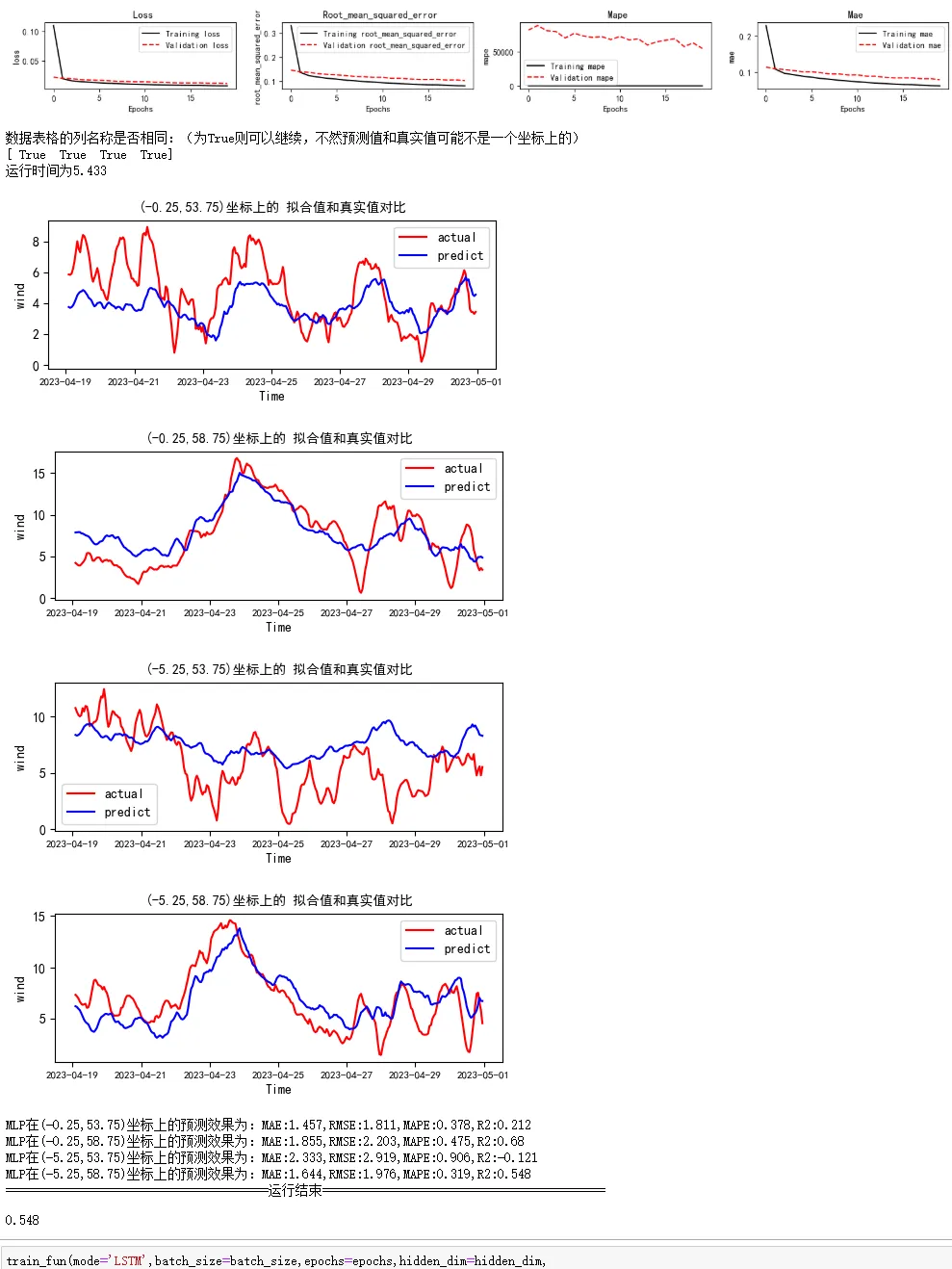
可以展示所有的坐标点上的拟合效果还有整体的 评估指标。

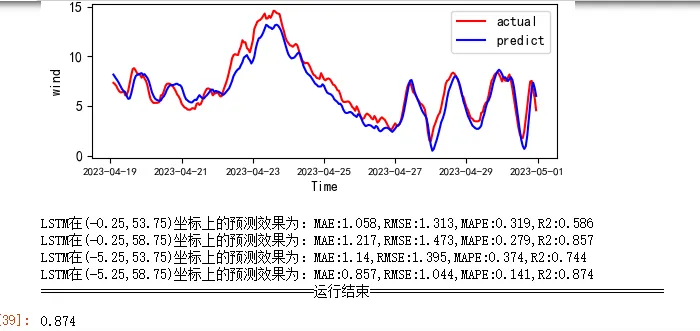
下面训练lstm,优于上面的训练函数都定义好了,改个参数就行。

train_fun(mode='LSTM',batch_size=batch_size,epochs=epochs,hidden_dim=hidden_dim,

                                lat_dim=lat_dim,lon_dim=lon_dim,verbose=0,show_loss=True,show_fit=True)
GRU模型

train_fun(mode='GRU',batch_size=90,epochs=epochs,hidden_dim=hidden_dim,

                                lat_dim=lat_dim,lon_dim=lon_dim,verbose=0,show_loss=True,show_fit=True)
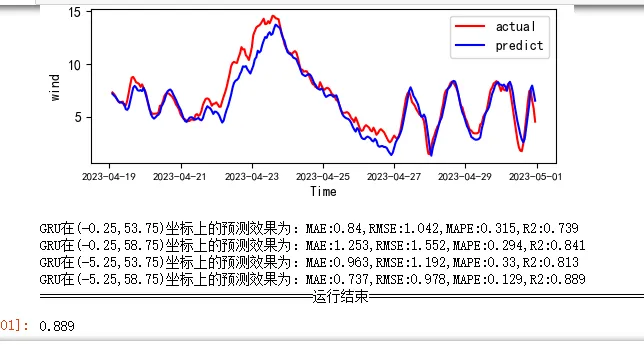
二维卷积模型:

train_fun(mode='ConvLSTM2D',batch_size=batch_size,epochs=epochs,hidden_dim=hidden_dim,

                                lat_dim=lat_dim,lon_dim=lon_dim,verbose=1,show_loss=True,show_fit=True)
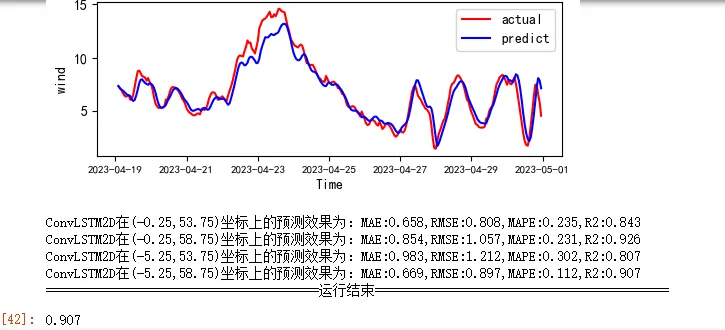
运行时间是LSTM,GRU的30多倍。。。虽然效果更好一点。

调整一下预测结果的数据框的索引,下面进行评估。

df_preds_all.index=df_sample.index

结果对比可视化

评价指标的表:

df_eval_all
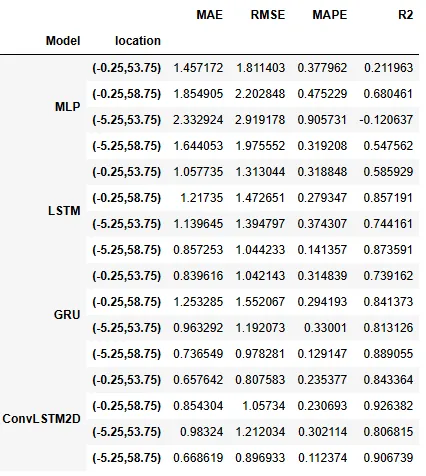
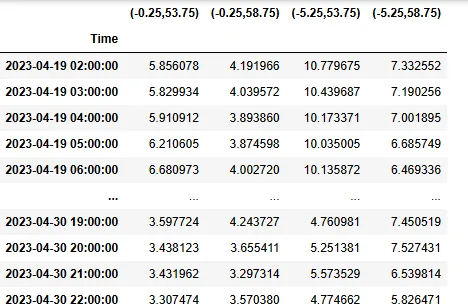
可以清楚的看到每个模型在每个坐标点的风速预测的误差指标。

预测结果的表:

df_preds_all.head(5)
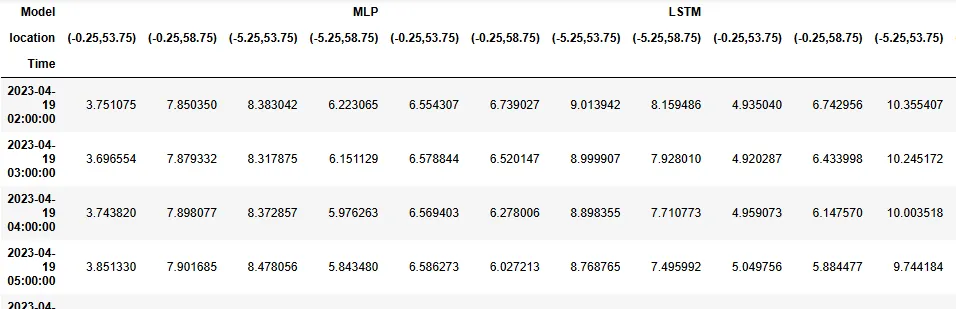
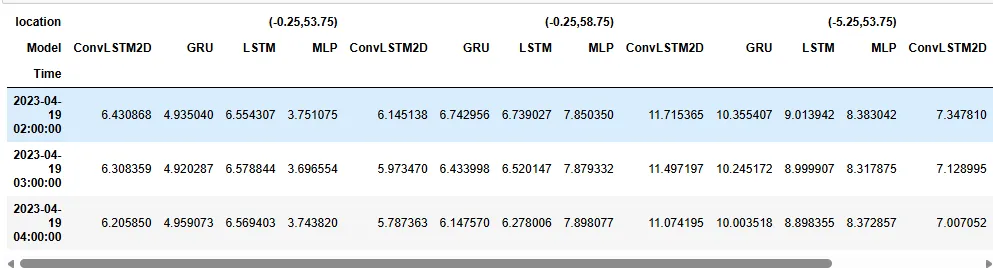
这些表都是多层索引的。列上面的第一层是模型,第二层是不同坐标轴。

获取真实值的表:

df_y_test=df_sample.copy()

cols = df_y_test.columns.map(lambda x: ','.join(''if'Unnamed'in i else i for i in x))

cols=[f'({c})'for c  in cols ]

df_y_test.columns=cols

df_y_test
预测表交换一下索引,坐标作为第一层,模型作为第二层。

df_multistep_preds=df_preds_all.T.swaplevel(0,1).sort_index().T

df_multistep_preds.head(3)
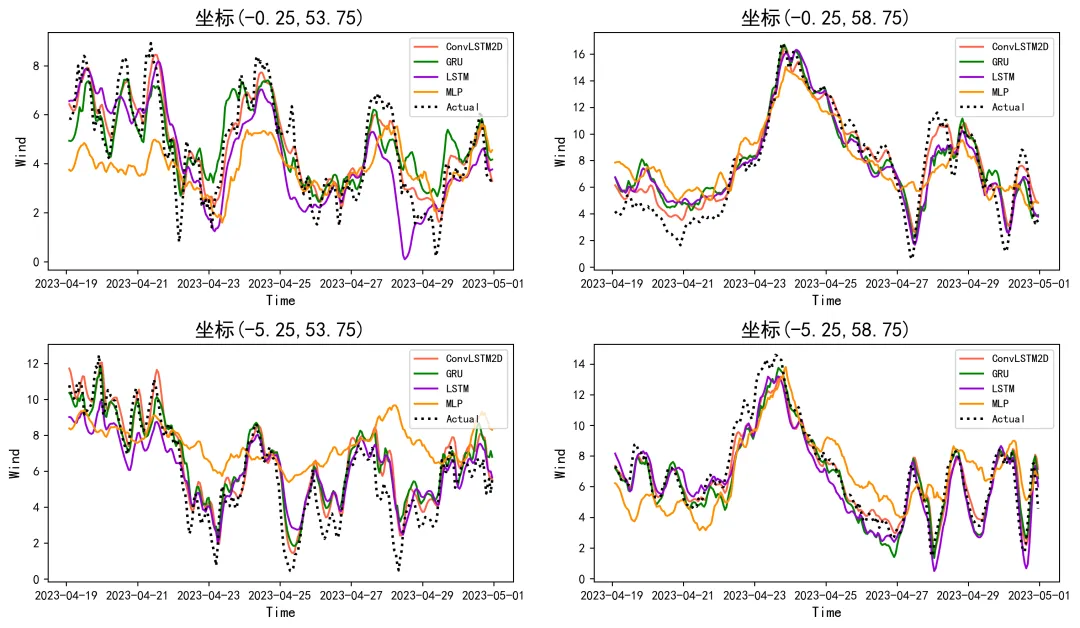
方便可视化,下面就可以把不同坐标上的不同模型预测效果进行可视化

Forecasting_horizon=[ f'坐标{i}'for i in location]

times=location

colors3 = [

'tomato''green''darkviolet''darkorange''royalblue',

'gold''deepskyblue''crimson''lime''orchid'

'sienna''cyan''magenta''yellowgreen''slateblue',

'chocolate''teal''firebrick''dodgerblue''olive'

]

plt.subplots(2,2,figsize=(12,7),dpi=256)

for i1,ti inenumerate(times):

    n=int(str('22')+str(i1+1))

    plt.subplot(n)

    data_model=df_multistep_preds[ti]

for i2,col inenumerate(data_model.columns):

        plt.plot(data_model.index,data_model[col],label=col,color=colors3[i2])

    plt.plot(data_model.index,df_y_test[ti],label='Actual',color='k',linestyle=':',lw=2)

    plt.ylabel('Wind',fontsize=12)

    plt.xlabel('Time',fontsize=12)

    plt.title(f'{Forecasting_horizon[i1]}',fontsize=16)

    plt.legend(fontsize=9,loc='upper right')

plt.tight_layout()

plt.show()
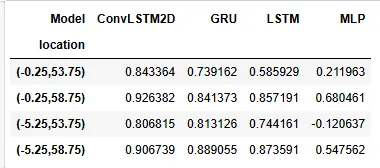
评价指标表做一下预处理

columns = pd.MultiIndex.from_tuples(df_eval_all.index, names=['Model''location'])

df_plot = pd.DataFrame(df_eval_all.values, columns=['MAE''RMSE''MAPE''R2'], index=columns).T

# 使用链式方法转换数据框

df_plot=df_plot.stack(level=1).swaplevel(0,1).sort_index(axis=1)

df_plot.swaplevel(0,1).sort_index().loc['R2',:].loc[location,:]
可视化

bar_width = 0.09;  marks = ['**','xxx',"+",'o','-']

Forecasting_horizon=[ f'坐标{i}'for i in location]

times=location

m =np.arange(len(times))

plt.subplots(4,1,figsize=(5,5),dpi=256)

for i1,ti inenumerate(['MAE','RMSE','MAPE','R2']):

    n=int(str('41')+str(i1+1))

    plt.subplot(n)

    df_one_model=df_plot.swaplevel(0,1).sort_index().loc[ti,:].loc[location,:]

for i,col inenumerate(df_one_model.columns):

        plt.bar(x=m+bar_width*i, height=df_one_model[col], label=col, width=bar_width,color=colors3[i])#hatch=marks[i],

    names=[f'    {index}'for index in Forecasting_horizon]

    plt.xticks(range(0len(names)),names,fontsize=7)

    plt.ylabel(ti,fontsize=10)

if i1==0:

        plt.legend(fontsize=8,bbox_to_anchor=(0.9,1.35),ncol=4) #,ncol=len(df_one_model.columns)

plt.tight_layout()

plt.show()
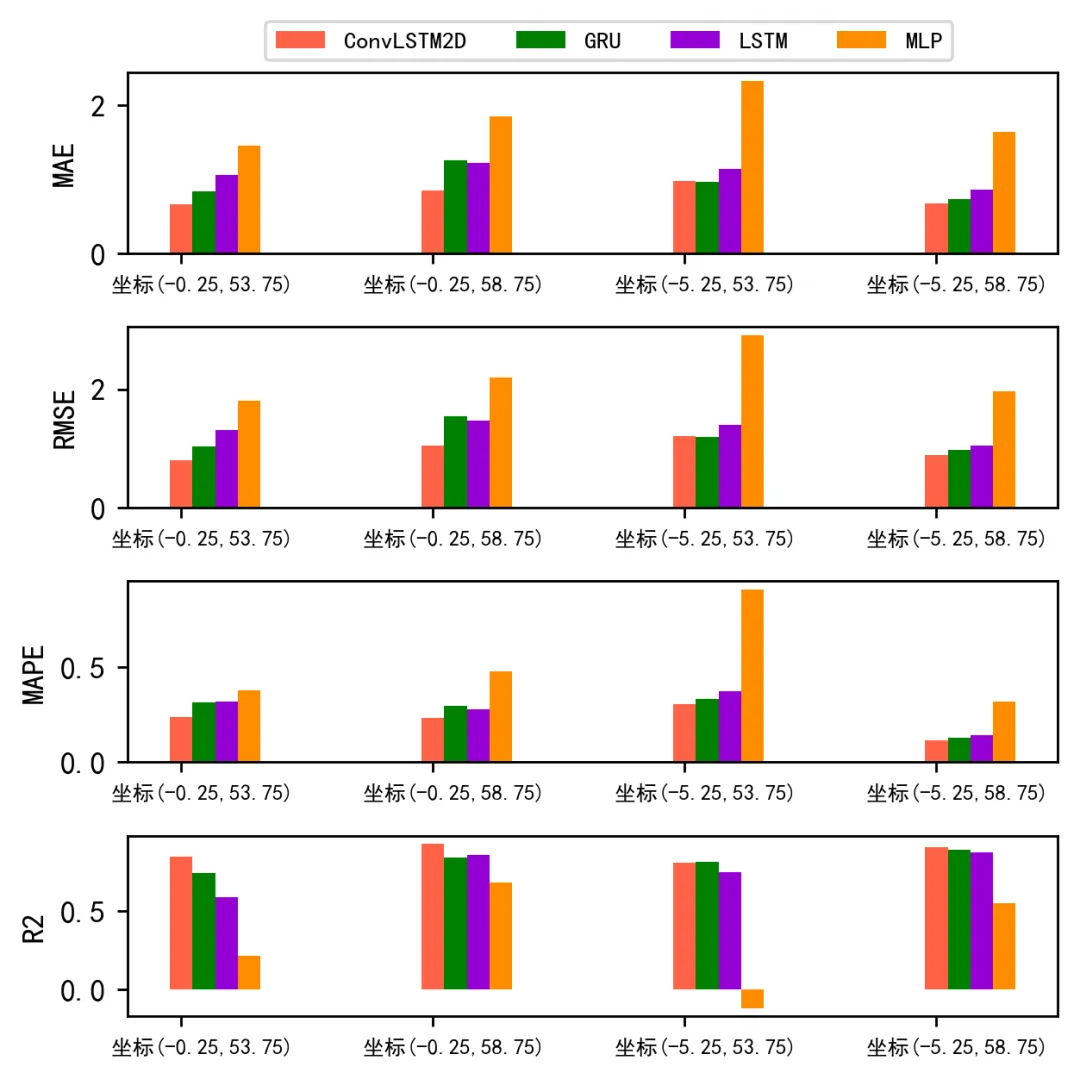
从上面的预测对比图和评价指标的图可以看到二维时空卷积可以做到比LSTM和GRU更好的效果,MLP效果最差。

这种二维时空卷积不仅可以放在这种风速预测场景用,还可以放在手机设备反欺诈场景,五个维度例如(样本量,时间步长,手机x轴,手机y轴,特征[触摸压力,触摸半径])等等

最新文章

随机文章

基本 文件 流程 错误 SQL 调试
  1. 请求信息 : 2026-08-21 19:58:23 HTTP/2.0 GET : https://f.mffb.com.cn/a/508781.html
  2. 运行时间 : 0.201802s [ 吞吐率:4.96req/s ] 内存消耗:4,963.26kb 文件加载:140
  3. 缓存信息 : 0 reads,0 writes
  4. 会话信息 : SESSION_ID=83825f94425c2e2135218c210b7061c2
  1. /yingpanguazai/ssd/ssd1/www/f.mffb.com.cn/public/index.php ( 0.79 KB )
  2. /yingpanguazai/ssd/ssd1/www/f.mffb.com.cn/vendor/autoload.php ( 0.17 KB )
  3. /yingpanguazai/ssd/ssd1/www/f.mffb.com.cn/vendor/composer/autoload_real.php ( 2.49 KB )
  4. /yingpanguazai/ssd/ssd1/www/f.mffb.com.cn/vendor/composer/platform_check.php ( 0.90 KB )
  5. /yingpanguazai/ssd/ssd1/www/f.mffb.com.cn/vendor/composer/ClassLoader.php ( 14.03 KB )
  6. /yingpanguazai/ssd/ssd1/www/f.mffb.com.cn/vendor/composer/autoload_static.php ( 4.90 KB )
  7. /yingpanguazai/ssd/ssd1/www/f.mffb.com.cn/vendor/topthink/think-helper/src/helper.php ( 8.34 KB )
  8. /yingpanguazai/ssd/ssd1/www/f.mffb.com.cn/vendor/topthink/think-validate/src/helper.php ( 2.19 KB )
  9. /yingpanguazai/ssd/ssd1/www/f.mffb.com.cn/vendor/topthink/think-orm/src/helper.php ( 1.47 KB )
  10. /yingpanguazai/ssd/ssd1/www/f.mffb.com.cn/vendor/topthink/think-orm/stubs/load_stubs.php ( 0.16 KB )
  11. /yingpanguazai/ssd/ssd1/www/f.mffb.com.cn/vendor/topthink/framework/src/think/Exception.php ( 1.69 KB )
  12. /yingpanguazai/ssd/ssd1/www/f.mffb.com.cn/vendor/topthink/think-container/src/Facade.php ( 2.71 KB )
  13. /yingpanguazai/ssd/ssd1/www/f.mffb.com.cn/vendor/symfony/deprecation-contracts/function.php ( 0.99 KB )
  14. /yingpanguazai/ssd/ssd1/www/f.mffb.com.cn/vendor/symfony/polyfill-mbstring/bootstrap.php ( 8.26 KB )
  15. /yingpanguazai/ssd/ssd1/www/f.mffb.com.cn/vendor/symfony/polyfill-mbstring/bootstrap80.php ( 9.78 KB )
  16. /yingpanguazai/ssd/ssd1/www/f.mffb.com.cn/vendor/symfony/var-dumper/Resources/functions/dump.php ( 1.49 KB )
  17. /yingpanguazai/ssd/ssd1/www/f.mffb.com.cn/vendor/topthink/think-dumper/src/helper.php ( 0.18 KB )
  18. /yingpanguazai/ssd/ssd1/www/f.mffb.com.cn/vendor/symfony/var-dumper/VarDumper.php ( 4.30 KB )
  19. /yingpanguazai/ssd/ssd1/www/f.mffb.com.cn/vendor/topthink/framework/src/think/App.php ( 15.30 KB )
  20. /yingpanguazai/ssd/ssd1/www/f.mffb.com.cn/vendor/topthink/think-container/src/Container.php ( 15.76 KB )
  21. /yingpanguazai/ssd/ssd1/www/f.mffb.com.cn/vendor/psr/container/src/ContainerInterface.php ( 1.02 KB )
  22. /yingpanguazai/ssd/ssd1/www/f.mffb.com.cn/app/provider.php ( 0.19 KB )
  23. /yingpanguazai/ssd/ssd1/www/f.mffb.com.cn/vendor/topthink/framework/src/think/Http.php ( 6.04 KB )
  24. /yingpanguazai/ssd/ssd1/www/f.mffb.com.cn/vendor/topthink/think-helper/src/helper/Str.php ( 7.29 KB )
  25. /yingpanguazai/ssd/ssd1/www/f.mffb.com.cn/vendor/topthink/framework/src/think/Env.php ( 4.68 KB )
  26. /yingpanguazai/ssd/ssd1/www/f.mffb.com.cn/app/common.php ( 0.03 KB )
  27. /yingpanguazai/ssd/ssd1/www/f.mffb.com.cn/vendor/topthink/framework/src/helper.php ( 18.78 KB )
  28. /yingpanguazai/ssd/ssd1/www/f.mffb.com.cn/vendor/topthink/framework/src/think/Config.php ( 5.54 KB )
  29. /yingpanguazai/ssd/ssd1/www/f.mffb.com.cn/config/app.php ( 0.95 KB )
  30. /yingpanguazai/ssd/ssd1/www/f.mffb.com.cn/config/cache.php ( 0.78 KB )
  31. /yingpanguazai/ssd/ssd1/www/f.mffb.com.cn/config/console.php ( 0.23 KB )
  32. /yingpanguazai/ssd/ssd1/www/f.mffb.com.cn/config/cookie.php ( 0.56 KB )
  33. /yingpanguazai/ssd/ssd1/www/f.mffb.com.cn/config/database.php ( 2.48 KB )
  34. /yingpanguazai/ssd/ssd1/www/f.mffb.com.cn/vendor/topthink/framework/src/think/facade/Env.php ( 1.67 KB )
  35. /yingpanguazai/ssd/ssd1/www/f.mffb.com.cn/config/filesystem.php ( 0.61 KB )
  36. /yingpanguazai/ssd/ssd1/www/f.mffb.com.cn/config/lang.php ( 0.91 KB )
  37. /yingpanguazai/ssd/ssd1/www/f.mffb.com.cn/config/log.php ( 1.35 KB )
  38. /yingpanguazai/ssd/ssd1/www/f.mffb.com.cn/config/middleware.php ( 0.19 KB )
  39. /yingpanguazai/ssd/ssd1/www/f.mffb.com.cn/config/route.php ( 1.89 KB )
  40. /yingpanguazai/ssd/ssd1/www/f.mffb.com.cn/config/session.php ( 0.57 KB )
  41. /yingpanguazai/ssd/ssd1/www/f.mffb.com.cn/config/trace.php ( 0.34 KB )
  42. /yingpanguazai/ssd/ssd1/www/f.mffb.com.cn/config/view.php ( 0.82 KB )
  43. /yingpanguazai/ssd/ssd1/www/f.mffb.com.cn/app/event.php ( 0.25 KB )
  44. /yingpanguazai/ssd/ssd1/www/f.mffb.com.cn/vendor/topthink/framework/src/think/Event.php ( 7.67 KB )
  45. /yingpanguazai/ssd/ssd1/www/f.mffb.com.cn/app/service.php ( 0.13 KB )
  46. /yingpanguazai/ssd/ssd1/www/f.mffb.com.cn/app/AppService.php ( 0.26 KB )
  47. /yingpanguazai/ssd/ssd1/www/f.mffb.com.cn/vendor/topthink/framework/src/think/Service.php ( 1.64 KB )
  48. /yingpanguazai/ssd/ssd1/www/f.mffb.com.cn/vendor/topthink/framework/src/think/Lang.php ( 7.35 KB )
  49. /yingpanguazai/ssd/ssd1/www/f.mffb.com.cn/vendor/topthink/framework/src/lang/zh-cn.php ( 13.70 KB )
  50. /yingpanguazai/ssd/ssd1/www/f.mffb.com.cn/vendor/topthink/framework/src/think/initializer/Error.php ( 3.31 KB )
  51. /yingpanguazai/ssd/ssd1/www/f.mffb.com.cn/vendor/topthink/framework/src/think/initializer/RegisterService.php ( 1.33 KB )
  52. /yingpanguazai/ssd/ssd1/www/f.mffb.com.cn/vendor/services.php ( 0.14 KB )
  53. /yingpanguazai/ssd/ssd1/www/f.mffb.com.cn/vendor/topthink/framework/src/think/service/PaginatorService.php ( 1.52 KB )
  54. /yingpanguazai/ssd/ssd1/www/f.mffb.com.cn/vendor/topthink/framework/src/think/service/ValidateService.php ( 0.99 KB )
  55. /yingpanguazai/ssd/ssd1/www/f.mffb.com.cn/vendor/topthink/framework/src/think/service/ModelService.php ( 2.04 KB )
  56. /yingpanguazai/ssd/ssd1/www/f.mffb.com.cn/vendor/topthink/think-trace/src/Service.php ( 0.77 KB )
  57. /yingpanguazai/ssd/ssd1/www/f.mffb.com.cn/vendor/topthink/framework/src/think/Middleware.php ( 6.72 KB )
  58. /yingpanguazai/ssd/ssd1/www/f.mffb.com.cn/vendor/topthink/framework/src/think/initializer/BootService.php ( 0.77 KB )
  59. /yingpanguazai/ssd/ssd1/www/f.mffb.com.cn/vendor/topthink/think-orm/src/Paginator.php ( 11.86 KB )
  60. /yingpanguazai/ssd/ssd1/www/f.mffb.com.cn/vendor/topthink/think-validate/src/Validate.php ( 63.20 KB )
  61. /yingpanguazai/ssd/ssd1/www/f.mffb.com.cn/vendor/topthink/think-orm/src/Model.php ( 23.55 KB )
  62. /yingpanguazai/ssd/ssd1/www/f.mffb.com.cn/vendor/topthink/think-orm/src/model/concern/Attribute.php ( 21.05 KB )
  63. /yingpanguazai/ssd/ssd1/www/f.mffb.com.cn/vendor/topthink/think-orm/src/model/concern/AutoWriteData.php ( 4.21 KB )
  64. /yingpanguazai/ssd/ssd1/www/f.mffb.com.cn/vendor/topthink/think-orm/src/model/concern/Conversion.php ( 6.44 KB )
  65. /yingpanguazai/ssd/ssd1/www/f.mffb.com.cn/vendor/topthink/think-orm/src/model/concern/DbConnect.php ( 5.16 KB )
  66. /yingpanguazai/ssd/ssd1/www/f.mffb.com.cn/vendor/topthink/think-orm/src/model/concern/ModelEvent.php ( 2.33 KB )
  67. /yingpanguazai/ssd/ssd1/www/f.mffb.com.cn/vendor/topthink/think-orm/src/model/concern/RelationShip.php ( 28.29 KB )
  68. /yingpanguazai/ssd/ssd1/www/f.mffb.com.cn/vendor/topthink/think-helper/src/contract/Arrayable.php ( 0.09 KB )
  69. /yingpanguazai/ssd/ssd1/www/f.mffb.com.cn/vendor/topthink/think-helper/src/contract/Jsonable.php ( 0.13 KB )
  70. /yingpanguazai/ssd/ssd1/www/f.mffb.com.cn/vendor/topthink/think-orm/src/model/contract/Modelable.php ( 0.09 KB )
  71. /yingpanguazai/ssd/ssd1/www/f.mffb.com.cn/vendor/topthink/framework/src/think/Db.php ( 2.88 KB )
  72. /yingpanguazai/ssd/ssd1/www/f.mffb.com.cn/vendor/topthink/think-orm/src/DbManager.php ( 8.52 KB )
  73. /yingpanguazai/ssd/ssd1/www/f.mffb.com.cn/vendor/topthink/framework/src/think/Log.php ( 6.28 KB )
  74. /yingpanguazai/ssd/ssd1/www/f.mffb.com.cn/vendor/topthink/framework/src/think/Manager.php ( 3.92 KB )
  75. /yingpanguazai/ssd/ssd1/www/f.mffb.com.cn/vendor/psr/log/src/LoggerTrait.php ( 2.69 KB )
  76. /yingpanguazai/ssd/ssd1/www/f.mffb.com.cn/vendor/psr/log/src/LoggerInterface.php ( 2.71 KB )
  77. /yingpanguazai/ssd/ssd1/www/f.mffb.com.cn/vendor/topthink/framework/src/think/Cache.php ( 4.92 KB )
  78. /yingpanguazai/ssd/ssd1/www/f.mffb.com.cn/vendor/psr/simple-cache/src/CacheInterface.php ( 4.71 KB )
  79. /yingpanguazai/ssd/ssd1/www/f.mffb.com.cn/vendor/topthink/think-helper/src/helper/Arr.php ( 16.63 KB )
  80. /yingpanguazai/ssd/ssd1/www/f.mffb.com.cn/vendor/topthink/framework/src/think/cache/driver/File.php ( 7.84 KB )
  81. /yingpanguazai/ssd/ssd1/www/f.mffb.com.cn/vendor/topthink/framework/src/think/cache/Driver.php ( 9.03 KB )
  82. /yingpanguazai/ssd/ssd1/www/f.mffb.com.cn/vendor/topthink/framework/src/think/contract/CacheHandlerInterface.php ( 1.99 KB )
  83. /yingpanguazai/ssd/ssd1/www/f.mffb.com.cn/app/Request.php ( 0.09 KB )
  84. /yingpanguazai/ssd/ssd1/www/f.mffb.com.cn/vendor/topthink/framework/src/think/Request.php ( 55.78 KB )
  85. /yingpanguazai/ssd/ssd1/www/f.mffb.com.cn/app/middleware.php ( 0.25 KB )
  86. /yingpanguazai/ssd/ssd1/www/f.mffb.com.cn/vendor/topthink/framework/src/think/Pipeline.php ( 2.61 KB )
  87. /yingpanguazai/ssd/ssd1/www/f.mffb.com.cn/vendor/topthink/think-trace/src/TraceDebug.php ( 3.40 KB )
  88. /yingpanguazai/ssd/ssd1/www/f.mffb.com.cn/vendor/topthink/framework/src/think/middleware/SessionInit.php ( 1.94 KB )
  89. /yingpanguazai/ssd/ssd1/www/f.mffb.com.cn/vendor/topthink/framework/src/think/Session.php ( 1.80 KB )
  90. /yingpanguazai/ssd/ssd1/www/f.mffb.com.cn/vendor/topthink/framework/src/think/session/driver/File.php ( 6.27 KB )
  91. /yingpanguazai/ssd/ssd1/www/f.mffb.com.cn/vendor/topthink/framework/src/think/contract/SessionHandlerInterface.php ( 0.87 KB )
  92. /yingpanguazai/ssd/ssd1/www/f.mffb.com.cn/vendor/topthink/framework/src/think/session/Store.php ( 7.12 KB )
  93. /yingpanguazai/ssd/ssd1/www/f.mffb.com.cn/vendor/topthink/framework/src/think/Route.php ( 23.73 KB )
  94. /yingpanguazai/ssd/ssd1/www/f.mffb.com.cn/vendor/topthink/framework/src/think/route/RuleName.php ( 5.75 KB )
  95. /yingpanguazai/ssd/ssd1/www/f.mffb.com.cn/vendor/topthink/framework/src/think/route/Domain.php ( 2.53 KB )
  96. /yingpanguazai/ssd/ssd1/www/f.mffb.com.cn/vendor/topthink/framework/src/think/route/RuleGroup.php ( 22.43 KB )
  97. /yingpanguazai/ssd/ssd1/www/f.mffb.com.cn/vendor/topthink/framework/src/think/route/Rule.php ( 26.95 KB )
  98. /yingpanguazai/ssd/ssd1/www/f.mffb.com.cn/vendor/topthink/framework/src/think/route/RuleItem.php ( 9.78 KB )
  99. /yingpanguazai/ssd/ssd1/www/f.mffb.com.cn/route/app.php ( 1.72 KB )
  100. /yingpanguazai/ssd/ssd1/www/f.mffb.com.cn/vendor/topthink/framework/src/think/facade/Route.php ( 4.70 KB )
  101. /yingpanguazai/ssd/ssd1/www/f.mffb.com.cn/vendor/topthink/framework/src/think/route/dispatch/Controller.php ( 4.74 KB )
  102. /yingpanguazai/ssd/ssd1/www/f.mffb.com.cn/vendor/topthink/framework/src/think/route/Dispatch.php ( 10.44 KB )
  103. /yingpanguazai/ssd/ssd1/www/f.mffb.com.cn/app/controller/Index.php ( 4.81 KB )
  104. /yingpanguazai/ssd/ssd1/www/f.mffb.com.cn/app/BaseController.php ( 2.05 KB )
  105. /yingpanguazai/ssd/ssd1/www/f.mffb.com.cn/vendor/topthink/think-orm/src/facade/Db.php ( 0.93 KB )
  106. /yingpanguazai/ssd/ssd1/www/f.mffb.com.cn/vendor/topthink/think-orm/src/db/connector/Mysql.php ( 5.44 KB )
  107. /yingpanguazai/ssd/ssd1/www/f.mffb.com.cn/vendor/topthink/think-orm/src/db/PDOConnection.php ( 52.47 KB )
  108. /yingpanguazai/ssd/ssd1/www/f.mffb.com.cn/vendor/topthink/think-orm/src/db/Connection.php ( 8.39 KB )
  109. /yingpanguazai/ssd/ssd1/www/f.mffb.com.cn/vendor/topthink/think-orm/src/db/ConnectionInterface.php ( 4.57 KB )
  110. /yingpanguazai/ssd/ssd1/www/f.mffb.com.cn/vendor/topthink/think-orm/src/db/builder/Mysql.php ( 16.58 KB )
  111. /yingpanguazai/ssd/ssd1/www/f.mffb.com.cn/vendor/topthink/think-orm/src/db/Builder.php ( 24.06 KB )
  112. /yingpanguazai/ssd/ssd1/www/f.mffb.com.cn/vendor/topthink/think-orm/src/db/BaseBuilder.php ( 27.50 KB )
  113. /yingpanguazai/ssd/ssd1/www/f.mffb.com.cn/vendor/topthink/think-orm/src/db/Query.php ( 15.71 KB )
  114. /yingpanguazai/ssd/ssd1/www/f.mffb.com.cn/vendor/topthink/think-orm/src/db/BaseQuery.php ( 45.13 KB )
  115. /yingpanguazai/ssd/ssd1/www/f.mffb.com.cn/vendor/topthink/think-orm/src/db/concern/TimeFieldQuery.php ( 7.43 KB )
  116. /yingpanguazai/ssd/ssd1/www/f.mffb.com.cn/vendor/topthink/think-orm/src/db/concern/AggregateQuery.php ( 3.26 KB )
  117. /yingpanguazai/ssd/ssd1/www/f.mffb.com.cn/vendor/topthink/think-orm/src/db/concern/ModelRelationQuery.php ( 20.07 KB )
  118. /yingpanguazai/ssd/ssd1/www/f.mffb.com.cn/vendor/topthink/think-orm/src/db/concern/ParamsBind.php ( 3.66 KB )
  119. /yingpanguazai/ssd/ssd1/www/f.mffb.com.cn/vendor/topthink/think-orm/src/db/concern/ResultOperation.php ( 7.01 KB )
  120. /yingpanguazai/ssd/ssd1/www/f.mffb.com.cn/vendor/topthink/think-orm/src/db/concern/WhereQuery.php ( 19.37 KB )
  121. /yingpanguazai/ssd/ssd1/www/f.mffb.com.cn/vendor/topthink/think-orm/src/db/concern/JoinAndViewQuery.php ( 7.11 KB )
  122. /yingpanguazai/ssd/ssd1/www/f.mffb.com.cn/vendor/topthink/think-orm/src/db/concern/TableFieldInfo.php ( 2.63 KB )
  123. /yingpanguazai/ssd/ssd1/www/f.mffb.com.cn/vendor/topthink/think-orm/src/db/concern/Transaction.php ( 2.77 KB )
  124. /yingpanguazai/ssd/ssd1/www/f.mffb.com.cn/vendor/topthink/framework/src/think/log/driver/File.php ( 5.96 KB )
  125. /yingpanguazai/ssd/ssd1/www/f.mffb.com.cn/vendor/topthink/framework/src/think/contract/LogHandlerInterface.php ( 0.86 KB )
  126. /yingpanguazai/ssd/ssd1/www/f.mffb.com.cn/vendor/topthink/framework/src/think/log/Channel.php ( 3.89 KB )
  127. /yingpanguazai/ssd/ssd1/www/f.mffb.com.cn/vendor/topthink/framework/src/think/event/LogRecord.php ( 1.02 KB )
  128. /yingpanguazai/ssd/ssd1/www/f.mffb.com.cn/vendor/topthink/think-helper/src/Collection.php ( 16.47 KB )
  129. /yingpanguazai/ssd/ssd1/www/f.mffb.com.cn/vendor/topthink/framework/src/think/facade/View.php ( 1.70 KB )
  130. /yingpanguazai/ssd/ssd1/www/f.mffb.com.cn/vendor/topthink/framework/src/think/View.php ( 4.39 KB )
  131. /yingpanguazai/ssd/ssd1/www/f.mffb.com.cn/vendor/topthink/framework/src/think/Response.php ( 8.81 KB )
  132. /yingpanguazai/ssd/ssd1/www/f.mffb.com.cn/vendor/topthink/framework/src/think/response/View.php ( 3.29 KB )
  133. /yingpanguazai/ssd/ssd1/www/f.mffb.com.cn/vendor/topthink/framework/src/think/Cookie.php ( 6.06 KB )
  134. /yingpanguazai/ssd/ssd1/www/f.mffb.com.cn/vendor/topthink/think-view/src/Think.php ( 8.38 KB )
  135. /yingpanguazai/ssd/ssd1/www/f.mffb.com.cn/vendor/topthink/framework/src/think/contract/TemplateHandlerInterface.php ( 1.60 KB )
  136. /yingpanguazai/ssd/ssd1/www/f.mffb.com.cn/vendor/topthink/think-template/src/Template.php ( 46.61 KB )
  137. /yingpanguazai/ssd/ssd1/www/f.mffb.com.cn/vendor/topthink/think-template/src/template/driver/File.php ( 2.41 KB )
  138. /yingpanguazai/ssd/ssd1/www/f.mffb.com.cn/vendor/topthink/think-template/src/template/contract/DriverInterface.php ( 0.86 KB )
  139. /yingpanguazai/ssd/ssd1/www/f.mffb.com.cn/runtime/temp/067d451b9a0c665040f3f1bdd3293d68.php ( 11.98 KB )
  140. /yingpanguazai/ssd/ssd1/www/f.mffb.com.cn/vendor/topthink/think-trace/src/Html.php ( 4.42 KB )
  1. CONNECT:[ UseTime:0.001059s ] mysql:host=127.0.0.1;port=3306;dbname=f_mffb;charset=utf8mb4
  2. SHOW FULL COLUMNS FROM `fenlei` [ RunTime:0.001567s ]
  3. SELECT * FROM `fenlei` WHERE `fid` = 0 [ RunTime:0.000749s ]
  4. SELECT * FROM `fenlei` WHERE `fid` = 63 [ RunTime:0.000694s ]
  5. SHOW FULL COLUMNS FROM `set` [ RunTime:0.001334s ]
  6. SELECT * FROM `set` [ RunTime:0.000606s ]
  7. SHOW FULL COLUMNS FROM `article` [ RunTime:0.001532s ]
  8. SELECT * FROM `article` WHERE `id` = 508781 LIMIT 1 [ RunTime:0.001348s ]
  9. UPDATE `article` SET `lasttime` = 1787313503 WHERE `id` = 508781 [ RunTime:0.017277s ]
  10. SELECT * FROM `fenlei` WHERE `id` = 66 LIMIT 1 [ RunTime:0.000726s ]
  11. SELECT * FROM `article` WHERE `id` < 508781 ORDER BY `id` DESC LIMIT 1 [ RunTime:0.001411s ]
  12. SELECT * FROM `article` WHERE `id` > 508781 ORDER BY `id` ASC LIMIT 1 [ RunTime:0.001004s ]
  13. SELECT * FROM `article` WHERE `id` < 508781 ORDER BY `id` DESC LIMIT 10 [ RunTime:0.001651s ]
  14. SELECT * FROM `article` WHERE `id` < 508781 ORDER BY `id` DESC LIMIT 10,10 [ RunTime:0.002596s ]
  15. SELECT * FROM `article` WHERE `id` < 508781 ORDER BY `id` DESC LIMIT 20,10 [ RunTime:0.009682s ]
0.205484s