目录
1.知识回顾
2.文件描述符
访问文件的本质
fd的数值分配规则
规则1、规则2
★规则3
FILE结构体
验证stdin、stdout、stderr对应的文件描述符
方法1:使用_fileno
方法2: 使用fileno()
方法3:查看/dev目录下的文件
引用计数
3.拓展阅读
4.补充练习题
5.补充: Linux的终端文件
1.知识回顾
参见OS29.【Linux】文件IO (1) open、write和close系统调用[1]文章
2.文件描述符
提出问题:FILE*和文件描述符fd有什么关系?
操作系统管理大量文件需要先描述再组织,而描述文件的各个属性需要结构体struct file,通常直接或间接包含以下信息:
1.在磁盘中的位置2.基本属性(权限、大小、读写位置、谁打开的、......)3.文件的内核缓冲区信息4.struct file* next 指针
struct file* next指针用于串联打开的文件(链表结构),便于操作系统增删查改文件,其结构体的定义在在linux内核v6.16.4的include/linux/fs.h中:
/** * struct file - Represents a file * @f_lock: Protects f_ep, f_flags. Must not be taken from IRQ context. * @f_mode: FMODE_* flags often used in hotpaths * @f_op: file operations * @f_mapping: Contents of a cacheable, mappable object. * @private_data: filesystem or driver specific data * @f_inode: cached inode * @f_flags: file flags * @f_iocb_flags: iocb flags * @f_cred: stashed credentials of creator/opener * @f_owner: file owner * @f_path: path of the file * @f_pos_lock: lock protecting file position * @f_pipe: specific to pipes * @f_pos: file position * @f_security: LSM security context of this file * @f_wb_err: writeback error * @f_sb_err: per sb writeback errors * @f_ep: link of all epoll hooks for this file * @f_task_work: task work entry point * @f_llist: work queue entrypoint * @f_ra: file's readahead state * @f_freeptr: Pointer used by SLAB_TYPESAFE_BY_RCU file cache (don't touch.) * @f_ref: reference count */struct file {spinlock_t f_lock;fmode_t f_mode;const struct file_operations *f_op;struct address_space *f_mapping;void *private_data;struct inode *f_inode;unsigned int f_flags;unsigned int f_iocb_flags;const struct cred *f_cred;struct fown_struct *f_owner;/* --- cacheline 1 boundary (64 bytes) --- */struct path f_path;union {/* regular files (with FMODE_ATOMIC_POS) and directories */struct mutex f_pos_lock;/* pipes */ u64 f_pipe; };loff_t f_pos;#ifdef CONFIG_SECURITYvoid *f_security;#endif/* --- cacheline 2 boundary (128 bytes) --- */errseq_t f_wb_err;errseq_t f_sb_err;#ifdef CONFIG_EPOLLstruct hlist_head *f_ep;#endifunion {struct callback_head f_task_work;struct llist_node f_llist;struct file_ra_state f_ra;freeptr_t f_freeptr; };file_ref_t f_ref;/* --- cacheline 3 boundary (192 bytes) --- */} __randomize_layout __attribute__((aligned(4))); /* lest something weird decides that 2 is OK */
访问文件的本质
在OS29.【Linux】文件IO (1) open、write和close系统调用文章提到过:
文件打开需要借助进程,可以推出:Linux的task_struct必定含有与文件相关的指针(task_struct的完整代码参见OS17.【Linux】进程基础知识(1)[2]文章),这里摘取一部分:
struct task_struct{//......struct files_struct *files;//......{
在linux内核v6.16.4的include/linux/fdtable.h中,有定义"打开的文件的表结构"
/* * Open file table structure */struct files_struct {/* * read mostly part */atomic_t count;bool resize_in_progress;wait_queue_head_t resize_wait;struct fdtable __rcu *fdt;struct fdtable fdtab;/* * written part on a separate cache line in SMP */spinlock_t file_lock ____cacheline_aligned_in_smp;unsigned int next_fd;unsigned long close_on_exec_init[1];unsigned long open_fds_init[1];unsigned long full_fds_bits_init[1];struct file __rcu * fd_array[NR_OPEN_DEFAULT];};
这里只研究struct file __rcu * fd_array[NR_OPEN_DEFAULT],__rcu是修饰符,这里不讨论,NR_OPEN_DEFAULT宏是fd_array的初始化fd_array元素的个数
现简化处理files_struct,认为只含有fd_array:
fd_array顾名思义,是存放struct file*的的数组,有下图:
struct file(注在include/linux/fs.h中定义了struct file)对象之间会用链式结构串联起来.方便增删查改
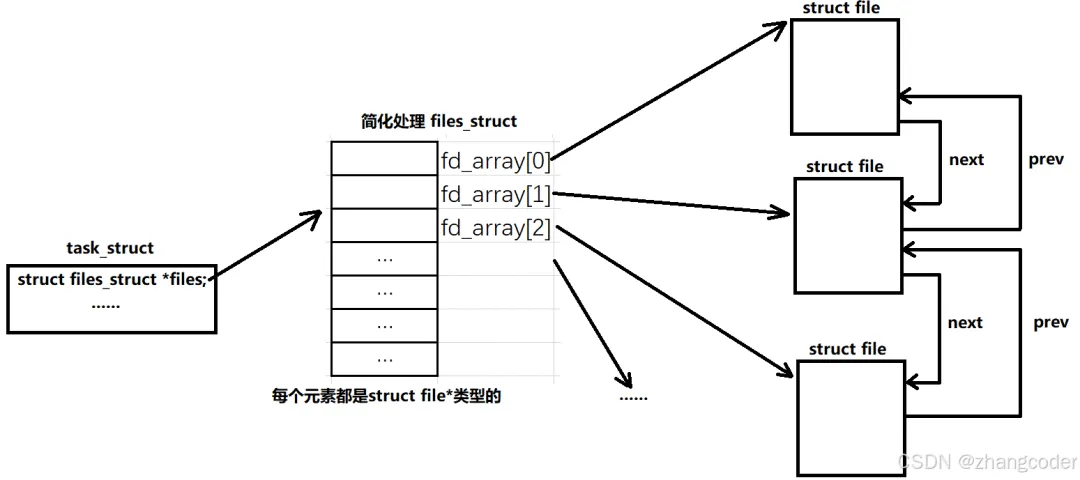
进程每打开一个文件时,open内部会将这个文件的struct file的指针添加到fd_array中,并返回fd_array下标
int open(const char *pathname, int flags, ... /* mode_t mode */ );
fd的数值分配规则
例如以下代码:
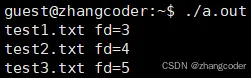
#include <stdio.h>#include <unistd.h>#include <fcntl.h>#include <sys/stat.h>int main(){umask(0);int fd1=open("test1.txt",O_WRONLY|O_CREAT|O_APPEND,0666);if (fd1<0) {perror("open failed");return -1; }int fd2=open("test2.txt",O_WRONLY|O_CREAT|O_APPEND,0666);if (fd2<0) {perror("open failed");return -1; }int fd3=open("test3.txt",O_WRONLY|O_CREAT|O_APPEND,0666);if (fd3<0) {perror("open failed");return -1; }printf("test1.txt fd=%d\n",fd1);printf("test2.txt fd=%d\n",fd2);printf("test3.txt fd=%d\n",fd3);close(fd1);close(fd2);close(fd3);return 0;}
运行结果:
规则1、规则2
规则1.打开的文件默认从3开始编号
规则2.fd=0、1、2默认被占用,因为进程默认打开3个IO流,不是C语言的特性
stdin: 键盘文件
stdout: 显示器文件
stderr: 显示器文件
可以用和read和write函数尝试向这些流写入:
#include <stdio.h>#include <unistd.h>#include <fcntl.h>#include <sys/stat.h>#include <string.h>#define BUFFER_SIZE 20#define STDIN_STR 20int main(){//默认打开3个流,不需要手动openchar buffer[BUFFER_SIZE];char* msg1="stdout\n";char* msg2="stderr\n";char stdin_str[STDIN_STR];ssize_t len=read(0,stdin_str,BUFFER_SIZE); stdin_str[len]='\0';write(1,stdin_str,strlen(stdin_str));write(1,msg1,strlen(msg1));write(2,msg2,strlen(msg2));return 0;}
运行结果:
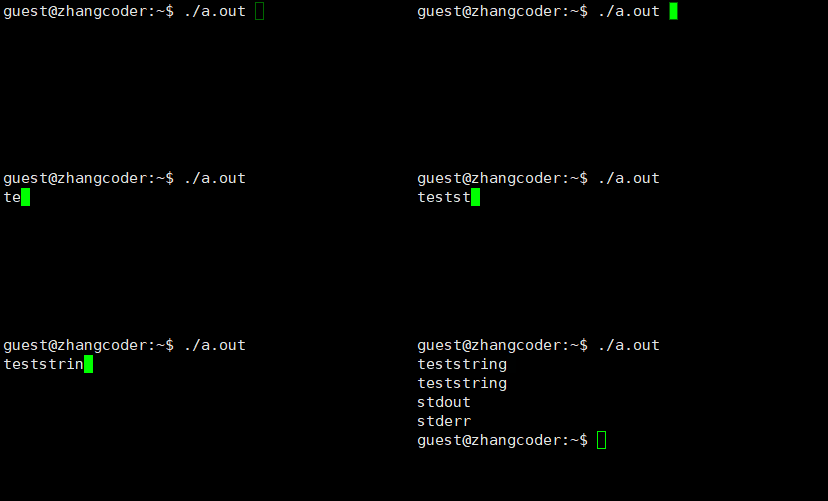
解释:使用read系统调用将显示器文件中的字符串写入到stdin_str中(一开始会阻塞,因为在等待用户输入),read返回值如果大于0,那么表示实际读取的字符数,要想能打印字符串,必须先为stdin_str的结尾添加\0.然后将stdin_str的字符串写入到stdin中打印
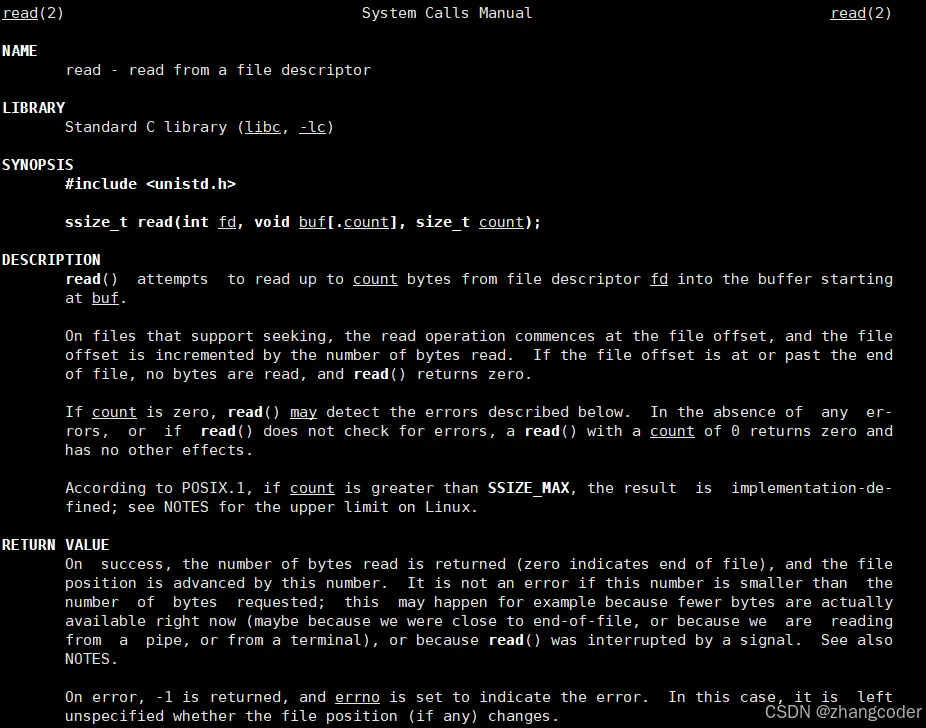
write(1,msg1,strlen(msg1))和write(2,msg2,strlen(msg2))都像显示器写入字符串
注意:虽然C语言的三个流是FILE类型的,但在操作系统层面上只认识fd
说明fd=0是stdout,而fd=1是stderr在之后的文章会证明
★规则3
先关闭0号文件描述符指向的struct file,再新建一个文件
#include <stdio.h>#include <unistd.h>#include <fcntl.h>#include <sys/stat.h>int main(){close(0);umask(0);int fd=open("test.txt",O_WRONLY|O_CREAT|O_APPEND,0666);if (fd<0) {perror("open failed");return -1; }printf("test.txt fd=%d\n",fd);close(fd);return 0;}
运行结果:

先关闭2号文件描述符指向的struct file,再新建一个文件
#include <stdio.h>#include <unistd.h>#include <fcntl.h>#include <sys/stat.h>int main(){close(2);umask(0);int fd=open("test.txt",O_WRONLY|O_CREAT|O_APPEND,0666);if (fd<0) {perror("open failed");return -1; }printf("test.txt fd=%d\n",fd);close(fd);return 0;}
运行结果:

从这两段代码可以看出: close(0),打印的是0; close(2),打印的是2…..
得出规则3: 设置文件的描述符时,从0下标开始,寻找最小的没有用的数组位置,它的下标就是新文件的文件描述符
FILE结构体
上面提到了"虽然C语言的三个流是FILE类型的,但在操作系统层面上只认识fd",为了让FILE结构体与操作系统交互,FILE结构体内部必然含有fd
注意:FILE结构体和内核的file结构体没有任何关系
查看gilbc-2.42的源代码:
在libio/bits/types/FILE.h中:
#ifndef __FILE_defined#define __FILE_defined 1struct _IO_FILE;/* The opaque type of streams. This is the definition used elsewhere. */typedef struct _IO_FILE FILE;#endif
FILE实际上是struct _IO_FILE的别名
在libio/bits/types/struct_FILE.h中:
/* The tag name of this struct is _IO_FILE to preserve historic C++ mangled names for functions taking FILE* arguments. That name should not be used in new code. */struct _IO_FILE{int _flags; /* High-order word is _IO_MAGIC; rest is flags. *//* The following pointers correspond to the C++ streambuf protocol. */char *_IO_read_ptr; /* Current read pointer */char *_IO_read_end; /* End of get area. */char *_IO_read_base; /* Start of putback+get area. */char *_IO_write_base; /* Start of put area. */char *_IO_write_ptr; /* Current put pointer. */char *_IO_write_end; /* End of put area. */char *_IO_buf_base; /* Start of reserve area. */char *_IO_buf_end; /* End of reserve area. *//* The following fields are used to support backing up and undo. */char *_IO_save_base; /* Pointer to start of non-current get area. */char *_IO_backup_base; /* Pointer to first valid character of backup area */char *_IO_save_end; /* Pointer to end of non-current get area. */struct _IO_marker *_markers;struct _IO_FILE *_chain;int _fileno;int _flags2:24;/* Fallback buffer to use when malloc fails to allocate one. */char _short_backupbuf[1];__off_t _old_offset; /* This used to be _offset but it's too small. *//* 1+column number of pbase(); 0 is unknown. */unsigned short _cur_column;signed char _vtable_offset;char _shortbuf[1]; _IO_lock_t *_lock;#ifdef _IO_USE_OLD_IO_FILE};
里面有一个int _fileno,这是文件描述符
因为stdin、stdout和stderr本身是结构体指针类型,所以可以使用->来打印_fileno对应的值:
验证stdin、stdout、stderr对应的文件描述符
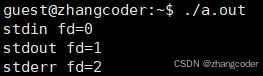
方法1:使用_fileno
#include <stdio.h>int main(){printf("stdin fd=%d\n",stdin->_fileno);printf("stdout fd=%d\n",stdout->_fileno);printf("stderr fd=%d\n",stderr->_fileno);return 0;}
运行结果:
方法2: 使用fileno()
当然,也可以使用stdio.h中的fileno()内部的宏来获取fd值:
声明:
int fileno(FILE *stream);
例如:
#include <stdio.h>int main(){printf("stdin fd=%d\n",fileno(stdin));return 0;}
运行结果:

细心的读者可能回去看glibc库中的实现,在glibc-2.42的/libio/fileno.c提供了__fileno的实现:
#include "libioP.h"#include <stdio.h>int__fileno (FILE *fp){CHECK_FILE (fp, EOF);if (!(fp->_flags & _IO_IS_FILEBUF) || _IO_fileno (fp) < 0) { __set_errno (EBADF);return -1; }return _IO_fileno (fp);}libc_hidden_def (__fileno)weak_alias (__fileno, fileno)libc_hidden_weak (fileno)/* The fileno implementation for libio does not require locking because it only accesses once a single variable and this is already atomic (at least at thread level). Therefore we don't test _IO_MTSAFE_IO here. */weak_alias (__fileno, fileno_unlocked)
如果没问题的话,会执行宏_IO_fileno (fp)
这个宏在/libio/iolibio.h中:
#define _IO_fileno(FP) ((FP)->_fileno)extern FILE* _IO_popen (const char*, const char*) __THROW;
方法3:查看/dev目录下的文件
ls -l /dev
运行结果:

引用计数
一个文件可以被多个进程打开,那么该文件的struct file中专门有一个变量来记录有多少个进程打开了这个文件,这是引用计数
1. 如果有N个文件描述符指向该文件, 那么struct file的引用计数变量的大小等于N
2.如果某个文件的引用计数变量值为0,那么内核才会真正执行关闭文件的操作,回收struct file对象,文将件指针置为NULL
3.拓展阅读
linux应用层的write()函数如何调用到驱动中的write()函数?作者: 简叔[3]
4.补充练习题
Linux下两个进程可以同时打开同一个文件,这时如下描述错误的是:
1.一个进程对文件长度和内容的修改另外一个进程可以立即感知 ( )
2.任何一个进程删除该文件时,另外一个进程会立即出现读写失败 ( )
答案:
1.正确
因为文件内容的修改是直接反馈至磁盘文件系统中的,因此当文件内容被修改,其他进程因为也是针对磁盘数据的操作,因此可以立即感知到
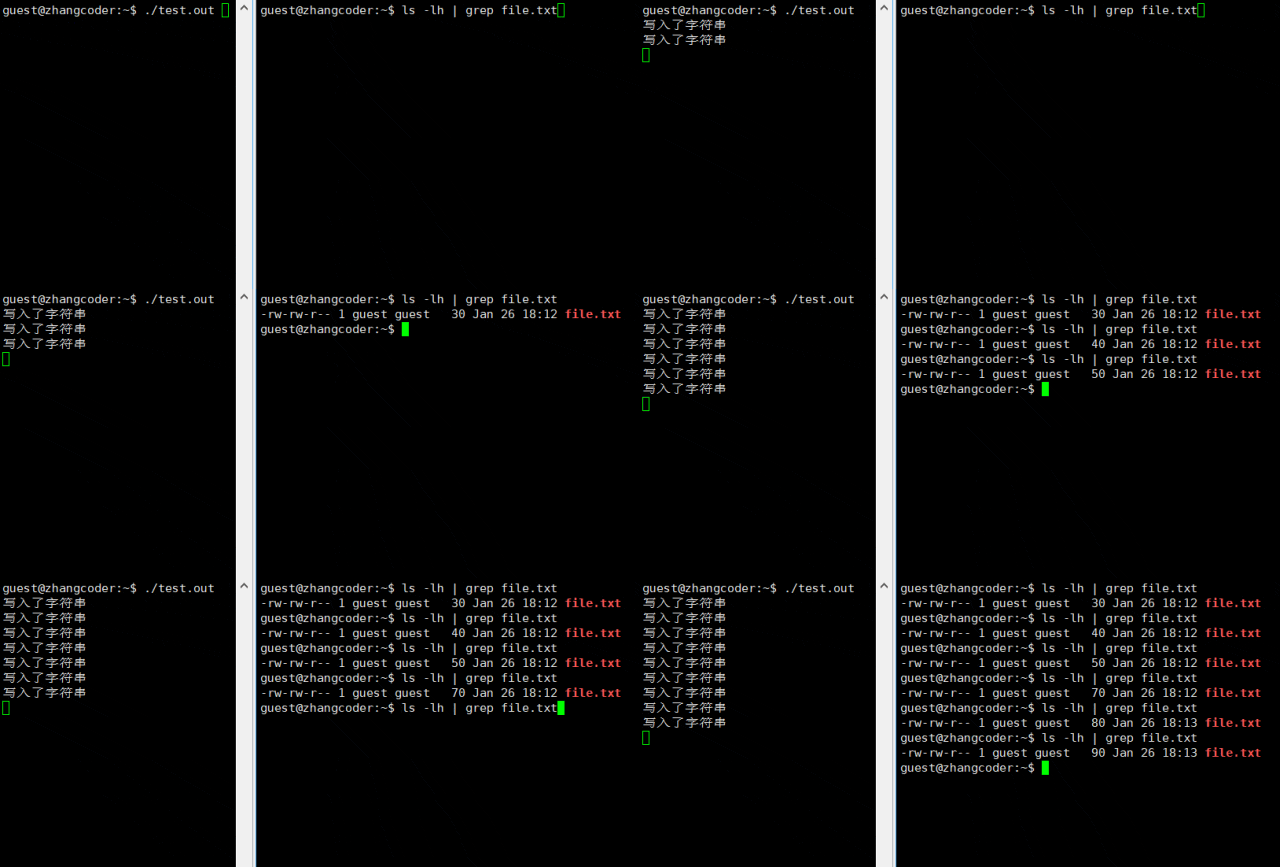
可以做个测试:
#include <stdio.h>#include <sys/types.h>#include <sys/stat.h>#include <fcntl.h>#include <unistd.h>int main(){int fd=open("./file.txt",O_CREAT|O_WRONLY,0664);if (fd<0) {perror("open failed");return 1; }char buffer[]="teststring";for (;;) {if (write(fd,buffer,sizeof(buffer)-1)==-1) {perror("open failed");return 2; }printf("写入了字符串\n");fflush(stdout);sleep(1); }close(fd);return 0;}
开两个终端,一个执行以上代码,另外一个查看file.txt大小
运行结果:打印出来文件大小一直在变
2.正确
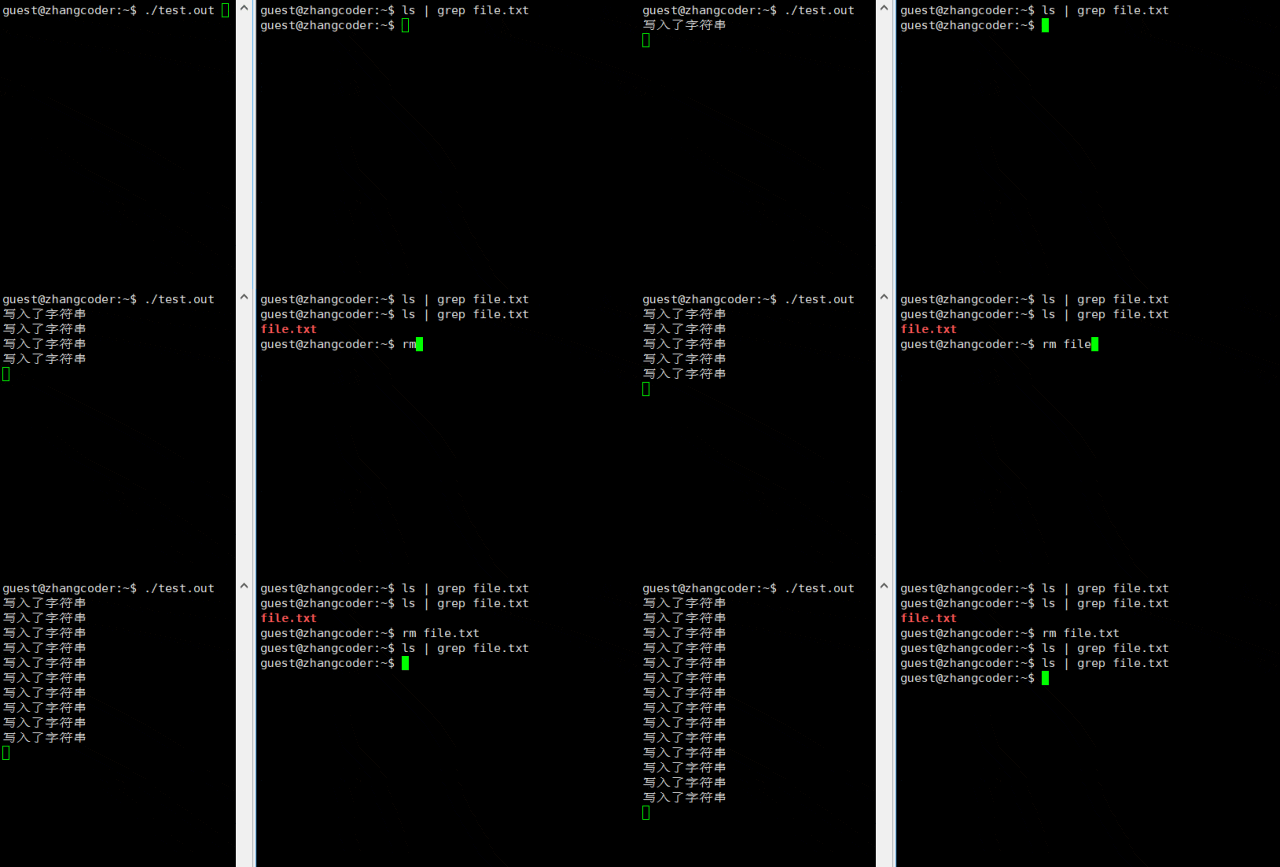
删除文件实际上一开始是删除文件的目录项,文件的数据以及inode并不会立即被删除,因为进程打开
文件的struct file数据结构仍然存在因此若进程已经打开文件,文件被删除时,并不会影响进程的操作,因为进程已经具备文件的描述信息
仍然使用上面的代码,开两个终端,一个执行以上代码,另外一个执行rm file.txt
运行结果: 正常删除
5.补充: Linux的终端文件
打开xshell,打开多个窗口,这里打开4个终端,都以同一个用户的身份登录:
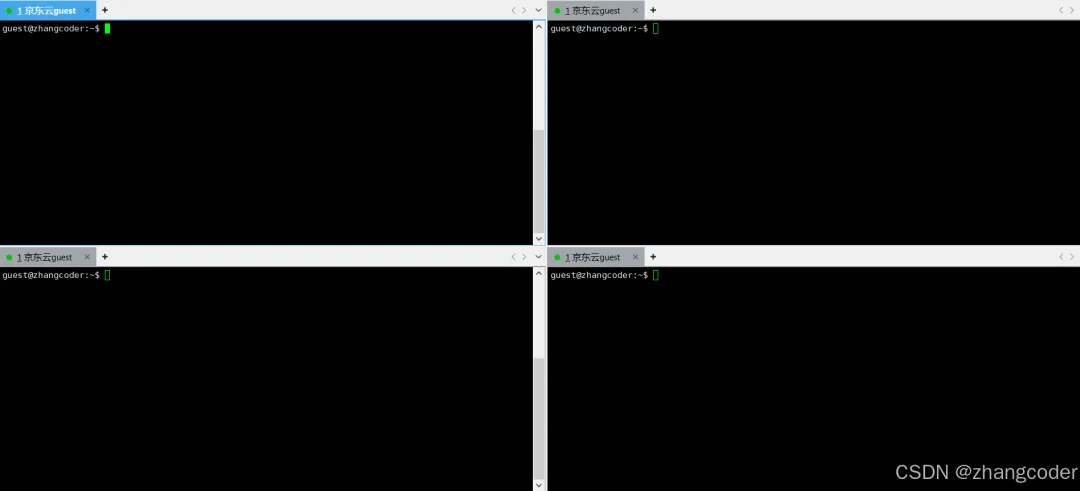
此时查看/dev/pts下的内容:
ls -l /dev/pts
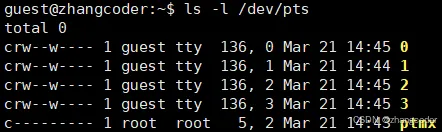
注: pts全称是pseudo terminal slave,伪终端从设备; ptmx全称是pseudo terminal multiplexor. 可以看看pts(4) - Linux manual page[4]的描述
关掉其中一个终端,再查看/dev/pts中的文件:
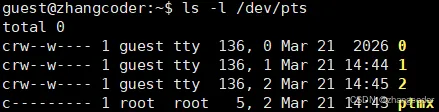
关掉其中一个终端,再查看/dev/pts中的文件:
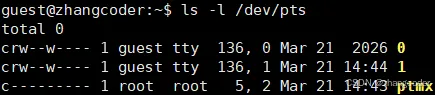
尝试向/dev/pts/1中显示数据:

结论1: /dev/pts其中一个名称为数字的文件就是一个终端文件
关掉其中一个终端,再查看/dev/pts中的文件:

结论2: 如果开了多个终端,会在/dev/pts目录下生成多个终端文件
除此之外,可以看看stackexchange的两个回答:linux - What is stored in /dev/pts files and can we open them? - Unix & Linux Stack Exchange[5]
tty - How does a Linux terminal work? - Unix & Linux Stack Exchange[6]
参考资料
[1] OS29.【Linux】文件IO (1) open、write和close系统调用: https://zhangcoder.blog.csdn.net/article/details/151083204?spm=1011.2415.3001.5331
[2] OS17.【Linux】进程基础知识(1): https://zhangcoder.blog.csdn.net/article/details/149281546?spm=1011.2415.3001.5331
[3] linux应用层的write()函数如何调用到驱动中的write()函数?作者: 简叔: https://mp.weixin.qq.com/s/XmWJMbPGZANyVKRJn1WNYw
[4] pts(4) - Linux manual page: https://www.man7.org/linux/man-pages/man4/pts.4.html
[5] linux - What is stored in /dev/pts files and can we open them? - Unix & Linux Stack Exchange: https://unix.stackexchange.com/questions/93531/what-is-stored-in-dev-pts-files-and-can-we-open-them
[6] tty - How does a Linux terminal work? - Unix & Linux Stack Exchange: https://unix.stackexchange.com/questions/79334/how-does-a-linux-terminal-work
 10个月宝宝每天需要喝多少奶粉?