首先要去钉钉开放平台创建一个企业应用,配置机器人获取到agentid
这个是发送工作通知

/** * 获取token */ @RequestMapping("/getToken") public OapiGettokenResponse getToken() throws com.taobao.api.ApiException { DingTalkClient client = new DefaultDingTalkClient("https://oapi.dingtalk.com/gettoken"); OapiGettokenRequest request = new OapiGettokenRequest(); request.setAppkey(""); request.setAppsecret(""); request.setHttpMethod("GET"); OapiGettokenResponse response = client.execute(request); return response; } /** * 发送工作通知 企业内部工作通知 */ @RequestMapping("/sendWorkNotice") public OapiMessageCorpconversationAsyncsendV2Response asyncsendV2() throws com.taobao.api.ApiException { OapiV2UserGetbymobileResponse oapiV2UserGetbymobileResponse = getByMobile(""); if (!oapiV2UserGetbymobileResponse.isSuccess()) { log.error(oapiV2UserGetbymobileResponse.getErrmsg()); return null; } OapiV2UserGetbymobileResponse.UserGetByMobileResponse result = oapiV2UserGetbymobileResponse.getResult(); DingTalkClient client = new DefaultDingTalkClient("https://oapi.dingtalk.com/topapi/message/corpconversation/asyncsend_v2"); OapiMessageCorpconversationAsyncsendV2Request request = new OapiMessageCorpconversationAsyncsendV2Request(); // yourAgentId request.setAgentId(10000000L); request.setUseridList(result.getUserid()); request.setToAllUser(false); OapiMessageCorpconversationAsyncsendV2Request.Msg msg = new OapiMessageCorpconversationAsyncsendV2Request.Msg(); msg.setMsgtype("text"); msg.setText(new OapiMessageCorpconversationAsyncsendV2Request.Text()); msg.getText().setContent("我要下班啦"); request.setMsg(msg); OapiGettokenResponse oapiGettokenResponse = this.getToken(); String accessToken = oapiGettokenResponse.getAccessToken(); OapiMessageCorpconversationAsyncsendV2Response rsp = null; try { rsp = client.execute(request, accessToken); } catch (com.taobao.api.ApiException e) { throw new RuntimeException(e); } return rsp; } /** * 获取手机号 企业内部工作通知 */ @RequestMapping("/getByMobile") public OapiV2UserGetbymobileResponse getByMobile(String mobile) throws com.taobao.api.ApiException { DingTalkClient client = new DefaultDingTalkClient("https://oapi.dingtalk.com/topapi/v2/user/getbymobile"); OapiV2UserGetbymobileRequest req = new OapiV2UserGetbymobileRequest(); req.setMobile(mobile); OapiGettokenResponse oapiGettokenResponse = this.getToken(); String accessToken = oapiGettokenResponse.getAccessToken(); OapiV2UserGetbymobileResponse rsp = client.execute(req, accessToken); return rsp; }
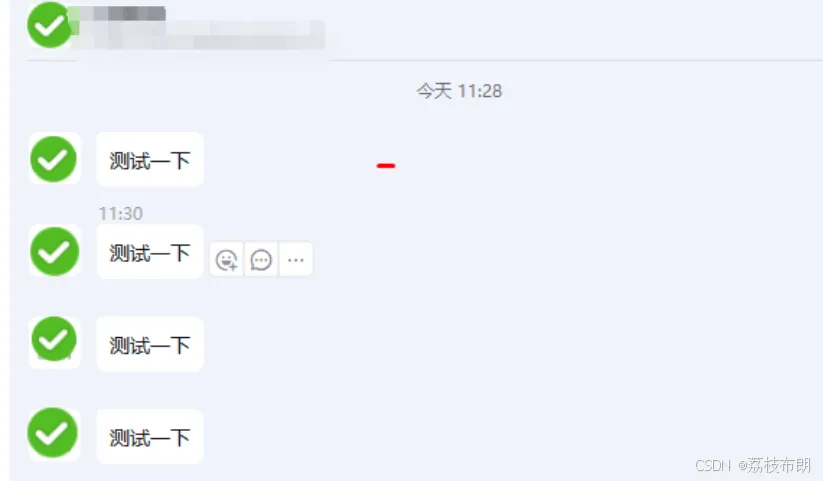
private static Client createClient() throws Exception { Config config = new Config(); config.protocol = "https"; config.regionId = "central"; return new Client(config); } @RequestMapping("/sendPrivateChatMsg") public void sendPrivateChatMsg(String phone, String content) throws Exception { if (StringUtils.isBlank(enterpriseToken)) { getToken(); } Client client = createClient(); BatchSendOTOHeaders batchSendOTOHeaders = new BatchSendOTOHeaders(); batchSendOTOHeaders.xAcsDingtalkAccessToken = enterpriseToken; BatchSendOTORequest batchSendOTORequest = new BatchSendOTORequest() .setRobotCode("")//机器人appkey .setUserIds(Arrays.asList("你的userid")) .setMsgKey("officialTextMsg") .setMsgParam("{ \"content\": \"" + "设备告警信息" + "\" }"); try { client.batchSendOTOWithOptions(batchSendOTORequest, batchSendOTOHeaders, new RuntimeOptions()); } catch (TeaException err) { if (!Common.empty(err.code) && !Common.empty(err.message)) { // err 中含有 code 和 message 属性,可帮助开发定位问题 log.error(err.code + ":" + err.message); // 企业凭证enterpriseToken不合法导致出错时获取新企业凭证并重试 if (err.code.equals("InvalidAuthentication")) { getToken(); createDingNotify("你的userid", content); } } } catch (Exception e) { TeaException err = new TeaException(e.getMessage(), e); if (!Common.empty(err.code) && !Common.empty(err.message)) { // err中含有code和message 属性,可帮助开发定位问题 log.error(err.code + ":" + err.message); } } } @RequestMapping("/createDingNotify") public void createDingNotify(String ingUserId, String content) throws Exception { if (StringUtils.isBlank(enterpriseToken)) { getToken(); } Client client = createClient(); BatchSendOTOHeaders batchSendOTOHeaders = new BatchSendOTOHeaders(); batchSendOTOHeaders.xAcsDingtalkAccessToken = enterpriseToken; BatchSendOTORequest batchSendOTORequest = new BatchSendOTORequest() .setRobotCode("")//机器人appkey .setUserIds(Arrays.asList("你的userid")) .setMsgKey("officialTextMsg") .setMsgParam("{ \"content\": \"" + "111" + "\" }"); try { client.batchSendOTOWithOptions(batchSendOTORequest, batchSendOTOHeaders, new RuntimeOptions()); } catch (TeaException err) { if (!Common.empty(err.code) && !Common.empty(err.message)) { // err 中含有 code 和 message 属性,可帮助开发定位问题 log.error(err.code + ":" + err.message); // 企业凭证enterpriseToken不合法导致出错时获取新企业凭证并重试 if (err.code.equals("InvalidAuthentication")) { getToken(); createDingNotify("你的userid", "测试一下"); } } } catch (Exception e) { TeaException err = new TeaException(e.getMessage(), e); if (!Common.empty(err.code) && !Common.empty(err.message)) { // err中含有code和message 属性,可帮助开发定位问题 log.error(err.code + ":" + err.message); } } }
sendWorkNotice这个接口会返回userid等用户信息
