使用python一键下载网页中的全部数据!
- 2026-10-29 18:41:11
使用python一键下载网页中的全部数据!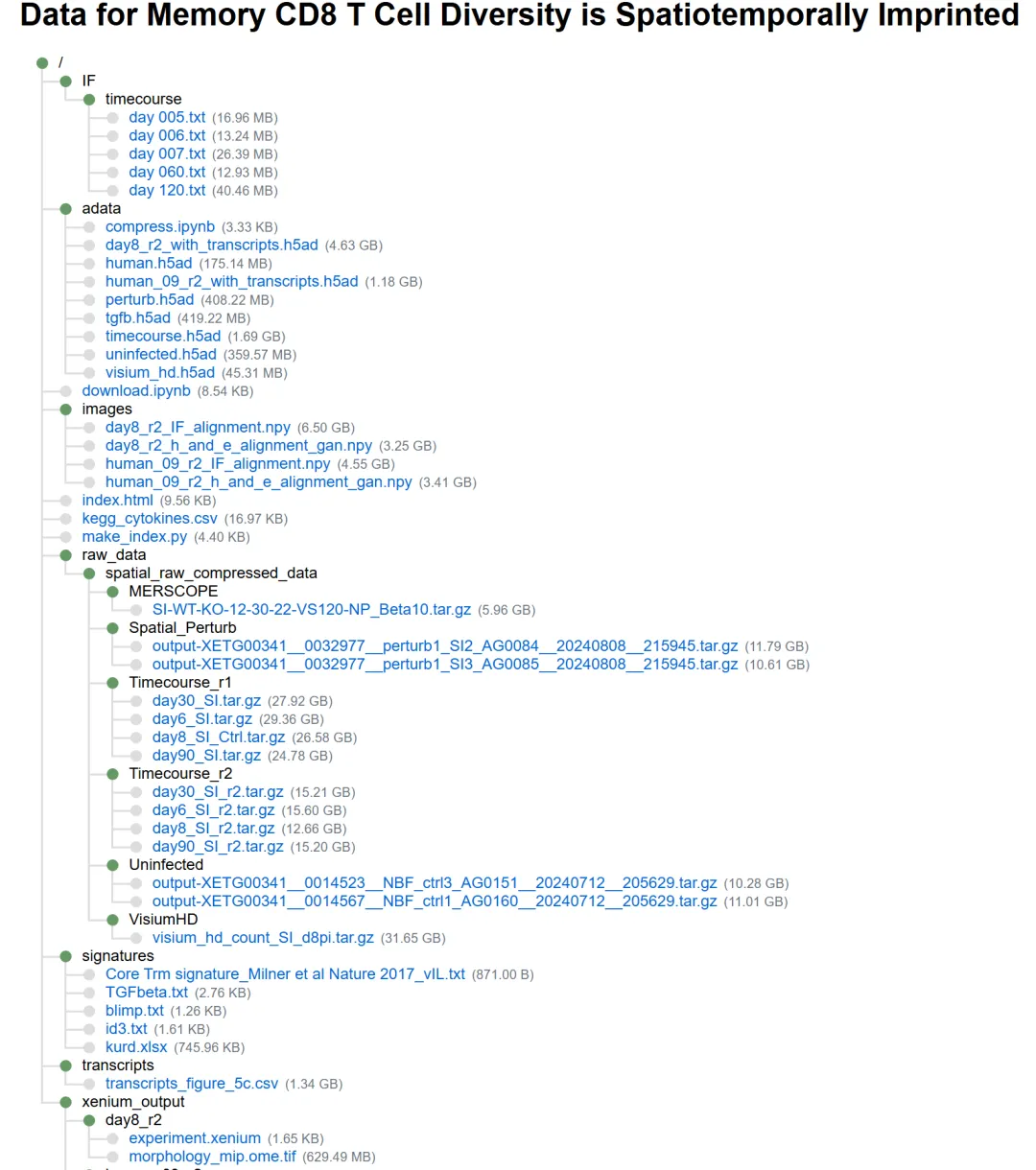
昨天,我们学习了这篇2025 年1月22号发表在Nature杂志上的文献,标题为《Tissue-resident memory CD8 T cell diversity is spatiotemporally imprinted》,里面给了代码和处理好的数据,但是数据呢,那是相当大啊,而且还有很多文件。如下,下载可能是个难题!
处理好的数据:https://2024-spatial-trm.data.heeg.io/
好在作者给了下载的命令,来学习一下!
链接构成
先看看上面的文件链接组成:
https://2024-spatial-trm.data.heeg.io/ + 上面的目录+ 具体的文件名
如:https://2024-spatial-trm.data.heeg.io/IF/timecourse/day%20005.txt
python下载
1、定义基本的url
base_url = "https://2024-spatial-trm.data.heeg.io/"2、定义一个下载函数
这里需要做一下环境配置,安装这里需要import的包即可。
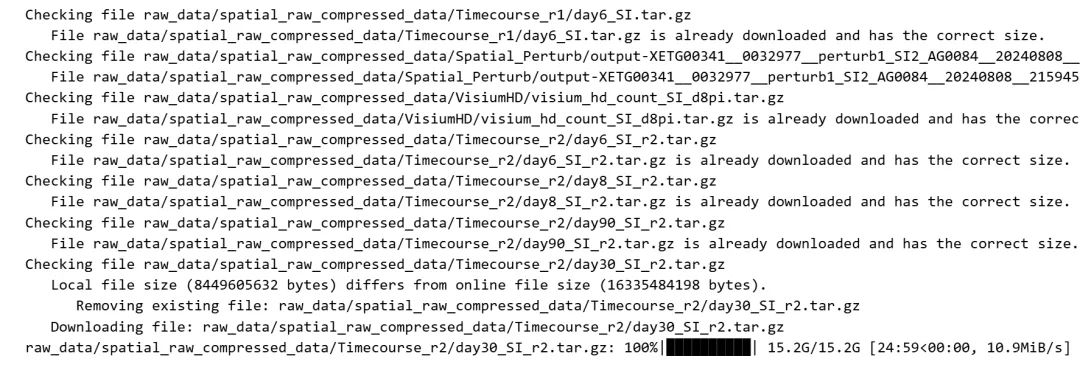
此外,这个函数写的非常棒,可以检查已经下载过的文件,并判断文件大小是不是完整的。对于已经下载完成的,二次运行下载会直接跳过!
这里下载主要用的模块为 requests,可以再去单独学习一下。
import osimport requestsimport gzipimport shutilfrom tqdm import tqdmdefdownload_file(file: str, base_url: str, force: bool = False):"""Downloads a file from a specified base URL. Args: file (str): Name of the file to download. base_url (str): Base URL where the file is located. force (bool, optional): If True, re-downloads the file even if it exists locally. Defaults to False. Raises: requests.exceptions.RequestException: If there is an error during download. (OSError, ValueError): If there is an error during extraction. """ print(f"Checking file {file}")# Ensure base_url ends with a slashifnot base_url.endswith("/"): base_url += "/" full_url = f"{base_url}{file}" download_path = f"{file}"# Check if file exists locally and compare sizes local_file_exists = os.path.exists(download_path) should_download = forceif local_file_exists andnot force:try:# Get the size of the online file response = requests.head(full_url) response.raise_for_status() online_size = int(response.headers.get("content-length", 0))# Get the size of the local file local_size = os.path.getsize(download_path)if online_size != local_size: print(f" Local file size ({local_size} bytes) differs from online file size ({online_size} bytes)." ) should_download = Trueelse: print(f" File {file} is already downloaded and has the correct size.")returnexcept requests.exceptions.RequestException as e: print(f" Error checking online file: {e}")returnelse: should_download = Trueif should_download:if local_file_exists: os.remove(download_path) print(f" Removing existing file: {download_path}") print(f" Downloading file: {file}")else: print(f" File {file} is already downloaded and up to date.")return# Create the destination folder if it doesn't exist os.makedirs(os.path.dirname(download_path), exist_ok=True)try: response = requests.get(full_url, stream=True) response.raise_for_status() # Raise an exception for error status codes total_size = int(response.headers.get("content-length", 0))with open(download_path, "wb") as f, tqdm( desc=file, total=total_size, unit="iB", unit_scale=True, unit_divisor=1024, ) as progress_bar:for chunk in response.iter_content(chunk_size=8192): size = f.write(chunk) progress_bar.update(size)except requests.exceptions.RequestException as e: print(f" Error downloading file: {e}")except (OSError, ValueError) as e: print(f" Error extracting file: {e}")3、下载可复现图的数据
定义好文件目录:
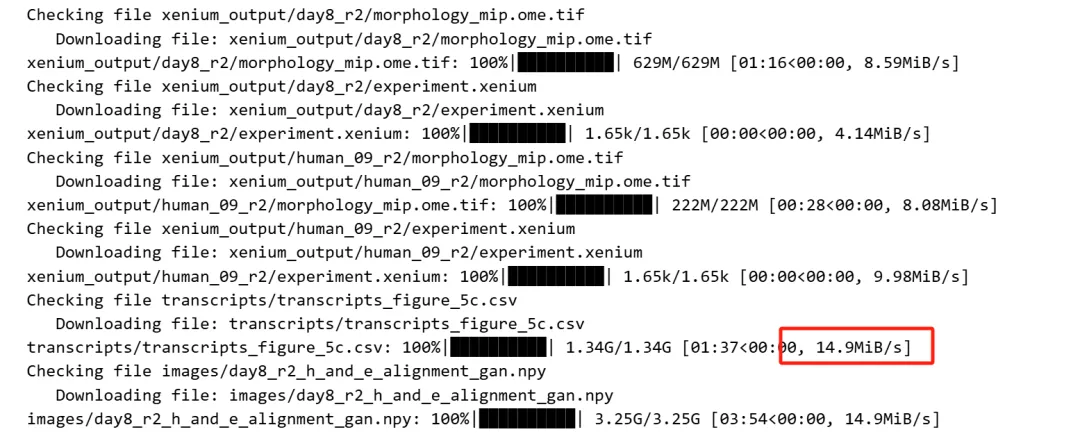
files = ["xenium_output/day8_r2/morphology_mip.ome.tif","xenium_output/day8_r2/experiment.xenium","xenium_output/human_09_r2/morphology_mip.ome.tif","xenium_output/human_09_r2/experiment.xenium","transcripts/transcripts_figure_5c.csv","images/day8_r2_h_and_e_alignment_gan.npy","images/human_09_r2_IF_alignment.npy","images/human_09_r2_h_and_e_alignment_gan.npy","images/day8_r2_IF_alignment.npy","adata/human.h5ad","adata/human_09_r2_with_transcripts.h5ad","adata/tgfb.h5ad","adata/day8_r2_with_transcripts.h5ad","adata/timecourse.h5ad","adata/uninfected.h5ad","adata/perturb.h5ad","adata/visium_hd.h5ad","IF/timecourse/day 120.txt","IF/timecourse/day 060.txt","IF/timecourse/day 006.txt","IF/timecourse/day 007.txt","IF/timecourse/day 005.txt",]调用上面的函数下载:
for f in files: download_file(f, base_url, force=False)速度相当丝滑!
4、下载 Xenium & Merscope的原始数据
定义好文件目录:
xenium_files = ["raw_data/spatial_raw_compressed_data/Uninfected/output-XETG00341__0014523__NBF_ctrl3_AG0151__20240712__205629.tar.gz","raw_data/spatial_raw_compressed_data/Uninfected/output-XETG00341__0014567__NBF_ctrl1_AG0160__20240712__205629.tar.gz","raw_data/spatial_raw_compressed_data/Timecourse_r1/day90_SI.tar.gz","raw_data/spatial_raw_compressed_data/Timecourse_r1/day6_SI.tar.gz","raw_data/spatial_raw_compressed_data/Timecourse_r1/day8_SI_Ctrl.tar.gz","raw_data/spatial_raw_compressed_data/Timecourse_r1/day30_SI.tar.gz","raw_data/spatial_raw_compressed_data/MERSCOPE/SI-WT-KO-12-30-22-VS120-NP_Beta10.tar.gz","raw_data/spatial_raw_compressed_data/Spatial_Perturb/output-XETG00341__0032977__perturb1_SI3_AG0085__20240808__215945.tar.gz","raw_data/spatial_raw_compressed_data/Spatial_Perturb/output-XETG00341__0032977__perturb1_SI2_AG0084__20240808__215945.tar.gz","raw_data/spatial_raw_compressed_data/VisiumHD/visium_hd_count_SI_d8pi.tar.gz","raw_data/spatial_raw_compressed_data/Timecourse_r2/day6_SI_r2.tar.gz","raw_data/spatial_raw_compressed_data/Timecourse_r2/day8_SI_r2.tar.gz","raw_data/spatial_raw_compressed_data/Timecourse_r2/day90_SI_r2.tar.gz","raw_data/spatial_raw_compressed_data/Timecourse_r2/day30_SI_r2.tar.gz",]下载:
for f in xenium_files: download_file(f, base_url, force=False)完美!又学到了一个新的技能,哈哈哈哈。
上面的数据就是本次需要复现的Nature文献里面的数据,来吗?进群方式:最新Nature杂志同款Xenium高精度HE图片绘制(文末有交流群)
转发:
生信入门&数据挖掘线上直播课2026年1月班,你的生物信息学入门课 时隔5年,我们的生信技能树VIP学徒继续招生啦 满足你生信分析计算需求的低价解决方案 生信故事会,来看看他们的生信入门故事 生信马拉松答疑专辑,获取你的生信专属答疑
本文来自网友投稿或网络内容,如有侵犯您的权益请联系我们删除,联系邮箱:596563534@qq.com 。
