从零开始:用 Python+Gemini3 四步搭建你自己的 AI Agent!
- 2026-10-21 13:30:21
很多人第一次看到 AI Agent 自己编辑文件、跑代码、修 bug,还能一直运行下去的时候,都觉得挺神奇。其实远没有想象中那么复杂。这里没什么秘密算法,也没有什么"智能体大脑"这种玄学概念。
AI Agent核心就三件事:循环 + LLM + 工具函数。
如果你会写个 while True 循环?那基本就算成功一半了。
这篇文章会完整展示怎么用 Gemini 3 搭一个真正能用的 Agent:从最基础的 API 调用,到一个能读写文件、理解需求的命令行助手。
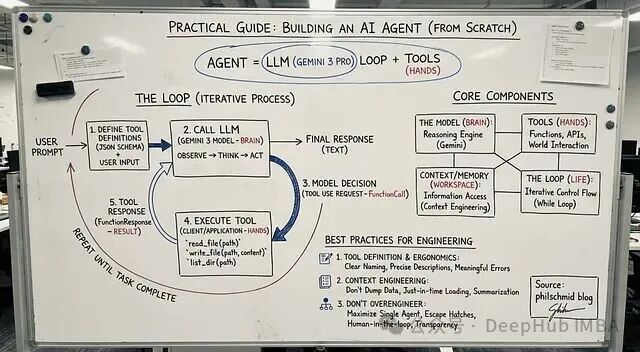
Agent 到底是什么
传统程序就是流程图那一套:步骤 A → 步骤 B → 步骤 C → 结束。
而Agent 不一样,它会根据当前状况决定下一步干什么。可以理解成围绕 LLM 搭的一个小系统,比如说:
规划任务
执行操作
根据结果调整
循环往复直到搞定
所以不是写死的脚本,更像是个会思考的循环。
不管多复杂的 Agent,都逃不开这四个部分:
1、模型 负责思考
这里用的是 Gemini 3 Pro。它可以分析用户需求,决定接下来该做什么。
2、工具 负责执行
就是一堆函数:读文件、列目录、发邮件、调 API...想加什么加什么。
3、上下文工作记忆
模型当前能看到的所有信息,怎么管理这块内容,业内叫 Context Engineering。
4、循环 运转机制
观察 → 思考 → 行动 → 重复,一直到任务完成。
就这么四块,没别的了。
循环的运行逻辑
几乎所有 Agent 都是这个流程:
先把可用的工具描述给模型看,然后把用户请求和工具定义一起发给模型。模型会做决策:要么直接回复,要么调用某个工具并传参数。
但是你要写代码负责在 Python 里执行这个工具。
执行完把结果喂回给 Gemini。
模型拿到新信息后继续判断下一步。
就这样循环,直到模型觉得任务完成了。
下面我们开始写:
第一步:基础聊天机器人
先写个 Gemini 3 API 的简单封装 ,其实就是个能记住对话的类。
from google import genai from google.genai import types class Agent: def __init__(self, model: str): self.model = model self.client = genai.Client() self.contents = [] def run(self, contents: str): self.contents.append({"role": "user", "parts": [{"text": contents}]}) response = self.client.models.generate_content( model=self.model, contents=self.contents ) self.contents.append(response.candidates[0].content) return response agent = Agent(model="gemini-3-pro-preview") response1 = agent.run( "Hello, what are the top 3 cities in Germany to visit? Only return the names." ) print(response1.text)
上面代码能跑,但是就是个聊天机器人。它啥也干不了,因为没有"手"。
第二步:加入工具函数
工具其实就是 Python 函数 + 一段 JSON schema 描述。描述是给 Gemini 看的,让它知道这个函数能干啥。
这里加三个简单的:
read_file- 读文件write_file- 写文件list_dir- 列目录
先写定义:
read_file_definition = { "name": "read_file", "description": "Reads a file and returns its contents.", "parameters": { "type": "object", "properties": { "file_path": {"type": "string"} }, "required": ["file_path"], }, } list_dir_definition = { "name": "list_dir", "description": "Lists the files in a directory.", "parameters": { "type": "object", "properties": { "directory_path": {"type": "string"} }, "required": ["directory_path"], }, } write_file_definition = { "name": "write_file", "description": "Writes contents to a file.", "parameters": { "type": "object", "properties": { "file_path": {"type": "string"}, "contents": {"type": "string"}, }, "required": ["file_path", "contents"], }, }
然后是实际的 Python 实现:
def read_file(file_path: str) -> dict: with open(file_path, "r") as f: return f.read() def write_file(file_path: str, contents: str) -> bool: with open(file_path, "w") as f: f.write(contents) return True def list_dir(directory_path: str) -> list[str]: return os.listdir(directory_path)
打包一下就搞定了:
file_tools = { "read_file": {"definition": read_file_definition, "function": read_file}, "write_file": {"definition": write_file_definition, "function": write_file}, "list_dir": {"definition": list_dir_definition, "function": list_dir}, }
第三步:真正的 Agent
现在把 Agent 类扩展一下,让它能:
识别工具调用
在 Python 里执行对应的函数
把结果传回 Gemini
继续循环直到完成
class Agent: def __init__(self, model: str, tools: dict, system_instruction="You are a helpful assistant."): self.model = model self.client = genai.Client() self.contents = [] self.tools = tools self.system_instruction = system_instruction def run(self, contents): # Add user input to history if isinstance(contents, list): self.contents.append({"role": "user", "parts": contents}) else: self.contents.append({"role": "user", "parts": [{"text": contents}]}) config = types.GenerateContentConfig( system_instruction=self.system_instruction, tools=[types.Tool( function_declarations=[ tool["definition"] for tool in self.tools.values() ] )], ) response = self.client.models.generate_content( model=self.model, contents=self.contents, config=config ) # Save model output self.contents.append(response.candidates[0].content) # If model wants to call tools if response.function_calls: functions_response_parts = [] for tool_call in response.function_calls: print(f"[Function Call] {tool_call}") if tool_call.name in self.tools: result = {"result": self.tools[tool_call.name]["function"](**tool_call.args)} else: result = {"error": "Tool not found"} print(f"[Function Response] {result}") functions_response_parts.append( {"functionResponse": {"name": tool_call.name, "response": result}} ) # Feed tool results back to the model return self.run(functions_response_parts) return response
这样就可以跑一下试试了:
agent = Agent( model="gemini-3-pro-preview", tools=file_tools, system_instruction="You are a helpful Coding Assistant. Respond like Linus Torvalds." ) response = agent.run("Can you list my files in the current directory?") print(response.text)
如果没问题,Gemini 会调工具,拿到结果,然后给出最终回复。
到这一步,一个能用的 Agent 就搭好了。
第四步:包装成命令行工具
最后我们在再套个输入循环就行:
agent = Agent( model="gemini-3-pro-preview", tools=file_tools, system_instruction="You are a helpful Coding Assistant. Respond like Linus Torvalds." ) print("Agent ready. Type something (or 'exit').") while True: user_input = input("You: ") if user_input.lower() in ['exit', 'quit']: break response = agent.run(user_input) print("Linus:", response.text, "\n")
代码很少但是效果已经相当不错了。
总结
搭 Agent 一开始看着挺唬人,但理解了结构之后,会发现简单得有点无聊。往简单了说,它就是个循环。一个里面跑着聪明模型的循环。明白这点之后,你就能造出看起来"有生命"的 Agent 了。
如果想继续扩展的话,可以加这些:
网络搜索、数据库查询、执行 shell 命令、调用云服务、长期记忆、工作流编排、任务调度、多步规划...
但不管怎么加,底层还是那个简单结构:
观察 → 思考 → 行动 → 重复
这就是现代 Agent 的核心。
重磅消息 | 2025年最新AI+全栈测试开发技能实战指南(第6期)
AI自动化测试全攻略:从AI 自动化测试实战到AI 智能测试平台开发!
99% 的人都不知道的 Claude Code 使用技巧!实测有效!Claude Code 接入GLM 4.7(保姆级教程)
如果这篇文章对你有帮助,不妨点个赞、转发、收藏,想第一时间收到推送,记得加个星标 ⭐

好了,今天的分享到此结束,感谢大家抽空阅读,我们下期再见,Respect!AI+全栈测开训练营本周进入到AI智能测试平台开发版块,目前报名还有优惠
END


后台回复【领资料包】试试
