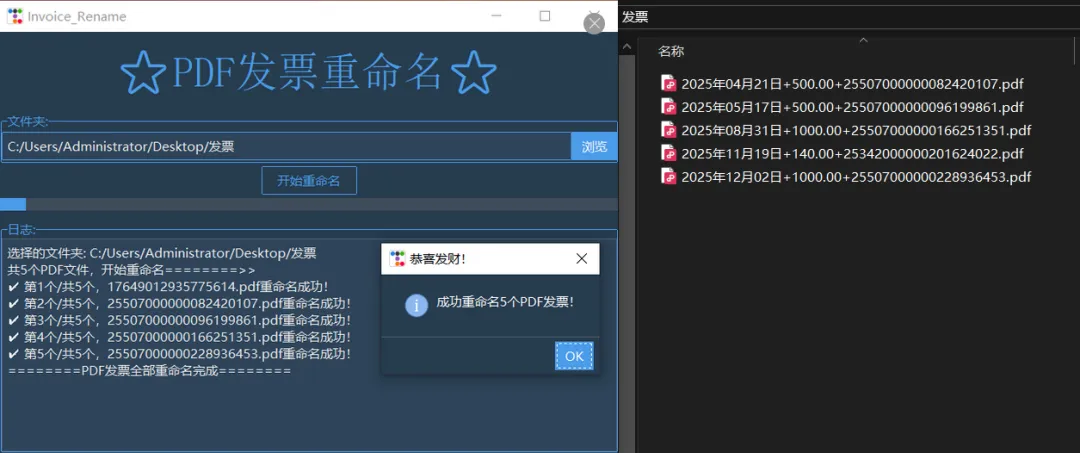
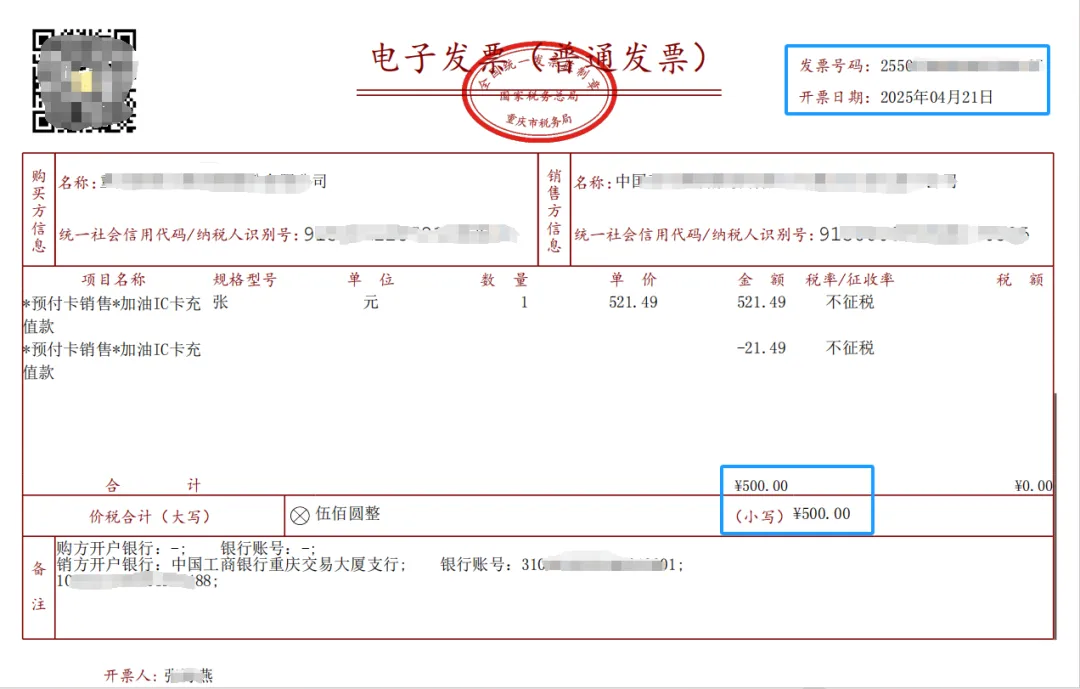
# -*- coding: utf-8 -*-"""@Time : 2025/12/13 9:10@Author : Driver_Won@微信公众号: Python与手工"""import reimport threadingimport pdfplumberimport ttkbootstrap as ttkfrom ttkbootstrap.constants import *from ttkbootstrap.dialogs import Messageboxfrom tkinter.filedialog import askdirectoryfrom pathlib import Pathclass GUI: def __init__(self, master): """Invoice_Rename GUI""" self.root = master self.invoice_pdf_dir = ttk.StringVar() # 生成一个StringVar对象,来保存发票文件夹路径 self.converting = False self.create_page() def create_page(self): """创建页面元素""" # 主控件 self.mf = ttk.Frame(self.root) self.mf.pack() # 标题标签 ttk.Label(self.mf, text='\U00002b50PDF发票重命名\U00002b50', font=('宋体', 30), bootstyle=PRIMARY).pack(pady=20) # 文件夹选择 lf1 = ttk.LabelFrame(self.mf, text="文件夹:", bootstyle=PRIMARY) lf1.pack(pady=2) ttk.Entry(lf1, width=74, textvariable=self.invoice_pdf_dir, bootstyle=PRIMARY).pack(side=LEFT, pady=2) self.b1 = ttk.Button(lf1, text='浏览', command=self.select_path, bootstyle=PRIMARY) self.b1.pack(side=RIGHT, pady=2) # 开始按钮 self.bt_start = ttk.Button(self.mf, text='开始重命名', width=10, command=self.start, bootstyle='outline-toolbutton') self.bt_start.pack(pady=2) # 进度条 self.pb = ttk.Progressbar(self.mf, length=740, mode=INDETERMINATE, bootstyle=PRIMARY) self.pb.pack(pady=2) # 日志显示 lf2 = ttk.LabelFrame(self.mf, text="日志:", bootstyle=PRIMARY) lf2.pack(pady=10) self.text = ttk.Text(lf2, wrap=ttk.WORD, height=12) self.text.config(state=DISABLED) # 默认text文本框不可编辑 self.text.pack(fill="both") def select_path(self): """ 选择文件夹按钮对应的事件,打开文件夹选择对话框 :return: """ path_pdf_dir = askdirectory(title='选择文件夹', ) # 文件选择对话框 if path_pdf_dir: # 选择了文件夹 self.invoice_pdf_dir.set(path_pdf_dir) self.insert_text(f'选择的文件夹: {path_pdf_dir}') def insert_text(self, text): """ 向文本框中插入文字 :return: """ self.text.config(state=NORMAL) self.text.insert(ttk.END, text) self.text.insert(ttk.END, "\n") self.text.see(ttk.END) # 设置文本框内容超出显示范围时自动滚动到底部 self.text.config(state=DISABLED) # self.text.update() def rename_invoice_pdf(self): """ PDF发票重命名 :return: """ target_dir = Path(self.invoice_pdf_dir.get()) if not self.invoice_pdf_dir.get() == '' else False if not target_dir or not target_dir.is_dir(): self.root.after(0, lambda: Messagebox.show_error(message='请先选择发票PDF文件夹!', title='出错啦!')) self.stop() return # 只处理文件夹下pdf文件 pdf_files = [f for f in target_dir.iterdir() if f.suffix == '.pdf'] pdf_num = len(pdf_files) renamed_num = 0 self.insert_text(f"共{pdf_num}个PDF文件,开始重命名========>>") # 开始提取信息 for i, pdf_path in enumerate(pdf_files): try: with pdfplumber.open(pdf_path) as f: page = f.pages[0] text = page.extract_text() # 开票日期 match_rq = re.search(r"开票日期[::]\s*(\d{4}年\d{2}月\d{2}日)", text) rq = match_rq.group(1).strip() if match_rq else f'未获取到日期{renamed_num+1}' # 金额 match_je = re.findall(r"[¥¥]\s*(\d+\.\d+)", text) je = match_je[-1] if match_je else f'未获取到金额{renamed_num+1}' # 发票号码 match_hm = re.search(r"发票号码[::]\s*(\w+)", text, re.IGNORECASE) hm = match_hm.group(1).strip() if match_hm else f'未获取到号码{renamed_num+1}' new_pdf_name = f"{rq}+{je}+{hm}.pdf" new_pdf_path = pdf_path.with_name(new_pdf_name) pdf_path.rename(new_pdf_path) renamed_num += 1 self.insert_text(f'✔ 第{i + 1}个/共{pdf_num}个,{pdf_path.name}重命名成功!') except Exception as e: self.insert_text(f'✘ 第{i + 1}个/共{pdf_num}个,{pdf_path.name}重命名失败! {e}') self.insert_text('========PDF发票全部重命名完成========\n') self.stop() self.root.after(0, lambda: Messagebox.show_info(message=f'成功重命名{pdf_num}个PDF发票!', title='恭喜发财!')) def start(self): """ 开始 :return: """ if self.converting: return self.converting = True self.bt_start.config(state=DISABLED) self.pb.start(12) threading.Thread(target=self.rename_invoice_pdf, daemon=True).start() def stop(self): """ 停止 :return: """ self.pb.stop() self.bt_start.config(state=NORMAL) self.converting = Falseif __name__ == "__main__": root = ttk.Window( title="Invoice_Rename", # 窗口标题 themename="superhero" # 主题 ) root.place_window_center() GUI(root) # 展示GUI界面 root.mainloop() # 进入消息循环(必需)