1. 创始时间与作者
2. 官方资源
Python 文档地址:https://docs.python.org/3/library/functools.html
源代码位置:https://github.com/python/cpython/blob/main/Lib/functools.py
Python 官方网站:https://www.python.org/
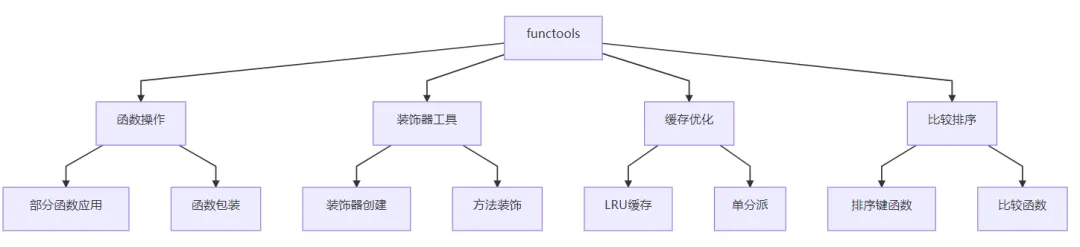
3. 核心功能
4. 应用场景
1. 函数部分应用
from functools import partial# 创建部分函数def power(base, exponent):return base**exponent# 创建平方函数(固定指数为2)square = partial(power, exponent=2)# 创建立方函数(固定指数为3)cube = partial(power, exponent=3)print(square(5)) # 输出: 25print(cube(3)) # 输出: 27# 在数据处理中的应用numbers = [1, 2, 3, 4, 5]squared_numbers = list(map(partial(power, exponent=2), numbers))print(squared_numbers) # 输出: [1, 4, 9, 16, 25]
2. 函数缓存优化
from functools import lru_cacheimport time@lru_cache(maxsize=128)def fibonacci(n):"""计算斐波那契数列(使用缓存优化)"""if n<2:return nreturn fibonacci(n-1) +fibonacci(n-2)# 测试性能start = time.time()result = fibonacci(35)end = time.time()print(f"fibonacci(35) = {result}, 耗时: {end - start:.4f}秒")# 查看缓存信息print(f"缓存命中率: {fibonacci.cache_info().hits}")print(f"缓存未命中: {fibonacci.cache_info().misses}")3. 装饰器工具
from functools import wrapsdef debug_decorator(func):"""调试装饰器,记录函数调用信息"""@wraps(func) # 保留原始函数的元数据def wrapper(*args, **kwargs):print(f"调用函数: {func.__name__}")print(f"参数: args={args}, kwargs={kwargs}")result = func(*args, **kwargs)print(f"返回值: {result}")return resultreturn wrapper@debug_decoratordef add_numbers(a, b):"""将两个数字相加"""return a+b# 测试装饰器result = add_numbers(5, 3)print(f"函数名: {add_numbers.__name__}")print(f"函数文档: {add_numbers.__doc__}")4. 泛型函数处理
from functools import singledispatch@singledispatchdef process_data(data):"""处理不同类型的数据"""raise NotImplementedError("不支持的数据类型")@process_data.registerdef _(data: str):print(f"处理字符串: {data.upper()}")@process_data.registerdef _(data: list):print(f"处理列表: 长度={len(data)}, 内容={data}")@process_data.registerdef _(data: dict):print(f"处理字典: 键={list(data.keys())}")# 测试单分派函数process_data("hello") # 处理字符串: HELLOprocess_data([1, 2, 3]) # 处理列表: 长度=3, 内容=[1, 2, 3]process_data({"a": 1, "b": 2}) # 处理字典: 键=['a', 'b']
5. 底层逻辑与技术原理
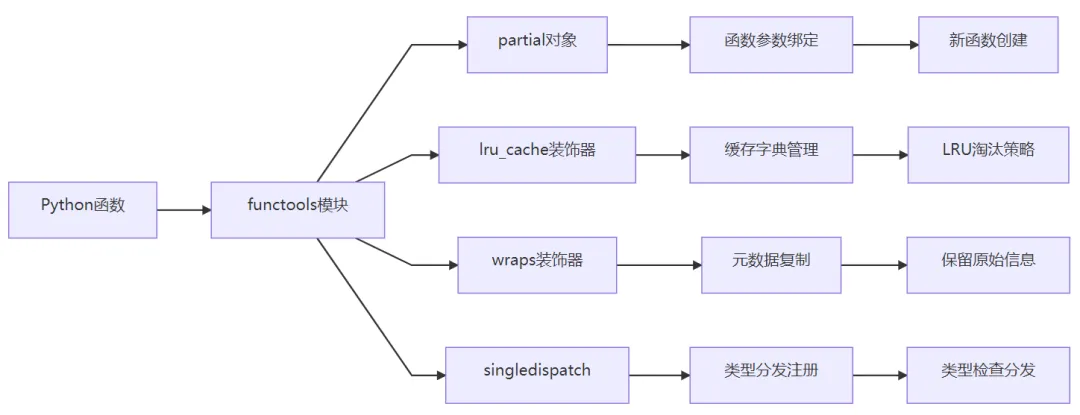
核心架构
关键技术
部分函数应用:
使用 partial 类包装原始函数
提前绑定部分参数,返回新函数对象
支持位置参数和关键字参数
缓存机制:
基于字典的缓存存储
LRU(最近最少使用)淘汰算法
线程安全的缓存操作
装饰器工具:
wraps 装饰器复制原始函数的元数据
保持函数名、文档字符串等属性
避免装饰器带来的元数据丢失
单分派泛型函数:
基于类型注解的函数分发
运行时类型检查和方法查找
支持多重注册和默认实现
6. 安装与配置
安装说明
# functools 是 Python 标准库的一部分,无需单独安装# 从 Python 2.5+ 开始内置支持# 检查 Python 版本python --version# 导入测试python -c"import functools; print('functools 模块可用')"版本兼容性
| Python 版本 | functools 功能支持 |
|---|
| 2.5+ | 基本功能(partial, reduce, wraps) |
| 3.2+ | lru_cache, total_ordering |
| 3.4+ | singledispatch |
| 3.8+ | cached_property |
| 3.9+ | cache(lru_cache(maxsize=None) 的别名) |
| 3.10+ | singledispatchmethod |
依赖关系
必需依赖:无(Python 标准库组件)
可选增强:
环境要求
| 组件 | 最低要求 | 推荐配置 |
|---|
| Python | 2.5+ | 3.8+ |
| 内存 | 无特殊要求 | 视缓存大小而定 |
| 性能 | 基础性能 | 无特殊要求 |
7. 性能特点
| 功能 | 性能影响 | 说明 |
|---|
| partial | 轻微 | 创建轻量级函数包装器 |
| lru_cache | 显著提升(缓存命中时) | 用空间换时间,缓存未命中时有轻微开销 |
| wraps | 轻微 | 元数据复制操作 |
| reduce | 中等 | 取决于迭代对象大小 |
| singledispatch | 轻微 | 类型检查和方法查找开销 |
注:性能特征基于典型使用场景,实际性能受具体实现和硬件影响
8. 高级功能使用
1. 自定义排序和比较
from functools import total_ordering, cmp_to_key@total_orderingclass Person:"""使用total_ordering简化比较操作"""def __init__(self, name, age):self.name = nameself.age = agedef __eq__(self, other):return self.age == other.agedef __lt__(self, other):return self.age<other.agedef __repr__(self):return f"Person(name='{self.name}', age={self.age})"# 使用total_ordering自动生成其他比较方法p1 = Person("Alice", 30)p2 = Person("Bob", 25)print(p1>p2) # 输出: Trueprint(p1<= p2) # 输出: False# 使用cmp_to_key处理旧式比较函数def old_style_compare(x, y):"""旧式比较函数(返回-1, 0, 1)"""if x.age<y.age:return -1elif x.age>y.age:return 1else:return 0# 转换为键函数用于现代排序people = [Person("Alice", 30), Person("Bob", 25), Person("Charlie", 35)]sorted_people = sorted(people, key=cmp_to_key(old_style_compare))print(sorted_people)2. 高级缓存策略
from functools import lru_cache, cached_propertyimport timeclass DataProcessor:"""使用多种缓存技术的处理器"""def __init__(self, data):self.data = data@cached_propertydef processed_data(self):"""缓存属性,只计算一次"""print("处理数据...")time.sleep(1) # 模拟耗时操作return [x*2 for x in self.data]@lru_cache(maxsize=32)def get_filtered_data(self, threshold):"""缓存方法结果,基于参数"""print(f"过滤数据,阈值: {threshold}")return [x for x in self.processed_data if x>threshold]# 使用示例processor = DataProcessor([1, 2, 3, 4, 5])# 第一次访问会计算print(processor.processed_data) # 输出: [2, 4, 6, 8, 10]# 第二次访问使用缓存print(processor.processed_data) # 输出: [2, 4, 6, 8, 10](无计算)# 缓存方法结果print(processor.get_filtered_data(5)) # 输出: [6, 8, 10](计算)print(processor.get_filtered_data(5)) # 输出: [6, 8, 10](缓存)print(processor.get_filtered_data(7)) # 输出: [8, 10](计算)3. 函数组合和管道
from functools import partial, reducedef compose(*functions):"""函数组合:compose(f, g, h)(x) = f(g(h(x)))"""return reduce(lambda f, g: lambda x: f(g(x)), functions, lambda x: x)def pipeline(*functions):"""函数管道:pipeline(f, g, h)(x) = h(g(f(x)))"""return reduce(lambda f, g: lambda x: g(f(x)), functions, lambda x: x)# 工具函数def add_one(x):return x+1def double(x):return x*2def square(x):return x**2# 组合函数:square(double(add_one(x)))composed_fn = compose(square, double, add_one)result = composed_fn(3) # ((3 + 1) * 2) ** 2 = 64print(f"组合函数结果: {result}")# 管道函数:square(double(add_one(x)))pipeline_fn = pipeline(add_one, double, square)result = pipeline_fn(3) # ((3 + 1) * 2) ** 2 = 64print(f"管道函数结果: {result}")# 使用partial创建专用函数add_five = partial(add_one, 4) # 实际上相当于 add_one(4) 但返回的是函数double_and_square = compose(square, double)result = double_and_square(5) # (5 * 2) ** 2 = 100print(f"专用函数结果: {result}")4. 高级单分派应用
from functools import singledispatchfrom dataclasses import dataclassfrom typing import Union@dataclassclass Rectangle:width: floatheight: float@dataclassclass Circle:radius: float@singledispatchdef area(shape):"""计算形状面积"""raise NotImplementedError("不支持的形状类型")@area.registerdef _(shape: Rectangle):return shape.width*shape.height@area.registerdef _(shape: Circle):return 3.14159*shape.radius**2@area.registerdef _(shape: tuple):# 处理元组类型if len(shape) == 2:return shape[0] *shape[1] # 视为矩形else:raise ValueError("无效的元组形状")# 使用示例shapes = [Rectangle(3, 4), Circle(5), (2, 6)]for shape in shapes:try:print(f"{shape} 的面积: {area(shape):.2f}")except Exception as e:print(f"计算 {shape} 面积时出错: {e}")
9. 与相关工具对比
| 特性 | functools | itertools | operator | 自定义实现 |
|---|
| 函数操作 | ⭐⭐⭐⭐⭐ | ⭐⭐⭐ | ⭐⭐⭐⭐ | ⭐⭐ |
| 缓存支持 | ⭐⭐⭐⭐⭐ | ❌ | ❌ | ⭐⭐ |
| 装饰器工具 | ⭐⭐⭐⭐⭐ | ❌ | ❌ | ⭐⭐ |
| 性能优化 | ⭐⭐⭐⭐ | ⭐⭐⭐⭐⭐ | ⭐⭐⭐⭐⭐ | ⭐⭐ |
| 学习曲线 | ⭐⭐⭐ | ⭐⭐⭐⭐ | ⭐⭐ | ⭐⭐⭐⭐⭐ |
| 标准库集成 | ✅ | ✅ | ✅ | ❌ |
10. 最佳实践案例
Web 应用缓存:
from functools import lru_cachefrom flask import Flaskimport requestsapp = Flask(__name__)@lru_cache(maxsize=100)def get_cached_url(url):"""带缓存的URL请求"""return requests.get(url).text@app.route('/proxy/<path:url>')def proxy_url(url):content = get_cached_url(url)return content数据处理管道:
from functools import partial, reduceimport pandas as pd# 创建数据处理管道data_processing_pipeline = [partial(pd.DataFrame.dropna, axis=0),partial(pd.DataFrame.fillna, value=0),lambda df: df.applymap(lambda x: x*2 if isinstance(x, (int, float)) else x)]def process_dataframe(df, pipeline):"""应用处理管道到DataFrame"""return reduce(lambda d, f: f(d), pipeline, df)# 使用示例df = pd.DataFrame({'A': [1, None, 3], 'B': [4, 5, 6]})processed_df = process_dataframe(df, data_processing_pipeline)API 响应处理:
from functools import singledispatchfrom datetime import datetimeimport json@singledispatchdef serialize(obj):"""序列化对象为JSON可格式化的数据"""raise TypeError(f"无法序列化类型: {type(obj)}")@serialize.registerdef _(obj: datetime):return obj.isoformat()@serialize.registerdef _(obj: set):return list(obj)def api_response(data):"""生成API响应,自动处理序列化"""return json.dumps(data, default=serialize, indent=2)# 使用示例response_data = {'timestamp': datetime.now(),'items': {1, 2, 3, 2, 1},'message': 'Hello World'}print(api_response(response_data))配置管理系统:
from functools import partial, lru_cacheimport yamlimport os@lru_cache(maxsize=1)def load_config(config_path="config.yaml"):"""加载并缓存配置文件"""with open(config_path, 'r') as f:return yaml.safe_load(f)def get_config_value(key, default=None, config_path="config.yaml"):"""获取配置值"""config = load_config(config_path)return config.get(key, default)# 创建专用配置获取函数get_db_config = partial(get_config_value, section='database')get_api_config = partial(get_config_value, section='api')# 使用示例db_host = get_db_config('host', 'localhost')api_timeout = get_api_config('timeout', 30)
总结
functools 是 Python 函数式编程的核心工具集,核心价值在于:
函数操作:提供部分应用、函数组合等高级函数操作
性能优化:通过缓存机制显著提升函数性能
代码质量:提供装饰器工具,改善代码可维护性
类型处理:支持基于类型的函数分发
技术亮点:
高效的 LRU 缓存实现
简洁的函数部分应用
完整的装饰器工具链
强大的类型分发系统
适用场景:
需要缓存优化的大量计算
函数式编程风格的应用
代码重构和装饰器开发
多态函数和类型处理
配置管理和工具函数创建
使用方式:
import functools# Python 标准库,无需安装
学习资源:
官方文档:https://docs.python.org/3/library/functools.html
深入教程:Real Python functools 指南
最佳实践:Python functools 模块详解
作为 Python 标准库的一部分,functools 模块已被广泛采用,是高级 Python 开发的必备工具。它遵循 Python 软件基金会许可证,可免费用于任何 Python 项目。



 10个月宝宝每天需要喝多少奶粉?